Author Archives: usernames

ASP.NET Core in Action 3 Your first application

ASP.NET Core in Action 3 Your first application

3 Your first application

3 您的第一个应用程序

This chapter covers

本章涵盖

  • Creating your first ASP.NET Core web application Running your application
    创建您的第一个 ASP.NET Core Web 应用程序运行您的应用程序

*Understanding the components of your application
了解应用程序的组件

In the previous chapters, I gave you an overview of how ASP.NET Core applications work and when you should use them. Now you should set up a development environment to use for building applications.

在前面的章节中,我概述了 ASP.NET Core 应用程序的工作原理以及何时应该使用它们。现在,您应该设置一个用于构建应用程序的开发环境。

TIP See appendix A for guidance on installing the .NET 7 software development kit (SDK) and choosing an editor/integrated development environment (IDE) for building ASP.NET Core apps.
提示:有关安装 .NET 7 软件开发工具包 (SDK) 和选择编辑器/集成开发环境 (IDE) 以构建 ASP.NET Core 应用程序的指导,请参阅附录 A。

In this chapter, you'll dive right in by creating your first web app. You'll get to kick the tires and poke around a little to get a feel for how it works. In later chapters, I’ll show you how to go about customizing and building your own applications.

在本章中,您将通过创建您的第一个 Web 应用程序来深入了解。您将可以踢轮胎并四处探查,以了解它的工作原理。在后面的章节中,我将向您展示如何自定义和构建自己的应用程序。

As you work through this chapter, you should begin to get a grasp of the various components that make up an ASP.NET Core application, as well as an understanding of the general application-building process. Most applications you create will start from a similar template, so it’s a good idea to get familiar with the setup as soon as possible.

在学习本章时,您应该开始掌握构成 ASP.NET Core 应用程序的各种组件,并了解一般的应用程序构建过程。您创建的大多数应用程序都将从类似的模板开始,因此最好尽快熟悉设置。

DEFINITION A template provides the basic code required to build an application. You can use a template as the starting point for building your own apps.
定义 模板提供构建应用程序所需的基本代码。您可以使用模板作为起点用于构建您自己的应用程序。

I’ll start by showing you how to create a basic ASP.NET Core application using one of the Visual Studio templates. If you’re using other tooling, such as the .NET command-line interface (CLI), you’ll have similar templates available. I use Visual Studio 2022 and ASP.NET Core 7 with .NET 7 in this chapter, but I also provide tips for working with the .NET CLI.

首先,我将向您展示如何使用其中一个 Visual Studio 模板创建基本的 ASP.NET Core 应用程序。如果您使用的是其他工具,例如 .NET 命令行界面 (CLI),您将有类似的模板可用。在本章中,我将 Visual Studio 2022 和 ASP.NET Core 7 与 .NET 7 结合使用,但我也提供了使用 .NET CLI 的提示。

TIP You can view the application code for this chapter in the GitHub repository for the book at http://mng.bz/5wj1.
提示 您可以在 http://mng.bz/5wj1 本书的 GitHub 存储库中查看本章的应用程序代码。

After you’ve created your application, I’ll show you how to restore all the necessary dependencies, compile your application, and run it to see the output. The application will be simple, containing the bare bones of an ASP.NET Core application that responds with "Hello World!"

创建应用程序后,我将向您展示如何恢复所有必要的依赖项、编译应用程序并运行它以查看输出。该应用程序将很简单,包含 ASP.NET Core 应用程序的基本框架,该应用程序以 “Hello World!

Having run your application, your next step is understanding what’s going on! We’ll take a journey through the ASP.NET Core application, looking at each file in the template in turn. You’ll get a feel for how an ASP.NET Core application is laid out and see what the C# code for the smallest possible app looks like.

运行应用程序后,下一步是了解发生了什么!我们将浏览 ASP.NET Core 应用程序,依次查看模板中的每个文件。您将了解 ASP.NET Core 应用程序的布局方式,并了解尽可能小的应用程序的 C# 代码是什么样子的。

As a final twist, you’ll see how to extend your application to handle requests for static files, as well as how to create a simple API that returns data in standard JavaScript Object Notation (JSON) format.

最后,您将了解如何扩展应用程序以处理对静态文件的请求,以及如何创建以标准 JavaScript 对象表示法 (JSON) 格式返回数据的简单 API。

At this stage, don’t worry if you find parts of the project confusing or complicated; you’ll be exploring each section in detail as you move through the book. By the end of the chapter, you should have a basic understanding of how ASP.NET Core applications are put together, from when your application is first run to when a response is generated. Before we begin, though, we’ll review how ASP.NET Core applications handle requests.

在这个阶段,如果您发现项目的某些部分令人困惑或复杂,请不要担心;在阅读本书时,您将详细探索每个部分。在本章结束时,您应该对 ASP.NET Core 应用程序是如何组合在一起的,从您的应用程序开始,您应该有一个基本的了解run 到生成响应时。不过,在开始之前,我们将回顾一下 ASP.NET Core 应用程序如何处理请求。

3.1 A brief overview of an ASP.NET Core application‌

3.1 ASP.NET Core 应用程序概述

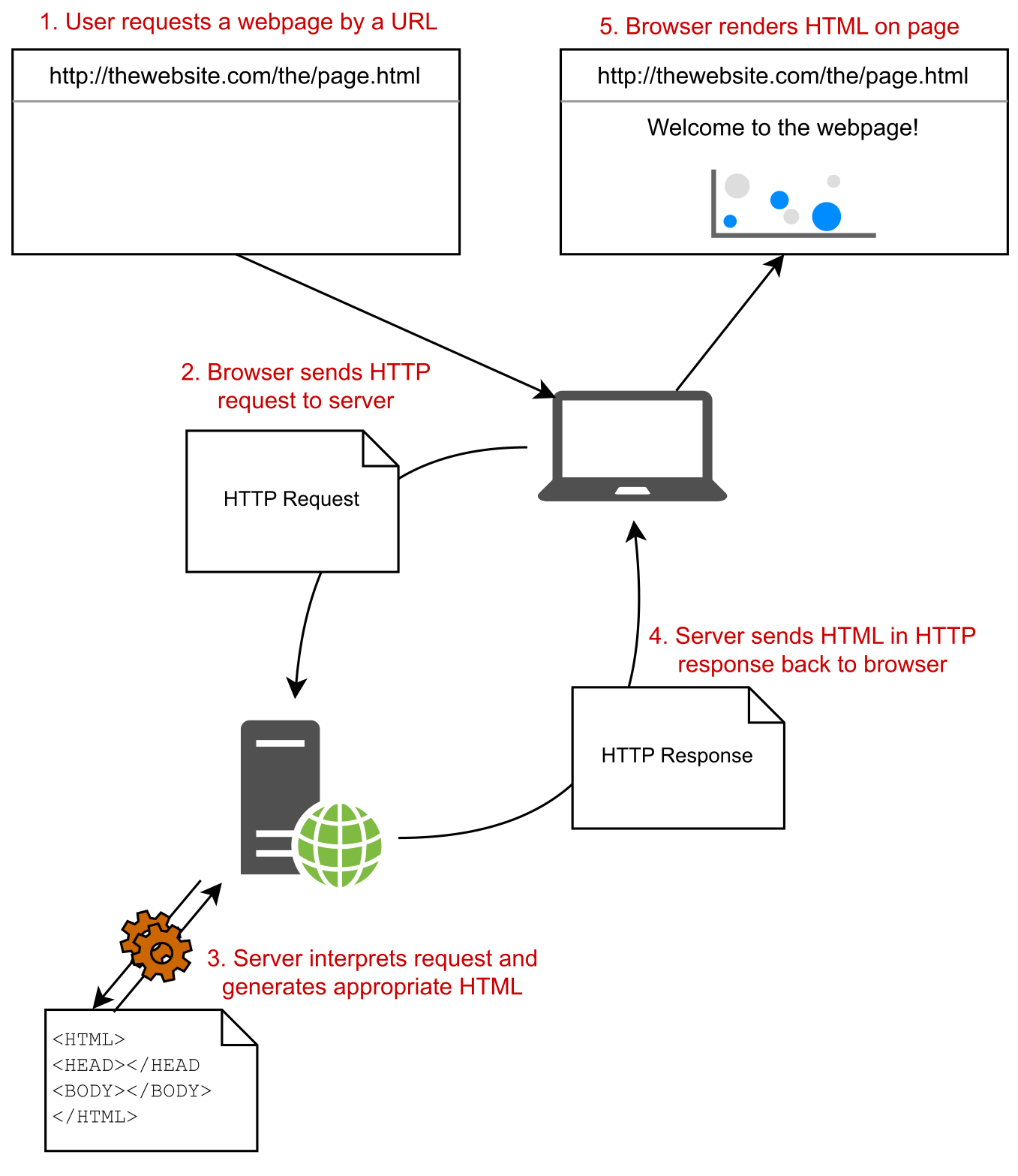
In chapter 1, I described how a browser makes an HTTP request to a server and receives a response, which it uses to render HTML on the page. ASP.NET Core allows you to generate that HTML dynamically depending on the particulars of the request, so that (for example) you can display different data depending on the current logged-in user.

在第 1 章中,我介绍了浏览器如何向服务器发出 HTTP 请求并接收响应,并使用该响应在页面上呈现 HTML。ASP.NET Core 允许您根据请求的详细信息动态生成该 HTML,以便(例如)您可以根据当前登录的用户显示不同的数据。

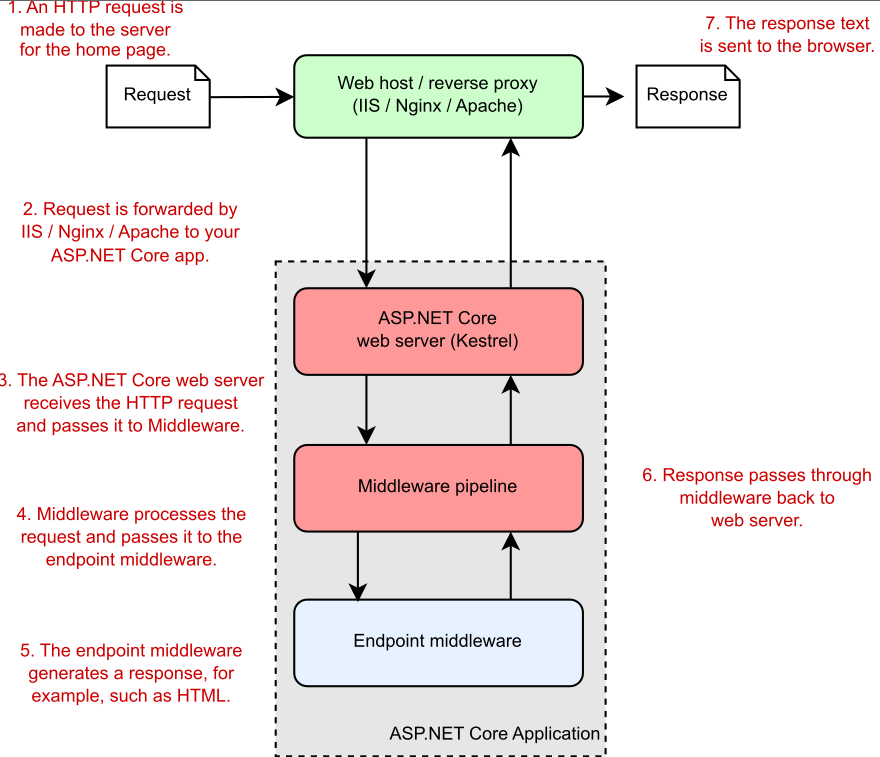
Suppose that you want to create a web app to display information about your company. You could create a simple ASP.NET Core app to achieve this goal; later, you could add dynamic features to your app. Figure 3.1 shows how the application would handle a request for a page in your application.

假设您要创建一个 Web 应用程序来显示有关您公司的信息。您可以创建一个简单的 ASP.NET Core 应用程序来实现此目标;稍后,您可以向应用程序添加动态功能。图 3.1 显示了应用程序如何处理对应用程序中页面的请求。
alt text

Figure 3.1 An overview of an ASP.NET Core application. The ASP.NET Core application receives an incoming HTTP request from the browser. Every request passes to the middleware pipeline, which potentially modifies it and then passes it to the endpoint middleware at the end of the pipeline to generate a response. The response passes back through the middleware to the server and finally out to the browser.

图 3.1 ASP.NET Core 应用程序概述。ASP.NET Core 应用程序从浏览器接收传入的 HTTP 请求。每个请求都会传递到中间件管道,中间件管道可能会对其进行修改,然后将其传递到管道末尾的终端节点中间件以生成响应。响应通过中间件传回服务器,最后传回浏览器。

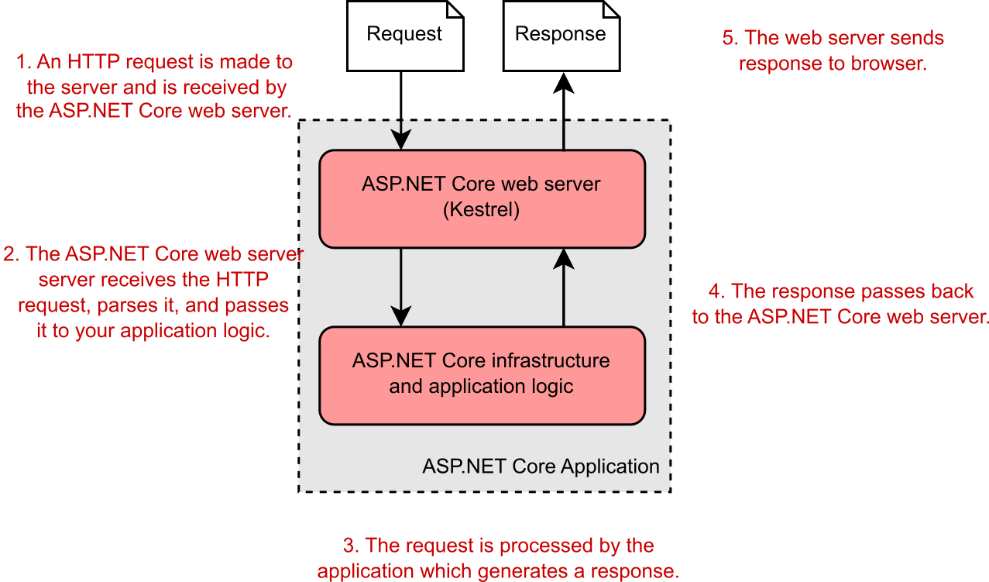
Much of this diagram should be familiar to you from figure 1.3 in chapter 1; the request and response and the ASP.NET Core web server are still there. But you’ll notice that I’ve added a reverse proxy to show a common deployment pattern for ASP.NET Core applications. I’ve also expanded the ASP.NET Core application itself to show the middleware pipeline and the endpoint middleware—the main custom part of your app that goes into generating the response from a request.

您应该从第 1 章的图 1.3 中熟悉此图表的大部分内容;请求和响应以及 ASP.NET Core Web 服务器仍然存在。但您会注意到,我添加了一个反向代理来显示 ASP.NET Core 应用程序的常见部署模式。我还扩展了 ASP.NET Core 应用程序本身,以显示中间件管道和终端节点中间件,后者是应用程序的主要自定义部分,用于从请求生成响应。

The first port of call after the reverse proxy forwards a request is the ASP.NET Core web server, which is the default cross-platform Kestrel server. Kestrel takes the raw incoming network request and uses it to generate an HttpContext object that the rest of the application can use.

反向代理转发请求后的第一个调用端口是 ASP.NET Core Web 服务器,它是默认的跨平台 Kestrel 服务器。Kestrel 获取原始传入网络请求,并使用它来生成应用程序其余部分可以使用的 HttpContext 对象。

The HttpContext object
HttpContext 对象
The HttpContext constructed by the ASP.NET Core web server is used by the application as a sort of storage box for a single request. Anything that’s specific to this particular request and the subsequent response can be associated with it and stored in it, such as properties of the request, request-specific services, data that’s been loaded, or errors that have occurred. The web server fills the initial HttpContext with details of the original HTTP request and other configuration details and then passes it on to the rest of the application.
由 ASP.NET Core Web 服务器构建的 HttpContext 被应用程序用作单个请求的一种存储盒。特定于此特定请求和后续响应的任何内容都可以与该请求相关联并存储在其中,例如请求的属性、特定于请求的服务、已加载的数据或已发生的错误。Web 服务器使用原始 HTTP 请求的详细信息和其他配置详细信息填充初始 HttpContext,然后将其传递给应用程序的其余部分。

NOTE Kestrel isn’t the only HTTP server available in ASP.NET Core, but it’s the most performant and is cross-platform. I’ll refer only to Kestrel throughout the book. A different web server, IIS HTTP Server, is used when running in-process in Internet Information Services (IIS). The main alternative, HTTP.sys, runs only in Windows and can’t be used with IIS.1

注意 Kestrel 并不是 ASP.NET Core 中唯一可用的 HTTP 服务器,但它是性能最高的,并且是跨平台的。我在整本书中只提到红隼。在 Internet Information Services (IIS) 中进行进程内运行时,会使用不同的 Web 服务器 IIS HTTP Server。主要替代方案 HTTP.sys 仅在 Windows 中运行,不能与 IIS 一起使用。1

Kestrel is responsible for receiving the request data and constructing a .NET representation of the request, but it doesn’t attempt to generate a response directly. For that task, Kestrel hands the HttpContext to the middleware pipeline in every ASP.NET Core application. This pipeline is a series of components that process the incoming request to perform common operations such as logging, handling exceptions, and serving static files.

Kestrel 负责接收请求数据并构造请求的 .NET 表示形式,但它不会尝试直接生成响应。对于该任务,Kestrel 将 HttpContext 交给每个 ASP.NET Core 应用程序中的中间件管道。此管道是一系列组件,用于处理传入请求以执行常见作,例如日志记录、处理异常和提供静态文件。

NOTE You’ll learn about the middleware pipeline in detail in chapter 4.
注意:您将在第 4 章中详细了解中间件管道。

At the end of the middleware pipeline is the endpoint middleware, which is responsible for calling the code that generates the final response. In most applications that code will be a Model-View-Controller (MVC), Razor Pages, or minimal API endpoint.

中间件管道的末端是端点中间件,它负责调用生成最终响应的代码。在大多数应用程序中,该代码将是模型-视图-控制器 (MVC)、Razor Pages 或最小 API 终结点。

Most ASP.NET Core applications follow this basic architecture, and the example in this chapter is no different. First, you’ll see how to create and run your application; then you’ll look at how the code corresponds to the outline in figure 3.1. Without further ado, let’s create an application!

大多数 ASP.NET Core 应用程序都遵循此基本体系结构,本章中的示例也不例外。首先,您将了解如何创建和运行您的应用程序;然后,您将了解代码如何与图 3.1 中的大纲相对应。事不宜迟,让我们创建一个应用程序!

3.2 Creating your first ASP.NET Core application‌

3.2 创建您的第一个 ASP.NET Core 应用程序

In this section you’re going to create a minimal API application that returns "Hello World!" when you call the HTTP API. This application is about the simplest ASP.NET Core application you can create, but it demonstrates many of the fundamental concepts of building and running applications with .NET.

在本节中,您将创建一个返回 “Hello World!” 的最小 API 应用程序。当您调用 HTTP API 时。此应用程序是您可以创建的最简单的 ASP.NET Core 应用程序,但它演示了使用 .NET 构建和运行应用程序的许多基本概念。

You can start building applications with ASP.NET Core in many ways, depending on the tools and operating system you’re using. Each set of tools has slightly different templates, but the templates have many similarities. The example used throughout this chapter is based on a Visual Studio 2022 template, but you can easily follow along with templates from the .NET CLI or Visual Studio for Mac.

您可以通过多种方式开始使用 ASP.NET Core 构建应用程序,具体取决于您使用的工具和作系统。每组工具的模板略有不同,但模板有许多相似之处。本章中使用的示例基于 Visual Studio 2022 模板,但您可以轻松地使用 .NET CLI 或 Visual Studio for Mac 中的模板进行作。

NOTE As a reminder, I use Visual Studio 2022 and ASP.NET Core with .NET 7 throughout the book.
注意:提醒一下,我在整本书中使用了 Visual Studio 2022 和 ASP.NET Core 和 .NET 7。

Getting an application up and running locally typically involves four basic steps, which we’ll work through in this chapter:

在本地启动和运行应用程序通常涉及四个基本步骤,我们将在本章中介绍这些步骤:

  1. Generate—Create the base application from a template to get started.
    生成 - 从模板创建基本应用程序以开始使用。

  2. Restore—Restore all the packages and dependencies to the local project folder using NuGet.
    还原 - 使用 NuGet 将所有包和依赖项还原到本地项目文件夹。

  3. Build—Compile the application, and generate all the necessary artifacts.
    构建 - 编译应用程序,并生成所有必要的工件。

  4. Run—Run the compiled application.
    运行 - 运行编译后的应用程序。

Visual Studio and the .NET CLI include many ASP.NET Core templates for building different types of applications, such as

Visual Studio 和 .NET CLI 包含许多 ASP.NET Core 模板,用于构建不同类型的应用程序,例如

  • Minimal API applications—HTTP API applications that return data in JSON format, which can be consumed by single-page applications (SPAs) and mobile apps.They’re typically used in conjunction with client-side applications such as Angular and React.js or mobile applications.
    最小 API 应用程序 — 以 JSON 格式返回数据的 HTTP API 应用程序,可供单页应用程序 (SPA) 和移动应用程序使用。它们通常与客户端应用程序(如 Angular 和 React.js)或移动应用程序结合使用。

  • Razor Pages web applications—Razor Pages applications generate HTML on the server and are designed to be viewed by users in a web browser directly.
    Razor Pages Web 应用程序 - Razor Pages 应用程序在服务器上生成 HTML,旨在供用户在 Web 浏览器中直接查看。

  • MVC applications—MVC applications are similar to Razor Pages apps in that they generate HTML on the server and are designed to be viewed by users directly in a web browser. They use traditional MVC controllers instead of Razor Pages.
    MVC 应用程序 - MVC 应用程序类似于 Razor Pages 应用程序,因为它们在服务器上生成 HTML,并且旨在供用户直接在 Web 浏览器中查看。它们使用传统的 MVC 控制器,而不是 Razor Pages。

  • Web API applications—Web API applications are similar to minimal API apps, in that they are typically consumed by SPAs and mobile apps. Web API apps provide additional functionality compared to minimal APIs, at the expense of some performance and convenience.
    Web API 应用程序 - Web API 应用程序类似于最小 API 应用程序,因为它们通常由 SPA 和移动应用程序使用。与最小 API 相比,Web API 应用程序提供了额外的功能,但会牺牲一些性能和便利性。

We’ll look at each of these application types in this book, but in part 1 we focus on minimal APIs, so in section 3.2.1 we start by looking at the simplest ASP.NET Core app you can create.

在本书中,我们将介绍这些应用程序类型中的每一种,但在第 1 部分中,我们将重点介绍最小的 API,因此在第 3.2.1 节中,我们首先介绍您可以创建的最简单的 ASP.NET Core 应用程序。

3.2.1 Using a template to get started‌

3.2.1 使用模板开始

In this section you’ll use a template to create your first ASP.NET Core minimal API application. Using a template can get you up and running with an application quickly, automatically configuring many of the fundamental pieces. Both Visual Studio and the .NET CLI come with standard templates for building web applications, console applications, and class libraries.

在本部分中,您将使用模板创建您的第一个 ASP.NET Core 最小 API 应用程序。使用模板可以使您快速启动并运行应用程序,并自动配置许多基本部分。Visual Studio 和 .NET CLI 都附带了用于构建 Web 应用程序、控制台应用程序和类库的标准模板。

TIP In .NET, a project is a unit of deployment, which will be compiled into a .dll file or an executable, for example. Each separate app is a separate project. Multiple projects can be built and developed at the same time in a solution.
提示 在 .NET 中,项目是一个部署单元,例如,它将被编译成 .dll 文件或可执行文件。每个单独的应用程序都是一个单独的项目。可以在解决方案中同时生成和开发多个项目。

To create your first web application, open Visual Studio, and perform the following steps:

要创建您的第一个 Web 应用程序,请打开 Visual Studio,然后执行以下步骤:

  1. Choose Create a New Project from the splash screen, or choose File > New > Project from the main Visual Studio screen.
    从初始屏幕中选择 Create a New Project,或从 Visual Studio 主屏幕中选择 File > New > Project。

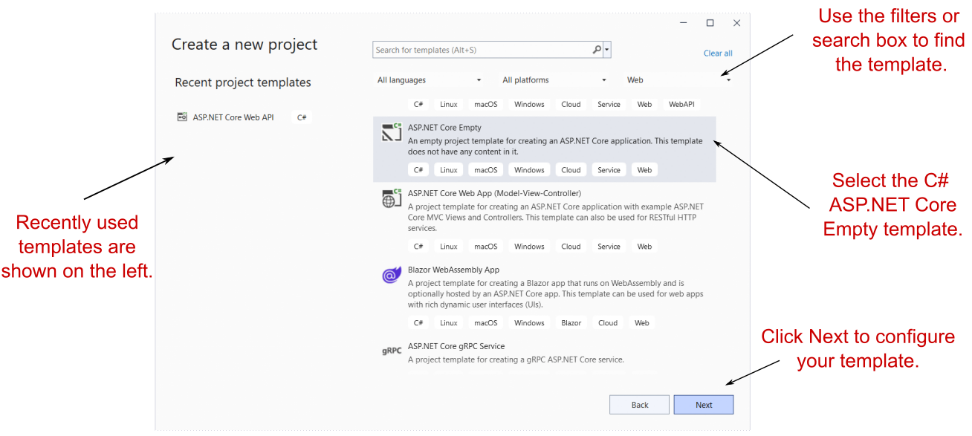
  2. From the list of templates, choose ASP.NET Core Empty; select the C# language template, as shown in figure 3.2; and then choose Next.
    从模板列表中,选择 ASP.NET Core Empty;选择 C# 语言模板,如图 3.2 所示;,然后选择 Next (下一步)
alt text

Figure 3.2 The Create a New Project dialog box. Select the C# ASP.NET Core Empty template in the list on the right side. When you next create a new project, you can choose a template from the Recent Project Templates list on the left side.

图 3.2 “创建新项目”对话框。在右侧的列表中选择 C# ASP.NET Core Empty 模板。下次创建新项目时,您可以从左侧的 Recent Project Templates (最近的项目模板) 列表中选择一个模板。

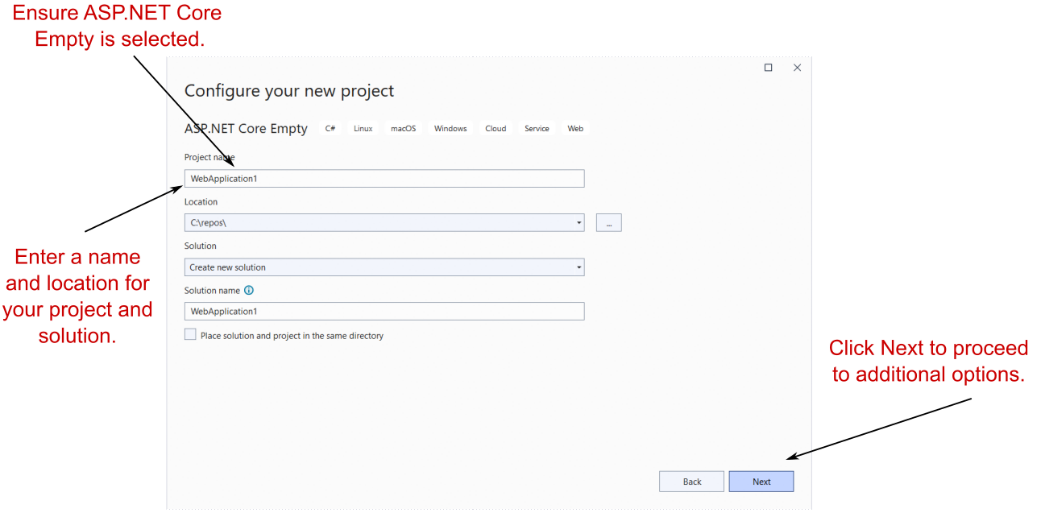
On the next screen, enter a project name, location, and solution name, and choose Create, as shown in figure 3.3. You might use WebApplication1 as both the project and solution name, for example.

在下一个屏幕上,输入项目名称、位置和解决方案名称,然后选择 Create(创建),如图3.3所示. 例如,您可以使用 WebApplication1 作为项目和解决方案名称。
alt text

Figure 3.3 The Configure Your New Project dialog box. Enter a project name, location, and solution name, and choose Next.

图 3.3 “Configure Your New Project”(配置新项目)对话框。输入项目名称、位置和解决方案名称,然后选择 Next(下一步)。

  1. On the following screen (figure 3.4), do the following:
    在以下屏幕(图 3.4)中,执行以下作:

a. Select .NET 7.0. If this option isn’t available, ensure that you have .NET 7 installed. See appendix A for details on configuring your environment.
a.选择 .NET 7.0。如果此选项不可用,请确保您已安装 .NET 7。有关配置环境的详细信息,请参阅附录 A。

b. Ensure that Configure for HTTPS is checked.
b.确保选中 Configure for HTTPS (为 HTTPS 配置)。

c. Ensure that Enable Docker is not checked.
c.确保未选中 Enable Docker。

d. Ensure that Do not use top-level statements is not checked. (I explain top-level statements in section 3.6.)
d.确保 Do not use top-level statements 未选中。(我在 3.6 节中解释了顶级语句)。

e. Choose Create.
e.选择 Create (创建)。
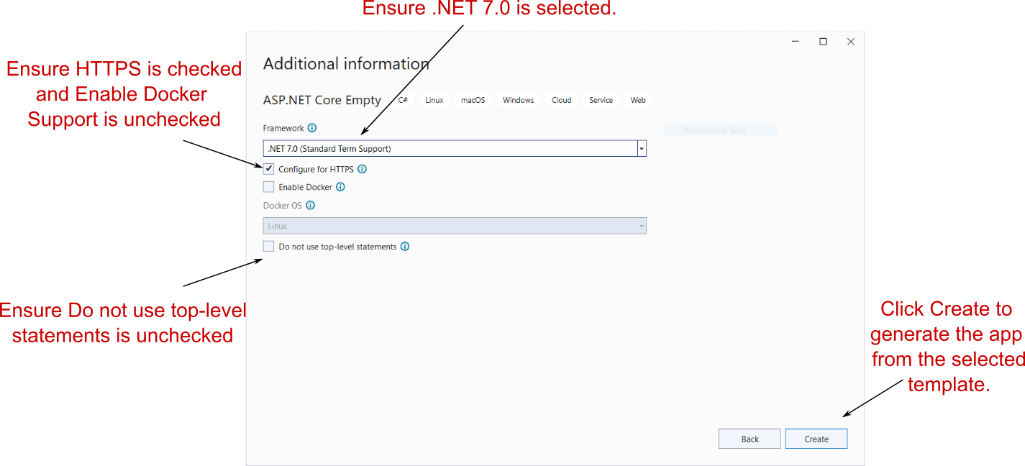
alt text

Figure 3.4 The Additional Information dialog box follows the Configure Your New Project dialog box and lets you customize the template that will generate your application. For this starter project, you’ll create an empty .NET 7 application that uses top-level statements.

图 3.4 “其他信息”对话框位于 “配置新项目” 对话框之后,并且用于自定义将生成应用程序的模板。对于此初学者项目,您将创建一个使用顶级语句的空 .NET 7 应用程序。

  1. Wait for Visual Studio to generate the application from the template. When Visual Studio finishes, an introductory page about ASP.NET Core appears; you should see that Visual Studio has created and added some files to your project, as shown in figure 3.5.
    等待 Visual Studio 从模板生成应用程序。Visual Studio 完成后,将显示有关 ASP.NET Core 的介绍性页面;您应该看到 Visual Studio 已经创建了一些文件并将其添加到您的项目中,如图 3.5 所示。
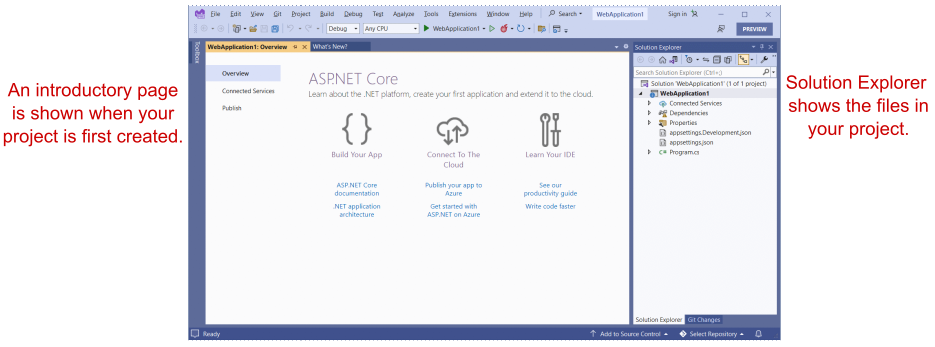
alt text

Figure 3.5 Visual Studio after creating a new ASP.NET Core application from a template. The Solution Explorer shows your newly created project. The introductory page has helpful links for learning about ASP.NET Core.

图 3.5 从模板创建新的 ASP.NET Core 应用程序后的 Visual Studio。Solution Explorer 将显示您新创建的项目。介绍性页面包含用于了解 ASP.NET Core 的有用链接。

If you’re not using Visual Studio, you can create a similar template by using the .NET CLI. Create a folder to hold your new project. Open a PowerShell or cmd prompt in the folder (Windows) or a terminal session (Linux or macOS), and run the commands in the following listing.

如果您不使用 Visual Studio,则可以使用 .NET CLI 创建类似的模板。创建一个文件夹来保存您的新文件夹项目。在文件夹 (Windows) 或终端会话 (Linux 或 macOS) 中打开 PowerShell 或 cmd 提示符,然后运行以下列表中的命令。

Listing 3.1 Creating a new minimal API application with the .NET CLI
清单 3.1 使用 .NET CLI 创建一个新的最小 API 应用程序

dotnet new sln -n WebApplication1 ❶
dotnet new web -o WebApplication1 ❷
dotnet sln add WebApplication1    ❸

❶ Creates a solution file called WebApplication1 in the current folder
在当前文件夹中创建名为 WebApplication1 的解决方案文件
❷ Creates an empty ASP.NET Core project in a subfolder, WebApplication1
在子文件夹 WebApplication1 中创建空的 ASP.NET Core 项目
❸ Adds the new project to the solution file
将新项目添加到解决方案文件中

NOTE Visual Studio uses the concept of a solution to work with multiple projects. The example solution consists of a single project, which is listed in the .sln file. If you use a CLI template to create your project, you won’t have a .sln file unless you generate it explicitly by using additional .NET CLI templates (listing 3.1).

注意:Visual Studio 使用解决方案的概念来处理多个项目。示例解决方案由一个项目组成,该项目在 .sln 文件中列出。如果使用 CLI 模板创建项目,则不会有 .sln 文件,除非使用其他 .NET CLI 模板(清单 3.1)显式生成该文件。

Whether you use Visual Studio or the .NET CLI, now you have the basic files required to build and run your first ASP.NET Core application.

无论您使用的是 Visual Studio 还是 .NET CLI,现在您都拥有构建和运行第一个 ASP.NET Core 应用程序所需的基本文件。

3.2.2 Building the application‌

3.2.2 构建应用程序

At this point, you have most of the files necessary to run your application, but you’ve got two steps left. First, you need to ensure all the dependencies used by your project are downloaded to your machine, and second, you need to compile your application so that it can be run.

此时,您拥有运行应用程序所需的大部分文件,但还剩下两个步骤。首先,您需要确保项目使用的所有依赖项都已下载到您的计算机上,其次,您需要编译应用程序,以便它可以运行。

The first step isn’t strictly necessary, as both Visual Studio and the .NET CLI automatically restore packages when they create your project, but it’s good to know what’s going on. In earlier versions of the .NET CLI, before 2.0, you needed to restore packages manually by using dotnet restore.

第一步并不是绝对必要的,因为 Visual Studio 和 .NET CLI 都会在创建项目时自动还原包,但最好了解发生了什么。在早期版本的 .NET CLI 中,在 2.0 之前,您需要使用 dotnet restore 手动还原包。

You can compile your application by choosing Build > Build Solution, pressing the shortcut Ctrl-Shift-B, or running dotnet build from the command line. If you build from Visual Studio, the output window shows the progress of the build, and assuming that everything is hunky-dory, Visual Studio compiles your application, ready for running. You can also run the dotnet build console commands from the Package Manager Console in Visual Studio.

您可以通过选择 Build > Build Solution(生成解决方案)、按快捷键 Ctrl-Shift-B 或从命令行运行 dotnet build 来编译应用程序。如果从 Visual Studio 进行构建,则输出窗口会显示构建进度,并假设一切都是 hunky-dory,则 Visual Studio 会编译您的应用程序,准备好运行。还可以从 Visual Studio 中的包管理器控制台运行 dotnet build 控制台命令。

TIP Visual Studio and the .NET CLI tools build your application automatically when you run it if they detect that a file has changed, so you generally won’t need to perform this step explicitly yourself.
提示 如果 Visual Studio 和 .NET CLI 工具检测到文件已更改,则它们在运行时会自动构建应用程序,因此您通常不需要自己显式执行此步骤。

NuGet packages and the .NET CLI
NuGet 包和 .NET CLI

One of the foundational components of .NET 7 cross-platform development is the .NET CLI, which provides several basic commands for creating, building, and running .NET 7 applications. Visual Studio effectively calls these commands automatically, but you can also invoke them directly from the command line if you’re using a different editor. The most common commands used during development are
.NET 7 跨平台开发的基础组件之一是.NET CLI,它提供了几个用于创建、构建和运行 .NET 7 应用程序的基本命令。Visual Studio 可以有效地自动调用这些命令,但如果您使用的是其他编辑器,也可以直接从命令行调用它们。开发过程中最常用的命令是

  • dotnet restore
  • dotnet build
  • dotnet run‌

Each of these commands should be run inside your project folder and will act on that project alone. Except where explicitly noted, this is the case for all .NET CLI commands.
这些命令中的每一个都应该在你的项目文件夹中运行,并且将单独作用于该项目。除非明确说明,否则所有 .NET CLI 命令都是这种情况。

Most ASP.NET Core applications have dependencies on various external libraries, which are managed through the NuGet package manager. These dependencies are listed in the project, but the files of the libraries themselves aren’t included. Before you can build and run your application, you need to ensure that there are local copies of each dependency on your machine. The first command, dotnet restore, ensures that your application’s NuGet dependencies are downloaded and the files are referenced correctly by your project.
大多数 ASP.NET Core 应用程序都依赖于各种外部库,这些库通过 NuGet 包管理器进行管理。这些依赖项在项目中列出,但不包括库本身的文件。在构建和运行应用程序之前,您需要确保计算机上有每个依赖项的本地副本。第一个命令 dotnet restore 可确保下载应用程序的 NuGet 依赖项,并且项目正确引用这些文件。

ASP.NET Core projects list their dependencies in the project’s .csproj file, an XML file that lists each dependency as a PackageReference node. When you run dotnet restore, it uses this file to establish which NuGet packages to download. Any dependencies listed are available for use in your application.
ASP.NET Core 项目在项目的 .csproj 文件中列出其依赖项,该文件是一个将每个依赖项列为 PackageReference 节点的 XML 文件。运行 dotnet restore 时,它会使用此文件来确定要下载的 NuGet 包。列出的任何依赖项都可用于您的应用程序。

The restore process typically happens implicitly when you build or run your application, as shown in the following figure, but it can be useful sometimes to run it explicitly, such as in continuous-integration build pipelines.
还原过程通常在您构建或运行应用程序时隐式发生,如下图所示,但有时显式运行它可能很有用,例如在持续集成构建管道中。

The dotnet build command runs dotnet restore implicitly. Similarly, dotnet run runs dotnet build and dotnet restore. If you don’t want to run the previous steps automatically, you can use the --no-restore and --no- build flags, as in dotnet build --no-restore.
dotnet build 命令隐式运行 dotnet restore。同样,dotnet run 运行 dotnet build 和 dotnet restore。如果不想自动运行前面的步骤,可以使用 --no-restore 和 --no- build 标志,如 dotnet build --no-restore 中所示。
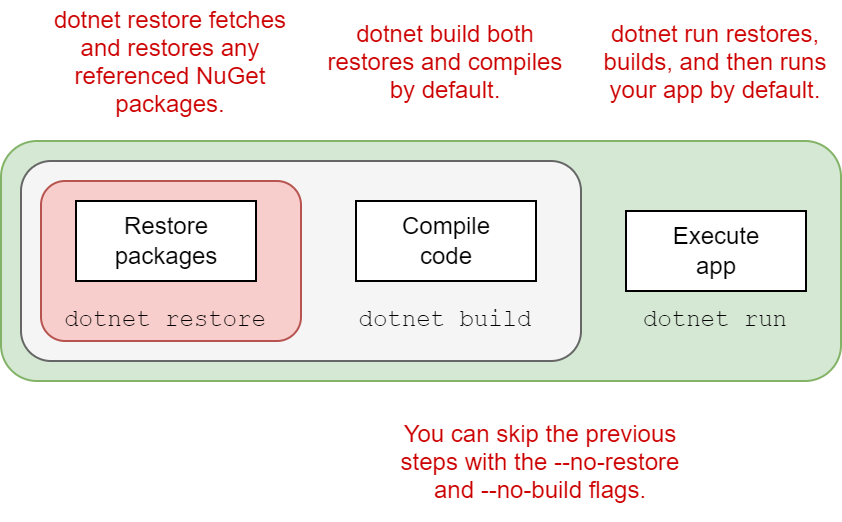
alt text

You can compile your application by using dotnet build, which checks for any errors in your application and, if it finds no problems, produces output binaries that can be run with dotnet run.
可以使用 dotnet build 编译应用程序,它会检查应用程序中的任何错误,如果未发现问题,则生成可以使用 dotnet run 运行的输出二进制文件。

Each command contains switches that can modify its behavior. To see the full list of available commands, run
每个命令都包含可以修改其行为的开关。要查看可用命令的完整列表,请运行

dotnet --help

To see the options available for a particular command, such as new, run
要查看特定命令的可用选项(如 new),请运行

dotnet new --help

3.3 Running the web application‌

3.3 运行 Web 应用程序

You’re ready to run your first application, and you have several ways to go about it. In Visual Studio, you can click the green arrow on the toolbar next to WebApplication1 or press the F5 shortcut. Visual Studio will automatically open a web browser window for you with the appropriate URL, and after a second or two, you should see the basic "Hello World!" response, as shown in figure 3.6.

您已准备好运行您的第一个应用程序,并且有几种方法可以开始运行。在 Visual Studio 中,您可以单击 WebApplication1 旁边的工具栏上的绿色箭头或按 F5 快捷方式。Visual Studio 将自动为您打开一个包含相应 URL 的 Web 浏览器窗口,一两秒钟后,您应该会看到基本的“Hello World! 响应,如图 3.6 所示。
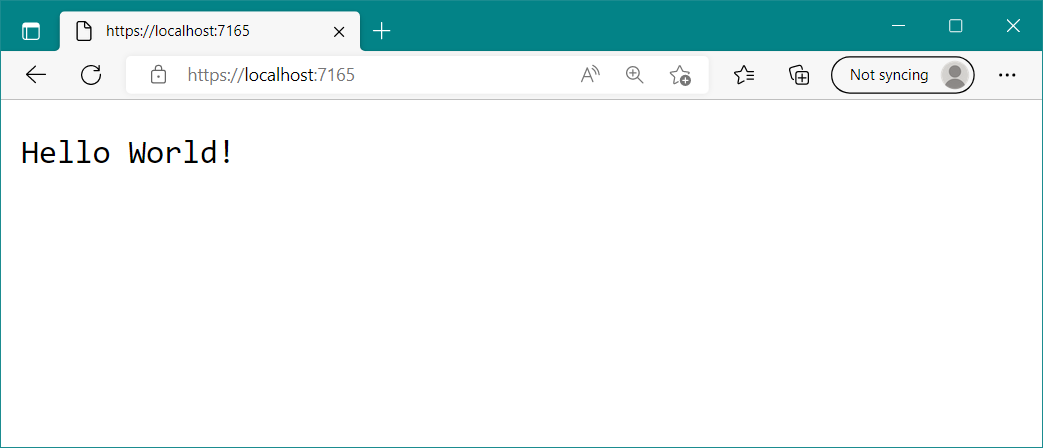
alt text

Figure 3.6 The output of your new ASP.NET Core application. The template chooses a random port to use for your application’s URL, which will be opened in the browser automatically when you run from Visual Studio.

图 3.6 新的 ASP.NET Core 应用程序的输出。该模板选择一个随机端口用于应用程序的 URL,当您从 Visual Studio 运行时,该端口将自动在浏览器中打开。

Alternatively, instead of using Visual Studio, you can run the application from the command line with the .NET CLI tools by using dotnet run. Then you can open the URL in a web browser manually, using the address provided on the command line.

或者,您可以使用 dotnet run 使用 .NET CLI 工具从命令行运行应用程序,而不是使用 Visual Studio。然后,您可以使用命令行上提供的地址在 Web 浏览器中手动打开 URL。

Depending on whether you created your application with Visual Studio, you may see an http:// or https:// URL.

根据是否使用 Visual Studio 创建应用程序,您可能会看到 http:// 或 https:// URL。

TIP The first time you run the application from Visual Studio, you may be prompted to install the development certificate. Doing so ensures that your browser doesn’t display warnings about an invalid certificate.2 See chapter 28 for more about HTTPS certificates.
提示 首次从 Visual Studio 运行应用程序时,系统可能会提示您安装开发证书。这样做可以确保您的浏览器不会显示有关无效证书的警告。 2 有关 HTTPS 证书的更多信息,请参见第 28 章。

This basic application has a single endpoint that returns the plain-text response when you request the path /, as you saw in figure 3.6. There isn’t anything more you can do with this simple app, so let’s look at some code!
此基本应用程序具有单个终端节点,当您请求路径 / 时,该终端节点将返回纯文本响应,如图 3.6.这个简单的应用程序没有更多的事情可以做,所以让我们看看一些代码!

3.4 Understanding the project layout‌

3.4 了解项目布局

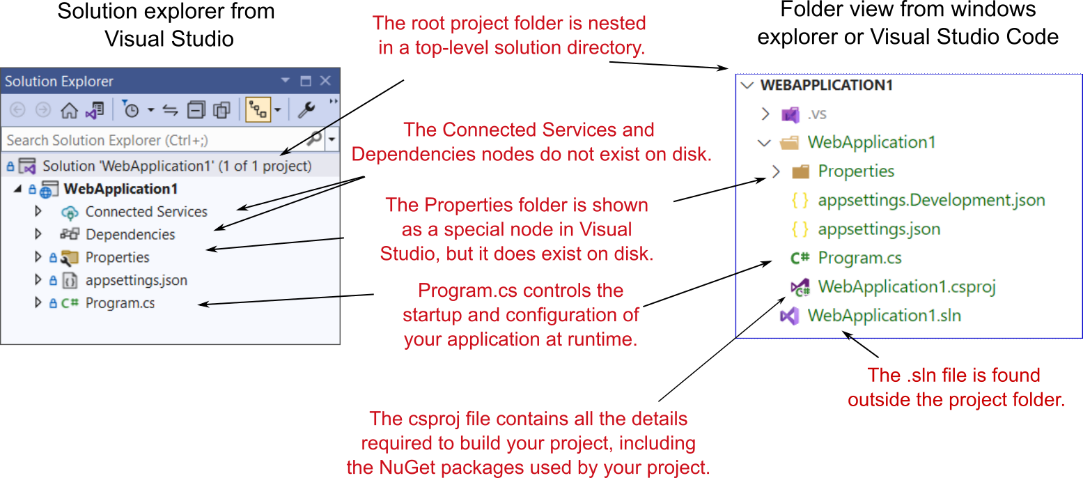
When you’re new to a framework, creating an application from a template can be a mixed blessing. On one hand, you can get an application up and running quickly, with little input required on your part. Conversely, the number of files can be overwhelming, leaving you scratching your head working out where to start. The basic web application template doesn’t contain a huge number of files and folders, as shown in figure 3.7, but I’ll run through the major ones to get you oriented.

当您不熟悉框架时,从模板创建应用程序可能是一件好坏参半的事情。一方面,您可以快速启动并运行应用程序,几乎不需要您输入。相反,文件的数量可能会让人不知所措,让您摸不着头脑,不知道从哪里开始。如图 3.7 所示,基本的 Web 应用程序模板不包含大量的文件和文件夹,但我将介绍主要的文件和文件夹,以便您了解情况。
alt text

Figure 3.7 Solution Explorer and folder on disk for a new ASP.NET Core application. Solution Explorer also displays the Connected Services and Dependencies nodes, which list NuGet and other dependencies, though the folders themselves don’t exist on disk.

图 3.7 新 ASP.NET Core 应用程序的解决方案资源管理器和磁盘上的文件夹。“解决方案资源管理器”还显示“连接的服务”和“依赖项”节点,其中列出了 NuGet 和其他依赖项,但文件夹本身并不存在于磁盘上。

The first thing to notice is that the main project, WebApplication1, is nested in a top-level directory with the name of the solution, which is also WebApplication1 in this case. Within this top-level folder you’ll also find the solution (.sln) file used by Visual Studio, though this is hidden in Visual Studio’s Solution Explorer view.

首先要注意的是,主项目 WebApplication1 嵌套在具有解决方案名称的顶级目录中,在本例中也是 WebApplication1。在此顶级文件夹中,您还可以找到 Visual Studio 使用的解决方案 (.sln) 文件,尽管该文件隐藏在 Visual Studio 的“解决方案资源管理器”视图中。

Inside the solution folder you’ll find your project folder, which contains the most important file in your project: WebApplication1.csproj. This file describes how to build your project and lists any additional NuGet packages that it requires. Visual Studio doesn’t show the .csproj file explicitly, but you can edit it if you double-click the project name in Solution Explorer or right-click and choose Properties from the contextual menu. We’ll take a closer look at this project file in the next section.

在解决方案文件夹中,您将找到您的项目文件夹,其中包含项目中最重要的文件:WebApplication1.csproj。此文件描述了如何构建project 并列出它所需的任何其他 NuGet 包。Visual Studio 不会显式显示 .csproj 文件,但如果您在解决方案资源管理器中双击项目名称,或者右键单击并从上下文菜单中选择“属性”,则可以对其进行编辑。我们将在下一节中仔细研究此项目文件。

Your project folder contains a subfolder called Properties, which contains a single file: launchSettings.json. This file controls how Visual Studio will run and debug the application. Visual Studio shows the file as a special node in Solution Explorer, out of alphabetical order, near the top of your project. You’ve got two more special nodes in the project, Dependencies and Connected Services, but they don’t have corresponding folders on disk.

您的项目文件夹包含一个名为 Properties 的子文件夹,其中包含一个文件:launchSettings.json。此文件控制 Visual Studio 运行和调试应用程序的方式。Visual Studio 在“解决方案资源管理器”中将文件显示为一个特殊节点,不按字母顺序显示在项目顶部附近。项目中还有两个特殊节点,即 Dependencies 和 Connected Services,但它们在磁盘上没有相应的文件夹。

Instead, they show a collection of all the dependencies, such as NuGet packages, and remote services that the project relies on.In the root of your project folder, you’ll find two JSON files: appsettings.json and appsettings.Development.json. These files provide configuration settings that are used at runtime to control the behavior of your app.

相反,它们显示项目所依赖的所有依赖项(如 NuGet 包和远程服务)的集合。项目文件夹的根目录中,您将找到两个 JSON 文件:appsettings.json 和 appsettings。Development.json. 这些文件提供在运行时用于控制应用程序行为的配置设置。

Finally, Visual Studio shows one C# file in the project folder: Program.cs. In section 3.6 you’ll see how this file configures and runs your application.

最后,Visual Studio 在项目文件夹中显示一个 C# 文件:Program.cs。在 Section 3.6 中,您将看到此文件如何配置和运行您的应用程序。

3.5 The .csproj project file: Declaring your dependencies‌

3.5 .csproj 项目文件:声明依赖项

The .csproj file is the project file for .NET applications and contains the details required for the .NET tooling to build your project. It defines the type of project being built (web app, console app, or library), which platform the project targets (.NET Core 3.1, .NET 7 and so on), and which NuGet packages the project depends on.

.csproj 文件是 .NET 应用程序的项目文件,包含用于生成项目的 .NET 工具所需的详细信息。它定义正在生成的项目的类型 (Web 应用程序、控制台应用程序或库) ,以及项目面向的平台 (.NET Core 3.1、.NET 7 等)以及项目所依赖的 NuGet 包。

The project file has been a mainstay of .NET applications, but in ASP.NET Core it has had a facelift to make it easier to read and edit. These changes include

项目文件一直是 .NET 应用程序的支柱,但在 ASP.NET Core 中,它已经进行了改进,使其更易于阅读和编辑。这些更改包括

  • No GUIDs—Previously, globally unique identifiers (GUIDs) were used for many things, but now they’re rarely used in the project file.
    无 GUID – 以前,全局唯一标识符 (GUID) 用于许多用途,但现在它们很少在项目文件中使用。

  • Implicit file includes—Previously, every file in the project had to be listed in the .csproj file to be included in the build. Now files are compiled automatically.
    隐式文件包含 — 以前,项目中的每个文件都必须在 .csproj 文件中列出才能包含在生成中。现在文件会自动编译。

  • No paths to NuGet package .dll files—Previously, you had to include the path to the .dll files contained in NuGet packages in the .csproj, as well as list the dependencies in a packages.config file. Now you can reference the NuGet package directly in your .csproj, and you don’t need to specify the path on disk.
    没有 NuGet 包.dll文件的路径 – 以前,必须在 .csproj 中包含 NuGet 包中包含的 .dll 文件的路径,并在 packages.config 文件中列出依赖项。现在,您可以直接在 .csproj 中引用 NuGet 包,而无需指定磁盘上的路径。

All these changes combine to make the project file far more compact than you’ll be used to from previous .NET projects. The following listing shows the entire .csproj file for your sample app.
所有这些更改结合在一起,使项目文件比您以前习惯的 .NET 项目要紧凑得多。以下清单显示了示例应用程序的整个 .csproj 文件。

Listing 3.2 The .csproj project file, showing SDK, target framework, and references
清单 3.2 .csproj 项目文件,显示 SDK、目标框架和引用

<Project Sdk="Microsoft.NET.Sdk.Web">             ❶
    <PropertyGroup>
        <TargetFramework>net7.0</TargetFramework> ❷
        <Nullable>enable</Nullable>               ❸
        <ImplicitUsings>enable</ImplicitUsings>   ❹
    </PropertyGroup>
</Project>

❶ The SDK attribute specifies the type of project you’re building.
SDK 属性指定要生成的项目类型。

❷ The TargetFramework is the framework you’ll run on—in this case, .NET 7.
TargetFramework 是你将在其上运行的框架,在本例中为 .NET 7。

❸ Enables the C# 8 feature “nullable reference types”
启用 C# 8 功能“可为 null 的引用类型”

❹ Enables the C# 10 feature “implicit using statements”
启用 C# 10 功能“隐式 using 语句”

For simple applications, you probably won’t need to change the project file much. The Sdk attribute on the Project element includes default settings that describe how to build your project, whereas the TargetFramework element describes the framework your application will run on. For .NET 6.0 projects, this element will have the net6.0 value; if you’re running on .NET 7, this will be net7.0. You can also enable and disable various features of the compiler, such as the C# 8 feature nullable reference types or the C# 10 feature implicit using statements.3‌‌

对于简单的应用程序,您可能不需要对项目文件进行太多更改。Project 元素上的 Sdk 属性包括描述如何生成项目的默认设置,而 TargetFramework 元素描述应用程序将在其上运行的框架。对于 .NET 6.0 项目,此元素将具有 net6.0 值;如果您在 .NET 7 上运行,则为 Net7.0。您还可以启用和禁用编译器的各种功能,例如 C# 8 功能可为 null 的引用类型或 C# 10 隐式 using 语句功能。 3

TIP With the new csproj style, Visual Studio users can double- click a project in Solution Explorer to edit the .csproj file without having to close the project first.
提示 使用新的 csproj 样式,Visual Studio 用户可以在“解决方案资源管理器”中双击项目来编辑 .csproj 文件,而不必先关闭项目。

The most common changes you’ll make to the project file are to add more NuGet packages by using the PackageReference element. By default, your app doesn’t reference any NuGet packages at all.

对项目文件进行的最常见更改是使用 PackageReference 元素添加更多 NuGet 包。默认情况下,您的应用根本不引用任何 NuGet 包。

Using NuGet libraries in your project
在项目中使用 NuGet 库

Even though all apps are unique in some way, they also have common requirements. Most apps need to access a database, for example, or manipulate JSON- or XML-formatted data. Rather than having to reinvent that code in every project, you should use existing reusable libraries.
尽管所有应用程序在某种程度上都是唯一的,但它们也有共同的要求。例如,大多数应用程序需要访问数据库,或者作 JSON 或 XML 格式的数据。您不必在每个项目中重新创建该代码,而应该使用现有的可重用库。

NuGet is the library package manager for .NET, where libraries are packaged in NuGet packages and published to https://www.nuget.org. You can use these packages in your project by referencing the unique package name in your .csproj file, making the package’s namespace and classes available in your code files.
NuGet 是 .NET 的库包管理器,其中的库打包在 NuGet 包中并发布到 https://www.nuget.org。您可以通过在 .csproj 文件中引用唯一的包名称来在项目中使用这些包,从而使包的命名空间和类在代码文件中可用。

You can publish (and host) NuGet packages to repositories other than nuget.org; see https://learn.micro soft.com/en-us/nuget for details.
您可以将 NuGet 包发布(和托管)到 nuget.org 以外的存储库;有关详细信息 ,请参阅 https://learn.micro soft.com/en-us/nuget。

You can add a NuGet reference to your project by running dotnet add package
可以通过运行 dotnet add package 将 NuGet 引用添加到项目

from inside the project folder. This command updates your project file with a node and restores the NuGet package for your project. To install the popular Newtonsoft.Json library, for example, you would run 从项目文件夹内。此命令使用 节点更新项目文件,并还原项目的 NuGet 包。例如,要安装流行的 Newtonsoft.Json 库,您需要运行

dotnet add package Newtonsoft.Json

This command adds a reference to the latest version of the library to your project file, as shown next, and makes the Newtonsoft.Json namespace available in your source-code files:
此命令将对最新版本的库的引用添加到您的项目文件中,如下所示,并使 Newtonsoft.Json 命名空间在您的源代码文件中可用:


<Project Sdk="Microsoft.NET.Sdk.Web">
    <PropertyGroup>
        <TargetFramework>net7.0</TargetFramework>
            <Nullable>enable</Nullable>
        <ImplicitUsings>enable</ImplicitUsings>
    </PropertyGroup>
    <ItemGroup>
        <PackageReference Include="NewtonSoft.Json" Version="13.0.1" />
    </ItemGroup>
</Project>

If you’re using Visual Studio, you can manage packages with the NuGet Package Manager by right-clicking the solution name or a project and choosing Manage NuGet Packages from the contextual menu.
如果您使用的是 Visual Studio,则可以使用 NuGet 包管理器管理包,方法是右键单击解决方案名称或项目,然后从上下文菜单中选择 Manage NuGet Packages。

As a point of interest, there’s no officially agreed-on pronunciation for NuGet. Feel free to use the popular “noo-get” or “nugget” style, or if you’re feeling especially posh, try “noo-jay”!
值得一提的是,NuGet 没有正式商定的发音。随意使用流行的 “no-get” 或 “nugget” 风格,或者如果你觉得特别时髦,试试 “no-jay”吧!

The simplified project file format is much easier to edit by hand than previous versions, which is great if you’re developing cross- platform. But if you’re using Visual Studio, don’t feel that you have to take this route. You can still use the GUI to add project references, exclude files, manage NuGet packages, and so on.

简化的项目文件格式比以前的版本更容易手动编辑,如果您正在跨平台开发,这非常有用。但是,如果您使用的是 Visual Studio,请不要觉得您必须走这条路。您仍然可以使用 GUI 添加项目引用、排除文件、管理 NuGet 包等。

Visual Studio will update the project file itself, as it always has.

Visual Studio 将一如既往地更新项目文件本身。

TIP For further details on the changes to the csproj format, see the documentation at http://mng.bz/vnzJ.
提示 有关对 csproj 格式的更改的更多详细信息,请参阅 http://mng.bz/vnzJ 中的文档。

The project file defines everything Visual Studio and the .NET CLI need to build your app—everything, that is, except the code! In the next section we’ll look at the file that defines your whole ASP.NET Core application: the Program.cs file.

项目文件定义了 Visual Studio 和 .NET CLI 构建应用程序所需的一切,即除代码之外的所有内容!在下一节中,我们将查看定义整个 ASP.NET Core 应用程序的文件:Program.cs 文件。

3.6 Program.cs file: Defining your application‌

3.6 Program.cs 文件:定义应用程序

All ASP.NET Core applications start life as a .NET Console application. As of .NET 6, that typically means a program written with top-level statements, in which the startup code for your application is written directly in a file instead of inside a static void Main function.

所有 ASP.NET Core 应用程序都以 .NET 控制台应用程序的形式开始运行。从 .NET 6 开始,这通常意味着使用顶级语句编写的程序,其中应用程序的启动代码直接写入文件中,而不是写入静态 void Main 函数中。

Top-level statements
顶级语句

Before C# 9, every .NET program had to include a static void Main function (it could also return int, Task, or Task), typically declared in a class called Program. This function, which must exist, defines the entry point for your program. This code runs when you start your application, as in this example:
在 C# 9 之前,每个 .NET 程序都必须包含一个静态 void Main 函数(它也可以返回 int、Task 或 Task),通常在名为 Program 的类中声明。此函数必须存在,用于定义程序的入口点。此代码在您启动应用程序时运行,如下例所示:


using System;
namespace MyApp
{
    public class Program
    {
        public static void Main(string[] args)
        {
            Console.WriteLine("Hello World!");
        }
    }
}

With top-level statements you can write the body of this method directly in the file, and the compiler generates the Main method for you.
使用顶级语句,您可以直接在文件中编写此方法的主体,编译器将为您生成 Main 方法。

When combined with C# 10 features such as implicit using statements, this dramatically simplifies the entry-point code of your app to
当与 C# 10 功能(如隐式 using 语句)结合使用时,这会极大地简化应用的入口点代码,以便


Console.WriteLine("Hello World!");

When you use the explicit Main function you can access the command-line arguments provided when the app was run using the args parameter. With top- level statements the args variable is also available as a string[], even though it’s not declared explicitly. You could echo each argument provided by using‌
您使用显式 Main 函数时,您可以使用 args 参数访问在运行应用程序时提供的命令行参数。对于顶级语句,args 变量也可以作为 string[] 使用,即使它没有显式声明。您可以使用


foreach(string arg in args)
{
    Console.WriteLine(arg);
}

In .NET 7 all the default templates use top-level statements, and I use them throughout this book. Most of the templates include an option to use the explicit Main function if you prefer (using the --use-program-main option if you’re using the CLI). For more information on top-level statements and their limitations, see http://mng.bz/4DZa. If you decide to switch approaches later, you can always add or remove the Main function manually as required.
在 .NET 7 中,所有默认模板都使用顶级语句,我在本书中一直使用它们。如果您愿意,大多数模板都包含一个选项,可以使用显式的 Main 函数(如果您使用的是 CLI,请使用 --use-program-main 选项)。有关 top-level 语句及其限制的更多信息,请参阅 http://mng.bz/4DZa。如果您决定稍后切换方法,则始终可以根据需要手动添加或删除 Main 函数。

In .NET 7 ASP.NET Core applications the top-level statements build and run a WebApplication instance, as shown in the following listing, which shows the default Program.cs file. The WebApplication is the core of your ASP.NET Core application, containing the application configuration and the Kestrel server that listens for requests and sends responses.

在 .NET 7 ASP.NET Core 应用程序中,顶级语句构建并运行 WebApplication 实例,如下面的清单所示,其中显示了默认的 Program.cs 文件。WebApplication 是 ASP.NET Core 应用程序的核心,包含应用程序配置和侦听请求并发送响应的 Kestrel 服务器。

Listing 3.3 The default Program.cs file that configures and runs a WebApplication
列表 3.3 配置和运行 WebApplication 的默认 Program.cs 文件


WebApplicationBuilder builder = WebApplication.CreateBuilder(args); ❶
WebApplication app = builder.Build();                               ❷
app.MapGet("/", () => "Hello World!");                              ❸
app.Run();                                                          ❹

❶ Creates a WebApplicationBuilder using the CreateBuilder method
使用 CreateBuilder 方法创建 WebApplicationBuilder

❷ Builds and returns an instance of WebApplication from the WebApplicationBuilder
从 WebApplicationBuilder 构建并返回 WebApplication 的实例

❸ Defines an endpoint for your application, which returns Hello World! when the path “/” is called
为您的应用程序定义一个端点,当调用路径 “/” 时,该端点将返回 Hello World!

❹ Runs the WebApplication to start listening for requests and generating responses
运行 WebApplication 以开始侦听请求并生成响应

These four lines contain all the initialization code you need to create a web server and start listening for requests. It uses a WebApplicationBuilder, created by the call to CreateBuilder, to define how the WebApplication is configured, before instantiating the WebApplication with a call to Build().

这四行包含创建 Web 服务器和开始侦听请求所需的所有初始化代码。它使用通过调用 CreateBuilder 创建的 WebApplicationBuilder 来定义 WebApplication 的配置方式,然后通过调用 Build() 实例化 WebApplication。

NOTE You’ll find this pattern of using a builder object to configure a complex object repeated throughout the ASP.NET Core framework. This technique is useful for allowing users to configure an object, delaying its creation until all configuration has finished. It’s also one of the patterns described in the “Gang of Four” book Design Patterns: Elements of Reusable Object- Oriented Software, by Erich Gamma, Richard Helm, Ralph Johnson, and John Vlissides (Addison-Wesley, 1994).‌‌‌‌
注意 您会发现这种使用 builder 对象配置复杂对象的模式在整个 ASP.NET Core 框架中重复出现。此技术可用于允许用户配置对象,延迟其创建,直到所有配置完成。它也是 Erich Gamma、Richard Helm、Ralph Johnson 和 John Vlissides 合著的《设计模式:可重用面向对象软件的元素》(Addison-Wesley,1994 年)一书中描述的模式之一。

In this simple application we don’t make any changes to WebApplicationBuilder before calling Build(), but WebApplicationBuilder configures a lot of things by default, including

在这个简单的应用程序中,我们在调用 Build() 之前不会对 WebApplicationBuilder 进行任何更改,但 WebApplicationBuilder 默认配置了很多内容,包括

  • Configuration—Your app loads values from JSON files and environment variables that you can use to control the app’s runtime behavior, such as loading connection strings for a database. You’ll learn more about the configuration system in chapter 10.
    配置 – 您的应用程序从 JSON 文件和环境变量加载值,您可以使用这些值来控制应用程序的运行时行为,例如加载数据库的连接字符串。您将在第 10 章中了解有关配置系统的更多信息。

  • Logging—ASP.NET Core includes an extensible logging system for observability and debugging. I cover the logging system in detail in chapter 26.
    日志记录 — ASP.NET Core 包括一个可扩展的日志记录系统,用于可观察性和调试。我在第 26 章中详细介绍了日志记录系统。

  • Services—Any classes that your application depends on for providing functionality—both those used by the framework and those specific to your application— must be registered so that they can be instantiated correctly at runtime. The WebApplicationBuilder configures the minimal set of services needed for an ASP.NET Core app. Chapters 8 and 9 look at service configuration in detail.
    服务 — 您的应用程序用于提供功能所依赖的任何类(框架使用的类和特定于您的应用程序的类)都必须注册,以便可以在运行时正确实例化它们。WebApplicationBuilder 配置 ASP.NET Core 应用程序所需的最小服务集。第 8 章和第 9 章详细介绍了服务配置。

  • Hosting—ASP.NET Core uses the Kestrel web server by default to handle requests.
    托管 — 默认情况下,ASP.NET Core 使用 Kestrel Web 服务器来处理请求。

After configuring the WebApplicationBuilder you call Build() to create a WebApplication instance. The WebApplication instance is where you define how your application handles and responds to requests, using two building blocks:

配置 WebApplicationBuilder 后,调用 Build() 来创建 WebApplication 实例。WebApplication 实例是定义应用程序如何处理和响应请求的地方,它使用两个构建块:

  • Middleware—These small components execute in sequence when the application receives an HTTP request. They can perform a whole host of functions, such as logging, identifying the current user for a request, serving static files, and handling errors. We’ll look in detail at the middleware pipeline in chapter 4.
    中间件 — 当应用程序收到 HTTP 请求时,这些小组件会按顺序执行。它们可以执行一系列功能,例如日志记录、识别请求的当前用户、提供静态文件以及处理错误。我们将在第 4 章中详细介绍中间件管道。

  • Endpoints—Endpoints define how the response should be generated for a specific request to a URL in your app.
    端点 - 端点定义应如何为应用程序中 URL 的特定请求生成响应。

For the application in listing 3.3, we didn’t add any middleware, but we defined a single endpoint using a call to MapGet:

对于清单 3.3 中的应用程序,我们没有添加任何中间件,但我们使用对 MapGet 的调用定义了一个端点:

app.MapGet("/", () => "Hello World!");

You use the MapGet function to define how to handle a request that uses the GET HTTP verb. There are other Map* functions for other HTTP verbs, such as MapPost.‌‌

使用 MapGet 函数定义如何处理使用 GET HTTP 动词的请求。还有其他 Map* 函数可用于其他 HTTP 动词,例如 MapPost。

DEFINITION Every HTTP request includes a verb that indicates the type of the request. When you’re browsing a website, the default verb is GET, which fetches a resource from the server so you can view it. The second-most-common verb is POST, which is used to send data to the server, such as when you’re completing a form.
定义 每个 HTTP 请求都包含一个动词,用于指示请求的类型。当您浏览网站时,默认动词是 GET,它从服务器获取资源以便您可以查看它。第二常见的动词是 POST,用于将数据发送到服务器,例如当您填写表单时。

The first argument passed to MapGet defines which URL path to respond to, and the second argument defines how to generate the response as a delegate that returns a string. In this simple case, the arguments say “When a request is made to the path / using the GET HTTP verb, respond with the plain-text value Hello World!”.

传递给 MapGet 的第一个参数定义要响应的 URL 路径,第二个参数定义如何将响应生成为返回字符串的委托。在这个简单的例子中,参数说“当使用 GET HTTP 动词向路径发出请求时,使用纯文本值 Hello World! 进行响应”。

DEFINITION A path is the remainder of the request URL after the domain has been removed. For a request to www.example.org/accout/manage, the path is /account/manage.
定义 路径是删除域后请求 URL 的其余部分。对于 www.example.org/accout/manage 的请求,路径为/account/manage 中。

While you’re configuring the WebApplication and WebApplicationBuilder the application isn’t handling HTTP requests. Only after the call to Run() does the HTTP server start listening for requests. At this point, your application is fully operational and can respond to its first request from a remote browser.

在配置 WebApplication 和 WebApplicationBuilder 时,应用程序不处理 HTTP 请求。只有在调用 Run() 之后,HTTP 服务器才会开始侦听请求。此时,您的应用程序已完全运行,并且可以响应来自远程浏览器的第一个请求。

NOTE The WebApplication and WebApplicationBuilder classes were introduced in .NET 6. The initialization code in previous versions of ASP.NET Core was more verbose but gave you more control of your application’s behavior. Configuration was typically split between two classes—Program and Startup‌‌‌ and used different configuration types—IHostBuilder and IHost, which have fewer defaults than WebApplication. In chapter 30 I describe some of these differences in more detail and show how to configure your application by using the generic IHost instead of WebApplication.
注意 WebApplication 和 WebApplicationBuilder 类是在 .NET 6 中引入的。以前版本的 ASP.NET Core 中的初始化代码更冗长,但可以让您更好地控制应用程序的行为。配置通常分为两个类 — Program 和 Startup,并使用了不同的配置类型 - IHostBuilder 和IHost 的默认值比 WebApplication 少。在第 30 章中,我将更详细地描述其中的一些差异,并演示如何使用泛型 IHost 而不是 WebApplication 来配置应用程序。

So far in this chapter, we’ve looked at the simplest ASP.NET core application you can build: a Hello World minimal API application. For the remainder of this chapter, we’re going to build on this app to introduce some fundamental concepts of ASP.NET Core.‌

到目前为止,在本章中,我们已经了解了您可以构建的最简单的 ASP.NET 核心应用程序:Hello World 最小 API 应用程序。在本章的其余部分,我们将在此应用程序的基础上介绍 ASP.NET Core 的一些基本概念。

3.7 Adding functionality to your application‌

3.7 向应用程序添加功能

The application setup you’ve seen so far in Program.cs consists of only four lines of code but still shows the overall structure of a typical ASP.NET Core app entry point, which typically consists of six steps:

到目前为止,您在 Program.cs 中看到的应用程序设置仅包含四行代码,但仍显示了典型的 ASP.NET Core 应用程序入口点的整体结构,通常包括六个步骤:

  1. Create a WebApplicationBuilder instance.
    创建 WebApplicationBuilder 实例。

  2. Register the required services and configuration with the WebApplicationBuilder.
    向 WebApplicationBuilder 注册所需的服务和配置。

  3. Call Build() on the builder instance to create a WebApplication instance.
    在构建器实例上调用 Build() 以创建一个WebApplication 实例。

  4. Add middleware to the WebApplication to create a pipeline.
    将中间件添加到 WebApplication 以创建管道。

  5. Map the endpoints in your application.
    映射应用程序中的终端节点。

  6. Call Run() on the WebApplication to start the server and handle requests.
    在 WebApplication 上调用 Run() 以启动服务器并处理请求。

The basic minimal API app shown previously in listing 3.3 was simple enough that it didn’t need steps 2 and 4, but otherwise it followed this sequence in its Program.cs file. The following listing extends the default application to add more functionality, and in doing so it uses all six steps.
前面清单 3.3 中所示的基本最小 API 应用程序非常简单,它不需要步骤 2 和 4,但除此之外,它在其 Program.cs 文件中遵循此顺序。下面的清单扩展了默认应用程序以添加更多功能,在此过程中,它使用了所有 6 个步骤。

Listing 3.4 The Program.cs file for a more complex example minimal API
列表 3.4 更复杂的示例最小 API 的 Program.cs 文件

using Microsoft.AspNetCore.HttpLogging;

WebApplicationBuilder builder = WebApplication.CreateBuilder(args);

builder.Services.AddHttpLogging(opts =>  opts.LoggingFields = HttpLoggingFields.RequestProperties);    ❶

builder.Logging.AddFilter( "Microsoft.AspNetCore.HttpLogging", LogLevel.Information);                  ❷

WebApplication app = builder.Build();

if (app.Environment.IsDevelopment())                                                                   ❸
{
    app.UseHttpLogging();                                                                              ❹
}

app.MapGet("/", () => "Hello World!");
app.MapGet("/person", () => new Person("Andrew", "Lock"));                                             ❺

app.Run();

public record Person(string FirstName, string LastName);                                               ❻

❶ You can customize features by adding or customizing the services of the application.
您可以通过添加或自定义应用程序的服务来自定义功能。

❷ Ensures that logs added by the HTTP logging middleware are visible in the log output
确保 HTTP 日志记录中间件添加的日志在日志输出中可见

❸ You can add middleware conditionally, depending on the runtime environment.
您可以根据运行时环境有条件地添加中间件。

❹ The HTTP logging middleware logs each request to your application in the log output.
HTTP 日志记录中间件在日志输出中记录对应用程序的每个请求。

❺ Creates a new endpoint that returns the C# object serialized as JSON
创建一个新端点,该端点返回序列化为 JSON 的 C# 对象

❻ Creates a record type
创建记录类型

The application in listing 3.4 configures two new features:

清单 3.4 中的应用程序配置了两个新功能

  • When running in the Development environment, details about each request are logged using the HttpLoggingMiddleware.4
    在 Development 环境中运行时,将使用 HttpLoggingMiddleware 记录有关每个请求的详细信息。4

  • Creates a new endpoint at /person that creates an instance of the C# record called Person and serializes it in the response as JSON.
    在 /person 处创建一个新端点,该端点创建名为 Person 的 C# 记录实例,并在响应中将其序列化为 JSON。

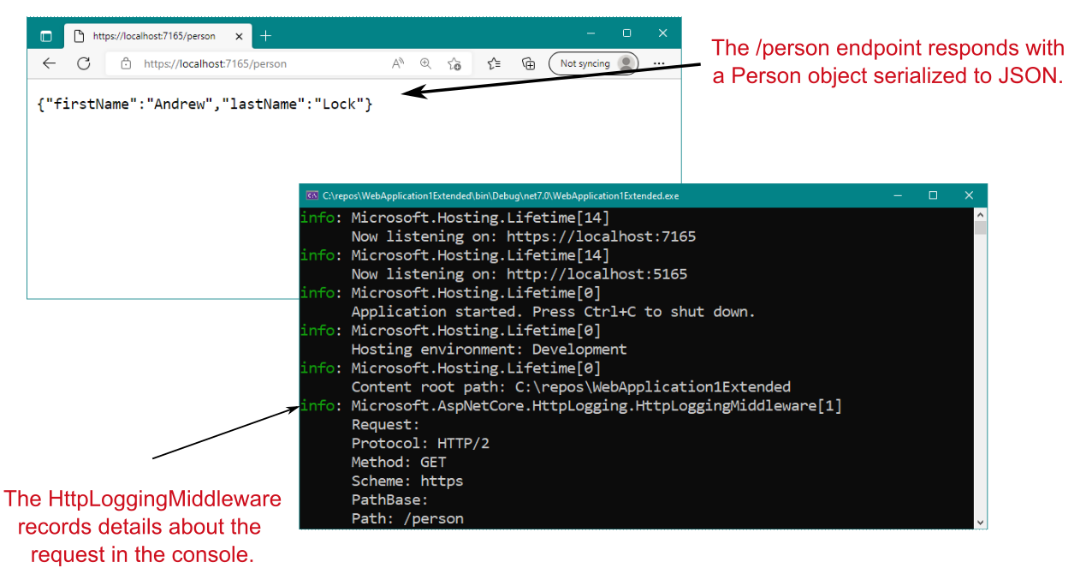
When you run the application and send requests via a web browser, you see details about the request displayed in the console, as shown in figure 3.8. If you call the /person endpoint you’ll see the JSON representation of the Person record you created in the endpoint.

当您运行应用程序并通过 Web 浏览器发送请求时,您会在控制台中看到有关请求的详细信息,如图 3.8 所示。如果您调用 /person 终端节点,您将看到您在终端节点中创建的 Person 记录的 JSON 表示形式。

NOTE You can view the application only on the same computer that’s running it at the moment; your application isn’t exposed to the internet yet. You’ll learn how to publish and deploy your application in chapter 27.
注意 您只能在当前运行应用程序的同一台计算机上查看该应用程序;您的应用程序尚未暴露在 Internet 上。您将在第 27 章中学习如何发布和部署应用程序。
alt text

Figure 3.8 Calling the /person endpoint returns a JSON- serialized version of the Person record instance. Details about each request are logged to the console by the HttpLoggingMiddleware.
图 3.8 调用 /person 端点会返回 Person 记录实例的 JSON 序列化版本。有关每个请求的详细信息由 HttpLoggingMiddleware 记录到控制台中。

Configuring services, logging, middleware, and endpoints is fundamental to building ASP.NET Core applications, so the rest of section 3.7 walks you through each of these concepts to give you a taste of how they’re used. I won’t explain them in detail (we have the rest of the book for that!), but you should keep in mind how they follow on from each other and how they contribute to the application’s configuration as a whole.

配置服务、日志记录、中间件和端点是构建 ASP.NET Core 应用程序的基础,因此第 3.7 节的其余部分将引导您了解这些概念中的每一个,以便您了解它们的使用方式。我不会详细解释它们(我们还有本书的其余部分来解释),但您应该记住它们如何相互跟进,以及它们如何为整个应用程序的配置做出贡献。

3.7.1 Adding and configuring services‌

3.7.1 添加和配置服务

ASP.NET Core uses small modular components for each distinct feature. This approach allows individual features to evolve separately, with only a loose coupling to others, and it’s generally considered to be good design practice. The downside to this approach is that it places the burden on the consumer of a feature to instantiate it correctly. Within your application, these modular components are exposed as one or more services that are used by the application.

ASP.NET Core 为每个不同的功能使用小型模块化组件。这种方法允许单个功能单独发展,只与其他功能松散耦合,这通常被认为是良好的设计实践。这种方法的缺点是,它给 Feature 的使用者带来了正确实例化它的负担。在您的应用程序中,这些模块化组件将作为应用程序使用的一个或多个服务公开。

DEFINITION Within the context of ASP.Net Core, service refers to any class that provides functionality to an application.
定义 在 ASP.Net Core 的上下文中,service 是指为应用程序提供功能的任何类。

Services could be classes exposed by a library or code you’ve written for your application.

服务可以是由您为应用程序编写的库或代码公开的类。

In an e-commerce app, for example, you might have a TaxCalculator that calculates the tax due on a particular product, taking into account the user’s location in the world. Or you might have a ShippingCostService that calculates the cost of shipping to a user’s location. A third service, OrderTotalCalculator, might use both of these services to work out the total price the user must pay for an order. Each service provides a small piece of independent functionality, but you can combine them to create a complete application. This design methodology scenario is known as the single- responsibility principle.

例如,在电子商务应用程序中,您可能有一个 TaxCalculator,它计算特定产品的应缴税款,同时考虑用户在世界上的位置。或者,您可能有一个 ShippingCostService,用于计算运送到用户位置的费用。第三个服务 OrderTotalCalculator 可能会使用这两个服务来计算用户必须为订单支付的总价。每个服务都提供一小部分独立的功能,但您可以将它们组合起来创建一个完整的应用程序。这种设计方法场景称为单一责任原则。

DEFINITION The single-responsibility principle (SRP) states that every class should be responsible for only a single piece of functionality; it should need to change only if that required functionality changes. SRP is one of the five main design principles promoted by Robert C. Martin in Agile Software Development, Principles, Patterns, and Practices (Pearson, 2013).
定义 单一责任原则 (SRP) 规定,每个类只应负责一项功能;仅当所需的功能发生变化时,才需要更改。SRP 是 Robert C. Martin 在 Agile Software 中推广的五个主要设计原则之一发展、原则、模式和实践(皮尔逊,2013 年)。

OrderTotalCalculator needs access to an instance of ShippingCostService and TaxCalculator. A naive approach to this problem is to use the new keyword and create an instance of a service whenever you need it. Unfortunately, this approach tightly couples your code to the specific implementation you’re using and can undo all the good you achieved by modularizing the features in the first place. In some cases, it may break the SRP by making you perform initialization code in addition to using the service you created.

OrderTotalCalculator 需要访问 ShippingCostService 和 TaxCalculator 的实例。解决这个问题的一个天真方法是使用 new 关键字,并在需要时创建一个服务实例。不幸的是,这种方法将您的代码与您正在使用的特定实现紧密耦合,并且可能会抵消您最初通过模块化功能获得的所有好处。在某些情况下,除了使用您创建的服务之外,它还会让您执行初始化代码,从而破坏 SRP。

One solution to this problem is to make it somebody else’s problem. When writing a service, you can declare your dependencies and let another class fill those dependencies for you. Then your service can focus on the functionality for which it was designed instead of trying to work out how to build its dependencies.

这个问题的一个解决方案是让它成为别人的问题。在编写服务时,您可以声明您的依赖项,并让另一个类为您填充这些依赖项。然后,您的服务可以专注于它所设计的功能,而不是尝试弄清楚如何构建其依赖项。

This technique is called dependency injection or the Inversion of Control (IoC) principle, a well-recognized design pattern that is used extensively. Typically, you’ll register the dependencies of your application into a container, which you can use to create any service. You can use the container to create both your own custom application services and the framework services used by ASP.NET Core. You must register each service with the container before using it in your application.‌

这种技术称为依赖关系注入或控制反转 (IoC) 原则,这是一种被广泛使用且公认的设计模式。通常,您会将应用程序的依赖项注册到容器中,您可以使用该容器创建任何服务。您可以使用容器创建自己的自定义应用程序服务和 ASP.NET Core 使用的框架服务。您必须先在容器中注册每个服务,然后才能在应用程序中使用它。

NOTE I describe the dependency inversion principle and the IoC container used in ASP.NET Core in detail in chapters 8 and 9.
注意:我在第 8 章和第 9 章中详细介绍了 ASP.NET Core 中使用的依赖反转原则和 IoC 容器。

In an ASP.NET Core application, this registration is performed by using the Services property of WebApplicationBuilder.

在 ASP.NET Core 应用程序中,此注册是使用 WebApplicationBuilder 的 Services 属性执行的。

Whenever you use a new ASP.NET Core feature in your application, you need to come back to Program.cs and add the necessary services. This task isn’t always as arduous as it sounds, typically requiring only a line or two of code to configure your applications.

每当在应用程序中使用新的 ASP.NET Core 功能时,都需要返回 Program.cs 并添加必要的服务。这项任务并不总是像听起来那么艰巨,通常只需要一两行代码来配置您的应用程序。

In listing 3.4 we configured an optional service for the HTTP logging middleware by using the line
在清单 3.4 中,我们使用

builder.Services.AddHttpLogging(opts =>
    opts.LoggingFields = HttpLoggingFields.RequestProperties);

Calling AddHttpLogging() adds the necessary services for the HTTP logging middleware to the IoC container and customizes the options used by the middleware for what to display.

调用 AddHttpLogging() 会将 HTTP 日志记录中间件的必要服务添加到 IoC 容器中,并自定义中间件用于显示内容的选项。

AddHttpLogging isn’t exposed directly on the Services property; it’s an extension method that provides a convenient way to encapsulate all the code required to set up HTTP logging. This pattern of encapsulating setup behind extension methods is common in ASP.NET Core.

AddHttpLogging 不会直接在服务上公开财产;它是一种扩展方法,提供了一种便捷的方式来封装设置 HTTP 日志记录所需的所有代码。这种将设置封装在扩展方法后面的模式在 ASP.NET Core 中很常见。

As well as registering framework-related services, the Services property is where you’d register any custom services you have in your application, such as the example TaxCalculator discussed previously. The Services property is an IServiceCollection, which is a list of every known service that your application will need to use. By adding a new service to it, you ensure that whenever a class declares a dependency on your service, the IoC container will know how to provide it.

除了注册与框架相关的服务外,您还可以在 Services 属性中注册应用程序中的任何自定义服务,例如前面讨论的示例 TaxCalculator。Services 属性是一个 IServiceCollection,它是应用程序需要使用的每个已知服务的列表。通过向其添加新服务,您可以确保每当类声明对您的服务的依赖项时,IoC 容器将知道如何提供它。

As well as configuring services, WebApplicationBuilder is where you customize other cross-cutting concerns, such as logging. In listing 3.4, I showed how you can add a logging filter to ensure that the logs generated by the HttpLoggingMiddleware are written to the console:

除了配置服务之外,WebApplicationBuilder 还可以自定义其他横切关注点,例如日志记录。在列表 3.4 中,我展示了如何添加日志过滤器确保HttpLoggingMiddleware 写入控制台:

builder.Logging.AddFilter(
    "Microsoft.AspNetCore.HttpLogging", LogLevel.Information);

This line ensures that logs of severity Information or greater created in the Microsoft .AspNetCore.HttpLogging namespace will be included in the log output.

此行可确保在 Microsoft 中创建严重性 Information 或更高级别的日志。AspNetCore.HttpLogging 命名空间将包含在日志输出中。

NOTE I show configuring log filters in code here for convenience, but this isn’t the idiomatic approach for configuring filters in ASP.NET Core. Typically, you control which levels are shown by adding values to appsettings.json instead, as shown in the source code accompanying this chapter. You’ll learn more about logging and log filtering in chapter 26.
注意 为方便起见,我在此处演示了在代码中配置日志筛选器,但这不是在 ASP.NET Core 中配置筛选器的惯用方法。通常,您可以通过向 Levels 添加值来控制显示哪些级别 appsettings.json 如本章随附的源代码所示。您将在第 26 章中了解有关日志记录和日志过滤的更多信息。

After you call Build() on the WebApplicationBuilder instance, you can’t register any more services or change your logging configuration; the services defined for the WebApplication instance are set in stone. The next step is defining how your application responds to HTTP requests.‌
在 WebApplicationBuilder 实例上调用 Build() 后,您将无法再注册任何其他服务或更改日志记录配置;为 WebApplication 实例定义的服务是一成不变的。下一步是定义应用程序如何响应 HTTP 请求。‌

3.7.2 Defining how requests are handled with middleware and endpoints‌
3.7.2 定义如何使用中间件和终端节点处理请求

After registering your services with the IoC container on WebApplicationBuilder and doing any further customization, you create a WebApplication instance. You can do three main things with the WebApplication instance:

在 WebApplicationBuilder 上向 IoC 容器注册服务并执行任何进一步的自定义后,您将创建一个 WebApplication 实例。您可以使用 WebApplication 实例执行三项主要作:

  • Add middleware to the pipeline.
    将中间件添加到管道中。

  • Map endpoints that generate a response for a request.
    映射为请求生成响应的终端节点。

  • Run the application by calling Run().
    通过调用 Run() 运行应用程序。

As I described previously, middleware consists of small components that execute in sequence when the application receives an HTTP request. They can perform a host of functions, such as logging, identifying the current user for a request, serving static files, and handling errors. Middleware is typically added to WebApplication by calling Use* extension methods. In listing 3.4, I showed an example of adding the HttpLoggingMiddleware to the middleware pipeline conditionally by calling UseHttpLogging():

如前所述,中间件由一些小组件组成,当应用程序收到 HTTP 请求时,这些小组件会按顺序执行。它们可以执行许多功能,例如日志记录、识别请求的当前用户、提供静态文件以及处理错误。中间件通常通过调用 Use* 扩展方法添加到 WebApplication。在示例 3.4 中,我展示了一个通过调用 UseHttpLogging() 有条件地将 HttpLoggingMiddleware 添加到中间件管道的示例:

if (app.Environment.IsDevelopment())
{
    app.UseHttpLogging();
}

We added only a single piece of middleware to the pipeline in this example, but when you’re adding multiple pieces of middleware, the order of the Use* calls is important: the order in which they’re added to the builder is the order in which they’ll execute in the final pipeline. Middleware can use only objects created by previous middleware in the pipeline; it can’t access objects created by later middleware.

在此示例中,我们只向管道添加了一个中间件,但是当您添加多个中间件时,Use* 调用的顺序很重要:它们添加到构建器的顺序就是它们在最终管道中的执行顺序。中间件只能使用管道中先前中间件创建的对象;它无法访问由更高版本的 middleware 创建的对象。

WARNING It’s important to consider the order of middleware when adding it to the pipeline, as middleware can use only objects created earlier in the pipeline.
警告 将中间件添加到管道时,请务必考虑中间件的顺序,因为中间件只能使用在管道中较早创建的对象。

You should also note that listing 3.4 uses the WebApplication.Environment property (an instance of IWebHostEnvironment) to provide different behavior when you’re in a development environment. The HttpLoggingMiddleware is added to the pipeline only when you’re running in development; when you’re running in production (or, rather, when EnvironmentName is not set to "Development"), the HttpLoggingMiddleware will not be added.

您还应该注意,清单 3.4 使用 WebApplication.Environment 属性(IWebHostEnvironment 的一个实例)在开发环境中提供不同的行为。这HttpLoggingMiddleware 仅在你在开发中运行时才会添加到管道中;当您在生产环境中运行时(或者更确切地说,当 EnvironmentName 未设置为 “Development” 时),将不会添加 HttpLoggingMiddleware。

NOTE You’ll learn about hosting environments and how to change the current environment in chapter 10.
注意: 您将在第 10 章中了解托管环境以及如何更改当前环境。

The WebApplicationBuilder builds an IWebHostEnvironment object and sets it on the Environment property. IWebHostEnvironment exposes several environment-related properties, such as‌

WebApplicationBuilder 构建一个 IWebHostEnvironment 对象,并在 Environment 属性上设置它。IWebHostEnvironment 公开了几个与环境相关的属性,例如

  • ContentRootPath—Location of the working directory for the app, typically the folder in which the application is running
    ContentRootPath - 应用程序工作目录的位置,通常是运行应用程序的文件夹

  • WebRootPath—Location of the wwwroot folder that contains static files
    WebRootPath — 包含静态文件的 wwwroot 文件夹的位置

  • EnvironmentName—Whether the current environment is a development or production environment
    EnvironmentName - 当前环境是开发环境还是生产环境

IWebHostEnvironment is already set by the time the WebApplication instance is created. EnvironmentName is typically set externally by using an environment variable when your application starts.

IWebHostEnvironment 在创建 WebApplication 实例时已设置。 EnvironmentName 通常是在应用程序启动时使用环境变量在外部设置的。

Listing 3.4 added only a single piece of middleware to the pipeline, but WebApplication automatically adds more middleware, including two of the most important and substantial pieces of middleware in the pipeline: the routing middleware and the endpoint middleware. The routing middleware is added automatically to the start of the pipeline, before any of the additional middleware added in Program.cs (so before the HttpLoggingMiddleware). The endpoint middleware is added to the end of the pipeline, after all the other middleware added in Program.cs.

清单 3.4 只向管道添加了一个中间件,但 WebApplication 自动添加了更多中间件,包括管道中两个最重要和最重要的中间件部分:路由中间件和端点 中间件。路由中间件会自动添加到管道的开头,在 Program.cs 中添加的任何其他中间件之前(因此在 HttpLoggingMiddleware 之前)。端点中间件将添加到管道的末尾,在 Program.cs 中添加所有其他中间件之后。

NOTE WebApplication adds several more pieces of middleware to the pipeline by default. It automatically adds error-handling middleware when you’re running in the development environment, for example. I discuss some of this autoadded middleware in detail in chapter 4.
注意: 默认情况下,WebApplication 会向管道添加更多的中间件。例如,当您在开发环境中运行时,它会自动添加错误处理中间件。我在第 4 章中详细讨论了一些自动添加的中间件。

Together, this pair of middleware is responsible for interpreting the request to determine which endpoint to invoke, for reading parameters from the request, and for generating the final response. For each request, the routing middleware uses the request’s URL to determine which endpoint to invoke. Then the rest of the middleware pipeline executes until the request reaches the endpoint middleware, at which point the endpoint middleware executes the endpoint to generate the final response.

这对中间件共同负责解释请求以确定要调用的终端节点、从请求中读取参数以及生成最终响应。对于每个请求,路由中间件使用请求的 URL 来确定要调用的终端节点。然后,中间件管道的其余部分执行,直到请求到达终端节点中间件,此时终端节点中间件执行终端节点以生成最终响应。

The routing and endpoint middleware work in tandem, using the set of endpoints defined for your application. In listing 3.4 we defined two endpoints:

路由和终端节点中间件使用为您的应用程序定义的终端节点集协同工作。在清单 3.4 中,我们定义了两个端点:

app.MapGet("/", () => "Hello World!");
app.MapGet("/person", () => new Person("Andrew", "Lock"));

You’ve already seen the default "Hello World!" endpoint. When you send a GET request to /, the routing middleware selects the "Hello World!" endpoint. The request continues down the middleware pipeline until it reaches the endpoint middleware, which executes the lambda and returns the string value in the response body.

您已经看到了默认的 “Hello World!” 端点。当您向 / 发送 GET 请求时,路由中间件会选择 “Hello World!” 端点。请求继续沿中间件管道向下移动,直到到达终端节点middleware,它执行 lambda 并返回字符串值。

The other endpoint defines a lambda to run for GET requests to the /person path, but it returns a C# record instead of a string. When you return a C# object from a minimal API endpoint, the object is serialized to JSON automatically and returned in the response body, as you saw in figure 3.8. In chapter 6 you’ll learn how to customize this response, as well as return other types of responses.

另一个终端节点定义一个 lambda,用于对 /person 路径的 GET 请求运行,但它返回 C# 记录而不是字符串。当您从最小 API 端点返回 C# 对象时,该对象会自动序列化为 JSON 并在响应正文中返回,如图 3.8 所示。在第 6 章中,您将学习如何自定义此响应,以及返回其他类型的响应。

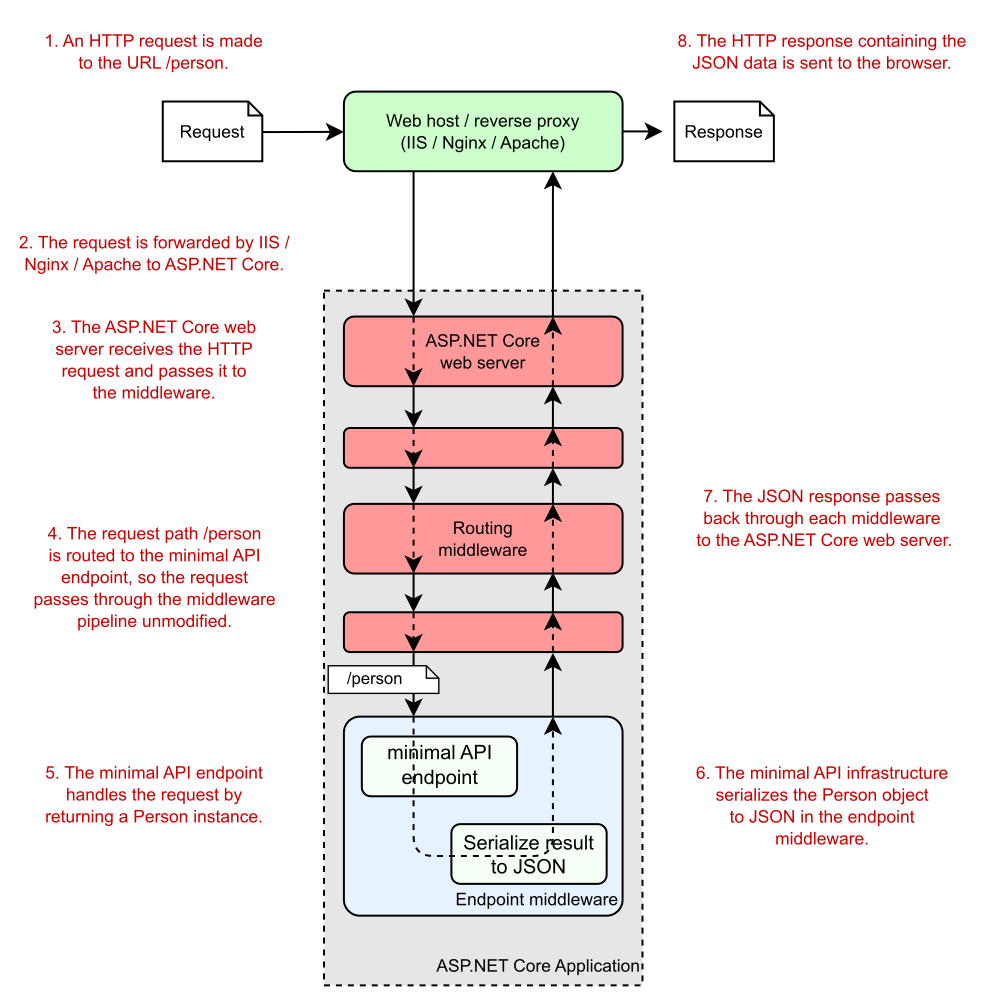
And there you have it. You’ve finished the tour of your first ASP.NET Core application! Before we move on, let’s take one last look at how our application handles a request. Figure 3.9 shows a request to the /person path being handled by the sample application. You’ve seen everything here already, so the process of handling a request should be familiar. The figure shows how the request passes through the middleware pipeline before being handled by the endpoint middleware. The endpoint executes the lambda method and generates the JSON response, which passes back through the middleware to the ASP.NET Core web server before being sent to the user’s browser.

你有它。您已经完成了第一个 ASP.NET Core 应用程序的浏览!在继续之前,让我们最后看一下我们的应用程序如何处理请求。图 3.9 显示了对示例应用程序正在处理的 /person 路径的请求。您已经在这里看到了所有内容,因此处理请求的过程应该很熟悉。该图显示了请求在由终端节点中间件处理之前如何通过中间件管道。终端节点执行 lambda 方法并生成 JSON 响应,该响应通过中间件传回 ASP.NET Core Web 服务器,然后再发送到用户的浏览器。
alt text

Figure 3.9 An overview of a request to the /person URL for the extended ASP.NET Core minimal API application. The routing middleware routes the request to the correct lambda method. The endpoint generates a JSON response by executing the method and passes the response back through the middleware pipeline to the browser.
图 3.9 对扩展 ASP.NET Core 最小 API 应用程序的 /person URL 的请求概述。路由中间件将请求路由到正确的 lambda 方法。终端节点通过执行该方法生成 JSON 响应,并通过中间件管道将响应传递回浏览器。

The trip has been pretty intense, but now you have a good overview of how an entire application is configured and how it handles a request by using minimal APIs. In chapter 4, you’ll take a closer look at the middleware pipeline that exists in all ASP.NET Core applications. You’ll learn how it’s composed, how you can use it to add functionality to your application, and how you can use it to create simple HTTP services.

这次旅行非常紧张,但现在您已经很好地了解了整个应用程序的配置方式以及它如何使用最少的 API 处理请求。在第 4 章中,您将仔细研究所有 ASP.NET Core 应用程序中存在的中间件管道。您将了解它是如何编写的,如何使用它来向应用程序添加功能,以及如何使用它来创建简单的 HTTP 服务。

Summary

总结

The .csproj file contains the details of how to build your project, including which NuGet packages it depends on. Visual Studio and the .NET CLI use this file to build your application.
.csproj 文件包含有关如何生成项目的详细信息,包括它所依赖的 NuGet 包。Visual Studio 和 .NET CLI 使用此文件构建应用程序。

Restoring the NuGet packages for an ASP.NET Core application downloads all your project’s dependencies so that it can be built and run.
还原 ASP.NET Core 应用程序的 NuGet 包会下载项目的所有依赖项,以便可以生成和运行它。

Program.cs is where you define the code that runs when your app starts. You can create a WebApplicationBuilder by using WebApplication.CreateBuilder() and call methods on the builder to create your application.
Program.cs 是您定义应用程序启动时运行的代码的位置。您可以使用 WebApplication.CreateBuilder() 创建 WebApplicationBuilder,并在生成器上调用方法来创建应用程序。

All services, both framework and custom application services, must be registered with the WebApplicationBuilder by means of the Services property, to be accessed later in your application.
所有服务(包括框架服务和自定义应用程序服务)都必须通过 Services 属性向 WebApplicationBuilder 注册,以便稍后在应用程序中访问。

After your services are configured you call Build() on the WebApplicationBuilder instance to create a WebApplication instance. You use WebApplication to configure your app’s middleware pipeline, to register the endpoints, and to start the server listening for requests.
配置服务后,在 WebApplicationBuilder 实例上调用 Build() 以创建 WebApplication 实例。您可以使用 WebApplication 配置应用程序的中间件管道、注册终端节点以及启动服务器侦听请求。

Middleware defines how your application responds to requests. The order in which middleware is registered defines the final order of the middleware pipeline for the application.
中间件定义应用程序如何响应请求。中间件的注册顺序定义了应用程序的中间件管道的最终顺序。

The WebApplication instance automatically adds RoutingMiddleware to the start of the middleware pipeline and EndpointMiddleware as the last middleware in the pipeline.
WebApplication 实例自动将 RoutingMiddleware 添加到中间件管道的开头,并将 EndpointMiddleware 作为管道中的最后一个中间件。

Endpoints define how a response should be generated for a given request and are typically tied to a request’s path. With minimal APIs, a simple function is used to generate a response.
终端节点定义应如何为给定请求生成响应,并且通常与请求的路径相关联。使用最少的 API,使用一个简单的函数来生成响应。

You can start the web server and begin accepting HTTP requests by calling Run on the WebApplication instance.
您可以通过在 WebApplication 实例上调用 Run 来启动 Web 服务器并开始接受 HTTP 请求。


  1. If you want to learn more about Kestrel, IIS HTTP Server, and HTTP.sys, this documentation describes the differences among them: http://mng.bz/6DgD.
    如果您想了解有关 Kestrel、IIS HTTP Server 和 HTTP.sys 的更多信息,本文档介绍了它们之间的区别:http://mng.bz/6DgD

  2. You can install the development certificate in Windows and macOS. For instructions on trusting the certificate on Linux, see your distribution’s instructions. Not all browsers (Mozilla Firefox, for example) use the certificate store, so follow your browser’s guidelines for trusting the certificate. If you still have difficulties, see the troubleshooting tips at http://mng.bz/o1pr.
    您可以在 Windows 和 macOS 中安装开发证书。有关在 Linux 上信任证书的说明,请参阅您的分配的说明。并非所有浏览器(例如 Mozilla Firefox)都使用证书存储,因此请遵循浏览器的信任证书指南。如果您仍遇到困难,请参阅 http://mng.bz/o1pr 中的故障排除提示。

  3. You can read about the new C# features included in .NET 7 and C# 11 at http://mng.bz/nWMg.
    您可以在 http://mng.bz/nWMg 上阅读 .NET 7 和 C# 11 中包含的新 C# 功能。

  4. You can read in more detail about HTTP logging in the documentation at http://mng.bz/QPmw.
    您可以在 http://mng.bz/QPmw 上的文档中阅读有关 HTTP 日志记录的更多详细信息。
ASP.NET Core in Action 2 Understanding ASP.NET Core

Part 1 Getting started with minimal APIs

第 1 部分:开始使用最少的 API

Web applications are everywhere these days, from social media web apps and news sites to the apps on your phone. Behind the scenes, there's almost always a server running a web application or an HTTP API. Web applications are expected to be infinitely scalable, deployed to the cloud, and highly performant. Getting started can be overwhelming at the best of times, and doing so with such high expectations can be even more of a challenge.

如今,Web 应用程序无处不在,从社交媒体 Web 应用程序和新闻网站到手机上的应用程序。在幕后,几乎总是有服务器运行 Web 应用程序或 HTTP API。Web 应用程序应具有无限可扩展性、部署到云中和高性能。在最好的情况下,开始可能会让人不知所措,而带着如此高的期望这样做可能是一个更大的挑战。

The good news for you as a reader is that ASP.NET Core was designed to meet those requirements. Whether you need a simple website, a complex e-commerce web app, or a distributed web of microservices, you can use your knowledge of ASP.NET Core to build lean web apps that fit your needs. ASP.NET Core lets you build and run web apps in Windows, Linux, or macOS. It's highly modular, so you use only the components you need, keeping your app as compact and performant as possible.

对于读者来说,好消息是 ASP.NET Core 旨在满足这些要求。无论您需要简单的网站、复杂的电子商务 Web 应用程序还是微服务的分布式 Web,您都可以利用自己的 ASP.NET Core 知识来构建符合您需求的精益 Web 应用程序。ASP.NET Core 允许您在 Windows、Linux 或 macOS 中构建和运行 Web 应用程序。它是高度模块化的,因此您只需使用所需的组件,从而使您的应用程序尽可能紧凑和高性能。

In part 1 you'll go from a standing start all the way to building your first API applications. Chapter 2 gives you a high-level overview of ASP.NET Core, which you'll find especially useful if you're new to web development in general. You'll get your first glimpse of a full ASP.NET Core application in chapter 3; we'll look at each component of the app in turn and see how they work together to generate a response.

在第 1 部分中,您将从零开始一直到构建您的第一个 API 应用程序。第 2 章为您提供了 ASP.NET Core 的高级概述,如果您一般是 Web 开发的新手,您会发现它特别有用。在第 3 章中,您将首次了解完整的 ASP.NET Core 应用程序;我们将看看app 中,并查看它们如何协同工作以生成响应。

Chapter 4 looks in detail at the middleware pipeline, which defines how incoming web requests are processed and how a response is generated. We'll look at several standard pieces of middleware and see how they can be combined to create your application's pipeline.

第 4 章详细介绍了中间件管道,它定义了如何处理传入的 Web 请求以及如何生成响应。我们将介绍几个标准的中间件,并了解如何将它们组合起来创建应用程序的管道。

Chapters 5 through 7 focus on building ASP.NET Core apps with minimal API endpoints, which are the new simplified approach to building JSON APIs in ASP.NET Core apps. In chapter 5 you'll learn how to create endpoints that generate JSON, how to use filters to extract common behavior, and how to use route groups to organize your APIs. In chapter 6 you'll learn about routing, the process of mapping URLs to endpoints. And in chapter 7 you'll learn about model binding and validation.

第 5 章到第 7 章重点介绍如何构建具有最少 API 端点的 ASP.NET Core 应用程序,这是在 ASP.NET Core 应用程序中构建 JSON API 的新简化方法。在第 5 章中,您将学习如何创建生成 JSON 的终端节点,如何使用过滤器提取常见行为,以及如何使用路由组来组织 API。在第 6 章中,您将了解路由,即将 URL 映射到端点的过程。在第 7 章中,您将学习模型绑定和验证。

There's a lot of content in part 1, but by the end you'll be well on your way to building simple APIs with ASP.NET Core. Inevitably, I'll gloss over some of the more complex configuration aspects of the framework, but you should get a good understanding of minimal APIs and how you can use them to build simple APIs. In later parts of this book, you'll learn how to configure your application and add extra features, such as user profiles and database interaction.

第 1 部分内容丰富,但到最后,您将顺利使用 ASP.NET Core 构建简单的 API。不可避免地,我将略过框架的一些更复杂的配置方面,但您应该很好地了解最小的 API 以及如何使用它们来构建简单的 API。在本书的后面部分,您将学习如何配置应用程序并添加额外的功能,例如用户配置文件和数据库交互。

We'll also look at how to build other types of applications, such as server-rendered web apps with Razor Pages.

我们还将了解如何构建其他类型的应用程序,例如使用 Razor Pages 构建服务器渲染的 Web 应用程序。

2 Understanding ASP.NET Core

2 了解 ASP.NET Core

This chapter covers

本章涵盖

  • Why ASP.NET Core was created
    创建 ASP.NET Core 的原因

  • The many application paradigms of ASP.NET Core Approaches to migrating an existing application to ASP.NET Core
    ASP.NET Core 的许多应用程序范例将现有应用程序迁移到 ASP.NET Core 的方法

In this chapter, I provide some background on ASP.NET Core: why web frameworks are useful, why ASP.NET Core was created, and how to choose when to use ASP.NET Core. If you’re new to .NET development, this chapter will help you understand the .NET landscape. If you’re already a .NET developer, I provide guidance on whether now is the right time to consider moving your focus to .NET Core and .NET 7, as well as on the advantages ASP.NET Core can offer over previous versions of ASP.NET.

在本章中,我将提供有关 ASP.NET Core 的一些背景知识:为什么 Web 框架很有用,为什么创建 ASP.NET Core,以及如何选择何时使用 ASP.NET Core。如果您不熟悉 .NET 开发,本章将帮助您了解 .NET 的前景。如果您已经是 .NET 开发人员,我将提供指导,说明现在是否是考虑将重点转移到 .NET Core 和 .NET 7 的合适时机,以及 ASP.NET Core 相对于以前版本的 ASP.NET 可以提供的优势。

2.1 Using a web framework‌

2.1 使用 Web 框架

If you’re new to web development, it can be daunting to move into an area with so many buzzwords and a plethora of ever-changing products. You may be wondering whether all those products are necessary. How hard can it be to return a file from a server?

如果您是 Web 开发的新手,那么进入一个拥有如此多流行语和大量不断变化的产品的领域可能会令人生畏。您可能想知道所有这些产品是否都是必要的。从服务器返回文件有多难?

Well, it’s perfectly possible to build a static web application without the use of a web framework, but its capabilities will be limited. As soon as you want to provide any kind of security or dynamism, you’ll likely run into difficulties, and the original simplicity that enticed you will fade before your eyes.

嗯,完全可以在不使用 Web 框架的情况下构建静态 Web 应用程序,但它的功能将受到限制。一旦你想提供任何类型的安全或活力,你可能会遇到困难,最初吸引你的简单性会在你眼前消失。

Just as desktop or mobile development frameworks can help you build native applications, ASP.NET Core makes writing web applications faster, easier, and more secure than trying to build everything from scratch. It contains libraries for common things like

正如桌面或移动开发框架可以帮助您构建原生应用程序一样,ASP.NET Core 使编写 Web 应用程序比尝试从头开始构建所有内容更快、更轻松、更安全。它包含用于常见内容的库,例如

  • Creating dynamically changing web pages Letting users log in to your web app
    创建动态变化的网页 允许用户登录到您的 Web 应用程序

  • Letting users use their Facebook accounts to log in to your web app
    允许用户使用其 Facebook 帐户登录您的 Web 应用程序

  • Providing a common structure for building maintainable applications
    为构建可维护的应用程序提供通用结构

  • Reading configuration files Serving image files
    读取配置文件提供图像文件

  • Logging requests made to your web app
    记录对 Web 应用程序发出的请求

The key to any modern web application is the ability to generate dynamic web pages. A dynamic web page may display different data depending on the current logged-in user, or it could display content submitted by users. Without a dynamic framework, it wouldn’t be possible to log in to websites or to display any sort of personalized data on a page. In short, websites like Amazon, eBay, and Stack

任何现代 Web 应用程序的关键是生成动态网页的能力。动态网页可能会根据当前登录的用户显示不同的数据,也可以显示用户提交的内容。如果没有动态框架,就不可能登录网站或在页面上显示任何类型的个性化数据。简而言之,Amazon、eBay 和 Stack 等网站

Overflow (shown in figure 2.1) wouldn’t be possible. Web frameworks for creating dynamic web pages are almost as old as the web itself, and Microsoft has created several over the years, so why create a new one?

溢出(如图 2.1 所示)是不可能的。用于创建动态网页的 Web 框架几乎与 Web 本身一样古老,Microsoft 多年来已经创建了多个框架,那么为什么要创建一个新的框架呢?

alt text

Figure 2.1 The Stack Overflow website (https://stackoverflow.com) is built with ASP.NET and has almost entirely dynamic content.

图 2.1 Stack Overflow 网站 (https://stackoverflow.com) 是使用 ASP.NET 构建的,几乎完全具有动态内容。

2.2 Why ASP.NET Core was created‌

2.2 创建 ASP.NET Core 的原因

Microsoft’s development of ASP.NET Core was motivated by the desire to create a web framework with five main goals:

Microsoft 开发 ASP.NET Core 的动机是希望创建一个具有五个主要目标的 Web 框架:

  • To be run and developed cross-platform
    跨平台运行和开发

  • To have a modular architecture for easier maintenance
    采用模块化架构,更易于维护

  • To be developed completely as open-source software
    完全作为开源软件开发

  • To adhere to web standards
    遵守 Web 标准

  • To be applicable to current trends in web development, such as client-side applications and deployment to cloud environments
    适用于 Web 开发的当前趋势,例如客户端应用程序和部署到云环境

To achieve all these goals, Microsoft needed a platform that could provide underlying libraries for creating basic objects such as lists and dictionaries, and for performing tasks such as simple file operations. Up to this point, ASP.NET development had always been focused—and dependent—on the Windows-only .NET Framework. For ASP.NET Core, Microsoft created a lightweight platform that runs on Windows, Linux, and macOS called .NET Core (subsequently .NET), as shown in figure 2.2.

为了实现所有这些目标,Microsoft 需要一个平台,该平台可以提供基础库,用于创建基本对象(如列表和字典)以及执行任务(如简单的文件作)。在此之前,ASP.NET 开发始终以仅限 Windows 的 .NET Framework 为中心。对于 ASP.NET Core,Microsoft创建了一个在 Windows、Linux 和 macOS 上运行的轻量级平台,称为 .NET Core(随后.NET),如图 2.2 所示。

alt text

Figure 2.2 The relationships among ASP.NET Core, ASP.NET, .NET Core/.NET 5+, and .NET Framework. ASP.NET Core runs on .NET Core and .NET 5+, so it can run cross-platform. Conversely, ASP.NET runs on .NET Framework only, so it’s tied to the Windows OS.

图 2.2 ASP.NET Core、ASP.NET、.NET Core/.NET 5+ 和 .NET Framework 之间的关系。ASP.NET Core 在 .NET Core 和 .NET 5+ 上运行,因此可以跨平台运行。相反,ASP.NET 仅在 .NET Framework 上运行,因此它与 Windows作系统相关联。

DEFINITION .NET 5 was the next version of .NET Core after 3.1, followed by .NET 6 and .NET 7. It represents a unification of .NET Core and other .NET platforms in a single runtime and framework. It was considered to be the future of .NET.
定义 .NET 5 是 3.1 之后的 .NET Core 的下一个版本,其次是 .NET 6 和 .NET 7。它表示 .NET Core 和其他 .NET 平台在单个运行时和框架中的统一。它被认为是 .NET 的未来。

which is why Microsoft chose to drop the “Core” from its name. For consistency with Microsoft’s language, I use the term .NET 5+ to refer to .NET 5, .NET 6, and .NET 7, and the term .NET Core to refer to previous versions.‌

这就是 Microsoft 选择从其名称中删除“Core”的原因。为了与 Microsoft 的语言保持一致,我使用术语 .NET 5+ 来指代 .NET 5、.NET 6 和 .NET 7,使用术语 .NET Core 来指代以前的版本。

.NET Core (and its successor, .NET 5+) employs many of the same APIs as .NET Framework but is more modular. It implements a different set of features from those in .NET Framework, with the goal of providing a simpler programming model and modern APIs. It’s a separate platform rather than a fork of .NET Framework, though it uses similar code for many of its APIs.

.NET Core(及其后续产品 .NET 5+)采用许多与 .NET Framework 相同的 API,但模块化程度更高。它实现了一组与 .NET Framework 中的功能不同的功能,目的是提供更简单的编程模型和现代 API。它是一个单独的平台,而不是 .NET Framework 的分支,尽管它的许多 API 都使用类似的代码。

NOTE If you’d like to learn more about the .NET ecosystem, you can read two posts on my blog: “Understanding the .NET ecosystem: The evolution of .NET into .NET 7” (http://mng.bz/Ao0W) and “Understanding the .NET ecosystem: The introduction of .NET Standard” (http://mng.bz/ZqPZ).
注意 如果您想了解有关 .NET 生态系统的更多信息,可以阅读我博客上的两篇文章:“了解 .NET 生态系统:.NET 向 .NET 7 的演变”(http://mng.bz/Ao0W 页)和“了解 .NET 生态系统:.NET Standard 简介”(http://mng.bz/ZqPZ 页)。

The benefits and limitations of ASP.NET
ASP.NET 的好处和局限性
ASP.NET Core is the latest evolution of Microsoft’s popular ASP.NET web framework, released in June 2016. Previous versions of ASP.NET had many incremental updates, focusing on high developer productivity and prioritizing backward compatibility. ASP.NET Core bucks that trend by making significant architectural changes that rethink the way the web framework is designed and built.
ASP.NET Core 是 Microsoft 流行的 ASP.NET Web 框架的最新发展版本,于 2016 年 6 月发布。以前的 ASP.NET 版本有许多增量更新,侧重于提高开发人员的工作效率并优先考虑向后兼容性。ASP.NET Core 通过对架构进行重大更改来重新思考 Web 框架的设计和构建方式,从而逆势而上。
ASP.NET Core owes a lot to its ASP.NET heritage, and many features have been carried forward from before, but ASP.NET Core is a new framework.
ASP.NET Core 在很大程度上归功于其 ASP.NET 传统,并且许多功能都从以前继承了下来,但 ASP.NET Core 是一个新框架。
The whole technology stack has been rewritten, including both the web framework and the underlying platform.
整个技术堆栈已被重写,包括 Web 框架和底层平台。
At the heart of the changes is the philosophy that ASP.NET should be able to hold its head high when measured against other modern frameworks, but existing .NET developers should continue to have a sense of familiarity.
这些变化的核心理念是这样一种理念,即 ASP.NET 与其他现代框架相比时,应该能够昂首挺胸,但现有的 .NET 开发人员应该继续保持熟悉感。
To understand why Microsoft decided to build a new framework, it’s important to understand the benefits and limitations of the legacy ASP.NET web framework.
要了解 Microsoft 决定构建新框架的原因,了解旧版 ASP.NET Web 框架的优势和局限性非常重要。
The first version of ASP.NET was released in 2002 as part of .NET Framework 1.0. The ASP.NET Web Forms paradigm that it introduced differed significantly from the conventional scripting environments of classic ASP and PHP. ASP.NET Web Forms allowed developers to create web applications rapidly by using a graphical designer and a simple event model that mirrored desktop application-building techniques.
ASP.NET 的第一个版本于 2002 年作为 .NET Framework 1.0的一部分发布. 它引入的 ASP.NET Web Forms 范例与传统 ASP 和 PHP 的传统脚本环境有很大不同。ASP.NET Web 窗体允许开发人员使用图形设计器和反映桌面应用程序构建技术的简单事件模型快速创建 Web 应用程序。
The ASP.NET framework allowed developers to create new applications quickly, but over time the web development ecosystem changed. It became apparent that ASP.NET Web Forms suffered from many problems, especially in building larger applications. In particular, a lack of testability, a complex stateful model, and limited influence on the generated HTML (making client- side development difficult) led developers to evaluate other options.
ASP.NET 框架允许开发人员快速创建新的应用程序,但随着时间的推移,Web 开发生态系统发生了变化。很明显,ASP.NET Web Forms 存在许多问题,尤其是在构建大型应用程序时。特别是,缺乏可测试性、复杂的有状态模型以及对生成的 HTML 的有限影响(使客户端开发变得困难)导致开发人员评估其他选项。
In response, Microsoft released the first version of ASP.NET MVC in 2009, based on the Model-View-Controller (MVC) pattern, a common web pattern used in frameworks such as Ruby on Rails, Django, and Java Spring. This framework allowed developers to separate UI elements from application logic, made testing easier, and provided tighter control of the HTML- generation process.
作为回应,Microsoft 于 2009 年发布了 ASP.NET MVC 的第一个版本,该版本基于模型-视图-控制器 (MVC) 模式,这是 Ruby on Rails、Django 和 Java Spring 等框架中使用的一种常见 Web 模式。该框架允许开发人员将 UI 元素与应用程序逻辑分离,使测试更容易,并提供对 HTML 生成过程的更严格控制。
ASP.NET MVC has been through four more iterations since its first release, but all these iterations were built on the same underlying framework provided by the System .Web.dll file. This library is part of .NET Framework, so it comes preinstalled with all versions of Windows. It contains all the core code that ASP.NET uses when you build a web application.
ASP.NET MVC 自首次发布以来已经经历了四次迭代,但所有这些迭代都是建立在 System 提供的相同底层框架之上的。Web.dll 文件。此库是 .NET Framework 的一部分,因此它预装在所有版本的 Windows 中。它包含 ASP.NET 在构建 Web 应用程序时使用的所有核心代码。
This dependency brings both advantages and disadvantages. On one hand, the ASP.NET framework is a reliable, battle-tested platform that’s fine for building web applications in Windows. It provides a wide range of features that have been in production for many years, and it’s well known by virtually all Windows web developers.
这种依赖关系既有优点也有缺点。一方面,ASP.NET 框架是一个可靠的、经过实战检验的平台,非常适合在 Windows 中构建 Web 应用程序。它提供了一系列已经投入生产多年的功能,几乎所有 Windows Web 开发人员都知道它。
On the other hand, this reliance is limiting. Changes to the underlying System.Web.dll file are far-reaching and, consequently, slow to roll out, which limits the extent to which ASP.NET is free to evolve and results in release cycles happening only every few years. There’s also an explicit coupling with the Windows web host, Internet Information Services (IIS), which precludes its use on non-Windows platforms.
另一方面,这种依赖是有限的。对基础 System.Web.dll 文件的更改影响深远,因此推出速度很慢,这限制了 ASP.NET 自由发展的程度,并导致发布周期每隔几年才发生一次。此外,还与 Windows Web 主机 Internet Information Services (IIS) 显式耦合,这阻止了它在非 Windows 平台上的使用。
More recently, Microsoft declared .NET Framework to be “done.” It won’t be removed or replaced, but it also won’t receive any new features.
最近,Microsoft 宣布 .NET Framework 已“完成”。它不会被删除或替换,但它也不会获得任何新功能。
Consequently, ASP.NET based on System.Web.dll won’t receive new features or updates either.
因此,基于 System.Web.dll 的 ASP.NET 也不会收到新功能或更新。
In recent years, many web developers have started looking at cross- platform web frameworks that can run on Windows as well as Linux and macOS. Microsoft felt the time had come to create a framework that was no longer tied to its Windows legacy; thus, ASP.NET Core was born.
近年来,许多 Web 开发人员开始寻找可以在 Windows 以及 Linux 和 macOS 上运行的跨平台 Web 框架。Microsoft 认为是时候创建一个不再与其 Windows 传统挂钩的框架了;因此,ASP.NET Core 诞生了。

With .NET 7, it’s possible to build console applications that run cross-platform. Microsoft created ASP.NET Core to be an additional layer on top of console applications so that converting to a web application involves adding and composing libraries, as shown in figure 2.3.

使用 .NET 7,可以构建跨平台运行的控制台应用程序。Microsoft Core 创建了 ASP.NET Core 作为控制台应用程序之上的附加层,因此转换为 Web 应用程序涉及添加和组合库,如图 2.3 所示。

alt text

Figure 2.3 ASP.NET Core application model. The .NET 7 platform provides a base console application model for running command-line apps. Adding a web server library converts this model to an ASP.NET Core web app. You can add other features, such as configuration and logging, using various libraries.

图 2.3 ASP.NET 核心应用程序模型。.NET 7 平台提供了用于运行命令行应用程序的基本控制台应用程序模型。添加 Web 服务器库会将此模型转换为 ASP.NET Core Web 应用程序。您可以使用各种库添加其他功能,例如配置和日志记录。

When you add an ASP.NET Core web server to your .NET 7 app, your console application can run as a web application.

将 ASP.NET Core Web 服务器添加到 .NET 7 应用时,控制台应用程序可以作为 Web 应用程序运行。

ASP.NET Core contains a huge number of APIs, but you’ll rarely need all the features available to you. Some of the features are built in and will appear in virtually every application you create, such as the ones for reading configuration files or performing logging. Other features are provided by separate libraries and built on top of these base capabilities to provide application-specific functionality, such as third-party logins via Facebook or Google.

ASP.NET Core 包含大量 API,但您很少需要所有可用的功能。某些功能是内置的,几乎会出现在您创建的每个应用程序中,例如用于读取配置文件或执行日志记录的应用程序。其他功能由单独的库提供,并基于这些基本功能构建,以提供特定于应用程序的功能,例如通过 Facebook 或 Google 进行第三方登录。

Most of the libraries and APIs you’ll use in ASP.NET Core are available on GitHub, in the Microsoft .NET organization repositories at https://github.com/dotnet/aspnetcore. You can find the core APIs there, including the authentication and logging APIs, as well as many peripheral libraries, such as the third-party authentication libraries.

您将在 ASP.NET Core 中使用的大多数库和 API 都可以在 GitHub 的 Microsoft .NET 组织存储库中找到 https://github.com/dotnet/aspnetcore。您可以在其中找到核心 API,包括身份验证和日志记录 API,以及许多外围库,例如第三方身份验证库。

All ASP.NET Core applications follow a similar design for basic configuration, but in general the framework is flexible, leaving you free to create your own code conventions. These common APIs, the extension libraries that build on them, and the design conventions they promote are covered by the somewhat-nebulous term ASP.NET Core.

所有 ASP.NET Core 应用程序都遵循类似的基本配置设计,但总的来说,该框架是灵活的,让您可以自由创建自己的代码约定。这些常见的 API、基于它们的扩展库以及它们所促进的设计约定都包含在有点模糊的术语 ASP.NET Core 中。

2.3 Understanding the many paradigms of ASP.NET Core‌

2.3 了解 ASP.NET Core 的多种范式

In chapter 1 you learned that ASP.NET Core provides a generalized web framework that can be used to build a wide variety of applications. As you may recall from section 1.2, the main paradigms are

在第 1 章中,您了解了 ASP.NET Core 提供了一个通用的 Web 框架,可用于构建各种应用程序。你可能还记得 1.2 节,主要的范例是

  • Minimal APIs—Simple HTTP APIs that can be consumed by mobile applications or browser-based single-page applications (SPAs)
    最少的 API — 可由移动应用程序或基于浏览器的单页应用程序 (SPA) 使用的简单 HTTP API

  • Web APIs—An alternative approach for building HTTP APIs that adds more structure and features than minimal APIs
    Web API — 一种构建 HTTP API 的替代方法,与最少的 API 相比,它增加了更多的结构和功能

  • gRPC APIs—Used to build efficient binary APIs for server-to-server communication using the gRPC protocol
    gRPC API — 用于使用 gRPC 协议构建高效的二进制 API,以实现服务器到服务器的通信

  • Razor Pages—Used to build page-based server- rendered applications
    Razor Pages - 用于构建基于页面的服务器渲染的应用程序

  • MVC controllers—Similar to Razor Pages; used for server-based applications but without the page- based paradigm
    MVC 控制器 — 类似于 Razor Pages;用于基于服务器的应用程序,但没有基于页面的范例

  • Blazor WebAssembly—A browser-based SPA framework using the WebAssembly standard, similar to JavaScript frameworks such as Angular, React, and Vue
    Blazor WebAssembly - 使用 WebAssembly 标准的基于浏览器的 SPA 框架,类似于 Angular、React 和 Vue 等 JavaScript 框架

  • Blazor Server—Used to build stateful applications, rendered on the server, that send UI events and page updates over WebSockets to provide the feel of a client-side SPA but with the ease of development of a server-rendered application
    Blazor Server - 用于构建在服务器上呈现的有状态应用程序,这些应用程序通过 WebSockets 发送 UI 事件和页面更新,以提供客户端 SPA 的感觉,但易于开发服务器呈现的应用程序

All these paradigms use the core functionality of ASP.NET Core and layer the additional functionality on top. Each paradigm is suited to a different style of web application or API, so some may fit better than others, depending on what sort of application you’re building.

所有这些范例都使用 ASP.NET Core 的核心功能,并将附加功能分层。每种范例都适合不同风格的 Web 应用程序或 API,因此有些可能比其他范例更适合,具体取决于您正在构建的应用程序类型。

Traditional page-based, server-side-rendered web applications are the bread and butter of ASP.NET development, both in the previous version of ASP.NET and now in ASP.NET Core. The Razor Pages and MVC controller paradigms provide two slightly different styles for building these types of applications but have many of the same concepts, as you’ll see in part 2. These paradigms can be useful for building rich, dynamic websites, whether they’re e- commerce sites, content management systems (CMSes), or large n-tier applications. Both the open-source CMS Orchard Core1 (figure 2.4) and cloudscribe2 CMS project, for example, are built with ASP.NET Core.

传统的基于页面、服务器端呈现的 Web 应用程序是 ASP.NET 开发的基础,无论是在以前的 ASP.NET 版本中,还是在现在的 ASP.NET Core 中。Razor Pages 和 MVC 控制器范例为构建这些类型的应用程序提供了两种略有不同的样式,但具有许多相同的概念,您将在第 2 部分中看到。这些范例可用于构建丰富的动态网站,无论它们是电子商务网站、内容管理系统 (CMS) 还是大型 n 层应用程序。例如,开源 CMS Orchard Core1(图 2.4)和 cloudscribe2 CMS 项目都是使用 ASP.NET Core 构建的。

alt text

Figure 2.4 The California School Information Services website (https://csis.fcmat.org) is built with Orchard Core and ASP.NET Core.

图 2.4 California School Information Services 网站 (https://csis.fcmat.org) 是使用 Orchard Core 和 ASP.NET Core 构建的。

In addition to server-rendered applications, ASP.NET core is ideally suited to building a REST or HTTP API server. Whether you’re building a mobile app, a JavaScript SPA using Angular, React, Vue, or some other client-side framework, it’s easy to create an ASP.NET Core application to act as the server-side API by using both the minimal API and web API paradigms built into ASP.NET Core. You’ll learn about minimal APIs in part 1 and about web APIs in chapter 20.

除了服务器渲染的应用程序外,ASP.NET 核心还非常适合构建 REST 或 HTTP API 服务器。无论您是使用 Angular、React、Vue 还是其他客户端框架构建移动应用程序、JavaScript SPA,都可以通过使用 ASP.NET Core 中内置的最小 API 和 Web API 范例轻松创建 ASP.NET Core 应用程序以充当服务器端 API。您将在第 1 部分中了解最小 API,在第 20 章中了解 Web API。

DEFINITION REST stands for representational state transfer. RESTful applications typically use lightweight and stateless HTTP calls to read, post (create/ update), and delete data.

定义 REST 代表 representational state transfer。RESTful 应用程序通常使用轻量级和无状态的 HTTP 调用来读取、发布(创建/更新)和删除数据。

ASP.NET Core isn’t restricted to creating RESTful services. It’s easy to create a web service or remote procedure call (RPC)- style service for your application, using gRPC for example, as shown in figure 2.5. In the simplest case, your application might expose only a single endpoint! ASP.NET Core is perfectly designed for building simple services, thanks to its cross-platform support and lightweight design.

ASP.NET Core 并不局限于创建 RESTful 服务。为您的应用程序创建 Web 服务或远程过程调用 (RPC) 样式的服务很容易,例如使用 gRPC,如图 2.5 所示。在最简单的情况下,您的应用程序可能只公开一个端点!ASP.NET Core 具有跨平台支持和轻量级设计,专为构建简单服务而设计。

DEFINITION gRPC is a modern open-source, high- performance RPC framework. You can read more at https://grpc.io.

定义 gRPC 是一个现代的开源、高性能 RPC 框架。您可以在 https://grpc.io 上阅读更多内容。

alt text

Figure 2.5 ASP.NET Core can act as the server-side application for a variety of clients: it can serve HTML pages for traditional web applications, act as a REST API for client-side SPA applications, or act as an ad hoc RPC service for client applications.

图 2.5 ASP.NET Core 可以充当各种客户端的服务器端应用程序:它可以为传统 Web 应用程序提供 HTML 页面,充当客户端 SPA 应用程序的 REST API,或充当客户端应用程序的临时 RPC 服务。

As well as server-rendered web apps, APIs, and gRPC endpoints, ASP.NET Core includes the Blazor framework, which can be used to build two very different styles of application. Blazor WebAssembly (WASM) apps run directly in your browser, in the same way as traditional JavaScript SPA frameworks such as Angular and React. Your .NET code is compiled to WebAssembly (https://webassembly.org) or executes on a .NET runtime compiled for WASM, and the browser downloads and runs it as it would a JavaScript app.

除了服务器呈现的 Web 应用、API 和 gRPC 终结点外,ASP.NET Core 还包括 Blazor 框架,该框架可用于构建两种截然不同的应用程序样式。Blazor WebAssembly (WASM) 应用直接在浏览器中运行,其方式与传统的 JavaScript SPA 框架(如 Angular 和 React)相同。您的 .NET 代码被编译为 WebAssembly (https://webassembly.org) 或在为 WASM 编译的 .NET 运行时上执行,浏览器会像下载 JavaScript 应用程序一样下载和运行它。

This way you can build highly interactive client-side applications while using C# and all the .NET APIs and libraries you already know.

这样,您就可以在使用 C# 和您已经知道的所有 .NET API 和库的同时构建高度交互的客户端应用程序。

By contrast, Blazor Server applications run on the server. Each mouse click or keyboard event is sent to the server via WebSockets. Then the server calculates the changes that should be made to the UI and sends the required changes back to the client, which updates the page in the browser.

相比之下,Blazor Server 应用程序在服务器上运行。每个鼠标单击或键盘事件都通过 WebSockets 发送到服务器。然后,服务器计算应该对 UI 进行的更改,并将所需的更改发送回客户端,客户端会在浏览器中更新页面。

The result is a “stateful” application that runs server-side but can be used to build highly interactive SPAs. The main downside of Blazor Server is that it requires a constant internet connection.

结果是一个“有状态”应用程序,它在服务器端运行,但可用于构建高度交互的 SPA。Blazor Server 的主要缺点是它需要持续的 Internet 连接。

NOTE In this book I focus on building traditional page-based, server-side- rendered web applications and RESTful web APIs. I also show how to create background worker services in chapter 34. For more information on Blazor, I recommend Blazor in Action, by Chris Sainty (Manning, 2022).‌

注意 在这本书中,我重点介绍了如何构建传统的基于页面、服务器端渲染的 Web 应用程序和 RESTful Web API。我还在 Chapter 34 中展示了如何创建后台 worker 服务。有关 Blazor 的更多信息,我推荐 Chris Sainty 的 Blazor in Action(曼宁,2022 年)。

With the ability to call on all these paradigms, you can use ASP.NET Core to build a wide variety of applications, but it’s still worth considering whether ASP.NET Core is right for your specific application. That decision will likely be affected by both your experience with .NET and the application you want to build.
由于能够调用所有这些范式,您可以使用 ASP.NET Core 构建各种应用程序,但仍然值得考虑 ASP.NET Core 是否适合您特定应用。该决定可能会受到您对 .NET 的体验和要构建的应用程序的影响。

2.4 When to choose ASP.NET Core‌

2.4 何时选择 ASP.NET Core

In this section I’ll describe some of the points to consider when deciding whether to use ASP.NET Core and .NET 7 instead of legacy .NET Framework ASP.NET. In most cases the decision will be to use ASP.NET Core, but you should consider some important caveats.

在本节中,我将介绍在决定是否使用 ASP.NET Core 和 .NET 7 而不是旧版 .NET Framework ASP.NET 时要考虑的一些要点。在大多数情况下,您决定使用 ASP.NET Core,但您应该考虑一些重要的注意事项。

When choosing a platform, you should consider multiple factors, not all of which are technical. One such factor is the level of support you can expect to receive from its creators. For some organizations, limited support can be one of the main obstacles to adopting open-source software. Luckily, Microsoft has pledged to provide full support for Long Term Support (LTS) versions of .NET and ASP.NET Core for at least three years from the time of their release. And as all development takes place in the open, sometimes you can get answers to your questions from the general community as well as from Microsoft directly.

选择平台时,您应该考虑多个因素,并非所有因素都是技术因素。其中一个因素是您可以期望从其创建者那里获得的支持水平。对于某些组织来说,有限的支持可能是采用开源软件的主要障碍之一。幸运的是,Microsoft 已承诺为 .NET 和 ASP.NET Core 的长期支持 (LTS) 版本提供全面支持,从发布之日起至少三年。由于所有开发都是在公开环境中进行的,因此有时您可以从一般社区以及直接从 Microsoft 获得问题的答案。

NOTE You can view Microsoft’s official support policy at http://mng.bz/RxXP.

注意: 您可以在 http://mng.bz/RxXP 查看 Microsoft 的官方支持政策。

When deciding whether to use ASP.NET Core, you have two primary dimensions to consider: whether you’re already a .NET developer and whether you’re creating a new application or looking to convert an existing one.

在决定是否使用 ASP.NET Core 时,您需要考虑两个主要方面:您是否已经是.NET 开发人员,无论您是要创建新应用程序还是希望转换现有应用程序。

2.4.1 If you’re new to .NET development‌

2.4.1 如果您不熟悉 .NET 开发

If you’re new to .NET development, you’re joining at a great time! Many of the growing pains associated with a new framework have been worked out, and the result is a stable, high-performance, cross-platform application framework.

如果你是 .NET 开发的新手,那么加入的时机正好!与新框架相关的许多成长之痛已经解决,结果是一个稳定、高性能、跨平台的应用程序框架。

The primary language of .NET development, and of ASP.NET Core in particular, is C#. This language has a huge following, for good reason! As an object-oriented C-based language, it provides a sense of familiarity to those who are used to C, Java, and many other languages. In addition, it has many powerful features, such as Language Integrated Query (LINQ), closures, and asynchronous programming constructs. The C# language is also designed in the open on GitHub, as is Microsoft’s C# compiler, code-named Roslyn (https://github.com/dotnet/roslyn).

.NET 开发(尤其是 ASP.NET Core 的主要语言)是 C#。这种语言有大量的追随者,这是有充分理由的!作为一种面向对象的基于 C 语言,它为习惯了 C、Java 和许多其他语言的人提供了一种熟悉感。此外,它还具有许多强大的功能,例如语言集成查询 (LINQ)、闭包和异步编程结构。C# 语言也是在 GitHub 上公开设计的,Microsoft 的 C# 编译器,代号为 Roslyn (https://github.com/dotnet/roslyn)。

NOTE I use C# throughout this book and will highlight some of the newer features it provides, but I won’t be teaching the language from scratch. If you want to learn C#, I recommend C# in Depth, 4th ed., by Jon Skeet (Manning, 2019), and Code Like a Pro in C#, by Jort Rodenburg (Manning, 2021).‌‌‌

注意 我在本书中都使用了 C#,并将重点介绍它提供的一些新功能,但我不会从头开始教授这门语言。如果您想学习 C#,我推荐 Jon Skeet 的 C# in Depth,第 4 版(Manning,2019 年)和 Jort Rodenburg 的 Code Like a Pro in C#(Manning,2021 年)。

One big advantage of ASP.NET Core and .NET 7 over .NET Framework is that they enable you to develop and run on any platform. With .NET 7 you can build and run the same application on Mac, Windows, and Linux, and even deploy to the cloud using tiny container deployments.
与 .NET Framework 相比,ASP.NET Core 和 .NET 7 的一大优势是,它们使您能够在任何平台上进行开发和运行。使用 .NET 7,您可以构建和运行相同的Mac、Windows 和 Linux 上的应用程序,甚至可以使用微型容器部署部署到云中。

Built with containers in mind
以容器为构建理念
Traditionally, web applications were deployed directly to a server or, more recently, to a virtual machine. Virtual machines allow operating systems to be installed in a layer of virtual hardware, abstracting away the underlying hardware. This approach has several advantages over direct installation, such as easy maintenance, deployment, and recovery. Unfortunately, virtual machines are also heavy, in terms of both file size and resource use.
传统上,Web 应用程序直接部署到服务器,或者最近部署到虚拟机。虚拟机允许将作系统安装在虚拟硬件层中,从而抽象出底层硬件。与直接安装相比,此方法具有多个优点,例如易于维护、部署和恢复。遗憾的是,虚拟机在文件大小和资源使用方面也很繁重。
This is where containers come in. Containers are far more lightweight and don’t have the overhead of virtual machines. They’re built in a series of layers and don’t require you to boot a new operating system when starting a new one, so they’re quick to start and great for quick provisioning.Containers (Docker in particular) are quickly becoming the go-to platform for building large, scalable systems.
这就是容器的用武之地。容器的轻量级要轻得多,并且没有虚拟机的开销。它们构建在一系列层中,在启动新作系统时不需要启动新作系统,因此它们可以快速启动,非常适合快速配置。容器(尤其是 Docker)正迅速成为构建大型可扩展系统的首选平台。
Containers have never been a particularly attractive option for ASP.NET applications, but with ASP.NET Core, .NET 7, and Docker for Windows, all that is changing. A lightweight ASP.NET Core application running on the cross-platform .NET 7 framework is perfect for thin container deployments. You can learn more about your deployment options in chapter 27.
容器从来都不是 ASP.NET 应用程序特别有吸引力的选择,但随着 ASP.NET Core、.NET 7 和 Docker for Windows 的推出,这一切都发生了变化。在跨平台 .NET 7 框架上运行的轻量级 ASP.NET Core 应用程序非常适合瘦容器部署。您可以在第 27 章中了解有关部署选项的更多信息。

In addition to running on each platform, one of the selling points of .NET is your ability to write and compile only once. Your application is compiled to Intermediate Language (IL) code, which is a platform-independent format. If a target system has the .NET 7 runtime installed, you can run compiled IL from any platform. You can develop on a Mac or a Windows machine, for example, and deploy exactly the same files to your production Linux machines. This compile-once, run-anywhere promise has finally been realized with ASP.NET Core and .NET 7.
除了在每个平台上运行之外,.NET 的卖点之一是您能够只编写和编译一次。您的应用程序被编译为中间语言 (IL) 代码,这是一种与平台无关的格式。如果目标系统安装了 .NET 7 运行时,则可以从任何平台运行编译的 IL。例如,您可以在 Mac 或 Windows 计算机上进行开发,并将完全相同的文件部署到生产 Linux 计算机上。“一次编写,到处运行”的承诺终于在 ASP.NET Core 和 .NET 7 中实现了。

TIP You can go one step further and package the .NET runtime with your app in a so-called self-contained deployment (SCD). This way, you can deploy cross-platform, and the target machine doesn’t even need .NET installed.
With SCDs, the generated deployment files are customized for the target machine, so you’re no longer deploying the same files everywhere in this case.

提示 您可以更进一步,将 .NET 运行时与您的应用程序打包到所谓的自包含部署 (SCD) 中。这样,您可以跨平台部署,并且目标计算机甚至不需要安装 .NET。使用 SCD 时,生成的部署文件会针对目标计算机进行自定义,因此在这种情况下,您不再需要在任何地方部署相同的文件。

Many of the web frameworks available today use similar well-established design patterns, and ASP.NET Core is no different. Ruby on Rails, for example, is known for its use of the MVC pattern; Node.js is known for the way it processes requests using small discrete modules (called a pipeline); and dependency injection is available in a wide variety of frameworks. If these techniques are familiar to you, you should find it easy to transfer them to ASP.NET Core; if they’re new to you, you can look forward to using industry best practices!

当今可用的许多 Web 框架都使用类似的成熟设计模式,ASP.NET Core 也不例外。例如,Ruby on Rails 以其对 MVC 模式的使用而闻名;Node.js 以其使用小型离散模块(称为管道)处理请求的方式而闻名;依赖项注入可用于各种框架。如果您熟悉这些技术,您应该会发现将它们传输到 ASP.NET Core 很容易;如果您对他们不熟悉,您可以期待使用行业最佳实践!

NOTE Design patterns are solutions to common software design problems. You’ll encounter a pipeline in chapter 4, dependency injection in chapters 8 and 9, and MVC in chapter 19.

注意 设计模式是常见软件设计问题的解决方案。您将在第 4 章中遇到管道,在第 8 章和第 9 章中遇到依赖关系注入,在第 19 章中遇到 MVC。

Whether you’re new to web development generally or only with .NET, ASP.NET Core provides a rich set of features with which you can build applications but doesn’t overwhelm you with concepts, as the legacy ASP.NET framework did. On the other hand, if you’re familiar with .NET, it’s worth considering whether now is the time to take a look at ASP.NET Core.

无论你是一般的 Web 开发新手,还是只使用 .NET,ASP.NET Core 都提供了一组丰富的功能,你可以利用这些功能构建应用程序,但不会像旧版 ASP.NET 框架那样被概念所淹没。在另一方面,如果您熟悉 .NET,则值得考虑现在是否是了解 ASP.NET Core 的时候。

2.4.2 If you’re a .NET Framework developer creating a new application‌

2.4.2 如果您是创建新应用程序的 .NET Framework 开发人员

If you’re already a .NET Framework developer, you’ve likely been aware of .NET Core and ASP.NET Core, but perhaps you were wary about jumping in too soon or didn’t want to hit the inevitable “version 1” problems. The good news is that ASP.NET Core and .NET are now mature, stable platforms, and it’s absolutely time to consider using .NET 7 for your new apps.

如果您已经是 .NET Framework 开发人员,您可能已经了解 .NET Core 和 ASP.NET Core,但也许您担心过早加入,或者不想遇到不可避免的“版本 1”问题。好消息是,ASP.NET Core 和 .NET 现在是成熟、稳定的平台,绝对是时候考虑将 .NET 7 用于您的新应用程序了。

As a .NET developer, if you aren’t using any Windows-specific constructs such as the Registry, the ability to build and deploy cross-platform opens the possibility for cheaper Linux hosting in the cloud, or for developing natively in macOS without the need for a virtual machine.

作为 .NET 开发人员,如果您不使用任何特定于 Windows 的结构(如注册表),则构建和部署跨平台的能力为在云中托管 Linux 或无需虚拟机即可在 macOS 中进行本机开发提供了可能性。

.NET Core and .NET 7 are inherently cross-platform, but you can still use platform-specific features if you need to.Windows-specific features such as the Registry and Directory Services, for example, can be enabled with a Compatibility Pack that makes these APIs available in .NET 5+. They’re available only when running .NET 5+ in Windows, not Linux or macOS, so you need to take care that such applications run only in a Windows environment or account for the potential missing APIs.

.NET Core 和 .NET 7 本质上是跨平台的,但如果需要,你仍然可以使用特定于平台的功能。特定于 Windows 的功能(例如,注册表和目录服务)可以通过兼容包启用,使这些 API 在 .NET 5+ 中可用。它们仅在 Windows 中运行 .NET 5+ 时可用,而不是在 Linux 或 macOS 中运行,因此您需要注意此类应用程序仅在 Windows 环境中运行,或者考虑可能缺少的 API。

TIP The Windows Compatibility Pack is designed to help port code from .NET Framework to .NET Core/.NET 5+. See http://mng.bz/2DeX.

提示 Windows 兼容包旨在帮助将代码从 .NET Framework 移植到 .NET Core/.NET 5+。请参阅 http://mng.bz/2DeX

The hosting model for the previous ASP.NET framework was a relatively complex one, relying on Windows IIS to provide the web-server hosting. In a cross-platform environment, this kind of symbiotic relationship isn’t possible, so an alternative hosting model has been adopted—one that separates web applications from the underlying host. This opportunity has led to the development of Kestrel, a fast, cross-platform HTTP server on which ASP.NET Core can run.

以前的 ASP.NET 框架的托管模型相对复杂,依赖 Windows IIS 提供 Web 服务器托管。在跨平台环境中,这种共生关系是不可能的,因此采用了另一种托管模型,即将 Web 应用程序与底层主机分开的模型。这个机会导致了 Kestrel 的开发,这是一种快速、跨平台的 HTTP 服务器,ASP.NET Core 可以在该服务器上运行。

Instead of the previous design, whereby IIS calls into specific points of your application, ASP.NET Core applications are console applications that self-host a web server and handle requests directly, as shown in figure 2.6. This hosting model is conceptually much simpler and allows you to test and debug your applications from the command line, though it doesn’t necessarily remove the need to run IIS (or the equivalent) in production.

与以前的设计不同,IIS 调用应用程序的特定点,ASP.NET Core 应用程序是自托管 Web 服务器并直接处理请求的控制台应用程序,如图 2.6 所示。此托管模型在概念上要简单得多,并且允许您从命令行测试和调试应用程序,尽管它不一定消除在生产中运行 IIS(或等效项)的需要。

ASP.NET Core and reverse proxies
ASP.NET Core 和反向代理
You can expose ASP.NET Core applications directly to the internet so that Kestrel receives requests directly from the network. That approach is fully supported. It’s more common, however, to use a reverse proxy between the raw network and your application. In Windows, the reverse-proxy server typically is IIS; in Linux or macOS, it might be NGINX, HAProxy, or Apache.There’s even an ASP.NET Core-based reverse proxy library called YARP (https://microsoft.github.io/reverse-proxy) that you can use to build your own reverse proxy.
您可以将 ASP.NET Core 应用程序直接公开到 Internet,以便 Kestrel 直接从网络接收请求。这种方法完全受支持。但是,更常见的是在原始网络和应用程序之间使用反向代理。在 Windows 中,反向代理服务器通常是 IIS;在 Linux 或 macOS 中,它可能是 NGINX、HAProxy 或 Apache。甚至还有一个名为 YARP (https://microsoft.github.io/reverse-proxy) 的基于 ASP.NET Core 的反向代理库,您可以使用它来构建自己的反向代理。
A reverse proxy is software responsible for receiving requests and forwarding them to the appropriate web server. The reverse proxy is exposed directly to the internet, whereas the underlying web server is exposed only to the proxy. This setup has several benefits, primarily security and performance for the web servers.
反向代理是负责接收请求并将其转发到适当的 Web 服务器的软件。反向代理直接向 Internet 公开,而底层 Web 服务器仅向代理公开。此设置有几个好处,主要是 Web 服务器的安全性和性能。
You may think that having a reverse proxy and a web server is somewhat redundant. Why not have one or the other? Well, one benefit is the decoupling of your application from the underlying operating system. The same ASP.NET Core web server, Kestrel, can be cross-platform and used behind a variety of proxies without putting any constraints on a particular implementation. Alternatively, if you wrote a new ASP.NET Core web server, you could use it in place of Kestrel without needing to change anything else about your application.
您可能认为拥有反向代理和 Web 服务器有点多余。为什么不拥有一个或另一个呢?嗯,一个好处是将您的应用程序与底层作系统解耦。相同的 ASP.NET Core Web 服务器 Kestrel 可以是跨平台的,并在各种代理后面使用,而不会对特定实现施加任何限制。或者,如果您编写了一个新的 ASP.NET Core Web 服务器,则可以使用它来代替 Kestrel,而无需更改有关应用程序的任何其他内容。
Another benefit of a reverse proxy is that it can be hardened against potential threats from the public internet. Reverse proxies are often responsible for additional aspects, such as restarting a process that has crashed. Kestrel can remain a simple HTTP server, not having to worry about these extra features, when it’s used behind a reverse proxy. You can think of this approach as being a simple separation of concerns: Kestrel is concerned with generating HTTP responses, whereas the reverse proxy is concerned with handling the connection to the internet.
反向代理的另一个好处是它可以针对来自公共互联网的潜在威胁进行强化。反向代理通常负责其他方面,例如重新启动已崩溃的进程。Kestrel 可以保持一个简单的 HTTP 服务器,当它在反向代理后面使用时,不必担心这些额外的功能。您可以将此方法视为简单的关注点分离:Kestrel 关注生成 HTTP 响应,而反向代理关注处理与 Internet 的连接。

alt text

Figure 2.6 The difference between hosting models in ASP.NET (top) and ASP.NET Core (bottom). In the previous version of ASP.NET, IIS is tightly coupled with the application. The hosting model in ASP.NET Core is simpler; IIS hands off the request to a self-hosted web server in the ASP.NET Core application and receives the response but has no deeper knowledge of the application.

图 2.6 在 ASP.NET(上)和 ASP.NET Core 中托管模型(下)之间的区别。在早期版本的 ASP.NET 中,IIS 与应用程序紧密耦合。ASP.NET Core 中的托管模型更简单;IIS 将请求移交给 ASP.NET Core 应用程序中的自托管 Web 服务器并接收响应,但对应用程序没有更深入的了解。

NOTE By default, when running in Windows, ASP.NET Core runs inside IIS, as shown in figure 2.6, which can provide better performance than the reverse-proxy version. This is primarily a deployment detail and doesn’t change the way you build ASP.NET Core applications.

注意 默认情况下,在 Windows 中运行时,ASP.NET Core 在 IIS 中运行,如图 2.6 所示,它可以提供比反向代理版本更好的性能。这主要是部署详细信息,不会改变您构建 ASP.NET Core 应用程序的方式。

Changing the hosting model to use a built-in HTTP web server has created another opportunity. Performance has been something of a sore point for ASP.NET applications in the past. It’s certainly possible to build high-performing applications—Stack Overflow (https://stackoverflow.com) is a testament to that fact—but the web framework itself isn’t designed with performance as a priority, so it can end up being an obstacle.

将托管模型更改为使用内置 HTTP Web 服务器创造了另一个机会。过去,性能一直是 ASP.NET 应用程序的痛点。构建高性能应用程序当然是可能的 — Stack Overflow (https://stackoverflow.com) 证明了这一事实 — 但 Web 框架本身在设计时并未将性能作为优先事项,因此它最终可能会成为一个障碍。

To make the product competitive cross-platform, the ASP.NET team focused on making the Kestrel HTTP server as fast as possible. TechEmpower (https://www.techempower.com/benchmarks) has been running benchmarks on a wide range of web frameworks from various languages for several years now. In round 20 of the plain-text benchmarks, TechEmpower announced that ASP.NET Core with Kestrel was among the 10 fastest of more than 400 frameworks tested!3

为了使产品在跨平台方面具有竞争力,ASP.NET 团队专注于使 Kestrel HTTP 服务器尽可能快。TechEmpower (https://www.techempower.com/benchmarks) 多年来一直在各种语言的各种 Web 框架上运行基准测试。在第 20 轮纯文本基准测试中,TechEmpower 宣布 ASP.NET Core with Kestrel 是测试的 400 多个框架中最快的 10 个框架之一!3

Web servers: Naming things is hard
Web 服务器:命名很困难
One difficult aspect of programming for the web is the confusing array of often-conflicting terminology. If you’ve used IIS, for example, you may have described it as a web server or possibly a web host. Conversely, if you’ve ever built an application with Node.js, you may have also referred to that application as a web server. Or you may have called the physical machine on which your application runs a web server. Similarly, you may have built an application for the internet and called it a website or a web application, probably somewhat arbitrarily based on the level of dynamism it displayed.
Web 编程的一个困难方面是一系列经常相互冲突的令人困惑的术语。例如,如果您使用过 IIS,您可能已将其描述为 Web 服务器或可能是 Web 主机。相反,如果您曾经使用 Node.js 构建过应用程序,您可能也曾将该应用程序称为 Web 服务器。或者,您可能已将运行应用程序的物理计算机称为 Web 服务器。同样,您可能已经构建了一个用于 Internet 的应用程序,并将其称为网站或 Web 应用程序,可能根据它显示的动态水平有点武断。
In this book, when I say web server in the context of ASP.NET Core, I’m referring to the HTTP server that runs as part of your ASP.NET Core application. By default, this server is the Kestrel web server, but that’s not a requirement. It’s possible to write a replacement web server for Kestrel if you so desire.
在本书中,当我在 ASP.NET Core 的上下文中提到 Web 服务器时,我指的是作为 ASP.NET Core 应用程序的一部分运行的 HTTP 服务器。默认情况下,此服务器是 Kestrel Web 服务器,但这不是必需的。如果您愿意,可以为 Kestrel 编写替换 Web 服务器。
The web server is responsible for receiving HTTP requests and generating responses. In the previous version of ASP.NET, IIS took this role, but in ASP.NET Core, Kestrel is the web server.
Web 服务器负责接收 HTTP 请求并生成响应。在早期版本的 ASP.NET 中,IIS 承担了此角色,但在 ASP.NET Core 中,Kestrel 是 Web 服务器。
I’ll use the term web application in this book to describe ASP.NET Core applications, regardless of whether they contain only static content or are dynamic. Either way, these applications are accessed via the web, so that name seems to be the most appropriate.
在本书中,我将使用术语 Web 应用程序来描述 ASP.NET Core 应用程序,无论它们只包含静态内容还是动态的。无论哪种方式,这些应用程序都是通过 Web 访问的,因此该名称似乎是最合适的。

Many of the performance improvements made to Kestrel came not from the ASP.NET team members themselves, but from contributors to the open-source project on GitHub (https://github.com/dotnet/aspnetcore). Developing in the open means that you typically see fixes and features make their way to production faster than you would for the previous version of ASP.NET, which was dependent on .NET Framework and Windows and, as such, had long release cycles.

对 Kestrel 所做的许多性能改进并非来自 ASP.NET 团队成员本身,而是来自 GitHub (https://github.com/dotnet/aspnetcore) 上开源项目的贡献者。以开放方式进行开发意味着您通常会看到修复程序和功能比以前版本的 ASP.NET 更快地进入生产环境,该版本依赖于 .NET Framework 和 Windows,因此具有较长的发布周期。

By contrast, .NET 5+ and hence ASP.NET Core are designed to be released in small increments. Major versions will be released on a predictable cadence, with a new version every year and a new LTS version released every two years (http://mng.bz/1qrg). In addition, bug fixes and minor updates can be released as and when they’re needed.Additional functionality is provided in NuGet packages independent of the underlying .NET 5+ platform.
相比之下,.NET 5+ 和 ASP.NET Core 旨在以小增量发布。主要版本将以可预测的节奏发布,每年发布一个新版本,每两年 (http://mng.bz/1qrg) 发布一个新的 LTS 版本。此外,可以在需要时发布错误修复和次要更新。NuGet 包中提供了独立于基础 .NET 5+ 平台的其他功能。

NOTE NuGet is a package manager for .NET that enables you to import libraries into your projects. It’s equivalent to Ruby Gems, npm for JavaScript, or Maven for Java.

注意: NuGet 是 .NET 的包管理器,可用于将库导入到项目中。它等效于 Ruby Gems、用于 JavaScript 的 npm 或用于 Java 的 Maven。

To enable this approach to releases, ASP.NET Core is highly modular, with as little coupling to other features as possible. This modularity lends itself to a pay-for-play approach to dependencies, where you start with a bare-bones application and add only the libraries you require, as opposed to the kitchen-sink approach of previous ASP.NET applications. Even MVC is an optional package! But don’t worry—this approach doesn’t mean that ASP.NET Core is lacking in features, only that you need to opt into them. Some of the key infrastructure improvements include

为了实现这种发布方法,ASP.NET Core 是高度模块化的,尽可能少地与其他功能耦合。这种模块化性适用于依赖项的付费方法,在这种方法中,您从一个基本的应用程序开始,只添加您需要的库,而不是以前的 ASP.NET 应用程序的厨房接收器方法。甚至 MVC 也是一个可选包!但别担心,这种方法并不意味着 ASP.NET Core 缺少功能,只是您需要选择使用这些功能。一些关键的基础设施改进包括

  • Middleware pipeline for defining your application’s behavior
    用于定义应用程序行为的中间件管道

  • Built-in support for dependency injection
    对依赖项注入的内置支持

  • Combined UI (MVC) and API (web API) infrastructure
    组合的 UI (MVC) 和 API (Web API) 基础设施

  • Highly extensible configuration system Standardized, extensible logging system
    高度可扩展的配置系统 标准化、可扩展的日志记录系统

  • Uses asynchronous programming by default for
    默认情况下使用异步编程

  • built-in scalability on cloud platforms
    云平台上的内置可扩展性

Each of these features was possible in the previous version of ASP.NET but required a fair amount of additional work to set up. With ASP.NET Core, they’re all there, ready and waiting to be connected.
这些功能在以前的 ASP.NET 版本中都是可能的,但需要相当多的额外工作才能建立。有了 ASP.NET Core,它们都已准备就绪,等待连接。

Microsoft fully supports ASP.NET Core, so if you want to build a new system, there’s no significant reason not to use it. The largest obstacle you’re likely to come across is wanting to use programming models that are no longer supported in ASP.NET Core, such as Web Forms or WCF Server, as I’ll discuss in the next section.

Microsoft 完全支持 ASP.NET Core,因此如果您想构建一个新系统,没有明显的理由不使用它。您可能遇到的最大障碍是希望使用 ASP.NET Core 中不再支持的编程模型,例如 Web 窗体或 WCF Server,我将在下一节中讨论。

I hope that this section whetted your appetite to use ASP.NET Core for building new applications. But if you’re an existing ASP.NET developer considering whether to convert an existing ASP.NET application to ASP.NET Core, that’s another question entirely.

我希望本节能激发您使用 ASP.NET Core 构建新应用程序的兴趣。但是,如果你是现有的 ASP.NET 开发人员,正在考虑是否将现有的 ASP.NET 应用程序转换为 ASP.NET Core,那完全是另一个问题。

2.4.3 Converting an existing ASP.NET application to ASP.NET Core‌

2.4.3 将现有 ASP.NET 应用程序转换为 ASP.NET Core

By contrast with new applications, an existing application presumably already provides value, so there should always be a tangible benefit to performing what may amount to a significant rewrite in converting from ASP.NET to ASP.NET Core. The advantages of adopting ASP.NET Core are much the same as those for new applications: cross-platform deployment, modular features, and a focus on performance. Whether the benefits are sufficient will depend largely on the particulars of your application, but some characteristics make conversion more difficult:

与新应用程序相比,现有应用程序可能已经提供了价值,因此在从 ASP.NET 转换为 ASP.NET Core 的过程中执行可能相当于重大重写的作应该始终会带来切实的好处。采用 ASP.NET Core 的优势与新应用程序的优势大致相同:跨平台部署、模块化功能和对性能的关注。好处是否足够在很大程度上取决于您的应用程序的具体情况,但有些特征使转换更加困难:

  • Your application uses ASP.NET Web Forms.
    您的应用程序使用 ASP.NET Web Forms。

  • Your application is built with WCF.
    您的应用程序是使用 WCF 构建的。

  • Your application is large, with many advanced MVC features.
    您的应用程序很大,具有许多高级 MVC 功能。

If you have an ASP.NET Web Forms application, attempting to convert it directly to ASP.NET Core isn’t advisable. Web Forms is inextricably tied to System.Web.dll and IIS, so it will likely never be available in ASP.NET Core. Converting an application to ASP.NET Core effectively involves rewriting the application from scratch, not only shifting frameworks, but also potentially shifting design paradigms.

如果您有 ASP.NET Web Forms 应用程序,则不建议尝试将其直接转换为 ASP.NET Core。Web 表单与 System.Web.dll 和 IIS 有着千丝万缕的联系,因此它可能永远不会在 ASP.NET Core 中提供。将应用程序有效地转换为 ASP.NET Core 涉及从头开始重写应用程序,不仅要改变框架,还可能改变设计范式。

All is not lost, however. Blazor server provides a stateful, component-based application that’s similar to the Web Forms application model. You may be able to gradually migrate your Web Forms application page by page to an ASP.NET Core Blazor server application.4 Alternatively, you could slowly introduce web API concepts into your Web Forms application, reducing the reliance on legacy Web Forms constructs such as ViewState, with the goal of ultimately moving to an ASP.NET Core web API application.

然而,一切都没有失去。Blazor 服务器提供基于组件的有状态应用程序,它类似于 Web Forms 应用程序模型。你可以逐步逐页将 Web 窗体应用程序迁移到 ASP.NET Core Blazor 服务器应用程序。4 或者,您可以慢慢地将 Web API 概念引入 Web 窗体应用程序,从而减少对旧版 Web 窗体构造(如 ViewState)的依赖,最终迁移到 ASP.NET Core Web API 应用程序。

Windows Communication Foundation (WCF) is only partially supported in ASP.NET Core. It’s possible to build client-side WCF services using the libraries provided by ASP.NET Core (https://github.com/dotnet/wcf) and to build server-side WCF services by using the Microsoft-supported community-driven project CoreWCF.5 These libraries don’t support all the APIs available in .NET Framework WCF (distributed transactions and some message security formats, for example), so if you absolutely need those APIs, it may be best to avoid ASP.NET Core for now.

服务,也可以使用 Microsoft 支持的社区驱动项目 CoreWCF 构建服务器端 WCF 服务。5 这些库不支持 .NET Framework WCF 中提供的所有 API(例如,分布式事务和某些消息安全格式),因此,如果您绝对需要这些 API,最好暂时避免使用 ASP.NET Core。

TIP If you like WCF’s contract-based RPC-style of programming but don’t have a hard requirement for WCF itself, consider using gRPC instead. gRPC is a modern RPC framework with many concepts that are similar to WCF, and it’s supported by ASP.NET Core out of the box (http://mng.bz/wv9Q).

提示 如果您喜欢 WCF 基于协定的 RPC 样式编程,但对 WCF 本身没有硬性要求,请考虑改用 gRPC。gRPC 是一个现代 RPC 框架,具有许多与 WCF 类似的概念,并且它由开箱即用的 ASP.NET Core (http://mng.bz/wv9Q) 提供支持。

If your existing application is complex and makes extensive use of the previous MVC or web API extensibility points or message handlers, porting your application to ASP.NET Core may be more difficult. ASP.NET Core is built with many features similar to the previous version of ASP.NET MVC, but the underlying architecture is different. Several of the previous features don’t have direct replacements, so they’ll require rethinking.

如果现有应用程序很复杂,并且广泛使用以前的 MVC 或 Web API 扩展点或消息处理程序,则将应用程序移植到 ASP.NET Core 可能会更加困难。ASP.NET Core 具有许多与以前版本的 ASP.NET MVC 类似的功能,但底层架构不同。前面的几个功能没有直接替换,因此需要重新考虑。

The larger the application is, the greater the difficulty you’re likely to have converting your application to ASP.NET Core.Microsoft itself suggests that porting an application from ASP.NET MVC to ASP.NET Core is at least as big a rewrite as porting from ASP.NET Web Forms to ASP.NET MVC. If that suggestion doesn’t scare you, nothing will!

应用程序越大,将应用程序转换为 ASP.NET Core 的难度就越大。
Microsoft本身表明,将应用程序从 ASP.NET MVC 移植到 ASP.NET Core 至少与从 ASP.NET Web Forms 移植到 ASP.NET MVC 一样大。如果这个建议没有吓到你,那就什么都不会了!

If an application is rarely used, isn’t part of your core business, or won’t need significant development in the near term, I suggest that you don’t try to convert it to ASP.NET Core. Microsoft will support .NET Framework for the foreseeable future (Windows itself depends on it!), and the
payoff in converting these fringe applications is unlikely to be worth the effort.

如果某个应用程序很少使用,不是您的核心业务的一部分,或者在短期内不需要重大开发,我建议您不要尝试将其转换为 ASP.NET Core。Microsoft 将在可预见的将来支持 .NET Framework(Windows 本身依赖于它!),并且

转换这些边缘应用程序的回报不太可能值得付出努力。

So when should you port an application to ASP.NET Core? As I’ve already mentioned, the best opportunity to get started is on small new greenfield projects instead of existing applications. That said, if the existing application in question is small or will need significant future development, porting may be a good option.

那么,何时应将应用程序移植到 ASP.NET Core?正如我已经提到的,最好的开始机会是小型的新绿地项目,而不是现有的应用程序。也就是说,如果现有应用程序很小或未来需要大量开发,则移植可能是一个不错的选择。

It’s always best to work in small iterations if possible when porting an application, rather than attempt to convert the entire application at the same time. Luckily, Microsoft provides tools for that purpose. A set of System.Web adapters, a .NET-based reverse proxy called YARP (Yet Another Reverse Proxy; http://mng.bz/qr92), and tooling built into Visual Studio can help you implement the strangler fig pattern (http://mng.bz/rW6J). This tooling allows you to migrate your application one page/API at a time, reducing the risk associated with porting an ASP.NET application to ASP.NET Core.

在移植应用程序时,如果可能的话,最好在小迭代中工作,而不是尝试同时转换整个应用程序。幸运的是,Microsoft 提供了用于此目的的工具。一组 System.Web 适配器、一个 .基于 NET 的反向代理称为 YARP(Yet Another Reverse Proxy; http://mng.bz/qr92) 和 Visual Studio 中内置的工具可以帮助您实现 strangler fig 模式 (http://mng.bz/rW6J)。借助此工具,您可以一次迁移一个页面/API 的应用程序,从而降低将 ASP.NET 应用程序移植到 ASP.NET Core 的相关风险。

In this chapter, we walked through some of the historical context of ASP.NET Core, as well as some of the advantages of adopting it. In chapter 3, you’ll create your first application from a template and run it. We’ll walk through each of the main components that make up your application and see how they work together to render a web page.‌

在本章中,我们介绍了 ASP.NET Core 的一些历史背景,以及采用它的一些优势。在第 3 章中,您将从模板创建第一个应用程序并运行它。我们将介绍构成应用程序的每个主要组件,并了解它们如何协同工作以呈现网页。

Summary

总结

Web frameworks provide a way to build dynamic web applications easily.
Web 框架提供了一种轻松构建动态 Web 应用程序的方法。

ASP.NET Core is a web framework built with modern software architecture practices and modularization as its focus.
ASP.NET Core 是一个以现代软件架构实践和模块化为重点构建的 Web 框架。

ASP.NET Core runs on the cross-platform .NET 7 platform. You can access Windows-specific features such as the Windows Registry by using the Windows Compatibility Pack.
ASP.NET Core 在跨平台的 .NET 7 平台上运行。您可以使用 Windows 兼容包访问特定于 Windows 的功能,例如 Windows 注册表。

.NET 5, .NET 6, and .NET 7 are the next versions of .NET Core after .NET Core 3.1.
.NET 5、.NET 6 和 .NET 7 是.NET Core 3.1 之后的 .NET Core的下一个版本。

ASP.NET Core is best used for new greenfield projects.
ASP.NET Core 最适合用于新的绿地项目。

Legacy technologies such as WCF Server and Web Forms can’t be used directly with ASP.NET Core, but they have analogues and supporting libraries that can help with porting ASP.NET applications to ASP.NET Core.
WCF Server 和 Web Forms 等旧技术不能直接与 ASP.NET Core 一起使用,但它们具有类似物和支持库,可帮助将 ASP.NET 应用程序移植到 ASP.NET Core。

You can convert an existing ASP.NET application to ASP.NET Core gradually by using the strangler fig pattern, using tooling and libraries provided by Microsoft.
通过使用 strangler fig 模式,您可以使用 Microsoft 提供的工具和库,逐步将现有的 ASP.NET 应用程序转换为 ASP.NET Core。

ASP.NET Core apps are often protected from the internet by a reverse-proxy server, which forwards requests to the application.
ASP.NET Core 应用程序通常由反向代理服务器保护,不受 Internet 的影响,该服务器将请求转发到应用程序。


1.Orchard Core (https://orchardcore.net). Source code at https://github.com/OrchardCMS/OrchardCore.

2.The cloudscribe project (https://www.cloudscribe.com). Source code at https://github.com/cloudscribe.

3.As always in web development, technology is in a constant state of flux, so these benchmarks will evolve over time. Although ASP.NET Core may not maintain its top-10 slot, you can be sure that performance is one of the key focal points of the ASP.NET Core team.

4.There is a community-driven effort to create Blazor versions of common WebForms components (http://mng.bz/PzPP). Also see an e-book for Blazor for Web Forms developers at http://mng.bz/JgDv.

5.You can find the CoreWCF libraries at https://github.com/corewcf/corewcf and details on upgrading a WCF service to .NET 5+ at http://mng.bz/mVg2.

ASP.NET Core in Action 1 Getting started with ASP.NET Core

ASP.NET Core in Action 1 Getting started with ASP.NET Core

1 Getting started with ASP.NET Core

1 ASP.NET Core 入门

This chapter covers

本章涵盖

  • What is ASP.NET Core?
    什么是 ASP.NET Core?

  • Things you can build with ASP.NET Core
    您可以使用 ASP.NET Core 构建的内容

  • How ASP.NET Core works
    ASP.NET Core 的工作原理

Choosing to learn and develop with a new framework is a big investment, so it’s important to establish early on whether it’s right for you. In this chapter, I provide some background on ASP.NET Core: what it is, how it works, and why you should consider it for building your web applications.

选择使用新框架进行学习和开发是一项巨大的投资,因此尽早确定它是否适合您非常重要。在本章中,我将提供有关 ASP.NET Core的一些背景知识:它是什么、它是如何工作的,以及为什么您应该考虑使用它来构建Web应用程序。

By the end of this chapter, you should have a good overview of the benefits of ASP.NET Core, the role of .NET 7, and the basic mechanics of how ASP.NET Core works. So without further ado, let’s dive in!

在本章结束时,您应该对ASP.NET Core的优势、.NET 7的作用以及ASP.NET Core工作原理的基本机制有一个很好的概述。因此,事不宜迟,让我们开始吧!

1.1 What is ASP.NET Core?‌

1.1 什么是 ASP.NET Core?

ASP.NET Core is a cross-platform, open-source application framework that you can use to build dynamic web applications quickly. You can use ASP.NET Core to build server-rendered web applications, backend server applications, HTTP APIs that can be consumed by mobile applications, and much more. ASP.NET Core runs on .NET 7,which is the latest version of .NET Core—a high-performance, cross-platform, open-source runtime.

ASP.NET Core是一个跨平台的开源应用程序框架,可用于快速构建动态Web应用程序。您可以使用ASP.NET Core构建服务器渲染的Web应用程序、后端服务器应用程序、移动应用程序可以使用的HTTP API等等。ASP.NET Core在.NET 7上运行,这是.NET Core的最新版本,是一种高性能、跨平台、开源运行时。

ASP.NET Core provides structure, helper functions, and a framework for building applications, which saves you from having to write a lot of this code yourself. Then the ASP.NET Core framework code calls in to your handlers, which in turn call methods in your application’s business logic, as shown in figure 1.1. This business logic is the core of your application. You can interact with other services here, such as databases or remote APIs, but your business logic typically doesn’t depend directly on ASP.NET Core.

ASP.NET Core提供结构、帮助程序函数和用于构建应用程序的框架,这使您不必自己编写大量此类代码。然后,ASP.NET Core框架代码调用您的处理程序,这些处理程序反过来调用应用程序业务逻辑中的方法,如图1.1所示。此业务逻辑是应用程序的核心。您可以在此处与其他服务(例如数据库或远程 API)进行交互,但您的业务逻辑通常不直接依赖于ASP.NET Core。

alt text

Figure 1.1 A typical ASP.NET Core application consists of several layers. The ASP.NET Core framework code handles requests from a client, dealing with the complex networking code. Then the framework calls in to handlers (Razor Pages and Web API controllers, for example) that you write using primitives provided by the framework. Finally, these handlers call in to your application’s domain logic—typically, C# classes and objects without any dependencies that are specific to ASP.NET Core.
图 1.1 典型的 ASP.NET Core应用程序由多个层组成。ASP.NET Core框架代码处理来自客户端的请求,处理复杂的网络代码。然后,框架调用使用框架提供的基元编写的处理程序(例如 Razor Pages和Web API控制器)。最后,这些处理程序调用应用程序的域逻辑 — 通常是没有任何特定于ASP.NET Core的依赖项的C#类和对象。

1.2 What types of applications can you build?‌

1.2 您可以构建哪些类型的应用程序?

ASP.NET Core provides a generalized web framework that you can use to build a wide variety of applications. ASP.NET Core includes APIs that support many paradigms:

ASP.NET Core 提供了一个通用的 Web 框架,您可以使用它来构建各种应用程序。ASP.NET Core 包含支持许多范例的 API:

  • Minimal APIs—Simple HTTP APIs that can be consumed by mobile applications or browser-based single-page applications.
    最小 API — 可供移动应用程序或基于浏览器的单页应用程序使用的简单 HTTP API。

  • Web APIs—An alternative approach to building HTTP APIs that adds more structure and features than minimal APIs.
    Web API — 一种构建 HTTP API 的替代方法,与最小 API 相比,它增加了更多的结构和功能。

  • gRPC APIs—Used to build efficient binary APIs for server-to-server communication using the gRPC protocol.
    gRPC API — 用于构建高效的二进制 API,以使用 gRPC 协议进行服务器到服务器通信。

  • Razor Pages—Used to build page-based server- rendered applications.
    Razor Pages - 用于构建基于页面的服务器渲染的应用程序。

  • MVC controllers—Similar to Razor Pages. Model- View-Controller (MVC) controller applications are for server-based applications but without the page- based paradigm.
    MVC 控制器 - 类似于 Razor Pages。模型-视图-控制器 (MVC) 控制器应用程序适用于基于服务器的应用程序,但没有基于页面的范例。

  • Blazor WebAssembly—A browser-based single- page application framework that uses the WebAssembly standard, similar to JavaScript frameworks such as Angular, React, and Vue.
    Blazor WebAssembly - 一种基于浏览器的单页应用程序框架,它使用 WebAssembly 标准,类似于 Angular、React 和 Vue 等 JavaScript 框架。

  • Blazor Server—Used to build stateful applications, rendered on the server, that send UI events and page updates over WebSockets to provide the feel of a client-side single-page application, but with the ease of development of a server-rendered application.
    Blazor Server - 用于构建在服务器上呈现的有状态应用程序,这些应用程序通过 WebSockets 发送 UI 事件和页面更新,以提供客户端单页应用程序的感觉,但易于开发服务器呈现的应用程序。

All these paradigms are based on the same building blocks of ASP.NET Core, such as the configuration and logging libraries, and then place extra functionality on top. The best paradigm for your application depends on multiple factors, including your API requirements, the details of existing applications you need to interact with, the details of your customers’ browsers and operating environment, and scalability and uptime requirements. You don’t need to choose only one of these paradigms; ASP.NET Core can combine multiple paradigms within a single application.

所有这些范例都基于ASP.NET Core的相同构建块,例如配置和日志记录库,然后将额外的功能放在顶部。应用程序的最佳范例取决于多种因素,包括 API 要求、需要与之交互的现有应用程序的详细信息、客户的浏览器和作环境的详细信息,以及可扩展性和正常运行时间要求。您不需要只选择这些范例中的一个;ASP.NET Core可以在单个应用程序中组合多个范例。

1.3 Choosing ASP.NET Core‌

1.3 选择 ASP.NET Core

I hope that now you have a general grasp of what ASP.NET Core is and the type of applications you can build with it. But one question remains: should you use it? Microsoft recommends that all new .NET web development use ASP.NET Core, but switching to or learning a new web stack is a big ask for any developer or company.

我希望现在您已经大致了解了 ASP.NET Core是什么以及您可以使用它构建的应用程序类型。但仍然存在一个问题:您应该使用它吗?Microsoft建议所有新的.NET Web开发都使用 ASP.NET Core,但切换到或学习新的 Web 堆栈对任何开发人员或公司来说都是一个很大的要求。

If you’re new to .NET development and are considering ASP.NET Core, welcome! Microsoft is pushing ASP.NET Core as an attractive option for web development beginners, but taking .NET cross-platform means that it’s competing with many other frameworks on their own turf. ASP.NET Core has many selling points compared with other cross-platform web frameworks:

如果你不熟悉.NET开发并正在考虑使用ASP.NET Core,欢迎使用!Microsoft正在推动 ASP.NET Core成为 Web 开发初学者的一个有吸引力的选择,但采用 .NET 跨平台意味着它正在与许多其他框架在自己的地盘上竞争。与其他跨平台Web框架相比,ASP.NET Core有很多卖点:

  • It’s a modern, high-performance, open-source web framework.
    它是一个现代、高性能、开源的 Web 框架。

  • It uses familiar design patterns and paradigms.
    它使用熟悉的设计模式和范例。

  • C# is a great language (but you can use VB.NET or F# if you prefer).
    C# 是一种很好的语言(但如果您愿意,也可以使用 VB.NET 或 F#)。

  • You can build and run on any platform.
    您可以在任何平台上构建和运行。

ASP.NET Core is a reimagining of the ASP.NET framework, built with modern software design principles on top of the new .NET platform. Although it’s new in one sense, .NET (previously called .NET Core) has had widespread production use since 2016 and has drawn significantly from the mature, stable, and reliable .NET Framework, which has been used for more than two decades. You can rest easy knowing that by choosing ASP.NET Core and .NET 7, you’re getting a dependable platform as well as a full-featured web framework.

ASP.NET Core是对 ASP.NET框架的重新构想,在新的 .NET 平台之上采用现代软件设计原则构建。尽管从某种意义上说,.NET(以前称为.NET Core)是新的,但它自2016年以来已被广泛用于生产领域,并且极大地借鉴了已经使用了二十多年的成熟、稳定和可靠的.NET Framework。您可以高枕无忧,因为您知道选择ASP.NET Core和.NET 7将获得一个可靠的平台以及一个功能齐全的Web框架。

One major selling point of ASP.NET Core and .NET 7 is the ability to develop and run on any platform. Whether you’re using a Mac, Windows, or Linux computer, you can run the same ASP.NET Core apps and develop across multiple environments. A wide range of distributions are supportedfor Linux users: RHEL, Ubuntu, Debian, CentOS, Fedora, and openSUSE, to name a few. ASP.NET Core even runs on the tiny Alpine distribution, for truly compact deployments to containers, so you can be confident that your operating system of choice will be a viable option.

ASP.NET Core和.NET 7的一个主要卖点是能够在任何平台上开发和运行。无论您使用的是 Mac、Windows 还是 Linux 计算机,您都可以运行相同的 ASP.NET Core 应用程序并跨多个环境进行开发。支持多种发行版对于 Linux 用户:RHEL、Ubuntu、Debian、CentOS、Fedora 和 openSUSE等。ASP.NET Core甚至在微型Alpine 发行版上运行,以实现真正紧凑的容器部署,因此您可以确信您选择的作系统将是一个可行的选择。

If you’re already a .NET developer, the choice of whether to invest in ASP.NET Core for new applications was largely a question of timing. Early versions of .NET Core lacked some features that made it hard to adopt, but that problem no longer exists in the latest versions of .NET. Now Microsoft explicitly advises that all new .NET applications should use.NET 7 (or newer).

如果您已经是.NET 开发人员,那么选择是否为新应用程序投资 ASP.NET Core在很大程度上是一个时间问题。早期版本的.NET Core缺少一些难以采用的功能,但最新版本的.NET 中不再存在该问题。现在 Microsoft 明确建议所有新的.NET 应用程序都应该使用.NET 7(或更高版本)。

Microsoft has pledged to provide bug and security fixes for the older ASP.NET framework, but it won’t provide any more feature updates. .NET Framework isn’t being removed, so your old applications will continue to work, but you shouldn’t use it for new development.

Microsoft已承诺为较旧的ASP.NET框架提供bug和安全修复,但不会提供更多功能更新。.NET Framework未被删除,因此您的旧应用程序将继续工作,但您不应将其用于新的开发。

The main benefits of ASP.NET Core over the previous ASP.NET framework are

与以前的 ASP.NET 框架相比,ASP.NET Core 的主要优点是

  • Cross-platform development and deployment Focus on performance as a feature
    跨平台开发和部署 专注于性能作为一项功能

  • A simplified hosting model
    简化的托管模型

  • Regular releases with a shorter release cycle Open-source
    发布周期更短的常规版本开源

  • Modular features
    模块化功能

  • More application paradigm options
    更多应用程序范例选项

  • The option to package .NET with an app when publishing for standalone deployments
    在发布独立部署时将 .NET 与应用程序打包的选项

As an existing .NET developer who’s moving to ASP.NET Core, your ability to build and deploy cross-platform opens the door to a whole new avenue of applications, such as taking advantage of cheaper Linux virtual machine hosting in the cloud, using Docker containers for repeatable continuous integration, or writing .NET code on your Mac without needing to run a Windows virtual machine. ASP.NET Core, in combination with .NET 7, makes all this possible.

作为正在迁移到 ASP.NET Core的现有 .NET 开发人员,您构建和部署跨平台的能力为全新的应用程序途径打开了大门,例如利用云中更便宜的 Linux 虚拟机托管,使用 Docker 容器进行可重复的持续集成,或者在 Mac 上编写 .NET 代码而无需运行 Windows 虚拟机。ASP.NET Core 与 .NET 7 相结合,使这一切成为可能。

That’s not to say that your experience deploying ASP.NET applications to Windows and Internet Information Services (IIS) is wasted. On the contrary, ASP.NET Core uses many of the same concepts as the previous ASP.NET framework, and you can still run your ASP.NET Core applications in IIS, so moving to ASP.NET Core doesn’t mean starting from scratch.‌

这并不是说您将 ASP.NET 应用程序部署到 Windows 和 Internet Information Services (IIS) 的经验是浪费的。相反,ASP.NET Core 使用许多与以前的 ASP.NET 框架相同的概念,并且你仍然可以在 IIS 中运行 ASP.NET Core 应用程序,因此迁移到 ASP.NET Core 并不意味着从头开始。

1.4 How does ASP.NET Core work?‌

1.4 ASP.NET Core 的工作原理是什么?

I’ve covered the basics of what ASP.NET Core is, what you can use it for, and why you should consider using it. In this section, you’ll see how an application built with ASP.NET Core works, from a user request for a URL to the display of a page in the browser. To get there, first you’ll see how an HTTP request works for any web server; then you’ll see how ASP.NET Core extends the process to create dynamic web pages.

我已经介绍了 ASP.NET Core 是什么、它可以用于什么以及为什么应该考虑使用它的基础知识。在本节中,您将了解使用 ASP.NET Core 构建的应用程序的工作原理,从用户对 URL 的请求到浏览器中的页面显示。要到达那里,首先您将了解 HTTP 请求如何适用于任何 Web 服务器;然后,您将看到 ASP.NET Core 如何扩展创建动态网页的过程。

1.4.1 How does an HTTP web request work?‌

1.4.1 HTTP Web 请求如何工作?

As you know now, ASP.NET Core is a framework for building web applications that serve data from a server. One of the most common scenarios for web developers is building a web app that you can view in a web browser. Figure 1.2 shows the high-level process you can expect from any web server.

正如您现在所知,ASP.NET Core 是一个框架,用于构建从服务器提供数据的 Web 应用程序。对于 Web 开发人员来说,最常见的方案之一是构建可在 Web 浏览器中查看的 Web 应用程序。图 1.2 显示了您可以从任何 Web 服务器获得的高级过程。

alt text

Figure 1.2 Requesting a web page. The user starts by requesting a web page, which causes an HTTP request to be sent to the server. The server interprets the request, generates the necessary HTML, and sends it back in an HTTP response. Then the browser can display the web page.

图 1.2 请求网页。用户首先请求一个网页,这会导致向服务器发送 HTTP 请求。服务器解释请求,生成必要的 HTML,并在 HTTP 响应中将其发送回。然后浏览器可以显示网页。

The process begins when a user navigates to a website or types a URL in their browser. The URL or web address consists of a hostname and a path to some resource on the web app. Navigating to the address in the browser sends a request from the user’s computer to the server on which the web app is hosted, using the HTTP protocol.

当用户导航到网站或在浏览器中键入 URL 时,该过程开始。URL 或 Web 地址由主机名和 Web 应用程序上某个资源的路径组成。导航到浏览器中的地址会使用 HTTP 协议将请求从用户的计算机发送到托管 Web 应用程序的服务器。

DEFINITION The hostname of a website uniquely identifies its location on the internet by mapping via the Domain Name Service (DNS) to an IP address. Examples include microsoft.com, www.google.co.uk, and facebook.com.

定义 网站的主机名通过域名服务 (DNS) 映射到 IP 地址,从而唯一标识其在 Internet 上的位置。示例包括 microsoft.com、www.google.co.uk 和 facebook.com。

A brief primer on HTTP
HTTP 简介
Hypertext Transfer Protocol (HTTP) is the application-level protocol that powers the web. It’s a stateless request-response protocol whereby a client machine sends a request to a server, which sends a response in turn.
超文本传输协议 (HTTP) 是支持 Web 的应用程序级协议。它是一种无状态的请求-响应协议,客户端计算机通过该协议向服务器发送请求,服务器反过来发送响应。
Every HTTP request consists of a verb indicating the type of the request and a path indicating the resource to interact with. A request typically also includes headers, which are key-value pairs, and in some cases a body, such as the contents of a form, when sending data to the server.‌‌
每个 HTTP 请求都包含一个动词(指示请求的类型)和一个路径(指示要与之交互的资源)。在向服务器发送数据时,请求通常还包括标头(键值对)和在某些情况下的正文,例如表单的内容。
An HTTP response contains a status code, indicating whether the request was successful, and optionally headers and a body.
HTTP 响应包含状态代码,指示请求是否成功,以及可选的标头和正文。
For a more detailed look at the HTTP protocol itself, as well as more examples, see section 1.3 (“A quick introduction to HTTP”) of Go Web Programming, by Sau Sheong Chang (Manning, 2016), at http://mng.bz/x4mB. You can also read the raw RFC specification at https://www.rfc-editor.org/rfc/rfc9110.txt if dense text is your thing!‌
有关 HTTP 协议本身的更详细内容以及更多示例,请参阅 Sau Sheong Chang (Manning, 2016) 在 http://mng.bz/x4mB 上编写的 Go Web Programming 的第 1.3 节(“HTTP 快速介绍”)。 您还可以阅读原始 RFC 规范,https://www.rfc-editor.org/rfc/rfc9110.txt 如果您喜欢密集文本!

The request passes through the internet, potentially to the other side of the world, until it finally makes its way to the server associated with the given hostname, on which the web app is running. The request is potentially received and rebroadcast at multiple routers along the way, but only when it reaches the server associated with the hostname is the request processed.

该请求通过 Internet 传递,可能到达世界的另一端,直到最终到达与运行 Web 应用程序的给定主机名关联的服务器。请求可能会在途中的多个路由器上接收并重新广播,但只有当它到达与主机名关联的服务器时,才会处理请求。

When the server receives the request, it processes that request and generates an HTTP response. Depending on the request, this response could be a web page, an image, a JavaScript file, a simple acknowledgment, or practically any other file. For this example, I’ll assume that the user has reached the home page of a web app, so the server responds with some HTML. The HTML is added to the HTTP response, which is sent back across the internet to the browser that made the request.

当服务器收到请求时,它会处理该请求并生成 HTTP 响应。根据请求,此响应可以是网页、图像、JavaScript 文件、简单确认或几乎任何其他文件。对于此示例,我假设用户具有到达 Web 应用程序的主页,因此服务器使用一些 HTML 进行响应。HTML 将添加到 HTTP 响应中,该响应将通过 Internet 发送回发出请求的浏览器。

As soon as the user’s browser begins receiving the HTTP response, it can start displaying content on the screen, but the HTML page may also reference other pages and links on the server. To display the complete web page instead of a static, colorless, raw HTML file, the browser must repeat the request process, fetching every referenced file. HTML, images, Cascading Style Sheets (CSS) for styling, and JavaScript files for extra behavior are all fetched using exactly the same HTTP request process.

一旦用户的浏览器开始接收 HTTP 响应,它就可以开始在屏幕上显示内容,但 HTML 页面也可能引用服务器上的其他页面和链接。要显示完整的网页而不是静态的、无色的原始 HTML 文件,浏览器必须重复请求过程,获取每个引用的文件。HTML、图像、用于样式的级联样式表 (CSS) 和用于额外行为的 JavaScript 文件都使用完全相同的 HTTP 请求过程来获取。

Pretty much all interactions that take place on the internet are a facade over this basic process. A basic web page may require only a few simple requests to render fully, whereas a large modern web page may take hundreds. At this writing, the Amazon .com home page (https://www.amazon.com) makes 410 requests, including requests for 4 CSS files, 12 JavaScript files, and 299 image files!

几乎所有发生在互联网上的交互都是这个基本过程的假象。一个基本的网页可能只需要几个简单的请求就可以完全呈现,而一个大型的现代网页可能需要数百个请求。在撰写本文时,Amazon .com 主页 (https://www.amazon.com) 发出了 410 个请求,包括对 4 个 CSS 文件、12 个 JavaScript 文件和 299 个图像文件的请求!

Now that you have a feel for the process, let’s see how ASP.NET Core dynamically generates the response on the server.

现在您已经了解了该过程,让我们看看 ASP.NET Core 如何在服务器上动态生成响应。

1.4.2 How does ASP.NET Core process a request?‌

1.4.2 ASP.NET Core 如何处理请求?

When you build a web application with ASP.NET Core, browsers will still be using the same HTTP protocol as before to communicate with your application. ASP.NET Core itself encompasses everything that takes place on the server to handle a request, including verifying that the request is valid, handling login details, and generating HTML.

当您使用 ASP.NET Core 构建 Web 应用程序时,浏览器仍将使用与以前相同的 HTTP 协议与您的应用程序通信。ASP.NET Core 本身包含服务器上为处理请求而发生的所有作,包括验证请求是否有效、处理登录详细信息和生成 HTML。

As with the generic web page example, the request process starts when a user’s browser sends an HTTP request to the server, as shown in figure 1.3.

与通用网页示例一样,当用户的浏览器向服务器发送 HTTP 请求时,请求进程开始,如图 1.3 所示。

alt text

Figure 1.3 How an ASP.NET Core application processes a request. A request is received by the ASP.NET Core application, which runs a self-hosted web server. The web server processes the request and passes it to the body of the application, which generates a response and returns it to the web server. The web server sends this response to the browser.

图 1.3 ASP.NET Core 应用程序如何处理请求。运行自托管 Web 服务器的 ASP.NET Core 应用程序接收请求。Web 服务器处理请求并将其传递给应用程序正文,后者生成响应并将其返回给 Web 服务器。Web 服务器将此响应发送到浏览器。

The request is received from the network by your ASP.NET Core application. Every ASP.NET Core application has a built- in web server—Kestrel, by default—that is responsible for receiving raw requests and constructing an internal representation of the data, an HttpContext object, which the rest of the application can use.

您的 ASP.NET Core 应用程序从网络接收请求。每个 ASP.NET Core 应用程序都有一个内置的 Web 服务器(默认为 Kestrel),该服务器负责接收原始请求并构建数据的内部表示形式,即应用程序的其余部分可以使用的 HttpContext 对象。

Your application can use the details stored in HttpContext to generate an appropriate response to the request, which may be to generate some HTML, to return an “access denied” message, or to send an email, all depending on your application’s requirements.

您的应用程序可以使用存储在 HttpContext 中的详细信息来生成对请求的适当响应,这可能是生成一些 HTML、返回“拒绝访问”消息或发送电子邮件,所有这些都取决于应用程序的要求。

When the application finishes processing the request, it returns the response to the web server. The ASP.NET Core web server converts the representation to a raw HTTP response and sends it to the network, which forwards it to the user’s browser.

当应用程序完成处理请求时,它会将响应返回给 Web 服务器。ASP.NET Core Web 服务器将表示形式转换为原始 HTTP 响应,并将其发送到网络,网络将其转发到用户的浏览器。

To the user, this process appears to be the same as for the generic HTTP request shown in figure 1.2: the user sent an HTTP request and received an HTTP response. All the differences are server-side, within your application.

对于用户来说,此过程似乎与图 1.2 中所示的通用 HTTP 请求相同:用户发送了一个 HTTP 请求并收到了一个 HTTP 响应。所有差异都是在服务器端的应用程序中。

You’ve seen how requests and responses find their way to and from an ASP.NET Core application, but I haven’t yet touched on how the response is generated. Throughout this book, we’ll look at the components that make up a typical ASP.NET Core application and how they fit together. A lot goes into generating a response in ASP.NET Core, typically within a fraction of a second, but over the course of the book we’ll step through an application slowly, covering each of the components in detail.‌

您已经了解了请求和响应如何与 ASP.NET Core 应用程序之间找到进出方式,但我尚未涉及响应是如何生成的。在本书中,我们将了解构成典型 ASP.NET Core 应用程序的组件,以及它们如何组合在一起。在 ASP.NET Core 中生成响应需要做很多工作,通常在几分之一秒内,但在本书的整个过程中我们将慢慢地逐步完成一个应用程序,详细介绍每个组件。

1.5 What you’ll learn in this book‌

1.5 您将在本书中学到什么

This book takes you on an in-depth tour of the ASP.NET Core framework. To benefit from the book, you should be familiar with C# or a similar object-oriented language. Basic familiarity with web concepts such as HTML and JavaScript will also be beneficial. You’ll learn the following:

本书将带您深入浏览 ASP.NET Core 框架。要从本书中受益,您应该熟悉 C# 或类似的面向对象语言。基本熟悉 HTML 和 JavaScript 等 Web 概念也将是有益的。您将了解以下内容:

  • How to build HTTP API applications using minimal APIs
    如何使用最少的 API 构建 HTTP API 应用程序

  • How to create page-based applications with Razor Pages
    如何使用 Razor Pages 创建基于页面的应用程序

  • Key ASP.NET Core concepts such as model-binding, validation, and routing
    关键 ASP.NET 核心概念,例如模型绑定、验证和路由

  • How to generate HTML for web pages by using Razor syntax and Tag Helpers
    如何使用 Razor 语法和标记帮助程序为网页生成 HTML

  • How to use features such as dependency injection, configuration, and logging as your applications grow more complex
    如何在应用程序变得越来越复杂时使用依赖项注入、配置和日志记录等功能

  • How to protect your application by using security best practices
    如何使用安全最佳实践保护您的应用程序

Throughout the book we’ll use a variety of examples to learn and explore concepts. The examples are generally small and self-contained so that we can focus on a single feature at a time.

在整本书中,我们将使用各种示例来学习和探索概念。这些示例通常很小,并且自包含,以便我们可以一次专注于一个功能。

I’ll be using Visual Studio for most of the examples in this book, but you’ll be able to follow along using your favorite editor or integrated development environment (IDE).

对于本书中的大多数示例,我将使用 Visual Studio,但您将能够使用您最喜欢的编辑器或集成开发环境 (IDE) 来学习。

Appendix A includes details on setting up your editor or IDE and installing the .NET 7 software development kit (SDK).

附录 A 包括有关设置编辑器或 IDE 以及安装 .NET 7 软件开发工具包 (SDK) 的详细信息。

Even though the examples in this book show Windows tools, everything you see can be achieved equally well on the Linux or Mac platform.

尽管本书中的示例展示了 Windows 工具,但您所看到的一切都可以在 Linux 或 Mac 平台上同样出色地实现。

TIP You can install .NET 7 from https://dotnet.microsoft.com/download. Appendix A contains further details on configuring your development environment to work with ASP.NET Core and .NET 7.

提示 您可以从 https://dotnet.microsoft.com/download 安装 .NET 7。附录 A 包含有关配置开发环境以使用 ASP.NET Core 和 .NET 7 的更多详细信息。

In chapter 2, we’ll look in greater depth at the types of applications you can create with ASP.NET Core. We’ll also explore its advantages over the older ASP.NET and .NET Framework platforms.

在第 2 章中,我们将更深入地了解您可以使用 ASP.NET Core 创建的应用程序类型。我们还将探讨它与旧版 ASP.NET 和 .NET Framework 平台相比的优势。

Summary

总结

ASP.NET Core is a cross-platform, open-source, high-performance web framework.
ASP.NET Core 是一个跨平台、开源、高性能的 Web 框架。
ASP.NET Core runs on .NET, previously called .NET Core.
ASP.NET Core 在 .NET(以前称为 .NET Core)上运行。

You can use Razor Pages or MVC controllers to build server-rendered, page-based web applications.
您可以使用 Razor Pages 或 MVC 控制器来构建服务器呈现的、基于页面的 Web 应用程序。

You can use minimal APIs or web APIs to build RESTful or HTTP APIs.
您可以使用最少的 API 或 Web API 来构建 RESTful 或 HTTP API。

You can use gRPC to build highly efficient server-to- server RPC applications.
您可以使用 gRPC 构建高效的服务器到服务器 RPC 应用程序。

You can use Blazor WebAssembly to build client- side applications that run in the browser and Blazor Server to build stateful, server-rendered applications that send UI updates via a WebSocket connection.
可以使用 Blazor WebAssembly 构建在浏览器中运行的客户端应用程序,使用 Blazor Server 构建有状态的服务器呈现的应用程序,这些应用程序通过 WebSocket 连接发送 UI 更新。

Microsoft recommends ASP.NET Core and .NET 7 or later for all new web development over the legacy ASP.NET and .NET Framework platforms.
Microsoft 建议 ASP.NET Core 和 .NET 7 或更高版本,以便在旧版 ASP.NET 和 .NET Framework 平台上进行所有新的 Web 开发。

Fetching a web page involves sending an HTTP request and receiving an HTTP response.
获取网页涉及发送 HTTP 请求和接收 HTTP 响应。

ASP.NET Core allows you to build responses to a given request dynamically.
ASP.NET Core 允许您动态构建对给定请求的响应。

An ASP.NET Core application contains a web server, which serves as the entry point for a request.
ASP.NET Core 应用程序包含一个 Web 服务器,该服务器用作请求的入口点。

ASP.NET Core in Action Preface

ASP.NET Core in Action Preface

preface

前言

ASP.NET has a long history; Microsoft released the first version in 2002 as part of the original .NET Framework 1.0. Since then, it's been through multiple iterations, each version bringing added features and extensibility. Each iteration, however, was built on the same underlying framework provided by System.Web.dll. This library is part of the .NET Framework, so it comes preinstalled in all versions of Windows.

ASP.NET有着悠久的历史;Microsoft于2002年发布了第一个版本,作为原始.NET Framework1.0的一部分。从那时起,它经历了多次迭代,每个版本都带来了更多的功能和可扩展性。但是,每个迭代都构建在System.Web.dll提供的相同底层框架之上。此库是.NET Framework的一部分,因此它预安装在所有版本的Windows中。

This brings mixed blessings. On one hand, the ASP.NET 4.X framework today is a reliable, battle-tested platform for building modern applications on Windows. On the other hand, it is limited by this reliance; changes to the underlying System.Web.dll are far-reaching and consequently slow to roll out, and it fundamentally excludes the many developers who are building and deploying to Linux or macOS.

这带来了喜忧参半。一方面,如今的ASP.NET4.X框架是一个可靠的、久经考验的平台,用于在Windows上构建现代应用程序。另一方面,它受到这种依赖的限制;对底层System.Web.dll的更改影响深远,因此推出速度较慢,从根本上将许多正在构建和部署到Linux或macOS的开发人员排除在外。

When I began looking into ASP.NET Core, I was one of those developers. A Windows user at heart, I was issued a Mac by my employer, so I was stuck working in a virtual machine all day. ASP.NET Core promised to change all that, allowing me to develop natively on both my Windows machine and my Mac.

当我开始研究ASP.NET Core时,我就是其中之一。我本质上是Windows用户,我的雇主给我发了一台Mac,所以我整天都被困在虚拟机中工作。ASP.NET Core承诺改变这一切,让我可以在Windows机器和Mac上进行原生开发。

I was relatively late to the party in many respects, taking an active interest only just before the RC2 release of ASP.NET Core. By this point there had already been eight (!) beta releases, many of which contained significant breaking changes. By not diving in fully until RC2, I was spared the pain of dodgy tooling and changing APIs.

在许多方面,我加入派对的时间相对较晚,只是在ASP.NET Core的RC2发布之前才开始积极关注。此时已经有8个beta版本,其中许多都包含重大的破坏性变化。由于直到RC2才完全深入研究,我免于狡猾的工具和更改API的痛苦。

What I saw at that point really impressed me. ASP.NET Core let developers use their existing knowledge of the .NET Framework, and of ASP.NET MVC applications in particular, while baking in current best practices such as dependency injection, strongly typed configuration, and logging. On top of that, you could build and deploy cross-platform. I was sold.

我当时所看到的真的给我留下了深刻的印象。ASP.NET Core允许开发人员使用他们现有的.NET Framework知识,特别是ASP.NET MVC应用程序,同时采用当前的最佳实践,如依赖项注入、强类型配置和日志记录。最重要的是,您可以跨平台构建和部署。我被说服了。

This book came about largely due to my approach to learning about ASP.NET Core. Rather than simply reading documentation and blog posts, I decided to try something new and start writing about what I learned. Each week I would dedicate some time to exploring a new aspect of ASP.NET Core, and I’d write a blog post about it. When the possibility of writing a book came about, I jumped at the chance—another excuse to dive further into the framework!

这本书的诞生很大程度上是由于我学习ASP.NET Core的方法。我决定尝试一些新的东西,并开始写下我学到的东西,而不是简单地阅读文档和博客文章。每周我都会花一些时间来探索ASP.NET Core的一个新方面,并写一篇关于它的博客文章。当写书的可能性出现时,我抓住了这个机会——这是进一步深入研究框架的另一个借口!

Since I started this book, a lot has changed, both with the book and ASP.NET Core. The first major release of the framework in June 2016 still had many rough edges, in particular around the tooling experience. With the release of
.NET 7 in November 2022, ASP.NET Core has really come into its own, with the APIs and tooling reaching mature levels.

自从我开始写这本书以来,这本书和ASP.NETCore都发生了很多变化。该框架的第一个主要版本于2016年6月发布,但仍有许多粗糙的边缘,尤其是在工具体验方面。随着.NET7在2022年11月发布,ASP.NET Core已经真正崭露头角,API和工具达到了成熟的水平。

Updates to the framework in .NET 6 and .NET 7 significantly simplified the getting-started experience for newcomers with the introduction of minimal hosting and minimal APIs, which provide a terser, simpler approach to writing APIs, much closer to the experience in other languages. You can get straight into building your app's functionality without having to understand architecture first.

.NET6和.NET7中对框架的更新通过引入最小托管和最小API显著简化了新手的入门体验,这些API提供了一种更简洁、更简单的API编写方法,更接近其他语言中的体验。您可以直接开始构建应用程序的功能,而无需先了解架构。

For some experienced ASP.NET Core developers, these changes can feel regressive and unstructured, but if you're one of them, I encourage you to give them a chance and to build your own structure and patterns. For brevity and clarity of the examples in this book, I often put the whole code for your app in one file, but don't think that's how you need to write your real applications. You're free to create helper methods, classes, and any structure that helps keep your applications maintainable while taking advantage of the performance benefits of minimal APIs.

对于一些经验丰富的ASP.NET Core开发人员来说,这些变化可能会让人感觉是倒退和非结构化的,但如果你是其中之一,我鼓励你给他们一个机会,并构建你自己的结构和模式。为了简洁明了地介绍本书中的示例,我经常将应用程序的整个代码放在一个文件中,但不要认为这是编写实际应用程序的方式。您可以自由创建帮助程序方法、类和任何结构,以帮助保持应用程序的可维护性,同时利用最小API的性能优势。

This book covers everything you need to get started with ASP.NET Core, whether you’re new to web development or an existing ASP.NET developer. It focuses on the framework itself, so I don’t go into details about client-side frameworks such as Angular and React or technologies like Docker. I also don’t cover all the new features in .NET 7, such as Blazor and gRPC; instead, I provide links where you can find more information.

本书涵盖了开始使用ASP.NETCore所需的一切,无论您是Web开发新手还是现有的ASP.NET开发人员。它侧重于框架本身,因此我不会详细介绍客户端框架(如Angular和React)或Docker等技术。我也没有介绍.NET7中的所有新功能,例如Blazor和gRPC;相反,我提供了链接,您可以在其中找到更多信息。

In this edition, I have significantly expanded and rearranged many chapters compared with previous editions of the book; some chapters have been split into more manageable sizes.

与本书的前几个版本相比,在这个版本中,我显着扩展和重新排列了许多章节;一些章节被分成了更易于管理的大小。

The early chapters feature a lot of new content focusing on minimal APIs and minimal hosting introduced in .NET 6.

前几章包含许多新内容,重点介绍.NET6中引入的最小API和最小托管。

I find it a joy to work with ASP.NET Core apps compared with apps using the previous version of ASP.NET, and I hope that my passion comes through in this book!

与使用以前版本的ASP.NET的应用程序相比,我发现使用ASP.NETCore应用程序是一种乐趣,我希望我的热情在这本书中得到体现!

acknowledgments‌

致谢

Although there is only one name on the cover of this book, a plethora of people contributed to both its writing and production. In this section I’d like to thank everyone who encouraged me, contributed, and put up with me for the past year.

虽然这本书的封面上只有一个名字,但很多人都为它的写作和制作做出了贡献。在本节中,我要感谢过去一年中所有鼓励我、做出贡献和容忍我的人。

First, and most important, I’d like to thank my girlfriend, Becky. Your continual support and encouragement means the world to me and has kept me going through such a busy time. You’ve taken the brunt of my stress and pressure, and I’m eternally grateful. I love you always.

首先,也是最重要的,我要感谢我的女朋友Becky。您一直以来的支持和鼓励对我来说意味着整个世界,让我度过了如此忙碌的时光。你首当其冲地承受了我的压力和压力,我永远感激不尽。我永远爱你。

I’d also like to thank my whole family for their support, in particular my parents, Jan and Bob, for putting up with my ranting; my sister, Amanda, for your always upbeat chats; and of course, Goose, for diligently ensuring that I take regular breaks for walks and tummy tickles.

我还要感谢我全家人的支持,特别是我的父母Jan和Bob,他们忍受了我的咆哮;我的姐姐Amanda,感谢你总是乐观的聊天;当然,还有Goose,他勤奋地确保我定期休息散步和挠肚子痒痒。

On a professional level, I’d like to thank Manning for giving me this opportunity. Brian Sawyer “discovered” me for the first version of this book and encouraged me to tackle the subsequent versions. Marina Michaels served as my development editor for the third time running and again proved to be alternately meticulous, critical, encouraging, and enthusiastic. The book is undoubtedly better thanks to your involvement.

在专业层面上,我要感谢Manning给我这个机会。BrianSawyer在这本书的第一个版本中“发现”了我,并鼓励我处理后续版本。MarinaMichaels担任我的第三次担任开发编辑,并再次证明他时而细致、批判、鼓励和热情。多亏了您的参与,这本书无疑会更好。

Thank you to my review editor, Adriana Sabo, and to all the reviewers: Alen Adanić, Ben McNamara, Bela Istók, Darrin Bishop, Dennis Liabenow, Al Pezewski, Emmanouil Chardalas, Foster Haines, Onofrei George, John Guthrie, Jean-François Morin, Pedro Seromenho, Joe Cuevas, José Antonio Martinez Perez, Joe Suchy, Luis Moux, Milan Šarenac, Milorad Imbra, Nik Rimington, Nitin Ainani, Oliver Korten, Raushan Jha, Richard Young, Rick Beerendonk, Ron Lease, Ruben Vandeginste, Sumit K. Singh, Towhidul Bashar, Daniel Vásquez, and Will Lopez. Your suggestions helped make this a better book.

感谢我的评论编辑AdrianaSabo和所有评论者:AlenAdanić、BenMcNamara、BelaIstók、DarrinBishop、DennisLiabenow、AlPezewski、EmmanouilChardalas、FosterHaines、OnofreiGeorge、JohnGuthrie、Jean-FrançoisMorin、PedroSeromenho、JoeCuevas、JoséAntonioMartinezPerez、JoeSuchy、LuisMoux、MilanŠarenac、MiloradImbra、NikRimington、NitinAinani、OliverKorten、RaushanJha、RichardYoung、RickBeerendonk、RonLease、RubenVandeginste、SumitK.Singh、TowhidulBashar、DanielVásquez和WillLopez。您的建议帮助使这本书变得更好。

My thanks go to the technical editor for this book, Filip Wojcieszyn, who is a founder and maintainer of several popular open-source projects, frequent conference speaker, and a Microsoft MVP. Filip provided invaluable feedback, highlighting my incorrect assumptions and technical biases, and ensuring technical correctness in everything I wrote.

我要感谢本书的技术编辑Filip Wojcieszyn,他是几个流行的开源项目的创始人和维护者,经常在会议上发表演讲,并且是Microsoft MVP。Filip提供了宝贵的反馈,强调了我的错误假设和技术偏见,并确保我写的所有内容的技术正确性。

I also wish to thank Tanya Wilke, who served as technical proofreader. Tanya verified that the code I wrote actually ran and made sense, working through the chapters with formidable efficiency.

我还要感谢担任技术校对员的Tanya Wilke。Tanya验证了我编写的代码确实运行良好且有意义,以惊人的效率完成了各个章节。

To everyone at Manning who helped get this book published and marketed, a heartfelt thanks. I’d also like to thank all the MEAP readers for their comments, which helped improve the book in numerous ways.

衷心感谢Manning帮助出版和营销这本书的每个人。我还要感谢大家MEAP读者的评论,这在许多方面帮助改进了这本书。

I would have never been in a position to write this book if not for the excellent content produced by members of the .NET community and those I follow on social media.

如果不是.NET社区和我在社交媒体上关注的人。

Finally, thanks to all those friends who encouraged and supported me, and showed interest generally. We may not have been able to meet up as much as we’d like, but I look forward to getting together for a drink as soon as it’s possible.

最后,感谢所有鼓励和支持我的朋友,并普遍表现出兴趣。我们可能无法如愿以偿地见面,但我期待着尽快聚在一起喝一杯。

about this book‌

关于本书

This book is about the ASP.NET Core framework, what it is, and how you can use it to build web applications. Although some of this content is already available online, it’s scattered around the internet in disparate documents and blog posts. This book guides you through building your first applications, introducing additional complexity as you cement previous concepts.

这本书介绍了ASP.NET Core框架、它是什么以及如何使用它来构建Web应用程序。尽管其中一些内容已经在网上提供,但它们分散在互联网上不同的文档和博客文章中。本书将指导您构建您的第一个应用程序,并在巩固以前的概念时引入额外的复杂性。

I present each topic using relatively small examples rather than building on a single example application through the book. There are merits to both approaches, but I wanted to ensure that the focus remained on the specific topics being taught, without the mental overhead of navigating an increasingly large project.

我使用相对较小的示例来介绍每个主题,而不是在本书中构建单个示例应用程序。这两种方法都有优点,但我想确保重点仍然放在所教授的特定主题上,而不会因驾驭越来越大的项目而产生脑力开销。

By the end of the book, you should have a solid understanding of how to build apps with ASP.NET Core, its strengths and weaknesses, and how to use its features to build apps securely. I don’t spend a lot of time on application architecture, but I make sure to point out best practices, especially where I cover architecture only superficially for the sake of brevity.

在本书结束时,您应该对如何使用ASP.NETCore构建应用程序、其优缺点以及如何使用其功能安全地构建应用程序有深入的了解。我不会在应用程序架构上花费太多时间,但我会确保指出最佳实践,尤其是为了简洁起见,我只是肤浅地介绍架构。

Who should read this book

谁应该阅读这本书

This book is for C# developers who are interested in learning a cross-platform web framework. It doesn’t assume that you have any experience building web applications. You may be a mobile or desktop developer, for example, though experience with ASP.NET or another web framework is undoubtedly beneficial.

本书适用于对学习跨平台Web框架感兴趣的C#开发人员。它不假定您具有构建Web应用程序的任何经验。例如,您可能是移动或桌面开发人员,但具有ASP.NET或其他Web框架的经验无疑是有益的。

I assume that in addition to a working knowledge of C# and .NET, you have some knowledge of common object-oriented practices and a basic understanding of relational databases in general. I assume passing familiarity with HTML and CSS and of JavaScript’s place as a client-side scripting language. You don’t need to know any JavaScript or CSS frameworks for this book, though ASP.NET Core works well with both if that is your forte.

我假设除了C#和.NET中,您对常见的面向对象的做法有一定的了解,并且对关系数据库有基本的了解。我假设你对HTML和CSS以及JavaScript作为客户端脚本语言的地位有所了解。对于本书,您不需要了解任何JavaScript或CSS框架,但如果这是您的强项,ASP.NET Core可以很好地与两者配合使用。

Web frameworks naturally touch on a wide range of topics, from the database and network to visual design and client- side scripting. I provide as much context as possible, and I include links to sites and books where you can learn more.

Web框架自然涉及广泛的主题,从数据库和网络到可视化设计和客户端脚本。我提供了尽可能多的背景信息,并提供了指向您可以了解更多信息的网站和书籍的链接。

How this book is organized

本书的组织方式

This book is divided into 5 parts, 36 chapters, and 2 appendices. Ideally, you will read the book cover to cover and then use it as a reference, but I realize that this approach won’t suit everyone. Although I use small sample apps to demonstrate a topic, some chapters build on the work of previous ones, so the content will make more sense when read sequentially.

本书分为5个部分、36章和2个附录。理想情况下,你会从头到尾阅读这本书,然后将其用作参考,但我意识到这种方法并不适合所有人。虽然我使用小型示例应用程序来演示主题,但有些章节建立在前几章的基础上,因此按顺序阅读时,内容会更有意义。

I strongly suggest reading the chapters in part 1 in sequence, as each chapter builds on topics introduced in the previous chapters and provides a basis for the rest of the book. Part 2 is also best read sequentially, though most of the chapters are independent if you wish to jump around.

我强烈建议按顺序阅读第1部分中的章节,因为每一章都建立在前几章介绍的主题之上,并为本书的其余部分提供了基础。第2部分也最好按顺序阅读,但如果您想跳来跳去,大多数章节都是独立的。

Part 3, again, is best read sequentially. You’ll get the best experience by reading the chapters in parts 4 and 5 sequentially, but many of the topics are independent, so you can read them out of order if you prefer. But I recommend only doing so after you’ve covered parts 1 to 3.

同样,第3部分最好按顺序阅读。按顺序阅读第4部分和第5部分中的章节将获得最佳体验,但许多主题是独立的,因此如果您愿意,可以不按顺序阅读它们。但我建议仅在您完成第1部分到第3部分后才这样做。

Part 1 provides a general introduction to ASP.NET Core, focusing on building small JSON APIs by using the latest features introduced in .NET 7. After we cover the basics, we look at building minimal API applications that provide the simplest programming model for ASP.NET Core web applications.

第1部分提供了ASP.NET Core的一般介绍,重点介绍如何使用.NET7中引入的最新功能构建小型JSONAPI。在介绍基础知识之后,我们将了解如何构建最小的API应用程序,这些应用程序为ASP.NETCoreWeb应用程序提供最简单的编程模型。

  • Chapter 1 introduces ASP.NET Core and its place in the web development landscape. It describes the type of applications you can build, some of the reasons to choose ASP.NET Core, and the basics of web requests in an ASP.NET Core application.

  • 第1章介绍了ASP.NETCore及其在Web开发领域中的地位。它介绍了您可以构建的应用程序类型、选择ASP.NETCore的一些原因,以及ASP.NET Core应用程序中Web请求的基础知识。

  • Chapter 2 looks at why you should consider using any web framework, why ASP.NET Core was created, and the different application paradigms you can use with ASP.NET Core. Finally, it looks at the situations when you should and shouldn’t choose ASP.NET Core.

  • 第2章探讨了为什么应该考虑使用任何Web框架,创建ASP.NETCore的原因,以及可以与ASP.NET Core一起使用的不同应用程序范例。最后,它着眼于您应该和不应该选择ASP.NET Core的情况。

  • Chapter 3 walks through all the components of a basic ASP.NET Core minimal API application, discussing their role and how they combine to generate a response to a web request.

  • 第3章介绍了基本ASP.NET Core最小API应用程序的所有组件,讨论了它们的作用以及它们如何组合以生成对Web请求的响应。

  • Chapter 4 describes the middleware pipeline, the main application pipeline in ASP.NET Core, which defines how incoming requests are processed and how a response should be generated.

  • 第4章介绍了中间件管道,这是ASP.NET Core中的主要应用程序管道,它定义了如何处理传入请求以及如何生成响应。

  • Chapter 5 shows how to use minimal API endpoints to create a JavaScript Object Notation (JSON) HTTP API that can be called by client-side apps, server-side apps, or mobile devices.

  • 第5章展示了如何使用最少的API端点来创建可由客户端应用程序、服务器端应用程序或移动设备调用的JavaScript对象表示法(JSON)HTTP API

  • Chapter 6 describes the ASP.NET Core routing system. Routing is the process of mapping incoming request URLs to a specific handler method, which executes to generate a response.

  • 第6章介绍了ASP.NET Core路由系统。路由是将传入请求URL映射到特定处理程序方法的过程,该方法执行以生成响应。

  • Chapter 7 looks at model binding in minimal APIs, the process of mapping form data and URL parameters passed in a request to concrete C# objects.

  • 第7章着眼于最小API中的模型绑定,以及将请求中传递的表单数据和URL参数映射到具体C#对象的过程。

Part 2 covers important topics for building fully-featured web applications after you understand the basics:

在了解了基础知识之后,第2部分将介绍构建功能齐全的Web应用程序的重要主题:

  • Chapter 8 introduces the concept of dependency injection (DI) and describes the DI container built into ASP.NET Core.

  • 第8章介绍了依赖关系注入(DI)的概念,并介绍了ASP.NETCore中内置的DI容器。

  • Chapter 9 builds on chapter 8 by describing how to register your own services with the DI container, the patterns you can use, and how to understand the lifetime of services the DI container creates.

  • 第9章以第8章为基础,介绍了如何向DI容器注册您自己的服务、您可以使用的模式以及如何了解DI容器创建的服务的生命周期。

  • Chapter 10 discusses how to read settings and secrets in ASP.NET Core, and how to map them to strongly typed objects.

  • 第10章讨论了如何读取ASP.NET Core中的设置和密钥,以及如何将它们映射到强类型对象。

  • Chapter 11 describes how to document your APIs using the OpenAPI standard and how this helps with testing scenarios and for automatically generating clients to call your APIs.

  • 第11章描述了如何使用OpenAPI标准记录您的API,以及它如何帮助测试场景和自动生成客户端来调用API。

  • Chapter 12 introduces EntityFramework Core (EF Core) for saving data in a relational database.

  • 第12章介绍了用于在关系数据库中保存数据的EntityFramework Core(EFCore)。

Part 3 moves away from minimal APIs and looks at how to build server-rendered page-based HTML applications using Razor Pages and the Model-View-Controller (MVC) architecture:

第3部分从最少的API出发,介绍如何使用RazorPages和模型-视图-控制器(MVC)体系结构构建服务器呈现的基于页面的HTML应用程序:

  • Chapter 13 shows how to use Razor Pages to build page-based web sites. Razor Pages are the recommended way to build server-rendered applications in ASP.NET Core and are designed for page-based applications.

  • 第13章介绍如何使用RazorPages构建基于页面的网站。RazorPages是在ASP.NET Core中构建服务器呈现的应用程序的推荐方法,专为基于页面的应用程序而设计。

  • Chapter 14 describes the Razor Pages routing system and how it differs from minimal APIs.

  • 第14章介绍了RazorPages路由系统以及它与最小API的区别。

  • Chapter 15 looks at page handlers in Razor Pages, which are responsible for choosing how to respond to a request and selecting what response to generate.

  • 第15章介绍了RazorPages中的页面处理程序,这些处理程序负责选择如何响应请求并选择要生成的响应。

  • Chapter 16 looks at model binding in Razor Pages, how it differs from minimal APIs, and the importance of validating your models.

  • 第16章介绍了RazorPages中的模型绑定、它与最小API的区别,以及验证模型的重要性。

  • Chapter 17 shows how to generate HTML web pages using the Razor template language.

  • 第17章介绍如何使用Razor模板语言生成HTML网页。

  • Chapter 18 builds on chapter 17 by introducing Tag Helpers, which can greatly reduce the amount of code required to build forms and web pages.

  • 第18章在第17章的基础上引入了标记帮助程序,这可以大大减少构建表单和网页所需的代码量。

  • Chapter 19 introduces MVC controllers as an alternative approach to building both server- rendered HTML applications and API applications.

  • 第19章介绍了MVC控制器作为构建服务器渲染的HTML应用程序和API应用程序的替代方法。

  • Chapter 20 describes how to use MVC controllers to build APIs that can be called by client-side apps as an alternative to minimal APIs.

  • 第20章描述了如何使用MVC控制器构建可由客户端应用程序调用的API,作为最小API的替代方案。

  • Chapter 21 introduces the MVC and Razor Pages filter pipeline, shows how it works, and describes some of the filters built into the framework.

  • 第21章介绍了MVC和RazorPages筛选器管道,展示了它的工作原理,并介绍了框架中内置的一些筛选器。

  • Chapter 22 builds on chapter 21 by showing how to create custom filters to reduce some of the duplication in your MVC and Razor Pages applications.

  • 第22章以第21章为基础,展示了如何创建自定义筛选器以减少MVC和RazorPages应用程序中的一些重复。

The chapters that make up part 4 cover important cross- cutting aspects of ASP.NET Core development:

构成第4部分的章节涵盖了ASP.NETCore开发的重要跨领域方面:

  • Chapter 23 describes how to add user profiles and authentication to your application by using ASP.NET Core Identity.

  • 第23章描述了如何使用ASP.NETCoreIdentity向应用程序添加用户配置文件和身份验证。

  • Chapter 24 builds on the previous chapter by introducing authorization for users so you can restrict which pages a signed-in user can access.

  • 第24章在上一章的基础上引入了用户授权,以便您可以限制已登录用户可以访问的页面。

  • Chapter 25 discusses authentication and authorization for API applications, how this differs from authentication in HTML applications, and how to get started with authentication in ASP.NET Core APIs.

  • 第25章讨论了API应用程序的身份验证和授权,这与HTML应用程序中的身份验证有何不同,以及如何开始在ASP.NET Core API中进行身份验证。

  • Chapter 26 shows how to configure logging in your application and how to write log messages to multiple locations.

  • 第26章展示了如何在应用程序中配置日志记录以及如何将日志消息写入多个位置。

  • Chapter 27 looks at how to publish your app and configure it for a production environment.

  • 第27章介绍了如何发布应用程序并针对生产环境对其进行配置。

  • Chapter 28 discusses the reason for adding HTTPS to your application, how to use HTTPS when developing locally and in production, and how to force HTTPS for your whole application.

  • 第28章讨论了将HTTPS添加到应用程序的原因,在本地和生产环境中开发时如何使用HTTPS,以及如何为整个应用程序强制使用HTTPS。

  • Chapter 29 explores some other security considerations you should make when developing your application and how to stay safe with ASP.NET Core.

  • 第29章探讨了在开发应用程序时应考虑的其他一些安全注意事项,以及如何使用ASP.NETCore保持安全。

Part 5 looks at various topics that help you take your ASP.NET Core applications further, including nonweb applications, custom configuration and components, and testing:

第5部分将介绍各种主题,这些主题可帮助您进一步改进ASP.NETCore应用程序,包括非Web应用程序、自定义配置和组件以及测试:

  • Chapter 30 discusses an alternative bootstrapping approach for ASP.NET Core apps, using the generic host and a Startup class.

  • 第30章讨论了ASP.NETCore应用程序的另一种引导方法,使用通用host和Startup类。

  • Chapter 31 describes how to build and use a variety of custom components, such as custom middleware, and how to handle complex configuration requirements.

  • 第31章描述了如何构建和使用各种自定义组件,例如自定义中间件,以及如何处理复杂的配置要求。

  • Chapter 32 expands on chapter 31, showing how to build custom Razor Page components such as custom Tag Helpers and custom validation attributes.

  • 第32章对第31章进行了扩展,展示了如何构建自定义Razor页面组件,例如自定义标记帮助程序和自定义验证属性。

  • Chapter 33 discusses the IHttpClientFactory service and how to use it to create HttpClient instances for calling remote APIs.

  • 第33章讨论了IHttpClientFactory服务以及如何使用它来创建用于调用远程API的HttpClient实例。

  • Chapter 34 explores the generic IHost abstraction, which you can use to create Windows Services and Linux daemons. You’ll also learn to run tasks in the background of your applications.

  • 第34章探讨了通用的IHost抽象,您可以使用它来创建Windows服务和Linux守护程序。您还将学习如何在应用程序的后台运行任务。

  • Chapter 35 shows how to test an ASP.NET Core application with the xUnit testing framework.

  • 第35章展示了如何使用xUnit测试框架测试ASP.NET Core应用程序。

  • Chapter 36 follows on from chapter 35, showing how to test ASP.NET Core applications specifically. It covers both unit tests and integration tests using the Test Host.

  • 第36章是第35章的后续内容,专门展示了如何测试ASP.NET Core应用程序。它涵盖单元测试和使用TestHost的集成测试。

The two appendices provide supplementary information:

两个附录提供了补充信息:

  • Appendix A describes how to configure your development environment, whether you’re in Windows, Linux, or macOS.

  • 附录A介绍了如何配置开发环境,无论您使用的是Windows、Linux还是macOS。

  • Appendix B contains links that I’ve found useful in learning about ASP.NET Core.

  • 附录B包含我发现对了解ASP.NETCore有用的链接。

About the code

关于代码

Source code is provided for all chapters except chapters 1, 2, 21, and 27, which don’t have any code. You can view the source code for each chapter in my GitHub repository at https://github.com/andrewlock/asp-dot-net-core-in-action-3e. A zip file containing all the source code is also available on the publisher’s website at https://www.manning.com/books/asp-net-core-in-action-third-edition. You can get executable snippets of code from the liveBook (online) version of this book at https://livebook.manning.com/book/asp-net-core-in-action-third-edition.

除了第1、2、21和27章之外,所有章节都提供了源代码,它们没有任何代码。您可以在https://github.com/andrewlock/asp-dot-net-core-in-action-3e 的我的GitHub存储库中查看每章的源代码。出版商的网站上也提供了包含所有源代码的zip文件,网址为https://livebook.manning.com/book/asp-net-core-in-action-third-edition。您可以从本书的liveBook(在线)版本(https://livebook.manning.com/book/asp-net-core-in-action-third-edition )获取可执行的代码片段。

All the code examples in this book use .NET 7 and were built using both Visual Studio and Visual Studio Code. To build and run the examples, you need to install the .NET software development kit (SDK), as described in appendix A.

本书中的所有代码示例都使用.NET7,并且是使用VisualStudio和VisualStudio Code构建的。构建并运行示例,您需要安装.NET软件开发工具包(SDK),如附录A中所述。

This book contains many examples of source code, both in numbered listings and inline with normal text. In both cases, source code is formatted in a fixed-width font like this to separate it from ordinary text. Sometimes code is also in bold to highlight changes from previous steps in the chapter, such as when a new feature adds to an existing line of code.

本书包含许多源代码示例,包括编号列表和与普通文本内联的源代码。在这两种情况下,源代码都采用固定宽度字体的格式,以便将其与普通文本区分开来。有时,代码也以粗体显示,以突出显示与本章中前面步骤相比的更改,例如,当新功能添加到现有代码行时。

In many cases, the original source code has been reformatted; we’ve added line breaks and reworked indentation to accommodate the available page space in the book. In rare cases, even this was not enough, and some listings include line-continuation markers (➥).

在许多情况下,原始源代码已被重新格式化;我们添加了换行符并重新设计了缩进,以适应书籍中可用的页面空间。在极少数情况下,即使这样还不够,一些商品信息包含行继续标记(➥)。

Additionally, comments in the source code have been removed from the listings when the code is described in the text. Code annotations accompany many of the listings, highlighting important concepts.

此外,当文本中描述代码时,源代码中的注释已从列表中删除。许多清单都附有代码注释,突出了重要的概念。

liveBook discussion forum

liveBook论坛

Purchase of ASP.NET Core in Action, Third Edition, includes free access to liveBook, Manning’s online reading platform. Using liveBook’s exclusive discussion features, you can attach comments to the book globally or to specific sections or paragraphs. It’s a snap to make notes for yourself, ask and answer technical questions, and receive help from the author and other users. To access the forum, go to https://livebook.manning.com/book/asp-net-core-in-action-third-edition/discussion. You can also learn more about Manning’s forums and the rules of conduct at https://livebook.manning.com/discussion.

购买ASP.NET Corein Action,ThirdEdition,即可免费访问Manning的在线阅读平台liveBook。使用liveBook的独有讨论功能,您可以将评论全局附加到书籍或特定部分或段落。您可以为自己做笔记,提出和回答技术问题,并从作者和其他用户那里获得帮助。要访问论坛,请转到https://livebook.manning.com/book/asp-net-core-in-action-third-edition/discussion。您还可以在https://livebook.manning.com/discussion上了解有关Manning论坛和行为准则的更多信息。

Manning’s commitment to our readers is to provide a venue where a meaningful dialogue between individual readers and between readers and the author can take place. It is not a commitment to any specific amount of participation on the part of the author, whose contribution to the forum remains voluntary (and unpaid). We suggest that you try asking the author some challenging questions lest his interest stray!

曼宁对读者的承诺是提供一个场所,让读者个人之间以及读者与作者之间可以进行有意义的对话。这并不是作者对任何特定参与量的承诺,他对论坛的贡献仍然是自愿的(并且是无偿的)。我们建议您尝试向作者询问一些具有挑战性的问题,以免他的兴趣偏离!

The forum and the archives of previous discussions will be accessible on the publisher’s website as long as the book is in print.

只要这本书是印刷的,就可以在出版商的网站上访问论坛和以前讨论的档案。

about the author‌

关于作者

alt text

ANDREW LOCK is a .NET developer and Microsoft MVP. He graduated with an engineering degree from Cambridge University, specializing in software engineering, and went on to obtain a PhD in digital image processing. He has been developing professionally with .NET since 2010, using a wide range of technologies, including WinForms, ASP.NET WebForms, ASP.NET MVC, ASP.NET Webpages, and most recently ASP.NET Core. Andrew has put many ASP.NET Core applications into production since version 1 was released in 2016. He has an active blog at https://andrewlock.net dedicated to ASP.NET Core. This blog has frequently been featured in the community spotlight by the ASP.NET team at Microsoft, on the .NET blog, and in the weekly community standups.

ANDREW LOCK是一名.NET开发人员和MicrosoftM VP。他毕业于剑桥大学,获得工程学位,专攻软件工程,并继续获得数字图像处理博士学位。自2010年以来,他一直在使用.NET进行专业开发,使用各种技术,包括WinForms、ASP.NET WebForms、ASP.NET MVC、ASP.NET Webpages,以及最近的ASP.NET Core。自2016年发布第1版以来,Andrew已经将许多ASP.NET Core应用程序投入生产。他在 https://andrewlock.net 上有一个活跃的博客,专门用于ASP.NET Core。此博客经常出现在Microsoft的ASP.NET团队的社区聚光灯、.NET博客和每周社区站立会议中。

about the cover illustration‌

关于封面插图

alt text

The caption for the illustration on the cover of ASP.NET Core in Action, Third Edition, is “The Captain Pasha. Kapudan pasha, admiral of the Turkish navy,” taken from a collection published in 1802 by William Miller.

《ASP.NET Corein Action》第三版封面上的插图说明是“帕夏船长。Kapudanpasha,土耳其海军上将”,摘自威廉·米勒(William Miller)于1802年出版的文集。

In those days, it was easy to identify where people lived and what their trade or station in life was by their dress alone.

在那些日子里,仅凭他们的衣着很容易确定人们居住的地方以及他们的职业或生活地位。

Manning celebrates the inventiveness and initiative of the computer business with book covers based on the rich diversity of regional culture centuries ago, brought back to life by pictures from collections such as this one.

Manning以几个世纪前丰富多样的地区文化为基础的书籍封面来庆祝计算机行业的创造力和主动性,这些书籍通过像这样的收藏中的图片重新焕发了生机。

ASP.NET Core in Action Contents

ASP.NET Core in Action CONTENTS

目录

front matter

preface acknowledgments about this book about the author about the cover illustration

前言 致谢 关于本书 关于作者 关于封面插图

1 Getting started with ASP.NET Core

1 ASP.NET Core 入门

Part 1 Getting started with minimal APIs

第1部分:开始使用最少的 API

2 Understanding ASP.NET Core

2 了解 ASP.NET Core

3 Your first application

3 您的第一个应用程序

4 Handling requests with the middleware pipeline

4 使用中间件管道处理请求

5 Creating a JSON API with minimal APIs

5 使用最少的 API创建 JSON API

6 Mapping URLs to endpoints using routing

6 使用路由将 URL 映射到端点

7 Model binding and validation in minimal APIs

7 在最少的 API 中进行模型绑定和验证

Part 2 Building complete applications

第2部分:构建完整的应用程序

8 An introduction to dependency injection

8 依赖关系注入简介

9 Registering services with dependency injection

9 使用依赖关系注入注册服务

10 Configuring an ASP.NET Core application

10 配置 ASP.NET Core 应用程序

11 Documenting APIs with OpenAPI

11 使用 OpenAPI记录 API

12 Saving data with Entity Framework Core

12 使用 Entity Framework Core 保存数据

Part 3 Generating HTML with Razor Pages and MVC

第3部分:使用 Razor Pages 和 MVC 生成 HTML

13 Creating a website with Razor Pages

13 使用 Razor Pages创建网站

14 Mapping URLs to Razor Pages using routing

14 使用路由将 URL 映射到 Razor Pages

15 Generating responses with page handlers in Razor Pages

15 使用 Razor Pages中的页面处理程序生成响应

16 Binding and validating requests with Razor Pages

16 使用 Razor Pages绑定和验证请求

17 Rendering HTML using Razor views

17 使用 Razor 视图呈现 HTML

18 Building forms with Tag Helpers

18 使用标记帮助程序构建表单

19 Creating a website with MVC controllers

19 使用 MVC 控制器创建网站

20 Creating an HTTP API using web API controllers

20 使用 Web API 控制器创建 HTTP API

21 The MVC and Razor Pages filter pipeline

21 MVC 和 Razor Pages 筛选器管道

22 Creating custom MVC and Razor Page filters

22 创建自定义 MVC 和 Razor 页面筛选器

Part 4 Securing and deploying your applications

第4部分:保护和部署应用程序

23 Authentication: Adding users to your application with Identity

23 身份验证:使用 Identity将用户添加到您的应用程序

24 Authorization: Securing your application

24 授权:保护您的应用程序

25 Authentication and authorization for APIs

25 API的身份验证和授权

26 Monitoring and troubleshooting errors with logging

26 使用日志记录监控和排除错误

27 Publishing and deploying your application

27 发布和部署您的应用程序

28 Adding HTTPS to an application

28 将 HTTPS 添加到应用程序

29 Improving your application's security

29 提高应用程序的安全性

Part 5 Going further with ASP.NET Core

第5部分:使ASP.NET Core更进一步

30 uilding ASP.NET Core apps with the generic host and Startup

30 使用通用主机和启动ASP.NET Core 应用程序

31 Advanced configuration of ASP.NET Core

31 ASP.NET Core的高级配置

32 Building custom MVC and Razor Pages components

32 构建自定义 MVC 和 Razor Pages 组件

33 Calling remote APIs with IHttpClientFactory

33 使用 IHttpClientFactory调用远程 API

34 Building background tasks and services

34 构建后台任务和服务

35 Testing applications with xUnit

35 使用 xUnit测试应用程序

36 Testing ASP.NET Core applications

36 测试 ASP.NET Core 应用程序

appendix A Preparing your development environment

附录 A 准备开发环境

appendix B Useful references index

附录 B 有用的参考索引

ASP.NET Core in Action Third Edition

ASP.NET Core in Action Third Edition
Andrew Lock

Praise for the Second Edition
对第二版的赞美

One of the greatest and most complete books about ASP.NET Core!
关于 ASP.NET Core 的最伟大、最完整的书籍之一!
—Delcoigne Vincent, Wavenet

Fantastic book. The topics are explained clearly and thoroughly. It’s well written and researched. If you want a thorough understanding of ASP.NET Core, this is where you need to start.
很棒的书。这些主题得到了清晰透彻的解释。它写得很好,研究得很好。如果您想全面了解 ASP.NET Core,则需要从这里开始。
—Luis Moux, EMO

A comprehensive training and reference for ASP.NET Core with a touch of history of the .NET realm for .NET newcomers as well as .NET seniors.
针对 ASP.NET Core 的全面培训和参考,为 .NET 新手和 .NET 高级用户提供 .NET 领域的一些历史。
—Jean-François Morin, Laval University

The most comprehensive ASP.NET Core book on the market. It covers just about everything you need to learn to quickly become productive in the often-confusing and fast-changing world of .NET Core.
市场上最全面的 ASP.NET Core 书籍。它几乎涵盖了在经常令人困惑且快速变化的 .NET Core 世界中快速提高工作效率所需学习的所有内容。
—Filip Wojcieszyn, Sonova AG

One of the best books to learn the ins and outs of ASP.NET Core with confidence.
自信地了解 ASP.NET Core 来龙去脉的最佳书籍之一。
—Raushan Jha, Microsoft

Includes comprehensive information that prepares you to deliver robust and reliable real industry-standard applications.
包括全面的信息,让您为交付强大可靠的真正行业标准应用程序做好准备。
—Daniel Vásquez, RWS

Excellent book with a thorough explanation of basic concepts and lots of tips for best practices. Highly recommended.
一本很好的书,对基本概念进行了详尽的解释,并提供了许多最佳实践的技巧。强烈推荐。
—Ruben Vandeginste, PeopleWare

Andrew Lock provides excellent insight into how to use ASP.NET Core. He provides clear, in-depth practical examples to solidify concepts described throughout the book. This book is a must have for .NET developers.
Andrew Lock 提供了有关如何使用 ASP.NET Core 的出色见解。他提供了清晰、深入的实践示例,以巩固整本书中描述的概念。这本书是 .NET 开发人员的必备书。
—Foster Haines, Foster’s Website Company

探索Docker Compose

寸有所长,尺有所短

单机单容器,docker够用
单机多容器,要docker compose
多机多容器,上K8S

为什么要有Docker Compose多容器部署?为了多快好省,总结起来就是为了偷懒

在使用 docker Compose之前,我们是怎么部署多个容器的APP应用的呢???
要从Dockerfile build image 或者 Dockerhub 拉取image
要创建多个container
要管理这些container(启动停止删除)
多容器部署的APP太恶心了(每次都这么多步骤)

docker Compose到底是什么
docker Compose 是一个用于定义和运行多容器 Docker 应用程序的工具
可使用 YAML 配置应用程序的服务
使用一个命令,可从配置中创建并启动所有服务

docker Compose 适用于所有环境:生产、暂存、开发、测试及 CI 工作流。还具有用于管理应用程序整个生命周期的命令:
启动、停止和重建服务
查看运行服务的状态
流式传输正在运行的服务的日志输出
在服务上运行一次性命令

docker yml 文件有一个默认在名字叫docker-compose.yml,其中有三个重要的概念:
Services
Networks
Volumes

Services
一个Services代表一个container,这个container可以从dockerhub registory的image来创建,或者从本地的Dockerfile build 出来的image来创建
Service的启动类似docker run,我们可以给其指定network和volume,所以可以给service指定network和Volume的引用

安装Docker Compose

// 安装dockers compose
apt install docker-compose
// 查看版本检查是否安装成功
docker-compose -v

在当前目录下创建YML文件

nano ng.yml

输入以下内容:

version: '3'
services:
  web:
    # 对象键值对冒号后要跟一个空格
    image: nginx
    ports:
      - 9998:80

使用docker compose 启动容器

root@debian:~# docker-compose -f ng.yml up -d
Creating network "root_default" with the default driver
Creating root_web_1 ... done

使用浏览器加上端口就可以访问。

关闭容器

root@debian:~# docker-compose -f ng.yml stop
Stopping root_web_1 ... done

其他命令

docker-compose up -d    #以后台方式启动运行
docker-compose ps   # 查看启动的服务App
docker-compose up --help
docker-compose down  #关闭删除
docker-compose build    #

其他:
如果把刚刚的ng.yml名称改为docker-compose.yml
可以直接用命令docker-compose up -d 启动容器。上面的-f参数是指定yml文件名称。

root@debian:~# ls
docker  docker-compose.yml
root@debian:~# docker-compose up -d
Creating network "root_default" with the default driver
Creating root_web_1 ... done
root@debian:~# docker-compose down
Stopping root_web_1 ... done
Removing root_web_1 ... done
Removing network root_default

命令使用说明

build 构建(重新构建)项目中的服务容器
config 检测 compose 文件的错误
up 启动服务
down 停止容器
images 列出项目中所包含的镜像
logs 查看服务容器的日志
kill 发送 SIGKILL 信号来强制停止服务容器
port 查看某个容器端口所映射的公共端口
ps 列出项目中目前的所有容器
restart 重启项目中的服务
rm 删除所有停止状态的服务容器
run 在指定服务上运行一个命令
scale 设置指定服务运行的容器个数
stop 停止处于运行状态的容器
start 启动被 stop 的服务容器
top 查看各个服务容器内运行的进程
pause 暂停一个服务容器
unpause 恢复处于暂停状态中的服务
docker-compose 术语:

服务(service):一个应用容器,实际上可以运行多个相同镜像的实例。
项目(project):由一组关联的应用容器组成的一个完整业务单元。
一个项目可以由多个服务(容器)关联而成,Compose 面向项目进行管理。

探索Docker 卷

你必须知道的Docker数据卷(Volume)

一、将Docker数据挂载到容器
在Docker中,要想实现数据的持久化(所谓Docker的数据持久化即数据不随着Container的结束而结束),需要将数据从宿主机挂载到容器中。目前Docker提供了三种不同的方式将数据从宿主机挂载到容器中:

(1)volumes:Docker管理宿主机文件系统的一部分,默认位于 /var/lib/docker/volumes 目录中;(最常用的方式)
所有Container的数据都保存在了这个目录下边,由于没有在创建时指定卷,所以Docker帮我们默认创建许多匿名(就上面这一堆很长ID的名字)卷。

(2)bind mounts:意为着可以存储在宿主机系统的任意位置;(比较常用的方式)
但是,bind mount在不同的宿主机系统时不可移植的,比如Windows和Linux的目录结构是不一样的,bind mount所指向的host目录也不能一样。这也是为什么bind mount不能出现在Dockerfile中的原因,因为这样Dockerfile就不可移植了。

(3)tmpfs:挂载存储在宿主机系统的内存中,而不会写入宿主机的文件系统;(一般都不会用的方式)

二、Volume的基本使用
2.1管理卷

// 创建一个自定义容器卷
docker volume create edc-nginx-vol

// 查看所有容器卷
docker volume ls

// 查看指定容器卷详情信息
docker volume inspect edc-nginx-vol

输出如下:

root@debian:~# docker volume create edc-nginx-vol
edc-nginx-vol
root@debian:~# docker volume ls
DRIVER    VOLUME NAME
local     88c39923317234d00b26d9ed1aef542423bfe61787344acadd8f35b0884d45e3
local     edc-nginx-vol
local     root_data
local     x_data
root@debian:~# docker volume inspect edc-nginx-vol
[
    {
        "CreatedAt": "2024-10-31T21:12:04+08:00",
        "Driver": "local",
        "Labels": {},
        "Mountpoint": "/var/lib/docker/volumes/edc-nginx-vol/_data",
        "Name": "edc-nginx-vol",
        "Options": {},
        "Scope": "local"
    }
]

2.2创建使用指定卷的容器
有了自定义容器卷,我们可以创建一个使用这个数据卷的容器,这里我们以nginx为例:

docker run -d -it --name=edc-nginx -p 8800:80 -v edc-nginx-vol:/usr/share/nginx/html nginx

其中,-v代表挂载数据卷,这里使用自定数据卷edc-nginx-vol,并且将数据卷挂载到 /usr/share/nginx/html (这个目录是yum安装nginx的默认网页目录)。如果没有通过-v指定,那么Docker会默认帮我们创建匿名数据卷进行映射和挂载。

创建好容器之后,我们可以进入容器里面看看:

root@debian:~# docker run -d -it --name=edc-nginx -p 8800:80 -v edc-nginx-vol:/usr/share/nginx/html nginx
d067ff1b256163fcbab2779a944d47603c7346a2b451af792d95bcb85bab97dd
root@debian:~# docker exec -it edc-nginx bash
root@d067ff1b2561:/# cd /usr/share/nginx/html
root@d067ff1b2561:/usr/share/nginx/html# ls
50x.html  index.html

可以看到有两个默认页,这时我们新启动一个SSH连接到宿主机去到刚刚创建的数据卷里边看看:

root@debian:~# cd /var/lib/docker/volumes/edc-nginx-vol/_data
root@debian:/var/lib/docker/volumes/edc-nginx-vol/_data# ls
50x.html  index.html

可以看到,我们可以访问到容器里面的两个默认页面,由此可知,volume帮我们做的类似于一个软链接的功能。在容器里边的改动,我们可以在宿主机里感知,而在宿主机里面的改动,在容器里边可以感知到。

这时,如果我们手动stop并且remove当前nginx容器,我们会发现容器卷里面的文件还在,并没有被删除掉。

root@debian:/var/lib/docker/volumes/edc-nginx-vol/_data# docker stop edc-nginx
edc-nginx
root@debian:/var/lib/docker/volumes/edc-nginx-vol/_data# docker rm edc-nginx
edc-nginx
root@debian:/var/lib/docker/volumes/edc-nginx-vol/_data# ls
50x.html  index.html

由此可以验证,在数据卷里边的东西是可以持久化的。如果下次还需要创建一个nginx容器,那么还是复用当前数据卷里面的文件。
此外,我们还可以启动多个nginx容器实例,并且共享同一个数据卷,复用性和扩展性较强。

2.3清理卷
如果不再使用自定义数据卷了,那么可以手动清理掉:

// 暂停容器实例
docker stop edc-nginx

// 移除容器实例
docker rm edc-nginx

// 删除自定义数据卷
docker volume rm edc-nginx-vol
root@debian:~# docker stop edc-nginx
// 前面已经停止过容器
Error response from daemon: No such container: edc-nginx
root@debian:~# docker rm edc-nginx
// 前面已经删除过容器
Error: No such container: edc-nginx
root@debian:~# docker volume rm edc-nginx-vol
// 成功删除卷
edc-nginx-vol

三、Bind Mounts的基本使用

3.1使用卷创建一个容器

docker run -d -it --name=edc-nginx -v /app/wwwroot:/usr/share/nginx/html nginx

这里指定了将宿主机上的 /app/wwwroot 目录(如果没有会自动创建)挂载到 /usr/share/nginx/html (这个目录是yum安装nginx的默认网页目录)。
这时我们再次进入容器内部看看:

root@debian:~# docker exec -it edc-nginx bash
root@12bbb8b84b25:/# cd /usr/share/nginx/html
root@12bbb8b84b25:/usr/share/nginx/html# ls
root@12bbb8b84b25:/usr/share/nginx/html#

可以看到,与volumes不同,bind mounts的方式会隐藏掉被挂载目录里面的内容(如果非空的话),这里是/usr/share/nginx/html 目录下的内容被隐藏掉了,因此我们看不到。

但是,我们可以将宿主机上的文件随时挂载到容器中:
Step1.新建一个index.html

root@debian:~# ls /
app  boot  etc   initrd.img      lib    lost+found  mnt  proc  run   srv  tmp  var      vmlinuz.old
bin  dev   home  initrd.img.old  lib64  media       opt  root  sbin  sys  usr  vmlinuz
root@debian:~# cd /app/wwwroot
root@debian:/app/wwwroot# nano index.html
root@debian:/app/wwwroot# ls
index.html

Step2.在容器中查看

root@12bbb8b84b25:/usr/share/nginx/html# ls
index.html

3.2验证绑定

docker inspect edc-nginx

通过上述命令可以看到一大波配置,我们要关注的是:

        "HostConfig": {
            "Binds": [
                "/app/wwwroot:/usr/share/nginx/html"
            ],
            "ContainerIDFile": "",

3.3清理

同volumes一样,当我们清理掉容器之后,挂载目录里面的文件仍然还在,不会随着容器的结束而消失,从而实现数据持久化。

3.4应用案例
在服务治理组件中,服务发现组件是一个最常用的组件之一,Consul是一个流行的服务发现开源项目,Consul推荐我们使用配置文件的方式注册服务信息。因此,我们常常会将填写好服务注册配置文件放在宿主机的一个文件目录下将其挂载到Consul的容器指定目录下,如下所示:

docker run -d -p 8500:8500 --restart=always \
    -v /app/data:/consul/data \
    -v /app/conf:/consul/config \
    -e CONSUL_BIND_INTERFACE='eth0' \
    --privileged=true \
    --name=consul_server_1 consul:1.4.4 agent -server -bootstrap-expect=3 -ui -node=consul_server_1 -client='0.0.0.0' \
    -data-dir /consul/data \
    -config-dir /consul/config \
    -datacenter=xdp_dc;

可以看到,我们通过Bind Mounts的方式将宿主机上的/XiLife/consul/data/server1目录挂载到了容器的/consul/data目录下,还将/XiLife/consul/conf/server1目录挂载到了容器的/consul/config目录下,而容器下的两个目录/consul/data和/consul/config则是我们指定的存放agent数据和配置文件的地方。因此,宿主机上的配置文件的变化会及时反映到容器中,比如我们在宿主机上的目录下更新了配置文件,那么只需要reload一下Consul的容器实例即可:

oot@debian:~# docker ps
CONTAINER ID   IMAGE          COMMAND                  CREATED          STATUS          PORTS                                                                                         NAMES
3fb3675de102   consul:1.4.4   "docker-entrypoint.s…"   57 seconds ago   Up 56 seconds   8300-8302/tcp, 8301-8302/udp, 8600/tcp, 8600/udp, 0.0.0.0:8500->8500/tcp, :::8500->8500/tcp   consul_server_1
root@debian:~# docker exec consul_server_1  consul reload
Configuration reload triggered

*.这里的consul-server是容器的名字,consul reload是重新加载的命令(非restart)。

四、小结

本文探索了Docker的数据卷及挂载数据到容器的两种主要方式Volumes和Bind Mounts,并介绍基本的使用方式和步骤,通过数据卷我们可以实现Docker的数据持久化,在实际应用中比较广泛。

YAML 入门教程

YAML 入门教程

YAML 是 "YAML Ain't a Markup Language"(YAML 不是一种标记语言)的递归缩写。在开发的这种语言时,YAML 的意思其实是:"Yet Another Markup Language"(仍是一种标记语言)。

YAML 的语法和其他高级语言类似,并且可以简单表达清单、散列表,标量等数据形态。它使用空白符号缩进和大量依赖外观的特色,特别适合用来表达或编辑数据结构、各种配置文件、倾印调试内容、文件大纲(例如:许多电子邮件标题格式和YAML非常接近)。

YAML 的配置文件后缀为 .yml,如:runoob.yml 。

基本语法

  • 大小写敏感
  • 使用缩进表示层级关系
  • 缩进不允许使用tab,只允许空格
  • 缩进的空格数不重要,只要相同层级的元素左对齐即可
  • '#'表示注释
  • 数据类型
    YAML 支持以下几种数据类型:

  • 对象:键值对的集合,又称为映射(mapping)/ 哈希(hashes) / 字典(dictionary)
  • 数组:一组按次序排列的值,又称为序列(sequence) / 列表(list)
  • 纯量(scalars):单个的、不可再分的值
  • YAML 对象
    对象键值对使用冒号结构表示 key: value,冒号后面要加一个空格。
    也可以使用 key:{key1: value1, key2: value2, ...}。
    还可以使用缩进表示层级关系;

    key: 
        child-key: value
        child-key2: value2
    

    较为复杂的对象格式,可以使用问号加一个空格代表一个复杂的 key,配合一个冒号加一个空格代表一个 value:

    ?  
        - complexkey1
        - complexkey2
    :
        - complexvalue1
        - complexvalue2
    

    意思即对象的属性是一个数组 [complexkey1,complexkey2],对应的值也是一个数组 [complexvalue1,complexvalue2]

    YAML 数组
    以 - 开头的行表示构成一个数组:

    - A
    - B
    - C
    

    YAML 支持多维数组,可以使用行内表示:

    key: [value1, value2, ...]
    数据结构的子成员是一个数组,则可以在该项下面缩进一个空格。

    -
     - A
     - B
     - C
    

    一个相对复杂的例子:

    companies:
        -
            id: 1
            name: company1
            price: 200W
        -
            id: 2
            name: company2
            price: 500W
    

    意思是 companies 属性是一个数组,每一个数组元素又是由 id、name、price 三个属性构成。

    数组也可以使用流式(flow)的方式表示:

    companies: [{id: 1,name: company1,price: 200W},{id: 2,name: company2,price: 500W}]
    

    复合结构

    数组和对象可以构成复合结构,例:

    languages:
      - Ruby
      - Perl
      - Python 
    websites:
      YAML: yaml.org 
      Ruby: ruby-lang.org 
      Python: python.org 
      Perl: use.perl.org
    

    转换为 json 为:

    { 
      languages: [ 'Ruby', 'Perl', 'Python'],
      websites: {
        YAML: 'yaml.org',
        Ruby: 'ruby-lang.org',
        Python: 'python.org',
        Perl: 'use.perl.org' 
      } 
    }
    

    纯量
    纯量是最基本的,不可再分的值,包括:

  • 字符串
  • 布尔值
  • 整数
  • 浮点数
  • Null
  • 时间
  • 日期
  • 使用一个例子来快速了解纯量的基本使用:

    boolean: 
        - TRUE  #true,True都可以
        - FALSE  #false,False都可以
    float:
        - 3.14
        - 6.8523015e+5  #可以使用科学计数法
    int:
        - 123
        - 0b1010_0111_0100_1010_1110    #二进制表示
    null:
        nodeName: 'node'
        parent: ~  #使用~表示null
    string:
        - 哈哈
        - 'Hello world'  #可以使用双引号或者单引号包裹特殊字符
        - newline
          newline2    #字符串可以拆成多行,每一行会被转化成一个空格
    date:
        - 2018-02-17    #日期必须使用ISO 8601格式,即yyyy-MM-dd
    datetime: 
        -  2018-02-17T15:02:31+08:00    #时间使用ISO 8601格式,时间和日期之间使用T连接,最后使用+代表时区
    

    引用
    & 锚点和 * 别名,可以用来引用:

    defaults: &defaults
      adapter:  postgres
      host:     localhost
    
    development:
      database: myapp_development
      <<: *defaults
    
    test:
      database: myapp_test
      <<: *defaults
    

    相当于:

    defaults:
      adapter:  postgres
      host:     localhost
    
    development:
      database: myapp_development
      adapter:  postgres
      host:     localhost
    
    test:
      database: myapp_test
      adapter:  postgres
      host:     localhost
    

    &用来建立锚点(defaults),<< 表示合并到当前数据,* 用来引用锚点。

    下面是另一个例子:

    - &showell Steve 
    - Clark 
    - Brian 
    - Oren 
    - *showell 
    

    转为 JavaScript 代码如下:

    [ 'Steve', 'Clark', 'Brian', 'Oren', 'Steve' ]
    

    参考地址:

    https://www.ruanyifeng.com/blog/2016/07/yaml.html
    https://www.jianshu.com/p/97222440cd08
    https://daihainidewo.github.io/blog/yaml%E6%95%99%E7%A8%8B/

    在 Docker 中安装 MariaDB

    在 Docker 中安装 MariaDB
    1.拉取 MariaDB 镜像:

    docker pull mariadb

    2.运行 MariaDB 容器:

    docker run -d -p 3306:3306 --name mymariadb -e MYSQL_ROOT_PASSWORD=your_password mariadb

    请将 your_password 替换为您设置的 MariaDB root 密码。

    3.确认 MariaDB 容器正在运行:

    docker ps

    现在您已经在 Docker 中成功安装了MariaDB。可以使用MySQL客户端连接到MariaDB数据库。

    安装phpmyadmin
    web管理工具phpmyadmin

    docker run --name phpmyadmin-5080 -d -e PMA_ARBITRARY=1 -p 5080:80 phpmyadmin

    在浏览器中输入http://docker_ip:5080
    在phpmyadmin中输入docker主机的ip地址,Mariadb的账号密码,就可以使用phpmyadmin管理了。