使用光盘安装.NET Framework 3.5
dism.exe /online /enable-feature /featurename:netfx3 /Source:F:\sources\sxs
Author Archives: usernames
Windows暂停更新到2052年
Windows暂停更新
找到了:reg add "HKEY_LOCAL_MACHINE\SOFTWARE\Microsoft\WindowsUpdate\UX\Settings" /v FlightSettingsMaxPauseDays /t reg_dword /d 10000 /f
就可以停止更新52年了
Angular ng.ps1加载错误
解决 npm.ps1 无法加载的问题
当运行 npm 命令时出现错误提示“无法加载文件 e:\environment\nodejs\npm.ps1,因为在此系统上禁止运行脚本”,这是由于 PowerShell 的执行策略阻止了脚本的运行。
示例错误
npm : 无法加载文件 e:\environment\nodejs\npm.ps1,因为在此系统上禁止运行脚本。
有关详细信息,请参阅 https:/go.microsoft.com/fwlink/?LinkID=135170 中的 about_Execution_Policies。
解决方法
1 查看当前执行策略
首先检查 PowerShell 的执行策略是否为受限制状态:
Get-ExecutionPolicy如果输出为 Restricted,表示禁止运行任何脚本。
2 修改执行策略
将执行策略更改为 RemoteSigned,允许本地脚本运行:
Set-ExecutionPolicy -Scope CurrentUser RemoteSigned输入后会提示确认,输入 Y 并按回车。
3 验证修改结果
再次检查执行策略是否已更改:
Get-ExecutionPolicy如果输出为 RemoteSigned,说明修改成功。
4 临时解决方案(可选)
如果不想永久修改策略,可以使用以下命令临时绕过限制:
PowerShell -ExecutionPolicy Bypass通过以上步骤,您可以成功解决 npm.ps1 无法加载的问题,并正常使用 npm 命令。
wget 与 curl 命令详解
wget 与 curl 命令详解
wget 命令
wget命令用来从指定的URL下载文件。wget非常稳定,它在带宽很窄的情况下和不稳定网络中有很强的适应性,如果是由于网络的原因下载失败,wget会不断的尝试,直到整个文件下载完毕。如果是服务器打断下载过程,它会再次联到服务器上从停止的地方继续下载。这对从那些限定了链接时间的服务器上下载大文件非常有用。
命令格式:wget [选项] URL资源
1. 下载单个文件
wget http://www.example.com/testfile.zip
下载的文件并保存在当前目录,在下载的过程中会显示进度条,包含(下载完成百分比,已经下载的字节,当前下载速度,剩余下载时间)
2. 下载并以不同的文件名保存
wget -O myfile.zip http://www.example.com/testfile.zip
-O 自定义文件名:重命名下载的文件
如果不指定"-O" 选项,wget默认会以 url 路径最后一个 "/" 的后面全部字符为下载的文件名,如wget http://www.example.com/testfile?id=123,下载后的文件名就为 testfile?id=123
3. 断点续传
wget -c http://www.example.com/testfile.zip
-c:继续接着执行上次未下载完的任务
当下载的文件特别大或者网络原因,文件没有下载完连接就已经被断开,使用 -c 选项可以在网络连接恢复时接着上次的下载任务继续下载,而不需要重头开始下载文件
wget默认重试20次连接下载文件,如果网络一直有问题下载可能失败。如果需要的话,你可以使用--tries增加重试次数。例如设置最多重试40次:wget --tries=40 http://www.example.com/testfile.zip
4. 后台下载
wget -b http://www.example.com/testfile.zip
-b:以后台运行的方式下载
对于下载非常大的文件不能及时下载完时,可以进行后台下载。后台下载时会在当前下载目录下创建一个 "wget-log" 文件记录下载日志,可以使用 tail -f wget-log 命令查看下载进度
5. 带宽控制和下载配额
wget --limit-rate=下载速度 http://www.example.com/testfile.zip
--limit-rate=下载速度:限定不超过指定的下载速度。例如:--limit-rate=300k
当你执行wget的时候,它默认会占用全部可能的宽带下载,但是当你准备下载一个大文件,而你还需要下载其它文件时就有必要限速了。
如果还需要限制下载配额,可使用选项 "-Q 下载配额",下载数据超过了指定配额会停止下载。注意,该选项对于单个文件下载无效,只适用于多文件下载或递归下载,例如:wget -Q 10m -i dowload.txt,如果不指定下载配额会下载download.txt文件包含的所有url,如果指定了下载配额为10m,下载数据超过了10m会停止后面url的下载(一个文件正在下载过程中下载数据超过了下载配额会继续完成该文件的下载不会立即停止下载)。
6. 多文件下载
wget -i url文件
-i url文件:从指定文件获取要下载的URL地址
如果有多个url资源需要下载,那么可以先生成一个文件,把下载地址的url按行写入该文件,然后使用 "-i" 选项指定该文件就可以批量下载了
7. 密码认证下载
wget --http-user=USER --http-password=PASS http://www.example.com/testfile.zip
--http-user=USER:设置 http 用户名为 USER
--http-password=PASS:设置 http 密码为 PASS
--ftp-user=USER:设置 ftp 用户名为 USER
--ftp-password=PASS:设置 ftp 密码为 PASS
对于需要证书做认证的网站,就只能利用其他下载工具了,例如curl
8. 递归下载
wget -r http://www.example.com/path1/path2/
-r:递归在下整个站点(www.example.com)资源
-nd:递归下载时不创建一层一层的目录,把所有的文件下载到当前目录;不指定该选项默认按照资源在站点位置创建相应目录
-np:递归下载时不搜索上层目录,只在当前路径path2下进行下载;不指定该选项默认搜素整个站点
-A 后缀名:指定要下载文件的后缀名,多个后缀名之间使用逗号进行分隔
-R 后缀名:排除要下载文件的后缀名,多个后缀名之间使用逗号进行分隔
-L:递归时不进入其它主机。不指定该选项的话,如果站点包含了外部站点的链接,这样可能会导致下载内容无限大
示例,只下载path2路径下的所有pdf和png文件,不创建额外目录全都保存在当前下载目录下:
wget -r -nd -np -A pdf,png http://www.example.com/path1/path2/
curl 命令
curl命令是一个利用URL规则在命令行下工作的文件传输工具。它支持文件的上传和下载,所以是综合传输工具,但按传统,习惯称curl为下载工具。作为一款强力工具,curl支持包括HTTP、HTTPS、ftp等众多协议,还支持POST、cookies、认证、从指定偏移处下载部分文件、用户代理字符串、限速、文件大小、进度条等特征。做网页处理流程和数据检索自动化,curl可以祝一臂之力。
与wget类似的下载功能
1. 单个文件下载
curl [-o 自定义文件名|-O] http://www.example.com/index.html
-o 自定义文件名:把服务器响应输出到指定文件
-O:与-o选项作用一样,区别在于以 url 路径最后一个"/"之后的部分作为文件名
如果这两个选项都不写,curl 默认会把服务器响应内容输出到终端
2. 断点续传
curl -O -C 偏移量 http://www.example.com/testfile.zip
-C 偏移量:从指定的偏移量处继续下载,偏移量以字节为单位
如果让curl自动推断出正确的续传位置可以使用 "-" 代替偏移量,例如:
curl -O -C - http://www.example.com/testfile.zip
3. 带宽控制和下载配额
curl -O --limit-rate 下载速度 http://www.example.com/testfile.zip
--limit-rate 下载速度:限定不超过指定的下载速度。例:--limit-rate 500k
--max-filesize 下载配额:指定最大可下载文件大小
处理复杂的web请求
1. 自动跳转
curl -L http://www.example.com
-L:自动跳转到重定向链接(Location)
有些链接访问时会自动跳转(响应状态码为3xx),-L参数会让 HTTP 请求跟随服务器的重定向。例如:访问 "http://a.com" 会重定向到 "http://b.com",使用"-L"选项会返回 "http://b.com" 的响应内容
2. 显示响应头信息
curl -i http://www.example.com
-i:输出包含响应头信息
-I:输出仅包含响应头信息,不包含响应内容
3. 显示通信过程
curl -v http://www.example.com
-v:显示一次http通信的整个过程,包括端口连接和http request头信息
如果还需要查看额外的通信信息,还可以使用选项 "--trace 输出文件" 或者 "--trace-ascii 输出文件",例如:curl --trace-ascii output.txt http://www.example.com,打开文件 "output.txt"可以查看结果。
4. 指定http请求方式
curl -X 请求方式 http://www.example.com/test
-X 请求方式:指定http请求方式(GET|POST|DELETE|PUT等)。默认是"GET"
5. 添加http请求头
curl -H 'kev:value' http://www.example.com/test
-H 'kev:value':添加http请求头。例:-H 'Content-Type:application/json'
添加多个请求头,-H 选项重复多次即可。例如:
curl -H 'Accept-Language: en-US' -H 'Secret-Message: xyzzy' http://www.example.com/test
6. 传递请求参数
curl -X POST -d '参数' http://www.example.com/test
-d '参数':指定POST请求体。参数形式可以是 "k1=v1&k2=v2", 也可以是json串
--data-urlencode '参数':与 -d 相同,区别在于会自动将发送的数据进行 URL 编码
使用 -d 参数以后,HTTP 请求会自动加上标头"Content-Type:application/x-www-form-urlencoded",并且会自动将请求转为 POST 方法,因此可以省略 "-X POST"。如果要发送的请求体为json串,需要指定"Content-Type:application/json",例如:
curl -d '{"user":"zhangsan", "password":"123456"}' -H 'Content-Type:application/json' http://www.example.com/login
参数较多时,可以下把参数数据保存到本地文本中,然后从文本中读取参数数据。例如:
curl -d '@requestData.txt' -H 'Content-Type:application/json' http://www.example.com/login
如果要以GET请求方式发送表单数据,可以直接把参数直接追加url之后。例如:
curl http://www.example.com/login?user=zhansan&password=123456
7. 文件上传
curl -F 'file=@文件' https://www.example.com/test
-F 'file=@文件':模拟http表单向服务器上传文件。更多参数形式:file=@文件;name1=value1;name2=value2
文件上传时 -F 选项默认会给 HTTP 请求头加上 Content-Type: multipart/form-data,默认文件MIME类型为 application/octet-stream
指定上传文件 MIME 类型。下面示例指定MIME类型为"image/png"
curl -F '[email protected];type=image/png' https://google.com/profile
指定上传文件名。下面示例中原始文件名为"photo.png",但是服务器接收到的文件名为 "me.png"
curl -F '[email protected];filename=me.png' https://google.com/profile
8. 设置来源网址
curl -e '源网址' https://www.example.com
-e '源网址' 或 --referer '源网址':设置来源网址,即http请求头的 Referer字段。和 -H 选项直接设置请求头 "Referer" 字段等效
9. 设置客户端用户代理
curl -A '代理信息' https://www.example.com
-A '代理信息' 或 --user-agent '代理信息':设置客户端用户代理,即http请求头的 User-Agent字段。和 -H 选项直接设置请求头 "User-Agent" 字段等效
将"User-Agent"改成 Chrome 浏览器,示例:
curl -A 'Mozilla/5.0 (Linux; Android 6.0; Nexus 5 Build/MRA58N) AppleWebKit/537.36 (KHTML, like Gecko) Chrome/80.0.3987.149 Mobile Safari/537.36' https://www.example.com
移出 "User-Agent" 请求头,示例:
curl -A '' https://www.example.com
10. 设置cookie
curl -b '参数' https://www.example.com
-b '参数' 或 --cookie '参数':设置cookie参数。参数形式可以是 key1=value1;key2=value2...,也可以是一个文件
-c 文件:把服务器响应的cookie信息写入到文件中
至于具体的cookie的值,可以从http response头信息的 "Set-Cookie" 字段中得到,可以保存服务器返回的cookie信息到文件,再用这文件作为下次请求的cookie信息,如下:
curl -c cookies.txt http://example.com
curl -b cookies.txt http://example.com
11. 设置服务器认证的用户名和密码
curl -u 'user[:password]' https://www.example.com
-u 'user[:password]':设置服务器认证的用户名和密码。只有用户名时,执行curl后提示输入密码
wget与curl对比
wget 是一个独立的下载程序,无需额外的资源库,它也允许你下载网页中或是 FTP 目录中的任何内容, 能享受它超凡的下载速度,简单直接。
curl是一个多功能工具,是libcurl这个库支持的。它可以下载网络内容,但同时它也能做更多别的事情。
从用途方面,wget倾向于网络文件下载;curl倾向于网络接口调试,相当于一个无图形界面的 PostMan 工具
参考文章:
https://segmentfault.com/a/1190000022301195
详解ip addr命令
Linux操作系统指南:详解ip addr命令
Linux操作系统作为一款强大的开源操作系统,广泛应用于服务器、嵌入式设备、超级计算机等领域。
其中,ip addr命令是Linux网络配置中的核心工具之一,用于显示和管理操作系统中网络接口的IP地址。
本文将详细介绍Linux的IP ADDR命令及其使用方法。
1. IP ADDR命令的基本概念
IP ADDR命令是iproute2套件中的一个命令,用于显示和管理操作系统中的网络接口的IP地址。
这个命令可以显示网络接口的所有信息,包括IP地址、子网掩码、广播地址等。
2. IP ADDR命令的基本语法
IP ADDR命令的基本语法如下:
ip addr [show] [设备名称]
ip addr add [IP地址] dev [设备名称]
ip addr del [IP地址] dev [设备名称]
在上述命令中,show用于显示设备的IP信息,add用于添加IP地址,del用于删除IP地址。dev后面跟的是设备名称,例如eth0、lo等。
3. IP ADDR命令的使用实例
下面是几个常见的使用实例:
显示所有网络接口的IP信息:
ip addr show
显示特定网络接口的IP信息:
ip addr show eth0
给特定网络接口添加IP地址:
ip addr add 192.168.1.2/24 dev eth0
删除特定网络接口的IP地址:
ip addr del 192.168.1.2/24 dev eth0
4. 总结
IP ADDR命令是Linux网络配置中的重要工具,掌握这个命令的使用方法对于理解和管理Linux系统的网络配置有着重要的意义。
希望本文能够帮助你更好地理解和使用IP ADDR命令。
debian系统下目录结构及用途
一、根目录(/)
根目录是Debian系统的根源,所有的一级目录都从这里开始。 根目录下,存放这常用文件夹结构:
/bin
bin 是 Binaries (二进制文件) 的缩写,/bin目录包含了一些基本的可执行命令,如ls、cp和mkdir等。这些命令是系统启动时必需的,不依赖于其他文件系统。
/boot
/boot目录包含了引导Linux内核启动时所需的文件。例如,内核映像文件(vmlinuz)和引导加载程序(GRUB或LILO)配置文件都位于此目录中。
/etc
/etc目录包含了系统的配置文件。在这个目录下,存着网络配置文件、用户账户配置文件、软件包管理器(apt)配置文件等。一般修改IP,DNS等系统参数都修改此目录下文件。
/home
/home目录是每个用户的个人主目录。当创建新用户时,每个新用户就会在这个目录下生成个人文件夹,有点类似windows的用户目录,用于存储文件和配置。可以将该目录单独分一个盘区存放,重做系统后数据不丢失
/lib和/lib64
/lib和/lib64目录包含了系统所需的共享库文件。这些库文件被可执行文件使用,以提供系统功能和支持。
/lost+found
这个目录一般情况下是空的,当系统非法关机后,这里就存放了一些文件。
/media
linux 系统会自动识别一些设备,例如U盘、光驱等等,当识别后,Linux 会把识别的设备挂载到这个目录下。
/mnt
系统提供该目录是为了让用户临时挂载别的文件系统的,我们可以将光驱挂载在 /mnt/ 上,然后进入该目录就可以查看光驱里的内容了。
/proc
proc 是 Processes(进程) 的缩写,/proc 是一种伪文件系统(也即虚拟文件系统),存储的是当前内核运行状态的一系列特殊文件,这个目录是一个虚拟的目录,它是系统内存的映射,我们可以通过直接访问这个目录来获取系统信息。 这个目录的内容不在硬盘上而是在内存里,我们也可以直接修改里面的某些文件,比如可以通过下面的命令来屏蔽主机的ping命令,使别人无法ping你的机器:
echo 1 > /proc/sys/net/ipv4/icmp_echo_ignore_all
/opt
/opt目录用于安装可选软件包。一些第三方软件,如跨平台应用程序和专有软件,可能会安装在这个目录下。通常情况下,它们会有自己的子目录,以保持整洁。
/root
/root目录是超级用户(root)的个人主目录。与普通用户的主目录(/home)不同,root用户的主目录位于/root目录下。
/tmp
/tmp目录用于存储临时文件。这个目录下的文件通常在系统重新启动后被清除,所以你可以在这里放置临时数据和缓存文件。
/var
/var目录存储经常变化的数据。数据包括日志文件(/var/log)、临时文件(/var/tmp)和软件包数据库(/var/lib/dpkg)等。
/usr: /usr目录是一个重要的目录,包含了系统的许多子目录和文件。主要内容如下:
/usr/bin:系统的用户可执行命令。 /usr/include:用于C/C++编程的头文件。 /usr/lib:非系统关键库的共享库文件。 /usr/local:用户自行安装的软件(通常由源码编译得到)。 /usr/sbin:系统管理员使用的系统管理命令。 /usr/share:共享数据文件,如系统文档、图标和桌面文件等。
二、自己编译的程序放置的目录
当编译自己的程序时,你可以选择将可执行文件和相关文件放置在以下目录之一: /usr/local/bin: /usr/local/bin目录用于存放用户自行编译的可执行文件。将你的程序放置在这里,可以使其成为系统的一部分,并在终端中全局访问。
/opt: 前面已提到,/opt目录适用于安装可选软件包。你可以创建一个子目录(如/opt/myprogram)来存放你编译的程序及其相关文件。
eg:需要注意的是,如果你希望你编译的程序能够被所有用户访问,你需要相应地设置文件和目录的权限。
三、第三方软件的安装目录
对于第三方软件的安装,一般而言,可以选择将其放置在/opt目录或者/usr/local目录下。
/opt目录:该目录用于安装可选的软件包。你可以在/opt目录下创建一个子目录,例如/opt/mysoftware,然后将第三方软件的文件放置在这个子目录中。这种方式可以将第三方软件与系统自带的软件分开,使其易于管理。
/usr/local目录:/usr/local目录也可以用于存放用户自行安装的软件。你可以将第三方软件的文件放置在/usr/local目录下的相应子目录中,例如/usr/local/bin用于存放可执行文件,/usr/local/lib用于存放库文件,等等。使用/usr/local目录的好处是,它可以让你的软件成为系统的一部分,并且能够被所有用户访问。
需要注意的是,无论你选择将第三方软件放置在/opt还是/usr/local目录下,你需要确保正确设置文件和目录的权限,以便所有用户能够访问和执行这些软件。
此外,对于特定的第三方软件,它们可能会有自己的安装指导或推荐的安装目录。在安装该软件之前,最好查阅其官方文档或参考指南,以了解它们的推荐安装位置。
四、用户源代码
用户源代码通常放置在用户的个人目录或者特定的源代码目录中。下面是两个常见的放置源代码的目录:
用户的个人目录: 每个用户都有自己的个人目录,通常位于/home目录下,其路径类似于/home/username,其中username是用户的用户名。在个人目录中,用户可以创建一个专门用于存放源代码的文件夹,例如/home/username/src或/home/username/code。这样做的好处是,每个用户都有自己的私有空间来管理和组织自己的源代码。
/usr/local/src目录: /usr/local/src目录是一个常见的用于存放用户源代码的系统级别目录。在这个目录下,用户可以创建一个子目录,例如/usr/local/src/myproject,并将源代码放置在其中。这种方式适用于多个用户或者系统范围内的共享源代码,使得多个用户可以方便地访问和共享源代码。
需要注意的是,放置源代码的具体目录位置可以根据个人偏好和实际需求进行自定义。重要的是选择一个有组织且易于管理的位置,并确保适当设置文件和目录的权限,以确保源代码的安全性和访问性。
--------------------------------
我们应该知道 Windows 有一个默认的安装目录专门用来安装软件。Linux 的软件安装目录也应该是有讲究的,遵循这一点,对后期的管理和维护也是有帮助的。
/usr 系统级的目录,可以理解为 C:/Windows/ , /usr/lib 可理解为 C:/Windows/System32 。
/usr/local 用户级的程序目录,可以理解为 C:/Progrem Files/ 。用户自己编译的软件默认会安装到这个目录下。
/opt 用户级的程序目录,可以理解为 D:/Software , opt 有可选的意思,这里可以用于放置第三方大型软件(或游戏),当你不需要时,直接 rm -rf 掉即可。
在硬盘容量不够时,也可将 /opt 单独挂载到其他磁盘上使用。
源码放哪里?
/usr/src 系统级的源码目录。
/usr/local/src 用户级的源码目录。
拓展:
/opt
Here’s where optional stuff is put. Trying out the latest Firefox beta? Install it to /opt where you can delete it without affecting other settings. Programs in here usually live inside a single folder whick contains all of their data, libraries, etc.
这里主要存放那些可选的程序。你想尝试最新的firefox测试版吗?那就装到/opt目录下吧,这样,当你尝试完,想删掉firefox的时候,你就可 以直接删除它,而不影响系统其他任何设置。安装到/opt目录下的程序,它所有的数据、库文件等等都是放在同个目录下面。
举个例子:刚才装的测试版firefox,就可以装到/opt/firefox_beta目录下,/opt/firefox_beta目录下面就包含了运 行firefox所需要的所有文件、库、数据等等。要删除firefox的时候,你只需删除/opt/firefox_beta目录即可,非常简单。
/usr/local
This is where most manually installed(ie. outside of your package manager) software goes. It has the same structure as /usr. It is a good idea to leave /usr to your package manager and put any custom scripts and things into /usr/local, since nothing important normally lives in /usr/local.
这里主要存放那些手动安装的软件,即不是通过“新立得”或apt-get安装的软件。它和/usr目录具有相类似的目录结构。让软件包管理器来管理/usr目录,而把自定义的脚本(scripts)放到/usr/local目录下面,我想这应该是个不错的主意。
常用目录及用途
/bin 存放二进制可执行文件(ls,cat,mkdir等),常用命令一般都在这里。
/etc 存放系统管理和配置文件
/home 存放所有用户文件的根目录,是用户主目录的基点,比如用户user的主目录就是/home/user,可以用~user表示
/usr 用于存放系统应用程序,比较重要的目录/usr/local 本地系统管理员软件安装目录(安装系统级的应用)。这是最庞大的目录,要用到的应用程序和文件几乎都在这个目录。
/usr/x11r6 存放x window的目录
/usr/bin 众多的应用程序
/usr/sbin 超级用户的一些管理程序
/usr/doc linux文档
/usr/include linux下开发和编译应用程序所需要的头文件
/usr/lib 常用的动态链接库和软件包的配置文件
/usr/man 帮助文档
/usr/src 源代码,linux内核的源代码就放在/usr/src/linux里
/usr/local/bin 本地增加的命令
/usr/local/lib 本地增加的库
/opt 额外安装的可选应用程序包所放置的位置。一般情况下,我们可以把tomcat等都安装到这里。
/proc 虚拟文件系统目录,是系统内存的映射。可直接访问这个目录来获取系统信息。
/root 超级用户(系统管理员)的主目录(特权阶级^o^)
/sbin 存放二进制可执行文件,只有root才能访问。这里存放的是系统管理员使用的系统级别的管理命令和程序。如ifconfig等。
/dev 用于存放设备文件。
/mnt 系统管理员安装临时文件系统的安装点,系统提供这个目录是让用户临时挂载其他的文件系统。
/boot 存放用于系统引导时使用的各种文件
/lib 存放跟文件系统中的程序运行所需要的共享库及内核模块。共享库又叫动态链接共享库,作用类似windows里的.dll文件,存放了根文件系统程序运行所需的共享文件。
/tmp 用于存放各种临时文件,是公用的临时文件存储点。
/var 用于存放运行时需要改变数据的文件,也是某些大文件的溢出区,比方说各种服务的日志文件(系统启动日志等。)等。
例:linux中lnmp相关软件的安装目录
Nginx 目录: /usr/local/nginx/
MySQL 目录 : /usr/local/mysql/
MySQL数据库所在目录:/usr/local/mysql/var/
PHP目录 : /usr/local/php/
PHP项目目录:/www/ 或者 /home/www/
FTP目录:/usr/local/ftp/
https://zhuanlan.zhihu.com/p/145270349
为什么无法一次配成Caddy2反向代理Gitea
Leave a reply
半夜里,趁着配置成功的兴头写下了《手把手教你Caddy2反向代理Gitea》。一觉醒来,回看文章满眼全是废话。其实总结最终的成功设置,上配置要点和配置项即可。这一步步、手把手的,凭什么让读者把我踩坑的过程重复一遍?
这是一篇回顾安装部署踩坑的文章。想直接跳到正确安装部署文件的,可以直接阅读这篇《Docker环境下Caddy2反向代理Gitea配置总结》。
话说回来,本该简单且在其他应用里重复过多次的配置形式,为什么会在这次Gitea的安装部署中搞那么繁杂?配置为什么会不断失败?为什么最终非要搞成小孩学步似的,小步前进,遇挫回退再迂回,最后才发现胜利的彼岸?
回顾整个部署探究过程,发现这里有对Caddy2配置尚不熟练的缘故,但是关键的坑来自于Gitea的文档和它的奇葩表现。由于没有仔细探究其代码,暂时无法从源码级别来揭示这个奇怪现象。
先说说官方文档的坑。
Gitea的缺省部署模式,其web服务侦听在3000端口,访问地址是::3000。但这个显然不符合大部分生产开发环境的实际情况。大部分的实际情况是:
希望地址更优雅些,把端口号3000去掉;希望通过https访问,更安全一些;想使用的域名,其根路径已经部署了其他应用或网站,如果希望配置在这个域名下,必须使用子路径来访问Gitea服务。当然,如果在第3步里,你恰好不想用子路径来访问,而是可以使用某域名的根路径,哪怕你用的是个多级域名,你可能都不会踩到这个大坑。所以,使用域名的根路径来部署,是安装成功的最佳选项。
如果上面的情况成立,那么就必须使用到Gitea的带路径配置,参见官方文档:使用:反向代理 - Docs中的“使用 Caddy 作为反向代理服务并将 Gitea 路由至一个子路径”,也就是把Gitea的访问地址,从:3000(或者),配置成。这中间的跨度涉及到了改3000端口(实际上不用改)、改https支持、改子路径、考虑先安装还是先改配置(必须先安装,再改配置,否则看到配置后的错误提示页会先让你质疑这次的安装是否成功)。
需要指出的是,上面这篇官方的中文版指导文档中的Caddy配置,只适用于caddy1,如果你使用的是Caddy2并自以为得到了精髓,随手就把proxy按照reverse_proxy的语法来修改,参见中文版文档:
git.example.com {
    # 注意: 路径 /git/ 最后需要有路径符号
    proxy /git/ http://localhost:3000
}
那么很不幸你掉进了第一个大坑且无法自我意识到。为了反复尝试这个配置选项,你会碰上其他大坑。考虑到语法的正确性和官方文档的权威性,你最终只会在不断的失败中一步步走向对自己的无尽怀疑而放弃这次的安装部署。
适用于Caddy2的正确方法,是在配置里使用route、uri等directives。关于这个的正确描述,官方文档里面存在,只是不存在于中文版。我在事后翻阅了Gitea在线文档的英文版本,发现同样是对应了中文版中的《反向代理》使用:反向代理 - Docs章节的英文版《Reverse Proxies》Reverse Proxies - Docs,其中关于“Caddy with a sub-path”的环节,描述的正是:
git.example.com {
    route /git/* {
        uri strip_prefix /git
        reverse_proxy localhost:3000
    }
}
虽然没有对这段配置做caddy的版本限定,但是在这段配置的下方提供了另外一个与中文版中同样的配置内容,上方注明:“Or, for Caddy v1:”。所以,只有上面这段配置才是在Caddy2下的正确打开方式。
所以,这踩到的第一个大坑来自于中文版官方文档的安装参考。这一点,不知道Gitea自己是否知道。如果有关人员能看到这一点,希望你们能对此做些修正。
再说说部署尝试的过程中,Gitea的不同奇葩表现。
看过上面文档一使用:反向代理 - Docs以后,你一定信心满满直奔Caddy环节,按照文档的要求去修改Caddy配置。然后你困惑了:接下来,是在gitea的缺省配置下,先在3000端口上安装好Gitea然后再去修改Gitea的配置呢?还是先直奔Gitea的配置目录,修改app.ini,再来安装?
先说答案:都可以,只是不同的方式下你会碰到不同的奇葩表现。
首先缺省情况下,如果Gitea容器尚未被启动,你是不可能在挂载的Gitea数据目录里看到gitea/conf/app.ini这个配置文件,所以你不会动这个念头。
但是,你很有可能会处于已经启动了Gitea容器,但是还没有打开浏览器进行Gitea安装的情况。这时候,你面临着先该配置再重启容器安装,还是先缺省安装再改配置的选择。
很不幸,官方文档里并没有给出这样的指导。于是你想,大不了硬着头皮两个都试下呗。
于是,在中文文档的错误指引下,你试了先改app.ini,在里面修改了ROOT_URL=https://domain.com/sub-path/ 。这个过程中你会反复怀疑,里面的端口号要不要改?域名要不要改?可能都会尝试一遍,无非是增加了出错后的排错复杂度。
然后,你会发现在Gitea的日志里,出现"Get /sub-path/ for 1.2.3.4 404 Not Found in 1.4ms @ web/goget.go :20(web.goGet)" 这样的提示,或者类似"install script not found"之类的提示。但是却在日志里清晰地看到,Gitea启动时有“Listen: :3000/sub-path”、“AppURL(ROOT_URL): ”的字样。
而浏览器端的表现,大部分情况下,你看到页面文字出来了,但是图片、LOGO、资源文件都没有加载。浏览器上检查元素,发现凡是带“/sub-path/”路径的资源,都加载失败。
结论是:ROOT_URL似乎生效了,但是似乎又没有生效。这种矛盾的现象和心情,伴随着你整个的部署过程。于是你会不断地尝试修改ROOT_URL、修改Caddy的reverse_proxy路径,将二者进行组合排列做部署尝试。然后你最成功的时候会发现,第一个页面成功了,但是上面所有的下级链接完全错误。
为什么会这样?其实这就是Gitea的奇葩表现:根页面的路径,与子页面的路径处理似乎不在一个层级。错误的配置,也可能出现根页面部分显示,或者根页面全部正确显示但是下级页面根本不显示。这种不一致的表现让你的心情像备胎一样的抓狂,但是你伸手却什么也抓不完整。直到你坚定地在caddy2里用route+uri stripe_prefix来处理反向代理和路径去除,并在Gitea里毫不犹豫地在ROOT_URL中加上Caddyfile里去除的路径prefix:sub-path。然后你就突然跳出了大坑们。
针对这个环节的奇葩表现,对Caddy2+Gitea的配置:将Gitea路由至一个子路径的情况,对app.ini的server区段做一个简单说明:
[server]
APP_DATA_PATH    = /data/gitea           # 正常配置,可以不修改
DOMAIN           = example.com             # 缺省安装过程中添加;后期修改也可以
SSH_DOMAIN       = example.com         # 与ssh相关,与本次部署中的WEB访问关系不大
HTTP_PORT        = 3000                         # gitea作为后端运行的容器,这个端口号可以不改。也不需要体现在下面的链接里
ROOT_URL         = https://example.com/sub-path/   # 可以直接写https;可以在缺省安装中页面填写;可以缺省安装页面不填写但是安装完毕后改app.ini
DISABLE_SSH      = false
SSH_PORT         = 22
SSH_LISTEN_PORT  = 22
LFS_START_SERVER = true
LFS_JWT_SECRET   = GM-EoJmU27V8sbTs8v-EPwXpA2f3wz5krICk4zeAtZc
OFFLINE_MODE     = false
相关文章:
《Docker环境下Caddy2反向代理Gitea配置总结》《手把手教你使用Caddy2反向代理部署Gitea》
https://www.90xe.com/post/4742.html
为公司省钱往往省不到自己身上
为公司省钱往往省不到自己身上
简单写个序:为公司省钱往往省不到自己身上,在某些方面,往往还会使自己的价值更低,省钱的好不一定会被公司记住,但因此而产生的风险和黑锅肯定是由自己来背。
花钱是为了创造更多更好的价值,所以不要替公司省钱,要为公司提供更好的产品。详细说明可见如下讨论文章:
其实老早就想写写了。但是一直太懒。又怕人说装13.但是想想还是写写吧。在企业IT管理中,总会遇到各种各样的问题。在提出新的需求的时候,新人和技术控们总喜欢用各种破解或者免费的软件去解决。
从我个人角度来看,这是比较错误的一种做法。当然这可能会与某些兄弟实际的情况有不同的地方。所以,只是一种大环境的概括,而并不是一个绝对的现象。大家如果说我这样做的,为啥老板不给加工资,为啥收入这么低。那么就需要想想为什么了。是不是需要换个老板了。
不要总说我老板根本不给钱,没用的。我认为,老板还不愿意给你加薪呢,你难道就不去争取了?说到底,员工和老板之间,无非是一个互相利用的关系,互相角力博弈的立场,互相拔河的比拼方向。老板利用你的能力,你利用老板的薪资,薪水与能力的角力博弈,老板不想加薪,而你又嫌工资低,他想少给点,你想多要点。 谈不上有什么感情。既然如此,那你还有什么理由说老板不同意不给钱进行IT投资呢?一句话:据理力争去争取属于你的东西。 没有高工资,舒适的工作环境,好用的工具都没有,那还干个屁啊?趁早换老板。 老婆不好找,但是找老板还是相对很容易的。
我入行差不多15年了吧。一般在企业中遇到一些新的问题。都是想要不要买什么东西。能用购买硬件解决的就不用软件。
有以下几种情况: 1.省钱省不到自己身上。开门办企业就是要花钱。很多技术总不想给老板要钱,总是要自己解决。 这导致以下的问题:出了问题找不到人帮忙,全靠自己。或者网上咨询。2. 想在老板前表功。觉得自己为公司省下了一大笔钱,老板应该感激,应该会给你表彰之类的。可以说这完全是一厢情愿。
能用硬件就尽量不要软件:为什么呢?因为出了问题,你会得到强力的原厂技术支持。有大部分的问题,不是靠个人能力可以解决的。如果你解决不了。黑锅就背定了,还不一定能得到老板的理解。他会认为你无能。之前你是省下了些钱,但是老板这个时候会完全忘记那些好处的。如果有硬件,有厂商。再不通情理的老板,也不会把所有的气都撒在你身上。至少有厂商垫背。你能力的问题会被老板们至少给排除一部分。 永远不要迷信技术,不要迷信你自己的能力。因为总有很多问题你搞不定。
其实能用硬件不用软件最重要的一点,前面没说。就是老板的心理问题。当然如果你坚持还是从技术角度出发,非要认为硬件不一定就比软件好,我也不反驳你。因为事实上也是这样。但是假如你买了一个深信服或者网康的上网行为管理在那里,老板能够看得见。维保过了,故障了。你说要花钱修或者续维保,老板一般都不会卡。如果设备坏了就麻烦。而且如果设备老旧,坏了,需要换新,老板一般也不会拒绝。因为公司已经习惯这个设备的功能使用了。但假如你买的是软件,这个不需要维保,你说要升级?老板一般会认为,我不是已经花过钱买了吗?怎么又要花钱?
看到有人在企业里ERP,邮件服务器居然用盗版。真的是不可思议了。你省下的钱老板给你了吗?出了问题是打个电话由厂商解决,还是心慌慌的在网上发贴求助?
只有在信息化上投入了大量的金钱,老板才会心疼这些投入,才会舍得高薪给IT,也就是给你了.搞几万几十万上百万服务器的人,永远比修电脑的待遇高。这个规则不仅仅适用于IT这个行业。试想想你新买苹果土豪金你可能会花200买个保护套,膜什么的。要是你花200块买个酷派你会这样买个200块的保护壳?假如你公司服务器全是PC代替的,路由交换都是DLINK,TPLINK。你觉得老板会给你开多少工资? 200万美金买一辆的车,3万块钱的QQ一比,人家刮花喷一下漆都能买你两辆车啊。购买的基数越大,用在维护上的基数也越大。老板开给你IT的工资,就是那个手机保护壳的钱,就是那个给车喷漆的钱,设备越贵,老板越舍得花钱。管理价值几百万上千万服务器设备的,永远比管理修电脑的收入高,就算是你管理的电脑数量价值总体超过了服务器。
只有买新的,买贵的设备,才能学到新东西。才能得到老板的重视。这是为什么呢?好的公司在买比如网络产品,什么TPLINK,DLINK根本不考虑。直接就是思科、华为、H3C等设备。服务器更不可能考虑什么组装服务器,普通PC当服务器。直接选品牌专业的服务器DELL、HP、联想、华为等等,稍微要求高点全是小型机,上百万一台的。我记得刚到苏州工作的时候原来公司有4台SUN的小型机,一台150多万块。有一个兄弟啥也不干,就维护这几台小型机,月薪比我们至少高1倍,每天还闲的没屁事可干。
贵的点东西,相对来说,稳定性就好些,你的事情就少些,但是这并不绝对,如果你非要抬杠我也没办法。自己的自由时间多些。说到这里都是泪,现在刚到一家台资企业,妈B的,居然还有08年以前的电脑,还有2004年买的笔记本台式机在用。大爷的了。。能用就凑合,工资更不用说,想加薪?还是换新IT吧。
每个老板最不舍得花钱的地方,IT投入一定名列前茅。如果你一定要赌运气。那就赌你的老板懂IT价值吧。
很多人说我们公司小,而且老板不可能批下资金的。但是,申请不申请资金是你的事。批不批准是老板的事。如果你自己不争取,老板会主动给你钱花?除非老板脑子进水了。老板还不愿意跟你加薪呢,你还不是一次又一次谈加薪的事情?但是话说回来,还是要看公司规模和实际情况。比如光办公室才几十个人,你就用思科4XXX系列?那真是找死了。但是这个又不绝对。假如你公司有MES系统,需要对每个产品进行标记,以便在任意一个产品故障时能够查到出来什么时间哪个生产线哪台设备哪个人生产出来的。这个时候就不能按公司规模来计算用什么产品了,就要从稳定角度出发,必须双核心冗余架构核心交换最好用思科4XXX系列,接入层交换机还要买冷备。所以,具体问题具体分析,不能一刀切。
不要再重复老板不批准,公司小不会投入这么多之类的屁话。说到底,老板和员工之间的关系,跟客户与厂商的关系是一样的。一个是想尽量少花钱拿到想要的,一个是想尽量高的价格卖出去手上的东西。
说下发生在我身上的事。上家公司刚成立的时候我就去了。信息化规划这边我从0开始。当时公司预算是900W。买的网络设备清一色的思科。光是两个核心4507,就花了40W。加上其他设备,光是网络硬件这块的就花去了100W不止。网络工程,服务器,存储,数据库,一年不到花了600多万。我说这种网络规模我管起来有点吃边。冗余架构的不太懂,需要去学习。老板就说了,花了这么多钱,要是管理不好不行。你去学吧。费用公司全出,报了一个CCNP,学费考试费加起来1W多,公司直接打给了培训中心,我去上课。 !!!¥¥¥¥在这家公司前面,是个马来西亚公司,那老板每次有事就问我,不花钱能搞定吗?我都说,想想办法。搞到最后,妈B的一箱网线都不给买,让去拆旧的不用的。电脑坏了就拆其他坏电脑上的硬件。最后要2个人用一台电脑了。。鼠标都不给买,总说,你自己想办法。最后因为要买一箱网线,老板就开骂说,我他妈的请你来干什么。总是要钱,自己想办法。 老子直接火了,对他说,妈的,老子不干了,你自己想办法弄网线去吧。
还有个例子。某证券公司的IT为了节省费用,使用了CENTOS装在了关键服务器上。在开市的前几个小时,发现服务器网络有问题,前端不能连接。找了N个高手来解决。眼看要开市了还没搞定,老板急的不行。有一个前来帮忙的忽然发现了问题所在。是网卡驱动的问题。虽然CENTOS95%以上的代码COPY了REDHAT,但偏偏这个网卡驱动不行。但是如果安装REDHAT就没有问题。后来临时编写了驱动才算是正常工作。老板火的不得了。就说公司就差这点钱吗?后来又重新安装购买了REDHAT.提议用CENTOS的兄弟不但没有在老板面前得好,还落得个收拾东西走人的下场。
如果你是一个技术控。那买使用最好的产品,才是提升能力最好的办法。所谓的技术,并不是你为老板省钱搞出来个ROS软路由,也不是用了几套破解的SERVER 操作系统,其实在我看来全是扯。其实只不过是考验你对主流或非主流的IT软硬件产品的了解熟悉程度而已。
如果你就想在小公司里混混就算了,要想进入好的公司,必须对技术有个全新的认识,那就是用最好的产品。你用ROS软路由用的再好,也没有会用思科路由的受到重视。比较有前途的好公司(并不一定大)是不会用你的什么ROUTEOS软路由,也不会用你的什么水之星之类的上网行为管理设备的。而是你解决问题的时间长短和出现问题的次数多少。
当然,我的意思也并不是说什么都要花钱。有时候,开源免费比收费的还要好。比如你为了方便知道什么设备宕机了好及时的修复。就可以用免费开源的网管工具。WEB服务器免费的总比收费的IIS好用。但是这种特例并不多。
总结:我仅仅是讲一种在企业中,IT面对问题的一种思路。而不是教你走极端。如果达不成我所说的目的便去跳楼上吊去。转变那种有了问题就怕花老板钱,怕老板不批的思路。转变有问题就想到使用盗版的思路。其实为什么IT业者待遇越来越差,地位越来越低,虽然不能说都是此类思维导致的,但是也占很大的原因比例。正所谓,NO ZUO NO DIE,自己都不尊重知识产权,不尊重技术,你一个出卖知识,出卖技术为生的人,凭什么老板会尊重IT人呢?会给你好的待遇呢?
Ultimate ASP.NET Core Web API 33 BONUS 2 – INTRODUCTION TO CQRS AND MEDIATR WITH ASP.NET CORE WEB API
33 BONUS 2 - INTRODUCTION TO CQRS AND MEDIATR WITH ASP.NET CORE WEB API
33 奖励 2 - 使用 ASP.NET 核心 WEB API 的 CQRS 和 MEDIATR 简介
In this chapter, we will provide an introduction to the CQRS pattern and how the .NET library MediatR helps us build software with this architecture.
在本章中,我们将介绍 CQRS 模式以及 .NET 库 MediatR 如何帮助我们构建具有此体系结构的软件。
In the Source Code folder, you will find the folder for this chapter with two folders inside – start and end. In the start folder, you will find a prepared project for this section. We are going to use it to explain the implementation of CQRS and MediatR. We have used the existing project from one of the previous chapters and removed the things we don’t need or want to replace - like the service layer.
在 Source Code 文件夹中,您将找到本章的文件夹,其中包含两个文件夹 – start 和 end。在 start 文件夹中,您将找到此部分的准备工程。我们将使用它来解释 CQRS 和 MediatR 的实现。我们使用了前几章中的现有项目,并删除了我们不需要或不想替换的东西 - 比如服务层。
In the end folder, you will find a finished project for this chapter.
在 end 文件夹中,您将找到本章的已完成项目。
33.1 About CQRS and Mediator Pattern
33.1 关于 CQRS 和中介模式
The MediatR library was built to facilitate two primary software architecture patterns: CQRS and the Mediator pattern. Whilst similar, let’s spend a moment understanding the principles behind each pattern.
MediatR 库的构建是为了促进两种主要的软件架构模式:CQRS 和 Mediaator 模式。虽然相似,但让我们花点时间了解每种模式背后的原则。
33.1.1 CQRS
CQRS stands for “Command Query Responsibility Segregation”. As the acronym suggests, it’s all about splitting the responsibility of commands (saves) and queries (reads) into different models.
CQRS 代表 “Command Query Responsibility Segregation”。正如首字母缩略词所暗示的那样,这一切都是为了将命令 (saves) 和查询 (reads) 的责任拆分到不同的模型中。
If we think about the commonly used CRUD pattern (Create-Read- Update-Delete), we usually have the user interface interacting with a datastore responsible for all four operations. CQRS would instead have us split these operations into two models, one for the queries (aka “R”), and another for the commands (aka “CUD”).
如果我们考虑常用的 CRUD 模式(创建-读取-更新-删除),我们通常会让用户界面与负责所有四个作的数据存储进行交互。相反,CQRS 会让我们将这些作拆分为两个模型,一个用于查询(又名“R”),另一个用于命令(又名“CUD”)。
The following image illustrates how this works:
下图说明了其工作原理:
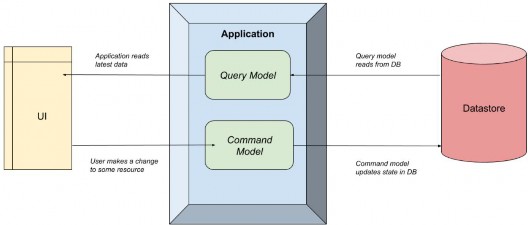
The Application simply separates the query and command models.
Application 只是将 query 和 command 模型分开。
The CQRS pattern makes no formal requirements of how this separation occurs. It could be as simple as a separate class in the same application (as we’ll see shortly with MediatR), all the way up to separate physical applications on different servers. That decision would be based on factors such as scaling requirements and infrastructure, so we won’t go into that decision path here.
CQRS 模式对这种分离的发生方式没有正式要求。它可以像同一应用程序中的单独类一样简单(我们稍后将在 MediatR 中看到),一直到不同服务器上的单独物理应用程序。该决策将基于扩展需求和基础设施等因素,因此我们不会在这里讨论该决策路径。
The key point being is that to create a CQRS system, we just need to split the reads from the writes.
关键是,要创建 CQRS 系统,我们只需要将读取与写入分开。
What problem is this trying to solve?
这试图解决什么问题?
Well, a common reason is when we design a system, we start with data storage. We perform database normalization, add primary and foreign keys to enforce referential integrity, add indexes, and generally ensure the “write system” is optimized. This is a common setup for a relational database such as SQL Server or MySQL. Other times, we think about the read use cases first, then try and add that into a database, worrying less about duplication or other relational DB concerns (often “document databases” are used for these patterns).
嗯,一个常见的原因是,当我们设计一个系统时,我们从数据存储开始。我们执行数据库规范化,添加主键和外键以强制引用完整性,添加索引,并且通常确保“写入系统”得到优化。这是关系数据库(如 SQL Server 或 MySQL)的常见设置。其他时候,我们首先考虑读取用例,然后尝试将其添加到数据库中,而不必担心重复或其他关系数据库问题(通常“文档数据库”用于这些模式)。
Neither approach is wrong. But the issue is that it’s a constant balancing act between reads and writes, and eventually one side will “win out”. All further development means both sides need to be analyzed, and often one is compromised.
这两种方法都没有错。但问题是,这是读取和写入之间的持续平衡行为,最终一方将 “胜出”。所有进一步的发展都意味着双方都需要分析,而且往往有一个会受到损害。
CQRS allows us to “break free” from these considerations and give each system the equal design and consideration it deserves without worrying about the impact of the other system. This has tremendous benefits on both performance and agility, especially if separate teams are working on these systems.
CQRS 使我们能够“摆脱”这些考虑,并为每个系统提供应有的平等设计和考虑,而无需担心其他系统的影响。这对性能和敏捷性都有巨大的好处,尤其是在不同的团队在这些系统上工作时。
33.1.2 Advantages and Disadvantages of CQRS
33.1.2 CQRS 的优点和缺点
The benefits of CQRS are:
CQRS 的优点是:
• Single Responsibility – Commands and Queries have only one job. It is either to change the state of the application or retrieve it. Therefore, they are very easy to reason about and understand.
单一职责 – 命令和查询只有一个作业。要么更改应用程序的状态,要么检索它。因此,它们很容易推理和理解。
• Decoupling – The Command or Query is completely decoupled from its handler, giving you a lot of flexibility on the handler side to implement it the best way you see fit.
Decoupling – Command 或 Query 与其处理程序完全解耦,在处理程序端为您提供了很大的灵活性,以便以您认为合适的最佳方式实施它。
• Scalability – The CQRS pattern is very flexible in terms of how you can organize your data storage, giving you options for great scalability. You can use one database for both Commands and Queries. You can use separate Read/Write databases, for improved performance, with messaging or replication between the databases for synchronization.
可伸缩性 – CQRS 模式在组织数据存储的方式方面非常灵活,为您提供了出色的可伸缩性选项。您可以对 Commands 和 Queries 使用一个数据库。您可以使用单独的读/写数据库来提高性能,并在数据库之间进行消息传递或复制以进行同步。
• Testability – It is very easy to test Command or Query handlers since they will be very simple by design, and perform only a single job.
可测试性 – 测试 Command 或 Query 处理程序非常容易,因为它们的设计非常简单,并且只执行一项工作。
Of course, it can’t all be good. Here are some of the disadvantages of CQRS:
当然,不可能都是好的。以下是 CQRS 的一些缺点:
• Complexity – CQRS is an advanced design pattern, and it will take you time to fully understand it. It introduces a lot of complexity that will create friction and potential problems in your project. Be sure to consider everything, before deciding to use it in your project.
复杂性 – CQRS 是一种高级设计模式,您需要花时间才能完全理解它。它引入了许多复杂性,这将在您的项目中产生摩擦和潜在问题。在决定在您的项目中使用它之前,请务必考虑所有因素。
• Learning Curve – Although it seems like a straightforward design pattern, there is still a learning curve with CQRS. Most developers are used to the procedural (imperative) style of writing code, and CQRS is a big shift away from that.
学习曲线 – 尽管它看起来是一个简单的设计模式,但 CQRS 仍然存在学习曲线。大多数开发人员都习惯了编写代码的过程(命令式)风格,而 CQRS 与此截然不同。
• Hard to Debug – Since Commands and Queries are decoupled from their handler, there isn’t a natural imperative flow of the application. This makes it harder to debug than traditional applications.
难以调试 – 由于命令和查询与其处理程序分离,因此应用程序没有自然的命令式流程。这使得它比传统应用程序更难调试。
33.1.3 Mediator Pattern
33.1.3 调解器模式
The Mediator pattern is simply defining an object that encapsulates how objects interact with each other. Instead of having two or more objects take a direct dependency on each other, they instead interact with a “mediator”, who is in charge of sending those interactions to the other party:
中介器模式只是定义一个对象,该对象封装了对象之间的交互方式。它们不是让两个或多个对象彼此直接依赖,而是与 “中介” 交互,该 “中介” 负责将这些交互发送给另一方:
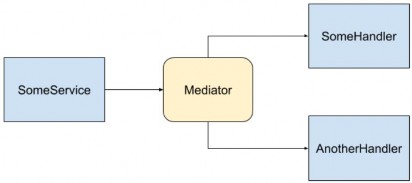
In this image, SomeService sends a message to the Mediator, and the Mediator then invokes multiple services to handle the message. There is no direct dependency between any of the blue components.
在此图中,SomeService 向 Mediator 发送一条消息,然后 Mediator 调用多个服务来处理该消息。任何蓝色组件之间都没有直接依赖关系。
The reason the Mediator pattern is useful is the same reason patterns like Inversion of Control are useful. It enables “loose coupling”, as the dependency graph is minimized and therefore code is simpler and easier to test. In other words, the fewer considerations a component has, the easier it is to develop and evolve.
中介者模式有用的原因与像 Inversion of Control 这样的模式有用的原因相同。它支持“松散耦合”,因为依赖关系图被最小化,因此代码更简单,更容易测试。换句话说,组件的考虑因素越少,它就越容易开发和发展。
We saw in the previous image how the services have no direct dependency, and the producer of the messages doesn’t know who or how many things are going to handle it. This is very similar to how a message broker works in the “publish/subscribe” pattern. If we wanted to add another handler we could, and the producer wouldn’t have to be modified.
在上图中,我们看到服务没有直接依赖关系,消息的生成者不知道谁或多少事情将处理它。这与消息代理在 “publish/subscribe” 模式中的工作方式非常相似。如果我们想添加另一个处理程序,我们可以这样做,并且不必修改 producer。
Now that we’ve been over some theory, let’s talk about how MediatR makes all these things possible.
现在我们已经了解了一些理论,让我们谈谈 MediatR 如何使所有这些事情成为可能。
33.2 How MediatR facilitates CQRS and Mediator Patterns
33.2 MediatR 如何促进 CQRS 和中介模式
You can think of MediatR as an “in-process” Mediator implementation, that helps us build CQRS systems. All communication between the user interface and the data store happens via MediatR.
您可以将 MediatR 视为“进程内”中介器实现,它帮助我们构建 CQRS 系统。用户界面和数据存储之间的所有通信都通过 MediatR 进行。
The term “in process” is an important limitation here. Since it’s a .NET library that manages interactions within classes on the same process, it’s not an appropriate library to use if we want to separate the commands and queries across two systems. A better approach would be to use a message broker such as Kafka or Azure Service Bus.
术语 “in process” 在这里是一个重要的限制。由于它是一个 .NET 库,用于管理同一进程上类内的交互,因此如果我们想跨两个系统分离命令和查询,则它不是一个合适的库。更好的方法是使用消息代理,例如 Kafka 或 Azure 服务总线。
However, for this chapter, we are going to stick with a simple single- process CQRS system, so MediatR fits the bill perfectly.
但是,在本章中,我们将坚持使用一个简单的单进程 CQRS 系统,因此 MediatR 完全符合要求。
33.3 Adding Application Project and Initial Configuration
33.3 添加应用程序项目和初始配置
Let’s start by opening the starter project from the start folder. You will see that we don’t have the Service nor the Service.Contracts projects. Well, we don’t need them. We are going to use CQRS with MediatR to replace that part of our solution.
让我们从 start 文件夹打开 starter 项目。您将看到我们没有 Service 和 Service.Contracts 项目。好吧,我们不需要它们。我们将使用 CQRS 和 MediatR 来替换我们解决方案的该部分。
But, we do need an additional project for our business logic so, let’s create a new class library (.NET Core) and name it Application.
但是,我们确实需要一个额外的项目来运行我们的业务逻辑,因此,让我们创建一个新的类库 (.NET Core) 并将其命名为 Application。
Additionally, we are going to add a new class named AssemblyReference. We will use it for the same purpose as we used the class with the same name in the Presentation project:
此外,我们将添加一个名为 AssemblyReference 的新类。我们将将其用于与 Presentation 项目中使用同名类相同的目的:
public static class AssemblyReference { }Now let’s install a couple of packages.
现在让我们安装几个包。
The first package we are going to install is the MediatR in the Application project:
我们要安装的第一个包是 Application 项目中的 MediatR:
PM> install-package MediatRThen in the main project, we are going to install another package that wires up MediatR with the ASP.NET dependency injection container:
然后在主项目中,我们将安装另一个包,该包将 MediatR 与 ASP.NET 依赖项注入容器连接起来:
PM> install-package MediatR.Extensions.Microsoft.DependencyInjectionAfter the installations, we are going to configure MediatR in the Program class:
安装完成后,我们将在 Program 类中配置 MediatR:
builder.Services.AddMediatR(typeof(Application.AssemblyReference).Assembly);For this, we have to reference the Application project, and add a using directive:
为此,我们必须引用 Application 项目,并添加一个 using 指令:
using MediatR;The AddMediatR method will scan the project assembly that contains the handlers that we are going to use to handle our business logic. Since we are going to place those handlers in the Application project, we are using the Application’s assembly as a parameter.
AddMediatR 方法将扫描包含我们将用于处理业务逻辑的处理程序的项目程序集。由于我们将这些处理程序放在 Application 项目中,因此我们将 Application 的程序集用作参数。
Before we continue, we have to reference the Application project from the Presentation project.
在继续之前,我们必须从 Presentation 项目中引用 Application 项目。
Now MediatR is configured, and we can use it inside our controller.
现在 MediatR 已经配置好了,我们可以在控制器中使用它。
In the Controllers folder of the Presentation project, we are going to find a single controller class. It contains only a base code, and we are going to modify it by adding a sender through the constructor injection:
在 Presentation 项目的 Controllers 文件夹中,我们将找到一个控制器类。它只包含一个基本代码,我们将通过构造函数注入添加一个 sender 来修改它:
[Route("api/companies")] [ApiController] public class CompaniesController : ControllerBase { private readonly ISender _sender; public CompaniesController(ISender sender) => _sender = sender; }Here we inject the ISender interface from the MediatR namespace. We are going to use this interface to send requests to our handlers.
在这里,我们从 MediatR 命名空间注入 ISender 接口。我们将使用此接口将请求发送到我们的处理程序。
We have to mention one thing about using ISender and not the IMediator interface. From the MediatR version 9.0, the IMediator interface is split into two interfaces:
我们必须提到关于使用 ISender 而不是 IMediator 接口的一件事。从 MediatR 版本 9.0 开始,IMediator 接口分为两个接口:
public interface ISender { Task<TResponse> Send<TResponse>(IRequest<TResponse> request, CancellationToken cancellationToken = default); Task<object?> Send(object request, CancellationToken cancellationToken = default); } public interface IPublisher { Task Publish(object notification, CancellationToken cancellationToken = default); Task Publish<TNotification>(TNotification notification, CancellationToken cancellationToken = default) where TNotification : INotification; } public interface IMediator : ISender, IPublisher { }So, by looking at the code, it is clear that you can continue using the IMediator interface to send requests and publish notifications. But it is recommended to split that by using ISender and IPublisher interfaces.
因此,通过查看代码,很明显您可以继续使用 IMediator 接口来发送请求和发布通知。但建议使用 ISender 和 IPublisher 接口来拆分该接口。
With that said, we can continue with the Application’s logic implementation.
话虽如此,我们可以继续 Application 的 logic implementation。
33.4 Requests with MediatR
33.4 使用 MediatR 的请求
MediatR Requests are simple request-response style messages where a single request is synchronously handled by a single handler (synchronous from the request point of view, not C# internal async/await). Good use cases here would be returning something from a database or updating a database.
MediatR 请求是简单的请求-响应样式的消息,其中单个请求由单个处理程序同步处理(从请求的角度来看是同步的,而不是 C# 内部的 async/await)。这里的好用例是从数据库返回一些东西或更新数据库。
There are two types of requests in MediatR. One that returns a value, and one that doesn’t. Often this corresponds to reads/queries (returning a value) and writes/commands (usually doesn’t return a value).
MediatR 中有两种类型的请求。一个返回值,另一个不返回值。这通常对应于 reads/queries(返回一个值)和 writes/commands(通常不返回一个值)。
So, before we start sending requests, we are going to create several folders in the Application project to separate queries, commands, and handlers:
因此,在开始发送请求之前,我们将在 Application 项目中创建多个文件夹,以分隔查询、命令和处理程序:
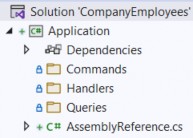
Since we are going to work only with the company entity, we are going to place our queries, commands, and handlers directly into these folders.
由于我们只要使用 company 实体,因此我们将查询、命令和处理程序直接放入这些文件夹中。
But in larger projects with multiple entities, we can create additional folders for each entity inside each of these folders for better organization.
但在具有多个实体的大型项目中,我们可以为每个文件夹中的每个实体创建额外的文件夹,以便更好地组织。
Also, as we already know, we are not going to send our entities as a result to the client but DTOs, so we have to reference the Shared project.
此外,正如我们已经知道的,我们不会将实体作为结果发送给客户端,而是发送给 DTO,因此我们必须引用 Shared 项目。
That said, let’s start with our first query. Let’s create it in the Queries folder:
也就是说,让我们从第一个查询开始。让我们在 Queries 文件夹中创建它:
public sealed record GetCompaniesQuery(bool TrackChanges) : IRequest<IEnumerable<CompanyDto>>;Here, we create the GetCompaniesQuery record, which implements IRequest<IEnumerable<CompanyDto>>. This simply means our request will return a list of companies.
在这里,我们创建 GetCompaniesQuery 记录,该记录实现 IRequest<IEnumerable<CompanyDto>>。这只是意味着我们的请求将返回公司列表。
Here we need two additional namespaces:
这里我们需要两个额外的命名空间:
using MediatR;
using Shared.DataTransferObjects;
Once we send the request from our controller’s action, we are going to see the usage of this query.
一旦我们从控制器的 action 发送请求,我们将看到这个查询的用法。
After the query, we need a handler. This handler in simple words will be our replacement for the service layer method that we had in our project. In our previous project, all the service classes were using the repository to access the database – we will make no difference here. For that, we have to reference the Contracts project so we can access the IRepositoryManager interface.
查询之后,我们需要一个处理程序。简单来说,这个处理程序将成为我们项目中服务层方法的替代品。在我们之前的项目中,所有服务类都使用存储库来访问数据库 – 我们在这里不会有什么区别。为此,我们必须引用 Contracts 项目,以便我们可以访问 IRepositoryManager 接口。
After adding the reference, we can create a new GetCompaniesHandler class in the Handlers folder:
添加引用后,我们可以在 Handlers 文件夹中创建一个新的 GetCompaniesHandler 类:
internal sealed class GetCompaniesHandler : IRequestHandler<GetCompaniesQuery, IEnumerable<CompanyDto>> { private readonly IRepositoryManager _repository; public GetCompaniesHandler(IRepositoryManager repository) => _repository = repository; public Task<IEnumerable<CompanyDto>> Handle(GetCompaniesQuery request, CancellationToken cancellationToken) { throw new NotImplementedException(); } }Our handler inherits from IRequestHandler<GetCompaniesQuery,IEnumerable<Product>>. This means this class will handle GetCompaniesQuery, in this case, returning the list of companies.
我们的处理程序继承自 IRequestHandler<GetCompaniesQuery,IEnumerable<Product>>。这意味着此类将处理 GetCompaniesQuery,在本例中,返回公司列表。
We also inject the repository through the constructor and add a default implementation of the Handle method, required by the IRequestHandler interface.
我们还通过构造函数注入存储库,并添加 IRequestHandler 接口所需的 Handle 方法的默认实现。
These are the required namespaces:
这些是必需的命名空间:
using Application.Queries;
using Contracts;
using MediatR;
using Shared.DataTransferObjects;
Of course, we are not going to leave this method to throw an exception. But before we add business logic, we have to install AutoMapper in the Application project:
当然,我们不会让此方法抛出异常。但在添加业务逻辑之前,我们必须在 Application 项目中安装 AutoMapper:
PM> Install-Package AutoMapper.Extensions.Microsoft.DependencyInjectionRegister the package in the Program class:
在 Program 类中注册包:
builder.Services.AddAutoMapper(typeof(Program));
builder.Services.AddMediatR(typeof(Application.AssemblyReference).Assembly);
And create the MappingProfile class, also in the main project, with a single mapping rule:
并在主项目中使用 single mapping rule 创建 MappingProfile 类:
public class MappingProfile : Profile { public MappingProfile() { CreateMap<Company, CompanyDto>() .ForMember(c => c.FullAddress, opt => opt.MapFrom(x => string.Join(' ', x.Address, x.Country))); } }Everything with these actions is familiar since we’ve already used AutoMapper in our project.
这些作的所有内容都是熟悉的,因为我们已经在项目中使用了 AutoMapper。
Now, we can modify the handler class:
现在,我们可以修改 handler 类:
internal sealed class GetCompaniesHandler : IRequestHandler<GetCompaniesQuery, IEnumerable<CompanyDto>> { private readonly IRepositoryManager _repository; private readonly IMapper _mapper; public GetCompaniesHandler(IRepositoryManager repository, IMapper mapper) {_repository = repository; _mapper = mapper; } public async Task<IEnumerable<CompanyDto>> Handle(GetCompaniesQuery request, CancellationToken cancellationToken) { var companies = await _repository.Company.GetAllCompaniesAsync(request.TrackChanges); var companiesDto = _mapper.Map<IEnumerable<CompanyDto>>(companies); return companiesDto; } }This logic is also familiar since we had almost the same one in our GetAllCompaniesAsync service method. One difference is that we are passing the track changes parameter through the request object.
此逻辑也很熟悉,因为我们在 GetAllCompaniesAsync 服务方法中具有几乎相同的逻辑。一个区别是,我们通过 request 对象传递 track changes 参数。
Now, we can modify CompaniesController:
现在,我们可以修改 CompaniesController:
[HttpGet] public async Task<IActionResult> GetCompanies() { var companies = await _sender.Send(new GetCompaniesQuery(TrackChanges: false)); return Ok(companies); }We use the Send method to send a request to our handler and pass the GetCompaniesQuery as a parameter. Nothing more than that. We also need an additional namespace:
我们使用 Send 方法向处理程序发送请求,并将 GetCompaniesQuery 作为参数传递。仅此而已。我们还需要一个额外的命名空间:
using Application.Queries;Our controller is clean as it was with the service layer implemented. But this time, we don’t have a single service class to handle all the methods but a single handler to take care of only one thing.
我们的控制器与实施服务层时一样干净。但是这一次,我们没有一个服务类来处理所有方法,而只有一个处理程序来处理一件事。
Now, we can test this:
现在,我们可以测试一下:
https://localhost:5001/api/companies
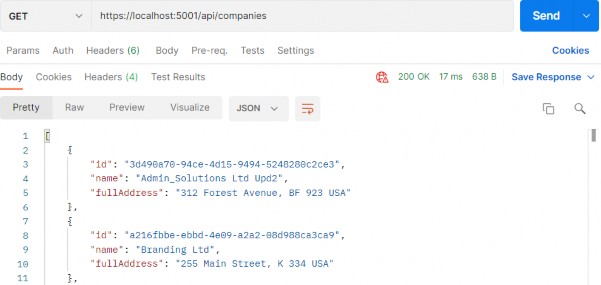
Everything works great. With this in mind, we can continue and implement the logic for fetching a single company.
一切都很好。考虑到这一点,我们可以继续并实现获取单个公司的逻辑。
So, let’s start with the query in the Queries folder:
因此,让我们从 Queries 文件夹中的查询开始:
public sealed record GetCompanyQuery(Guid Id, bool TrackChanges) : IRequest<CompanyDto>;Then, let’s implement a new handler:
然后,让我们实现一个新的处理程序:
internal sealed class GetCompanyHandler : IRequestHandler<GetCompanyQuery, CompanyDto> { private readonly IRepositoryManager _repository; private readonly IMapper _mapper; public GetCompanyHandler(IRepositoryManager repository, IMapper mapper) { _repository = repository; _mapper = mapper; } public async Task<CompanyDto> Handle(GetCompanyQuery request, CancellationToken cancellationToken) { var company = await _repository.Company.GetCompanyAsync(request.Id, request.TrackChanges); if (company is null) throw new CompanyNotFoundException(request.Id); var companyDto = _mapper.Map<CompanyDto>(company); return companyDto;} }So again, our handler inherits from the IRequestHandler interface accepting the query as the first parameter and the result as the second. Then, we inject the required services and familiarly implement the Handle method.
因此,我们的处理程序再次继承自 IRequestHandler 接口,接受查询作为第一个参数,将结果作为第二个参数。然后,我们注入所需的服务并熟悉地实现 Handle 方法。
We need these namespaces here:
我们在此处需要这些命名空间:
using Application.Queries;
using AutoMapper;
using Contracts;
using Entities.Exceptions;
using MediatR;
using Shared.DataTransferObjects;
Lastly, we have to add another action in CompaniesController:
最后,我们必须在 CompaniesController 中添加另一个作:
[HttpGet("{id:guid}", Name = "CompanyById")] public async Task<IActionResult> GetCompany(Guid id) { var company = await _sender.Send(new GetCompanyQuery(id, TrackChanges: false)); return Ok(company); }Awesome, let’s test it:
太棒了,让我们测试一下:
https://localhost:5001/api/companies/3d490a70-94ce-4d15-9494-5248280c2ce3
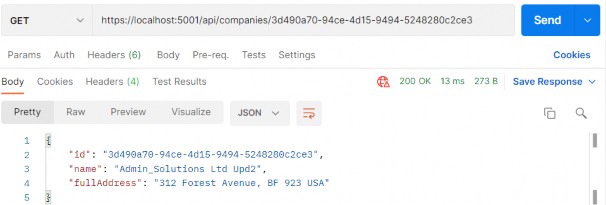
Excellent, we can see the company DTO in the response body. Additionally, we can try an invalid request:
太好了,我们可以在响应正文中看到公司 DTO。此外,我们可以尝试无效的请求:
https://localhost:5001/api/companies/3d490a70-94ce-4d15-9494-5248280c2ce2
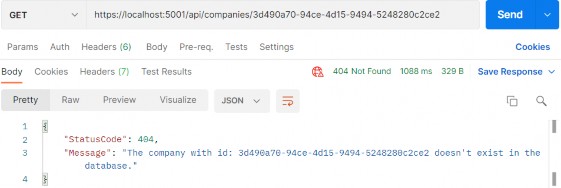
And, we can see this works as well.
而且,我们可以看到这也有效。
33.5 Commands with MediatR
33.5 使用 MediatR 的命令
As with both queries, we are going to start with a command record creation inside the Commands folder:
与这两个查询一样,我们将从 Commands 文件夹中的命令记录创建开始:
public sealed record CreateCompanyCommand(CompanyForCreationDto Company) : IRequest<CompanyDto>;Our command has a single parameter sent from the client, and it inherits from IRequest
我们的命令有一个从客户端发送的参数,它继承自 IRequest。我们的请求必须返回 CompanyDto,因为我们在作中需要它来在 return 语句中创建有效的路由。
After the query, we are going to create another handler:
查询之后,我们将创建另一个处理程序:
internal sealed class CreateCompanyHandler : IRequestHandler<CreateCompanyCommand, CompanyDto> { private readonly IRepositoryManager _repository; private readonly IMapper _mapper; public CreateCompanyHandler(IRepositoryManager repository, IMapper mapper) { _repository = repository; _mapper = mapper; } public async Task<CompanyDto> Handle(CreateCompanyCommand request, CancellationToken cancellationToken) { var companyEntity = _mapper.Map<Company>(request.Company); _repository.Company.CreateCompany(companyEntity); await _repository.SaveAsync();var companyToReturn = _mapper.Map<CompanyDto>(companyEntity); return companyToReturn; } }So, we inject our services and implement the Handle method as we did with the service method. We map from the creation DTO to the entity, save it to the database, and map it to the company DTO object.
因此,我们注入我们的服务并实现 Handle 方法,就像我们对 service 方法所做的那样。我们从创建 DTO 映射到实体,将其保存到数据库,并将其映射到公司 DTO 对象。
Then, before we add a new mapping rule in the MappingProfile class:
然后,在我们在 MappingProfile 类中添加新的映射规则之前:
CreateMap<CompanyForCreationDto, Company>();Now, we can add a new action in a controller:
现在,我们可以在控制器中添加一个新的动作:
[HttpPost] public async Task<IActionResult> CreateCompany([FromBody] CompanyForCreationDto companyForCreationDto) { if (companyForCreationDto is null) return BadRequest("CompanyForCreationDto object is null"); var company = await _sender.Send(new CreateCompanyCommand(companyForCreationDto)); return CreatedAtRoute("CompanyById", new { id = company.Id }, company); }That’s all it takes. Now we can test this:
就这样。现在我们可以测试一下:
https://localhost:5001/api/companies
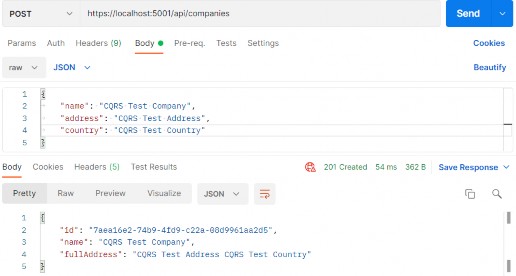
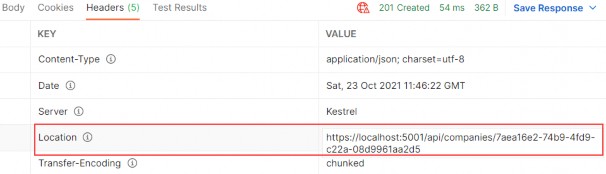
A new company is created, and if we inspect the Headers tab, we are going to find the link to fetch this new company:
创建了一个新公司,如果我们检查 Headers 选项卡,我们将找到获取这家新公司的链接:
There is one important thing we have to understand here. We are communicating to a datastore via simple message constructs without having any idea on how it’s being implemented. The commands and queries could be pointing to different data stores. They don’t know how their request will be handled, and they don’t care.
在这里,我们必须了解一件重要的事情。我们通过简单的消息构造与 datastore 通信,但不知道它是如何实现的。命令和查询可能指向不同的数据存储。他们不知道他们的请求将如何处理,他们也不在乎。
33.5.1 Update Command
33.5.1 update 命令
Following the same principle from the previous example, we can implement the update request.
按照前面示例中的相同原则,我们可以实现 update 请求。
Let’s start with the command:
让我们从命令开始:
public sealed record UpdateCompanyCommand
(Guid Id, CompanyForUpdateDto Company, bool TrackChanges) : IRequest;
This time our command inherits from IRequest without any generic parameter. That’s because we are not going to return any value with this request.
这次我们的命令继承自 IRequest,没有任何泛型参数。那是因为我们不会在这个请求中返回任何值。
Let’s continue with the handler implementation:
让我们继续处理程序实现:
internal sealed class UpdateCompanyHandler : IRequestHandler<UpdateCompanyCommand, Unit> { private readonly IRepositoryManager _repository; private readonly IMapper _mapper; public UpdateCompanyHandler(IRepositoryManager repository, IMapper mapper) { _repository = repository; _mapper = mapper; } public async Task<Unit> Handle(UpdateCompanyCommand request, CancellationToken cancellationToken) {var companyEntity = await _repository.Company.GetCompanyAsync(request.Id, request.TrackChanges); if (companyEntity is null) throw new CompanyNotFoundException(request.Id); _mapper.Map(request.Company, companyEntity); await _repository.SaveAsync(); return Unit.Value; } }This handler inherits from IRequestHandler<UpdateCompanyCommand, Unit>. This is new for us because the first time our command is not returning any value. But IRequestHandler always accepts two parameters (TRequest and TResponse). So, we provide the Unit structure for the TResponse parameter since it represents the void type.
此处理程序继承自 IRequestHandler<UpdateCompanyCommand, Unit> .这对我们来说是新的,因为第一次我们的命令没有返回任何值。但 IRequestHandler 始终接受两个参数(TRequest 和 TResponse)。因此,我们为 TResponse 参数提供了 Unit 结构,因为它表示 void 类型。
Then the Handle implementation is familiar to us except for the return part. We have to return something from the Handle method and we use Unit.Value.
然后,除了 return 部分之外,我们熟悉 Handle 实现。我们必须从 Handle 方法返回一些内容,并使用 Unit.Value。
Before we modify the controller, we have to add another mapping rule:
在我们修改控制器之前,我们必须添加另一个映射规则:
CreateMap<CompanyForUpdateDto, Company>();Lastly, let’s add a new action in the controller:
最后,让我们在控制器中添加一个新作:
[HttpPut("{id:guid}")] public async Task<IActionResult> UpdateCompany(Guid id, CompanyForUpdateDto companyForUpdateDto) { if (companyForUpdateDto is null) return BadRequest("CompanyForUpdateDto object is null"); await _sender.Send(new UpdateCompanyCommand(id, companyForUpdateDto, TrackChanges: true)); return NoContent(); }At this point, we can send a PUT request from Postman:
此时,我们可以从 Postman 发送一个 PUT 请求:
https://localhost:5001/api/companies/7aea16e2-74b9-4fd9-c22a-08d9961aa2d5
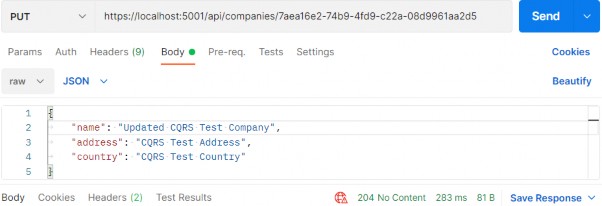
There is the 204 status code.
有 204 状态代码。
If you fetch this company, you will find the name updated for sure.
如果你找到这家公司,你肯定会发现名称更新了。
33.5.2 Delete Command
33.5.2 Delete 命令
After all of this implementation, this one should be pretty straightforward.
在所有这些实现之后,这个应该非常简单。
Let’s start with the command:
让我们从命令开始:
public record DeleteCompanyCommand(Guid Id, bool TrackChanges) : IRequest;Then, let’s continue with a handler:
然后,让我们继续使用处理程序:
internal sealed class DeleteCompanyHandler : IRequestHandler<DeleteCompanyCommand, Unit> { private readonly IRepositoryManager _repository; public DeleteCompanyHandler(IRepositoryManager repository) => _repository = repository; public async Task<Unit> Handle(DeleteCompanyCommand request, CancellationToken cancellationToken) { var company = await _repository.Company.GetCompanyAsync(request.Id, request.TrackChanges); if (company is null) throw new CompanyNotFoundException(request.Id); _repository.Company.DeleteCompany(company); await _repository.SaveAsync(); return Unit.Value; } }Finally, let’s add one more action inside the controller:
最后,让我们在控制器中再添加一个操作:
[HttpDelete("{id:guid}")]
public async Task<IActionResult> DeleteCompany(Guid id) { await _sender.Send(new DeleteCompanyCommand(id, TrackChanges: false)); return NoContent(); }
That’s it. Pretty easy.We can test this now:
就是这样。很简单。我们现在可以测试一下:
https://localhost:5001/api/companies/7aea16e2-74b9-4fd9-c22a-08d9961aa2d5
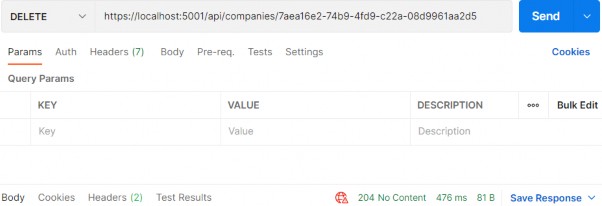
It works great.
它效果很好。
Now that we know how to work with requests using MediatR, let’s see how to use notifications.
现在,我们已经知道如何使用 MediatR 处理请求,让我们看看如何使用通知。
33.6 MediatR Notifications
So for we’ve only seen a single request being handled by a single handler. However, what if we want to handle a single request by multiple handlers?
因此,我们只看到单个请求由单个处理程序处理。但是,如果我们想处理多个处理程序的单个请求怎么办?
That’s where notifications come in. In these situations, we usually have multiple independent operations that need to occur after some event. Examples might be:
这就是通知的用武之地。在这些情况下,我们通常会有多个独立的作需要在某些事件之后发生。示例可能是:
• Sending an email
• Invalidating a cache
• ...
To demonstrate this, we will update the delete company flow we created previously to publish a notification and have it handled by two handlers.
为了演示这一点,我们将更新之前创建的删除公司流程,以发布通知并让两个处理程序处理该通知。
Sending an email is out of the scope of this book (you can learn more about that in our Bonus 6 Security book). But to demonstrate the behavior of notifications, we will use our logger service and log a message as if the email was sent.
发送电子邮件不在本书的讨论范围之内(您可以在我们的 Bonus 6 Security 书籍中了解更多信息)。但为了演示通知的行为,我们将使用我们的 logger 服务并记录一条消息,就像电子邮件已发送一样。
So, the flow will be - once we delete the Company, we want to inform our administrators with an email message that the delete has action occurred.
因此,流程将是 - 删除公司后,我们希望通过电子邮件通知管理员发生了删除作。
That said, let’s start by creating a new Notifications folder inside the Application project and add a new notification in that folder:
也就是说,让我们首先在 Application 项目中创建一个新的 Notifications 文件夹,然后在该文件夹中添加新的通知:
public sealed record CompanyDeletedNotification(Guid Id, bool TrackChanges) : INotification;The notification has to inherit from the INotification interface. This is the equivalent of the IRequest we saw earlier, but for Notifications.
通知必须继承自 INotification 接口。这相当于我们之前看到的 IRequest,但用于 Notifications。
As we can conclude, notifications don’t return a value. They work on the fire and forget principle, like publishers.
我们可以得出结论,通知不返回值。他们像出版商一样,按照 Fire and Forget 的原则工作。
Next, we are going to create a new Emailhandler class:
接下来,我们将创建一个新的 Emailhandler 类:
internal sealed class EmailHandler : INotificationHandler<CompanyDeletedNotification> { private readonly ILoggerManager _logger; public EmailHandler(ILoggerManager logger) => _logger = logger; public async Task Handle(CompanyDeletedNotification notification, CancellationToken cancellationToken) { _logger.LogWarn($"Delete action for the company with id: {notification.Id} has occurred."); await Task.CompletedTask; } }Here, we just simulate sending our email message in an async manner. Without too many complications, we use our logger service to process the message.
在这里,我们只是模拟以异步方式发送电子邮件。没有太多的复杂性,我们使用 logger 服务来处理消息。
Let’s continue by modifying the DeleteCompanyHandler class:
我们继续修改 DeleteCompanyHandler 类:
internal sealed class DeleteCompanyHandler : INotificationHandler<CompanyDeletedNotification> { private readonly IRepositoryManager _repository; public DeleteCompanyHandler(IRepositoryManager repository) => _repository = repository; public async Task Handle(CompanyDeletedNotification notification, CancellationToken cancellationToken) { var company = await _repository.Company.GetCompanyAsync(notification.Id, notification.TrackChanges); if (company is null) throw new CompanyNotFoundException(notification.Id); _repository.Company.DeleteCompany(company); await _repository.SaveAsync(); } }This time, our handler inherits from the INotificationHandler interface, and it doesn’t return any value – we’ve modified the method signature and removed the return statement.
这一次,我们的处理程序继承自 INotificationHandler 接口,它不返回任何值 – 我们修改了方法签名并删除了 return 语句。
Finally, we have to modify the controller’s constructor:
最后,我们必须修改控制器的构造函数:
private readonly ISender _sender; private readonly IPublisher _publisher; public CompaniesController(ISender sender, IPublisher publisher) { _sender = sender; _publisher = publisher; }We inject another interface, which we are going to use to publish notifications.
我们注入另一个接口,我们将使用它来发布通知。
And, we have to modify the DeleteCompany action:
而且,我们必须修改 DeleteCompany作:
[HttpDelete("{id:guid}")] public async Task<IActionResult> DeleteCompany(Guid id) { await _publisher.Publish(new CompanyDeletedNotification(id, TrackChanges: false)); return NoContent(); }To test this, let’s create a new company first:
为了测试这一点,让我们先创建一个新公司:
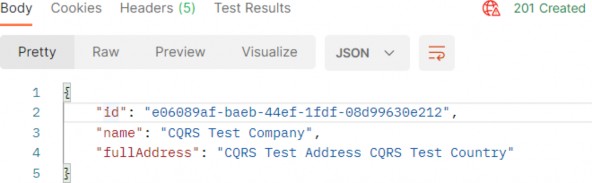
Now, if we send the Delete request, we are going to receive the 204 NoContent response:
现在,如果我们发送 Delete 请求,我们将收到 204 NoContent 响应:
https://localhost:5001/api/companies/e06089af-baeb-44ef-1fdf-08d99630e212

And also, if we inspect the logs, we will find a new logged message stating that the delete action has occurred:
此外,如果我们检查日志,我们将找到一条新的日志记录消息,指出已发生删除操作:

33.7 MediatR Behaviors
33.7 MediatR 行为
Often when we build applications, we have many cross-cutting concerns. These include authorization, validating, and logging.
通常,当我们构建应用程序时,我们有许多横切关注点。这些作包括 authorization、validation 和 logging。
Instead of repeating this logic throughout our handlers, we can make use of Behaviors. Behaviors are very similar to ASP.NET Core middleware in that they accept a request, perform some action, then (optionally) pass along the request.
我们可以使用 Behaviors,而不是在整个处理程序中重复这个逻辑。行为与 ASP.NET Core 中间件非常相似,因为它们接受请求,执行一些作,然后(可选地)传递请求。
In this section, we are going to use behaviors to perform validation on the DTOs that come from the client.
在本节中,我们将使用行为对来自客户端的 DTO 执行验证。
As we have already learned in chapter 13, we can perform the validation by using data annotations attributes and the ModelState dictionary. Then we can extract the validation logic into action filters to clear our actions. Well, we can apply all of that to our current solution as well.
正如我们在第 13 章中学到的那样,我们可以使用数据注释属性和 ModelState 字典来执行验证。然后,我们可以将验证逻辑提取到作筛选器中以清除我们的作。好吧,我们也可以将所有这些应用到我们当前的解决方案中。
But, some developers have a preference for using fluent validation over data annotation attributes. In that case, behaviors are the perfect place to execute that validation logic.
但是,一些开发人员更喜欢使用 Fluent 验证而不是数据注释属性。在这种情况下,行为是执行该验证逻辑的完美位置。
So, let’s go step by step and add the fluent validation in our project first and then use behavior to extract validation errors if any, and return them to the client.
因此,让我们一步一步地开始,首先在我们的项目中添加 Fluent 验证,然后使用 behavior 提取验证错误(如果有),并将它们返回给客户端。
33.7.1 Adding Fluent Validation
33.7.1 添加 Fluent 验证
The FluentValidation library allows us to easily define very rich custom validation for our classes. Since we are implementing CQRS, it makes the most sense to define validation for our Commands. We should not bother ourselves with defining validators for Queries, since they don’t contain any behavior. We use Queries only for fetching data from the application.
FluentValidation 库允许我们轻松地为类定义非常丰富的自定义验证。由于我们正在实现 CQRS,因此为命令定义验证是最有意义的。我们不应该费心为 Queries 定义验证器,因为它们不包含任何行为。我们仅使用 Queries 从应用程序获取数据。
So, let’s start by installing the FluentValidation package in the Application project:
因此,让我们首先在 Application 项目中安装 FluentValidation 包:
PM> install-package FluentValidation.AspNetCoreThe FluentValidation.AspNetCore package installs both FluentValidation and FluentValidation.DependencyInjectionExtensions packages.
FluentValidation.AspNetCore 包同时安装 FluentValidation 和 FluentValidation.DependencyInjectionExtensions 包。
After the installation, we are going to register all the validators inside the service collection by modifying the Program class:
安装完成后,我们将通过修改 Program 类来注册服务集合中的所有验证器:
builder.Services.AddValidatorsFromAssembly(typeof(Application.AssemblyReference).Assem bly);
builder.Services.AddMediatR(typeof(Application.AssemblyReference).Assembly); builder.Services.AddAutoMapper(typeof(Program));
Then, let’s create a new Validators folder inside the Application project and add a new class inside:
然后,让我们在 Application 项目中创建一个新的 Validators 文件夹,并在其中添加一个新类:
public sealed class CreateCompanyCommandValidator : AbstractValidator<CreateCompanyCommand> {public CreateCompanyCommandValidator() { RuleFor(c => c.Company.Name).NotEmpty().MaximumLength(60); RuleFor(c => c.Company.Address).NotEmpty().MaximumLength(60); } }The following using directives are necessary for this class:
此类需要以下 using 指令:
using Application.Commands;
using FluentValidation;
We create the CreateCompanyCommandValidator class that inherits from the AbstractValidator<T> class, specifying the type CreateCompanyCommand. This lets FluentValidation know that this validation is for the CreateCompanyCommand record. Since this record contains a parameter of type CompanyForCreationDto, which is the object that we have to validate since it comes from the client, we specify the rules for properties from that DTO.
我们创建从 AbstractValidator<T> 类继承的 CreateCompanyCommandValidator 类,并指定类型 CreateCompanyCommand。这让 FluentValidation 知道此验证是针对 CreateCompanyCommand 记录的。由于此记录包含一个 CompanyForCreationDto 类型的参数,该参数是我们必须验证的对象,因为它来自客户端,因此我们为该 DTO 中的属性指定规则。
The NotEmpty method specifies that the property can’t be null or empty, and the MaximumLength method specifies the maximum string length of the property.
NotEmpty 方法指定属性不能为 null 或为空,MaximumLength 方法指定属性的最大字符串长度。
33.7.2 Creating Decorators with MediatR PipelineBehavior
33.7.2 使用 MediatR PipelineBehavior 创建装饰器
The CQRS pattern uses Commands and Queries to convey information, and receive a response. In essence, it represents a request-response pipeline. This gives us the ability to easily introduce additional behavior around each request that is going through the pipeline, without actually modifying the original request.
CQRS 模式使用命令和查询来传达信息并接收响应。从本质上讲,它表示一个请求-响应管道。这使我们能够轻松地围绕通过管道的每个请求引入其他行为,而无需实际修改原始请求。
You may be familiar with this technique under the name Decorator pattern. Another example of using the Decorator pattern is the ASP.NET Core Middleware concept, which we talked about in section 1.8.
您可能熟悉这种名为 Decorator 模式的技术。使用 Decorator 模式的另一个例子是 ASP.NET Core Middleware 概念,我们在 1.8 节中讨论过。
MediatR has a similar concept to middleware, and it is called IPipelineBehavior:
MediatR 与中间件的概念类似,称为 IPipelineBehavior:
public interface IPipelineBehavior<in TRequest, TResponse> where TRequest : notnull { Task<TResponse> Handle(TRequest request, CancellationToken cancellationToken, RequestHandlerDelegate<TResponse> next); }The pipeline behavior is a wrapper around a request instance and gives us a lot of flexibility with the implementation. Pipeline behaviors are a good fit for cross-cutting concerns in your application. Good examples of cross- cutting concerns are logging, caching, and of course, validation!
管道行为是请求实例的包装器,为我们的实现提供了很大的灵活性。管道行为非常适合应用程序中的横切关注点。横切关注点的好例子是日志记录、缓存,当然还有验证!
Before we use this interface, let’s create a new exception class in the Entities/Exceptions folder:
在使用此接口之前,让我们在 Entities/Exceptions 文件夹中创建一个新的异常类:
public sealed class ValidationAppException : Exception { public IReadOnlyDictionary<string, string[]> Errors { get; } public ValidationAppException(IReadOnlyDictionary<string, string[]> errors) :base("One or more validation errors occurred") => Errors = errors; }Next, to implement the IPipelineBehavior interface, we are going to create another folder named Behaviors in the Application project, and add a single class inside it:
接下来,为了实现 IPipelineBehavior 接口,我们将在 Application 项目中创建另一个名为 Behaviors 的文件夹,并在其中添加一个类:
public sealed class ValidationBehavior<TRequest, TResponse> : IPipelineBehavior<TRequest, TResponse> where TRequest : IRequest<TResponse> { private readonly IEnumerable<IValidator<TRequest>> _validators; public ValidationBehavior(IEnumerable<IValidator<TRequest>> validators) => _validators = validators; public async Task<TResponse> Handle(TRequest request, CancellationToken cancellationToken, RequestHandlerDelegate<TResponse> next) { if (!_validators.Any()) return await next(); var context = new ValidationContext<TRequest>(request); var errorsDictionary = _validators .Select(x => x.Validate(context)) .SelectMany(x => x.Errors) .Where(x => x != null) .GroupBy( x => x.PropertyName.Substring(x.PropertyName.IndexOf('.') + 1), x => x.ErrorMessage,(propertyName, errorMessages) => new { Key = propertyName, Values = errorMessages.Distinct().ToArray() }) .ToDictionary(x => x.Key, x => x.Values); if (errorsDictionary.Any()) throw new ValidationAppException(errorsDictionary); return await next(); } }This class has to inherit from the IPipelineBehavior interface and implement the Handler method. We also inject a collection of IValidator implementations in the constructor. The FluentValidation library will scan our project for all AbstractValidator implementations for a given type and then provide us with the instance at runtime. It is how we can apply the actual validators that we implemented in our project.
此类必须继承自 IPipelineBehavior 接口并实现 Handler 方法。我们还在构造函数中注入了一组 IValidator 实现。FluentValidation 库将扫描我们的项目以查找给定类型的所有 AbstractValidator 实现,然后在运行时为我们提供实例。这就是我们如何应用我们在项目中实现的实际验证器。
Then, if there are no validation errors, we just call the next delegate to allow the execution of the next component in the middleware.
然后,如果没有验证错误,我们只调用 next 委托,以允许在中间件中执行 next 组件。
But if there are any errors, we extract them from the _validators collection and group them inside the dictionary. If there are entries in our dictionary, we throw the ValidationAppException and pass the dictionary with errors. This exception will be caught inside our global error handler, which we will modify in a minute.
但是如果有任何错误,我们会从 _validators 集合中提取它们,并在字典中对它们进行分组。如果字典中有条目,则抛出 ValidationAppException 并传递带有错误的字典。这个异常将在我们的全局错误处理程序中捕获,我们将在一分钟内对其进行修改。
But before we do that, we have to register this behavior in the Program class:
但在此之前,我们必须在 Program 类中注册此行为:
builder.Services.AddMediatR(typeof(Application.AssemblyReference).Assembly); builder.Services.AddAutoMapper(typeof(Program)); builder.Services.AddTransient(typeof(IPipelineBehavior<,>), typeof(ValidationBehavior<,>)); builder.Services.AddValidatorsFromAssembly(typeof(Application.AssemblyReference).Assembly);After that, we can modify the ExceptionMiddlewareExtensions class:
之后,我们可以修改 ExceptionMiddlewareExtensions 类:
public static class ExceptionMiddlewareExtensions
{ public static void ConfigureExceptionHandler(this WebApplication app, ILoggerManager logger) { app.UseExceptionHandler(appError => { appError.Run(async context => { context.Response.ContentType = "application/json"; var contextFeature = context.Features.Get<IExceptionHandlerFeature>(); if (contextFeature != null) { context.Response.StatusCode = contextFeature.Error switch { NotFoundException => StatusCodes.Status404NotFound, BadRequestException => StatusCodes.Status400BadRequest, ValidationAppException => StatusCodes.Status422UnprocessableEntity, _ => StatusCodes.Status500InternalServerError }; logger.LogError($"Something went wrong: {contextFeature.Error}"); if (contextFeature.Error is ValidationAppException exception) { await context.Response .WriteAsync(JsonSerializer.Serialize(new { exception.Errors })); } else { await context.Response.WriteAsync(new ErrorDetails() { StatusCode = context.Response.StatusCode, Message = contextFeature.Error.Message, }.ToString()); } } }); }); } }
So we modify the switch statement to check for the ValidationAppException type and to assign a proper status code 422.
因此,我们修改 switch 语句以检查 ValidationAppException 类型并分配正确的状态代码 422。
Then, we use the declaration pattern to test the type of the variable and assign it to a new variable named exception. If the type is ValidationAppException we just write our response to the client providing our errors dictionary as a parameter. Otherwise, we do the same thing we did up until now.
然后,我们使用声明模式来测试变量的类型,并将其分配给名为 exception 的新变量。如果类型是 ValidationAppException,我们只将响应写入客户端,提供我们的 errors 字典作为参数。否则,我们将做与现在相同的事情。
Now, we can test this by sending an invalid request:
现在,我们可以通过发送无效请求来测试这一点:
https://localhost:5001/api/companies
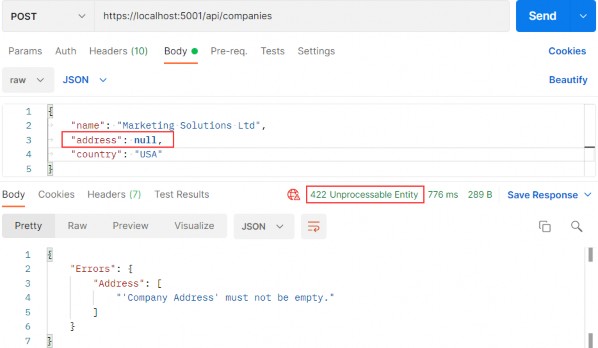
Excellent, this works great.
太好了,这效果很好。
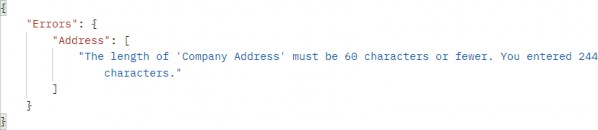
Additionally, if the Address property has too many characters, we will see a different message:
此外,如果 Address 属性的字符太多,我们将看到一条不同的消息:
Great.
伟大。
33.7.3 Validating null Object
33.7.3 验证 null 对象
Now, if we send a request with an empty request body, we are going to get the result produced from our action:
现在,如果我们发送一个请求正文为空的请求,我们将得到我们的作生成的结果:
https://localhost:5001/api/companies
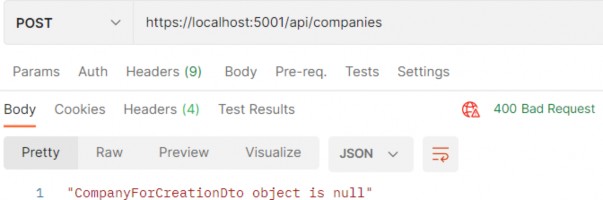
We can see the 400 status code and the error message. It is perfectly fine since we want to have a Bad Request response if the object sent from the client is null. But if for any reason you want to remove that validation from the action, and handle it with fluent validation rules, you can do that by modifying the CreateCompanyCommandValidator class and overriding the Validate method:
我们可以看到 400 状态代码和错误消息。这完全没问题,因为如果从客户端发送的对象为 null,我们希望得到 Bad Request 响应。但是,如果出于任何原因,您希望从作中删除该验证,并使用 Fluent 验证规则处理它,则可以通过修改 CreateCompanyCommandValidator 类并重写 Validate 方法来执行此作:
public sealed class CreateCompanyCommandValidator : AbstractValidator<CreateCompanyCommand> { public CreateCompanyCommandValidator() { RuleFor(c => c.Company.Name).NotEmpty().MaximumLength(60); RuleFor(c => c.Company.Address).NotEmpty().MaximumLength(60); } public override ValidationResult Validate(ValidationContext<CreateCompanyCommand> context) { return context.InstanceToValidate.Company is null ? new ValidationResult(new[] { new ValidationFailure("CompanyForCreationDto", "CompanyForCreationDto object is null") }) : base.Validate(context); } }Now, you can remove the validation check inside the action and send a null body request:
现在,您可以删除作中的验证检查并发送 null 正文请求:
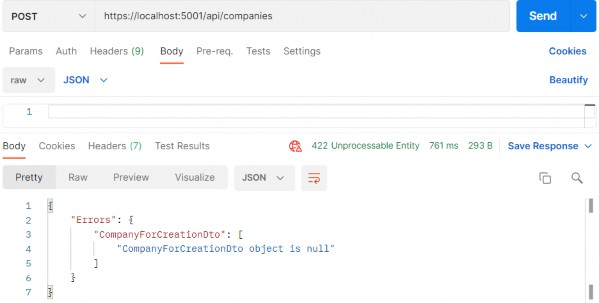
Pay attention that now the status code is 422 and not 400. But this validation is now part of the fluent validation.
请注意,现在状态代码是 422 而不是 400。但此验证现在是 Fluent 验证的一部分。
If this solution fits your project, feel free to use it. Our recommendation is to use 422 only for the validation errors, and 400 if the request body is null.
如果此解决方案适合您的项目,请随意使用。我们建议仅对验证错误使用 422,如果请求正文为 null,则使用 400。
Ultimate ASP.NET Core Web API 32 BONUS 1 – RESPONSE PERFORMANCE IMPROVEMENTS
32 BONUS 1 - RESPONSE PERFORMANCE IMPROVEMENTS
32 奖励 1 - 响应性能改进
As mentioned in section 6.1.1, we will show you an alternative way of handling error responses. To repeat, with custom exceptions, we have great control of returning error responses to the client due to the global error handler, which is pretty fast if we use it correctly. Also, the code is pretty clean and straightforward since we don’t have to care about the return types and additional validation in the service methods.
如 6.1.1 节所述,我们将向您展示一种处理错误响应的替代方法。重复一遍,对于自定义异常,由于全局错误处理程序,我们可以很好地控制将错误响应返回给客户端,如果我们正确使用它,这将非常快。此外,代码非常简洁明了,因为我们不必关心服务方法中的返回类型和其他验证。
Even though some libraries enable us to write custom responses, for example, OneOf, we still like to create our abstraction logic, which is tested by us and fast. Additionally, we want to show you the whole creation process for such a flow.
尽管一些库允许我们编写自定义响应,例如 OneOf,但我们仍然喜欢创建我们的抽象逻辑,它由我们测试并且快速。此外,我们还想向您展示此类流程的整个创建过程。
For this example, we will use an existing project from part 6 and modify it to implement our API Response flow.
在此示例中,我们将使用 第 6 部分中的现有项目,并对其进行修改以实现我们的 API 响应流。
32.1 Adding Response Classes to the Project
32.1 向项目添加响应类
Let’s start with the API response model classes.
让我们从 API 响应模型类开始。
The first thing we are going to do is create a new Responses folder in the Entities project. Inside that folder, we are going to add our first class:
我们要做的第一件事是在 Entities 项目中创建一个新的 Responses 文件夹。在该文件夹中,我们将添加我们的第一个类:
public abstract class ApiBaseResponse { public bool Success { get; set; } protected ApiBaseResponse(bool success) => Success = success; }This is an abstract class, which will be the main return type for all of our methods where we have to return a successful result or an error result. It also contains a single Success property stating whether the action was successful or not.
这是一个抽象类,它将是我们所有方法的主要返回类型,我们必须返回成功结果或错误结果。它还包含一个 Success 属性,用于说明作是否成功。
Now, if our result is successful, we are going to create only one class in the same folder:
现在,如果我们的结果成功,我们将只在同一个文件夹中创建一个类:
public sealed class ApiOkResponse<TResult> : ApiBaseResponse { public TResult Result { get; set; } public ApiOkResponse(TResult result) :base(true) { Result = result; } }We are going to use this class as a return type for a successful result. It inherits from the ApiBaseResponse and populates the Success property to true through the constructor. It also contains a single Result property of type TResult. We will store our concrete result in this property, and since we can have different result types in different methods, this property is a generic one.
我们将使用这个类作为成功结果的返回类型。它继承自 ApiBaseResponse,并通过构造函数将 Success 属性填充为 true。它还包含一个 TResult 类型的 Result 属性。我们将具体结果存储在此属性中,由于我们可以在不同的方法中具有不同的结果类型,因此此属性是通用属性。
That’s all regarding the successful responses. Let’s move one to the error classes.
这就是关于成功响应的全部内容。让我们将一个移动到 error 类。
For the error responses, we will follow the same structure as we have for the exception classes. So, we will have base abstract classes for NotFound or BadRequest or any other error responses, and then concrete implementations for these classes like CompanyNotFound or CompanyBadRequest, etc.
对于错误响应,我们将遵循与异常类相同的结构。因此,我们将为 NotFound 或 BadRequest 或任何其他错误响应提供基本抽象类,然后为这些类提供具体实现,例如 CompanyNotFound 或 CompanyBadRequest 等。
That said, let’s use the same folder to create an abstract error class:
也就是说,让我们使用相同的文件夹来创建一个抽象错误类:
public abstract class ApiNotFoundResponse : ApiBaseResponse { public string Message { get; set; } public ApiNotFoundResponse(string message) : base(false) { Message = message; } }This class also inherits from the ApiBaseResponse, populates the Success property to false, and has a single Message property for the error message.
此类还继承自 ApiBaseResponse,将 Success 属性填充为 false,并且具有错误消息的单个 Message 属性。
In the same manner, we can create the ApiBadRequestResponse class:
以同样的方式,我们可以创建 ApiBadRequestResponse 类:
public abstract class ApiBadRequestResponse : ApiBaseResponse { public string Message { get; set; } public ApiBadRequestResponse(string message) : base(false) { Message = message; } }This is the same implementation as the previous one. The important thing to notice is that both of these classes are abstract.
这与上一个实现相同。需要注意的重要一点是,这两个类都是抽象的。
To continue, let’s create a concrete error response:
为了继续,让我们创建一个具体的错误响应:
public sealed class CompanyNotFoundResponse : ApiNotFoundResponse { public CompanyNotFoundResponse(Guid id) : base($"Company with id: {id} is not found in db.") { } }The class inherits from the ApiNotFoundResponse abstract class, which again inherits from the ApiBaseResponse class. It accepts an id parameter and creates a message that sends to the base class.
该类继承自 ApiNotFoundResponse 抽象类,而 ApiNotFoundResponse 抽象类又继承自 ApiBaseResponse 类。它接受 id 参数并创建发送到基类的消息。
We are not going to create the CompanyBadRequestResponse class because we are not going to need it in our example. But the principle is the same.
我们不打算创建 CompanyBadRequestResponse 类,因为在我们的示例中不需要它。但原理是一样的。
32.2 Service Layer Modification
32.2 服务层修改
Now that we have the response model classes, we can start with the service layer modification.
现在我们有了响应模型类,我们可以从服务层修改开始。
Let’s start with the ICompanyService interface:
让我们从 ICompanyService 接口开始:
public interface ICompanyService { ApiBaseResponse GetAllCompanies(bool trackChanges); ApiBaseResponse GetCompany(Guid companyId, bool trackChanges); }We don’t return concrete types in our methods anymore. Instead of the IEnumerable
我们不再在方法中返回具体类型。 我们返回 ApiBaseResponse 类型,而不是 IEnumerable 或 CompanyDto 返回类型。这将使我们能够返回成功结果或返回任何错误响应结果。
After the interface modification, we can modify the CompanyService class:
修改接口后,我们可以修改 CompanyService 类:
public ApiBaseResponse GetAllCompanies(bool trackChanges) { var companies = _repository.Company.GetAllCompanies(trackChanges); var companiesDto = _mapper.Map<IEnumerable<CompanyDto>>(companies); return new ApiOkResponse<IEnumerable<CompanyDto>>(companiesDto); } public ApiBaseResponse GetCompany(Guid id, bool trackChanges) { var company = _repository.Company.GetCompany(id, trackChanges); if (company is null) return new CompanyNotFoundResponse(id); var companyDto = _mapper.Map<CompanyDto>(company); return new ApiOkResponse<CompanyDto>(companyDto); }Both method signatures are modified to use APIBaseResponse, and also the return types are modified accordingly. Additionally, in the GetCompany method, we are not using an exception class to return an error result but the CompanyNotFoundResponse class. With the ApiBaseResponse abstraction, we are safe to return multiple types from our method as long as they inherit from the ApiBaseResponse abstract class. Here you could also log some messages with _logger.
两个方法签名都被修改为使用 APIBaseResponse,并且返回类型也相应地被修改。此外,在 GetCompany 方法中,我们没有使用异常类来返回错误结果,而是使用 CompanyNotFoundResponse 类。使用 ApiBaseResponse 抽象,我们可以安全地从方法中返回多个类型,只要它们继承自 ApiBaseResponse 抽象类。在这里,您还可以使用 _logger 记录一些消息。
One more thing to notice here.
这里还有一点需要注意。
In the GetAllCompanies method, we don’t have an error response just a successful one. That means we didn’t have to implement our Api response flow, and we could’ve left the method unchanged (in the interface and this class). If you want that kind of implementation it is perfectly fine. We just like consistency in our projects, and due to that fact, we’ve changed both methods.
在 GetAllCompanies 方法中,我们没有错误响应,只有一个成功的响应。这意味着我们不必实现 Api 响应流,并且可以保持方法不变(在接口和这个类中)。如果你想要这种实现,那完全没问题。我们就像我们项目中的一致性一样,因此,我们改变了这两种方法。
32.3 Controller Modification
32.3 控制器修改
Before we start changing the actions in the CompaniesController, we have to create a way to handle error responses and return them to the client – similar to what we have with the global error handler middleware.
在我们开始更改 CompaniesController 中的作之前,我们必须创建一种方法来处理错误响应并将其返回给客户端 – 类似于我们使用全局错误处理程序中间件的方法。
We are not going to create any additional middleware but another controller base class inside the Presentation/Controllers folder:
我们不打算创建任何其他中间件,而是在 Presentation/Controllers 文件夹中创建另一个控制器基类:
public class ApiControllerBase : ControllerBase { public IActionResult ProcessError(ApiBaseResponse baseResponse) { return baseResponse switch { ApiNotFoundResponse => NotFound(new ErrorDetails { Message = ((ApiNotFoundResponse)baseResponse).Message, StatusCode = StatusCodes.Status404NotFound }), ApiBadRequestResponse => BadRequest(new ErrorDetails { Message = ((ApiBadRequestResponse)baseResponse).Message, StatusCode = StatusCodes.Status400BadRequest }), _ => throw new NotImplementedException() }; } }This class inherits from the ControllerBase class and implements a single ProcessError action accepting an ApiBaseResponse parameter. Inside the action, we are inspecting the type of the sent parameter, and based on that type we return an appropriate message to the client. A similar thing we did in the exception middleware class.
此类继承自 ControllerBase 类,并实现接受 ApiBaseResponse 参数的单个 ProcessError作。在作中,我们将检查已发送参数的类型,并根据该类型向客户端返回适当的消息。我们在异常中间件类中做了类似的事情。
If you add additional error response classes to the Response folder, you only have to add them here to process the response for the client.
如果向 Response 文件夹添加其他错误响应类,则只需在此处添加它们即可处理客户端的响应。
Additionally, this is where we can see the advantage of our abstraction approach.
此外,这就是我们可以看到抽象方法的优势的地方。
Now, we can modify our CompaniesController:
现在,我们可以修改我们的 CompaniesController:
[Route("api/companies")] [ApiController] public class CompaniesController : ApiControllerBase { private readonly IServiceManager _service; public CompaniesController(IServiceManager service) => _service = service; [HttpGet] public IActionResult GetCompanies() { var baseResult = _service.CompanyService.GetAllCompanies(trackChanges: false); var companies = ((ApiOkResponse<IEnumerable<CompanyDto>>)baseResult).Result; return Ok(companies); } [HttpGet("{id:guid}")] public IActionResult GetCompany(Guid id) { var baseResult = _service.CompanyService.GetCompany(id, trackChanges: false); if (!baseResult.Success) return ProcessError(baseResult); var company = ((ApiOkResponse<CompanyDto>)baseResult).Result; return Ok(company); } }Now our controller inherits from the ApiControllerBase, which inherits from the ControllerBase class. In the GetCompanies action, we extract the result from the service layer and cast the baseResult variable to the concrete ApiOkResponse type, and use the Result property to extract our required result of type IEnumerable
现在我们的控制器继承自 ApiControllerBase,而 ApiControllerBase 继承自 ControllerBase 类。在 GetCompanies作中,我们从服务层提取结果,并将 baseResult 变量转换为具体的 ApiOkResponse 类型,并使用 Result 属性提取所需的 IEnumerable 类型结果。
We do a similar thing for the GetCompany action. Of course, here we check if our result is successful and if it’s not, we return the result of the ProcessError method.
我们对 GetCompany作执行类似的作。当然,这里我们检查结果是否成功,如果不是,我们返回 ProcessError 方法的结果。
And that’s it.
就是这样。
We can leave the solution as is, but we mind having these castings inside our actions – they can be moved somewhere else making them reusable and our actions cleaner. So, let’s do that.
我们可以保持解决方案不变,但我们介意在我们的 action 中放置这些铸件——它们可以移动到其他地方,使它们可重用,我们的 action 更干净。所以,让我们开始吧。
In the same project, we are going to create a new Extensions folder and a new ApiBaseResponseExtensions class:
在同一个项目中,我们将创建一个新的 Extensions 文件夹和一个新的 ApiBaseResponseExtensions 类:
public static class ApiBaseResponseExtensions { public static TResultType GetResult<TResultType>(this ApiBaseResponse apiBaseResponse) => ((ApiOkResponse<TResultType>)apiBaseResponse).Result; }The GetResult method will extend the ApiBaseResponse type and return the result of the required type.
GetResult 方法将扩展 ApiBaseResponse 类型并返回所需类型的结果。
Now, we can modify actions inside the controller:
现在,我们可以修改控制器内部的 action:
[HttpGet] public IActionResult GetCompanies() { var baseResult = _service.CompanyService.GetAllCompanies(trackChanges: false); var companies = baseResult.GetResult<IEnumerable<CompanyDto>>(); return Ok(companies); } [HttpGet("{id:guid}")] public IActionResult GetCompany(Guid id) { var baseResult = _service.CompanyService.GetCompany(id, trackChanges: false); if (!baseResult.Success) return ProcessError(baseResult); var company = baseResult.GetResult<CompanyDto>(); return Ok(company); }This is much cleaner and easier to read and understand.
这更简洁,更容易阅读和理解。
32.4 Testing the API Response Flow
32.4 测试 API 响应流
Now we can start our application, open Postman, and send some requests.
现在我们可以启动应用程序,打开 Postman,并发送一些请求。
Let’s try to get all the companies:
让我们尝试获取所有公司:
https://localhost:5001/api/companies
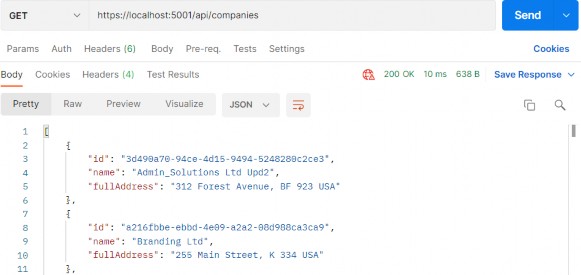
Then, we can try to get a single company:
然后,我们可以尝试获得一家公司:
https://localhost:5001/api/companies/3d490a70-94ce-4d15-9494-5248280c2ce3
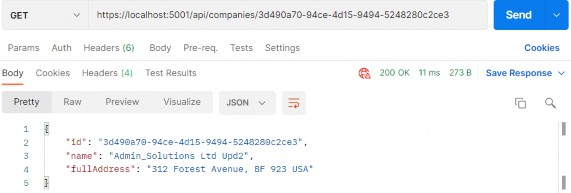
And finally, let’s try to get a company that does not exist:
最后,让我们尝试获得一家不存在的公司:
https://localhost:5001/api/companies/3d490a70-94ce-4d15-9494-5248280c2ce2
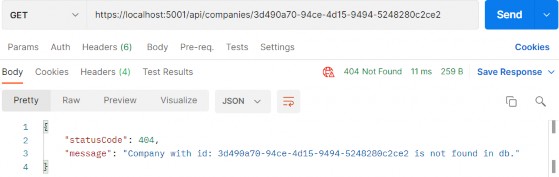
And we have our response with a proper status code and response body. Excellent.
我们的响应具有适当的状态代码和响应正文。非常好。
We have a solution that is easy to implement, fast, and extendable.
我们有一个易于实施、快速且可扩展的解决方案。
Our suggestion is to go with custom exceptions since they are easier to implement and fast as well. But if you have an app flow where you have to return error responses at a much higher rate and thus maybe impact the app’s performance, the APi Response flow is the way to go.
我们建议使用自定义异常,因为它们更容易实现且速度更快。但是,如果您的应用程序流必须以更高的速率返回错误响应,从而可能会影响应用程序的性能,那么 APi 响应流就是您的不二之选。