Author Archives: usernames

Ultimate ASP.NET Core Web API 11 WORKING WITH PUT REQUESTS

11 WORKING WITH PUT REQUESTS
11 使用 PUT 请求

In this section, we are going to show you how to update a resource using the PUT request. We are going to update a child resource first and then we are going to show you how to execute insert while updating a parent resource.‌
在本节中,我们将向您展示如何使用 PUT 请求更新资源。我们将首先更新子资源,然后我们将向您展示如何在更新父资源时执行 insert。

11.1 Updating Employee

11.1 更新员工

In the previous sections, we first changed our interface, then the repository/service classes, and finally the controller. But for the update, this doesn’t have to be the case.‌
在前面的部分中,我们首先更改了接口,然后更改了存储库/服务类,最后更改了控制器。但对于更新,情况并非必须如此。

Let’s go step by step.
让我们一步一步来。

The first thing we are going to do is to create another DTO record for update purposes:
我们要做的第一件事是创建另一个 DTO 记录以进行更新:

public record EmployeeForUpdateDto(string Name, int Age, string Position);

We do not require the Id property because it will be accepted through the URI, like with the DELETE requests. Additionally, this DTO contains the same properties as the DTO for creation, but there is a conceptual difference between those two DTO classes. One is for updating and the other is for creating. Furthermore, once we get to the validation part, we will understand the additional difference between those two.
我们不需要 Id 属性,因为它将通过 URI 接受,就像 DELETE 请求一样。此外,此 DTO 包含与用于创建的 DTO 相同的属性,但这两个 DTO 类之间存在概念差异。一个用于更新,另一个用于创建。此外,一旦我们进入验证部分,我们将了解这两者之间的额外区别。

Because we have an additional DTO record, we require an additional mapping rule:
因为我们有额外的 DTO 记录,所以我们需要额外的映射规则:

CreateMap<EmployeeForUpdateDto, Employee>();

After adding the mapping rule, we can modify the IEmployeeService interface:
添加映射规则后,我们可以修改 IEmployeeService 接口:

using Shared.DataTransferObjects;

namespace Service.Contracts
{
    public interface IEmployeeService
    {
        IEnumerable<EmployeeDto> GetEmployees(Guid companyId, bool trackChanges);
        EmployeeDto GetEmployee(Guid companyId, Guid id, bool trackChanges);
        EmployeeDto CreateEmployeeForCompany(Guid companyId, EmployeeForCreationDto employeeForCreation, bool trackChanges);
        void DeleteEmployeeForCompany(Guid companyId, Guid id, bool trackChanges);
        void UpdateEmployeeForCompany(Guid companyId, Guid id, EmployeeForUpdateDto employeeForUpdate, bool compTrackChanges, bool empTrackChanges);
    }
}

We are declaring a method that contains both id parameters – one for the company and one for employee, the employeeForUpdate object sent from the client, and two track changes parameters, again, one for the company and one for the employee. We are doing that because we won't track changes while fetching the company entity, but we will track changes while fetching the employee.
我们声明了一个包含两个 id 参数的方法 – 一个用于公司,一个用于员工,从客户端发送的 employeeForUpdate 对象,以及两个跟踪更改参数,同样,一个用于公司,一个用于员工。我们这样做是因为我们不会在获取公司实体时跟踪更改,但我们会在获取员工时跟踪更改。

That said, let’s modify the EmployeeService class:
也就是说,让我们修改 EmployeeService 类:

public void UpdateEmployeeForCompany(Guid companyId, Guid id, EmployeeForUpdateDto employeeForUpdate, bool compTrackChanges, bool empTrackChanges)
{
    var company = _repository.Company.GetCompany(companyId, compTrackChanges);
    if (company is null)
        throw new CompanyNotFoundException(companyId);
    var employeeEntity = _repository.Employee.GetEmployee(companyId, id, empTrackChanges);
    if (employeeEntity is null)
        throw new EmployeeNotFoundException(id);
    _mapper.Map(employeeForUpdate, employeeEntity);
    _repository.Save();
}

So first, we fetch the company from the database. If it doesn’t exist, we interrupt the flow and send the response to the client. After that, we do the same thing for the employee. But there is one difference here. Pay attention to the way we fetch the company and the way we fetch the employeeEntity. Do you see the difference?
因此,首先,我们从数据库中获取公司。如果不存在,我们将中断流并将响应发送到客户端。之后,我们为员工做同样的事情。但这里有一个区别。注意我们获取 company 的方式以及我们获取 employeeEntity 的方式。您看到区别了吗?

As we’ve already said: the trackChanges parameter will be set to true for the employeeEntity. That’s because we want EF Core to track changes on this entity. This means that as soon as we change any property in this entity, EF Core will set the state of that entity to Modified.
正如我们已经说过的:employeeEntity 的 trackChanges 参数将设置为 true。这是因为我们希望 EF Core 跟踪此实体上的更改。这意味着,一旦我们更改此实体中的任何属性,EF Core 就会将该实体的状态设置为 Modified。

As you can see, we are mapping from the employeeForUpdate object (we will change just the age property in a request) to the employeeEntity — thus changing the state of the employeeEntity object to Modified.
如您所见,我们正在从 employeeForUpdate 对象(我们只更改请求中的 age 属性)映射到 employeeEntity,从而将 employeeEntity 对象的状态更改为 Modified。

Because our entity has a modified state, it is enough to call the Save method without any additional update actions. As soon as we call the Save method, our entity is going to be updated in the database.
由于我们的实体具有已修改的状态,因此调用 Save 方法就足够了,无需任何其他更新作。调用 Save 方法后,我们的实体将在数据库中更新。

Now, when we have all of these, let’s modify the EmployeesController:
现在,当我们拥有所有这些时,让我们修改 EmployeesController:

[HttpPut("{id:guid}")]
public IActionResult UpdateEmployeeForCompany(Guid companyId, Guid id, [FromBody] EmployeeForUpdateDto employee)
{
    if (employee is null) return BadRequest("EmployeeForUpdateDto object is null");
    _service.EmployeeService.UpdateEmployeeForCompany(companyId, id, employee, compTrackChanges: false, empTrackChanges: true);
    return NoContent();
}

We are using the PUT attribute with the id parameter to annotate this action. That means that our route for this action is going to be: api/companies/{companyId}/employees/{id}.
我们使用带有 id 参数的 PUT 属性来注释此作。这意味着此作的路由将为:api/companies/{companyId}/employees/{id}。

Then, we check if the employee object is null, and if it is, we return a BadRequest response.
然后,我们检查 employee 对象是否为 null,如果为 null,则返回 BadRequest 响应。

After that, we just call the update method from the service layer and pass false for the company track changes and true for the employee track changes.
之后,我们只需从服务层调用 update 方法,并为公司跟踪变化传递 false,为员工跟踪变化传递 true。

Finally, we return the 204 NoContent status.
最后,我们返回 204 NoContent 状态。

We can test our action:
我们可以测试我们的操作:
https://localhost:5001/api/companies/C9D4C053-49B6-410C-BC78-2D54A9991870/employees/80ABBCA8-664D-4B20-B5DE-024705497D4A

alt text

And it works; we get the 204 No Content status.
它奏效了;我们得到 204 No Content 状态。

We can check our executed query through EF Core to confirm that only the Age column is updated:
我们可以通过 EF Core 检查已执行的查询,以确认仅更新了 Age 列:

alt text

Excellent.
非常好。

You can send the same request with the invalid company id or employee id. In both cases, you should get a 404 response, which is a valid response to this kind of situation.
您可以使用无效的公司 ID 或员工 ID 发送相同的请求。在这两种情况下,您都应该得到 404 响应,这是对这种情况的有效响应。

NOTE: We’ve changed only the Age property, but we have sent all the other properties with unchanged values as well. Therefore, Age is only updated in the database. But if we send the object with just the Age property, other properties will be set to their default values and the whole object will be updated — not just the Age column. That’s because the PUT is a request for a full update. This is very important to know.
注意:我们只更改了 Age 属性,但我们也发送了值未更改的所有其他属性。因此,仅在数据库中更新 Age。但是,如果我们只发送具有 Age 属性的对象,则其他属性将设置为其默认值,并且整个对象将更新,而不仅仅是 Age 列。这是因为 PUT 是完全更新的请求。了解这一点非常重要。

11.1.1 About the Update Method from the RepositoryBase Class‌

11.1.1 关于 RepositoryBase 类中的 Update 方法

Right now, you might be asking: “Why do we have the Update method in the RepositoryBase class if we are not using it?”
现在,您可能会问:“如果我们不使用 Update 方法,为什么我们在 RepositoryBase 类中有它?

The update action we just executed is a connected update (an update where we use the same context object to fetch the entity and to update it). But sometimes we can work with disconnected updates. This kind of update action uses different context objects to execute fetch and update actions or sometimes we can receive an object from a client with the Id property set as well, so we don’t have to fetch it from the database. In that situation, all we have to do is to inform EF Core to track changes on that entity and to set its state to modified. We can do both actions with the Update method from our RepositoryBase class. So, you see, having that method is crucial as well.
我们刚刚执行的更新作是连接更新(我们使用相同的上下文对象来获取实体并更新它的更新)。但有时我们可以使用断开连接的更新。这种更新作使用不同的上下文对象来执行 fetch 和 update作,或者有时我们也可以从设置了 Id 属性的客户端接收对象,因此我们不必从数据库中获取它。在这种情况下,我们只需通知 EF Core 跟踪该实体的更改,并将其状态设置为 modified。我们可以使用 RepositoryBase 类中的 Update 方法执行这两个作。所以,你看,拥有这种方法也很重要。

One note, though. If we use the Update method from our repository, even if we change just the Age property, all properties will be updated in the database.
不过,有一点需要注意。如果我们使用存储库中的 Update 方法,即使我们只更改 Age 属性,所有属性都将在数据库中更新。

11.2 Inserting Resources while Updating One

11.2 在更新资源时插入资源

While updating a parent resource, we can create child resources as well without too much effort. EF Core helps us a lot with that process. Let’s see how.‌
在更新父资源时,我们也可以创建子资源,而无需太多工作。EF Core 在此过程中为我们提供了很大帮助。让我们看看如何作。

The first thing we are going to do is to create a DTO record for update:
我们要做的第一件事是创建一个用于更新的 DTO 记录:

public record CompanyForUpdateDto(string Name, string Address, string Country, IEnumerable<EmployeeForCreationDto> Employees);

After this, let’s create a new mapping rule:
在此之后,让我们创建一个新的映射规则:

CreateMap<CompanyForUpdateDto, Company>();

Then, let’s move on to the interface modification:
然后,让我们继续进行接口修改:

using Shared.DataTransferObjects;

namespace Service.Contracts
{
    public interface ICompanyService
    {
        IEnumerable<CompanyDto> GetAllCompanies(bool trackChanges);
        CompanyDto GetCompany(Guid companyId, bool trackChanges);
        CompanyDto CreateCompany(CompanyForCreationDto company);
        IEnumerable<CompanyDto> GetByIds(IEnumerable<Guid> ids, bool trackChanges);
        (IEnumerable<CompanyDto> companies, string ids) CreateCompanyCollection(IEnumerable<CompanyForCreationDto> companyCollection);
        void DeleteCompany(Guid companyId, bool trackChanges);
        void UpdateCompany(Guid companyid, CompanyForUpdateDto companyForUpdate, bool trackChanges);
    }
}

And of course, the service class modification:
当然,服务类修改:

public void UpdateCompany(Guid companyId, CompanyForUpdateDto companyForUpdate, bool trackChanges)
{
    var companyEntity = _repository.Company.GetCompany(companyId, trackChanges);
    if (companyEntity is null)
        throw new CompanyNotFoundException(companyId);
    _mapper.Map(companyForUpdate, companyEntity);
    _repository.Save();
}

So again, we fetch our company entity from the database, and if it is null, we just return the NotFound response. But if it’s not null, we map the companyForUpdate DTO to companyEntity and call the Save method.
因此,我们从数据库中获取我们的公司实体,如果它是 null,我们只返回 NotFound 响应。但如果它不为 null,我们将 companyForUpdate DTO 映射到 companyEntity 并调用 Save 方法。

Right now, we can modify our controller:
现在,我们可以修改我们的控制器:

[HttpPut("{id:guid}")]
public IActionResult UpdateCompany(Guid id, [FromBody] CompanyForUpdateDto company)
{
    if (company is null)
        return BadRequest("CompanyForUpdateDto object is null");
    _service.CompanyService.UpdateCompany(id, company, trackChanges: true);
    return NoContent();
}

That’s it. You can see that this action is almost the same as the employee update action.
就是这样。您可以看到,此作与 employee update作几乎相同。

Let’s test this now:
现在让我们测试一下:
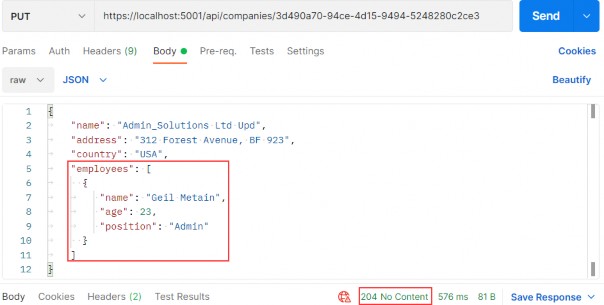
https://localhost:5001/api/companies/3d490a70-94ce-4d15-9494-5248280c2ce3i

alt text

We modify the name of the company and attach an employee as well. As a result, we can see 204, which means that the entity has been updated. But what about that new employee?
我们修改公司名称并附加员工。结果,我们可以看到 204,这意味着该实体已更新。但是那位新员工呢?

Let’s inspect our query:
我们来检查一下我们的查询:

alt text

You can see that we have created the employee entity in the database. So, EF Core does that job for us because we track the company entity. As soon as mapping occurs, EF Core sets the state for the company entity to modified and for all the employees to added. After we call the Save method, the Name property is going to be modified and the employee entity is going to be created in the database.
您可以看到我们已经在数据库中创建了 employee 实体。因此,EF Core 为我们完成了这项工作,因为我们跟踪公司实体。映射发生后,EF Core 会将公司实体的状态设置为 modified,并将所有员工的状态设置为 added。调用 Save 方法后,将修改 Name 属性,并在数据库中创建 employee 实体。

We are finished with the PUT requests, so let’s continue with PATCH.
我们已经完成了 PUT 请求,所以让我们继续 PATCH。

Ultimate ASP.NET Core Web API 10 WORKING WITH DELETE REQUESTS

10 WORKING WITH DELETE REQUESTS

10 使用 DELETE 请求

Let’s start this section by deleting a child resource first. So, let’s modify the IEmployeeRepository interface:‌
让我们先删除子资源来开始本节。因此,让我们修改 IEmployeeRepository 接口:

using Entities.Models;

namespace Contracts
{
    public interface IEmployeeRepository
    {
        IEnumerable<Employee> GetEmployees(Guid companyId, bool trackChanges);
        Employee GetEmployee(Guid companyId, Guid id, bool trackChanges);
        void CreateEmployeeForCompany(Guid companyId, Employee employee);
        void DeleteEmployee(Employee employee);
    }
}

The next step for us is to modify the EmployeeRepository class:
下一步是修改 EmployeeRepository 类:

public void DeleteEmployee(Employee employee) => Delete(employee);

After that, we have to modify the IEmployeeService interface:
之后,我们必须修改 IEmployeeService 接口:

using Shared.DataTransferObjects;

namespace Service.Contracts
{
    public interface IEmployeeService
    {
        IEnumerable<EmployeeDto> GetEmployees(Guid companyId, bool trackChanges);
        EmployeeDto GetEmployee(Guid companyId, Guid id, bool trackChanges);
        EmployeeDto CreateEmployeeForCompany(Guid companyId, EmployeeForCreationDto employeeForCreation, bool trackChanges);
        void DeleteEmployeeForCompany(Guid companyId, Guid id, bool trackChanges);
    }
}

And of course, the EmployeeService class:
当然,还有 EmployeeService 类:

public void DeleteEmployeeForCompany(Guid companyId, Guid id, bool trackChanges)
{
    var company = _repository.Company.GetCompany(companyId, trackChanges);
    if (company is null) throw new CompanyNotFoundException(companyId);
    var employeeForCompany = _repository.Employee.GetEmployee(companyId, id, trackChanges);
    if (employeeForCompany is null)
throw new EmployeeNotFoundException(id);
    _repository.Employee.DeleteEmployee(employeeForCompany);
    _repository.Save();
}

Pretty straightforward method implementation where we fetch the company and if it doesn’t exist, we return the Not Found response. If it exists, we fetch the employee for that company and execute the same check, where if it’s true, we return another not found response. Lastly, we delete the employee from the database.
非常简单的方法实现,我们获取公司,如果它不存在,我们返回 Not Found 响应。如果存在,我们获取该公司的员工并执行相同的检查,如果为 true,则返回另一个 not found 响应。最后,我们从数据库中删除该员工。

Finally, we can add a delete action to the controller class:
最后,我们可以向 controller 类添加一个 delete作:

[HttpDelete("{id:guid}")]
public IActionResult DeleteEmployeeForCompany(Guid companyId, Guid id)
{
    _service.EmployeeService.DeleteEmployeeForCompany(companyId, id, trackChanges: false);
    return NoContent();
}

There is nothing new with this action. We collect the companyId from the root route and the employee’s id from the passed argument. Call the service method and return the NoContent() method, which returns the status code 204 No Content.
此作没有什么新内容。我们从根路由中收集 companyId,从传递的参数中收集员工的 ID。调用 service 方法并返回 NoContent() 方法,该方法返回状态代码 204 No Content。

Let’s test this:
我们来测试一下
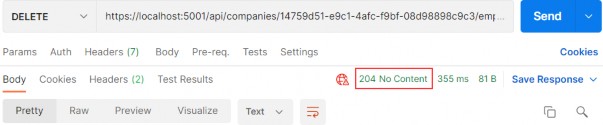
https://localhost:5001/api/companies/14759d51-e9c1-4afc-f9bf-08d98898c9c3/employees/e06cfcc6-e353-4bd8-0870-08d988af0956

alt text

Excellent. It works great.
非常好。它效果很好。

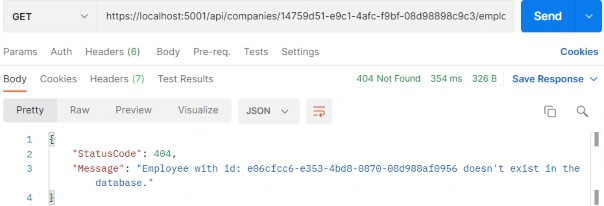
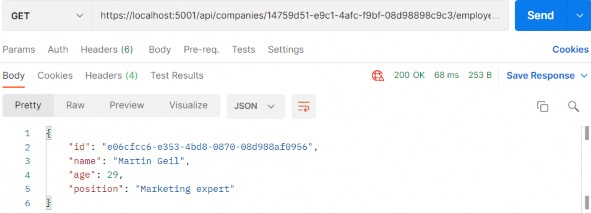
You can try to get that employee from the database, but you will get 404 for sure:
你可以尝试从数据库中获取该员工,但你肯定会得到 404:
https://localhost:5001/api/companies/14759d51-e9c1-4afc-f9bf-08d98898c9c3/employees/e06cfcc6-e353-4bd8-0870-08d988af0956

alt text

We can see that the DELETE request isn’t safe because it deletes the resource, thus changing the resource representation. But if we try to send this delete request one or even more times, we would get the same 404 result because the resource doesn’t exist anymore. That’s what makes the DELETE request idempotent.
我们可以看到 DELETE 请求不安全,因为它会删除资源,从而更改资源表示形式。但是,如果我们尝试发送一次甚至多次此删除请求,我们将得到相同的 404 结果,因为资源不再存在。这就是 DELETE 请求具有幂等性的原因。

10.1 Deleting a Parent Resource with its Children

10.1 删除父资源及其子项

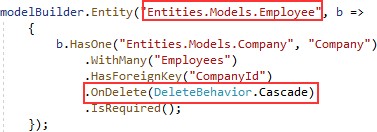
With Entity Framework Core, this action is pretty simple. With the basic configuration, cascade deleting is enabled, which means deleting a parent resource will automatically delete all of its children. We can confirm that from the migration file:‌
使用 Entity Framework Core,此作非常简单。使用基本配置时,启用了级联删除,这意味着删除父资源将自动删除其所有子资源。我们可以从迁移文件中确认:

alt text

So, all we have to do is to create a logic for deleting the parent resource.
因此,我们所要做的就是创建一个用于删除父资源的逻辑。

Well, let’s do that following the same steps as in a previous example:
好吧,让我们按照与上一个示例相同的步骤来执行此作:

using Entities.Models;

namespace Contracts
{
    public interface ICompanyRepository
    {
        IEnumerable<Company> GetAllCompanies(bool trackChanges); 
        Company GetCompany(Guid companyId, bool trackChanges);
        void CreateCompany(Company company);

        IEnumerable<Company> GetByIds(IEnumerable<Guid> ids, bool trackChanges);
        void DeleteCompany(Company company);
    }
}

Then let’s modify the repository class:
然后让我们修改 repository 类:

public void DeleteCompany(Company company) => Delete(company);

Then we have to modify the service interface:
然后我们就得修改服务接口了:

using Shared.DataTransferObjects;

namespace Service.Contracts
{
    public interface ICompanyService
    {
        IEnumerable<CompanyDto> GetAllCompanies(bool trackChanges);
        CompanyDto GetCompany(Guid companyId, bool trackChanges);
        CompanyDto CreateCompany(CompanyForCreationDto company);
        IEnumerable<CompanyDto> GetByIds(IEnumerable<Guid> ids, bool trackChanges);
        (IEnumerable<CompanyDto> companies, string ids) CreateCompanyCollection(IEnumerable<CompanyForCreationDto> companyCollection);
        void DeleteCompany(Guid companyId, bool trackChanges);
    }
}

And the service class:
而 service 类:

public void DeleteCompany(Guid companyId, bool trackChanges)
{
    var company = _repository.Company.GetCompany(companyId, trackChanges);
    if (company is null)
        throw new CompanyNotFoundException(companyId);
    _repository.Company.DeleteCompany(company);
    _repository.Save();
}

Finally, let’s modify our controller:
最后,让我们修改我们的控制器:

[HttpDelete("{id:guid}")]
public IActionResult DeleteCompany(Guid id)
{
    _service.CompanyService.DeleteCompany(id, trackChanges: false);
    return NoContent();
}

And let’s test our action:
让我们测试一下我们的操作:
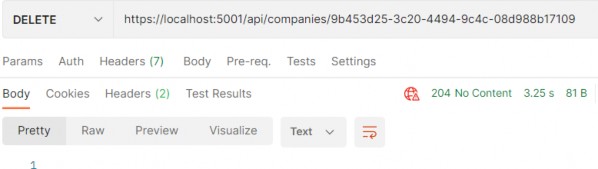
https://localhost:5001/api/companies/0AD5B971-FF51-414D-AF01-34187E407557

alt text

It works.
它有效。

You can check in your database that this company alongside its children doesn’t exist anymore.
您可以在数据库中检查这家公司及其子公司是否不再存在。

There we go. We have finished working with DELETE requests and we are ready to continue to the PUT requests.
好了。我们已经完成了 DELETE 请求的处理,并准备继续处理 PUT 请求。

Ultimate ASP.NET Core Web API 9 CREATING RESOURCES

9 CREATING RESOURCES
9 创建资源

In this section, we are going to show you how to use the POST HTTP method to create resources in the database.‌
在本节中,我们将向您展示如何使用 POST HTTP 方法在数据库中创建资源。

So, let’s start.
那么,让我们开始吧。

9.1 Handling POST Requests

9.1 处理 POST 请求

Firstly, let’s modify the decoration attribute for the GetCompany action in the Companies controller:‌
首先,让我们在 Companies 控制器中修改 GetCompany作的 decoration 属性:

[HttpGet("{id:guid}", Name = "CompanyById")]

With this modification, we are setting the name for the action. This name will come in handy in the action method for creating a new company.
通过此修改,我们将设置作的名称。这个名字在创建新公司的作方法中会派上用场。

We have a DTO class for the output (the GET methods), but right now we need the one for the input as well. So, let’s create a new record in the Shared/DataTransferObjects folder:
我们有一个用于输出的 DTO 类(GET 方法),但现在我们也需要一个用于输入的 DTO 类。因此,让我们在 Shared/DataTransferObjects 文件夹中创建一个新记录:

public record CompanyForCreationDto(string Name, string Address, string Country);

We can see that this DTO record is almost the same as the Company record but without the Id property. We don’t need that property when we create an entity.
我们可以看到,此 DTO 记录与 Company 记录几乎相同,但没有 Id 属性。在创建实体时,我们不需要该属性。

We should pay attention to one more thing. In some projects, the input and output DTO classes are the same, but we still recommend separating them for easier maintenance and refactoring of our code. Furthermore, when we start talking about validation, we don’t want to validate the output objects — but we definitely want to validate the input ones.
我们还应该注意一件事。在某些项目中,输入和输出 DTO 类是相同的,但我们仍然建议将它们分开,以便于维护和重构代码。此外,当我们开始讨论验证时,我们不想验证输出对象 — 但我们肯定想要验证输入对象。

With all of that said and done, let’s continue by modifying the ICompanyRepository interface:
完成所有这些作后,让我们继续修改 ICompanyRepository 接口:

using Entities.Models;

namespace Contracts
{
    public interface ICompanyRepository
    {
        IEnumerable<Company> GetAllCompanies(bool trackChanges); 
        Company GetCompany(Guid companyId, bool trackChanges);
        void CreateCompany(Company company);
    }
}

After the interface modification, we are going to implement that interface:
修改接口后,我们将实现该接口:

public void CreateCompany(Company company) => Create(company);

We don’t explicitly generate a new Id for our company; this would be done by EF Core. All we do is to set the state of the company to Added.
我们不会为公司显式生成新 ID;这将由 EF Core 完成。我们所做的只是将公司的状态设置为 Added。

Next, we want to modify the ICompanyService interface:
接下来,我们要修改 ICompanyService 接口:

using Shared.DataTransferObjects;

namespace Service.Contracts
{
    public interface ICompanyService
    {
        IEnumerable<CompanyDto> GetAllCompanies(bool trackChanges);
        CompanyDto GetCompany(Guid companyId, bool trackChanges);
        CompanyDto CreateCompany(CompanyForCreationDto company);
    }
}

And of course, we have to implement this method in the CompanyService class:
当然,我们必须在 CompanyService 类中实现此方法:

public CompanyDto CreateCompany(CompanyForCreationDto company)
{
    var companyEntity = _mapper.Map<Company>(company);
    _repository.Company.CreateCompany(companyEntity);
    _repository.Save();
    var companyToReturn = _mapper.Map<CompanyDto>(companyEntity);
    return companyToReturn;
}

Here, we map the company for creation to the company entity, call the repository method for creation, and call the Save() method to save the entity to the database. After that, we map the company entity to the company DTO object to return it to the controller.
在这里,我们将要创建的公司映射到公司实体,调用用于创建的存储库方法,并调用 Save() 方法将实体保存到数据库。之后,我们将公司实体映射到公司 DTO 对象,以将其返回给控制器。

But we don’t have the mapping rule for this so we have to create another mapping rule for the Company and CompanyForCreationDto objects.Let’s do this in the MappingProfile class:
但是我们没有用于此目的的映射规则,因此我们必须为 Company 和 CompanyForCreationDto 对象创建另一个映射规则。让我们在 MappingProfile 类中执行此作:

using AutoMapper;
using Entities.Models;
using Shared.DataTransferObjects;

namespace CompanyEmployees
{
    public class MappingProfile : Profile
    {
        public MappingProfile()
        {
            CreateMap<Company, CompanyDto>().ForMember(c => c.FullAddress, opt => opt.MapFrom(x => string.Join(' ', x.Address, x.Country)));

            CreateMap<Employee, EmployeeDto>();

            CreateMap<CompanyForCreationDto, Company>();
        }
    }
}

Our POST action will accept a parameter of the type CompanyForCreationDto, and as you can see our service method accepts the parameter of the same type as well, but we need the Company object to send it to the repository layer for creation. Therefore, we have to create this mapping rule.
我们的 POST作将接受 CompanyForCreationDto 类型的参数,如您所见,我们的服务方法也接受相同类型的参数,但我们需要 Company 对象将其发送到存储库层进行创建。因此,我们必须创建此映射规则。

Last, let’s modify the controller:
最后,我们修改控制器:

[HttpPost]
public IActionResult CreateCompany([FromBody] CompanyForCreationDto company)
{
    if (company is null)
        return BadRequest("CompanyForCreationDto object is null");
    var createdCompany = _service.CompanyService.CreateCompany(company);

    return CreatedAtRoute("CompanyById", new { id = createdCompany.Id }, createdCompany);
}

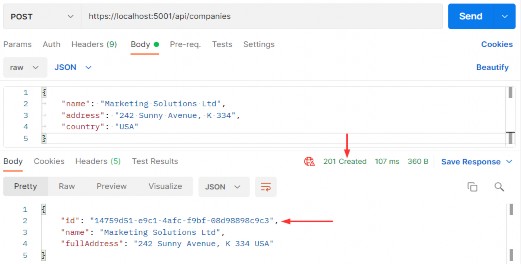
Let’s use Postman to send the request and examine the result:
让我们使用 Postman 发送请求并检查结果:
https://localhost:5001/api/companies

alt text

9.2 Code Explanation

9.2 代码说明

Let’s talk a little bit about this code. The interface and the repository parts are pretty clear, so we won’t talk about that. We have already explained the code in the service method. But the code in the controller contains several things worth mentioning.‌
我们来谈谈这段代码。界面和存储库部分非常清晰,因此我们不会讨论这些。我们已经在 service 方法中解释了代码。但是控制器中的代码包含几个值得一提的内容。

If you take a look at the request URI, you’ll see that we use the same one as for the GetCompanies action: api/companies — but this time we are using the POST request.
如果您查看请求 URI,您会发现我们使用与 GetCompanies作相同的 URI:api/companies,但这次我们使用的是 POST 请求。

The CreateCompany method has its own [HttpPost] decoration attribute, which restricts it to POST requests. Furthermore, notice the company parameter which comes from the client. We are not collecting it from the URI but the request body. Thus the usage of the [FromBody] attribute. Also, the company object is a complex type; therefore, we have to use [FromBody].
CreateCompany 方法具有自己的 [HttpPost] 修饰属性,该属性将其限制为 POST 请求。此外,请注意来自客户端的 company 参数。我们不是从 URI 中收集数据,而是从请求正文中收集数据。因此,使用[FromBody] 属性。此外,company 对象是一个复杂类型;因此,我们必须使用 [FromBody]。

If we wanted to, we could explicitly mark the action to take this parameter from the URI by decorating it with the [FromUri] attribute, though we wouldn’t recommend that at all because of security reasons and the complexity of the request.
如果需要,我们可以通过使用 [FromUri] 属性修饰作来显式标记从 URI 中获取此参数的作,尽管出于安全原因和请求的复杂性,我们根本不建议这样做。

Because the company parameter comes from the client, it could happen that it can’t be deserialized. As a result, we have to validate it against the reference type’s default value, which is null.
由于 company 参数来自客户端,因此可能无法对其进行反序列化。因此,我们必须根据引用类型的默认值 (null) 对其进行验证。

The last thing to mention is this part of the code:
最后要提到的是这部分代码:

CreatedAtRoute("CompanyById", new { id = companyToReturn.Id }, companyToReturn);

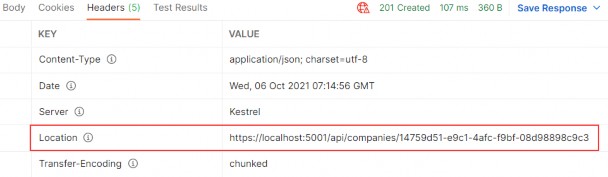
CreatedAtRoute will return a status code 201, which stands for Created. Also, it will populate the body of the response with the new company object as well as the Location attribute within the response header with the address to retrieve that company. We need to provide the name of the action, where we can retrieve the created entity.
CreatedAtRoute 将返回状态代码 201,代表 Created。此外,它还将使用新的 company 对象以及响应标头中的 Location 属性填充响应正文,其中包含用于检索该公司的地址。我们需要提供作的名称,以便我们可以在其中检索创建的实体。

If we take a look at the headers part of our response, we are going to see a link to retrieve the created company:
如果我们查看响应的 headers 部分,我们将看到一个链接来检索创建的公司:

alt text

Finally, from the previous example, we can confirm that the POST method is neither safe nor idempotent. We saw that when we send the POST request, it is going to create a new resource in the database — thus changing the resource representation. Furthermore, if we try to send this request a couple of times, we will get a new object for every request (it will have a different Id for sure).
最后,从前面的示例中,我们可以确认 POST 方法既不安全也不幂等。我们看到,当我们发送 POST 请求时,它将在数据库中创建一个新资源——从而改变资源表示形式。此外,如果我们尝试多次发送此请求,我们将为每个请求获取一个新对象(它肯定会具有不同的 Id)。

Excellent.
非常好。

There is still one more thing we need to explain.
还有一件事我们需要解释。

9.2.1 Validation from the ApiController Attribute‌

9.2.1 从 ApiController 属性进行验证

In this section, we are going to talk about the [ApiController] attribute that we can find right below the [Route] attribute in our controller:
在本节中,我们将讨论 [ApiController] 属性,我们可以在控制器中的 [Route] 属性正下方找到该属性:

[Route("api/companies")] [ApiController] public class CompaniesController : ControllerBase {

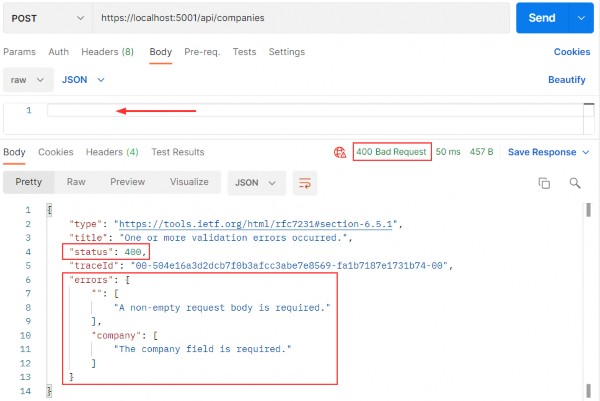
But, before we start with the explanation, let’s place a breakpoint in the CreateCompany action, right on the if (company is null) check.Then, let’s use Postman to send an invalid POST request:
但是,在开始解释之前,让我们在 CreateCompany作中放置一个断点,就在 if (company is null) 检查上。然后,让我们使用 Postman 发送一个无效的 POST 请求:
https://localhost:5001/api/companies

alt text

We are going to talk about Validation in chapter 13, but for now, we have to explain a couple of things.
我们将在第 13 章讨论验证,但现在,我们必须解释几件事。

First of all, we have our response - a Bad Request in Postman, and we have error messages that state what’s wrong with our request. But, we never hit that breakpoint that we’ve placed inside the CreateCompany action.
首先,我们有我们的响应 - Postman 中的 Bad Request,并且我们有错误消息说明我们的请求出了什么问题。但是,我们从未遇到放置在 CreateCompany作中的断点。

Why is that?
为什么?

Well, the [ApiController] attribute is applied to a controller class to enable the following opinionated, API-specific behaviors:
嗯,[ApiController] 属性应用于控制器类,以启用以下特定于 API 的固执己见的行为:

• Attribute routing requirement
属性路由要求

• Automatic HTTP 400 responses
自动 HTTP 400 响应

• Binding source parameter inference
绑定源参数推理

• Multipart/form-data request inference
部分/表单数据请求推理

• Problem details for error status codes
错误状态代码的问题详细信息

As you can see, it handles the HTTP 400 responses, and in our case, since the request’s body is null, the [ApiController] attribute handles that and returns the 400 (BadReqeust) response before the request even hits the CreateCompany action.
如您所见,它处理 HTTP 400 响应,在我们的示例中,由于请求正文为 null,因此 [ApiController] 属性会处理该响应,并在请求到达 CreateCompany作之前返回 400 (BadReqeust) 响应。

This is useful behavior, but it prevents us from sending our custom responses with different messages and status codes to the client. This will be very important once we get to the Validation.
这是有用的行为,但它会阻止我们将具有不同消息和状态代码的自定义响应发送到客户端。一旦我们进入验证,这将非常重要。

So to enable our custom responses from the actions, we are going to add this code into the Program class right above the AddControllers method:
因此,为了启用来自作的自定义响应,我们将以下代码添加到 AddControllers 方法正上方的 Program 类中:

builder.Services.Configure<ApiBehaviorOptions>(options => { options.SuppressModelStateInvalidFilter = true; });

With this, we are suppressing a default model state validation that is implemented due to the existence of the [ApiController] attribute in all API controllers. So this means that we can solve the same problem differently, by commenting out or removing the [ApiController] attribute only, without additional code for suppressing validation. It's all up to you. But we like keeping it in our controllers because, as you could’ve seen, it provides additional functionalities other than just 400 – Bad Request responses.
这样,我们将禁止默认模型状态验证,该验证是由于所有 API 控制器中存在 [ApiController] 属性而实现的。因此,这意味着我们可以以不同的方式解决相同的问题,只需注释掉或删除 [ApiController] 属性,而无需额外的代码来抑制验证。这一切都取决于您。但是我们喜欢将它保存在我们的控制器中,因为正如你所看到的,它提供了额外的功能,而不仅仅是 400 – Bad Request 响应。

Now, once we start the app and send the same request, we will hit that breakpoint and see our response in Postman.
现在,一旦我们启动应用程序并发送相同的请求,我们将命中该断点并在 Postman 中看到我们的响应。

Nicely done.
干得漂亮。

Now, we can remove that breakpoint and continue with learning about the creation of child resources.
现在,我们可以删除该断点并继续了解子资源的创建。

9.3 Creating a Child Resource

9.3 创建子资源

While creating our company, we created the DTO object required for the CreateCompany action. So, for employee creation, we are going to do the same thing:‌
在创建公司时,我们创建了 CreateCompany作所需的 DTO 对象。所以,对于员工创建,我们将做同样的事情:

public record EmployeeForCreationDto(string Name, int Age, string Position);

We don’t have the Id property because we are going to create that Id on the server-side. But additionally, we don’t have the CompanyId because we accept that parameter through the route:[Route("api/companies/{companyId}/employees")]
我们没有 Id 属性,因为我们要在服务器端创建该 Id。但此外,我们没有 CompanyId,因为我们通过路由接受该参数:[Route(“api/companies/{companyId}/employees”)]

The next step is to modify the IEmployeeRepository interface:
下一步是修改 IEmployeeRepository 接口:

using Entities.Models;

namespace Contracts
{
    public interface IEmployeeRepository
    {
        IEnumerable<Employee> GetEmployees(Guid companyId, bool trackChanges);
        Employee GetEmployee(Guid companyId, Guid id, bool trackChanges);
        void CreateEmployeeForCompany(Guid companyId, Employee employee);
    }
}

Of course, we have to implement this interface:
当然,我们必须实现这个接口:

using Contracts;
using Entities.Models;

namespace Repository
{
    public class EmployeeRepository : RepositoryBase<Employee>, IEmployeeRepository
    {
        public EmployeeRepository(RepositoryContext repositoryContext) : base(repositoryContext) { }
        public IEnumerable<Employee> GetEmployees(Guid companyId, bool trackChanges) => FindByCondition(e => e.CompanyId.Equals(companyId), trackChanges).OrderBy(e => e.Name).ToList();
        public Employee GetEmployee(Guid companyId, Guid id, bool trackChanges) => FindByCondition(e => e.CompanyId.Equals(companyId) && e.Id.Equals(id), trackChanges).SingleOrDefault();
        public void CreateEmployeeForCompany(Guid companyId, Employee employee) { employee.CompanyId = companyId; Create(employee); }

    }
}

Because we are going to accept the employee DTO object in our action and send it to a service method, but we also have to send an employee object to this repository method, we have to create an additional mapping rule in the MappingProfile class:
因为我们要在作中接受 employee DTO 对象并将其发送到 service 方法,但我们还必须将 employee 对象发送到此存储库方法,因此我们必须在 MappingProfile 类中创建额外的映射规则:

CreateMap<EmployeeForCreationDto, Employee>();

The next thing we have to do is IEmployeeService modification:
接下来我们要做的是修改 IEmployeeService:

using Shared.DataTransferObjects;

namespace Service.Contracts
{
    public interface IEmployeeService
    {
        IEnumerable<EmployeeDto> GetEmployees(Guid companyId, bool trackChanges);
        EmployeeDto GetEmployee(Guid companyId, Guid id, bool trackChanges);
        EmployeeDto CreateEmployeeForCompany(Guid companyId, EmployeeForCreationDto employeeForCreation, bool trackChanges);
    }
}

And implement this new method in EmployeeService:
并在 EmployeeService 中实现这个新方法:

public EmployeeDto CreateEmployeeForCompany(Guid companyId, EmployeeForCreationDto employeeForCreation, bool trackChanges)
{
    var company = _repository.Company.GetCompany(companyId, trackChanges);
    if (company is null) throw new CompanyNotFoundException(companyId);
    var employeeEntity = _mapper.Map<Employee>(employeeForCreation);
    _repository.Employee.CreateEmployeeForCompany(companyId, employeeEntity);
    _repository.Save();
    var employeeToReturn = _mapper.Map<EmployeeDto>(employeeEntity);
    return employeeToReturn;
}

We have to check whether that company exists in the database because there is no point in creating an employee for a company that does not exist. After that, we map the DTO to an entity, call the repository methods to create a new employee, map back the entity to the DTO, and return it to the caller.
我们必须检查数据库中是否存在该公司,因为为不存在的公司创建员工是没有意义的。之后,我们将 DTO 映射到实体,调用存储库方法以创建新员工,将实体映射回 DTO,并将其返回给调用方。

Now, we can add a new action in the EmployeesController:
现在,我们可以在 EmployeesController 中添加一个新动作:

[HttpPost]
public IActionResult CreateEmployeeForCompany(Guid companyId, [FromBody] EmployeeForCreationDto employee)
{
    if (employee is null) 
        return BadRequest("EmployeeForCreationDto object is null");
    var employeeToReturn = _service.EmployeeService.CreateEmployeeForCompany(companyId, employee, trackChanges: false);
    return CreatedAtRoute("GetEmployeeForCompany", new { companyId, id = employeeToReturn.Id }, employeeToReturn);
}

As we can see, the main difference between this action and the CreateCompany action (if we exclude the fact that we are working with different DTOs) is the return statement, which now has two parameters for the anonymous object.
正如我们所看到的,此作与 CreateCompany作(如果排除我们使用的是不同 DTO 的事实)之间的主要区别在于 return 语句,该语句现在有两个用于匿名对象的参数。

For this to work, we have to modify the HTTP attribute above the GetEmployeeForCompany action:
为此,我们必须修改 GetEmployeeForCompany作上方的 HTTP 属性:

[HttpGet("{id:guid}", Name = "GetEmployeeForCompany")]
public IActionResult GetEmployeeForCompany(Guid companyId, Guid id)
{
    var employee = _service.EmployeeService.GetEmployee(companyId, id, trackChanges: false);
    return Ok(employee);
}

Let’s give this a try:
让我们试一试:
https://localhost:5001/api/companies/14759d51-e9c1-4afc-f9bf-08d98898c9c3/employees

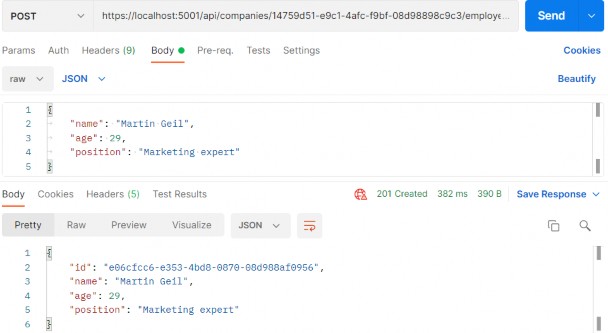
alt text

Excellent. A new employee was created.
非常好。创建了一个新员工。

If we take a look at the Headers tab, we'll see a link to fetch our newly created employee. If you copy that link and send another request with it, you will get this employee for sure:
如果我们查看 Headers 选项卡,我们将看到一个链接,用于获取我们新创建的员工。如果您复制该链接并发送另一个请求,您肯定会得到这个员工:

alt text

9.4 Creating Children Resources Together with a Parent

9.4 与父资源一起创建子资源

There are situations where we want to create a parent resource with its children. Rather than using multiple requests for every single child, we want to do this in the same request with the parent resource.‌
在某些情况下,我们希望创建一个包含其子资源的父资源。我们希望在具有父资源的同一请求中执行此作,而不是对每个子项使用多个请求。

We are going to show you how to do this.
我们将向您展示如何执行此作。

The first thing we are going to do is extend the CompanyForCreationDto class:
我们要做的第一件事是扩展 CompanyForCreationDto 类:

public record CompanyForCreationDto(string Name, string Address, string Country, IEnumerable<EmployeeForCreationDto> Employees);

We are not going to change the action logic inside the controller nor the repository/service logic; everything is great there. That’s all. Let’s test it:
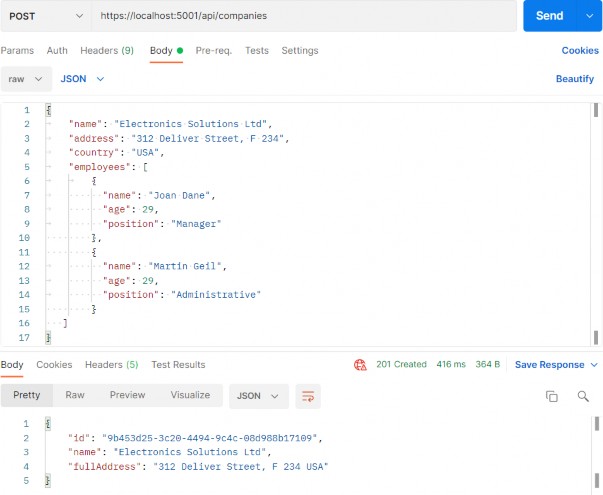
我们不会更改控制器内部的动作逻辑,也不会更改存储库/服务逻辑;那里的一切都很棒。就这样。让我们测试一下:
https://localhost:5001/api/companies

alt text

You can see that this company was created successfully.
您可以看到此公司已成功创建。

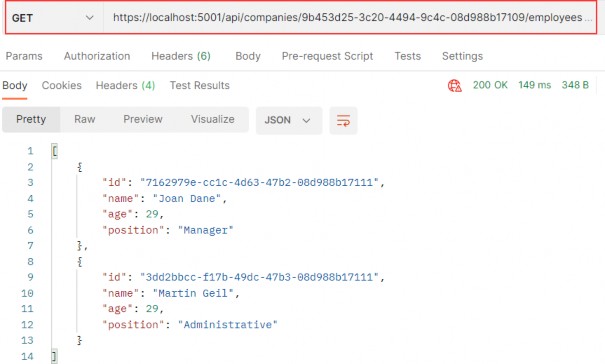
Now we can copy the location link from the Headers tab, paste it in another Postman tab, and just add the /employees part:
现在我们可以从 Headers 选项卡复制位置链接,将其粘贴到另一个 Postman 选项卡中,然后添加 /employees 部分:

alt text

We have confirmed that the employees were created as well.
我们已经确认员工也被创建出来了。

9.5 Creating a Collection of Resources
9.5 创建资源集合

Until now, we have been creating a single resource whether it was Company or Employee. But it is quite normal to create a collection of resources, and in this section that is something we are going to work with.‌
到目前为止,我们一直在创建单个资源,无论是 Company 还是 Employee。但是创建资源集合是很正常的,在本节中,我们将要处理这一点。

If we take a look at the CreateCompany action, for example, we can see that the return part points to the CompanyById route (the GetCompany action). That said, we don’t have the GET action for the collection creating action to point to. So, before we start with the POST collection action, we are going to create the GetCompanyCollection action in the Companies controller.
例如,如果我们看一下 CreateCompany作,我们可以看到返回部分指向 CompanyById 路由(GetCompany作)。也就是说,我们没有要指向的集合创建作的 GET作。因此,在开始执行 POST 集合作之前,我们将在 Companies 控制器中创建 GetCompanyCollection作。

But first, let's modify the ICompanyRepository interface:
但首先,让我们修改 ICompanyRepository 接口:

IEnumerable<Company> GetByIds(IEnumerable<Guid> ids, bool trackChanges);

Then we have to change the CompanyRepository class:
然后我们必须更改 CompanyRepository 类:

public IEnumerable<Company> GetByIds(IEnumerable<Guid> ids, bool trackChanges) => FindByCondition(x => ids.Contains(x.Id), trackChanges) .ToList();

After that, we are going to modify ICompanyService:
之后,我们将修改 ICompanyService:

using Shared.DataTransferObjects;

namespace Service.Contracts
{
    public interface ICompanyService
    {
        IEnumerable<CompanyDto> GetAllCompanies(bool trackChanges);
        CompanyDto GetCompany(Guid companyId, bool trackChanges);
        CompanyDto CreateCompany(CompanyForCreationDto company);
        IEnumerable<CompanyDto> GetByIds(IEnumerable<Guid> ids, bool trackChanges);
    }
}

And implement this in CompanyService:
并在 CompanyService 中实现这一点:

public IEnumerable<CompanyDto> GetByIds(IEnumerable<Guid> ids, bool trackChanges)
{
    if (ids is null)
        throw new IdParametersBadRequestException();
    var companyEntities = _repository.Company.GetByIds(ids, trackChanges);
    if (ids.Count() != companyEntities.Count())
        throw new CollectionByIdsBadRequestException();
    var companiesToReturn = _mapper.Map<IEnumerable<CompanyDto>>(companyEntities);
    return companiesToReturn;
}

Here, we check if ids parameter is null and if it is we stop the execution flow and return a bad request response to the client. If it’s not null, we fetch all the companies for each id in the ids collection. If the count of ids and companies mismatch, we return another bad request response to the client. Finally, we are executing the mapping action and returning the result to the caller.
在这里,我们检查 ids 参数是否为 null,如果为 null,则停止执行流并向客户端返回错误的请求响应。如果它不为 null,我们将获取 ids 集合中每个 id 的所有公司。如果 ids 和 companies 的计数不匹配,我们将向客户端返回另一个错误的请求响应。最后,我们执行 mapping作并将结果返回给调用者。

Of course, we don’t have these two exception classes yet, so let’s create them.
当然,我们还没有这两个异常类,所以让我们创建它们。

Since we are returning a bad request result, we are going to create a new abstract class in the Entities/Exceptions folder:
由于我们返回了一个错误的请求结果,因此我们将在 Entities/Exceptions 文件夹中创建一个新的抽象类:

namespace Entities.Exceptions
{
    public abstract class BadRequestException : Exception
    {
        protected BadRequestException(string message) : base(message) { }
    }
}

Then, in the same folder, let’s create two new specific exception classes:
然后,在同一个文件夹中,让我们创建两个新的特定异常类:

namespace Entities.Exceptions
{
    public sealed class IdParametersBadRequestException : BadRequestException
    {
        public IdParametersBadRequestException() : base("Parameter ids is null") { }
    }

}
namespace Entities.Exceptions
{
    public sealed class CollectionByIdsBadRequestException : BadRequestException
    {
        public CollectionByIdsBadRequestException() : base("Collection count mismatch comparing to ids.") { }
    }
}

At this point, we’ve removed two errors from the GetByIds method. But, to show the correct response to the client, we have to modify the ConfigureExceptionHandler class – the part where we populate the StatusCode property:
此时,我们已经从 GetByIds 方法中删除了两个错误。但是,为了向客户端显示正确的响应,我们必须修改 ConfigureExceptionHandler 类 – 我们填充 StatusCode 属性的部分:

using Contracts;
using Entities.ErrorModel;
using Entities.Exceptions;
using Microsoft.AspNetCore.Diagnostics;

namespace CompanyEmployees.Extensions
{
    public static class ExceptionMiddlewareExtensions
    {
        public static void ConfigureExceptionHandler(this WebApplication app, ILoggerManager logger)
        {
            app.UseExceptionHandler(appError =>
            {
                appError.Run(async context =>
                {
                    context.Response.ContentType = "application/json";
                    var contextFeature = context.Features.Get<IExceptionHandlerFeature>();
                    if (contextFeature != null)
                    {
                        //context.Response.StatusCode = contextFeature.Error
                        //switch
                        //{
                        //    NotFoundException => StatusCodes.Status404NotFound,
                        //    _ => StatusCodes.Status500InternalServerError
                        //};

                        context.Response.StatusCode = contextFeature.Error switch
                        {
                            NotFoundException => StatusCodes.Status404NotFound,
                            BadRequestException => StatusCodes.Status400BadRequest,
                            _ => StatusCodes.Status500InternalServerError
                        };

                        logger.LogError($"Something went wrong: {contextFeature.Error}");
                        await context.Response.WriteAsync(new ErrorDetails()
                        {
                            StatusCode = context.Response.StatusCode,
                            Message = contextFeature.Error.Message,
                        }.ToString());
                    }
                });
            });
        }
    }
}

After that, we can add a new action in the controller:
之后,我们可以在控制器中添加一个新的动作:

[HttpGet("collection/({ids})", Name = "CompanyCollection")]
public IActionResult GetCompanyCollection(IEnumerable<Guid> ids)
{
    var companies = _service.CompanyService.GetByIds(ids, trackChanges: false);
    return Ok(companies);
}

And that's it. This action is pretty straightforward, so let's continue towards POST implementation.
就是这样。此作非常简单,因此让我们继续进行 POST 实现。

Let’s modify the ICompanyService interface first:
让我们先修改 ICompanyService 接口:

using Shared.DataTransferObjects;

namespace Service.Contracts
{
    public interface ICompanyService
    {
        IEnumerable<CompanyDto> GetAllCompanies(bool trackChanges);
        CompanyDto GetCompany(Guid companyId, bool trackChanges);
        CompanyDto CreateCompany(CompanyForCreationDto company);
        IEnumerable<CompanyDto> GetByIds(IEnumerable<Guid> ids, bool trackChanges);
        (IEnumerable<CompanyDto> companies, string ids) CreateCompanyCollection(IEnumerable<CompanyForCreationDto> companyCollection);
    }
}

So, this new method will accept a collection of the CompanyForCreationDto type as a parameter, and return a Tuple with two fields (companies and ids) as a result.
因此,这个新方法将接受 CompanyForCreationDto 类型的集合作为参数,并返回一个包含两个字段(companies 和 ids)的 Tuples。

That said, let’s implement it in the CompanyService class:
也就是说,让我们在 CompanyService 类中实现它:

public (IEnumerable<CompanyDto> companies, string ids) CreateCompanyCollection(IEnumerable<CompanyForCreationDto> companyCollection)
{
    if (companyCollection is null)
        throw new CompanyCollectionBadRequest();
    var companyEntities = _mapper.Map<IEnumerable<Company>>(companyCollection);
    foreach (var company in companyEntities)
    {
        _repository.Company.CreateCompany(company);
    }
    _repository.Save(); 
    var companyCollectionToReturn = _mapper.Map<IEnumerable<CompanyDto>>(companyEntities);
    var ids = string.Join(",", companyCollectionToReturn.Select(c => c.Id));
    return (companies: companyCollectionToReturn, ids: ids);
}

So, we check if our collection is null and if it is, we return a bad request. If it isn’t, then we map that collection and save all the collection elements to the database. Finally, we map the company collection back, take all the ids as a comma-separated string, and return the Tuple with these two fields as a result to the caller.
因此,我们检查我们的集合是否为 null,如果为 null,则返回一个错误的请求。如果不是,那么我们映射该集合并将所有集合元素保存到数据库中。最后,我们将 company 集合映射回来,将所有 id 作为逗号分隔的字符串,并将包含这两个字段的 Tuple 作为结果返回给调用者。

Again, we can see that we don’t have the exception class, so let’s just create it:
同样,我们可以看到我们没有 exception 类,所以让我们创建它:

namespace Entities.Exceptions
{
    public sealed class CompanyCollectionBadRequest : BadRequestException
    {
        public CompanyCollectionBadRequest() : base("Company collection sent from a client is null.")
        { }
    }
}

Finally, we can add a new action in the CompaniesController:
最后,我们可以在 CompaniesController 中添加一个新作:

[HttpPost("collection")]
public IActionResult CreateCompanyCollection([FromBody] IEnumerable<CompanyForCreationDto> companyCollection)
{
    var result = _service.CompanyService.CreateCompanyCollection(companyCollection);
    return CreatedAtRoute("CompanyCollection", new { result.ids }, result.companies);
}

We receive the companyCollection parameter from the client, send it to the service method, and return a result with a comma-separated string and our newly created companies.
我们从客户端接收 companyCollection 参数,将其发送到 service 方法,并返回一个带有逗号分隔字符串的结果和我们新创建的公司。

Now you may ask, why are we sending a comma-separated string when we expect a collection of ids in the GetCompanyCollection action?
现在您可能会问,当我们期望在 GetCompanyCollection作中有一个 id 集合时,为什么还要发送一个逗号分隔的字符串?

Well, we can’t just pass a list of ids in the CreatedAtRoute method because there is no support for the Header Location creation with the list. You may try it, but we're pretty sure you would get the location like this:
我们不能只在 CreatedAtRoute 方法中传递 id 列表,因为不支持使用该列表创建 Header Location。您可以尝试一下,但我们非常确定您会得到这样的位置:

alt text

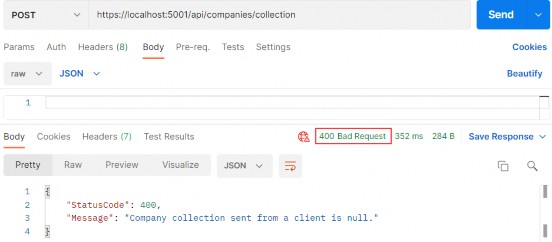
We can test our create action now with a bad request:
我们现在可以使用错误的请求来测试我们的 create操作:
https://localhost:5001/api/companies/collection

alt text

We can see that the request is handled properly and we have a correct response.
我们可以看到请求得到了正确的处理,并且我们得到了正确的响应。

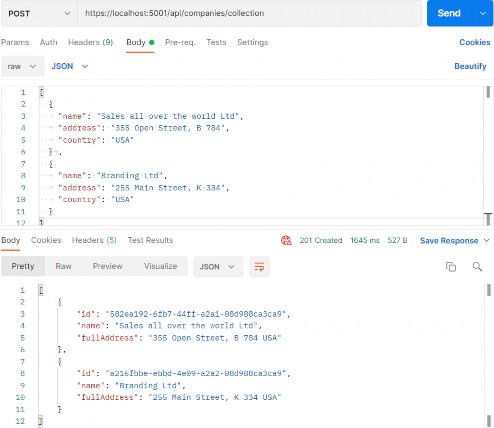
Now, let’s send a valid request:
现在,让我们发送一个有效的请求:
https://localhost:5001/api/companies/collection

alt text

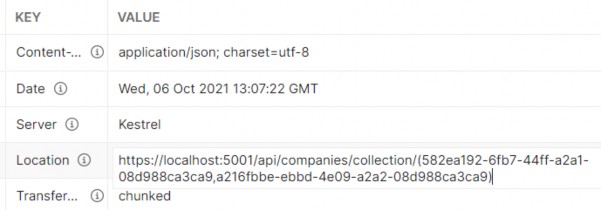
Excellent. Let’s check the header tab:
非常好。让我们检查一下 header 选项卡:

alt text

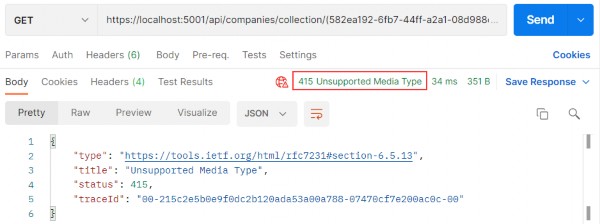
We can see a valid location link. So, we can copy it and try to fetch our newly created companies:
我们可以看到有效的位置链接。因此,我们可以复制它并尝试获取我们新创建的公司:

alt text

But we are getting the 415 Unsupported Media Type message. This is because our API can’t bind the string type parameter to the IEnumerable argument in the GetCompanyCollection action.
但是我们收到了 415 Unsupported Media Type 消息。这是因为我们的 API 无法将字符串类型参数绑定到 GetCompanyCollection作中的 IEnumerable 参数。

Well, we can solve this with a custom model binding.
好吧,我们可以通过自定义模型绑定来解决这个问题。

9.6 Model Binding in API

9.6 API 中的模型绑定

Let’s create the new folder ModelBinders in the Presentation project and inside the new class ArrayModelBinder:‌
让我们在 Presentation 项目和新类 ArrayModelBinder 中创建新文件夹 ModelBinders:

using Microsoft.AspNetCore.Mvc.ModelBinding;
using System.ComponentModel;
using System.Reflection;

namespace CompanyEmployees.Presentation.ModelBinders
{
    public class ArrayModelBinder : IModelBinder
    {
        public Task BindModelAsync(ModelBindingContext bindingContext)
        {
            if (!bindingContext.ModelMetadata.IsEnumerableType)
            {
                bindingContext.Result = ModelBindingResult.Failed();
                return Task.CompletedTask;
            }
            var providedValue = bindingContext.ValueProvider.GetValue(bindingContext.ModelName).ToString();
            if (string.IsNullOrEmpty(providedValue))
            {
                bindingContext.Result = ModelBindingResult.Success(null);
                return Task.CompletedTask;
            }
            var genericType = bindingContext.ModelType.GetTypeInfo().GenericTypeArguments[0];
            var converter = TypeDescriptor.GetConverter(genericType);
            var objectArray = providedValue.Split(new[] { "," }, StringSplitOptions.RemoveEmptyEntries).Select(x => converter.ConvertFromString(x.Trim())).ToArray();
            var guidArray = Array.CreateInstance(genericType, objectArray.Length);
            objectArray.CopyTo(guidArray, 0);
            bindingContext.Model = guidArray;
            bindingContext.Result = ModelBindingResult.Success(bindingContext.Model);
            return Task.CompletedTask;
        }
    }
}

At first glance, this code might be hard to comprehend, but once we explain it, it will be easier to understand.
乍一看,这段代码可能很难理解,但是一旦我们解释了它,就会更容易理解。

We are creating a model binder for the IEnumerable type. Therefore, we have to check if our parameter is the same type.
我们正在为 IEnumerable 类型创建模型绑定器。因此,我们必须检查我们的参数是否为相同类型。

Next, we extract the value (a comma-separated string of GUIDs) with the ValueProvider.GetValue() expression. Because it is a type string, we just check whether it is null or empty. If it is, we return null as a result because we have a null check in our action in the controller. If it is not, we move on.
接下来,我们使用 ValueProvider.GetValue() 表达式提取值(以逗号分隔的 GUID 字符串)。因为它是一个类型字符串,所以我们只检查它是 null 还是空。如果是,我们将返回 null,因为我们在控制器中的作中有 null 检查。如果不是,我们继续前进。

In the genericType variable, with the reflection help, we store the type the IEnumerable consists of. In our case, it is GUID. With the converter variable, we create a converter to a GUID type. As you can see, we didn’t just force the GUID type in this model binder; instead, we inspected what is the nested type of the IEnumerable parameter and then created a converter for that exact type, thus making this binder generic.
在 genericType 变量中,在反射帮助下,我们存储 IEnumerable 包含的类型。在我们的例子中,它是 GUID。使用 converter 变量,我们创建到 GUID 类型的转换器。如你所见,我们不仅在此模型绑定器中强制使用 GUID 类型;相反,我们检查了 IEnumerable 参数的嵌套类型是什么,然后为该确切类型创建了一个转换器,从而使此 Binder 成为通用的。

After that, we create an array of type object (objectArray) that consist of all the GUID values we sent to the API and then create an array of GUID types (guidArray), copy all the values from the objectArray to the guidArray, and assign it to the bindingContext.
之后,我们创建一个对象类型的数组 (objectArray),其中包含我们发送到 API 的所有 GUID 值,然后创建一个 GUID 类型数组 (guidArray),将所有值从 objectArray 复制到 guidArray,并将其分配给 bindingContext。

These are the required using directives:
这些是必需的 using 指令:

using Microsoft.AspNetCore.Mvc.ModelBinding; 
using System.ComponentModel; 
using System.Reflection;

And that is it. Now, we have just to make a slight modification in the GetCompanyCollection action:
就是这样。现在,我们只需要在 GetCompanyCollection作中进行轻微修改:

[HttpGet("collection/({ids})", Name = "CompanyCollection")]
// public IActionResult GetCompanyCollection(IEnumerable<Guid> ids)
public IActionResult GetCompanyCollection([ModelBinder(BinderType = typeof(ArrayModelBinder))] IEnumerable<Guid> ids)
{
    var companies = _service.CompanyService.GetByIds(ids, trackChanges: false);
    return Ok(companies);
}

This is the required namespace:
这是必需的命名空间:

using CompanyEmployees.Presentation.ModelBinders;

Visual Studio will provide two different namespaces to resolve the error, so be sure to pick the right one.
Visual Studio 将提供两个不同的命名空间来解决错误,因此请务必选择正确的命名空间。

Excellent.
非常好。

Our ArrayModelBinder will be triggered before an action executes. It will convert the sent string parameter to the IEnumerable type, and then the action will be executed:
我们的 ArrayModelBinder 将在 action 执行之前触发。它会将发送的字符串参数转换为 IEnumerable 类型,然后执行作:

https://localhost:5001/api/companies/collection/(582ea192-6fb7-44ff-a2a1-08d988ca3ca9,a216fbbe-ebbd-4e09-a2a2-08d988ca3ca9)

alt text

Well done.
干的好。

We are ready to continue towards DELETE actions.
我们已准备好继续执行 DELETE作。

Ultimate ASP.NET Core Web API 8 METHOD SAFETY AND METHOD IDEMPOTENCY

8 METHOD SAFETY AND METHOD IDEMPOTENCY
8 方法安全和方法幂等性

Before we start with the Create, Update, and Delete actions, we should explain two important principles in the HTTP standard. Those standards are Method Safety and Method Idempotency.‌
在开始执行 Create、Update 和 Delete作之前,我们应该解释 HTTP 标准中的两个重要原则。这些标准是方法安全和方法幂等性。

We can consider a method a safe one if it doesn’t change the resource representation. So, in other words, the resource shouldn’t be changed after our method is executed.
如果一个方法不改变资源表示,我们可以认为它是安全的。所以,换句话说,在我们的方法执行后,资源不应该被改变。

If we can call a method multiple times with the same result, we can consider that method idempotent. So in other words, the side effects of calling it once are the same as calling it multiple times.
如果我们可以多次调用一个方法并获得相同的结果,则可以认为该方法是幂等的。所以换句话说,调用一次的副作用与多次调用它的副作用相同。

Let’s see how this applies to HTTP methods:
让我们看看这如何应用于 HTTP 方法:

HTTP Method Is it Safe? Is it Idempotent?
GET Yes Yes
OPTIONS Yes Yes
HEAD Yes Yes
POST No No
DELETE No Yes
PUT No Yes
PATCH No No

As you can see, the GET, OPTIONS, and HEAD methods are both safe and idempotent, because when we call those methods they will not change the resource representation. Furthermore, we can call these methods multiple times, but they will return the same result every time.
如您所见,GET、OPTIONS 和 HEAD 方法既安全又幂等,因为当我们调用这些方法时,它们不会更改资源表示形式。此外,我们可以多次调用这些方法,但它们每次都会返回相同的结果。

The POST method is neither safe nor idempotent. It causes changes in the resource representation because it creates them. Also, if we call the POST method multiple times, it will create a new resource every time.
POST 方法既不安全也不幂等。它会导致资源表示形式发生变化,因为它会创建资源表示形式。此外,如果我们多次调用 POST 方法,它每次都会创建一个新资源。

The DELETE method is not safe because it removes the resource, but it is idempotent because if we delete the same resource multiple times, we will get the same result as if we have deleted it only once.
DELETE 方法不安全,因为它会删除资源,但它是幂等的,因为如果我们多次删除同一资源,我们将得到与只删除一次相同的结果。

PUT is not safe either. When we update our resource, it changes. But it is idempotent because no matter how many times we update the same resource with the same request it will have the same representation as if we have updated it only once.
PUT 也不安全。当我们更新资源时,它会发生变化。但它是幂等的,因为无论我们使用相同的请求更新同一资源多少次,它都将具有相同的表示形式,就好像我们只更新了一次一样。

Finally, the PATCH method is neither safe nor idempotent.
最后,PATCH 方法既不安全也不幂等。

Now that we’ve learned about these principles, we can continue with our application by implementing the rest of the HTTP methods (we have already implemented GET). We can always use this table to decide which method to use for which use case.
现在我们已经了解了这些原则,我们可以通过实现其余的 HTTP 方法(我们已经实现了 GET)来继续我们的应用程序。我们始终可以使用此表来决定将哪种方法用于哪个用例。

Ultimate ASP.NET Core Web API 7 CONTENT NEGOTIATION

7 CONTENT NEGOTIATION

7 内容协商

Content negotiation is one of the quality-of-life improvements we can add to our REST API to make it more user-friendly and flexible. And when we design an API, isn’t that what we want to achieve in the first place?‌
内容协商是我们可以添加到 REST API 中的生活质量改进之一,以使其更加用户友好和灵活。当我们设计 API 时,这不正是我们最初想要实现的目标吗?

Content negotiation is an HTTP feature that has been around for a while, but for one reason or another, it is often a bit underused.
内容协商是一项已经存在了一段时间的 HTTP 功能,但出于某种原因,它通常没有得到充分利用。

In short, content negotiation lets you choose or rather “negotiate” the content you want to get in a response to the REST API request.
简而言之,内容协商允许您选择或更确切地说是“协商”您希望在响应 REST API 请求时获得的内容。

7.1 What Do We Get Out of the Box?

7.1 我们开箱即用什么?

By default, ASP.NET Core Web API returns a JSON formatted result.‌
默认情况下,ASP.NET Core Web API 返回 JSON 格式的结果。

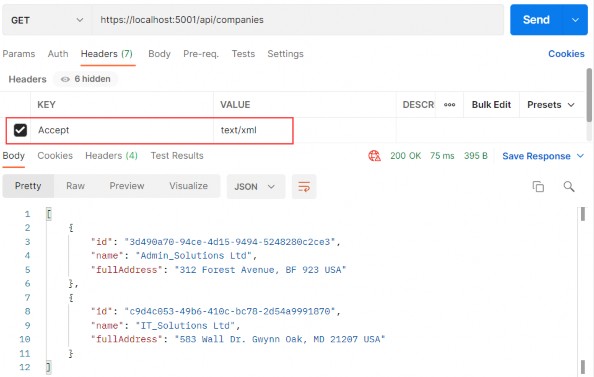
We can confirm that by looking at the response from the GetCompanies action:
我们可以通过查看 GetCompanies action的回复来确认这一点:
https://localhost:5001/api/companies

alt text

We can clearly see that the default result when calling GET on /api/companies returns the JSON result. We have also used the Accept header (as you can see in the picture above) to try forcing the server to return other media types like plain text and XML.
我们可以清楚地看到,在 /api/companies 上调用 GET 时,默认结果返回的是 JSON 结果。我们还使用了 Accept 标头(如上图所示)来尝试强制服务器返回其他媒体类型,如纯文本和 XML。

But that doesn’t work. Why?
但这行不通。为什么?

Because we need to configure server formatters to format a response the way we want it.
因为我们需要配置服务器格式化程序以按照我们想要的方式格式化响应。

Let’s see how to do that.
让我们看看如何做到这一点。

7.2 Changing the Default Configuration of Our Project

7.2 更改我们项目的默认配置

A server does not explicitly specify where it formats a response to JSON.‌ But you can override it by changing configuration options through the AddControllers method.
服务器没有明确指定它对 JSON 的响应的格式。但是,您可以通过 AddControllers 方法更改配置选项来覆盖它。

We can add the following options to enable the server to format the XML response when the client tries negotiating for it:
我们可以添加以下选项,使服务器能够在客户端尝试协商 XML 响应时格式化 XML 响应:

using CompanyEmployees.Extensions;
using Contracts;
using Microsoft.AspNetCore.HttpOverrides;
using NLog;

var builder = WebApplication.CreateBuilder(args);

// Add services to the container.
LogManager.LoadConfiguration(
    string.Concat(Directory.GetCurrentDirectory(),
    "/nlog.config"));
builder.Services.ConfigureLoggerService();

builder.Services.ConfigureCors();
builder.Services.ConfigureIISIntegration();
builder.Services.ConfigureRepositoryManager();
builder.Services.ConfigureServiceManager();
builder.Services.ConfigureSqlContext(builder.Configuration);
builder.Services.AddAutoMapper(typeof(Program));
// builder.Services.AddControllers().AddApplicationPart(typeof(CompanyEmployees.Presentation.AssemblyReference).Assembly);
builder.Services.AddControllers(config => { config.RespectBrowserAcceptHeader = true; }).AddXmlDataContractSerializerFormatters().AddApplicationPart(typeof(CompanyEmployees.Presentation.AssemblyReference).Assembly);

First things first, we must tell a server to respect the Accept header. After that, we just add the AddXmlDataContractSerializerFormatters method to support XML formatters.
首先,我们必须告诉服务器遵守 Accept 标头。之后,我们只需添加 AddXmlDataContractSerializerFormatters 方法来支持 XML 格式化程序。

Now that we have our server configured, let’s test the content negotiation once more.
现在我们已经配置了服务器,让我们再次测试内容协商。

7.3 Testing Content Negotiation

7.3 测试 Content Negotiation

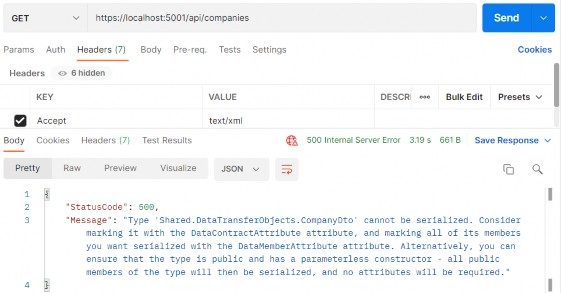
Let’s see what happens now if we fire the same request through Postman:‌
让我们看看如果我们通过 Postman 触发相同的请求,现在会发生什么:
https://localhost:5001/api/companies

alt text

We get an error because XmlSerializer cannot easily serialize our positional record type. There are two solutions to this. The first one is marking our CompanyDto record with the [Serializable] attribute:
我们收到一个错误,因为 XmlSerializer 无法轻松地序列化我们的位置记录类型。有两种解决方案。第一个是使用 [Serializable] 属性标记我们的 CompanyDto 记录:

[Serializable] 
public record CompanyDto(Guid Id, string Name, string FullAddress);

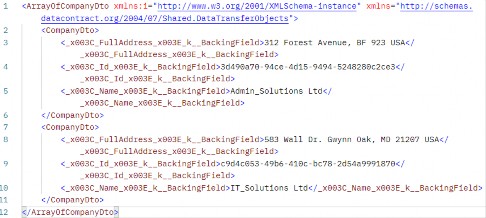
Now, we can send the same request again:
现在,我们可以再次发送相同的请求:

alt text

This time, we are getting our XML response but, as you can see,properties have some strange names. That’s because the compiler behind the scenes generates the record as a class with fields named like that (name_BackingField) and the XML serializer just serializes those fields with the same names.
这一次,我们收到了 XML 响应,但正如你所看到的,属性有一些奇怪的名称。这是因为后台编译器将记录生成为一个类,其中包含类似 (name_BackingField) 的字段,而 XML 序列化程序只是序列化具有相同名称的这些字段。

If we don’t want these property names in our response, but the regular ones, we can implement a second solution. Let’s modify our record with the init only property setters:
如果我们不希望响应中包含这些属性名称,而是常规属性名称,则可以实现第二个解决方案。让我们使用 init only 属性 setter 修改我们的记录:

namespace Shared.DataTransferObjects
{
    [Serializable]
    // public record CompanyDto(Guid Id, string Name, string FullAddress);
    public record CompanyDto
    {
        public Guid Id { get; init; }
        public string? Name { get; init; }
        public string? FullAddress { get; init; }
    }
}

This object is still immutable and init-only properties protect the state of the object from mutation once initialization is finished.
此对象仍然是不可变的,并且仅 init-only 属性可在初始化完成后保护对象的状态免受更改。

Additionally, we have to make one more change in the MappingProfile class:
此外,我们还必须在 MappingProfile 类中再进行一项更改:

using AutoMapper;
using Entities.Models;
using Shared.DataTransferObjects;

namespace CompanyEmployees
{
    public class MappingProfile : Profile
    {
        public MappingProfile()
        {
            //CreateMap<Company, CompanyDto>().ForCtorParam("FullAddress", opt => opt.MapFrom(x => string.Join(' ', x.Address, x.Country)));
            CreateMap<Company, CompanyDto>().ForMember(c => c.FullAddress, opt => opt.MapFrom(x => string.Join(' ', x.Address, x.Country)));

            CreateMap<Employee, EmployeeDto>();
        }
    }
}

We are returning this mapping rule to a previous state since now, we do have properties in our object.
我们将此映射规则返回到以前的状态,因为从现在开始,我们的对象中确实有属性。

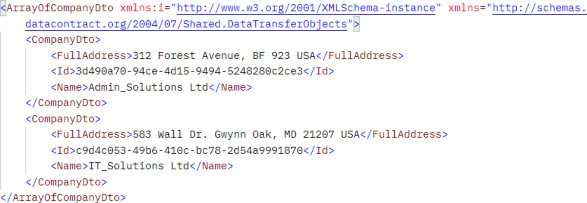
Now, we can send the same request again:
现在,我们可以再次发送相同的请求:

alt text

There is our XML response.
下面是我们的 XML 响应。

Now by changing the Accept header from text/xml to text/json, we can get differently formatted responses — and that is quite awesome, wouldn’t you agree?
现在,通过将 Accept 标头从 text/xml 更改为 text/json,我们可以获得不同格式的响应 — 这真是太棒了,你不同意吗?

Okay, that was nice and easy.
好吧,这很好,很容易。

But what if despite all this flexibility a client requests a media type that a server doesn’t know how to format?
但是,如果尽管有所有这些灵活性,但客户端请求的媒体类型服务器不知道如何格式化,该怎么办?

7.4 Restricting Media Types

7.4 限制媒体类型

Currently, it – the server - will default to a JSON type.‌
目前,它(服务器)将默认为 JSON 类型。

But we can restrict this behavior by adding one line to the configuration:
但是我们可以通过在配置中添加一行来限制这种行为:

using CompanyEmployees.Extensions;
using Contracts;
using Microsoft.AspNetCore.HttpOverrides;
using NLog;

var builder = WebApplication.CreateBuilder(args);

// Add services to the container.
LogManager.LoadConfiguration(
    string.Concat(Directory.GetCurrentDirectory(),
    "/nlog.config"));
builder.Services.ConfigureLoggerService();

builder.Services.ConfigureCors();
builder.Services.ConfigureIISIntegration();
builder.Services.ConfigureRepositoryManager();
builder.Services.ConfigureServiceManager();
builder.Services.ConfigureSqlContext(builder.Configuration);
builder.Services.AddAutoMapper(typeof(Program));
// builder.Services.AddControllers().AddApplicationPart(typeof(CompanyEmployees.Presentation.AssemblyReference).Assembly);
// builder.Services.AddControllers(config => { config.RespectBrowserAcceptHeader = true; }).AddXmlDataContractSerializerFormatters().AddApplicationPart(typeof(CompanyEmployees.Presentation.AssemblyReference).Assembly);
builder.Services.AddControllers(config => { config.RespectBrowserAcceptHeader = true; config.ReturnHttpNotAcceptable = true; }).AddXmlDataContractSerializerFormatters().AddApplicationPart(typeof(CompanyEmployees.Presentation.AssemblyReference).Assembly);
var app = builder.Build();

We added the ReturnHttpNotAcceptable = true option, which tells the server that if the client tries to negotiate for the media type the server doesn’t support, it should return the 406 Not Acceptable status code.
我们添加了 ReturnHttpNotAcceptable = true 选项,该选项告诉服务器,如果客户端尝试协商服务器不支持的媒体类型,它应返回 406 Not Acceptable 状态代码。

This will make our application more restrictive and force the API consumer to request only the types the server supports. The 406 status code is created for this purpose.
这将使我们的应用程序更具限制性,并强制 API 使用者仅请求服务器支持的类型。406 状态代码就是为此目的而创建的。

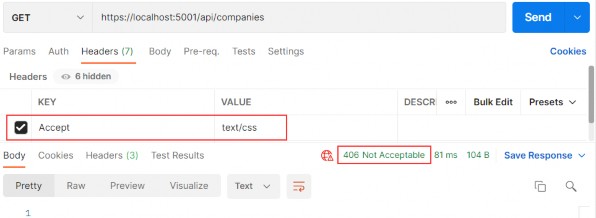
Now, let’s try fetching the text/css media type using Postman to see what happens:
现在,让我们尝试使用 Postman 获取 text/css 媒体类型,看看会发生什么:
https://localhost:5001/api/companies

alt text

And as expected, there is no response body and all we get is a nice 406 Not Acceptable status code.
正如预期的那样,没有响应正文,我们得到的只是一个很好的 406 Not Acceptable 状态代码。

So far so good.
目前为止,一切都好。

7.5 More About Formatters

7.5 更多关于 Formatters

If we want our API to support content negotiation for a type that is not “in‌ the box,” we need to have a mechanism to do this.
如果我们希望我们的 API 支持非“开箱即用”的类型的内容协商,我们需要有一种机制来做到这一点。

So, how can we do that?
那么,我们该怎么做呢?

ASP.NET Core supports the creation of custom formatters. Their purpose is to give us the flexibility to create our formatter for any media types we need to support.
ASP.NET Core 支持创建自定义格式化程序。它们的目的是让我们能够灵活地为需要支持的任何媒体类型创建格式化程序。

We can make the custom formatter by using the following method:
我们可以使用以下方法制作自定义格式化程序:

• Create an output formatter class that inherits the TextOutputFormatter class.
创建继承 TextOutputFormatter 类的输出格式化程序类。

• Create an input formatter class that inherits the TextInputformatter class.
创建继承 TextInputformatter 类的输入格式化程序类。

• Add input and output classes to the InputFormatters and OutputFormatters collections the same way we did for the XML formatter.
向 InputFormatters 和 OutputFormatters 集合添加输入和输出类,方法与我们对 XML 格式化程序执行的作相同。

Now let’s have some fun and implement a custom CSV formatter for our example.
现在,让我们来找点乐子,为我们的示例实现一个自定义的 CSV 格式化程序。

7.6 Implementing a Custom Formatter

7.6 实现自定义格式化程序

Since we are only interested in formatting responses, we need to implement only an output formatter. We would need an input formatter only if a request body contained a corresponding type.‌
由于我们只对格式化响应感兴趣,因此我们只需要实现一个输出格式化程序。只有当请求正文包含相应的类型时,我们才需要 input 格式化程序。

The idea is to format a response to return the list of companies in a CSV format.
这个想法是设置响应的格式,以 CSV 格式返回公司列表。

Let’s add a CsvOutputFormatter class to our main project:
让我们将 CsvOutputFormatter 类添加到我们的主项目中:

using Microsoft.AspNetCore.Mvc.Formatters;
using Microsoft.Net.Http.Headers;
using Shared.DataTransferObjects;
using System.Text;

namespace CompanyEmployees
{
    public class CsvOutputFormatter : TextOutputFormatter
    {
        public CsvOutputFormatter()
        {
            SupportedMediaTypes.Add(MediaTypeHeaderValue.Parse("text/csv"));
            SupportedEncodings.Add(Encoding.UTF8); SupportedEncodings.Add(Encoding.Unicode);
        }
        protected override bool CanWriteType(Type? type)
        {
            if (typeof(CompanyDto).IsAssignableFrom(type) || typeof(IEnumerable<CompanyDto>).IsAssignableFrom(type))
            {
                return base.CanWriteType(type);
            }
            return false;
        }
        public override async Task WriteResponseBodyAsync(OutputFormatterWriteContext context, Encoding selectedEncoding)
        {
            var response = context.HttpContext.Response; var buffer = new StringBuilder();
            if (context.Object is IEnumerable<CompanyDto>)
            {
                foreach (var company in (IEnumerable<CompanyDto>)context.Object)
                {
                    FormatCsv(buffer, company);
                }
            }
            else
            {
                FormatCsv(buffer, (CompanyDto)context.Object);
            }
            await response.WriteAsync(buffer.ToString());
        }
        private static void FormatCsv(StringBuilder buffer, CompanyDto company)
        {
            buffer.AppendLine($"{company.Id},\"{company.Name},\"{company.FullAddress}\"");
        }
    }
}

There are a few things to note here:
这里有几点需要注意:

• In the constructor, we define which media type this formatter should parse as well as encodings.
在构造函数中,我们定义此格式化程序应解析的媒体类型以及编码。

• The CanWriteType method is overridden, and it indicates whether or not the CompanyDto type can be written by this serializer.
CanWriteType 方法被覆盖,它指示此序列化程序是否可以写入 CompanyDto 类型。

• The WriteResponseBodyAsync method constructs the response.
WriteResponseBodyAsync 方法构造响应。

• And finally, we have the FormatCsv method that formats a response the way we want it.
最后,我们有 FormatCsv 方法,它可以按照我们想要的方式格式化响应。

The class is pretty straightforward to implement, and the main thing that you should focus on is the FormatCsv method logic.
该类的实现非常简单,您应该关注的主要内容是 FormatCsv 方法逻辑。

Now we just need to add the newly made formatter to the list of OutputFormatters in the ServicesExtensions class:
现在,我们只需将新创建的格式化程序添加到 ServicesExtensions 类中的 OutputFormatters 列表中:

public static IMvcBuilder AddCustomCSVFormatter(this IMvcBuilder builder) => builder.AddMvcOptions(config => config.OutputFormatters.Add(new CsvOutputFormatter()));

And to call it in the AddControllers:
要在 AddController 中调用它:

builder.Services.AddControllers(config => { config.RespectBrowserAcceptHeader = true; config.ReturnHttpNotAcceptable = true; }).AddXmlDataContractSerializerFormatters() .AddCustomCSVFormatter() .AddApplicationPart(typeof(CompanyEmployees.Presentation.AssemblyReference).Assembly);

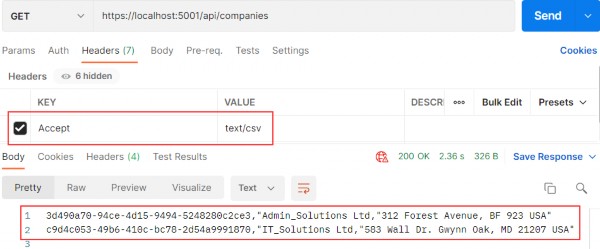
Let’s run this and see if it works. This time we will put text/csv as the value for the Accept header:
让我们运行它,看看它是否有效。这次我们将 text/csv 作为 Accept 标头的值:

https://localhost:5001/api/companies

alt text

Well, what do you know, it works!
嗯,你知道什么,它有效!

In this chapter, we finished working with GET requests in our project and we are ready to move on to the POST PUT and DELETE requests. We have a lot more ground to cover, so let’s get down to business.
在本章中,我们完成了项目中 GET 请求的处理,并准备继续处理 POST PUT 和 DELETE 请求。我们还有很多领域要涵盖,所以让我们开始谈正事。

Ultimate ASP.NET Core Web API 6 GETTING ADDITIONAL RESOURCES

6 GETTING ADDITIONAL RESOURCES
获取额外资源

As of now, we can continue with GET requests by adding additional actions to our controller. Moreover, we are going to create one more controller for the Employee resource and implement an additional action in it.‌
截至目前,我们可以通过向控制器添加其他作来继续处理 GET 请求。此外,我们将为 Employee 资源再创建一个控制器,并在其中实施一个额外的作。

6.1 Getting a Single Resource From the Database

6.1 从数据库中获取单个资源

Let’s start by modifying the ICompanyRepository interface:‌
让我们从修改 ICompanyRepository 接口开始:

using Entities.Models;

namespace Contracts
{
    public interface ICompanyRepository
    {
        IEnumerable<Company> GetAllCompanies(bool trackChanges); 
        Company GetCompany(Guid companyId, bool trackChanges);
    }
}

Then, we are going to implement this interface in the CompanyRepository.cs file:
然后,我们将在 CompanyRepository.cs 文件中实现这个接口:

using Contracts;
using Entities.Models;

namespace Repository
{
    public class CompanyRepository : RepositoryBase<Company>, ICompanyRepository
    {
        public CompanyRepository(RepositoryContext repositoryContext) : base(repositoryContext) { }
        public IEnumerable<Company> GetAllCompanies(bool trackChanges) => FindAll(trackChanges).OrderBy(c => c.Name).ToList();

        public Company GetCompany(Guid companyId, bool trackChanges) => FindByCondition(c => c.Id.Equals(companyId), trackChanges).SingleOrDefault();
    }
}

Then, we have to modify the ICompanyService interface:
然后,我们必须修改 ICompanyService 接口:

using Shared;

namespace Service.Contracts
{
    public interface ICompanyService
    {
        IEnumerable<CompanyDto> GetAllCompanies(bool trackChanges);
        CompanyDto GetCompany(Guid companyId, bool trackChanges);
    }
}

And of course, we have to implement this interface in the CompanyService class:
当然,我们必须在 CompanyService 类中实现此接口:

using AutoMapper;
using Contracts;
using Service.Contracts;
using Shared;

namespace Service
{
    internal sealed class CompanyService : ICompanyService
    {
        private readonly IRepositoryManager _repository;
        private readonly ILoggerManager _logger;
        private readonly IMapper _mapper;
        public CompanyService(IRepositoryManager repository, ILoggerManager logger, IMapper mapper)
        {
            _repository = repository;
            _logger = logger;
            _mapper = mapper;
        }

        public IEnumerable<CompanyDto> GetAllCompanies(bool trackChanges)
        {
            var companies = _repository.Company.GetAllCompanies(trackChanges);
            var companiesDto = _mapper.Map<IEnumerable<CompanyDto>>(companies);
            return companiesDto;
        }

        public CompanyDto GetCompany(Guid id, bool trackChanges)
        {
            var company = _repository.Company.GetCompany(id, trackChanges);
            //Check if the company is null
            var companyDto = _mapper.Map<CompanyDto>(company);
            return companyDto;
        }
    }
}

So, we are calling the repository method that fetches a single company from the database, maps the result to companyDto, and returns it. You can also see the comment about the null checks, which we are going to solve just in a minute.
因此,我们调用了 repository 方法,该方法从数据库中获取单个公司,将结果映射到 companyDto,然后返回它。您还可以查看有关 null 检查的注释,我们稍后将解决该问题。

Finally, let’s change the CompanyController class:
最后,让我们更改 CompanyController 类:

using Microsoft.AspNetCore.Mvc;
using Service.Contracts;

namespace CompanyEmployees.Presentation.Controllers
{
    [Route("api/[controller]")]
    [ApiController]
    public class CompaniesController : ControllerBase
    {
        private readonly IServiceManager _service;
        public CompaniesController(IServiceManager service) => _service = service;

        [HttpGet]
        public IActionResult GetCompanies()
        {
            // throw new Exception("Exception");
            var companies = _service.CompanyService.GetAllCompanies(trackChanges: false);
            return Ok(companies);
        }

        [HttpGet("{id:guid}")]
        public IActionResult GetCompany(Guid id)
        {
            var company = _service.CompanyService.GetCompany(id, trackChanges: false);
            return Ok(company);
        }

    }
}

The route for this action is /api/companies/id and that’s because the /api/companies part applies from the root route (on top of the controller) and the id part is applied from the action attribute [HttpGet(“{id:guid}“)]. You can also see that we are using a route constraint (:guid part) where we explicitly state that our id parameter is of the GUID type. We can use many different constraints like int, double, long, float, datetime, bool, length, minlength, maxlength, and many others.
此作的路由是 /api/companies/id,这是因为 /api/companies 部分从根路由(在控制器的顶部)应用,而 id 部分从作属性 [HttpGet(“{id:guid}”)] 应用。您还可以看到,我们正在使用路由约束(:guid 部分),其中我们显式声明我们的 id 参数是 GUID 类型。我们可以使用许多不同的约束,如 int、double、long、float、datetime、bool、length、minlength、maxlength 等。

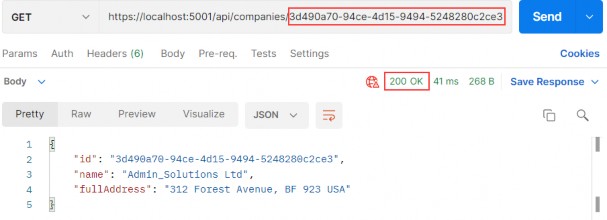
Let’s use Postman to send a valid request towards our API:
让我们使用 Postman 向我们的 API 发送一个有效的请求:
https://localhost:5001/api/companies/3d490a70-94ce-4d15-9494-5248280c2ce3

alt text

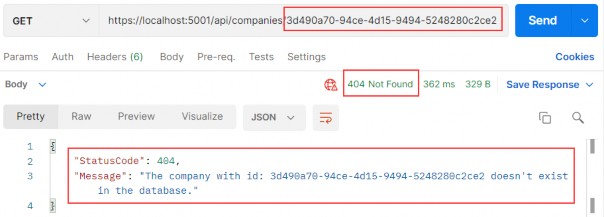
Great. This works as expected. But, what if someone uses an invalid id parameter?
伟大。这按预期工作。但是,如果有人使用了无效的 id 参数怎么办?

6.1.1 Handling Invalid Requests in a Service Layer‌

6.1.1 处理服务层中的无效请求

As you can see, in our service method, we have a comment stating that the result returned from the repository could be null, and this is something we have to handle. We want to return the NotFound response to the client but without involving our controller’s actions. We are going to keep them nice and clean as they already are.
如你所见,在我们的 service 方法中,我们有一条注释,指出从存储库返回的结果可能是 null,这是我们必须处理的事情。我们希望将 NotFound 响应返回给客户端,但不涉及控制器的作。我们将保持它们已经的良好和干净。

So, what we are going to do is to create custom exceptions that we can call from the service methods and interrupt the flow. Then our error handling middleware can catch the exception, process the response, and return it to the client. This is a great way of handling invalid requests inside a service layer without having additional checks in our controllers.
因此,我们要做的是创建自定义异常,我们可以从服务方法中调用这些异常并中断流。然后我们的错误处理中间件可以捕获异常,处理响应,并将其返回给客户端。这是在服务层内处理无效请求的好方法,而无需在我们的控制器中进行额外的检查。

That said, let’s start with a new Exceptions folder creation inside the Entities project. Since, in this case, we are going to create a not found response, let’s create a new NotFoundException class inside that folder:
也就是说,让我们从 Entities 项目中创建新的 Exceptions 文件夹开始。由于在本例中,我们将创建一个未找到的响应,因此让我们在该文件夹中创建一个新的 NotFoundException 类:

namespace Entities.Exceptions
{
    public abstract class NotFoundException : Exception
    {
        protected NotFoundException(string message) : base(message) { }
    }
}

This is an abstract class, which will be a base class for all the individual not found exception classes. It inherits from the Exception class to represent the errors that happen during application execution. Since in our current case, we are handling the situation where we can’t find the company in the database, we are going to create a new CompanyNotFoundException class in the same Exceptions folder:
这是一个抽象类,它将成为所有单个 not found 异常类的基类。它继承自 Exception 类,以表示应用程序执行期间发生的错误。由于在当前情况下,我们正在处理在数据库中找不到公司的情况,因此我们将在同一个 Exceptions 文件夹中创建一个新的 CompanyNotFoundException 类:

namespace Entities.Exceptions
{
    public sealed class CompanyNotFoundException : NotFoundException
    {
        public CompanyNotFoundException(Guid companyId) : base($"The company with id: {companyId} doesn't exist in the database.") { }
    }
}

Right after that, we can remove the comment in the GetCompany method and throw this exception:
紧接着,我们可以删除 GetCompany 方法中的注释并引发以下异常:

using AutoMapper;
using Contracts;
using Entities.Exceptions;
using Service.Contracts;
using Shared;

namespace Service
{
    internal sealed class CompanyService : ICompanyService
    {
        private readonly IRepositoryManager _repository;
        private readonly ILoggerManager _logger;
        private readonly IMapper _mapper;
        public CompanyService(IRepositoryManager repository, ILoggerManager logger, IMapper mapper)
        {
            _repository = repository;
            _logger = logger;
            _mapper = mapper;
        }

        public IEnumerable<CompanyDto> GetAllCompanies(bool trackChanges)
        {
            var companies = _repository.Company.GetAllCompanies(trackChanges);
            var companiesDto = _mapper.Map<IEnumerable<CompanyDto>>(companies);
            return companiesDto;
        }

        //public CompanyDto GetCompany(Guid id, bool trackChanges)
        //{
        //    var company = _repository.Company.GetCompany(id, trackChanges);
        //    //Check if the company is null
        //    var companyDto = _mapper.Map<CompanyDto>(company);
        //    return companyDto;
        //}

        public CompanyDto GetCompany(Guid id, bool trackChanges)
        {
            var company = _repository.Company.GetCompany(id, trackChanges);
            if (company is null) throw new CompanyNotFoundException(id);
            var companyDto = _mapper.Map<CompanyDto>(company);
            return companyDto;
        }
    }
}

Finally, we have to modify our error middleware because we don’t want to return the 500 error message to our clients for every custom error we throw from the service layer.
最后,我们必须修改我们的错误中间件,因为我们不想为我们从服务层抛出的每个自定义错误返回 500 错误消息给客户端。

So, let’s modify the ExceptionMiddlewareExtensions class in the main project:
因此,让我们修改主项目中的 ExceptionMiddlewareExtensions 类:

using Contracts;
using Entities.ErrorModel;
using Entities.Exceptions;
using Microsoft.AspNetCore.Diagnostics;

namespace CompanyEmployees.Extensions
{
    public static class ExceptionMiddlewareExtensions
    {
        public static void ConfigureExceptionHandler(this WebApplication app, ILoggerManager logger)
        {
            app.UseExceptionHandler(appError =>
            {
                appError.Run(async context =>
                {
                    context.Response.ContentType = "application/json";
                    var contextFeature = context.Features.Get<IExceptionHandlerFeature>();
                    if (contextFeature != null)
                    {
                        context.Response.StatusCode = contextFeature.Error
                        switch
                        {
                            NotFoundException => StatusCodes.Status404NotFound,
                            _ => StatusCodes.Status500InternalServerError
                        };
                        logger.LogError($"Something went wrong: {contextFeature.Error}");
                        await context.Response.WriteAsync(new ErrorDetails()
                        {
                            StatusCode = context.Response.StatusCode,
                            Message = contextFeature.Error.Message,
                        }.ToString());
                    }
                });
            });
        }
    }
}

We remove the hardcoded StatusCode setup and add the part where we populate it based on the type of exception we throw in our service layer. We are also dynamically populating the Message property of the ErrorDetails object that we return as the response.
我们删除硬编码的 StatusCode 设置,并添加部分,根据我们在服务层中抛出的异常类型来填充它。我们还动态填充作为响应返回的 ErrorDetails 对象的 Message 属性。

Additionally, you can see the advantage of using the base abstract exception class here (NotFoundException in this case). We are not checking for the specific class implementation but the base type. This allows us to have multiple not found classes that inherit from the NotFoundException class and this middleware will know that we want to return the NotFound response to the client.
此外,您可以在此处看到使用基抽象异常类的优势(在本例中为 NotFoundException)。我们检查的不是特定的类实现,而是基类型。这允许我们拥有多个从 NotFoundException 类继承的未找到的类,并且此中间件将知道我们想要将 NotFound 响应返回给客户端。

Excellent. Now, we can start the app and send the invalid request:
非常好。现在,我们可以启动应用程序并发送无效请求:

https://localhost:5001/api/companies/3d490a70-94ce-4d15-9494-5248280c2ce2

alt text

We can see the status code we require and also the response object with proper StatusCode and Message properties. Also, if you inspect the log message, you will see that we are logging a correct message.
我们可以看到所需的状态代码,还可以看到具有适当 StatusCode 和 Message 属性的响应对象。此外,如果您检查日志消息,您将看到我们记录的消息正确无误。

With this approach, we have perfect control of all the exceptional cases in our app. We have that control due to global error handler implementation. For now, we only handle the invalid id sent from the client, but we will handle more exceptional cases in the rest of the project.
通过这种方法,我们可以完美地控制应用程序中的所有特殊情况。由于全局错误处理程序的实现,我们拥有了这种控制权。目前,我们只处理客户端发送的无效 ID,但我们将在项目的其余部分处理更多异常情况。

In our tests for a published app, the regular request sent from Postman took 7ms and the exceptional one took 14ms. So you can see how fast the response is.
在我们对已发布应用程序的测试中,从 Postman 发送的常规请求需要 7 毫秒,特殊请求需要 14 毫秒。所以你可以看到响应有多快。

Of course, we are using exceptions only for these exceptional cases (Company not found, Employee not found...) and not throwing them all over the application. So, if you follow the same strategy, you will not face any performance issues.
当然,我们只对这些特殊情况(未找到公司、未找到员工等)使用异常,而不是在整个应用程序中抛出它们。因此,如果您遵循相同的策略,您将不会遇到任何性能问题。

Lastly, if you have an application where you have to throw custom exceptions more often and maybe impact your performance, we are going to provide an alternative to exceptions in the first bonus chapter of this book (Chapter 32).
最后,如果您的应用程序必须更频繁地引发自定义异常,并且可能会影响您的性能,我们将在本书的附1章(第 32 章)中提供异常的替代方案。

6.2 Parent/Child Relationships in Web API

6.2 Web API 中的父/子关系

Up until now, we have been working only with the company, which is a parent (principal) entity in our API. But for each company, we have a related employee (dependent entity). Every employee must be related to a certain company and we are going to create our URIs in that manner.‌
到目前为止,我们只与公司合作,该公司是我们 API 中的父(主体)实体。但对于每家公司,我们都有一个相关的员工(依赖实体)。每个员工都必须与某家公司相关,我们将以这种方式创建我们的 URI。

That said, let’s create a new controller in the Presentation project and name it EmployeesController:
也就是说,让我们在 Presentation 项目中创建一个新控制器,并将其命名为 EmployeesController:

using Microsoft.AspNetCore.Mvc;
using Service.Contracts;

namespace CompanyEmployees.Presentation.Controllers
{
    [Route("api/companies/{companyId}/employees")]
    [ApiController]
    public class EmployeesController : ControllerBase
    {
        private readonly IServiceManager _service;
        public EmployeesController(IServiceManager service) => _service = service;
    }
}

We are familiar with this code, but our main route is a bit different. As we said, a single employee can’t exist without a company entity and this is exactly what we are exposing through this URI. To get an employee or employees from the database, we have to specify the companyId parameter, and that is something all actions will have in common. For that reason, we have specified this route as our root route.
我们熟悉这段代码,但是我们的主要路线有点不同。正如我们所说,没有公司实体就不能存在单个员工,这正是我们通过此 URI 公开的内容。要从数据库中获取一个或多个员工,我们必须指定 companyId 参数,这是所有作的共同点。因此,我们已将此路由指定为我们的根路由。

Before we create an action to fetch all the employees per company, we have to modify the IEmployeeRepository interface:
在我们创建一个动作来获取每个公司的所有员工之前,我们必须修改 IEmployeeRepository 接口:

using Entities.Models;

namespace Contracts
{
    public interface IEmployeeRepository
    {
        IEnumerable<Employee> GetEmployees(Guid companyId, bool trackChanges);
    }
}

After interface modification, we are going to modify the EmployeeRepository class:
修改接口后,我们将修改 EmployeeRepository 类:

using Contracts;
using Entities.Models;

namespace Repository
{
    public class EmployeeRepository : RepositoryBase<Employee>, IEmployeeRepository
    {
        public EmployeeRepository(RepositoryContext repositoryContext) : base(repositoryContext) { }
        public IEnumerable<Employee> GetEmployees(Guid companyId, bool trackChanges) => FindByCondition(e => e.CompanyId.Equals(companyId), trackChanges).OrderBy(e => e.Name).ToList();
    }
}

Then, before we start adding code to the service layer, we are going to create a new DTO. Let’s name it EmployeeDto and add it to the Shared/DataTransferObjects folder:
然后,在我们开始向服务层添加代码之前,我们将创建一个新的 DTO。让我们将其命名为 EmployeeDto 并将其添加到 Shared/DataTransferObjects 文件夹中:

namespace Shared.DataTransferObjects
{
    public record CompanyDto(Guid Id, string Name, string FullAddress);
}

Since we want to return this DTO to the client, we have to create a mapping rule inside the MappingProfile class:
由于我们想将此 DTO 返回给客户端,因此我们必须在 MappingProfile 类中创建一个映射规则:

using AutoMapper;
using Entities.Models;
using Shared.DataTransferObjects;

namespace CompanyEmployees
{
    public class MappingProfile : Profile
    {
        public MappingProfile()
        {
            CreateMap<Company, CompanyDto>().ForCtorParam("FullAddress", opt => opt.MapFrom(x => string.Join(' ', x.Address, x.Country)));
            CreateMap<Employee, EmployeeDto>();
        }
    }
}

Now, we can modify the IEmployeeService interface:
现在,我们可以修改 IEmployeeService 接口:

using Shared.DataTransferObjects;

namespace Service.Contracts
{
    public interface IEmployeeService { 
        IEnumerable<EmployeeDto> GetEmployees(Guid companyId, bool trackChanges); 
    }
}

And of course, we have to implement this interface in the EmployeeService class:
当然,我们必须在 EmployeeService 类中实现这个接口:

using AutoMapper;
using Contracts;
using Entities.Exceptions;
using Service.Contracts;
using Shared.DataTransferObjects;

namespace Service
{
    internal sealed class EmployeeService : IEmployeeService
    {
        private readonly IRepositoryManager _repository;
        private readonly ILoggerManager _logger;
        private readonly IMapper _mapper;
        public EmployeeService(IRepositoryManager repository, ILoggerManager logger, IMapper mapper)
        {
            _repository = repository;
            _logger = logger;
            _mapper = mapper;
        }

        public IEnumerable<EmployeeDto> GetEmployees(Guid companyId, bool trackChanges)
        {
            var company = _repository.Company.GetCompany(companyId, trackChanges);
            if (company is null) throw new CompanyNotFoundException(companyId);
            var employeesFromDb = _repository.Employee.GetEmployees(companyId, trackChanges);
            var employeesDto = _mapper.Map<IEnumerable<EmployeeDto>>(employeesFromDb);
            return employeesDto;
        }
    }
}

Here, we first fetch the company entity from the database. If it doesn’t exist, we return the NotFound response to the client. If it does, we fetch all the employees for that company, map them to the collection of EmployeeDto and return it to the caller.
在这里,我们首先从数据库中获取 company 实体。如果不存在,我们将 NotFound 响应返回给客户端。如果是这样,我们将获取该公司的所有员工,将它们映射到 EmployeeDto 的集合,并将其返回给调用方。

Finally, let’s modify the Employees controller:
最后,让我们修改 Employees 控制器:

[HttpGet]
public IActionResult GetEmployeesForCompany(Guid companyId)
{
    var employees = _service.EmployeeService.GetEmployees(companyId, trackChanges: false);
    return Ok(employees);
}

This code is pretty straightforward — nothing we haven’t seen so far — but we need to explain just one thing. As you can see, we have the companyId parameter in our action and this parameter will be mapped from the main route. For that reason, we didn’t place it in the [HttpGet] attribute as we did with the GetCompany action.
这段代码非常简单 — 到目前为止我们还没有见过 — 但我们只需要解释一件事。如您所见,我们的作中有 companyId 参数,此参数将从主路由映射。因此,我们没有像对 GetCompany作那样将其放在 [HttpGet] 属性中。

That done, we can send a request with a valid companyId:
完成后,我们可以发送具有有效 companyId:
https://localhost:5001/api/companies/c9d4c053-49b6-410c-bc78-2d54a9991870/employees

alt text

And with an invalid companyId:
并且使用无效的 companyId:
https://localhost:5001/api/companies/c9d4c053-49b6-410c-bc78-2d54a9991873/employees

alt text

Excellent. Let’s continue by fetching a single employee.
非常好。让我们继续获取单个员工。

6.3 Getting a Single Employee for Company

6.3 为公司招聘一名员工

So, as we did in previous sections, let’s start with the‌ IEmployeeRepository interface modification:
因此,正如我们在前面的部分中所做的那样,让我们从 IEmployeeRepository 接口修改开始:

using Entities.Models;

namespace Contracts
{
    public interface IEmployeeRepository
    {
        IEnumerable<Employee> GetEmployees(Guid companyId, bool trackChanges);
        Employee GetEmployee(Guid companyId, Guid id, bool trackChanges);
    }
}

Now, let’s implement this method in the EmployeeRepository class:
现在,让我们在 EmployeeRepository 类中实现此方法:

using Contracts;
using Entities.Models;

namespace Repository
{
    public class EmployeeRepository : RepositoryBase<Employee>, IEmployeeRepository
    {
        public EmployeeRepository(RepositoryContext repositoryContext) : base(repositoryContext) { }
        public IEnumerable<Employee> GetEmployees(Guid companyId, bool trackChanges) => FindByCondition(e => e.CompanyId.Equals(companyId), trackChanges).OrderBy(e => e.Name).ToList();
        public Employee GetEmployee(Guid companyId, Guid id, bool trackChanges) => FindByCondition(e => e.CompanyId.Equals(companyId) && e.Id.Equals(id), trackChanges).SingleOrDefault();

    }
}

Next, let’s add another exception class in the Entities/Exceptions folder:
接下来,让我们在 Entities/Exceptions 文件夹中添加另一个异常类:

namespace Entities.Exceptions
{
    public class EmployeeNotFoundException : NotFoundException
    {
        public EmployeeNotFoundException(Guid employeeId) : base($"Employee with id: {employeeId} doesn't exist in the database.") { }
    }
}

We will soon see why do we need this class.
我们很快就会明白为什么我们需要这个类。

To continue, we have to modify the IEmployeeService interface:
要继续,我们必须修改 IEmployeeService 接口:

using Shared.DataTransferObjects;

namespace Service.Contracts
{
    public interface IEmployeeService { 
        IEnumerable<EmployeeDto> GetEmployees(Guid companyId, bool trackChanges);
        EmployeeDto GetEmployee(Guid companyId, Guid id, bool trackChanges);
    }
}

And implement this new method in the EmployeeService class:
并在 EmployeeService 类中实现这个新方法:

using AutoMapper;
using Contracts;
using Entities.Exceptions;
using Service.Contracts;
using Shared.DataTransferObjects;

namespace Service
{
    internal sealed class EmployeeService : IEmployeeService
    {
        private readonly IRepositoryManager _repository;
        private readonly ILoggerManager _logger;
        private readonly IMapper _mapper;
        public EmployeeService(IRepositoryManager repository, ILoggerManager logger, IMapper mapper)
        {
            _repository = repository;
            _logger = logger;
            _mapper = mapper;
        }

        public IEnumerable<EmployeeDto> GetEmployees(Guid companyId, bool trackChanges)
        {
            var company = _repository.Company.GetCompany(companyId, trackChanges);
            if (company is null) 
                throw new CompanyNotFoundException(companyId);
            var employeesFromDb = _repository.Employee.GetEmployees(companyId, trackChanges);
            var employeesDto = _mapper.Map<IEnumerable<EmployeeDto>>(employeesFromDb);
            return employeesDto;
        }

        public EmployeeDto GetEmployee(Guid companyId, Guid id, bool trackChanges)
        {
            var company = _repository.Company.GetCompany(companyId, trackChanges);
            if (company is null) 
                throw new CompanyNotFoundException(companyId);
            var employeeDb = _repository.Employee.GetEmployee(companyId, id, trackChanges);
            if (employeeDb is null) 
                throw new EmployeeNotFoundException(id);
            var employee = _mapper.Map<EmployeeDto>(employeeDb);
            return employee;
        }
    }
}

This is also a pretty clear code and we can see the reason for creating a new exception class.
这也是一个非常清晰的代码,我们可以看到创建新的异常类的原因。

Finally, let’s modify the EmployeeController class:
最后,让我们修改 EmployeeController 类:

using Microsoft.AspNetCore.Mvc;
using Service.Contracts;

namespace CompanyEmployees.Presentation.Controllers
{
    [Route("api/companies/{companyId}/employees")]
    [ApiController]
    public class EmployeesController : ControllerBase
    {
        private readonly IServiceManager _service;
        public EmployeesController(IServiceManager service) => _service = service;

        [HttpGet]
        public IActionResult GetEmployeesForCompany(Guid companyId)
        {
            var employees = _service.EmployeeService.GetEmployees(companyId, trackChanges: false);
            return Ok(employees);
        }

        [HttpGet("{id:guid}")]
        public IActionResult GetEmployeeForCompany(Guid companyId, Guid id)
        {
            var employee = _service.EmployeeService.GetEmployee(companyId, id, trackChanges: false);
            return Ok(employee);
        }
    }
}

Excellent. You can see how clear our action is.
非常好。你可以看到我们的行动是多么明确。

We can test this action by using already created requests from the Bonus 2-CompanyEmployeesRequests.postman_collection.json file placed in the folder with the exercise files:
我们可以使用位于包含练习文件的文件夹中的 Bonus 2-CompanyEmployeesRequests.postman_collection.json 文件中已创建的请求来测试此作:

https://localhost:5001/api/companies/c9d4c053-49b6-410c-bc78-2d54a9991870/employees/86dba8c0-d178-41e7-938c-ed49778fb52a

alt text

When we send the request with an invalid company or employee id:
当我们使用无效的公司或员工 ID 发送请求时:
https://localhost:5001/api/companies/c9d4c053-49b6-410c-bc78-2d54a9991870/employees/86dba8c0-d178-41e7-938c-ed49778fb52c

alt text

alt text

Our responses are pretty self-explanatory, which makes for a good user experience.
我们的回答不言自明,这带来了良好的用户体验。

Until now, we have received only JSON formatted responses from our API. But what if we want to support some other format, like XML for example?
到目前为止,我们只收到了来自 API 的 JSON 格式的响应。但是,如果我们想要支持一些其他格式,例如 XML,该怎么办?

Well, in the next chapter we are going to learn more about Content Negotiation and enabling different formats for our responses.
那么,在下一章中,我们将了解有关 Content Negotiation 和为我们的响应启用不同格式的更多信息。

Ultimate ASP.NET Core Web API 5 GLOBAL ERROR HANDLING

5 GLOBAL ERROR HANDLING

5 全局错误处理

Exception handling helps us deal with the unexpected behavior of our system. To handle exceptions, we use the try-catch block in our code as well as the finally keyword to clean up our resources afterward.‌
异常处理有助于我们处理系统的意外行为。为了处理异常,我们在代码中使用 try-catch 块,然后使用 finally 关键字来清理我们的资源。

Even though there is nothing wrong with the try-catch blocks in our Actions and methods in the Web API project, we can extract all the exception handling logic into a single centralized place. By doing that, we make our actions cleaner, more readable, and the error handling process more maintainable.
即使 Web API 项目中的 Actions 和 methods 中的 try-catch 块没有问题,我们也可以将所有异常处理逻辑提取到一个集中的位置。通过这样做,我们使我们的作更清晰、更具可读性,并且错误处理过程更易于维护。

In this chapter, we are going to refactor our code to use the built-in middleware for global error handling to demonstrate the benefits of this approach. Since we already talked about the middleware in ASP.NET Core (in section 1.8), this section should be easier to understand.
在本章中,我们将重构我们的代码,以使用内置中间件进行全局错误处理,以演示这种方法的好处。由于我们已经在 ASP.NET Core 中讨论了中间件(在 1.8 节中),因此本节应该更容易理解。

5.1 Handling Errors Globally with the Built-In Middleware

5.1 使用内置中间件全局处理错误

The UseExceptionHandler middleware is a built-in middleware that we can use to handle exceptions. So, let’s dive into the code to see this middleware in action.‌
UseExceptionHandler 中间件是一个内置中间件,我们可以使用它来处理异常。因此,让我们深入研究代码,看看这个中间件的实际效果。

We are going to create a new ErrorModel folder in the Entities project, and add the new class ErrorDetails in that folder:
我们将在 Entities 项目中创建一个新的 ErrorModel 文件夹,并在该文件夹中添加新的类 ErrorDetails:

using System.Text.Json;

namespace Entities.ErrorModel
{
    public class ErrorDetails
    {
        public int StatusCode { get; set; }
        public string? Message { get; set; }
        public override string ToString() => JsonSerializer.Serialize(this);
    }
}

We are going to use this class for the details of our error message.
我们将使用这个类来获取错误消息的详细信息。

To continue, in the Extensions folder in the main project, we are going to add a new static class: ExceptionMiddlewareExtensions.cs.
要继续,在主项目的 Extensions 文件夹中,我们将添加新的静态类:ExceptionMiddlewareExtensions.cs。

Now, we need to modify it:
现在,我们需要修改它:

using Contracts;
using Entities.ErrorModel;
using Microsoft.AspNetCore.Diagnostics;
using System.Net;

namespace CompanyEmployees.Extensions
{
    public static class ExceptionMiddlewareExtensions
    {
        public static void ConfigureExceptionHandler(this WebApplication app, ILoggerManager logger)
        {
            app.UseExceptionHandler(appError =>
            {
                appError.Run(async context =>
                {
                    context.Response.StatusCode = (int)HttpStatusCode.InternalServerError;
                    context.Response.ContentType = "application/json";
                    var contextFeature = context.Features.Get<IExceptionHandlerFeature>();
                    if (contextFeature != null)
                    {
                        logger.LogError($"Something went wrong: {contextFeature.Error}");
                        await context.Response.WriteAsync(new ErrorDetails()
                        {
                            StatusCode = context.Response.StatusCode,
                            Message = "Internal Server Error.",
                        }.ToString());
                    }
                });
            });
        }
    }
}

In the code above, we create an extension method, on top of the WebApplication type, and we call the UseExceptionHandler method. That method adds a middleware to the pipeline that will catch exceptions, log them, and re-execute the request in an alternate pipeline.
在上面的代码中,我们在 WebApplication 类型之上创建了一个扩展方法,并调用 UseExceptionHandler 方法。该方法将中间件添加到管道中,该中间件将捕获异常、记录异常,并在备用管道中重新执行请求。

Inside the UseExceptionHandler method, we use the appError variable of the IApplicationBuilder type. With that variable, we call the Run method, which adds a terminal middleware delegate to the application’s pipeline. This is something we already know from section 1.8.
在 UseExceptionHandler 方法中,我们使用 IApplicationBuilder 类型的 appError 变量。使用该变量,我们调用 Run 方法,该方法将终端中间件委托添加到应用程序的管道中。这是我们从 1.8 节中已经知道的。

Then, we populate the status code and the content type of our response, log the error message and finally return the response with the custom-created object. Later on, we are going to modify this middleware even more to support our business logic in a service layer.
然后,我们填充响应的状态代码和内容类型,记录错误消息,最后返回包含自定义创建对象的响应。稍后,我们将进一步修改这个中间件,以支持我们在服务层中的业务逻辑。

Of course, there are several namespaces we should add to make this work:
当然,我们应该添加几个命名空间才能实现此目的:

using Contracts;
using Entities.ErrorModel;
using Microsoft.AspNetCore.Diagnostics;
using System.Net;

5.2 Program Class Modification

5.2 Program类修改

To be able to use this extension method, let’s modify the Program class:‌
为了能够使用这个扩展方法,让我们修改 Program 类:

using CompanyEmployees.Extensions;
using Contracts;
using Microsoft.AspNetCore.HttpOverrides;
using NLog;

var builder = WebApplication.CreateBuilder(args);

// Add services to the container.
LogManager.LoadConfiguration(
    string.Concat(Directory.GetCurrentDirectory(),
    "/nlog.config"));
builder.Services.ConfigureLoggerService();

builder.Services.ConfigureCors();
builder.Services.ConfigureIISIntegration();
builder.Services.ConfigureRepositoryManager();
builder.Services.ConfigureServiceManager();
builder.Services.ConfigureSqlContext(builder.Configuration);
builder.Services.AddAutoMapper(typeof(Program));
builder.Services.AddControllers().AddApplicationPart(typeof(CompanyEmployees.Presentation.AssemblyReference).Assembly);

var app = builder.Build();

// Configure the HTTP request pipeline.
var logger = app.Services.GetRequiredService<ILoggerManager>();
app.ConfigureExceptionHandler(logger);

app.UseHttpsRedirection();

app.UseForwardedHeaders(new ForwardedHeadersOptions
{
    ForwardedHeaders = ForwardedHeaders.All
});

app.UseCors("CorsPolicy");
app.UseAuthorization();

app.MapControllers();

app.Run();

Here, we first extract the ILoggerManager service inside the logger variable. Then, we just call the ConfigureExceptionHandler method and pass that logger service. It is important to know that we have to extract the ILoggerManager service after the var app = builder.Build() code line because the Build method builds the WebApplication and registers all the services added with IOC.
在这里,我们首先提取 logger 变量中的 ILoggerManager 服务。然后,我们只需调用 ConfigureExceptionHandler 方法并传递该 Logger 服务。请务必知道,我们必须在 var app = builder.Build() 之后提取 ILoggerManager 服务,因为 Build 方法构建 WebApplication 并注册使用 IOC 添加的所有服务。

Additionally, we remove the call to the UseDeveloperExceptionPage method in the development environment since we don’t need it now and it also interferes with our error handler middleware.
此外,我们在开发环境中删除了对 UseDeveloperExceptionPage 方法的调用,因为我们现在不需要它,它还会干扰我们的错误处理程序中间件。

Finally, let’s remove the try-catch block from the GetAllCompanies service method:
最后,让我们从 GetAllCompanies 服务方法中删除 try-catch 块:

using AutoMapper;
using Contracts;
using Entities.Models;
using Service.Contracts;
using Shared;
using System;
using System.Collections.Generic;
using System.Linq;
using System.Text;
using System.Threading.Tasks;

namespace Service
{
    internal sealed class CompanyService : ICompanyService
    {
        private readonly IRepositoryManager _repository;
        private readonly ILoggerManager _logger;
        private readonly IMapper _mapper;
        public CompanyService(IRepositoryManager repository, ILoggerManager logger, IMapper mapper)
        {
            _repository = repository;
            _logger = logger;
            _mapper = mapper;
        }
        //public IEnumerable<CompanyDto> GetAllCompanies(bool trackChanges)
        //{
        //    try
        //    {
        //        var companies = _repository.Company.GetAllCompanies(trackChanges);
        //        var companiesDto = _mapper.Map<IEnumerable<CompanyDto>>(companies);
        //        return companiesDto;
        //    }
        //    catch (Exception ex)
        //    {
        //        _logger.LogError($"Something went wrong in the {nameof(GetAllCompanies)} service method {ex}");
        //        throw;
        //    }
        //}

        public IEnumerable<CompanyDto> GetAllCompanies(bool trackChanges)
        {
            var companies = _repository.Company.GetAllCompanies(trackChanges);
            var companiesDto = _mapper.Map<IEnumerable<CompanyDto>>(companies);
            return companiesDto;
        }

    }
}

And from our GetCompanies action:
从我们的 GetCompanies action中:

using Microsoft.AspNetCore.Mvc;
using Service.Contracts;
using System;
using System.Collections.Generic;
using System.Linq;
using System.Text;
using System.Threading.Tasks;

namespace CompanyEmployees.Presentation.Controllers
{
    [Route("api/[controller]")]
    [ApiController]
    public class CompaniesController : ControllerBase
    {
        private readonly IServiceManager _service;
        public CompaniesController(IServiceManager service) => _service = service;

        //[HttpGet]
        //public IActionResult GetCompanies()
        //{
        //    try
        //    {
        //        var companies = _service.CompanyService.GetAllCompanies(trackChanges: false);
        //        return Ok(companies);
        //    }
        //    catch
        //    {
        //        return StatusCode(500, "Internal server error");
        //    }
        //}

        [HttpGet]
        public IActionResult GetCompanies()
        {
            var companies = _service.CompanyService.GetAllCompanies(trackChanges: false);
            return Ok(companies);
        }

    }
}

And there we go. Our methods are much cleaner now. More importantly, we can reuse this functionality to write more readable methods and actions in the future.
好了。我们现在的方法要干净得多。更重要的是,我们可以在未来重用此功能来编写更多可读的方法和作。

5.3 Testing the Result

5.3 测试结果

To inspect this functionality, let’s add the following line to the‌ GetCompanies action, just to simulate an error:
为了检查此功能,让我们将以下行添加到 GetCompanies作中,以模拟错误:

        [HttpGet]
        public IActionResult GetCompanies()
        {
            throw new Exception("Exception");
            var companies = _service.CompanyService.GetAllCompanies(trackChanges: false);
            return Ok(companies);
        }

NOTE: Once you send the request, Visual Studio will stop the execution inside the GetCompanies action on the line where we throw an exception. This is normal behavior and all you have to do is to click the continue button to finish the request flow. Additionally, you can start your app with CTRL+F5, which will prevent Visual Studio from stopping the execution. Also, if you want to start your app with F5 but still to avoid VS execution stoppages, you can open the Tools->Options->Debugging->General option and uncheck the Enable Just My Code checkbox.
注意:发送请求后,Visual Studio 将在引发异常的行上的 GetCompanies作中停止执行。这是正常行为,您所要做的就是单击 continue (继续) 按钮以完成请求流。此外,您可以使用 Ctrl+F5 启动应用程序,这将阻止 Visual Studio 停止执行。此外,如果您想使用 F5 启动应用程序,但仍要避免 VS 执行停止,则可以打开 Tools->Options->Debugging->General 选项,并取消选中 Enable Just My Code 复选框。

And send a request from Postman:
从 Postman发送请求:
https://localhost:5001/api/companies

We can check our log messages to make sure that logging is working as well.
我们可以检查日志消息以确保日志记录也正常工作。

Ultimate ASP.NET Core Web API 4 HANDLING GET REQUESTS

4 HANDLING GET REQUESTS

4 处理 GET 请求

We’re all set to add some business logic to our application. But before we do that, let’s talk a bit about controller classes and routing because they play an important part while working with HTTP requests.‌
我们已准备好向应用程序添加一些业务逻辑。但在我们这样做之前,让我们先谈谈控制器类和路由,因为它们在处理 HTTP 请求时起着重要的作用。

4.1 Controllers and Routing in WEB API

4.1 WEB API 中的控制器和路由

Controllers should only be responsible for handling requests, model validation, and returning responses to the frontend or some HTTP client. Keeping business logic away from controllers is a good way to keep them lightweight, and our code more readable and maintainable.‌
控制器应该只负责处理请求、模型验证以及将响应返回给前端或某些 HTTP 客户端。让业务逻辑远离控制器是保持它们轻量级的好方法,并且我们的代码更具可读性和可维护性。

If you want to create the controller in the main project, you would right- click on the Controllers folder and then Add=>Controller. Then from the menu, you would choose API Controller Class and give it a name:
如果要在主项目中创建控制器,请右键单击 Controllers 文件夹,然后单击 Add=>Controller。然后从菜单中选择 API Controller Class 并为其命名:

alt text

But, that’s not the thing we are going to do. We don’t want to create our controllers in the main project.
但是,这不是我们要做的事情。我们不想在主项目中创建控制器。

What we are going to do instead is create a presentation layer in our application.
相反,我们要做的是在我们的应用程序中创建一个表示层。

The purpose of the presentation layer is to provide the entry point to our system so that consumers can interact with the data. We can implement this layer in many ways, for example creating a REST API, gRPC, etc.
表示层的目的是提供我们系统的入口点,以便消费者可以与数据进行交互。我们可以通过多种方式实现此层,例如创建 REST API、gRPC 等。

However, we are going to do something different from what you are normally used to when creating Web APIs. By convention, controllers are defined in the Controllers folder inside the main project.
但是,我们将做一些与您通常习惯的创建 Web API 不同的事情。按照约定,控制器在主项目内的 Controllers 文件夹中定义。

Why is this a problem?
为什么这是一个问题?

Because ASP.NET Core uses Dependency Injection everywhere, we need to have a reference to all of the projects in the solution from the main project. This allows us to configure our services inside the Program class.
由于 ASP.NET Core 在任何地方都使用依赖关系注入,因此我们需要从主项目引用解决方案中的所有项目。这允许我们在 Program 类中配置我们的服务。

While this is exactly what we want to do, it introduces a big design flaw. What’s preventing our controllers from injecting anything they want inside the constructor?
虽然这正是我们想要做的,但它引入了一个很大的设计缺陷。是什么阻止了我们的控制器在构造函数中注入他们想要的任何东西?

So how can we impose some more strict rules about what controllers can do?
那么,我们如何对控制器可以做什么施加一些更严格的规则呢?

Do you remember how we split the Service layer into the Service.Contracts and Service projects? That was one piece of the puzzle.
你还记得我们是如何将 Service 层拆分为 Service.Contracts 和 Service 项目的吗?这是拼图的一部分。

Another part of the puzzle is the creation of a new class library project,CompanyEmployees.Presentation.
难题的另一部分是创建一个新的类库项目 CompanyEmployees.Presentation。

Inside that new project, we are going to install Microsoft.AspNetCore.Mvc.Core package so it has access to the ControllerBase class for our future controllers. Additionally, let’s create a single class inside the Presentation project:
在该新项目中,我们将安装 Microsoft.AspNetCore.Mvc.Core 包,以便它可以访问我们未来控制器的 ControllerBase 类。此外,让我们在 Presentation 项目中创建一个类:

namespace CompanyEmployees.Presentation
{
    public static class AssemblyReference { }
}

It's an empty static class that we are going to use for the assembly reference inside the main project, you will see that in a minute.
这是一个空的静态类,我们将用于主项目中的程序集引用,您稍后会看到它。

The one more thing, we have to do is to reference the Service.Contracts project inside the Presentation project.
我们还要做的另一件事是引用 Presentation 项目中的 Service.Contracts 项目。

Now, we are going to delete the Controllers folder and the WeatherForecast.cs file from the main project because we are not going to need them anymore.
现在,我们将从主项目中删除 Controllers 文件夹和 WeatherForecast.cs 文件,因为我们不再需要它们。

Next, we have to reference the Presentation project inside the main one. As you can see, our presentation layer depends only on the service contracts, thus imposing more strict rules on our controllers.
接下来,我们必须在主项目中引用 Presentation 项目。正如你所看到的,我们的表示层只依赖于服务契约,因此对我们的控制器施加了更严格的规则。

Then, we have to modify the Program.cs file:
然后,我们必须修改 Program.cs 文件:

//builder.Services.AddControllers();
builder.Services.AddControllers().AddApplicationPart(typeof(CompanyEmployees.Presentation.AssemblyReference).Assembly);

Without this code, our API wouldn’t work, and wouldn’t know where to route incoming requests. But now, our app will find all of the controllers inside of the Presentation project and configure them with the framework. They are going to be treated the same as if they were defined conventionally.
如果没有这些代码,我们的 API 将无法工作,并且不知道将传入请求路由到何处。但现在,我们的应用程序将在 Presentation 项目中找到所有控制器,并使用框架对其进行配置。它们将被当作按约定定义的一样对待。

But, we don’t have our controllers yet. So, let’s navigate to the Presentation project, create a new folder named Controllers, and then a new class named CompaniesController. Since this is a class library project, we don’t have an option to create a controller as we had in the main project. Therefore, we have to create a regular class and then modify it:
但是,我们还没有控制器。因此,让我们导航到 Presentation 项目,创建一个名为 Controllers 的新文件夹,然后创建一个名为 CompaniesController 的新类。由于这是一个类库项目,因此我们无法像在主项目中那样创建控制器。因此,我们必须创建一个常规类,然后对其进行修改:

using Microsoft.AspNetCore.Mvc;

namespace CompanyEmployees.Presentation.Controllers
{
    [Route("api/[controller]")]
    [ApiController]
    public class CompaniesController : ControllerBase
    { }
}

We’ve created this controller in the same way the main project would.
我们以与主项目相同的方式创建此控制器。

Every web API controller class inherits from the ControllerBase abstract class, which provides all necessary behavior for the derived class.
每个 Web API 控制器类都继承自 ControllerBase 抽象类,该抽象类为派生类提供所有必要的行为。

Also, above the controller class we can see this part of the code:
此外,在 controller 类的上方,我们可以看到这部分代码:

[Route("api/[controller]")]

This attribute represents routing and we are going to talk more about routing inside Web APIs.
这个属性表示路由,我们将更多地讨论 Web API 中的路由。

Web API routing routes incoming HTTP requests to the particular action method inside the Web API controller. As soon as we send our HTTP request, the MVC framework parses that request and tries to match it to an action in the controller.
Web API 路由将传入的 HTTP 请求路由到 Web API 控制器内的特定作方法。一旦我们发送 HTTP 请求,MVC 框架就会解析该请求并尝试将其与控制器中的作匹配。

There are two ways to implement routing in the project:
有两种方法可以在项目中实现路由:

• Convention-based routing and
• 基于约定的路由和

• Attribute routing
• 属性路由

Convention-based routing is called such because it establishes a convention for the URL paths. The first part creates the mapping for the controller name, the second part creates the mapping for the action method, and the third part is used for the optional parameter. We can configure this type of routing in the Program class:
之所以称为基于约定的路由,是因为它为 URL 路径建立了约定。第一部分为控制器名称创建映射,第二部分为作方法创建映射,第三部分用于可选参数。我们可以在 Program 类中配置这种类型的路由:

alt text

Our Web API project doesn’t configure routes this way, but if you create an MVC project this will be the default route configuration. Of course, if you are using this type of route configuration, you have to use the app.UseRouting method to add the routing middleware in the application’s pipeline.
我们的 Web API 项目不会以这种方式配置路由,但如果您创建一个 MVC 项目,这将是默认路由配置。当然,如果您使用的是这种类型的路由配置,则必须使用该应用程序。UseRouting 方法在应用程序的管道中添加路由中间件。

If you inspect the Program class in our main project, you won’t find the UseRouting method because the routes are configured with the app.MapControllers method, which adds endpoints for controller actions without specifying any routes.
如果你检查主项目中的 Program 类,则不会找到 UseRouting 方法,因为路由是使用应用程序配置的app.MapControllers 方法,该方法为控制器作添加端点,而无需指定任何路由。

Attribute routing uses the attributes to map the routes directly to the action methods inside the controller. Usually, we place the base route above the controller class, as you can see in our Web API controller class. Similarly, for the specific action methods, we create their routes right above them.
属性路由 (Attribute routing) 使用属性将路由直接映射到控制器内的作方法。通常,我们将基路由放在 controller 类之上,正如您在 Web API controller 类中看到的那样。同样,对于特定的 action methods,我们在它们的正上方创建它们的 route。

While working with the Web API project, the ASP.NET Core team suggests that we shouldn’t use Convention-based Routing, but Attribute routing instead.
在使用 Web API 项目时,ASP.NET Core 团队建议我们不应使用基于约定的路由,而应使用属性路由。

Different actions can be executed on the resource with the same URI, but with different HTTP Methods. In the same manner for different actions, we can use the same HTTP Method, but different URIs. Let’s explain this quickly.
可以对具有相同 URI 但使用不同的 HTTP 方法的资源执行不同的作。以相同的方式用于不同的作,我们可以使用相同的 HTTP 方法,但使用不同的 URI。让我们快速解释一下。

For Get request, Post, or Delete, we use the same URI /api/companies but we use different HTTP Methods like GET, POST, or DELETE. But if we send a request for all companies or just one company, we are going to use the same GET method but different URIs (/api/companies for all companies and /api/companies/{companyId} for a single company).
对于 Get 请求、Post 或 Delete,我们使用相同的 URI /api/companies,但我们使用不同的 HTTP 方法,如 GET、POST 或 DELETE。但是,如果我们向所有公司或仅向一家公司发送请求,我们将使用相同的 GET 方法,但使用不同的 URI(所有公司的 /api/companies,单个公司的 /api/companies/{companyId})。

We are going to understand this even more once we start implementing different actions in our controller.
一旦我们开始在控制器中实现不同的作,我们将更加了解这一点。

4.2 Naming Our Resources

4.2 命名我们的资源

The resource name in the URI should always be a noun and not an action. That means if we want to create a route to get all companies, we should create this route: api/companies and not this one:‌/api/getCompanies.
URI 中的资源名称应始终是名词,而不是作。这意味着,如果我们想创建一个路由来获取所有公司,我们应该创建这个路由:api/companies,而不是这个:/api/getCompanies。

The noun used in URI represents the resource and helps the consumer to understand what type of resource we are working with. So, we shouldn’t choose the noun products or orders when we work with the companies resource; the noun should always be companies. Therefore, by following this convention if our resource is employees (and we are going to work with this type of resource), the noun should be employees.
URI 中使用的名词代表资源,并帮助使用者了解我们正在使用的资源类型。因此,当我们使用 companies 资源时,我们不应该选择名词 products 或 orders;名词应始终为 companies。因此,如果我们的资源是 employees(并且我们将使用这种类型的资源),则名词应该是 employees,请遵循此约定。

Another important part we need to pay attention to is the hierarchy between our resources. In our example, we have a Company as a principal entity and an Employee as a dependent entity. When we create a route for a dependent entity, we should follow a slightly different convention:/api/principalResource/{principalId}/dependentResource.
我们需要注意的另一个重要部分是我们资源之间的层次结构。在我们的示例中,我们将 Company 作为委托人实体,将 Employee 作为依赖实体。当我们为依赖实体创建路由时,我们应该遵循略有不同的约定:/api/principalResource/{principalId}/dependentResource。

Because our employees can’t exist without a company, the route for the employee's resource should be /api/companies/{companyId}/employees.
因为我们的员工没有公司就无法存在,所以员工资源的路由应该是 /api/companies/{companyId}/employees。

With all of this in mind, we can start with the Get requests.
考虑到所有这些,我们可以从 Get 请求开始。

4.3 Getting All Companies From the Database

4.3 从数据库中获取所有公司

So let’s start.‌
那么让我们开始吧。

The first thing we are going to do is to change the base route from [Route("api/[controller]")] to [Route("api/companies")]. Even though the first route will work just fine, with the second example we are more specific to show that this routing should point to the CompaniesController class.
我们要做的第一件事是更改 base 路由从 [Route(“api/[controller]”)] 到 [Route(“api/companies”)]。尽管第一个路由可以正常工作,但在第二个示例中,我们更具体地表明此路由应指向 CompaniesController 类。

Now it is time to create the first action method to return all the companies from the database. Let’s create a definition for the GetAllCompanies method in the ICompanyRepository interface:
现在,是时候创建第一个作方法以从数据库中返回所有公司了。让我们在 ICompanyRepository 接口中为 GetAllCompanies 方法创建一个定义:

using Entities.Models;

namespace Contract
{
    public interface ICompanyRepository
    {

            IEnumerable<Company> GetAllCompanies(bool trackChanges);

    }
}

For this to work, we need to add a reference from the Entities project to the Contracts project.
为此,我们需要添加从 Entities 项目到 Contracts 项目的引用。

Now, we can continue with the interface implementation in the CompanyRepository class:
现在,我们可以继续在 CompanyRepository 类中实现接口:

using Contract;
using Entities.Models;

namespace Repository
{
    //public class CompanyRepository : RepositoryBase<Company>, ICompanyRepository
    //{
    //    public CompanyRepository(RepositoryContext repositoryContext) : base(repositoryContext) { }
    //}

    internal sealed class CompanyRepository : RepositoryBase<Company>, ICompanyRepository
    {
        public CompanyRepository(RepositoryContext repositoryContext) : base(repositoryContext) { }
        public IEnumerable<Company> GetAllCompanies(bool trackChanges) => FindAll(trackChanges).OrderBy(c => c.Name).ToList();
    }
}

As you can see, we are calling the FindAll method from the RepositoryBase class, ordering the result with the OrderBy method, and then executing the query with the ToList method.
如您所见,我们从 RepositoryBase 类调用 FindAll 方法,使用 OrderBy 方法对结果进行排序,然后使用 ToList 方法执行查询。

After the repository implementation, we have to implement a service layer.
在仓库实现之后,我们必须实现一个服务层。

Let’s start with the ICompanyService interface modification:
让我们从 ICompanyService 接口修改开始:

using Entities.Models;

namespace Service.Contracts
{
    public interface ICompanyService
    {
        IEnumerable<Company> GetAllCompanies(bool trackChanges);
    }
}

Since the Company model resides in the Entities project, we have to add the Entities reference to the Service.Contracts project. At least, we have for now.
由于 Company 模型驻留在 Entities 项目中,因此我们必须将 Entities 引用添加到 Service.Contracts 项目中。至少,我们现在有。

Let’s be clear right away before we proceed. Getting all the entities from the database is a bad idea. We’re going to start with the simplest method and change it later on.
在我们继续之前,让我们马上弄清楚。从数据库中获取所有实体是一个坏主意。我们将从最简单的方法开始,稍后再进行更改。

Then, let’s continue with the CompanyService modification:
然后,让我们继续进行 CompanyService 修改:

internal sealed class CompanyService : ICompanyService { private readonly IRepositoryManager _repository; private readonly ILoggerManager _logger; public CompanyService(IRepositoryManager repository, ILoggerManager logger) { _repository = repository; _logger = logger; } public IEnumerable<Company> GetAllCompanies(bool trackChanges) { try { var companies = _repository.Company.GetAllCompanies(trackChanges); return companies; } catch (Exception ex) { _logger.LogError($"Something went wrong in the {nameof(GetAllCompanies)} service method {ex}"); throw; } } }

We are using our repository manager to call the GetAllCompanies method from the CompanyRepository class and return all the companies from the database.
我们使用存储库管理器从 CompanyRepository 类调用 GetAllCompanies 方法,并返回数据库中的所有公司。

Finally, we have to return companies by using the GetAllCompanies method inside the Web API controller.
最后,我们必须在 Web API 控制器中使用 GetAllCompanies 方法返回公司。

The purpose of the action methods inside the Web API controllers is not only to return results. It is the main purpose, but not the only one. We need to pay attention to the status codes of our Web API responses as well. Additionally, we are going to decorate our actions with the HTTP attributes which will mark the type of the HTTP request to that action.
Web API 控制器中的作方法的目的不仅仅是返回结果。这是主要目的,但不是唯一目的。我们还需要注意 Web API 响应的状态代码。此外,我们将使用 HTTP 属性来装饰我们的作,这些属性将标记该作的 HTTP 请求的类型。

So, let’s modify the CompaniesController:
那么,让我们修改 CompaniesController:

using Microsoft.AspNetCore.Mvc;
using Service.Contracts;

namespace CompanyEmployees.Presentation.Controllers
{
    [Route("api/companies")]
    [ApiController]
    public class CompaniesController : ControllerBase
    {
        private readonly IServiceManager _service;
        public CompaniesController(IServiceManager service) => _service = service;
        [HttpGet]
        public IActionResult GetCompanies()
        {
            try
            {
                var companies = _service.CompanyService.GetAllCompanies(trackChanges: false);
                return Ok(companies);
            }
            catch
            {
                return StatusCode(500, "Internal server error");
            }
        }
    }
}

Let’s explain this code a bit.
让我们稍微解释一下这段代码。

First of all, we inject the IServiceManager interface inside the constructor. Then by decorating the GetCompanies action with the [HttpGet] attribute, we are mapping this action to the GET request. Then, we use an injected service to call the service method that gets the data from the repository class.
首先,我们在构造函数中注入 IServiceManager 接口。然后,通过使用 GetCompanies的[HttpGet] 属性,我们将此作映射到 GET 请求。然后,我们使用注入的服务来调用从 repository 类获取数据的 service 方法。

The IActionResult interface supports using a variety of methods, which return not only the result but also the status codes. In this situation,the OK method returns all the companies and also the status code 200 — which stands for OK. If an exception occurs, we are going to return the internal server error with the status code 500.
IActionResult 接口支持使用多种方法,这些方法不仅返回结果,还返回状态代码。在这种情况下,OK 方法返回所有公司以及状态代码 200 — 代表 OK。如果发生异常,我们将返回状态代码为 500 的内部服务器错误。

Because there is no route attribute right above the action, the route for the GetCompanies action will be api/companies which is the route placed on top of our controller.
由于作正上方没有 route 属性,因此 GetCompanies作的路由将是 api/companies,这是放置在控制器顶部的路由。

4.4 Testing the Result with Postman

4.4 使用 Postman 测试结果

To check the result, we are going to use a great tool named Postman, which helps a lot with sending requests and displaying responses. If you download our exercise files, you will find the file Bonus 2- CompanyEmployeesRequests.postman_collection.json, which contains a request collection divided for each chapter of this book. You can import them in Postman to save yourself the time of manually typing them:‌
为了检查结果,我们将使用一个名为 Postman 的出色工具,它对发送请求和显示响应有很大帮助。如果您下载我们的练习文件,您将找到文件 Bonus 2- CompanyEmployeesRequests.postman_collection.json,其中包含为本书的每一章划分的请求集合。您可以在 Postman 中导入它们,以节省手动输入它们的时间:

alt text

NOTE: Please note that some GUID values will be different for your project, so you have to change them according to those values.
注意:请注意,某些 GUID 值对于您的项目会有所不同,因此您必须根据这些值更改它们。

So let’s start the application by pressing the F5 button and check that it is now listening on the https://localhost:5001 address:
因此,让我们按 F5 按钮启动应用程序,并检查它现在是否正在侦听 https://localhost:5001 地址:

alt text

If this is not the case, you probably ran it in the IIS mode; so turn the application off and start it again, but in the CompanyEmployees mode:
如果不是这种情况,您可能在 IIS 模式下运行了它;因此,请关闭应用程序并再次启动它,但在 CompanyEmployees 模式下:

alt text

Now, we can use Postman to test the result:
现在,我们可以使用 Postman 来测试结果:
https://localhost:5001/api/companies

alt text

Excellent, everything is working as planned. But we are missing something. We are using the Company entity to map our requests to the database and then returning it as a result to the client, and this is not a good practice. So, in the next part, we are going to learn how to improve our code with DTO classes.
太好了,一切都按计划进行。但我们缺少一些东西。我们使用 Company 实体将请求映射到数据库,然后将其作为结果返回给客户端,这不是一个好的做法。因此,在下一部分中,我们将学习如何使用 DTO 类改进我们的代码。

4.5 DTO Classes vs. Entity Model Classes

4.5 DTO 类与实体模型类

A data transfer object (DTO) is an object that we use to transport data between the client and server applications.‌
数据传输对象 (DTO) 是我们用来在客户端和服务器应用程序之间传输数据的对象。

So, as we said in a previous section of this book, it is not a good practice to return entities in the Web API response; we should instead use data transfer objects. But why is that?
因此,正如我们在本书的上一节中所说,在 Web API 响应中返回实体不是一个好的做法;我们应该改用 Data Transfer 对象。但这是为什么呢?

Well, EF Core uses model classes to map them to the tables in the database and that is the main purpose of a model class. But as we saw, our models have navigational properties and sometimes we don’t want to map them in an API response. So, we can use DTO to remove any property or concatenate properties into a single property.
EF Core 使用模型类将它们映射到数据库中的表,这就是模型类的主要用途。但正如我们所看到的,我们的模型具有导航属性,有时我们不想在 API 响应中映射它们。因此,我们可以使用 DTO 删除任何属性或将属性连接成单个属性。

Moreover, there are situations where we want to map all the properties from a model class to the result — but still, we want to use DTO instead. The reason is if we change the database, we also have to change the properties in a model — but that doesn’t mean our clients want the result changed. So, by using DTO, the result will stay as it was before the model changes.
此外,在某些情况下,我们希望将模型类中的所有属性映射到结果——但我们仍然希望使用 DTO 来代替。原因是如果我们更改数据库,我们也必须更改模型中的属性 — 但这并不意味着我们的客户希望更改结果。因此,通过使用 DTO,结果将保持与模型更改之前相同。

As we can see, keeping these objects separate (the DTO and model classes) leads to a more robust and maintainable code in our application.
正如我们所看到的,将这些对象分开(DTO 和模型类)会导致我们的应用程序代码更加健壮和可维护。

Now, when we know why should we separate DTO from a model class in our code, let’s create a new project named Shared and then a new folder DataTransferObjects with the CompanyDto record inside:
现在,当我们知道为什么应该在代码中将 DTO 与模型类分开时,让我们创建一个名为 Shared 的新项目,然后创建一个新文件夹 DataTransferObjects,创建CompanyDto 类:

namespace Shared.DataTransferObjects
{
    public record CompanyDto(Guid Id, string Name, string FullAddress);
}

Instead of a regular class, we are using a record for DTO. This specific record type is known as a Positional record.
我们使用的不是常规类,而是 DTO 的记录。此特定记录类型称为 Positional record。

A Record type provides us an easier way to create an immutable reference type in .NET. This means that the Record’s instance property values cannot change after its initialization. The data are passed by value and the equality between two Records is verified by comparing the value of their properties.
Record 类型为我们提供了一种在 .NET 中创建不可变引用类型的更简单方法。这意味着 Record 的实例属性值在初始化后无法更改。数据按值传递,并通过比较两个 Record 的属性值来验证它们之间的相等性。

Records can be a valid alternative to classes when we have to send or receive data. The very purpose of a DTO is to transfer data from one part of the code to another, and immutability in many cases is useful. We use them to return data from a Web API or to represent events in our application.
当我们必须发送或接收数据时,记录可以是类的有效替代方案。DTO 的真正目的是将数据从代码的一部分传输到另一部分,在许多情况下,不变性很有用。我们使用它们从 Web API 返回数据或表示应用程序中的事件。

This is the exact reason why we are using records for our DTOs.
这就是我们为 DTO 使用记录的确切原因。

In our DTO, we have removed the Employees property and we are going to use the FullAddress property to concatenate the Address and Country properties from the Company class. Furthermore, we are not using validation attributes in this record, because we are going to use this record only to return a response to the client. Therefore, validation attributes are not required.
在我们的 DTO 中,我们删除了 Employees 属性,我们将使用 FullAddress 属性来连接 Company 类中的 Address 和 Country 属性。此外,我们没有在此记录中使用验证属性,因为我们仅将使用此记录将响应返回给客户端。因此,验证属性不是必需的。

So, the first thing we have to do is to add the reference from the Shared project to the Service.Contracts project, and remove the Entities reference. At this moment the Service.Contracts project is only referencing the Shared project.
因此,我们要做的第一件事是将 Shared 项目中的引用添加到 Service.Contracts 项目中,并删除 Entities 引用。此时,Service.Contracts 项目仅引用 Shared 项目。

Then, we have to modify the ICompanyService interface:
然后,我们必须修改 ICompanyService 接口:

using Shared.DataTransferObjects;

namespace Service.Contracts
{
    public interface ICompanyService
    {
        IEnumerable<CompanyDto> GetAllCompanies(bool trackChanges);
    }
}

And the CompanyService class:
以及 CompanyService 类:

using Contract;
using Service.Contracts;
using Shared.DataTransferObjects;

namespace Service
{
    internal sealed class CompanyService : ICompanyService
    {
        private readonly IRepositoryManager _repository;
        private readonly ILoggerManager _logger;
        public CompanyService(IRepositoryManager repository, ILoggerManager logger)
        {
            _repository = repository;
            _logger = logger;
        }
        public IEnumerable<CompanyDto> GetAllCompanies(bool trackChanges)
        {
            try
            {
                var companies = _repository.Company.GetAllCompanies(trackChanges);
                var companiesDto = companies.Select(c => new CompanyDto(c.Id, c.Name ?? "", string.Join(' ', c.Address, c.Country))).ToList();
                return companiesDto;
            }
            catch (Exception ex)
            {
                _logger.LogError($"Something went wrong in the {nameof(GetAllCompanies)} service method {ex}");
                throw;
            }
        }
    }
}

Let’s start our application and test it with the same request from Postman:https://localhost:5001/api/companies
让我们启动我们的应用程序,并使用来自 Postman:https://localhost:5001/api/companies 的相同请求对其进行测试

alt text

This time we get our CompanyDto result, which is a more preferred way. But this can be improved as well. If we take a look at our mapping code in the GetCompanies action, we can see that we manually map all the properties. Sure, it is okay for a few fields — but what if we have a lot more? There is a better and cleaner way to map our classes and that is by using the Automapper.
这次我们得到 CompanyDto 结果,这是一种更可取的方法。但这也可以改进。如果我们查看 GetCompanies作中的映射代码,我们可以看到我们手动映射了所有属性。当然,对于一些领域来说,这是可以的——但如果我们有更多的领域呢?有一种更好、更简洁的方法来映射我们的类,那就是使用 Automapper。

4.6 Using AutoMapper in ASP.NET Core

4.6 在 ASP.NET Core 中使用 AutoMapper

AutoMapper is a library that helps us with mapping objects in our applications. By using this library, we are going to remove the code for manual mapping — thus making the action readable and maintainable.‌
AutoMapper 是一个库,可帮助我们在应用程序中映射对象。通过使用这个库,我们将删除用于手动映射的代码 — 从而使作可读且可维护。

So, to install AutoMapper, let’s open a Package Manager Console window, choose the Service project as a default project from the drop-down list, and run the following command:
因此,要安装 AutoMapper,让我们打开一个 Package Manager Console 窗口,从下拉列表中选择 Service 项目作为默认项目,然后运行以下命令:

PM> Install-Package AutoMapper.Extensions.Microsoft.DependencyInjection

After installation, we are going to register this library in the Program class:
安装后,我们将在 Program 类中注册此库:

builder.Services.AddAutoMapper(typeof(Program));

As soon as our library is registered, we are going to create a profile class, also in the main project, where we specify the source and destination objects for mapping:
注册库后,我们将创建一个 profile 类,也是在主项目中,我们在其中指定要映射的源和目标对象:

using AutoMapper;
using Entities.Models;
using Shared.DataTransferObjects;

namespace CompanyEmployees
{
    public class MappingProfile : Profile
    {
        public MappingProfile()
        {
            CreateMap<Company, CompanyDto>().ForMember(c => c.FullAddress, opt => opt.MapFrom(x => string.Join(' ', x.Address, x.Country)));
        }
    }
}

The MappingProfile class must inherit from the AutoMapper’s Profile class. In the constructor, we are using the CreateMap method where we specify the source object and the destination object to map to. Because we have the FullAddress property in our DTO record, which contains both the Address and the Country from the model class, we have to specify additional mapping rules with the ForMember method.
MappingProfile 类必须继承自 AutoMapper 的 Profile 类。在构造函数中,我们使用 CreateMap 方法,在其中指定要映射到的源对象和目标对象。由于我们的 DTO 记录中有 FullAddress 属性,其中包含模型类中的 Address 和 Country,因此我们必须使用 ForMember 方法指定其他映射规则。

Now, we have to modify the ServiceManager class to enable DI in our service classes:
现在,我们必须修改 ServiceManager 类以在我们的服务类中启用 DI:

using Contract;
using Service.Contracts;
using Service;
using AutoMapper;

//public sealed class ServiceManager : IServiceManager
//{
//    private readonly Lazy<ICompanyService> _companyService; private readonly Lazy<IEmployeeService> _employeeService;
//    public ServiceManager(IRepositoryManager repositoryManager, ILoggerManager logger)
//    {
//        _companyService = new Lazy<ICompanyService>(() => new CompanyService(repositoryManager, logger));
//        _employeeService = new Lazy<IEmployeeService>(() => new EmployeeService(repositoryManager, logger));
//    }
//    public ICompanyService CompanyService => _companyService.Value;
//    public IEmployeeService EmployeeService => _employeeService.Value;
//}

public sealed class ServiceManager : IServiceManager
{
    private readonly Lazy<ICompanyService> _companyService;
    private readonly Lazy<IEmployeeService> _employeeService;
    public ServiceManager(IRepositoryManager repositoryManager, ILoggerManager logger, IMapper mapper)
    {
        _companyService = new Lazy<ICompanyService>(() => new CompanyService(repositoryManager, logger, mapper));
        _employeeService = new Lazy<IEmployeeService>(() => new EmployeeService(repositoryManager, logger, mapper));
    }
    public ICompanyService CompanyService => _companyService.Value;
    public IEmployeeService EmployeeService => _employeeService.Value;
}

Of course, now we have two errors regarding our service constructors. So we need to fix that in both CompanyService and EmployeeService classes:
当然,现在我们有两个关于服务构造函数的错误。因此,我们需要在 CompanyService 和 EmployeeService 类中修复该问题:

using AutoMapper;
using Contract;
using Service.Contracts;
using Shared.DataTransferObjects;

namespace Service
{
    //internal sealed class CompanyService : ICompanyService
    //{
    //    private readonly IRepositoryManager _repository;
    //    private readonly ILoggerManager _logger;
    //    public CompanyService(IRepositoryManager repository, ILoggerManager logger)
    //    {
    //        _repository = repository;
    //        _logger = logger;
    //    }
    //}

    //internal sealed class CompanyService : ICompanyService
    //{
    //    private readonly IRepositoryManager _repository;
    //    private readonly ILoggerManager _logger;
    //    public CompanyService(IRepositoryManager repository, ILoggerManager logger)
    //    {
    //        _repository = repository; 
    //        _logger = logger;
    //    }
    //    public IEnumerable<Company> GetAllCompanies(bool trackChanges)
    //    {
    //        try
    //        {
    //            var companies = _repository.Company.GetAllCompanies(trackChanges);
    //            return companies;
    //        }
    //        catch (Exception ex)
    //        {
    //            _logger.LogError($"Something went wrong in the {nameof(GetAllCompanies)} service method {ex}");
    //            throw;
    //        }
    //    }
    //}

    internal sealed class CompanyService : ICompanyService
    {
        private readonly IRepositoryManager _repository;
        private readonly ILoggerManager _logger;
        private readonly IMapper _mapper;
        public CompanyService(IRepositoryManager repository, ILoggerManager logger, IMapper mapper)
        {
            _repository = repository;
            _logger = logger;
            _mapper = mapper;
        }
        public IEnumerable<CompanyDto> GetAllCompanies(bool trackChanges)
        {
            try
            {
                var companies = _repository.Company.GetAllCompanies(trackChanges);
                var companiesDto = companies.Select(c => new CompanyDto(c.Id, c.Name ?? "", string.Join(' ', c.Address, c.Country))).ToList();
                return companiesDto;
            }
            catch (Exception ex)
            {
                _logger.LogError($"Something went wrong in the {nameof(GetAllCompanies)} service method {ex}");
                throw;
            }
        }
    }
}

We should do the same in the EmployeeService class:
我们应该在 EmployeeService 类中做同样的事情:

using AutoMapper;
using Contract;
using Service.Contracts;

namespace Service
{
    internal sealed class EmployeeService : IEmployeeService
    {
        private readonly IRepositoryManager _repository; 
        private readonly ILoggerManager _logger;
        private readonly IMapper _mapper;
        public EmployeeService(IRepositoryManager repository, ILoggerManager logger, IMapper mapper)
        {
            _repository = repository; 
            _logger = logger;
            _mapper = mapper;
        }
    }
}

Finally, we can modify the GetAllCompanies method in the CompanyService class:
最后,我们可以修改 CompanyService 类中的 GetAllCompanies 方法:

using AutoMapper;
using Contract;
using Service.Contracts;
using Shared.DataTransferObjects;

namespace Service
{
    internal sealed class CompanyService : ICompanyService
    {
        private readonly IRepositoryManager _repository;
        private readonly ILoggerManager _logger;
        private readonly IMapper _mapper;
        public CompanyService(IRepositoryManager repository, ILoggerManager logger, IMapper mapper)
        {
            _repository = repository;
            _logger = logger;
            _mapper = mapper;
        }

        public IEnumerable<CompanyDto> GetAllCompanies(bool trackChanges)
        {
            try
            {
                var companies = _repository.Company.GetAllCompanies(trackChanges);
                var companiesDto = _mapper.Map<IEnumerable<CompanyDto>>(companies);
                return companiesDto;
            }
            catch (Exception ex)
            {
                _logger.LogError($"Something went wrong in the {nameof(GetAllCompanies)} service method {ex}");
                throw;
            }
        }
    }
}

We are using the Map method and specify the destination and then the source object.
我们使用的是 Map 方法,并指定目标对象,然后指定源对象。

Excellent.
非常好。

Now if we start our app and send the same request from Postman, we are going to get an error message:
现在,如果我们启动应用程序并从 Postman 发送相同的请求,我们将收到一条错误消息:

alt text

This happens because AutoMapper is not able to find the specific FullAddress property as we specified in the MappingProfile class. We are intentionally showing this error for you to know what to do if it happens to you in your projects.
发生这种情况是因为 AutoMapper 无法找到我们在 MappingProfile 类中指定的特定 FullAddress 属性。我们有意显示此错误,以便您知道如果在您的项目中发生该怎么做。

So to solve this, all we have to do is to modify the MappingProfile class:
因此,要解决此问题,我们所要做的就是修改 MappingProfile 类:

using AutoMapper;
using Entities.Models;
using Shared.DataTransferObjects;

namespace CompanyEmployees
{
    public class MappingProfile : Profile
    {
        //public MappingProfile()
        //{
        //    CreateMap<Company, CompanyDto>().ForMember(c => c.FullAddress, opt => opt.MapFrom(x => string.Join(' ', x.Address, x.Country)));
        //}

        public MappingProfile() { CreateMap<Company, CompanyDto>().ForCtorParam("FullAddress", opt => opt.MapFrom(x => string.Join(' ', x.Address, x.Country))); }
    }
}

This time, we are not using the ForMember method but the ForCtorParam method to specify the name of the parameter in the constructor that AutoMapper needs to map to.
这一次,我们不使用 ForMember 方法,而是使用 ForCtorParam 方法来指定 AutoMapper 需要映射到的构造函数中的参数名称。

Now, let’s use Postman again to send the request to test our app:
现在,让我们再次使用 Postman 发送请求来测试我们的 app:
https://localhost:5001/api/companies

alt text

We can see that everything is working as it is supposed to, but now with much better code.
我们可以看到一切都按预期工作,但现在代码要好得多。

Ultimate ASP.NET Core Web API 3 ONION ARCHITECTURE IMPLEMENTATION

3 Onion architecture implementation

3 洋葱架构实现

In this chapter, we are going to talk about the Onion architecture, its layers, and the advantages of using it. We will learn how to create different layers in our application to separate the different application parts and improve the application's maintainability and testability.‌
在本章中,我们将讨论 Onion 架构、它的层以及使用它的优势。我们将学习如何在应用程序中创建不同的层,以分离不同的应用程序部分并提高应用程序的可维护性和可测试性。

That said, we are going to create a database model and transfer it to the MSSQL database by using the code first approach. So, we are going to learn how to create entities (model classes), how to work with the DbContext class, and how to use migrations to transfer our created database model to the real database. Of course, it is not enough to just create a database model and transfer it to the database. We need to use it as well, and for that, we will create a Repository pattern as a data access layer.
也就是说,我们将创建一个数据库模型,并使用 Code First 方法将其传输到 MSSQL 数据库。因此,我们将学习如何创建实体(模型类),如何使用 DbContext 类,以及如何使用迁移将我们创建的数据库模型传输到真实数据库。当然,仅仅创建一个数据库模型并将其传输到数据库是不够的。我们也需要使用它,为此,我们将创建一个 Repository 模式作为数据访问层。

With the Repository pattern, we create an abstraction layer between the data access and the business logic layer of an application. By using it, we are promoting a more loosely coupled approach to access our data in the database.
使用 Repository 模式,我们在应用程序的数据访问和业务逻辑层之间创建一个抽象层。通过使用它,我们正在推广一种更松散耦合的方法来访问数据库中的数据。

Also, our code becomes cleaner, easier to maintain, and reusable. Data access logic is stored in a separate class, or sets of classes called a repository, with the responsibility of persisting the application’s business model.
此外,我们的代码变得更干净、更易于维护和可重用。数据访问逻辑存储在单独的类或称为存储库的类集中,负责持久化应用程序的业务模型。

Additionally, we are going to create a Service layer to extract all the business logic from our controllers, thus making the presentation layer and the controllers clean and easy to maintain.
此外,我们将创建一个 Service 层,从控制器中提取所有业务逻辑,从而使表示层和控制器干净且易于维护。

So, let’s start with the Onion architecture explanation.
那么,让我们从 Onion 架构解释开始。

3.1 About Onion Architecture

3.1 关于 Onion 架构

The Onion architecture is a form of layered architecture and we can visualize these layers as concentric circles. Hence the name Onion architecture. The Onion architecture was first introduced by Jeffrey Palermo, to overcome the issues of the traditional N-layered architecture approach.‌
洋葱架构是分层架构的一种形式,我们可以将这些层可视化为同心圆。因此得名 Onion 架构。Onion 架构最初由 Jeffrey Palermo 引入,以克服传统 N 层架构方法的问题。

There are multiple ways that we can split the onion, but we are going to choose the following approach where we are going to split the architecture into 4 layers:
我们可以通过多种方式拆分洋葱,但我们将选择以下方法,我们将架构拆分为 4 层:

• Domain Layer 域层
• Service Layer 服务层
• Infrastructure Layer 基础设施层
• Presentation Layer 表示层

Conceptually, we can consider that the Infrastructure and Presentation layers are on the same level of the hierarchy.
从概念上讲,我们可以认为 Infrastructure 和 Presentation 层位于层次结构的同一级别。

Now, let us go ahead and look at each layer with more detail to see why we are introducing it and what we are going to create inside of that layer:
现在,让我们继续更详细地了解每个层,以了解我们为什么要引入它以及我们将在该层中创建什么:
alt text

We can see all the different layers that we are going to build in our project.
我们可以看到要在项目中构建的所有不同层

3.1.1 Advantages of the Onion Architecture‌

3.1.1 Onion 架构的优势

Let us take a look at what are the advantages of Onion architecture, and why we would want to implement it in our projects.
让我们看一下 Onion 架构的优势是什么,以及为什么我们想在我们的项目中实现它。

All of the layers interact with each other strictly through the interfaces defined in the layers below. The flow of dependencies is towards the core of the Onion. We will explain why this is important in the next section.
所有层都严格通过下面层中定义的接口相互交互。依赖项的流向 Onion 的核心。我们将在下一节中解释为什么这很重要。

Using dependency inversion throughout the project, depending on abstractions (interfaces) and not the implementations, allows us to switch out the implementation at runtime transparently. We are depending on abstractions at compile-time, which gives us strict contracts to work with, and we are being provided with the implementation at runtime.
在整个项目中使用依赖反转,取决于抽象 (接口) 而不是实现,允许我们在运行时透明地切换实现。我们在编译时依赖于抽象,这为我们提供了严格的契约,并且我们在运行时获得了实现。

Testability is very high with the Onion architecture because everything depends on abstractions. The abstractions can be easily mocked with a mocking library such as Moq. We can write business logic without concern about any of the implementation details. If we need anything from an external system or service, we can just create an interface for it and consume it. We do not have to worry about how it will be implemented.The higher layers of the Onion will take care of implementing that interface transparently.
Onion 架构的可测试性非常高,因为一切都依赖于抽象。可以使用模拟库(如 Moq)轻松模拟抽象。我们可以编写业务逻辑,而无需担心任何实现细节。如果我们需要来自外部系统或服务的任何内容,我们只需为它创建一个接口并使用它。我们不必担心它将如何实施。Onion 的较高层将负责透明地实现该接口。

3.1.2 Flow of Dependencies‌

3.1.2 依赖流程

The main idea behind the Onion architecture is the flow of dependencies, or rather how the layers interact with each other. The deeper the layer resides inside the Onion, the fewer dependencies it has.
Onion 架构背后的主要思想是依赖关系的流动,或者更确切地说是各层如何相互交互。该层位于 Onion 内部的深度越深,它的依赖项就越少。

The Domain layer does not have any direct dependencies on the outside layers. It is isolated, in a way, from the outside world. The outer layers are all allowed to reference the layers that are directly below them in the hierarchy.
Domain 层对外部层没有任何直接的依赖关系。在某种程度上,它与外界隔绝。外部层都允许引用层次结构中位于其正下方的层。

We can conclude that all the dependencies in the Onion architecture flow inwards. But we should ask ourselves, why is this important?
我们可以得出结论,Onion 架构中的所有依赖项都是向内流动的。但我们应该问问自己,为什么这很重要?

The flow of dependencies dictates what a certain layer in the Onion architecture can do. Because it depends on the layers below it in the hierarchy, it can only call the methods that are exposed by the lower layers.
依赖项的流程决定了 Onion 架构中的某个层可以做什么。因为它依赖于层次结构中低于它的层,所以它只能调用由较低层公开的方法。

We can use lower layers of the Onion architecture to define contracts or interfaces. The outer layers of the architecture implement these interfaces. This means that in the Domain layer, we are not concerning ourselves with infrastructure details such as the database or external services.
我们可以使用 Onion 架构的较低层来定义合约或接口。体系结构的外部层实现这些接口。这意味着在域层,我们不关心基础设施细节,例如数据库或外部服务。

Using this approach, we can encapsulate all of the rich business logic in the Domain and Service layers without ever having to know any implementation details. In the Service layer, we are going to depend only on the interfaces that are defined by the layer below, which is the Domain layer.
使用这种方法,我们可以将所有丰富的业务逻辑封装在 Domain 和 Service 层中,而无需了解任何实现细节。在 Service 层中,我们将仅依赖于由下面的层定义的接口,即 Domain 层。

So, after all the theory, we can continue with our project implementation.
所以,在所有理论之后,我们可以继续我们的项目实施。

Let’s start with the models and the Entities project.
让我们从模型和实体项目开始。

3.2 Creating Models

3.2 创建模型

Using the example from the second chapter of this book, we are going to extract a new Class Library project named Entities.‌
使用本书第二章中的示例,我们将提取一个名为 Entities 的新类库项目。

Inside it, we are going to create a folder named Models, which will contain all the model classes (entities). Entities represent classes that Entity Framework Core uses to map our database model with the tables from the database. The properties from entity classes will be mapped to the database columns.

So, in the Models folder we are going to create two classes and modify them:

//Company.cs 

using System.ComponentModel.DataAnnotations;
using System.ComponentModel.DataAnnotations.Schema;

namespace Entities.Models
{
    public class Company
    {
        [Column("CompanyId")]
        public Guid Id { get; set; }

        [Required(ErrorMessage = "Company name is a required field.")]
        [MaxLength(60, ErrorMessage = "Maximum length for the Name is 60 characters.")]

        public string? Name { get; set; }
        [Required(ErrorMessage = "Company address is a required field.")]
        [MaxLength(60, ErrorMessage = "Maximum length for the Address is 60 characters")]
        public string? Address { get; set; }

        public string? Country { get; set; }

        public ICollection<Employee>? Employees { get; set; }
    }
}
//Employee.cs

using System.ComponentModel.DataAnnotations;
using System.ComponentModel.DataAnnotations.Schema;

namespace Entities.Models
{
    public class Employee
    {
        [Column("EmployeeId")] 
        public Guid Id { get; set; }

        [Required(ErrorMessage = "Employee name is a required field.")]
        [MaxLength(30, ErrorMessage = "Maximum length for the Name is 30 characters.")]
        public string? Name { get; set; }

        [Required(ErrorMessage = "Age is a required field.")]
        public int Age { get; set; }

        [Required(ErrorMessage = "Position is a required field.")]
        [MaxLength(20, ErrorMessage = "Maximum length for the Position is 20 characters.")]
        public string? Position { get; set; }

        [ForeignKey(nameof(Company))]
        public Guid CompanyId { get; set; }

        public Company? Company { get; set; }
    }
}

We have created two classes: the Company and Employee. Those classes contain the properties which Entity Framework Core is going to map to the columns in our tables in the database. But not all the properties will be mapped as columns. The last property of the Company class (Employees) and the last property of the Employee class (Company) are navigational properties; these properties serve the purpose of defining the relationship between our models.
我们创建了两个类:Company 和 Employee。这些类包含 Entity Framework Core 将映射到数据库中表中列的属性。但并非所有属性都将映射为列。Company 类的最后一个属性 (Employees) 和 Employee 类的最后一个属性 (Company) 是导航属性;这些属性用于定义模型之间的关系。

We can see several attributes in our entities. The [Column] attribute will specify that the Id property is going to be mapped with a different name in the database. The [Required] and [MaxLength] properties are here for validation purposes. The first one declares the property as mandatory and the second one defines its maximum length.
我们可以在实体中看到几个属性。[Column] 属性将指定 Id 属性将在数据库中使用不同的名称进行映射。此处的 [Required] 和 [MaxLength] 属性用于验证目的。第一个选项将属性声明为 mandatory 属性,第二个选项定义其最大长度。

Once we transfer our database model to the real database, we are going to see how all these validation attributes and navigational properties affect the column definitions.
一旦我们将数据库模型传输到真实数据库,我们将看到所有这些验证属性和导航属性如何影响列定义。

3.3 Context Class and the Database Connection

3.3 Context 类和数据库连接

Before we start with the context class creation, we have to create another‌ .NET Class Library and name it Repository. We are going to use this project for the database context and repository implementation.
在开始创建上下文类之前,我们必须创建另一个 .NET 类库并将其命名为 Repository。我们将使用此项目进行数据库上下文和存储库实现。

Now, let's create the context class, which will be a middleware component for communication with the database. It must inherit from the Entity Framework Core’s DbContext class and it consists of DbSet properties, which EF Core is going to use for the communication with the database.Because we are working with the DBContext class, we need to install the Microsoft.EntityFrameworkCore package in the Repository project. Also, we are going to reference the Entities project from the Repository project:
现在,让我们创建 context 类,它将是一个用于与数据库通信的中间件组件。它必须继承自 Entity Framework Core 的 DbContext 类,并且由 DbSet 属性组成,EF Core 将使用这些属性与数据库通信。由于我们正在使用 DBContext 类,因此需要在 Repository 项目中安装 Microsoft.EntityFrameworkCore 包。此外,我们还将从 Repository 项目中引用 Entities 项目:
alt text

Then, let’s navigate to the root of the Repository project and create the RepositoryContext class:
然后,让我们导航到 Repository 项目的根目录并创建 RepositoryContext 类:

// RepositoryContext.cs 
using Entities.Models;
using Microsoft.EntityFrameworkCore;

namespace Repository
{
    public class RepositoryContext : DbContext
    {
        public RepositoryContext(DbContextOptions options) : base(options) { }
        public DbSet<Company>? Companies { get; set; }
        public DbSet<Employee>? Employees { get; set; }
    }
}

After the class modification, let’s open the appsettings.json file, in the main project, and add the connection string named sqlconnection:
修改类后,让我们在主项目中打开 appsettings.json 文件,并添加名为 sqlconnection 的连接字符串:

{
    "Logging": {
        "LogLevel": { "Default": "Warning" }
    },
    "ConnectionStrings": {
        "sqlConnection": "server=.; database=CompanyEmployee; Integrated Security=true"
    },
    "AllowedHosts": "*"
}

It is quite important to have the JSON object with the ConnectionStrings name in our appsettings.json file, and soon you will see why.
在我们的 appsettings.json 文件中拥有具有 ConnectionStrings 名称的 JSON 对象非常重要,您很快就会明白原因。

But first, we have to add the Repository project’s reference into the main project.
但首先,我们必须将 Repository 项目的引用添加到主项目中。

Then, let’s create a new ContextFactory folder in the main project and inside it a new RepositoryContextFactory class. Since our RepositoryContext class is in a Repository project and not in the main one, this class will help our application create a derived DbContext instance during the design time which will help us with our migrations:
然后,让我们在主项目中创建一个新的 ContextFactory 文件夹,并在其中创建一个新的 RepositoryContextFactory 类。由于我们的 RepositoryContext 类位于 Repository 项目中,而不是在主项目中,因此此类将帮助我们的应用程序在设计时创建一个派生的 DbContext 实例,这将有助于我们进行迁移:

// RepositoryContextFactory.cs

using Microsoft.EntityFrameworkCore;
using Microsoft.EntityFrameworkCore.Design;
using Repository;

namespace CompanyEmployees.ContextFactory
{
    public class RepositoryContextFactory : IDesignTimeDbContextFactory<RepositoryContext>
    {
        public RepositoryContext CreateDbContext(string[] args)
        {
            var configuration = new ConfigurationBuilder().SetBasePath(
                Directory.GetCurrentDirectory()).AddJsonFile("appsettings.json").Build(); 
            var builder = new DbContextOptionsBuilder<RepositoryContext>().
                UseSqlServer(configuration.GetConnectionString("sqlConnection"));
            return new RepositoryContext(builder.Options);
        }
    }
}

We are using the IDesignTimeDbContextFactory<out TContext> interface that allows design-time services to discover implementations of this interface. Of course, the TContext parameter is our RepositoryContext class.
我们正在使用 IDesignTimeDbContextFactory<out TContext> 接口,该接口允许设计时服务发现此接口的实现。当然,TContext 参数是我们的 RepositoryContext 类。

For this, we need to add two using directives:
为此,我们需要添加两个 using 指令:

using Microsoft.EntityFrameworkCore.Design;
using Repository;

Then, we have to implement this interface with the CreateDbContext method. Inside it, we create the configuration variable of the IConfigurationRoot type and specify the appsettings file, we want to use. With its help, we can use the GetConnectionString method to access the connection string from the appsettings.json file. Moreover, to be able to use the UseSqlServer method, we need to install the Microsoft.EntityFrameworkCore.SqlServer package in the main project and add one more using directive:
然后,我们必须使用 CreateDbContext 方法实现此接口。在其中,我们创建 IConfigurationRoot 类型的配置变量,并指定我们要使用的 appsettings 文件。在它的帮助下,我们可以使用 GetConnectionString 方法从 appsettings.json 文件访问连接字符串。此外,为了能够使用 UseSqlServer 方法,我们需要在主项目中安装 Microsoft.EntityFrameworkCore.SqlServer 包,并再添加一个 using 指令:

using Microsoft.EntityFrameworkCore;

If we navigate to the GetConnectionString method definition, we will see that it is an extension method that uses the ConnectionStrings name from the appsettings.json file to fetch the connection string by the provided key:
如果我们导航到 GetConnectionString 方法定义,我们将看到它是一个扩展方法,它使用 appsettings.json 文件中的 ConnectionStrings 名称通过提供的键获取连接字符串:
alt text

Finally, in the CreateDbContext method, we return a new instance of our RepositoryContext class with provided options.
最后,在 CreateDbContext 方法中,我们返回 RepositoryContext 类的新实例,其中包含提供的选项。

3.4 Migration and Initial Data Seed

3.4 迁移和初始数据种子

Migration is a standard process of creating and updating the database from our application. Since we are finished with the database model creation, we can transfer that model to the real database. But we need to modify our CreateDbContext method first:‌
迁移是从我们的应用程序创建和更新数据库的标准过程。由于我们已经完成了数据库模型的创建,因此我们可以将该模型传输到真实数据库。但是我们需要先修改我们的 CreateDbContext 方法:

using Microsoft.EntityFrameworkCore;
using Microsoft.EntityFrameworkCore.Design;
using Repository;

namespace CompanyEmployees.ContextFactory
{
    public class RepositoryContextFactory : IDesignTimeDbContextFactory<RepositoryContext>
    {
        public RepositoryContext CreateDbContext(string[] args)
        {
            var configuration = new ConfigurationBuilder().SetBasePath(
                Directory.GetCurrentDirectory()).AddJsonFile("appsettings.json").Build();

            //var builder = new DbContextOptionsBuilder<RepositoryContext>().
            //    UseSqlServer(configuration.GetConnectionString("sqlConnection"));

            var builder = new DbContextOptionsBuilder<RepositoryContext>().
                    UseSqlServer(configuration.GetConnectionString("sqlConnection"),
                    b => b.MigrationsAssembly("CompanyEmployees"));

            return new RepositoryContext(builder.Options);
        }
    }
}

We have to make this change because migration assembly is not in our main project, but in the Repository project. So, we’ve just changed the project for the migration assembly.
我们必须进行此更改,因为迁移程序集不在我们的主项目中,而是在 Repository 项目中。因此,我们刚刚更改了迁移程序集的项目。

Before we execute our migration commands, we have to install an additional ef core library: Microsoft.EntityFrameworkCore.Tools
在执行迁移命令之前,我们必须安装一个额外的 ef 核心库:Microsoft.EntityFrameworkCore.Tools

Now, let’s open the Package Manager Console window and create our first migration:
现在,让我们打开 Package Manager Console 窗口并创建我们的第一个迁移:

PM> Add-Migration DatabaseCreation

net8使用以下命令

PS C:\CompanyEmployees\CompanyEmployees> dotnet ef migrations add DatabaseCreation
Build started...
Build succeeded.
Done. To undo this action, use 'ef migrations remove'
PS 

With this command, we are creating migration files and we can find them in the Migrations folder in our main project:
使用此命令,我们正在创建迁移文件,并且可以在主项目的 Migrations 文件夹中找到它们:
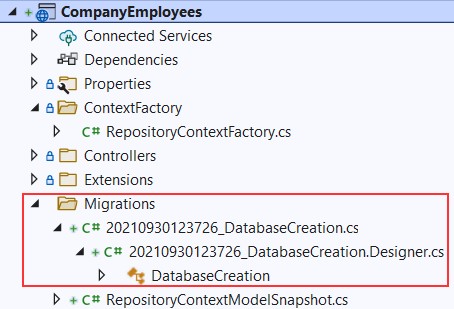
alt text

With those files in place, we can apply migration:
这些文件就位后,我们可以应用迁移:

PM> Update-Database

net8使用以下命令

PS C:\CompanyEmployees\CompanyEmployees> dotnet ef database update
Build started...
Build succeeded.
Applying migration '20250503152559_DatabaseCreation'.
Done.

Excellent. We can inspect our database now:
非常好。我们现在可以检查我们的数据库:
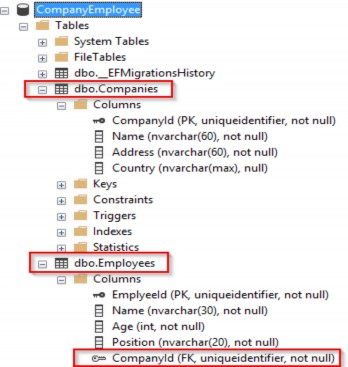
alt text

Once we have the database and tables created, we should populate them with some initial data. To do that, we are going to create another folder in the Repository project called Configuration and add the CompanyConfiguration class:
创建数据库和表后,我们应该使用一些初始数据填充它们。为此,我们将在 Repository 项目中创建另一个名为 Configuration 的文件夹,并添加 CompanyConfiguration 类:

// CompanyConfiguration.cs

using Entities.Models;
using Microsoft.EntityFrameworkCore;
using Microsoft.EntityFrameworkCore.Metadata.Builders;

namespace Repository.Configuration
{
    public class CompanyConfiguration : IEntityTypeConfiguration<Company>
    {
        public void Configure(EntityTypeBuilder<Company> builder)
        {
            builder.HasData(
                new Company
                {
                    Id = new Guid("c9d4c053-49b6-410c-bc78-2d54a9991870"),
                    Name = "IT_Solutions Ltd",
                    Address = "583 Wall Dr. Gwynn Oak, MD 21207",
                    Country = "USA"
                },
                new Company
                {
                    Id = new Guid("3d490a70-94ce-4d15-9494-5248280c2ce3"),
                    Name = "Admin_Solutions Ltd",
                    Address = "312 Forest Avenue, BF 923",
                    Country = "USA"
                });
        }
    }
}

Let’s do the same thing for the EmployeeConfiguration class:
让我们对 EmployeeConfiguration 类执行相同的作:

// EmployeeConfiguration.cs

using Entities.Models;
using Microsoft.EntityFrameworkCore;
using Microsoft.EntityFrameworkCore.Metadata.Builders;

namespace Repository.Configuration
{
    public class EmployeeConfiguration : IEntityTypeConfiguration<Employee>
    {
        public void Configure(EntityTypeBuilder<Employee> builder)
        {
            builder.HasData(
                new Employee
                {
                    Id = new Guid("80abbca8-664d-4b20-b5de-024705497d4a"),
                    Name = "Sam Raiden",
                    Age = 26,
                    Position = "Software developer",
                    CompanyId = new Guid("c9d4c053-49b6-410c-bc78-2d54a9991870")
                },
                new Employee
                {
                    Id = new Guid("86dba8c0-d178-41e7-938c-ed49778fb52a"),
                    Name = "Jana McLeaf",
                    Age = 30,
                    Position = "Software developer",
                    CompanyId = new Guid("c9d4c053-49b6-410c-bc78-2d54a9991870")
                },
                new Employee
                {
                    Id = new Guid("021ca3c1-0deb-4afd-ae94-2159a8479811"),
                    Name = "Kane Miller",
                    Age = 35,
                    Position = "Administrator",
                    CompanyId = new Guid("3d490a70-94ce-4d15-9494-5248280c2ce3")
                });
        }
    }
}

To invoke this configuration, we have to change the RepositoryContext class:
要调用此配置,我们必须更改 RepositoryContext 类:

// /Repository/RepositoryContext.cs 
using Entities.Models;
using Microsoft.EntityFrameworkCore;
using Repository.Configuration;

namespace Repository
{
    //public class RepositoryContext : DbContext
    //{
    //    public RepositoryContext(DbContextOptions options) : base(options) { }
    //    public DbSet<Company>? Companies { get; set; }
    //    public DbSet<Employee>? Employees { get; set; }
    //}

    public class RepositoryContext : DbContext { 
        public RepositoryContext(DbContextOptions options) : base(options) { } 
        protected override void OnModelCreating(ModelBuilder modelBuilder) { 
            modelBuilder.ApplyConfiguration(new CompanyConfiguration()); 
            modelBuilder.ApplyConfiguration(new EmployeeConfiguration()); 
        }
        public DbSet<Company> Companies { get; set; } 
        public DbSet<Employee> Employees { get; set; } }
}

Now, we can create and apply another migration to seed these data to the database:
现在,我们可以创建并应用另一个迁移,以将这些数据播种到数据库:

dotnet ef migrations add InitialData
dotnet ef database update

This will transfer all the data from our configuration files to the respective tables.
这会将配置文件中的所有数据传输到相应的表中。

3.5 Repository Pattern Logic

3.5 存储库模式逻辑

After establishing a connection to the database and creating one, it's time to create a generic repository that will provide us with the CRUD methods. As a result, all the methods can be called upon any repository class in our project.‌
在建立与数据库的连接并创建一个连接后,是时候创建一个通用存储库了,它将为我们提供 CRUD 方法。因此,所有方法都可以在我们项目中的任何存储库类上调用。

Furthermore, creating the generic repository and repository classes that use that generic repository is not going to be the final step. We will go a step further and create a wrapper class around repository classes and inject it as a service in a dependency injection container.
此外,创建使用该泛型存储库的泛型存储库和存储库类不会是最后一步。我们将更进一步,围绕存储库类创建一个包装器类,并将其作为服务注入到依赖项注入容器中。

Consequently, we will be able to instantiate this class once and then call any repository class we need inside any of our controllers.
因此,我们将能够实例化这个类一次,然后在我们的任何控制器中调用我们需要的任何仓库类。

The advantages of this approach will become clearer once we use it in the project.
一旦我们在项目中使用它,这种方法的优势就会变得更加明显。

That said, let’s start by creating an interface for the repository inside the Contracts project:
也就是说,让我们从 Contracts 项目中的存储库创建一个接口开始:

// /Contract/IRepositoryBase.cs

using System.Linq.Expressions;

namespace Contract
{
    public interface IRepositoryBase<T>
    {
        IQueryable<T> FindAll(bool trackChanges);
        IQueryable<T> FindByCondition(Expression<Func<T, bool>> expression, bool trackChanges);
        void Create(T entity);
        void Update(T entity);
        void Delete(T entity);
    }
}

Right after the interface creation, we are going to reference Contracts inside the Repository project. Also, in the Repository project, we are going to create an abstract class RepositoryBase — which is going to implement the IRepositoryBase interface:
在创建接口后,我们将引用 Repository 项目中的 Contracts。此外,在 Repository 项目中,我们将创建一个抽象类 RepositoryBase — 它将实现 IRepositoryBase 接口:

// /Repository/RepositoryBase.cs

using System.Linq.Expressions;
using Contract;
using Microsoft.EntityFrameworkCore;

namespace Repository
{
    public abstract class RepositoryBase<T> : IRepositoryBase<T> where T : class
    {
        protected RepositoryContext RepositoryContext;
        public RepositoryBase(RepositoryContext repositoryContext) => RepositoryContext = repositoryContext;
        public IQueryable<T> FindAll(bool trackChanges) => !trackChanges ? RepositoryContext.Set<T>().AsNoTracking() : RepositoryContext.Set<T>();
        public IQueryable<T> FindByCondition(Expression<Func<T, bool>> expression, bool trackChanges) => !trackChanges ? RepositoryContext.Set<T>().Where(expression).AsNoTracking() : RepositoryContext.Set<T>().Where(expression); 
        public void Create(T entity) => RepositoryContext.Set<T>().Add(entity); 
        public void Update(T entity) => RepositoryContext.Set<T>().Update(entity); 
        public void Delete(T entity) => RepositoryContext.Set<T>().Remove(entity);
    }
}

This abstract class as well as the IRepositoryBase interface work with the generic type T. This type T gives even more reusability to the RepositoryBase class. That means we don’t have to specify the exact model (class) right now for the RepositoryBase to work with. We can do that later on.
此抽象类以及 IRepositoryBase 接口使用泛型类型 T。此类型 T 为 RepositoryBase 类提供了更多的可重用性。这意味着我们现在不必为 RepositoryBase 指定确切的模型(类)。我们以后再做。

Moreover, we can see the trackChanges parameter. We are going to use it to improve our read-only query performance. When it’s set to false, we attach the AsNoTracking method to our query to inform EF Core that it doesn’t need to track changes for the required entities. This greatly improves the speed of a query.
此外,我们可以看到 trackChanges 参数。我们将使用它来提高只读查询性能。当它设置为 false 时,我们将 AsNoTracking 方法附加到我们的查询,以通知 EF Core 它不需要跟踪所需实体的更改。这大大提高了查询的速度。

3.6 Repository User Interfaces and Classes

3.6 存储库接口和类

Now that we have the RepositoryBase class, let’s create the user classes that will inherit this abstract class.‌
现在我们有了 RepositoryBase 类,让我们创建将继承此抽象类的用户类。

By inheriting from the RepositoryBase class, they will have access to all the methods from it. Furthermore, every user class will have its interface for additional model-specific methods.
通过继承 RepositoryBase 类,他们将可以访问该类中的所有方法。此外,每个 user class 都将具有其用于其他特定于模型的方法的接口。

This way, we are separating the logic that is common for all our repository user classes and also specific for every user class itself.
这样,我们将所有存储库用户类通用的逻辑以及每个用户类本身的特定逻辑分开。

Let’s create the interfaces in the Contracts project for the Company and Employee classes:
让我们在 Contracts 项目中为 Company 和 Employee 类创建接口:

// /Contract/ICompanyRepository.cs

namespace Contract
{
    public interface ICompanyRepository { }
}
// /Contract/IEmployeeRepository.cs

namespace Contract
{
    public interface IEmployeeRepository { }
}

After this, we can create repository user classes in the Repository project.
在此之后,我们可以在 Repository 项目中创建存储库用户类。

The first thing we are going to do is to create the CompanyRepository class:
我们要做的第一件事是创建 CompanyRepository 类:

// /Repository/CompanyRepository.cs

using Contract;
using Entities.Models;

namespace Repository
{
    public class CompanyRepository : RepositoryBase<Company>, ICompanyRepository
    {
        public CompanyRepository(RepositoryContext repositoryContext) : base(repositoryContext) { }
    }
}

And then, the EmployeeRepository class:
然后,EmployeeRepository 类:

// /Repository/EmployeeRepository.cs

using Contract;
using Entities.Models;

namespace Repository
{
    public class EmployeeRepository : RepositoryBase<Employee>, IEmployeeRepository
    {
        public EmployeeRepository(RepositoryContext repositoryContext) : base(repositoryContext) { }
    }
}

After these steps, we are finished creating the repository and repository- user classes. But there are still more things to do.
完成这些步骤后,我们完成了 repository 和 repository- user 类的创建。但还有更多的事情要做。

3.7 Creating a Repository Manager

3.7 创建仓库管理器

It is quite common for the API to return a response that consists of data from multiple resources; for example, all the companies and just some employees older than 30. In such a case, we would have to instantiate both of our repository classes and fetch data from their resources.‌
API 返回由来自多个资源的数据组成的响应是很常见的;例如,所有公司和一些 30 岁以上的员工。在这种情况下,我们将不得不实例化我们的两个存储库类并从它们的资源中获取数据。

Maybe it’s not a problem when we have only two classes, but what if we need the combined logic of five or even more different classes? It would just be too complicated to pull that off.
当我们只有两个类时,也许这不是问题,但如果我们需要五个甚至更多不同类的组合逻辑呢?要做到这一点太复杂了。

With that in mind, we are going to create a repository manager class, which will create instances of repository user classes for us and then register them inside the dependency injection container. After that, we can inject it inside our services with constructor injection (supported by ASP.NET Core). With the repository manager class in place, we may call any repository user class we need.
考虑到这一点,我们将创建一个存储库管理器类,它将为我们创建存储库用户类的实例,然后在依赖项注入容器中注册它们。之后,我们可以通过构造函数注入(由 ASP.NET Core 支持)将其注入我们的服务中。有了 repository manager 类,我们可以调用我们需要的任何 repository user 类。

But we are also missing one important part. We have the Create, Update, and Delete methods in the RepositoryBase class, but they won’t make any change in the database until we call the SaveChanges method. Our repository manager class will handle that as well.
但我们也缺少一个重要的部分。我们在 RepositoryBase 类中有 Create、Update 和 Delete 方法,但在调用 SaveChanges 方法之前,它们不会在数据库中进行任何更改。我们的仓库管理器类也会处理这个问题。

That said, let’s get to it and create a new interface in the Contract project:
也就是说,让我们开始在 Contract 项目中创建一个新界面:

// /Contract/IRepositoryManager.cs

namespace Contract
{
    public interface IRepositoryManager
    {
        ICompanyRepository Company { get; }
        IEmployeeRepository Employee { get; }
        void Save();
    }
}

And add a new class to the Repository project:
并将一个新类添加到 Repository 项目中:

// /Repository/RepositoryManager.cs

using Contract;

namespace Repository
{
    public sealed class RepositoryManager : IRepositoryManager
    {
        private readonly RepositoryContext _repositoryContext;
        private readonly Lazy<ICompanyRepository> _companyRepository;
        private readonly Lazy<IEmployeeRepository> _employeeRepository;
        public RepositoryManager(RepositoryContext repositoryContext)
        {
            _repositoryContext = repositoryContext;
            _companyRepository = new Lazy<ICompanyRepository>(() => new CompanyRepository(repositoryContext));
            _employeeRepository = new Lazy<IEmployeeRepository>(() => new EmployeeRepository(repositoryContext));
        }
        public ICompanyRepository Company => _companyRepository.Value;
        public IEmployeeRepository Employee => _employeeRepository.Value;
        public void Save() => _repositoryContext.SaveChanges();
    }
}

As you can see, we are creating properties that will expose the concrete repositories and also we have the Save() method to be used after all the modifications are finished on a certain object. This is a good practice because now we can, for example, add two companies, modify two employees, and delete one company — all in one action — and then just call the Save method once. All the changes will be applied or if something fails, all the changes will be reverted:
如您所见,我们正在创建将公开具体存储库的属性,并且我们还有 Save() 方法,可在完成对某个对象的所有修改后使用。这是一种很好的做法,因为现在我们可以添加两个公司,修改两个员工,删除一个公司 - 所有这些都在一个作中完成 - 然后只需调用 Save 方法一次。将应用所有更改,或者如果失败,则所有更改都将被还原:

_repository.Company.Create(company); 
_repository.Company.Create(anotherCompany); _repository.Employee.Update(employee); 
_repository.Employee.Update(anotherEmployee); _repository.Company.Delete(oldCompany); 
_repository.Save();

The interesting part with the RepositoryManager implementation is that we are leveraging the power of the Lazy class to ensure the lazy initialization of our repositories. This means that our repository instances are only going to be created when we access them for the first time, and not before that.
RepositoryManager 实现的有趣之处在于,我们利用 Lazy 类的强大功能来确保存储库的延迟初始化。这意味着我们的存储库实例只会在我们第一次访问它们时创建,而不是在此之前。

After these changes, we need to register our manager class in the main project. So, let’s first modify the ServiceExtensions class by adding this code:
完成这些更改后,我们需要在主项目中注册我们的 manager 类。因此,让我们首先通过添加以下代码来修改 ServiceExtensions 类:

// /CompanyEmployees.Extensions/ServiceExtensions.cs

using Contract;
using LoggerService;
using Repository;

namespace CompanyEmployees.Extensions
{
    public static class ServiceExtensions
    {
        public static void ConfigureCors(this IServiceCollection services) =>
            services.AddCors(options =>
            {
                options.AddPolicy("CorsPolicy", builder =>
                builder.AllowAnyOrigin()
                       .AllowAnyMethod()
                       .AllowAnyHeader());
            });

        public static void ConfigureIISIntegration(this IServiceCollection services) =>
            services.Configure<IISOptions>(options =>
            {
            });

        public static void ConfigureLoggerService(this IServiceCollection services) => 
            services.AddSingleton<ILoggerManager, LoggerManager>();

        public static void ConfigureRepositoryManager(this IServiceCollection services) => 
            services.AddScoped<IRepositoryManager, RepositoryManager>();
    }
}

And in the Program class above the AddController() method, we have to add this code:

builder.Services.ConfigureCors();
builder.Services.ConfigureIISIntegration();
builder.Services.ConfigureRepositoryManager();

builder.Services.AddControllers();

Excellent.
非常好。

As soon as we add some methods to the specific repository classes, and add our service layer, we are going to be able to test this logic.
一旦我们将一些方法添加到特定的存储库类中,并添加我们的服务层,我们就可以测试这个逻辑。

So, we did an excellent job here. The repository layer is prepared and ready to be used to fetch data from the database.
所以,我们在这里做得很好。存储库层已准备就绪,可用于从数据库中获取数据。

Now, we can continue towards creating a service layer in our application.
现在,我们可以继续在我们的应用程序中创建一个服务层。

3.8 Adding a Service Layer

3.8 添加服务层

The Service layer sits right above the Domain layer (the Contracts project is the part of the Domain layer), which means that it has a reference to the Domain layer. The Service layer will be split into two‌ projects, Service.Contracts and Service.
Service 层位于 Domain 层的正上方(Contracts 项目是 Domain 层的一部分),这意味着它具有对 Domain 层的引用。Service 层将拆分为两个项目:Service.Contract 和 Service。

So, let’s start with the Service.Contracts project creation (.NET Core Class Library) where we will hold the definitions for the service interfaces that are going to encapsulate the main business logic. In the next section, we are going to create a presentation layer and then, we will see the full use of this project.
因此,让我们从 Service.Contracts 项目创建(.NET Core 类库)开始,我们将在其中保存将封装主业务逻辑的服务接口的定义。在下一节中,我们将创建一个表示层,然后,我们将看到此项目的完整使用。

Once the project is created, we are going to add three interfaces inside it.
创建项目后,我们将在其中添加三个接口。

ICompanyService:

// /Service.Contracts/ICompanyService.cs

namespace Service.Contracts
{
    public interface ICompanyService { }
}

IEmployeeService:

// /Service.Contracts/IEmployeeService.cs

namespace Service.Contracts
{
    public interface IEmployeeService { }
}

And IServiceManager:

// /Service.Contracts/IServiceManager.cs

namespace Service.Contracts
{
    public interface IServiceManager
    {
        ICompanyService CompanyService { get; }
        IEmployeeService EmployeeService { get; }
    }
}

As you can see, we are following the same pattern as with the repository contracts implementation.
如您所见,我们遵循与 repository contracts 实现相同的模式。

Now, we can create another project, name it Service, and reference the Service.Contracts and Contracts projects inside it:
现在,我们可以创建另一个项目,将其命名为 Service,并引用Service.Contracts 和 Contracts 项目:
alt text

After that, we are going to create classes that will inherit from the interfaces that reside in the Service.Contracts project.
之后,我们将创建将从驻留在 Service.Contracts 项目中的接口继承的类。

So, let’s start with the CompanyService class:
因此,让我们从 CompanyService 类开始:

// /Service/CompanyService.cs

using Contract;
using Service.Contracts;

namespace Service
{
    internal sealed class CompanyService : ICompanyService
    {
        private readonly IRepositoryManager _repository;
        private readonly ILoggerManager _logger;
        public CompanyService(IRepositoryManager repository, ILoggerManager logger)
        {
            _repository = repository; _logger = logger;
        }
    }
}

As you can see, our class inherits from the ICompanyService interface, and we are injecting the IRepositoryManager and ILoggerManager interfaces. We are going to use IRepositoryManager to access the repository methods from each user repository class (CompanyRepository or EmployeeRepository), and ILoggerManager to access the logging methods we’ve created in the second section of this book.
如您所见,我们的类继承自 ICompanyService 接口,并且我们正在注入 IRepositoryManager 和 ILoggerManager 接口。我们将使用 IRepositoryManager 访问每个用户存储库类(CompanyRepository 或 EmployeeRepository)中的存储库方法,并使用 ILoggerManager 访问我们在本书的第二部分中创建的日志记录方法。

To continue, let’s create a new EmployeeService class:
要继续,让我们创建一个新的 EmployeeService 类:

// /Service/EmployeeService.cs

using Contract;
using Service.Contracts;

namespace Service
{
    internal sealed class EmployeeService : IEmployeeService
    {
        private readonly IRepositoryManager _repository; 
        private readonly ILoggerManager _logger; 
        public EmployeeService(IRepositoryManager repository, ILoggerManager logger)
        {
            _repository = repository; _logger = logger;
        }
    }
}

Finally, we are going to create the ServiceManager class:
最后,我们将创建 ServiceManager 类:

// /Service/ServiceManager.cs

using Contract;
using Service.Contracts;
using Service;

public sealed class ServiceManager : IServiceManager
{
    private readonly Lazy<ICompanyService> _companyService; private readonly Lazy<IEmployeeService> _employeeService;
    public ServiceManager(IRepositoryManager repositoryManager, ILoggerManager logger)
    {
        _companyService = new Lazy<ICompanyService>(() => new CompanyService(repositoryManager, logger));
        _employeeService = new Lazy<IEmployeeService>(() => new EmployeeService(repositoryManager, logger));
    }
    public ICompanyService CompanyService => _companyService.Value;
    public IEmployeeService EmployeeService => _employeeService.Value;
}

Here, as we did with the RepositoryManager class, we are utilizing the Lazy class to ensure the lazy initialization of our services.
在这里,正如我们对 RepositoryManager 类所做的那样,我们利用 Lazy 类来确保服务的延迟初始化。

Now, with all these in place, we have to add the reference from the Service project inside the main project. Since Service is already referencing Service.Contracts, our main project will have the same reference as well.
现在,完成所有这些作后,我们必须在主项目中添加来自 Service 项目的引用。由于 Service 已经引用了 Service.Contracts,因此我们的主项目也将具有相同的引用。

Now, we have to modify the ServiceExtensions class:
现在,我们必须修改 ServiceExtensions 类:

using Contract;
using LoggerService;
using Repository;
using Service.Contracts;

namespace CompanyEmployees.Extensions
{
    public static class ServiceExtensions
    {
        public static void ConfigureCors(this IServiceCollection services) =>
            services.AddCors(options =>
            {
                options.AddPolicy("CorsPolicy", builder =>
                builder.AllowAnyOrigin()
                       .AllowAnyMethod()
                       .AllowAnyHeader());
            });

        public static void ConfigureIISIntegration(this IServiceCollection services) =>
            services.Configure<IISOptions>(options =>
            {
            });

        public static void ConfigureLoggerService(this IServiceCollection services) => 
            services.AddSingleton<ILoggerManager, LoggerManager>();

        public static void ConfigureRepositoryManager(this IServiceCollection services) => 
            services.AddScoped<IRepositoryManager, RepositoryManager>();

        public static void ConfigureServiceManager(this IServiceCollection services) => 
            services.AddScoped<IServiceManager, ServiceManager>();
    }
}

And we have to add using directives:
我们必须添加 using 指令:

using Service; 
using Service.Contracts;

Then, all we have to do is to modify the Program class to call this extension method:
然后,我们所要做的就是修改 Program 类以调用此扩展方法:

builder.Services.ConfigureIISIntegration();
builder.Services.ConfigureRepositoryManager();
builder.Services.ConfigureServiceManager();

builder.Services.AddControllers();

3.9 Registering RepositoryContext at a Runtime

3.9 在运行时注册 RepositoryContext

With the RepositoryContextFactory class, which implements the IDesignTimeDbContextFactory interface, we have registered our RepositoryContext class at design time. This helps us find the RepositoryContext class in another project while executing migrations.‌
使用实现 IDesignTimeDbContextFactory 接口的 RepositoryContextFactory 类,我们在设计时注册了 RepositoryContext 类。这有助于我们在执行迁移时在另一个项目中找到 RepositoryContext 类。

But, as you could see, we have the RepositoryManager service registration, which happens at runtime, and during that registration, we must have RepositoryContext registered as well in the runtime, so we could inject it into other services (like RepositoryManager service). This might be a bit confusing, so let’s see what that means for us.
但是,正如你所看到的,我们有 RepositoryManager 服务注册,这发生在运行时,在注册期间,我们也必须在运行时注册 RepositoryContext,以便我们可以将其注入到其他服务(如 RepositoryManager 服务)中。这可能有点令人困惑,所以让我们看看这对我们意味着什么。

Let’s modify the ServiceExtensions class:
让我们修改 ServiceExtensions 类:

using Contract;
using LoggerService;
using Microsoft.EntityFrameworkCore;
using Repository;
using Service.Contracts;

namespace CompanyEmployees.Extensions
{
    public static class ServiceExtensions
    {
        public static void ConfigureCors(this IServiceCollection services) =>
            services.AddCors(options =>
            {
                options.AddPolicy("CorsPolicy", builder =>
                builder.AllowAnyOrigin()
                       .AllowAnyMethod()
                       .AllowAnyHeader());
            });

        public static void ConfigureIISIntegration(this IServiceCollection services) =>
            services.Configure<IISOptions>(options =>
            {
            });

        public static void ConfigureLoggerService(this IServiceCollection services) => 
            services.AddSingleton<ILoggerManager, LoggerManager>();

        public static void ConfigureRepositoryManager(this IServiceCollection services) => 
            services.AddScoped<IRepositoryManager, RepositoryManager>();

        public static void ConfigureServiceManager(this IServiceCollection services) => 
            services.AddScoped<IServiceManager, ServiceManager>();

        public static void ConfigureSqlContext(this IServiceCollection services, IConfiguration configuration) => 
            services.AddDbContext<RepositoryContext>(opts => opts.UseSqlServer(configuration.GetConnectionString("sqlConnection")));
    }
}

We are not specifying the MigrationAssembly inside the UseSqlServer method. We don’t need it in this case.
我们没有在 UseSqlServer 方法中指定 MigrationAssembly。在这种情况下,我们不需要它。

As the final step, we have to call this method in the Program class:
作为最后一步,我们必须在 Program 类中调用此方法:

builder.Services.ConfigureRepositoryManager();
builder.Services.ConfigureServiceManager();
builder.Services.ConfigureSqlContext(builder.Configuration);

builder.Services.AddControllers();

With this, we have completed our implementation, and our service layer is ready to be used in our next chapter where we are going to learn about handling GET requests in ASP.NET Core Web API.
这样,我们已经完成了我们的实现,我们的服务层已准备好在下一章中使用,我们将在下一章中学习如何在 ASP.NET Core Web API 中处理 GET 请求。

One additional thing. From .NET 6 RC2, there is a shortcut method AddSqlServer, which can be used like this:
还有一件事。从 .NET 6 RC2 开始,有一个快捷方法 AddSqlServer,可以像这样使用:

public static void ConfigureSqlContext(this IServiceCollection services, IConfiguration configuration) => services.AddSqlServer<RepositoryContext>((configuration.GetConnectionString("sqlConnection")));

This method replaces both AddDbContext and UseSqlServer methods and allows an easier configuration. But it doesn’t provide all of the features the AddDbContext method provides. So for more advanced options, it is recommended to use AddDbContext. We will use it throughout the rest of the project.
此方法替换了 AddDbContext 和 UseSqlServer 方法,并允许更轻松地进行配置。但它不提供 AddDbContext 方法提供的所有功能。因此,对于更高级的选项,建议使用 AddDbContext。我们将在项目的其余部分使用它。
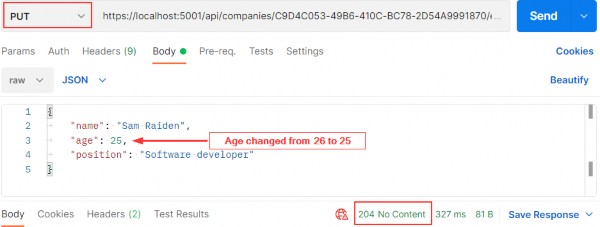
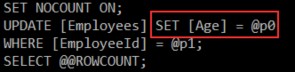
Ultimate ASP.NET Core Web API 2 Creating the Required Projects

2 Configuring a logging service

2 配置日志记录服务

Why do logging messages matter so much during application development? While our application is in the development stage, it's easy to debug the code and find out what happened. But debugging in a production environment is not that easy.‌
为什么在应用程序开发过程中,日志记录消息如此重要?虽然我们的应用程序处于开发阶段,但很容易调试代码并找出发生了什么。但是在生产环境中进行调试并不是那么容易。

That's why log messages are a great way to find out what went wrong and why and where the exceptions have been thrown in our code in the production environment. Logging also helps us more easily follow the flow of our application when we don’t have access to the debugger.
这就是为什么日志消息是找出问题所在以及生产环境中代码中引发异常的原因和位置的好方法。日志记录还有助于我们在无法访问调试器时更轻松地跟踪应用程序的流程。

.NET Core has its implementation of the logging mechanism, but in all our projects we prefer to create our custom logger service with the external logger library NLog.
.NET Core 具有日志记录机制的实现,但在我们所有的项目中,我们更喜欢使用外部记录器库 NLog 创建自定义记录器服务。

We are going to do that because having an abstraction will allow us to have any logger behind our interface. This means that we can start with NLog, and at some point, we can switch to any other logger and our interface will still work because of our abstraction.
我们之所以这样做,是因为有一个抽象将允许我们在接口后面拥有任何 Logger。这意味着我们可以从 NLog 开始,在某些时候,我们可以切换到任何其他 logger,并且由于我们的抽象,我们的接口仍然可以工作。

2.1 Creating the Required Projects

2.1 创建所需的项目

Let’s create two new projects. In the first one named Contracts, we are going to keep our interfaces. We will use this project later on too, to define our contracts for the whole application. The second one, LoggerService, we are going to use to write our logger logic in.‌
让我们创建两个新项目。在第一个名为 Contract,我们将保留我们的接口。我们稍后也将使用这个项目来定义整个应用程序的 Contract。第二个是 LoggerService,我们将使用它来编写我们的 Logger 逻辑。

To create a new project, right-click on the solution window, choose Add, and then NewProject. Choose the Class Library (C#) project template:
要创建新项目,请右键单击解决方案窗口,选择 Add(添加),然后选择 NewProject。选择 Class Library (C#) 项目模板:

alt text

Finally, name it Contracts, and choose the .NET 6.0 as a version. Do the same thing for the second project and name it LoggerService. Now that we have these projects in place, we need to reference them from our main project.
最后,将其命名为 Contracts,并选择 .NET 6.0 作为版本。对第二个项目执行相同的作,并将其命名为 LoggerService。现在我们已经准备好了这些项目,我们需要从主项目中引用它们。

To do that, navigate to the solution explorer. Then in the LoggerService project, right-click on Dependencies and choose the Add Project Reference option. Under Projects, click Solution and check the Contracts project.
为此,请导航到解决方案资源管理器。然后在 LoggerService 项目中,右键单击 Dependencies 并选择 Add Project Reference 选项。在 Projects 下,单击 Solution 并选中 Contracts 项目。

Now, in the main project right click on Dependencies and then click on Add Project Reference. Check the LoggerService checkbox to import it. Since we have referenced the Contracts project through the LoggerService, it will be available in the main project too.
现在,在主项目中,右键单击 Dependencies,然后单击 Add Project Reference。选中 LoggerService 复选框以导入它。由于我们已经通过 LoggerService 引用了 Contracts 项目,因此它也将在主项目中可用。

2.2 Creating the ILoggerManager Interface and Installing NLog

2.2 创建 ILoggerManager 接口并安装 NLog

Our logger service will contain four methods for logging our messages:‌
我们的 logger 服务将包含四种记录消息的方法:

• Info messages
• 信息消息

• Debug messages
• 调试消息

• Warning messages
• 警告消息

• Error messages
• 错误消息

To achieve this, we are going to create an interface named ILoggerManager inside the Contracts project containing those four method definitions.
为此,我们将在包含这四个方法定义的 Contracts 项目中创建一个名为 ILoggerManager 的接口。

So, let’s do that first by right-clicking on the Contracts project, choosing the Add -> New Item menu, and then selecting the Interface option where we have to specify the name ILoggerManager and click the Add button. After the file creation, we can add the code:
因此,让我们首先右键单击 Contracts 项目,选择 Add -> New Item 菜单,然后选择 Interface 选项,我们必须在其中指定名称 ILoggerManager 并单击 Add 按钮。创建文件后,我们可以添加代码:

namespace Contract
{
    public interface ILoggerManager
    {
            void LogInfo(string message); 
            void LogWarn(string message);
            void LogDebug(string message); 
            void LogError(string message); 
    }
}

Before we implement this interface inside the LoggerService project, we need to install the NLog library in our LoggerService project. NLog is a logging platform for .NET which will help us create and log our messages.
在 LoggerService 项目中实现此接口之前,我们需要在 LoggerService 项目中安装 NLog 库。NLog 是一个 .NET 的日志记录平台,它将帮助我们创建和记录我们的消息。

We are going to show two different ways of adding the NLog library to our project.
我们将展示将 NLog 库添加到项目中的两种不同方法。

  1. In the LoggerService project, right-click on the Dependencies and choose Manage NuGet Packages. After the NuGet Package Manager window appears, just follow these steps:
    在 LoggerService 项目中,右键单击 Dependencies 并选择 Manage NuGet Packages。出现 NuGet 包管理器窗口后,只需按照以下步骤作:

alt text

  1. From the View menu, choose Other Windows and then click on the Package Manager Console. After the console appears, type:
    从 View (视图) 菜单中,选择 Other Windows (其他窗口),然后单击 Package Manager 控制台。控制台出现后,键入:
Install-Package NLog.Extensions.Logging -Version 1.7.4

After a couple of seconds, NLog is up and running in our application.
几秒钟后,NLog 在我们的应用程序中启动并运行。

2.3 Implementing the Interface and Nlog.Config File

2.3 实现接口和 Nlog.Config 文件

In the LoggerService project, we are going to create a new‌ class: LoggerManager. We can do that by repeating the same steps for the interface creation just choosing the class option instead of an interface. Now let’s have it implement the ILoggerManager interface we previously defined:
在 LoggerService 项目中,我们将创建一个新类:LoggerManager。为此,只需选择 class 选项而不是 interface,即可对界面创建重复相同的步骤。现在让我们让它实现我们之前定义的 ILoggerManager 接口:

using Contract;
using NLog;

namespace LoggerService
{
    public class LoggerManager : ILoggerManager
    {
        private static ILogger logger = LogManager.GetCurrentClassLogger();
        public LoggerManager() { }
        public void LogDebug(string message) => logger.Debug(message);
        public void LogError(string message) => logger.Error(message);
        public void LogInfo(string message) => logger.Info(message);
        public void LogWarn(string message) => logger.Warn(message);
    }
}

As you can see, our methods are just wrappers around NLog’s methods. Both ILogger and LogManager are part of the NLog namespace. Now, we need to configure it and inject it into the Program class in the section related to the service configuration.
如你所见,我们的方法只是 NLog 方法的包装器。ILogger 和 LogManager 都是 NLog 命名空间的一部分。现在,我们需要配置它并将其注入到与服务配置相关的部分的 Program 类中。

NLog needs to have information about where to put log files on the file system, what the name of these files will be, and what is the minimum level of logging that we want.
NLog 需要了解将日志文件放在文件系统上的哪个位置、这些文件的名称以及我们所需的最低日志记录级别的信息。

We are going to define all these constants in a text file in the main project and name it nlog.config. So, let’s right-click on the main project, choose Add -> New Item, and then search for the Text File. Select the Text File, and add the name nlog.config.
我们将在主项目的文本文件中定义所有这些常量,并将其命名为 nlog.config。因此,让我们右键单击主项目,选择 Add -> New Item,然后搜索 Text File。选择文本文件,并添加名称 nlog.config。

<?xml version="1.0" encoding="utf-8" ?>
<nlog xmlns="http://www.nlog-project.org/schemas/NLog.xsd" 
      xmlns:xsi="http://www.w3.org/2001/XMLSchema-instance" 
      autoReload="true" 
      internalLogLevel="Trace" 
      internalLogFile=".\internal_logs\internallog.txt">
    <targets>
        <target name="logfile" 
                xsi:type="File" 
                fileName=".\logs\${shortdate}_logfile.txt" 
                layout="${longdate} ${level:uppercase=true} ${message}"/>
    </targets>
    <rules>
        <logger name="*" minlevel="Debug" writeTo="logfile" />
    </rules>
</nlog>

You can find the internal logs at the project root, and the logs folder in the bin\debug folder of the main project once we start the app. Once the application is published both folders will be created at the root of the output folder which is what we want.
您可以在项目根目录下找到内部日志,并在启动应用程序后在主项目的 bin\debug 文件夹中找到 logs 文件夹。应用程序发布后,将在输出文件夹的根目录下创建两个文件夹,这就是我们想要的。

NOTE: If you want to have more control over the log output, we suggest renaming the current file to nlog.development.config and creating another configuration file called nlog.production.config. Then you can do something like this in the code: env.ConfigureNLog($"nlog.{env.EnvironmentName}.config"); to get the different configuration files for different environments. From our experience production path is what matters, so this might be a bit redundant.
注意:如果您想对日志输出进行更多控制,我们建议将当前文件重命名为 nlog.development.config,并创建另一个名为 nlog.production.config 的配置文件。然后,您可以在代码中执行如下作:env.ConfigureNLog($"nlog.{env.EnvironmentName}.config");以获取不同环境的不同配置文件。根据我们的经验,生产路径才是最重要的,所以这可能有点多余。

2.4 Configuring Logger Service for Logging Messages

2.4 配置 Logger 服务以记录消息

Setting up the configuration for a logger service is quite easy. First, we need to update the Program class and include the path to the configuration file for the NLog configuration:‌
为 Logger 服务设置配置非常简单。首先,我们需要更新 Program 类并包含 NLog 配置的配置文件路径:

using CompanyEmployees.Extensions;
using Microsoft.AspNetCore.HttpOverrides;
using NLog;

var builder = WebApplication.CreateBuilder(args);

// Add services to the container.

// 这个方法在net8的nlog5.4中提示已过时
LogManager.LoadConfiguration(
    string.Concat(Directory.GetCurrentDirectory(), 
    "/nlog.config"));
builder.Services.ConfigureCors();
builder.Services.ConfigureIISIntegration();

We are using NLog’s LogManager static class with the LoadConfiguration method to provide a path to the configuration file.
我们将 NLog 的 LogManager 静态类与 LoadConfiguration 方法结合使用,以提供配置文件的路径。

NOTE: If VisualStudio asks you to install the NLog package in the main project, don’t do it. Just remove the LoggerService reference from the main project and add it again. We have already installed the required package in the LoggerService project and the main project should be able to reference it as well.
注意:如果 VisualStudio 要求您在主项目中安装 NLog 包,请不要这样做。只需从主项目中删除 LoggerService 引用,然后再次添加即可。我们已经在 LoggerService 项目中安装了所需的包,主项目也应该能够引用它。
The next thing we need to do is to add the logger service inside the .NET Core’s IOC container. There are three ways to do that:
接下来我们需要做的是在 .NET Core 的 IOC 容器中添加记录器服务。有三种方法可以做到这一点:

• By calling the services.AddSingleton method, we can create a service the first time we request it and then every subsequent request will call the same instance of the service. This means that all components share the same service every time they need it and the same instance will be used for every method call.
• 通过调用services.AddSingleton 方法,我们可以在第一次请求服务时创建一个服务,然后每个后续请求都将调用该服务的同一实例。这意味着所有组件每次需要时都共享相同的服务,并且每个方法调用都将使用相同的实例。

• By calling the services.AddScoped method, we can create a service once per request. That means whenever we send an HTTP request to the application, a new instance of the service will be created.
• 通过调用services.AddScoped 方法,我们可以为每个请求创建一次服务。这意味着每当我们向应用程序发送 HTTP 请求时,都会创建一个新的服务实例。

• By calling the services.AddTransient method, we can create a service each time the application requests it. This means that if multiple components need the service, it will be created again for every single component request.
• 通过调用services.AddTransient方法,我们可以在每次应用程序请求时创建一个服务。这意味着,如果多个组件需要该服务,将为每个组件请求再次创建该服务。

So, let’s add a new method in the ServiceExtensions class:
因此,让我们在 ServiceExtensions 类中添加一个新方法:

using Contract;
using LoggerService;

namespace CompanyEmployees.Extensions
{
    public static class ServiceExtensions
    {
        public static void ConfigureCors(this IServiceCollection services) =>
            services.AddCors(options =>
            {
                options.AddPolicy("CorsPolicy", builder =>
                builder.AllowAnyOrigin()
                       .AllowAnyMethod()
                       .AllowAnyHeader());
            });

        public static void ConfigureIISIntegration(this IServiceCollection services) =>
            services.Configure<IISOptions>(options =>
            {
            });

        public static void ConfigureLoggerService(this IServiceCollection services) => 
            services.AddSingleton<ILoggerManager, LoggerManager>();
    }
}

And after that, we need to modify the Program class to include our newly created extension method:
之后,我们需要修改 Program 类以包含我们新创建的扩展方法:

builder.Services.AddControllers();
builder.Services.ConfigureLoggerService();
builder.Services.ConfigureCors();
builder.Services.ConfigureIISIntegration();

Every time we want to use a logger service, all we need to do is to inject it into the constructor of the class that needs it. .NET Core will resolve that service and the logging features will be available.
每次我们想使用 Logger 服务时,我们需要做的就是将其注入到需要它的类的构造函数中。.NET Core 将解析该服务,并且日志记录功能将可用。

This type of injecting a class is called Dependency Injection and it is built into .NET Core.
这种类型的注入类称为依赖项注入,它内置于 .NET Core 中。

Let’s learn a bit more about it.
让我们更多地了解它。
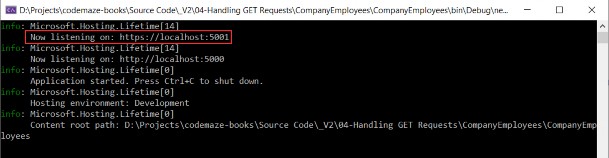
2.5 DI, IoC, and Logger Service Testing

2.5 DI、IoC 和 Logger 服务测试

What is Dependency Injection (DI) exactly and what is IoC (Inversion of Control)?‌
究竟什么是依赖注入 (DI),什么是 IoC(控制反转)?

Dependency injection is a technique we use to achieve the decoupling of objects and their dependencies. It means that rather than instantiating an object explicitly in a class every time we need it, we can instantiate it once and then send it to the class.
依赖注入是我们用来实现对象及其依赖的解耦的一种技术。这意味着,与其每次需要时都在类中显式实例化对象,不如实例化它一次,然后将其发送到类。

This is often done through a constructor. The specific approach we utilize is also known as the Constructor Injection.
这通常是通过构造函数完成的。我们使用的特定方法也称为 Constructor Injection。

In a system that is designed around DI, you may find many classes requesting their dependencies via their constructors. In this case, it is helpful to have a class that manages and provides dependencies to classes through the constructor.
在围绕 DI 设计的系统中,您可能会发现许多类通过其构造函数请求其依赖项。在这种情况下,拥有一个通过构造函数管理类并提供类依赖项的类会很有帮助。

These classes are referred to as containers or more specifically, Inversion of Control containers. An IoC container is essentially a factory that is responsible for providing instances of the types that are requested from it.
这些类称为容器,或者更具体地说,称为控制反转容器。IoC 容器本质上是一个工厂,负责提供从它请求的类型的实例。

To test our logger service, we are going to use the default WeatherForecastController. You can find it in the main project in the Controllers folder. It comes with the ASP.NET Core Web API template.
为了测试我们的 logger 服务,我们将使用默认的 WeatherForecastController。您可以在主项目的 Controllers 文件夹中找到它。它附带 ASP.NET Core Web API 模板。

In the Solution Explorer, we are going to open the Controllers folder and locate the WeatherForecastController class. Let’s modify it:
在解决方案资源管理器中,我们将打开 Controllers 文件夹并找到 WeatherForecastController 类。让我们修改一下:

using Contract;
using Microsoft.AspNetCore.Mvc;

[Route("[controller]")]
[ApiController]
public class WeatherForecastController : ControllerBase
{
    private ILoggerManager _logger;
    public WeatherForecastController(ILoggerManager logger) { _logger = logger; }
    [HttpGet]
    public IEnumerable<string> Get()
    {
        _logger.LogInfo("Here is info message from our values controller."); 
        _logger.LogDebug("Here is debug message from our values controller."); 
        _logger.LogWarn("Here is warn message from our values controller."); 
        _logger.LogError("Here is an error message from our values controller.");
        return new string[] { "value1", "value2" };
    }
}

Now let’s start the application and browse to :
现在,让我们启动应用程序并浏览到:
https://localhost:5001/weatherforecast.

As a result, you will see an array of two strings. Now go to the folder that you have specified in the nlog.config file, and check out the result. You should see two folders: the internal_logs folder and the logs folder. Inside the logs folder, you should find a file with the following logs:
结果,您将看到一个包含两个字符串的数组。现在转到您在 nlog.config 文件中指定的文件夹,并查看结果。您应该看到两个文件夹:internal_logs 文件夹和 logs 文件夹。在 logs 文件夹中,您应该会找到一个包含以下日志的文件:

alt text

That’s all we need to do to configure our logger for now. We’ll add some messages to our code along with the new features.
这就是我们现在需要做的配置 logger 的全部工作。我们将向代码中添加一些消息以及新功能。