Mastering Minimal APIs in ASP.NET Core
Copyright © 2022 Packt Publishing
In memory of my mother and father, Giovanna and Francesco, for their sacrifices and for supporting me in studying and facing new challenges every day.
为了纪念我的父母 Giovanna 和 Francesco,感谢他们的牺牲,以及支持我学习和每天面对新的挑战。
– 安德里亚·土里
– Andrea Tosato
To my family, friends, and colleagues, who have always believed in me during this journey.
– Marco Minerva
感谢我的家人、朋友和同事,他们在这段旅程中一直相信我。
– 马可·密涅瓦
In memory of my beloved mom, and to my wife, Francesca, for her sacrifices and understanding.
Last but not least, to my son, Leonardo. The greatest success in my life.
– Emanuele Bartolesi
为了纪念我敬爱的妈妈,以及我的妻子弗朗西斯卡,感谢她的牺牲和理解。
最后但并非最不重要的一点是,感谢我的儿子莱昂纳多。我一生中最大的成功。
– 埃马努埃莱·巴托莱西
Contributors
贡献
About the authors
作者简介
Andrea Tosato is a full stack software engineer and architect of .NET applications. Andrea has successfully developed .NET applications in various industries, sometimes facing complex technological challenges. He deals with desktop, web, and mobile development but with the arrival of the cloud, Azure has become his passion. In 2017, he co-founded Cloudgen Verona (a .NET community based in Verona, Italy) with his friend, Marco Zamana. In 2019, he was named Microsoft MVP for the first time in the Azure category. Andrea graduated from the University of Pavia with a degree in computer engineering in 2008 and successfully completed his master’s degree, also in computer engineering, in Modena in 2011. Andrea was born in 1986 in Verona, Italy, where he currently works as a remote worker. You can find Andrea on Twitter.
Andrea Tosato 是一名全栈软件工程师和 .NET 应用程序架构师。Andrea 在各个行业成功开发了 .NET 应用程序,有时面临复杂的技术挑战。他处理桌面、Web 和移动开发,但随着云的到来,Azure 已成为他的热情所在。2017 年,他与朋友 Marco Zamana 共同创立了 Cloudgen Verona(一个位于意大利维罗纳的 .NET 社区)。2019 年,他首次被评为 Azure 类别的 Microsoft MVP。Andrea 于 2008 年毕业于帕维亚大学,获得计算机工程学位,并于 2011 年在摩德纳成功完成了计算机工程硕士学位。Andrea 于 1986 年出生于意大利维罗纳,目前在那里担任远程工作者。你可以在 Twitter 上找到 Andrea。
Marco Minerva has been a computer enthusiast since elementary school when he received an old Commodore VIC-20 as a gift. He began developing with GW-BASIC. After some experience with Visual Basic, he has been using .NET since its first introduction. He got his master’s degree in information technology in 2006. Today, he lives in Taggia, Italy, where he works as a freelance consultant and is involved in designing and developing solutions for the Microsoft ecosystem, building applications for desktop, mobile, and web. His expertise is in backend development as a software architect. He runs training courses, is a speaker at technical events, writes articles for magazines, and regularly makes live streams about coding on Twitch. He has been a Microsoft MVP since 2013. You can find Marco on Twitter.
Marco Minerva 从小学开始就是一个计算机爱好者,当时他收到了一台旧的 Commodore VIC-20 作为礼物。他开始使用 GW-BASIC 进行开发。在具备一些 Visual Basic 经验后,他自首次引入 .NET 以来就一直在使用 .NET。他于 2006 年获得信息技术硕士学位。如今,他住在意大利塔吉亚,在那里他是一名自由顾问,参与为 Microsoft 生态系统设计和开发解决方案,构建桌面、移动和 Web 应用程序。他的专长是作为软件架构师进行后端开发。他举办培训课程,在技术活动中发表演讲,为杂志撰写文章,并定期在 Twitch 上制作有关编码的直播。自 2013 年以来,他一直是 Microsoft MVP。您可以在 Twitter 上找到 Marco。
Emanuele Bartolesi is a Microsoft 365 architect who is passionate about frontend technologies and everything related to the cloud, especially Microsoft Azure. He currently lives in Zurich and actively participates in local and international community activities and events. Emanuele shares his love of technology through his blog. He has also become a Twitch affiliate as a live coder, and you can find him as kasuken on Twitch to write some code with him. Emanuele has been a Microsoft MVP in the developer technologies category since 2014, and a GitHub Star since 2022. You can find Emanuele on Twitter.
Emanuele Bartolesi 是一名 Microsoft 365 架构师,他对前端技术以及与云相关的一切(尤其是 Microsoft Azure)充满热情。他目前居住在苏黎世,积极参与当地和国际社区活动。Emanuele 通过他的博客分享了他对技术的热爱。他还作为实时编码员成为 Twitch 的附属机构,您可以在 Twitch 上找到他作为 kasuken 与他一起编写一些代码。Emanuele 自 2014 年以来一直是开发人员技术类别的 Microsoft MVP,自 2022 年以来一直是 GitHub Star。您可以在 Twitter 上找到 Emanuele。
About the reviewers
关于审稿人
Marco Parenzan is a senior solution architect for Smart Factory, IoT, and Azure-based solutions at beanTech, a tech company in Italy. He has been a Microsoft Azure MVP since 2014 and has been playing with the cloud since 2010. He speaks about Azure and .NET development at major community events in Italy. He is a community lead for 1nn0va, a recognized Microsoft-oriented community in Pordenone, Italy, where he organizes local community events. He wrote a book on Azure for Packt Publishing in 2016. He loves playing with his Commodore 64 and trying to write small retro games in .NET or JavaScript.
Marco Parenzan 是意大利科技公司 beanTech 的智能工厂、IoT 和基于 Azure 的解决方案的高级解决方案架构师。自 2014 年以来,他一直是 Microsoft Azure MVP,自 2010 年以来一直在玩云。他在意大利的主要社区活动中谈论 Azure 和 .NET 开发。他是 1nn0va 的社区负责人,这是意大利波代诺内一个公认的面向 Microsoft 的社区,他在那里组织当地社区活动。他在 2016 年为 Packt Publishing 撰写了一本关于 Azure 的书。他喜欢玩他的 Commodore 64,并尝试用 .NET 或 JavaScript 编写小型复古游戏。
Marco Zamana lives in Verona in the magnificent hills of Valpolicella. He has a background as a software developer and architect. He was Microsoft’s Most Valuable Professional for 3 years in the artificial intelligence category. He currently works as a cloud solution architect in engineering at Microsoft. He is the co-founder of Cloudgen Verona, a Veronese association that discusses topics related to the cloud and, above all, Azure.
Marco Zamana 住在维罗纳 Valpolicella 壮丽的山丘上。他拥有软件开发人员和架构师的背景。他在人工智能类别中连续 3 年被评为 Microsoft 最有价值专家。他目前在 Microsoft 担任工程部门的云解决方案架构师。他是 Cloudgen Verona 的联合创始人,这是一个 Veronese 协会,讨论与云相关的主题,尤其是 Azure。
Ashirwad Satapathi works as an associate consultant at Microsoft and has expertise in building scalable applications with ASP.NET Core and Microsoft Azure. He is a published author and an active blogger in the C# Corner developer community. He was awarded the title of C# Corner Most Valuable Professional (MVP) in September 2020 and September 2021 for his contributions to the developer community. He is also a member of the Outreach Committee of the .NET Foundation.
Ashirwad Satapathi 是 Microsoft 的助理顾问,拥有使用 ASP.NET Core 和 Microsoft Azure 构建可缩放应用程序的专业知识。他是 C# Corner 开发人员社区的出版作者和活跃的博客作者。他于 2020 年 9 月和 2021 年 9 月被授予 C# Corner 最有价值专家 (MVP) 称号,以表彰他对开发者社区的贡献。他还是 .NET Foundation 外展委员会的成员。
Table of Contents
目录
Preface
前言
Part 1: Introduction
第 1 部分:简介
1 Introduction to Minimal APIs
最小 API 简介
2 Exploring Minimal APIs and Their Advantages
探索最小 API 及其优势
3 Working with Minimal APIs
使用最少的 API
Part 2: What’s New in .NET 6?
第 2 部分:.NET 6 中的新增功能
4 Dependency Injection in a Minimal API Project
最小 API 项目中的依赖关系注入
5 Using Logging to Identify Errors
使用日志记录识别错误
6 Exploring Validation and Mapping
探索验证和映射
7 Integration with the Data Access Layer
与 Data Access Layer 集成
Part 3: Advanced Development and Microservices Concepts
第 3 部分:高级开发和微服务概念
8 Adding Authentication and Authorization
添加身份验证和授权
9 Leveraging Globalization and Localization
利用全球化和本地化
10 Evaluating and Benchmarking the Performance of Minimal APIs
评估最小 API 的性能并对其进行基准测试
Index
索引
Other Books You May Enjoy
您可能喜欢的其他书籍
Preface
前言
The simplification of code is every developer’s dream. Minimal APIs are a new feature in .NET 6 that aims to simplify code. They are used for building APIs with minimal dependencies in ASP.NET Core. Minimal APIs simplify API development through the use of more compact code syntax.
简化代码是每个开发人员的梦想。最小 API 是 .NET 6 中的一项新功能,旨在简化代码。它们用于在 ASP.NET Core 中构建具有最小依赖项的 API。最少的 API 通过使用更紧凑的代码语法简化了 API 开发。
Developers using minimal APIs will be able to take advantage of this syntax on some occasions to work more quickly with less code and fewer files to maintain. Here, you will be introduced to the main new features of .NET 6 and understand the basic themes of minimal APIs, which weren’t available in .NET 5 and previous versions. You’ll see how to enable Swagger for API documentation, along with CORS, and how to handle application errors. You will learn to structure your code better with Microsoft’s new .NET framework called Dependency Injection. Finally, you will see the performance and benchmarking improvements in .NET 6 that are introduced with minimal APIs.
使用最少 API 的开发人员将能够在某些情况下利用此语法,以更少的代码和更少的文件更快地工作。在这里,将向您介绍 .NET 6 的主要新功能,并了解最小 API 的基本主题,这些主题在 .NET 5 和以前的版本中不可用。您将了解如何为 API 文档以及 CORS 启用 Swagger,以及如何处理应用程序错误。您将学习如何使用 Microsoft 的新 .NET 框架(称为 Dependency Injection)更好地构建代码。最后,您将看到 .NET 6 中的性能和基准测试改进,这些改进是通过最少的 API 引入的。
By the end of this book, you will be able to leverage minimal APIs and understand in what way they are related to the classic development of web APIs.
在本书结束时,您将能够利用最少的 API,并了解它们与 Web API 的经典开发有何关系。
Who this book is for
这本书是给谁的
This book is for .NET developers who want to build .NET and .NET Core APIs and want to study the new features of .NET 6. Basic knowledge of C#, .NET, Visual Studio, and REST APIs is assumed.
本书适用于想要构建 .NET 和 .NET Core API 并希望学习 .NET 6 新功能的 .NET 开发人员。假定您具备 C#、.NET、Visual Studio 和 REST API 的基本知识。
What this book covers
本书涵盖的内容
Chapter 1, Introduction to Minimal APIs, introduces you to the motivations behind introducing minimal APIs within .NET 6. We will explain the main new features of .NET 6 and the work that the .NET team is doing with this latest version. You will come to understand the reasons why we decided to write the book.
第 1 章 最小 API 简介,介绍了在 .NET 6 中引入最小 API 的动机。我们将解释 .NET 6 的主要新功能以及 .NET 团队正在使用此最新版本所做的工作。您将了解我们决定写这本书的原因。
Chapter 2, Exploring Minimal APIs and Their Advantages, introduces you to the basic ways in which minimal APIs differ from .NET 5 and all previous versions. We will explore in detail routing and serialization with System.Text.JSON. Finally, we will end with some concepts related to writing our first REST API.
第 2 章“探索最小 API 及其优势”介绍了最小 API 与 .NET 5 和所有以前版本的基本区别。我们将详细探讨 System.Text.JSON 的路由和序列化。最后,我们将介绍与编写第一个 REST API 相关的一些概念。
Chapter 3, Working with Minimal APIs, introduces you to the advanced ways in which minimal APIs differ from .NET 5 and all previous versions. We will explore in detail how to enable Swagger for API documentation. We will see how to enable CORS and how to handle application errors.
第 3 章 使用最小 API 介绍了最小 API 与 .NET 5 和所有以前版本的不同之处。我们将详细探讨如何为 API 文档启用 Swagger。我们将了解如何启用 CORS 以及如何处理应用程序错误。
Chapter 4, Dependency Injection in a Minimal API Project, introduces you to Dependency Injection and goes over how to use it with a minimal API.
第 4 章 最小 API 项目中的依赖注入 介绍了依赖注入,并介绍了如何将其与最小 API 一起使用。
Chapter 5, Using Logging to Identify Errors, teaches you about the logging tools that .NET provides. A logger is one of the tools that developers have to use to debug an application or understand its failure in production. The logging library has been built into ASP.NET with several features enabled by design.
第 5 章 使用日志记录识别错误,介绍 .NET 提供的日志记录工具。记录器是开发人员用来调试应用程序或了解其在生产中的故障的工具之一。日志记录库已内置于 ASP.NET 中,并通过设计启用了多项功能。
Chapter 6, Exploring Validation and Mapping, will teach you how to validate incoming data to an API and how to return any errors or messages. Once the data is validated, it can be mapped to a model that will then be used to process the request.
第 6 章 探索验证和映射 将教您如何验证 API 的传入数据以及如何返回任何错误或消息。验证数据后,可以将其映射到模型,然后该模型将用于处理请求。
Chapter 7, Integration with the Data Access Layer, helps you understand the best practices for accessing and using data in minimal APIs.
第 7 章 与数据访问层集成 可帮助您了解在最小 API 中访问和使用数据的最佳实践。
Chapter 8, Adding Authentication and Authorization, looks at how to write an authentication and authorization system by leveraging our own database or a cloud service such as Azure Active Directory.
第 8 章 添加身份验证和授权,介绍如何利用我们自己的数据库或云服务(如 Azure Active Directory)编写身份验证和授权系统。
Chapter 9, Leveraging Globalization and Localization, shows you how to leverage the translation system in a minimal API project and provide errors in the same language of the client.
第 9 章 利用全球化和本地化 向您展示如何在最小的 API 项目中利用翻译系统,并以客户端的相同语言提供错误。
Chapter 10, Evaluating and Benchmarking the Performance of Minimal APIs, shows the improvements in .NET 6 and those that will be introduced with the minimal APIs.
第 10 章 评估最小 API 的性能并对其进行基准测试,介绍了 .NET 6 中的改进以及最小 API 将引入的改进。
To get the most out of this book
充分利用本书
You will need Visual Studio 2022 with ASP.NET and a web development workload or Visual Studio Code and K6 installed on your computer.
您的计算机上需要带有 ASP.NET 和 Web 开发工作负载的 Visual Studio 2022 或 Visual Studio Code 和 K6。
All code examples have been tested using Visual Studio 2022 and Visual Studio Code on the Windows OS.
所有代码示例均已在 Windows作系统上使用 Visual Studio 2022 和 Visual Studio Code 进行了测试。
If you are using the digital version of this book, we advise you to type the code yourself or access the code from the book’s GitHub repository (a link is available in the next section). Doing so will help you avoid any potential errors related to the copying and pasting of code.
如果您使用的是本书的数字版本,我们建议您自己输入代码或从本书的 GitHub 存储库访问代码(下一节中提供了链接)。这样做将帮助您避免与复制和粘贴代码相关的任何潜在错误。
Basic development skills for Microsoft web technology are required to fully understand this book.
要完全理解本书,需要具备 Microsoft Web 技术的基本开发技能。
Download the example code files
下载示例代码文件
You can download the example code files for this book from GitHub at https://github.com/PacktPublishing/Minimal-APIs-in-ASP.NET-Core-6. If there’s an update to the code, it will be updated in the GitHub repository.
您可以从 GitHub 下载本书的示例代码文件,网址为 https://github.com/PacktPublishing/Minimal-APIs-in-ASP.NET-Core-6。如果代码有更新,它将在 GitHub 存储库中更新。
We also have other code bundles from our rich catalog of books and videos available at https://github.com/PacktPublishing/. Check them out!
我们还在 https://github.com/PacktPublishing/ 上提供了丰富的书籍和视频目录中的其他代码包。看看他们吧!
Download the color images
下载彩色图像
We also provide a PDF file that has color images of the screenshots and diagrams used in this book.You can download it here: https://packt.link/GmUNL
我们还提供了一个 PDF 文件,其中包含本书中使用的屏幕截图和图表的彩色图像。您可以在此处下载:https://packt.link/GmUNL
Conventions used
使用的约定
There are a number of text conventions used throughout this book.
本书中使用了许多文本约定。
Code in text: Indicates code words in text, database table names, folder names, filenames, file extensions, pathnames, dummy URLs, user input, and Twitter handles. Here is an example: “In minimal APIs, we define the route patterns using the Map methods of the WebApplication object.”
文本中的代码:指示文本中的代码词、数据库表名称、文件夹名称、文件名、文件扩展名、路径名、虚拟 URL、用户输入和 Twitter 句柄。下面是一个示例:“在最小的 API 中,我们使用 WebApplication 对象的 Map 方法定义路由模式。
A block of code is set as follows:
代码块设置如下:
app.MapGet("/hello-get", () => "[GET] Hello World!");
app.MapPost("/hello-post", () => "[POST] Hello World!");
app.MapPut("/hello-put", () => "[PUT] Hello World!");
app.MapDelete("/hello-delete", () => "[DELETE] Hello World!");
When we wish to draw your attention to a particular part of a code block, the relevant lines or items are set in bold:
当我们希望您注意到代码块的特定部分时,相关行或项目以粗体设置:
if (app.Environment.IsDevelopment())
{
    app.UseSwagger();
    app.UseSwaggerUI();
}
Any command-line input or output is written as follows:
任何命令行输入或输出的编写方式如下:
dotnet new webapi -minimal -o Chapter01
Bold: Indicates a new term, an important word, or words that you see onscreen. For instance, words in menus or dialog boxes appear in bold. Here is an example: “Open Visual Studio 2022 and from the main screen, click on Create a new project.”
粗体:表示新词、重要字词或您在屏幕上看到的字词。例如,菜单或对话框中的单词以粗体显示。这是一个例子:“打开 Visual Studio 2022,然后在主屏幕上单击创建新项目。
Tips or important notes
提示或重要说明
Appear like this.
如下所示。
Get in touch
联系我们
Feedback from our readers is always welcome.
我们始终欢迎读者的反馈。
General feedback: If you have questions about any aspect of this book, email us at [email protected] and mention the book title in the subject of your message.
一般反馈:如果您对本书的任何方面有任何疑问,请发送电子邮件至 [email protected] 并在邮件主题中提及书名。
Errata: Although we have taken every care to ensure the accuracy of our content, mistakes do happen. If you have found a mistake in this book, we would be grateful if you would report this to us. Please visit www.packtpub.com/support/errata and fill in the form.
勘误表: 尽管我们已尽一切努力确保内容的准确性,但错误还是会发生。如果您发现本书中有错误,如果您能向我们报告,我们将不胜感激。请访问 www.packtpub.com/support/errata 并填写表格。
Piracy: If you come across any illegal copies of our works in any form on the internet, we would be grateful if you would provide us with the location address or website name. Please contact us at [email protected] with a link to the material.
盗版:如果您在互联网上发现任何形式的非法复制我们的作品,如果您能向我们提供位置地址或网站名称,我们将不胜感激。请通过 [email protected] 与我们联系,并提供材料链接。
If you are interested in becoming an author: If there is a topic that you have expertise in and you are interested in either writing or contributing to a book, please visit authors.packtpub.com.
如果您有兴趣成为作者:如果您擅长某个主题,并且您对写作或为一本书做出贡献感兴趣,请访问 authors.packtpub.com。
Share Your Thoughts
分享您的想法
Once you’ve read Mastering Minimal APIs in ASP.NET Core, we’d love to hear your thoughts! Please click here to go straight to the Amazon review page for this book and share your feedback.
阅读了掌握 ASP.NET Core 中的最小 API 后,我们很想听听你的想法!请单击此处直接进入本书的亚马逊评论页面并分享您的反馈。
Your review is important to us and the tech community and will help us make sure we’re delivering excellent quality content.
您的评论对我们和技术社区都很重要,这将有助于我们确保我们提供卓越的内容质量。
Part 1: Introduction
第 1 部分:简介
In the first part of the book, we want to introduce you to the context of the book. We will explain the basics of minimal APIs and how they work. We want to add, brick by brick, the knowledge needed to take advantage of all the power that minimal APIs can grant us.
在本书的第一部分,我们想向您介绍这本书的背景。我们将解释最小 API 的基础知识及其工作原理。我们希望一砖一瓦地添加所需的知识,以利用最小 API 可以赋予我们的所有功能。
We will cover the following chapters in this part:
我们将在这部分介绍以下章节:
Chapter 1, Introduction to Minimal APIs
第 1 章 最小 API 简介
Chapter 2, Exploring Minimal APIs and Their Advantages
第 2 章 探索最小 API 及其优点
Chapter 3, Working with Minimal APIs
第 3 章 使用最少的 API
1 Introduction to Minimal APIs
1 最小 API 简介
In this chapter of the book, we will introduce some basic themes related to minimal APIs in .NET 6.0, showing how to set up a development environment for .NET 6 and more specifically for developing minimal APIs with ASP.NET Core.
在本书的这一章中,我们将介绍一些与 .NET 6.0 中的最小 API 相关的基本主题,展示如何为 .NET 6 设置开发环境,更具体地说,如何为 ASP.NET Core 开发最小 API。
We will first begin with a brief history of minimal APIs. Then, we will create a new minimal API project with Visual Studio 2022 and Visual Code Studio. At the end, we will take a look at the structure of our project.
首先,我们将从最小 API 的简要历史开始。然后,我们将使用 Visual Studio 2022 和 Visual Code Studio 创建一个新的最小 API 项目。最后,我们将看看我们项目的结构。
By the end of this chapter, you will be able to create a new minimal API project and start to work with this new template for a REST API.
在本章结束时,您将能够创建一个新的最小 API 项目,并开始为 REST API 使用这个新模板。
In this chapter, we will be covering the following topics:
在本章中,我们将介绍以下主题:
• A brief history of the Microsoft Web API
• Creating a new minimal API project
• Looking at the structure of the project
Technical requirements
技术要求
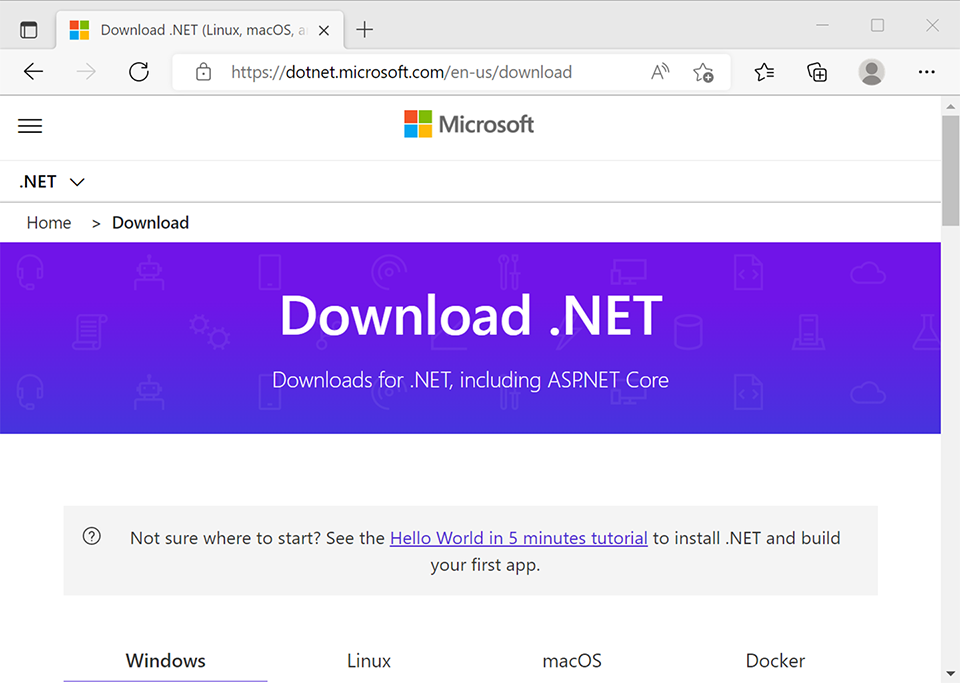
To work with the ASP.NET Core 6 minimal APIs you need to install, first of all, .NET 6 on your development environment.
要使用 ASP.NET Core 6 最小 API,您需要首先在开发环境中安装 .NET 6。
If you have not already installed it, let’s do that now:
如果您还没有安装它,我们现在就安装它:
-
Navigate to the following link: https://dotnet.microsoft.com.
导航到以下链接:https://dotnet.microsoft.com。
-
Click on the Download button.
点击 下载 按钮。
-
By default, the browser chooses the right operating system for you, but if not, select your operating system at the top of the page.
默认情况下,浏览器会为您选择合适的作系统,如果没有,请在页面顶部选择您的作系统。
-
Download the LTS version of the .NET 6.0 SDK.
下载 .NET 6.0 SDK 的 LTS 版本。
-
Start the installer.
启动安装程序。
-
Reboot the machine (this is not mandatory).
重新启动计算机(这不是强制性的)。
You can see which SDKs are installed on your development machine using the following command in a terminal:
您可以在终端中使用以下命令查看开发计算机上安装了哪些 SDK:
dotnet –list-sdks
Before you start coding, you will need a code editor or an Integrated Development Environment (IDE). You can choose your favorite from the following list:
在开始编码之前,您需要一个代码编辑器或集成开发环境 (IDE)。您可以从以下列表中选择您最喜欢的:
• Visual Studio Code for Windows, Mac, or Linux
• Visual Studio 2022
• Visual Studio 2022 for Mac
In the last few years, Visual Studio Code has become very popular not only in the developer community but also in the Microsoft community. Even if you use Visual Studio 2022 for your day-to-day work, we recommend downloading and installing Visual Studio Code and giving it a try.
在过去的几年里,Visual Studio Code 不仅在开发人员社区中非常流行,而且在 Microsoft 社区中也非常流行。即使您将 Visual Studio 2022 用于日常工作,我们也建议您下载并安装 Visual Studio Code 并试一试。
Let’s download and install Visual Studio Code and some extensions:
让我们下载并安装 Visual Studio Code 和一些扩展:
-
Navigate to https://code.visualstudio.com.
导航到 https://code.visualstudio.com。
-
Download the Stable or the Insiders edition.
下载 Stable 或 Insiders 版本。
-
Start the installer.
启动安装程序。
-
Launch Visual Studio Code.
启动 Visual Studio Code。
-
Click on the Extensions icon.
单击 Extensions 图标。
You will see the C# extension at the top of the list.
您将在列表顶部看到 C# 扩展。
- Click on the Install button and wait.
点击 Install 安装 按钮并等待。
You can install other recommended extensions for developing with C# and ASP.NET Core. If you want to install them, you see our recommendations in the following table:
您可以安装其他推荐的扩展,以便使用 C# 和 ASP.NET Core 进行开发。如果您想安装它们,您可以在下表中看到我们的建议:
Additionally, if you want to proceed with the IDE that’s most widely used by .NET developers, you can download and install Visual Studio 2022.
此外,如果您想继续使用 .NET 开发人员使用最广泛的 IDE,您可以下载并安装 Visual Studio 2022。
If you don’t have a license, check if you can use the Community Edition. There are a few restrictions on getting a license, but you can use it if you are a student, have open source projects, or want to use it as an individual. Here’s how to download and install Visual Studio 2022:
如果您没有许可证,请检查是否可以使用 Community Edition。获得许可证有一些限制,但如果您是学生、拥有开源项目或想以个人身份使用它,则可以使用它。以下是下载和安装 Visual Studio 2022 的方法:
-
Navigate to https://visualstudio.microsoft.com/downloads/.
导航到 https://visualstudio.microsoft.com/downloads/。
-
Select Visual Studio 2022 version 17.0 or later and download it.
选择 Visual Studio 2022 版本 17.0 或更高版本并下载它。
-
Start the installer.
启动安装程序。
-
On the Workloads tab, select the following:
在 Workloads (工作负载) 选项卡上,选择以下选项:
• ASP.NET and web development
• Azure Development
- On the Individual Components tab, select the following:
在 Individual Components 选项卡上,选择以下选项:
• Git for Windows
All the code samples in this chapter can be found in the GitHub repository for this book at https://github.com/PacktPublishing/Minimal-APIs-in-ASP.NET-Core-6/tree/main/Chapter01.
本章中的所有代码示例都可以在本书的 GitHub 存储库中找到,网址为 https://github.com/PacktPublishing/Minimal-APIs-in-ASP.NET-Core-6/tree/main/Chapter01。
Now, you have an environment in which you can follow and try the code used in this book.
现在,您有一个环境,可以在其中遵循和尝试本书中使用的代码。
A brief history of the Microsoft Web API
Microsoft Web API 简史
A few years ago in 2007, .NET web applications went through an evolution with the introduction of ASP.NET MVC. Since then, .NET has provided native support for the Model-View-Controller pattern that was common in other languages.
几年前的 2007 年,随着 ASP.NET MVC 的推出,.NET Web 应用程序经历了一场演变。从那时起,.NET 就为其他语言中常见的 Model-View-Controller 模式提供了本机支持。
Five years later, in 2012, RESTful APIs were the new trend on the internet and .NET responded to this with a new approach for developing APIs, called ASP.NET Web API. It was a significant improvement over Windows Communication Foundation (WCF) because it was easier to develop services for the web. Later, in ASP.NET Core these frameworks were unified under the name ASP.NET Core MVC: one single framework with which to develop web applications and APIs.
五年后,即 2012 年,RESTful API 成为 Internet 上的新趋势,.NET 以一种称为 ASP.NET Web API 的 API 开发新方法对此做出了回应。与 Windows Communication Foundation (WCF) 相比,这是一个重大改进,因为它更容易开发 Web 服务。后来,在 ASP.NET Core 中,这些框架统一为 ASP.NET Core MVC:一个用于开发 Web 应用程序和 API 的单一框架。
In ASP.NET Core MVC applications, the controller is responsible for accepting inputs, orchestrating operations, and at the end, returning a response. A developer can extend the entire pipeline with filters, binding, validation, and much more. It’s a fully featured framework for building modern web applications.
在 ASP.NET Core MVC 应用程序中,控制器负责接受输入、编排作,并在最后返回响应。开发人员可以使用过滤器、绑定、验证等来扩展整个管道。它是一个功能齐全的框架,用于构建现代 Web 应用程序。
But in the real world, there are also scenarios and use cases where you don’t need all the features of the MVC framework or you have to factor in a constraint on performance. ASP.NET Core implements a lot of middleware that you can remove from or add to your applications at will, but there are a lot of common features that you would need to implement by yourself in this scenario.
但在现实世界中,也有一些场景和用例不需要 MVC 框架的所有功能,或者必须考虑性能约束。ASP.NET Core 实现了许多中间件,你可以随意从应用程序中删除或添加到应用程序中,但在这种情况下,有许多常见功能需要你自己实现。
At last, ASP.NET Core 6.0 has filled these gaps with minimal APIs.
最后,ASP.NET Core 6.0 用最少的 API 填补了这些空白。
Now that we have covered a brief history of minimal APIs, we will start creating a new minimal API project in the next section.
现在我们已经简要介绍了最小 API 的历史,我们将在下一节中开始创建一个新的最小 API 项目。
Creating a new minimal API project
创建新的最小 API 项目
Let’s start with our first project and try to analyze the new template for the minimal API approach when writing a RESTful API.
让我们从第一个项目开始,尝试在编写 RESTful API 时分析最小 API 方法的新模板。
In this section, we will create our first minimal API project. We will start by using Visual Studio 2022 and then we will show how you can also create the project with Visual Studio Code and the .NET CLI.
在本节中,我们将创建我们的第一个最小 API 项目。我们将从使用 Visual Studio 2022 开始,然后我们将展示如何使用 Visual Studio Code 和 .NET CLI 创建项目。
Creating the project with Visual Studio 2022
使用 Visual Studio 2022 创建项目
Follow these steps to create a new project in Visual Studio 2022:
按照以下步骤在 Visual Studio 2022 中创建新项目:
- Open Visual Studio 2022 and on the main screen, click on Create a new project:
打开 Visual Studio 2022 并在主屏幕上单击 Create a new project:
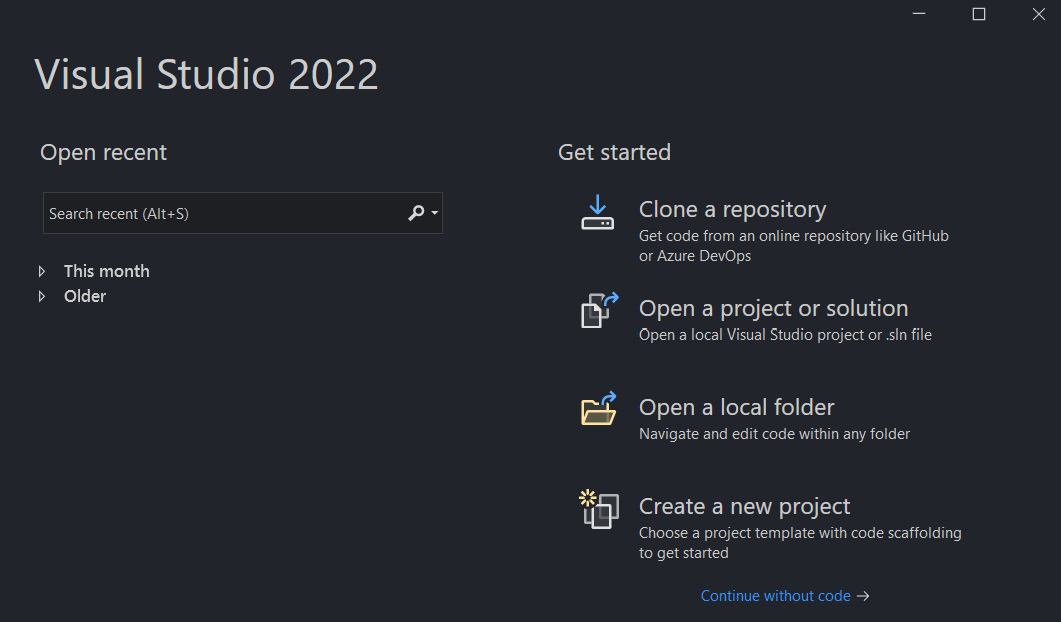
Figure 1.1 – Visual Studio 2022 splash screen
图 1.1 – Visual Studio 2022 初始屏幕
-
On the next screen, write API in the textbox at the top of the window and select the template called ASP.NET Core Web API:
在下一个屏幕上,在窗口顶部的文本框中编写 API,然后选择名为 ASP.NET Core Web API 的模板:
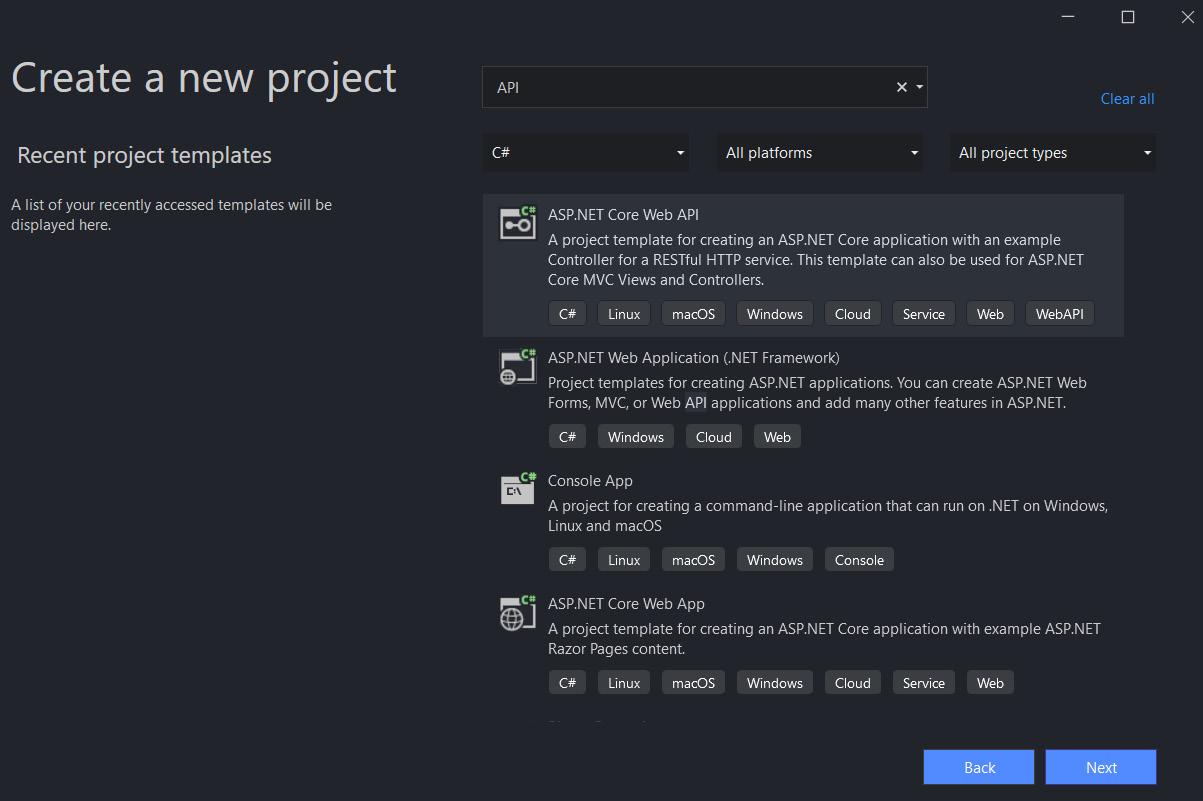
Figure 1.2 – Create a new project screen
图 1.2 – Create a new project 屏幕
-
Next, on the Configure your new project screen, insert a name for the new project and select the root folder for your new solution:
接下来,在 Configure your new project 屏幕上,插入新项目的名称,然后选择新解决方案的根文件夹:
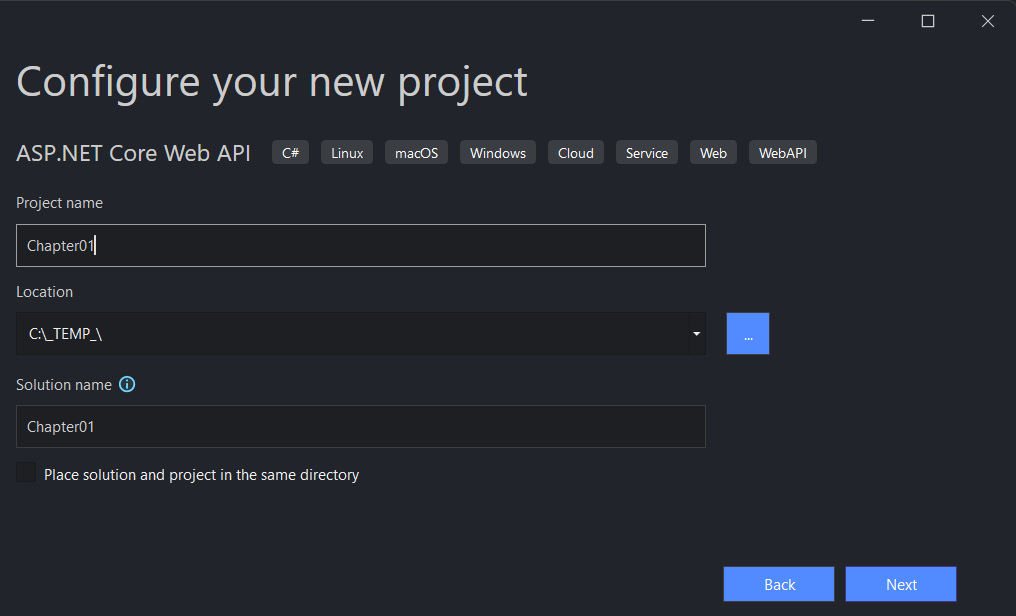
Figure 1.3 – Configure your new project screen
图 1.3 – 配置您的新项目屏幕
For this example we will use the name Chapter01, but you can choose any name that appeals to you.
在此示例中,我们将使用名称 Chapter01,但您可以选择任何吸引您的名称。
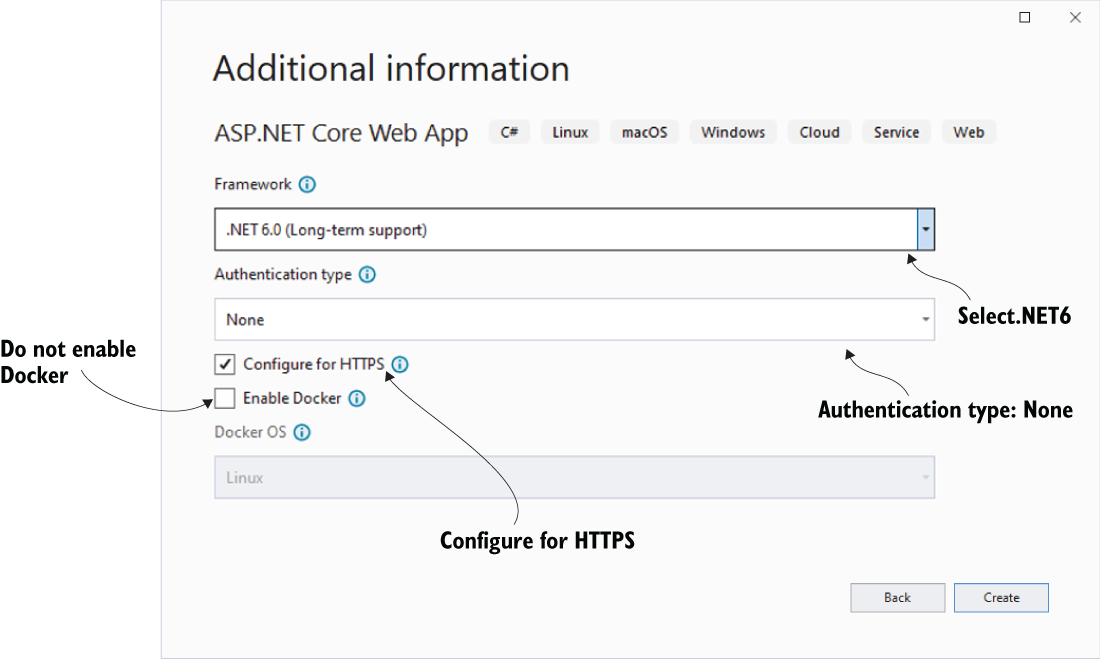
- On the following Additional information screen, make sure to select .NET 6.0 (Long-term-support) from the Framework dropdown. And most important of all, uncheck the Use controllers (uncheck to use minimal APIs) option.
在下面的 Additional information 屏幕上,确保从 Framework 下拉列表中选择 .NET 6.0 (Long-term-support)。最重要的是,取消选中 Use controllers (取消选中以使用最少的 API) 选项。
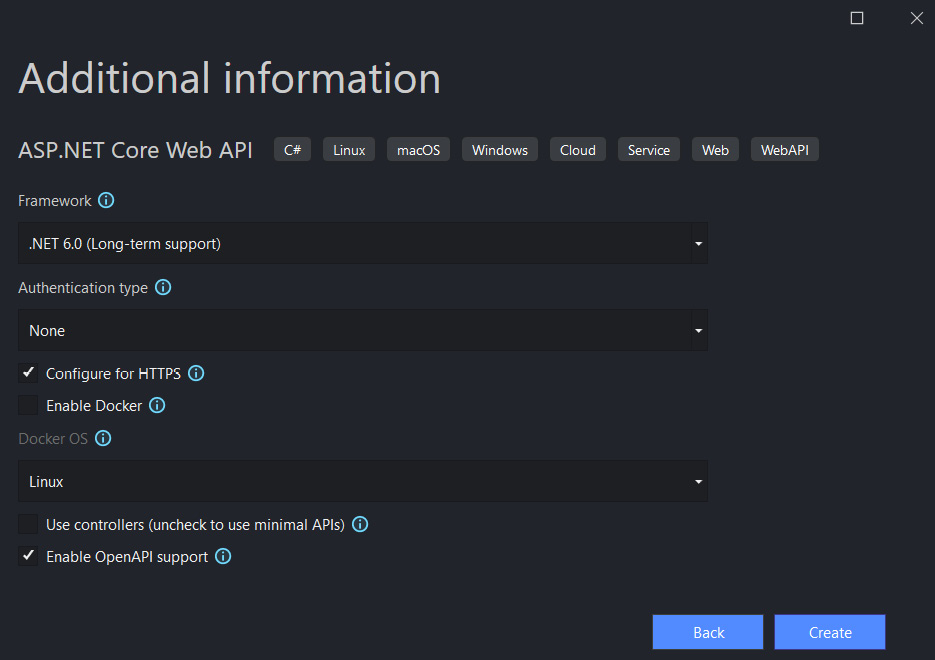
Figure 1.4 – Additional information screen
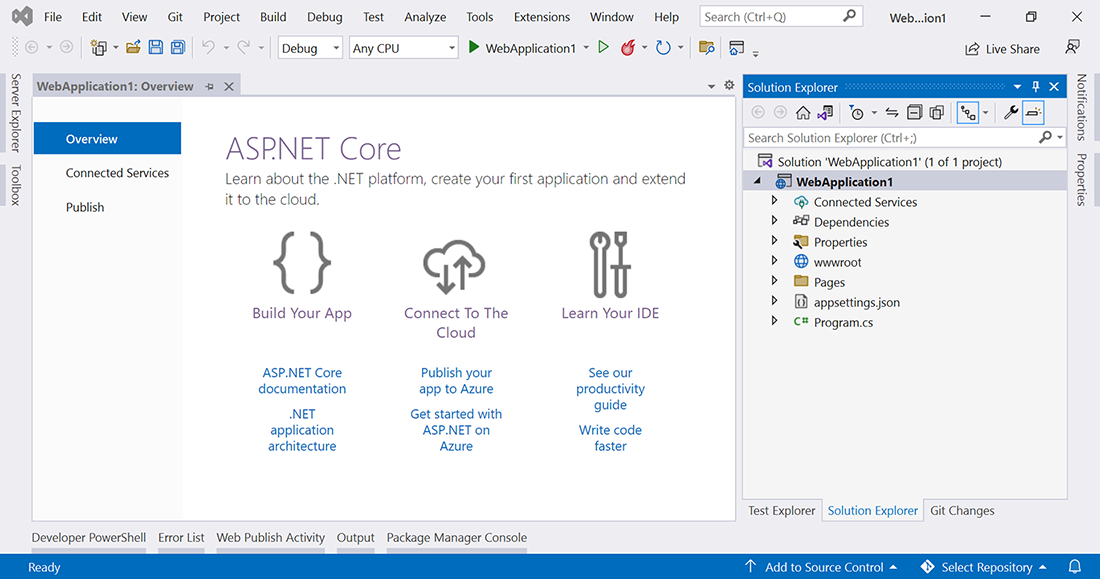
- Click Create and, after a few seconds, you will see the code of your new minimal API project.
单击 Create(创建),几秒钟后,您将看到新的最小 API 项目的代码。
Now we are going to show how to create the same project using Visual Studio Code and the .NET CLI.
现在,我们将展示如何使用 Visual Studio Code 和 .NET CLI 创建相同的项目。
Creating the project with Visual Studio Code
使用 Visual Studio Code 创建项目
Creating a project with Visual Studio Code is easier and faster than with Visual Studio 2022 because you don’t have to use a UI or wizard, rather just a terminal and the .NET CLI.
使用 Visual Studio Code 创建项目比使用 Visual Studio 2022 更容易、更快捷,因为您不必使用 UI 或向导,而只需使用终端和 .NET CLI。
You don’t need to install anything new for this because the .NET CLI is included with the .NET 6 installation (as in the previous versions of the .NET SDKs). Follow these steps to create a project using Visual Studio Code:
您无需为此安装任何新内容,因为 .NET CLI 包含在 .NET 6 安装中(与以前版本的 .NET SDK 一样)。按照以下步骤使用 Visual Studio Code 创建项目:
-
Open your console, shell, or Bash terminal, and switch to your working directory.
打开您的控制台、shell 或 Bash 终端,然后切换到您的工作目录。
-
Use the following command to create a new Web API application:
使用以下命令创建新的 Web API 应用程序:
dotnet new webapi -minimal -o Chapter01
As you can see, we have inserted the -minimal parameter in the preceding command to use the minimal API project template instead of the ASP.NET Core template with the controllers.
如您所见,我们在前面的命令中插入了 -minimal 参数,以使用最小 API 项目模板,而不是控制器的 ASP.NET Core 模板。
- Now open the new project with Visual Studio Code using the following commands:
现在使用以下命令使用 Visual Studio Code 打开新项目:
cd Chapter01
code.
Now that we know how to create a new minimal API project, we are going to have a quick look at the structure of this new template.
现在我们知道如何创建一个新的最小 API 项目,我们将快速了解一下这个新模板的结构。
Looking at the structure of the project
查看项目结构
Whether you are using Visual Studio or Visual Studio Code, you should see the following code in the Program.cs file:
无论您使用的是 Visual Studio 还是 Visual Studio Code,您都应该在 Program.cs 文件中看到以下代码:
var builder = WebApplication.CreateBuilder(args);
// Add services to the container.
// Learn more about configuring Swagger/OpenAPI at https://aka.
ms/aspnetcore/swashbuckle
builder.Services.AddEndpointsApiExplorer();
builder.Services.AddSwaggerGen();
var app = builder.Build();
// Configure the HTTP request pipeline.
if (app.Environment.IsDevelopment())
{
app.UseSwagger();
app.UseSwaggerUI();
}
app.UseHttpsRedirection();
var summaries = new[]
{
"Freezing", "Bracing", "Chilly", "Cool", "Mild", "Warm",
"Balmy", "Hot", "Sweltering", "Scorching"
};
app.MapGet("/weatherforecast", () =>
{
var forecast = Enumerable.Range(1, 5).Select(index =>
new WeatherForecast
(
DateTime.Now.AddDays(index),
Random.Shared.Next(-20, 55),
summaries[Random.Shared.Next(summaries.Length)]
))
.ToArray();
return forecast;
})
.WithName("GetWeatherForecast");
app.Run();
internal record WeatherForecast(DateTime Date, int
TemperatureC, string? Summary)
{
public int TemperatureF => 32 + (int)(TemperatureC /
0.5556);
}
First of all, with the minimal API approach, all of your code will be inside the Program.cs file. If you are a seasoned .NET developer, it’s easy to understand the preceding code, and you’ll find it similar to some of the things you’ve always used with the controller approach.
首先,使用最小 API 方法,您的所有代码都将位于 Program.cs 文件中。如果您是一位经验丰富的 .NET 开发人员,则很容易理解前面的代码,并且您会发现它类似于您一直使用控制器方法的一些内容。
At the end of the day, it’s another way to write an API, but it’s based on ASP.NET Core.
归根结底,这是编写 API 的另一种方式,但它基于 ASP.NET Core。
However, if you are new to ASP.NET, this single file approach is easy to understand. It’s easy to understand how to extend the code in the template and add more features to this API.
但是,如果您不熟悉 ASP.NET,这种单文件方法很容易理解。很容易理解如何扩展模板中的代码并向此 API 添加更多功能。
Don’t forget that minimal means that it contains the minimum set of components needed to build an HTTP API but it doesn’t mean that the application you are going to build will be simple. It will require a good design like any other .NET application.
不要忘记,minimal 意味着它包含构建 HTTP API 所需的最少组件集,但这并不意味着您要构建的应用程序会很简单。与任何其他 .NET 应用程序一样,它需要良好的设计。
As a final point, the minimal API approach is not a replacement for the MVC approach. It’s just another way to write the same thing.
最后一点,最小 API 方法不能替代 MVC 方法。这只是另一种写同样东西的方法。
Let’s go back to the code.
让我们回到代码。
Even the template of the minimal API uses the new approach of .NET 6 web applications: a top-level statement.
即使是最小 API 的模板也使用 .NET 6 Web 应用程序的新方法:顶级语句。
It means that the project has a Program.cs file only instead of using two files to configure an application.
这意味着项目只有一个 Program.cs 文件,而不是使用两个文件来配置应用程序。
If you don’t like this style of coding, you can convert your application to the old template for ASP.NET Core 3.x/5. This approach still continues to work in .NET as well.
如果您不喜欢这种编码样式,可以将应用程序转换为 ASP.NET Core 3.x/5 的旧模板。此方法在 .NET 中也将继续有效。
Important note : We can find more information about the .NET 6 top-level statements template at https://docs.microsoft.com/dotnet/core/tutorials/top-level-templates.
重要提示 : 我们可以在 https://docs.microsoft.com/dotnet/core/tutorials/top-level-templates 中找到有关 .NET 6 顶级语句模板的更多信息。
By default, the new template includes support for the OpenAPI Specification and more specifically, Swagger.
默认情况下,新模板包括对 OpenAPI 规范的支持,更具体地说,包括对 Swagger 的支持。
Let’s say that we have our documentation and playground for the endpoints working out of the box without any additional configuration needed.
假设我们有现成的端点文档和 Playground,无需任何额外的配置。
You can see the default configuration for Swagger in the following two lines of codes:
您可以在以下两行代码中看到 Swagger 的默认配置:
builder.Services.AddEndpointsApiExplorer();
builder.Services.AddSwaggerGen();
Very often, you don’t want to expose Swagger and all the endpoints to the production or staging environments. The default template enables Swagger out of the box only in the development environment with the following lines of code:
通常,您不希望将 Swagger 和所有终端节点公开给生产或暂存环境。默认模板仅在开发环境中启用开箱即用的 Swagger,代码行如下:
if (app.Environment.IsDevelopment())
{
         app.UseSwagger();
         app.UseSwaggerUI();
}
If the application is running on the dev elopment environment, you must also include the Swagger documentation, but otherwise not.
如果应用程序在 dev elopment 环境中运行,则还必须包含 Swagger 文档,否则不得包含。
Note : We’ll talk in detail about Swagger in Chapter 3, Working with Minimal APIs.
注意:我们将在第 3 章 使用最小 API 中详细讨论 Swagger。
In these last few lines of code in the template, we are introducing another generic concept for .NET 6 web applications: environments.
在模板的最后几行代码中,我们引入了 .NET 6 Web 应用程序的另一个通用概念:环境。
Typically, when we develop a professional application, there are a lot of phases through which an application is developed, tested, and finally published to the end users.
通常,当我们开发专业应用程序时,应用程序会经历许多开发、测试并最终发布给最终用户的阶段。
By convention, these phases are regulated and called development, staging, and production. As developers, we might like to change the behavior of the application based on the current environment.
按照惯例,这些阶段受到监管,称为开发、暂存和生产。作为开发人员,我们可能希望根据当前环境更改应用程序的行为。
There are several ways to access this information but the typical way to retrieve the actual environment in modern .NET 6 applications is to use environment variables. You can access the environment variables directly from the app variable in the Program.cs file.
有多种方法可以访问此信息,但在现代 .NET 6 应用程序中检索实际环境的典型方法是使用环境变量。您可以直接从 Program.cs 文件中的 app 变量访问环境变量。
The following code block shows how to retrieve all the information about the environments directly from the startup point of the application:
以下代码块演示如何直接从应用程序的启动点检索有关环境的所有信息:
if (app.Environment.IsDevelopment())
{
           // your code here
}
if (app.Environment.IsStaging())
{
           // your code here
}
if (app.Environment.IsProduction())
{
           // your code here
}
In many cases, you can define additional environments, and you can check your custom environment with the following code:
在许多情况下,您可以定义其他环境,并且可以使用以下代码检查您的自定义环境:
if (app.Environment.IsEnvironment("TestEnvironment"))
{
           // your code here
}
To define routes and handlers in minimal APIs, we use the MapGet, MapPost, MapPut, and MapDelete methods. If you are used to using HTTP verbs, you will have noticed that the verb Patch is not present, but you can define any set of verbs using MapMethods.
要在最小的 API 中定义路由和处理程序,我们使用 MapGet、MapPost、MapPut 和 MapDelete 方法。如果您习惯使用 HTTP 动词,您会注意到动词 Patch 不存在,但您可以使用 MapMethods 定义任何动词集。
For instance, if you want to create a new endpoint to post some data to the API, you can write the following code:
例如,如果要创建一个新的终端节点以将一些数据发布到 API,则可以编写以下代码:
app.MapPost("/weatherforecast", async (WeatherForecast
    model, IWeatherService repo) =>
{
         // ...
});
As you can see in the short preceding code, it’s very easy to add a new endpoint with the new minimal API template.
正如您在前面的简短代码中所看到的,使用新的最小 API 模板添加新终端节点非常容易。
It was more difficult previously, especially for a new developer, to code a new endpoint with binding parameters and use dependency injection.
以前,使用绑定参数编写新终端节点并使用依赖项注入更加困难,尤其是对于新开发人员而言。
Important note : We’ll talk in detail about routing in Chapter 2, Exploring Minimal APIs and Their Advantages, and about dependency injection in Chapter 4, Dependency Injection in a Minimal API Project.
重要提示 : 我们将在第 2 章 探索最小 API 及其优势中详细讨论路由,并在第 4 章 最小 API 项目中的依赖注入。
Summary
总结
In this chapter, we first started with a brief history of minimal APIs. Next, we saw how to create a project with Visual Studio 2022 as well as Visual Studio Code and the .NET CLI. After that, we examined the structure of the new template, how to access different environments, and how to start interacting with REST endpoints.
在本章中,我们首先从最小 API 的简要历史开始。接下来,我们了解了如何使用 Visual Studio 2022 以及 Visual Studio Code 和 .NET CLI 创建项目。之后,我们检查了新模板的结构、如何访问不同的环境以及如何开始与 REST 端点交互。
In the next chapter, we will see how to bind parameters, the new routing configuration, and how to customize a response.
在下一章中,我们将了解如何绑定参数、新的路由配置以及如何自定义响应。
2 Exploring Minimal APIs and Their Advantages
探索最小 API 及其优势
In this chapter of the book, we will introduce some of the basic themes related to minimal APIs in .NET 6.0, showing how they differ from the controller-based web APIs that we have written in the previous version of .NET. We will also try to underline both the pros and the cons of this new approach of writing APIs.
在本书的这一章中,我们将介绍与 .NET 6.0 中的最小 API 相关的一些基本主题,展示它们与我们在早期版本的 .NET 中编写的基于控制器的 Web API 有何不同。我们还将尝试强调这种编写 API 的新方法的优缺点。
In this chapter, we will be covering the following topics:
在本章中,我们将介绍以下主题:
• Routing
• Parameter binding
• Exploring responses
• Controlling serialization
• Architecting a minimal API project
Technical requirements
技术要求
To follow the descriptions in this chapter, you will need to create an ASP.NET Core 6.0 Web API application. You can either use one of the following options:
要按照本章中的描述进行作,您需要创建一个 ASP.NET Core 6.0 Web API 应用程序。您可以使用以下选项之一:
• Option 1: Click on the New | Project command in the File menu of Visual Studio 2022 – then, choose the ASP.NET Core Web API template. Select a name and the working directory in the wizard and be sure to uncheck the Use controllers (uncheck to use minimal APIs) option in the next step.
选项 1:点击新建 |Visual Studio 2022 的 File (文件) 菜单中的 Project (项目) 命令,然后选择 ASP.NET Core Web API 模板。在向导中选择一个名称和工作目录,并确保在下一步中取消选中 Use controllers (不选中使用最少的 API) 选项。
• Option 2: Open your console, shell, or Bash terminal, and change to your working directory. Use the following command to create a new Web API application:
选项 2:打开您的控制台、shell 或 Bash 终端,然后切换到您的工作目录。使用以下命令创建新的 Web API 应用程序:
dotnet new webapi -minimal -o Chapter02
Now, open the project in Visual Studio by double-clicking the project file, or in Visual Studio Code, by typing the following command in the already open console:
现在,通过在 Visual Studio 中双击项目文件或在 Visual Studio Code 中通过在已打开的控制台中键入以下命令来打开项目:
cd Chapter02
code.
Finally, you can safely remove all the code related to the WeatherForecast sample, as we don’t need it for this chapter.
最后,您可以安全地删除与 WeatherForecast 示例相关的所有代码,因为本章不需要它。
All the code samples in this chapter can be found in the GitHub repository for this book at https://github.com/PacktPublishing/Minimal-APIs-in-ASP.NET-Core-6/tree/main/Chapter02.
本章中的所有代码示例都可以在本书的 GitHub 存储库中找到,网址为 https://github.com/PacktPublishing/Minimal-APIs-in-ASP.NET-Core-6/tree/main/Chapter02。
Routing
路由
According to the official Microsoft documentation available at https://docs.microsoft.com/aspnet/core/fundamentals/routing, the following definition is given for routing:
根据 https://docs.microsoft.com/aspnet/core/fundamentals/routing 上提供的官方 Microsoft 文档,路由给出了以下定义:
Routing is responsible for matching incoming HTTP requests and dispatching those requests to the app’s executable endpoints. Endpoints are the app’s units of executable request-handling code. Endpoints are defined in the app and configured when the app starts. The endpoint matching process can extract values from the request’s URL and provide those values for request processing. Using endpoint information from the app, routing is also able to generate URLs that map to endpoints.
路由负责匹配传入的 HTTP 请求并将这些请求分派到应用程序的可执行端点。端点是应用程序的可执行请求处理代码单元。终端节点在应用程序中定义,并在应用程序启动时进行配置。终端节点匹配过程可以从请求的 URL 中提取值,并提供这些值以供请求处理。使用应用程序中的终端节点信息,路由还能够生成映射到终端节点的 URL。
In controller-based web APIs, routing is defined via the UseEndpoints() method in Startup.cs or using data annotations such as Route, HttpGet, HttpPost, HttpPut, HttpPatch, and HttpDelete right over the action methods.
在基于控制器的 Web API 中,路由是通过 Startup.cs 中的 UseEndpoints() 方法定义的,或者使用作方法上的数据注释(如 Route、HttpGet、HttpPost、HttpPut、HttpPatch 和 HttpDelete)来定义。
As mentioned in Chapter 1, Introduction to Minimal APIs in minimal APIs, we define the route patterns using the Map methods of the WebApplication object. Here’s an example:
如第 1 章 最小 API 简介中所述,在最小 API 中,我们使用 WebApplication 对象的 Map 方法定义路由模式。下面是一个示例:
app.MapGet("/hello-get", () => "[GET] Hello World!");
app.MapPost("/hello-post", () => "[POST] Hello World!");
app.MapPut("/hello-put", () => "[PUT] Hello World!");
app.MapDelete("/hello-delete", () => "[DELETE] Hello
World!");
In this code, we have defined four endpoints, each with a different routing and method. Of course, we can use the same route pattern with different HTTP verbs.
在此代码中,我们定义了四个终端节点,每个终端节点都有不同的路由和方法。当然,我们可以对不同的 HTTP 动词使用相同的路由模式。
Note : As soon as we add an endpoint to our application (for example, using MapGet()), UseRouting() is automatically added at the start of the middleware pipeline and UseEndpoints() at the end of the pipeline.
注意 : 一旦我们将端点添加到应用程序(例如,使用 MapGet()),UseRouting() 就会自动添加到中间件管道的开头,UseEndpoints() 会自动添加到管道的末尾。
As shown here, ASP.NET Core 6.0 provides Map methods for the most common HTTP verbs. If we need to use other verbs, we can use the generic MapMethods:
如此处所示,ASP.NET Core 6.0 为最常见的 HTTP 动词提供了 Map 方法。如果我们需要使用其他动词,我们可以使用通用的 MapMethods:
app.MapMethods("/hello-patch", new[] { HttpMethods.Patch },
() => "[PATCH] Hello World!");
app.MapMethods("/hello-head", new[] { HttpMethods.Head },
() => "[HEAD] Hello World!");
app.MapMethods("/hello-options", new[] {
HttpMethods.Options }, () => "[OPTIONS] Hello World!");
In the following sections, we will show in detail how routing works effectively and how we can control its behavior.
在以下部分中,我们将详细展示路由如何有效工作以及如何控制其行为。
Route handlers
路由处理程序
Methods that execute when a route URL matches (according to parameters and constraints, as described in the following sections) are called route handlers. Route handlers can be a lambda expression, a local function, an instance method, or a static method, whether synchronous or asynchronous:
当路由 URL 匹配时执行的方法(根据参数和约束,如以下部分所述)称为路由处理程序。路由处理程序可以是 lambda 表达式、本地函数、实例方法或静态方法,无论是同步方法还是异步方法:
• Here’s an example of a lambda expression (inline or using a variable):
以下是 lambda 表达式的示例(内联或使用变量):
app.MapGet("/hello-inline", () => "[INLINE LAMBDA]
Hello World!");
var handler = () => "[LAMBDA VARIABLE] Hello World!";
app.MapGet("/hello", handler);
• Here’s an example of a local function:
下面是一个本地函数的示例:
string Hello() => "[LOCAL FUNCTION] Hello World!";
app.MapGet("/hello", Hello);
• The following is an example of an instance method:
以下是实例方法的示例:
var handler = new HelloHandler();
app.MapGet("/hello", handler.Hello);
class HelloHandler
{
public string Hello()
=> "[INSTANCE METHOD] Hello
World!";
}
• Here, we can see an example of a static method:
在这里,我们可以看到一个静态方法的示例:
app.MapGet("/hello", HelloHandler.Hello);
class HelloHandler
{
public static string Hello()
=> "[STATIC METHOD] Hello World!";
}
Route parameters
路由参数
As with the previous versions of .NET, we can create route patterns with parameters that will be automatically captured by the handler:
与以前版本的 .NET 一样,我们可以创建路由模式,其中包含处理程序将自动捕获的参数:
app.MapGet("/users/{username}/products/{productId}",
(string username, int productId)
=> $"The Username is {username} and the product Id
is {productId}");
A route can contain an arbitrary number of parameters. When a request is made to this route, the parameters will be captured, parsed, and passed as arguments to the corresponding handler. In this way, the handler will always receive typed arguments (in the preceding sample, we are sure that the username is string and the product ID is int).
路由可以包含任意数量的参数。当向此路由发出请求时,参数将被捕获、解析并作为参数传递给相应的处理程序。这样,处理程序将始终接收类型化参数(在前面的示例中,我们确保 username 是 string,产品 ID 是 int)。
If the route values cannot be casted to the specified types, then an exception of the BadHttpRequestException type will be thrown, and the API will respond with a 400 Bad Request message.
如果无法将路由值强制转换为指定类型,则将引发 BadHttpRequestException 类型的异常,并且 API 将以 400 Bad Request 消息进行响应。
Route constraints
路由约束
Route constraints are used to restrict valid types for route parameters. Typical constraints allow us to specify that a parameter must be a number, a string, or a GUID. To specify a route constraint, we simply need to add a colon after the parameter name, then specify the constraint name:
路由约束用于限制路由参数的有效类型。典型约束允许我们指定参数必须是数字、字符串或 GUID。要指定路由约束,我们只需要在参数名称后添加一个冒号,然后指定约束名称:
app.MapGet("/users/{id:int}", (int id) => $"The user Id is
{id}");
app.MapGet("/users/{id:guid}", (Guid id) => $"The user Guid
is {id}");
Minimal APIs support all the route constraints that were already available in the previous versions of ASP.NET Core. You can find the full list of route constraints at the following link: https://docs.microsoft.com/aspnet/core/fundamentals/routing#route-constraint-reference.
最小 API 支持以前版本的 ASP.NET Core 中已经提供的所有路由约束。您可以在以下链接中找到路由约束的完整列表:https://docs.microsoft.com/aspnet/core/fundamentals/routing#route-constraint-reference。
If, according to the constraints, no route matches the specified path, we don’t get an exception. Instead we obtain a 404 Not Found message, because, in fact, if the constraints do not fit, the route itself isn’t reachable. So, for example, in the following cases we get 404 responses:
如果根据约束,没有路由与指定的路径匹配,则不会收到异常。相反,我们会收到 404 Not Found 消息,因为事实上,如果约束不合适,则路由本身无法访问。因此,例如,在以下情况下,我们会收到 404 个响应:
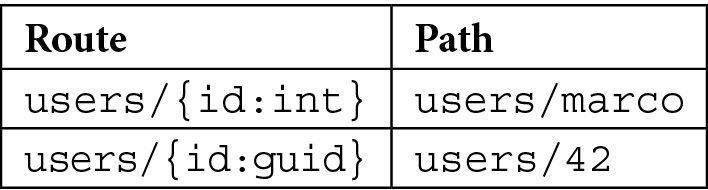
Table 2.1 – Examples of an invalid path according to the route constraints
表 2.1 – 根据路由约束的无效路径示例
Every other argument in the handler that is not declared as a route constraint is expected, by default, in the query string. For example, see the following:
默认情况下,处理程序中未声明为路由约束的所有其他参数都应在查询字符串中。例如,请参阅以下内容:
// Matches hello?name=Marco
app.MapGet("/hello", (string name) => $"Hello, {name}!");
In the next section, Parameter binding, we’ll go deeper into how to use binding to further customize routing by specifying, for example, where to search for routing arguments, how to change their names, and how to have optional route parameters.
在下一节 参数绑定 中,我们将更深入地介绍如何使用 binding 进一步自定义路由,例如,指定在何处搜索路由参数、如何更改其名称以及如何拥有可选的路由参数。
Parameter binding
参数绑定
Parameter binding is the process that converts request data (i.e., URL paths, query strings, or the body) into strongly typed parameters that can be consumed by route handlers. ASP.NET Core minimal APIs support the following binding sources:
参数绑定是将请求数据(即 URL 路径、查询字符串或正文)转换为路由处理程序可以使用的强类型参数的过程。ASP.NET Core 最小 API 支持以下绑定源:
• Route values
• Query strings
• Headers
• The body (as JSON, the only format supported by default)
• A service provider (dependency injection)
We’ll talk in detail about dependency injection in Chapter 4, Implementing Dependency Injection.
我们将在 第 4 章 实现依赖注入 中详细讨论依赖注入。
As we’ll see later in this chapter, if necessary, we can customize the way in which binding is performed for a particular input. Unfortunately, in the current version, binding from Form is not natively supported in minimal APIs. This means that, for example, IFormFile is not supported either.
正如我们在本章后面看到的那样,如有必要,我们可以自定义对特定 input 执行绑定的方式。遗憾的是,在当前版本中,最小的 API 本身并不支持从 Form 进行绑定。这意味着,例如,IFormFile 也不受支持。
To better understand how parameter binding works, let’s take a look at the following API:
为了更好地理解参数绑定的工作原理,我们来看一下以下 API:
var builder = WebApplication.CreateBuilder(args);
builder.Services.AddScoped<PeopleService>();
var app = builder.Build();
app.MapPut("/people/{id:int}", (int id, bool notify, Person
person, PeopleService peopleService) => { });
app.Run();
public class PeopleService { }
public record class Person(string FirstName, string
LastName);
Parameters that are passed to the handler are resolved in the following ways:
传递给处理程序的参数通过以下方式解析:
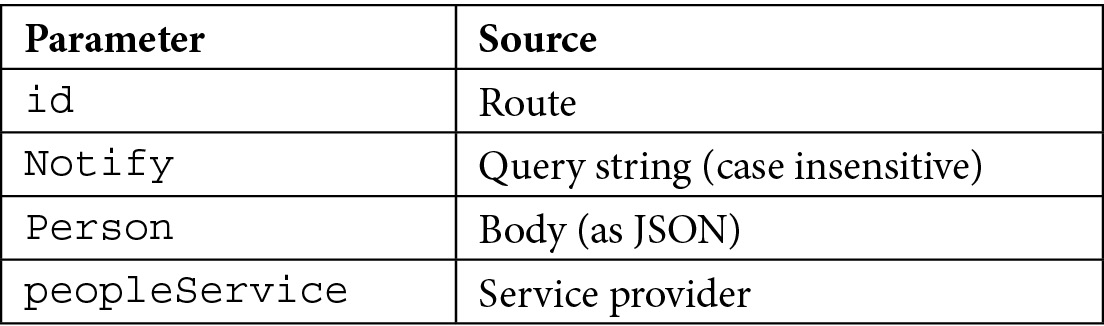
Table 2.2 – Parameter binding sources
表 2.2 – 参数绑定源
As we can see, ASP.NET Core is able to automatically understand where to search for parameters for binding, based on the route pattern and the types of the parameters themselves. For example, a complex type such as the Person class is expected in the request body.
正如我们所看到的,ASP.NET Core 能够根据路由模式和参数本身的类型,自动理解在何处搜索要绑定的参数。例如,请求正文中应包含复杂类型(如 Person 类)。
If needed, as in the previous versions of ASP.NET Core, we can use attributes to explicitly specify where parameters are bound from and, optionally, use different names for them. See the following endpoint:
如果需要,就像在早期版本的 ASP.NET Core 中一样,我们可以使用属性来显式指定参数的绑定位置,并可选择为它们使用不同的名称。请参阅以下终端节点:
app.MapGet("/search", string q) => { });
The API can be invoked with /search?q=text. However, using q as the name of the argument isn’t a good idea, because its meaning is not self-explanatory. So, we can modify the handler using FromQueryAttribute:
可以使用 /search?q=text 调用 API。但是,使用 q 作为参数的名称并不是一个好主意,因为它的含义不言自明。因此,我们可以使用 FromQueryAttribute 修改处理程序:
app.MapGet("/search", ([FromQuery(Name = "q")] string
searchText) => { });
In this way, the API still expects a query string parameter named q, but in the handler its value is now bound to the searchText argument.
这样,API 仍然需要名为 q 的查询字符串参数,但在处理程序中,其值现在绑定到 searchText 参数。
Note : According to the standard, the GET, DELETE, HEAD, and OPTIONS HTTP options should never have a body. If, nevertheless, you want to use it, you need to explicitly add the [FromBody] attribute to the handler argument; otherwise, you’ll get an InvalidOperationException error. However, keep in mind that this is a bad practice.
注意 : 根据该标准,GET、DELETE、HEAD 和 OPTIONS HTTP 选项不应有正文。但是,如果要使用它,则需要将 [FromBody] 属性显式添加到 handler 参数;否则,您将收到 InvalidOperationException 错误。但是,请记住,这是一种不好的做法。
By default, all the parameters in route handlers are required. So, if, according to routing, ASP.NET Core finds a valid route, but not all the required parameters are provided, we will get an error. For example, let’s look at the following method:
默认情况下,路由处理程序中的所有参数都是必需的。因此,如果根据路由,ASP.NET Core 找到了一个有效的路由,但未提供所有必需的参数,我们将收到错误。例如,让我们看看下面的方法:
app.MapGet("/people", (int pageIndex, int itemsPerPage) => { });
If we call the endpoint without the pageIndex or itemsPerPage query string values, we will obtain a BadHttpRequestException error, and the response will be 400 Bad Request.
如果我们在没有 pageIndex 或 itemsPerPage 查询字符串值的情况下调用终端节点,我们将获得 BadHttpRequestException 错误,并且响应将为 400 Bad Request。
To make the parameters optional, we just need to declare them as nullable or provide a default value. The latter case is the most common. However, if we adopt this solution, we cannot use a lambda expression for the handler. We need another approach, for example, a local function:
要使参数成为可选的,我们只需要将它们声明为 nullable 或提供默认值。后一种情况是最常见的。但是,如果我们采用此解决方案,则不能对处理程序使用 lambda 表达式。我们需要另一种方法,例如本地函数:
// This won't compile
//app.MapGet("/people", (int pageIndex = 0, int
itemsPerPage = 50) => { });
string SearchMethod(int pageIndex = 0,
int itemsPerPage = 50) => $"Sample
result for page {pageIndex} getting
{itemsPerPage} elements";
app.MapGet("/people", SearchMethod);
In this case, we are dealing with a query string, but the same rules apply to all the binding sources.
在本例中,我们正在处理查询字符串,但相同的规则适用于所有绑定源。
Keep in mind that if we use nullable reference types (which are enabled by default in .NET 6.0 projects) and we have, for example, a string parameter that could be null, we need to declare it as nullable – otherwise, we’ll get a BadHttpRequestException error again. The following example correctly defines the orderBy query string parameter as optional:
请记住,如果我们使用可为 null 的引用类型(在 .NET 6.0 项目中默认启用),并且我们有一个可能为 null 的字符串参数,则需要将其声明为可为 null,否则,我们将再次收到 BadHttpRequestException 错误。以下示例正确地将 orderBy 查询字符串参数定义为可选:
app.MapGet("/people", (string? orderBy) => $"Results ordered by {orderBy}");
Special bindings
特殊绑定
In controller-based web APIs, a controller that inherits from Microsoft.AspNetCore.Mvc.ControllerBase has access to some properties that allows it to get the context of the request and response: HttpContext, Request, Response, and User. In minimal APIs, we don’t have a base class, but we can still access this information because it is treated as a special binding that is always available to any handler:
在基于控制器的 Web API 中,从 Microsoft.AspNetCore.Mvc.ControllerBase 继承的控制器有权访问一些属性,这些属性允许它获取请求和响应的上下文:HttpContext、Request、Response 和 User。在最小的 API 中,我们没有基类,但我们仍然可以访问此信息,因为它被视为任何处理程序始终可用的特殊绑定:
app.MapGet("/products", (HttpContext context, HttpRequest req, HttpResponse res, ClaimsPrincipal user) => { });
Tip : We can also access all these objects using the IHttpContextAccessor interface, as we did in the previous ASP.NET Core versions.
提示 : 我们还可以使用 IHttpContextAccessor 接口访问所有这些对象,就像我们在以前的 ASP.NET Core 版本中所做的那样。
Custom binding
自定义绑定
In some cases, the default way in which parameter binding works isn’t enough for our purpose. In minimal APIs, we don’t have support for the IModelBinderProvider and IModelBinder interfaces, but we have two alternatives to implement custom model binding.
在某些情况下,参数绑定的默认工作方式不足以满足我们的目的。在最小的 API 中,我们不支持 IModelBinderProvider 和 IModelBinder 接口,但我们有两种实现自定义模型绑定的方法。
Important note : The IModelBinderProvider and IModelBinder interfaces in controller-based projects allow us to define the mapping between the request data and the application model. The default model binder provided by ASP.NET Core supports most of the common data types, but, if necessary, we can extend the system by creating our own providers. We can find more information at the following link: https://docs.microsoft.com/aspnet/core/mvc/advanced/custom-model-binding.
重要提示 : 基于控制器的项目中的 IModelBinderProvider 和 IModelBinder 接口允许我们定义请求数据和应用程序模型之间的映射。ASP.NET Core 提供的默认模型 Binder 支持大多数常见数据类型,但如有必要,我们可以通过创建自己的提供程序来扩展系统。我们可以在以下链接中找到更多信息:https://docs.microsoft.com/aspnet/core/mvc/advanced/custom-model-binding。
If we want to bind a parameter that comes from a route, query string, or header to a custom type, we can add a static TryParse method to the type:
如果我们想将来自路由、查询字符串或标头的参数绑定到自定义类型,我们可以向该类型添加静态 TryParse 方法:
// GET /navigate?location=43.8427,7.8527
app.MapGet("/navigate", (Location location) => $"Location:
{location.Latitude}, {location.Longitude}");
public class Location
{
public double Latitude { get; set; }
public double Longitude { get; set; }
public static bool TryParse(string? value,
IFormatProvider? provider, out Location? location)
{
if (!string.IsNullOrWhiteSpace(value))
{
var values = value.Split(',',
StringSplitOptions.RemoveEmptyEntries);
if (values.Length == 2 && double.
TryParse(values[0],
NumberStyles.AllowDecimalPoint,
CultureInfo.InvariantCulture,
out var latitude) && double.
TryParse(values[1], NumberStyles.
AllowDecimalPoint, CultureInfo.
InvariantCulture, out var longitude))
{
location = new Location
{ Latitude = latitude,
Longitude = longitude };
return true;
}
}
location = null;
return false;
}
}
In the TryParse method, we can try to split the input parameter and check whether it contains two decimal values: in this case, we parse the numbers to build the Location object and we return true. Otherwise, we return false because the Location object cannot be initialized.
在 TryParse 方法中,我们可以尝试拆分输入参数并检查它是否包含两个十进制值:在本例中,我们解析数字以构建 Location 对象并返回 true。否则,我们将返回 false,因为无法初始化 Location 对象。
Important note : When the minimal API finds that a type contains a static TryParse method, even if it is a complex type, it assumes that it is passed in the route or the query string, based on the routing template. We can use the [FromHeader] attributes to change the binding source. In any case, TryParse will never be invoked for the body of the request.
重要提示 : 当最小 API 发现某个类型包含静态 TryParse 方法时,即使它是一个复杂类型,它也会根据路由模板假定它是在路由或查询字符串中传递的。我们可以使用 [FromHeader] 属性来更改绑定源。在任何情况下,都不会为请求正文调用 TryParse。
If we need to completely control how binding is performed, we can implement a static BindAsync method on the type. This isn’t a very common solution, but in some cases, it can be useful:
如果我们需要完全控制绑定的执行方式,我们可以在类型上实现静态 BindAsync 方法。这不是一个非常常见的解决方案,但在某些情况下,它可能很有用:
// POST /navigate?lat=43.8427&lon=7.8527
app.MapPost("/navigate", (Location location) =>
$"Location: {location.Latitude}, {location.Longitude}");
public class Location
{
// ...
public static ValueTask<Location?> BindAsync(HttpContext
context, ParameterInfo parameter)
{
if (double.TryParse(context.Request.Query["lat"],
NumberStyles.AllowDecimalPoint, CultureInfo.
InvariantCulture, out var latitude)&& double.
TryParse(context.Request.Query["lon"],
NumberStyles.AllowDecimalPoint, CultureInfo.
InvariantCulture, out var longitude))
{
var location = new Location
{ Latitude = latitude, Longitude = longitude };
return ValueTask.
FromResult<Location?>(location);
}
return ValueTask.FromResult<Location?>(null);
}
}
As we can see, the BindAsync method takes the whole HttpContext as an argument, so we can read all the information we need to create the actual Location object that is passed to the route handler. In this example, we read two query string parameters (lat and lon), but (in the case of POST, PUT, or PATCH methods) we can also read the entire body of the request and manually parse its content. This can be useful, for instance, if we need to handle requests that have a format other than JSON (which, as said before, is the only one supported by default).
正如我们所看到的,BindAsync 方法将整个 HttpContext 作为参数,因此我们可以读取创建传递给路由处理程序的实际 Location 对象所需的所有信息。在此示例中,我们读取两个查询字符串参数(lat 和 lon),但(在 POST、PUT 或 PATCH 方法的情况下)我们还可以读取请求的整个正文并手动解析其内容。例如,如果我们需要处理格式不是 JSON 的请求(如前所述,JSON 是默认支持的唯一格式),这可能很有用。
If the BindAsync method returns null, while the corresponding route handler parameter cannot assume this value (as in the previous example), we will get an HttpBadRequestException error, which. as usual, will be wrapped in a 400 Bad Request response.
如果 BindAsync 方法返回 null,而相应的路由处理程序参数不能采用此值(如前面的示例所示),我们将收到 HttpBadRequestException 错误。像往常一样,将包装在 400 Bad Request 响应中。
Important note : We shouldn’t define both the TryParse and BindAsync methods using a type; if both are present, BindAsync always has precedence (that is, TryParse will never be invoked).
重要提示 : 我们不应该使用类型同时定义 TryParse 和 BindAsync 方法;如果两者都存在,则 BindAsync 始终具有优先权(即,永远不会调用 TryParse)。
Now that we have looked at parameter binding and understood how to use it and customize its behavior, let’s see how to work with responses in minimal APIs.
现在我们已经了解了参数绑定并了解了如何使用它并自定义其行为,让我们看看如何在最小的 API 中使用响应。
Exploring responses
探索响应
As with controller-based projects, with route handlers of minimal APIs as well, we can directly return a string or a class (either synchronously or asynchronously):
与基于控制器的项目一样,使用最小 API 的路由处理程序,我们可以直接返回字符串或类(同步或异步):
• If we return a string (as in the examples of the previous section), the framework writes the string directly to the response, setting its content type to text/plain and the status code to 200 OK
如果我们返回一个字符串(如上一节的示例所示),框架会将该字符串直接写入响应,将其内容类型设置为 text/plain,并将状态代码设置为 200 OK
• If we use a class, the object is serialized into the JSON format and sent to the response with the application/json content type and a 200 OK status code
如果我们使用类,则对象将序列化为 JSON 格式,并使用 application/json 内容类型和 200 OK 状态代码发送到响应
However, in a real application, we typically need to control the response type and the status code. In this case, we can use the static Results class, which allows us to return an instance of the IResult interface, which in minimal APIs acts how IActionResult does for controllers. For instance, we can use it to return a 201 Created response rather than a 400 Bad Request or a 404 Not Found message. L et’s look at some examples:
但是,在实际应用程序中,我们通常需要控制响应类型和状态代码。在这种情况下,我们可以使用静态 Results 类,该类允许我们返回 IResult 接口的实例,该实例在最小的 API 中的作用类似于 IActionResult 对控制器的作用。例如,我们可以使用它来返回 201 Created 响应,而不是 400 Bad Request 或 404 Not Found 消息。我们来看看一些例子:
app.MapGet("/ok", () => Results.Ok(new Person("Donald",
"Duck")));
app.MapGet("/notfound", () => Results.NotFound());
app.MapPost("/badrequest", () =>
{
// Creates a 400 response with a JSON body.
return Results.BadRequest(new { ErrorMessage = "Unable to
complete the request" });
});
app.MapGet("/download", (string fileName) =>
Results.File(fileName));
record class Person(string FirstName, string LastName);
Each method of the Results class is responsible for setting the response type and status code that correspond to the meaning of the method itself (e.g., the Results.NotFound() method returns a 404 Not Found response). Note that even if we typically need to return an object in the case of a 200 OK response (with Results.Ok()), it isn’t the only method that allows this. Many other methods allow us to include a custom response; in all these cases, the response type will be set to application/json and the object will automatically be JSON-serialized.
Results 类的每个方法都负责设置与方法本身的含义相对应的响应类型和状态代码(例如,Results.NotFound() 方法返回 404 Not Found 响应)。请注意,即使我们通常需要在 200 OK 响应的情况下返回一个对象(使用 Results.Ok()),它也不是唯一允许这样做的方法。许多其他方法允许我们包含自定义响应;在所有这些情况下,响应类型都将设置为 application/json,并且对象将自动进行 JSON 序列化。
The current version of minimal APIs does not support content negotiation. We only have a few methods that allow us to explicitly set the content type, when getting a file with Results.Bytes(), Results.Stream(), and Results.File(), or when using Results.Text() and Results.Content(). In all other cases, when we’re dealing with complex objects, the response will be in JSON format. This is a precise design choice since most developers rarely need to support other media types. By supporting only JSON without performing content negotiation, minimal APIs can be very efficient.
当前版本的 minimal API 不支持内容协商。只有少数方法允许我们显式设置内容类型,当使用 Results.Bytes()、Results.Stream() 和 Results.File() 获取文件时,或者使用 Results.Text() 和 Results.Content() 时。在所有其他情况下,当我们处理复杂对象时,响应将采用 JSON 格式。这是一个精确的设计选择,因为大多数开发人员很少需要支持其他媒体类型。通过仅支持 JSON 而不执行内容协商,最少的 API 可以非常高效。
However, this approach isn’t enough in all scenarios. In some cases, we may need to create a custom response type, for example, if we want to return an HTML or XML response instead of the standard JSON. We can manually use the Results.Content() method (which allows us to specify the content as a simple string with a particular content type), but, if we have this requirement, it is better to implement a custom IResult type, so that the solution can be reused.
但是,这种方法并非在所有情况下都足够。在某些情况下,我们可能需要创建自定义响应类型,例如,如果我们要返回 HTML 或 XML 响应而不是标准 JSON。我们可以手动使用 Results.Content() 方法(它允许我们将内容指定为具有特定内容类型的简单字符串),但是,如果我们有此要求,最好实现自定义 IResult 类型,以便可以重用解决方案。
For example, let’s suppose that we want to serialize objects in XML instead of JSON. We can then define an XmlResult class that implements the IResult interface:
例如,假设我们想用 XML 而不是 JSON 来序列化对象。然后,我们可以定义一个实现 IResult 接口的 XmlResult 类:
public class XmlResult : IResult
{
private readonly object value;
public XmlResult(object value)
{
this.value = value;
}
public Task ExecuteAsync(HttpContext httpContext)
{
using var writer = new StringWriter();
var serializer = new XmlSerializer(value.GetType());
serializer.Serialize(writer, value);
var xml = writer.ToString();
httpContext.Response.ContentType = MediaTypeNames.
Application.Xml;
httpContext.Response.ContentLength = Encoding.UTF8
.GetByteCount(xml);
return httpContext.Response.WriteAsync(xml);
}
}
The IResult interface requires us to implement the ExecuteAsync method, which receives the current HttpContext as an argument. We serialize the value using the XmlSerializer class and then write it to the response, specifying the correct response type.
IResult 接口要求我们实现 ExecuteAsync 方法,该方法接收当前 HttpContext 作为参数。我们使用 XmlSerializer 类序列化该值,然后将其写入响应,并指定正确的响应类型。
Now, we can directly use the new XmlResult type in our route handlers. However, best practices suggest that we create an extension method for the IResultExtensions interface, as with the following one:
现在,我们可以直接在路由处理程序中使用新的 XmlResult 类型。但是,最佳实践建议我们为 IResultExtensions 接口创建一个扩展方法,如下所示:
public static class ResultExtensions
{
public static IResult Xml(this IResultExtensions
resultExtensions, object value) => new XmlResult(value);
}
In this way, we have a new Xml method available on the Results.Extensions property:
这样,我们在 Results.Extensions 属性上就有了一个新的 Xml 方法:
app.MapGet("/xml", () => Results.Extensions.Xml(new City { Name = "Taggia" }));
public record class City
{
public string? Name { get; init; }
}
The benefit of this approach is that we can reuse it everywhere we need to deal with XML without having to manually handle the serialization and the response type (as we should have done using the Result.Content() method instead).
这种方法的好处是,我们可以在需要处理 XML 的任何地方重用它,而不必手动处理序列化和响应类型(就像我们应该使用 Result.Content() 方法所做的那样)。
Tip : If we want to perform content validation, we need to manually check the Accept header of the HttpRequest object, which we can pass to our handlers, and then create the correct response accordingly.
提示 : 如果我们想执行内容验证,我们需要手动检查 HttpRequest 对象的 Accept 标头,我们可以将其传递给我们的处理程序,然后相应地创建正确的响应。
After analyzing how to properly handle responses in minimal APIs, we’ll see how to control the way our data is serialized and deserialized in the next section.
在分析了如何在最小 API 中正确处理响应之后,我们将在下一节中了解如何控制数据的序列化和反序列化方式。
Controlling serialization
控制序列化
As described in the previous sections, minimal APIs only provide built-in support for the JSON format. In particular, the framework uses System.Text.Json for serialization and deserialization. In controller-based APIs, we can change this default and use JSON.NET instead. This is not possible when working with minimal APIs: we can’t replace the serializer at all.
如前几节所述,最小 API 仅提供对 JSON 格式的内置支持。具体而言,框架使用 System.Text.Json 进行序列化和反序列化。在基于控制器的 API 中,我们可以更改此默认值并改用 JSON.NET。当使用最少的 API 时,这是不可能的:我们根本无法替换序列化器。
The built-in serializer uses the following options:
内置序列化程序使用以下选项:
• Case-insensitive property names during serialization
序列化期间不区分大小写的属性名称
• Camel case property naming policy
驼峰式大小写属性命名策略
• Support for quoted numbers (JSON strings for number properties)
支持带引号的数字(数字属性的 JSON 字符串)
Note : We can find more information about the System.Text.Json namespace and all the APIs it provides at the following link: https://docs.microsoft.com/dotnet/api/system.text.json.
注意 : 我们可以在以下链接中找到有关 System.Text.Json 命名空间及其提供的所有 API 的更多信息:https://docs.microsoft.com/dotnet/api/system.text.json。
In controller-based APIs, we can customize these settings by calling AddJsonOptions() fluently after AddControllers(). In minimal APIs, we can’t use this approach since we don’t have controllers at all, so we need to explicitly call the Configure method for JsonOptions. So, let’s consider this handler:
在基于控制器的 API 中,我们可以通过在 AddControllers() 之后流畅地调用 AddJsonOptions() 来自定义这些设置。在最小的 API 中,我们不能使用这种方法,因为我们根本没有控制器,因此我们需要显式调用 JsonOptions 的 Configure 方法。那么,让我们考虑一下这个处理程序:
app.MapGet("/product", () =>
{
var product = new Product("Apple", null, 0.42, 6);
return Results.Ok(product);
});
public record class Product(string Name, string? Description, double UnitPrice, int Quantity)
{
public double TotalPrice => UnitPrice * Quantity;
}
Using the default JSON options, we get this result:
使用默认的 JSON 选项,我们得到以下结果:
{
"name": "Apple",
"description": null,
"unitPrice": 0.42,
"quantity": 6,
"totalPrice": 2.52
}
Now, let’s configure JsonOptions:
现在,让我们配置 JsonOptions:
var builder = WebApplication.CreateBuilder(args);
builder.Services.Configure<Microsoft.AspNetCore.Http.Json.
JsonOptions>(options =>
{
options.SerializerOptions.DefaultIgnoreCondition =
JsonIgnoreCondition.WhenWritingNull;
options.SerializerOptions.IgnoreReadOnlyProperties
= true;
});
Calling the /product endpoint again, we’ll now get the following:
再次调用 /product 端点,我们现在将获得以下内容:
{
"name": "Apple",
"unitPrice": 0.42,
"quantity": 6
}
As expected, the Description property hasn’t been serialized because it is null, as well as TotalPrice, which isn’t included in the response because it is read-only.
正如预期的那样,Description 属性尚未序列化,因为它为 null,以及 TotalPrice,由于它是只读的,因此未包含在响应中。
Another typical use case for JsonOptions is when we want to add converters that will be automatically applied for each serialization or deserialization, for example, JsonStrinEnumConverter to convert enumeration values into or from strings.
JsonOptions 的另一个典型用例是当我们想要添加将自动应用于每个序列化或反序列化的转换器时,例如,JsonStrinEnumConverter 用于将枚举值转换为字符串或从字符串转换。
Important note : Be aware that the JsonOptions class used by minimal APIs is the one available in the Microsoft.AspNetCore.Http.Json namespace. Do not confuse it with the one that is defined in the Microsoft.AspNetCore.Mvc namespace; the name of the object is the same, but the latter is valid only for controllers, so it has no effect if set in a minimal API project.
重要提示 : 请注意,最小 API 使用的 JsonOptions 类是 Microsoft.AspNetCore.Http.Json 命名空间中可用的类。不要将其与 Microsoft.AspNetCore.Mvc 命名空间中定义的名称混淆;对象的名称相同,但后者仅对控制器有效,因此如果在最小 API 项目中设置,则无效。
Because of the JSON-only support, if we do not explicitly add support for other formats, as described in the previous sections (using, for example, the BindAsync method on a custom type), minimal APIs will automatically perform some validations on the body binding source and handle the following scenarios:
由于仅支持 JSON,如果我们没有显式添加对其他格式的支持,如前面部分所述(例如,在自定义类型上使用 BindAsync 方法),则最小 API 将在正文绑定源上自动执行一些验证并处理以下情况:
Table 2.3 – The response status codes for body binding problems
表 2.3 – 正文绑定问题的响应状态代码
In these cases, because body validation fails, our route handlers will never be invoked, and we will get the response status codes shown in the preceding table directly.
在这些情况下,由于主体验证失败,我们的路由处理程序将永远不会被调用,我们将直接获取上表中显示的响应状态代码。
Now, we have covered all the pillars that we need to start developing minimal APIs. However, there is another important thing to talk about: the correct way to design a real project to avoid common mistakes within the architecture.
现在,我们已经涵盖了开始开发最小 API 所需的所有支柱。但是,还有一件重要的事情要谈:设计真实项目的正确方法,以避免架构中的常见错误。
Architecting a minimal API project
构建一个最小的 API 项目
Up to now, we have written route handlers directly in the Program.cs file. This is a perfectly supported scenario: with minimal APIs, we can write all our code inside this single file. In fact, almost all the samples show this solution. However, while this is allowed, we can easily imagine how this approach can lead to unstructured and therefore unmaintainable projects. If we have fewer endpoints, it is fine – otherwise, it is better to organize our handlers in separate files.
到目前为止,我们已经直接在 Program.cs 文件中编写了路由处理程序。这是一个完全支持的场景:使用最少的 API,我们可以在这个文件中编写所有代码。事实上,几乎所有样本都显示了这种解决方案。然而,虽然这是允许的,但我们可以很容易地想象这种方法如何导致非结构化的、因此无法维护的项目。如果端点较少,那很好 —— 否则,最好将我们的处理程序组织在单独的文件中。
Let’s suppose that we have the following code right in the Program.cs file because we have to handle CRUD operations:
假设 Program.cs 文件中有以下代码,因为我们必须处理 CRUD作:
app.MapGet("/api/people", (PeopleService peopleService) =>
{ });
app.MapGet("/api/people/{id:guid}", (Guid id, PeopleService
peopleService) => { });
app.MapPost("/api/people", (Person Person, PeopleService
people) => { });
app.MapPut("/api/people/{id:guid}", (Guid id, Person
Person, PeopleService people) => { });
app.MapDelete("/api/people/{id:guid}", (Guid id,
PeopleService people) => { });
It’s easy to imagine that, if we have all the implementation here (even if we’re using PeopleService to extract the business logic), this file can easily explode. So, in real scenarios, the inline lambda approach isn’t the best practice. We should use the other methods that we have covered in the Routing section to define the handlers instead. So, it is a good idea to create an external class to hold all the route handlers:
很容易想象,如果我们在这里拥有所有实现(即使我们使用 PeopleService 来提取业务逻辑),此文件很容易爆炸。因此,在实际场景中,内联 lambda 方法并不是最佳实践。我们应该使用 路由 部分介绍的其他方法来定义处理程序。因此,创建一个外部类来保存所有路由处理程序是一个好主意:
public class PeopleHandler
{
public static void MapEndpoints(IEndpointRouteBuilder
app)
{
app.MapGet("/api/people", GetList);
app.MapGet("/api/people/{id:guid}", Get);
app.MapPost("/api/people", Insert);
app.MapPut("/api/people/{id:guid}", Update);
app.MapDelete("/api/people/{id:guid}", Delete);
}
private static IResult GetList(PeopleService
peopleService) { /* ... */ }
private static IResult Get(Guid id, PeopleService
peopleService) { /* ... */ }
private static IResult Insert(Person person,
PeopleService people) { /* ... */ }
private static IResult Update(Guid id, Person
person, PeopleService people) { /* ... */ }
private static IResult Delete(Guid id) { /* ... */ }
}
We have grouped all the endpoint definitions inside the PeopleHandler.MapEndpoints static method, which takes the IEndpointRouteBuilder interface as an argument, which in turn is implemented by the WebApplication class. Then, instead of using lambda expressions, we have created separate methods for each handler, so that the code is much cleaner. In this way, to register all these handlers in our minimal API, we just need the following code in Program.cs:
我们已将所有端点定义分组到 PeopleHandler.MapEndpoints 静态方法中,该方法将 IEndpointRouteBuilder 接口作为参数,而该接口又由 WebApplication 类实现。然后,我们没有使用 lambda 表达式,而是为每个处理程序创建了单独的方法,以便代码更加简洁。这样,要在我们的最小 API 中注册所有这些处理程序,我们只需要在 Program.cs 中编写以下代码:
var builder = WebApplication.CreateBuilder(args);
// ..
var app = builder.Build();
// ..
PeopleHandler.MapEndpoints(app);
app.Run();
Going forward
展望未来
The approach just shown allows us to better organize a minimal API project, but still requires that we explicitly add a line to Program.cs for every handler we want to define. Using an interface and a bit of reflection, we can create a straightforward and reusable solution to simplify our work with minimal APIs.
刚才展示的方法使我们能够更好地组织一个最小的 API 项目,但仍然需要我们为要定义的每个处理程序显式添加一行 to Program.cs。使用接口和一些反射,我们可以创建一个简单且可重用的解决方案,以最少的 API 简化我们的工作。
So, let’s start by defining the following interface:
因此,让我们从定义以下接口开始:
public interface IEndpointRouteHandler
{
public void MapEndpoints(IEndpointRouteBuilder app);
}
As the name implies, we need to make all our handlers (as with PeopleHandler previously) implement it:
顾名思义,我们需要让所有的处理程序(就像之前的 PeopleHandler 一样)实现它:
public class PeopleHandler : IEndpointRouteHandler
{
public void MapEndpoints(IEndpointRouteBuilder app)
{
// ...
}
// ...
}
Note : The MapEndpoints method isn’t static anymore, because now it is the implementation of the IEndpointRouteHandler interface.
注意 : MapEndpoints 方法不再是静态的,因为它现在是 IEndpointRouteHandler 接口的实现。
Now we need a new extension method that, using reflection, scans an assembly for all the classes that implement this interface and automatically calls their MapEndpoints methods:
现在,我们需要一个新的扩展方法,该方法使用反射扫描程序集中实现此接口的所有类,并自动调用其 MapEndpoints 方法:
public static class IEndpointRouteBuilderExtensions
{
public static void MapEndpoints(this
IEndpointRouteBuilder app, Assembly assembly)
{
var endpointRouteHandlerInterfaceType =
typeof(IEndpointRouteHandler);
var endpointRouteHandlerTypes =
assembly.GetTypes().Where(t =>
t.IsClass && !t.IsAbstract && !t.IsGenericType
&& t.GetConstructor(Type.EmptyTypes) != null
&& endpointRouteHandlerInterfaceType
.IsAssignableFrom(t));
foreach (var endpointRouteHandlerType in
endpointRouteHandlerTypes)
{
var instantiatedType = (IEndpointRouteHandler)
Activator.CreateInstance
(endpointRouteHandlerType)!;
instantiatedType.MapEndpoints(app);
}
}
}
Tip : If you want to go into further detail about reflection and how it works in .NET, you can start by browsing the following page: https://docs.microsoft.com/dotnet/csharp/programming-guide/concepts/reflection.
提示 : 如果您想更详细地了解反射及其在 .NET 中的工作原理,可以先浏览以下页面:https://docs.microsoft.com/dotnet/csharp/programming-guide/concepts/reflection。
With all these pieces in place, the last thing to do is to call the extension method in the Program.cs file, before the Run() method:
完成所有这些部分后,最后要做的是在 Run() 方法之前调用 Program.cs 文件中的扩展方法:
app.MapEndpoints(Assembly.GetExecutingAssembly());
app.Run();
In this way, when we add new handlers, we should only need to create a new class that implements the IEndpointRouteHandler interface. No other changes will be required in Program.cs to add the new endpoints to the routing engine.
这样,当我们添加新的处理程序时,我们应该只需要创建一个实现 IEndpointRouteHandler 接口的新类。Program.cs 中无需进行其他更改即可将新终端节点添加到路由引擎。
Writing route handlers in external files and thinking about a way to automate endpoint registrations so that Program.cs won’t grow for each feature addition is the right way to architect a minimal API project.
在外部文件中编写路由处理程序并考虑一种自动化终端节点注册的方法,以便Program.cs不会因每个功能添加而增长,这是构建最小 API 项目的正确方法。
Summary
总结
ASP.NET Core minimal APIs represent a new way of writing HTTP APIs in the .NET world. In this chapter, we covered all the pillars that we need to start developing minimal APIs, how to effectively approach them, and the best practices to take into consideration when deciding to follow this architecture.
ASP.NET Core 最小 API 代表了在 .NET 环境中编写 HTTP API 的一种新方法。在本章中,我们介绍了开始开发最小 API 所需的所有支柱、如何有效地处理它们,以及在决定遵循此架构时要考虑的最佳实践。
In the next chapter, we’ll focus on some advanced concepts such as documenting APIs with Swagger, defining a correct error handling system, and integrating a minimal API with a single-page application.
在下一章中,我们将重点介绍一些高级概念,例如使用 Swagger 记录 API、定义正确的错误处理系统以及将最小 API 与单页应用程序集成。
3 Working with Minimal APIs
使用最少的 API
In this chapter, we will try to apply some advanced development techniques available in earlier versions of .NET. We will touch on four common topics that are disjointed from each other.
在本章中,我们将尝试应用早期版本的 .NET 中提供的一些高级开发技术。我们将讨论四个彼此脱节的常见主题。
We’ll cover productivity topics and best practices for frontend interfacing and configuration management.
我们将介绍前端接口和配置管理的生产力主题和最佳实践。
Every developer, sooner or later, will encounter the issues that we describe in this chapter. A programmer will have to write documentation for APIs, will have to make the API talk to a JavaScript frontend, will have to handle errors and try to fix them, and will have to configure the application according to parameters.
每个开发人员迟早都会遇到我们在本章中描述的问题。程序员必须为 API 编写文档,必须使 API 与 JavaScript 前端通信,必须处理错误并尝试修复它们,并且必须根据参数配置应用程序。
The themes we will touch on in this chapter are as follows:
我们将在本章中讨论的主题如下:
• Exploring Swagger
• Supporting CORS
• Working with global API settings
• Error handling
Technical requirements
技术要求
As reported in the previous chapters, it will be necessary to have the .NET 6 development framework available; you will also need to use .NET tools to run an in-memory web server.
如前几章所述,有必要提供 .NET 6 开发框架;您还需要使用 .NET 工具来运行内存中的 Web 服务器。
To validate the functionality of cross-origin resource sharing (CORS), we should exploit a frontend application residing on a different HTTP address from the one where we will host the API.
为了验证跨域资源共享 (CORS) 的功能,我们应该利用驻留在与我们将托管 API 的 HTTP 地址不同的 HTTP 地址上的前端应用程序。
To test the CORS example that we will propose within the chapter, we will take advantage of a web server in memory, which will allow us to host a simple static HTML page.
为了测试我们将在本章中提出的 CORS 示例,我们将利用内存中的 Web 服务器,这将允许我们托管一个简单的静态 HTML 页面。
To host the web page (HTML and JavaScript), we will therefore use LiveReloadServer, which you can install as a .NET tool with the following command:
因此,为了托管网页(HTML 和 JavaScript),我们将使用 LiveReloadServer,您可以使用以下命令将其作为 .NET 工具安装:
dotnet tool install -g LiveReloadServer
All the code samples in this chapter can be found in the GitHub repository for this book at https://github.com/PacktPublishing/Minimal-APIs-in-ASP.NET-Core-6/tree/main/Chapter03.
本章中的所有代码示例都可以在本书的 GitHub 存储库中找到,网址为 https://github.com/PacktPublishing/Minimal-APIs-in-ASP.NET-Core-6/tree/main/Chapter03。
Exploring Swagger
探索 Swagger
Swagger has entered the life of .NET developers in a big way; it’s been present on the project shelves for several versions of Visual Studio.
Swagger 已经在很大程度上进入了 .NET 开发人员的生活;它已出现在多个版本的 Visual Studio 的项目架上。
Swagger is a tool based on the OpenAPI specification and allows you to document APIs with a web application. According to the official documentation available at https://oai.github.io/Documentation/introduction.xhtml:
Swagger 是基于 OpenAPI 规范的工具,允许您使用 Web 应用程序记录 API。根据 https://oai.github.io/Documentation/introduction.xhtml 上提供的官方文档:
“The OpenAPI Specification allows the description of a remote API accessible through HTTP or HTTP-like protocols.
An API defines the allowed interactions between two pieces of software, just like a user interface defines the ways in which a user can interact with a program.
“OpenAPI 规范允许描述可通过 HTTP 或类似 HTTP 的协议访问的远程 API。API 定义两个软件之间允许的交互,就像用户界面定义用户与程序交互的方式一样。
An API is composed of the list of possible methods to call (requests to make), their parameters, return values and any data format they require (among other things). This is equivalent to how a user’s interactions with a mobile phone app are limited to the buttons, sliders and text boxes in the app’s user interface.”
API 由可能调用的方法列表 (发出的请求) 、它们的参数、返回值和它们需要的任何数据格式 (以及其他内容) 组成。这相当于用户与手机应用程序的交互仅限于应用程序用户界面中的按钮、滑块和文本框。
Swagger in the Visual Studio scaffold
Visual Studio 基架中的 Swagger
We understand then that Swagger, as we know it in the .NET world, is nothing but a set of specifications defined for all applications that expose web-based APIs:
然后我们明白,正如我们在 .NET 世界中所知道的那样,Swagger 只不过是为公开基于 Web 的 API 的所有应用程序定义的一组规范:
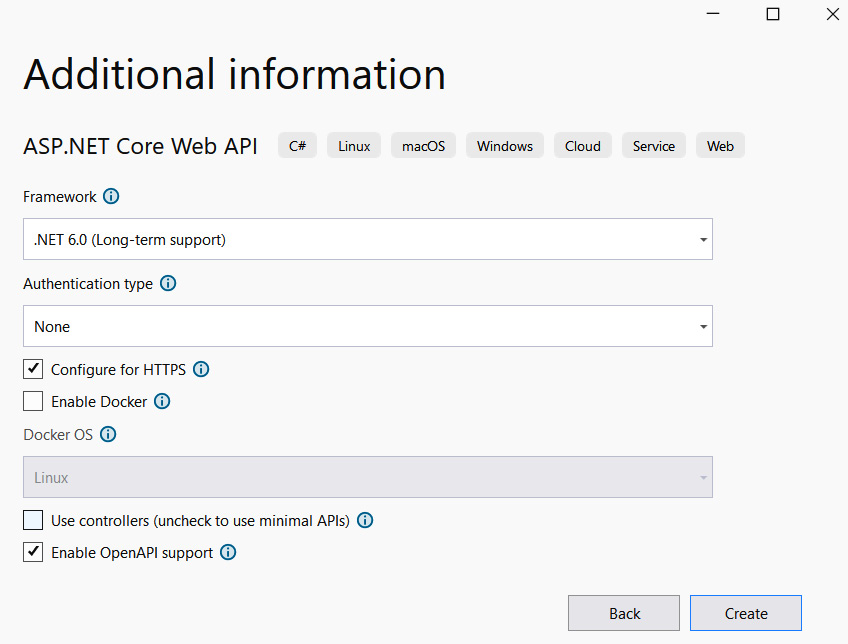
Figure 3.1 – Visual Studio scaffold
By selecting Enable OpenAPI support, Visual Studio goes to add a NuGet package called Swashbuckle.AspNetCore and automatically configures it in the Program.cs file.
通过选择“启用 OpenAPI 支持”,Visual Studio 将添加一个名为 Swashbuckle.AspNetCore 的 NuGet 包,并自动在 Program.cs 文件中对其进行配置。
We show the few lines that are added with a new project. With these few pieces of information, a web application is enabled only for the development environment, which allows the developer to test the API without generating a client or using tools external to the application:
我们显示了随新项目添加的几行。有了这几条信息,Web 应用程序仅针对开发环境启用,这允许开发人员在不生成客户端或使用应用程序外部工具的情况下测试 API:
var builder = WebApplication.CreateBuilder(args);
builder.Services.AddEndpointsApiExplorer();
builder.Services.AddSwaggerGen();
var app = builder.Build();
if (app.Environment.IsDevelopment())
{
app.UseSwagger();
app.UseSwaggerUI();
}
The graphical part generated by Swagger greatly increases productivity and allows the developer to share information with those who will interface with the application, be it a frontend application or a machine application.
Swagger 生成的图形部分大大提高了生产力,并允许开发人员与将与应用程序交互的人员共享信息,无论是前端应用程序还是机器应用程序。
Note : We remind you that enabling Swagger in a production environment is strongly discouraged because sensitive information could be publicly exposed on the web or on the network where the application resides.
注意 : 我们提醒您,强烈建议不要在生产环境中启用 Swagger,因为敏感信息可能会在 Web 或应用程序所在的网络上公开暴露。
We have seen how to introduce Swagger into our API applications; this functionality allows us to document our API, as well as allow users to generate a client to call our application. Let’s see the options we have to quickly interface an application with APIs described with OpenAPI.
我们已经了解了如何将 Swagger 引入我们的 API 应用程序;此功能允许我们记录我们的 API,并允许用户生成客户端来调用我们的应用程序。让我们看看我们必须选择哪些选项来快速将应用程序与 OpenAPI 中描述的 API 连接起来。
OpenAPI Generator
OpenAPI 生成器
With Swagger, and especially with the OpenAPI standard, you can automatically generate clients to connect to the web application. Clients can be generated for many languages but also for development tools. We know how tedious and repetitive it is to write clients to access the Web API. Open API Generator helps us automate code generation, inspect the API documentation made by Swagger and OpenAPI, and automatically generate code to interface with the API. Simple, easy, and above all, fast.
使用 Swagger,尤其是 OpenAPI 标准,您可以自动生成客户端以连接到 Web 应用程序。可以为多种语言生成客户端,也可以为开发工具生成客户端。我们知道编写客户端来访问 Web API 是多么乏味和重复。Open API Generator 帮助我们自动生成代码,检查 Swagger 和 OpenAPI 制作的 API 文档,并自动生成代码以与 API 交互。简单、轻松,最重要的是,快速。
The @openapitools/openapi-generator-cli npm package is a very well-known package wrapper for OpenAPI Generator, which you can find at https://openapi-generator.tech/.
@openapitools/openapi-generator-cli npm 包是 OpenAPI 生成器的一个非常知名的包包装器,您可以在 https://openapi-generator.tech/ 中找到它。
With this tool, you can generate clients for programming languages as well as load testing tools such as JMeter and K6.
使用此工具,您可以为编程语言生成客户端以及 JMeter 和 K6 等负载测试工具。
It is not necessary to install the tool on your machine, but if the URL of the application is accessible from the machine, you can use a Docker image, as described by the following command:
无需在计算机上安装该工具,但如果可以从计算机访问应用程序的 URL,则可以使用 Docker 映像,如以下命令所述:
docker run --rm \
-v ${PWD}:/local openapitools/openapi-generator-cli generate \
-i /local/petstore.yaml \
-g go \
-o /local/out/go
The command allows you to generate a Go client using the OpenAPI definition found in the petstore.yaml file that is mounted on the Docker volume.
该命令允许您使用挂载在 Docker 卷上的 petstore.yaml 文件中找到的 OpenAPI 定义生成 Go 客户端。
Now, let’s go into detail to understand how you can leverage Swagger in .NET 6 projects and with minimal APIs.
现在,让我们详细介绍如何在 .NET 6 项目中利用 Swagger 并使用最少的 API。
Swagger in minimal APIs
在最少的 API 中使用Swagger
In ASP.NET Web API, as in the following code excerpt, we see a method documented with C# language annotations with the triple slash (///).
在 Web API ASP.NET,如以下代码摘录所示,我们看到一个使用带有三斜杠 () 的 C# 语言注释记录的方法。
The documentation section is leveraged to add more information to the API description. In addition, the ProducesResponseType annotations help Swagger identify the possible codes that the client must handle as a result of the method call:
利用 documentation 部分向 API 描述添加更多信息。此外,ProducesResponseType 注释可帮助 Swagger 识别客户端在方法调用后必须处理的可能代码:
/// <summary>
/// Creates a Contact.
/// </summary>
/// <param name="contact"></param>
/// <returns>A newly created Contact</returns>
/// <response code="201">Returns the newly created contact</response>
/// <response code="400">If the contact is null</response>
[HttpPost]
[ProducesResponseType(StatusCodes.Status201Created)]
[ProducesResponseType(StatusCodes.Status400BadRequest)]
public async Task<IActionResult> Create(Contact contactItem)
{
_context.Contacts.Add(contactItem);
await _context.SaveChangesAsync();
return CreatedAtAction(nameof(Get), new { id =
contactItem.Id }, contactItem);
}
Swagger, in addition to the annotations on single methods, is also instructed by the documentation of the language to give further information to those who will then have to use the API application. A description of the methods of the parameters is always welcome by those who will have to interface; unfortunately, it is not possible to exploit this functionality in the minimal API.
除了单个方法的注释外,该语言的文档还指示 Swagger 为那些随后必须使用 API 应用程序的人提供更多信息。对参数方法的描述总是受到那些必须进行接口的人的欢迎;遗憾的是,无法在最小 API 中利用此功能。
Let’s go in order and see how to start using Swagger on a single method:
让我们按顺序来看看如何在单个方法上开始使用 Swagger:
var builder = WebApplication.CreateBuilder(args);
builder.Services.AddEndpointsApiExplorer();
builder.Services.AddSwaggerGen(c =>
{
c.SwaggerDoc("v1", new()
{
Title = builder.Environment.ApplicationName,
Version = "v1", Contact = new()
{ Name = "PacktAuthor", Email = "[email protected]",
Url = new Uri("https://www.packtpub.com/") },
Description = "PacktPub Minimal API - Swagger",
License = new Microsoft.OpenApi.Models.
OpenApiLicense(),
TermsOfService = new("https://www.packtpub.com/")
});
});
var app = builder.Build();
if (app.Environment.IsDevelopment())
{
app.UseSwagger();
app.UseSwaggerUI();
}
With this first example, we have configured Swagger and general Swagger information. We have included additional information that enriches Swagger’s UI. The only mandatory information is the title, while the version, contact, description, license, and terms of service are optional.
在第一个示例中,我们配置了 Swagger 和常规 Swagger 信息。我们添加了丰富 Swagger UI 的其他信息。唯一的必填信息是标题,而版本、联系人、描述、许可证和服务条款是可选的。
The UseSwaggerUI() method automatically configures where to put the UI and the JSON file describing the API with the OpenAPI format.
UseSwaggerUI() 方法自动配置放置 UI 和描述 OpenAPI 格式 API 的 JSON 文件的位置。
Here is the result at the graphical level:
这是图形级别的结果:
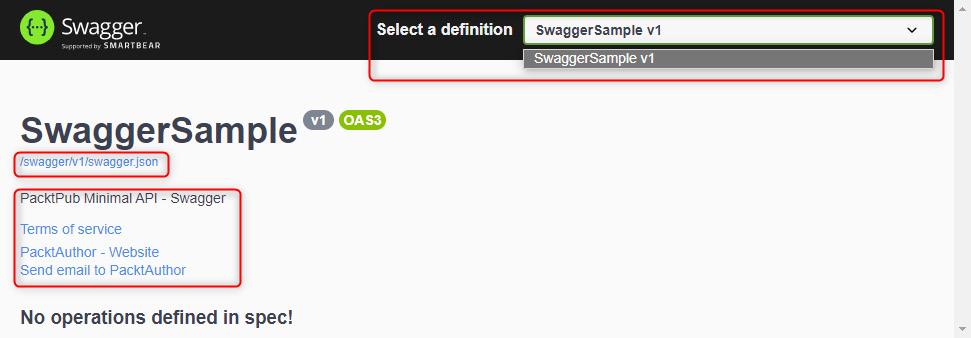
Figure 3.2 – The Swagger UI
We can immediately see that the OpenAPI contract information has been placed in the /swagger/v1/swagger.json path.
我们可以立即看到 OpenAPI 合约信息已经放在 /swagger/v1/swagger.json 路径下。
The contact information is populated, but no operations are reported as we haven’t entered any yet. Should the API have versioning? In the top-right section, we can select the available operations for each version.
联系信息已填充,但未报告任何作,因为我们尚未输入任何作。API 应该有版本控制吗?在右上角,我们可以为每个版本选择可用的作。
We can customize the Swagger URL and insert the documentation on a new path; the important thing is to redefine SwaggerEndpoint, as follows:
我们可以自定义 Swagger URL 并将文档插入到新路径上;重要的是重新定义 SwaggerEndpoint,如下所示:
app.UseSwaggerUI(c => c.SwaggerEndpoint("/swagger/v1/swagger.json", $"{builder.Environment.ApplicationName} v1"));
Let’s now go on to add the endpoints that describe the business logic.
现在,我们继续添加描述业务逻辑的终端节点。
It is very important to define RouteHandlerBuilder because it allows us to describe all the properties of the endpoint that we have written in code.
定义 RouteHandlerBuilder 非常重要,因为它允许我们描述我们在代码中编写的端点的所有属性。
The UI of Swagger must be enriched as much as possible; we must describe at best what the minimal APIs allow us to specify. Unfortunately, not all the functionalities are available, as in ASP.NET Web API.
必须尽可能丰富 Swagger 的 UI;我们最多只能描述最小 API 允许我们指定的内容。遗憾的是,并非所有功能都可用,就像 ASP.NET Web API 一样。
Versioning in minimal APIs
在最少的 API 中进行版本控制
Versioning in minimal APIs is not handled in the framework functionality; as a result, even Swagger cannot handle UI-side API versioning. So, we observe that when we go to the Select a definition section shown in Figure 3.2, only one entry for the current version of the API is visible.
最小 API 中的版本控制不在框架功能中处理;因此,即使是 Swagger 也无法处理 UI 端 API 版本控制。因此,我们观察到,当我们转到图 3.2 所示的 Select a definition 部分时,只有当前版本 API 的一个条目可见。
Swagger features
Swagger 功能
We just realized that not all features are available in Swagger; let’s now explore what is available instead. To describe the possible output values of an endpoint, we can call functions that can be called after the handler, such as the Produces or WithTags functions, which we are now going to explore.
我们刚刚意识到并非所有功能在 Swagger 中都可用;现在让我们来探索一下可用的内容。为了描述终端节点的可能输出值,我们可以调用可以在处理程序之后调用的函数,例如 Produces 或 WithTags 函数,我们现在将探讨这些函数。
The Produces function decorates the endpoint with all the possible responses that the client should be able to manage. We can add the name of the operation ID; this information will not appear in the Swagger screen, but it will be the name with which the client will create the method to call the endpoint. OperationId is the unique name of the operation made available by the handler.
Produces 函数使用客户端应该能够管理的所有可能的响应来装饰终端节点。我们可以添加作 ID 的名称;此信息不会显示在 Swagger 屏幕中,但它将是客户端创建调用终结点的方法时使用的名称。OperationId 是处理程序可用的作的唯一名称。
To exclude an endpoint from the API description, you need to call ExcludeFromDescription(). This function is rarely used, but it is very useful in cases where you don’t want to expose endpoints to programmers who are developing the frontend because that particular endpoint is used by a machine application.
要从 API 描述中排除终端节点,您需要调用 ExcludeFromDescription()。此函数很少使用,但在您不想将端点公开给正在开发前端的程序员的情况下,它非常有用,因为该特定端点由机器应用程序使用。
Finally, we can add and tag the various endpoints and segment them for better client management:
最后,我们可以添加和标记各种终端节点,并对其进行细分以更好地管理客户端:
app.MapGet("/sampleresponse", () =>
{
return Results.Ok(new ResponseData("My Response"));
})
.Produces<ResponseData>(StatusCodes.Status200OK)
.WithTags("Sample")
.WithName("SampleResponseOperation"); // operation ids to
Open API
app.MapGet("/sampleresponseskipped", () =>
{
return Results.Ok(new ResponseData("My Response Skipped"));
})
.ExcludeFromDescription();
app.MapGet("/{id}", (int id) => Results.Ok(id));
app.MapPost("/", (ResponseData data) => Results.Ok(data))
.Accepts<ResponseData>(MediaTypeNames.Application.Json);
This is the graphical result of Swagger; as I anticipated earlier, the tags and operation IDs are not shown by the web client:
这是 Swagger 的图形结果;正如我之前所预料的那样,Web 客户端不会显示标签和作 ID:
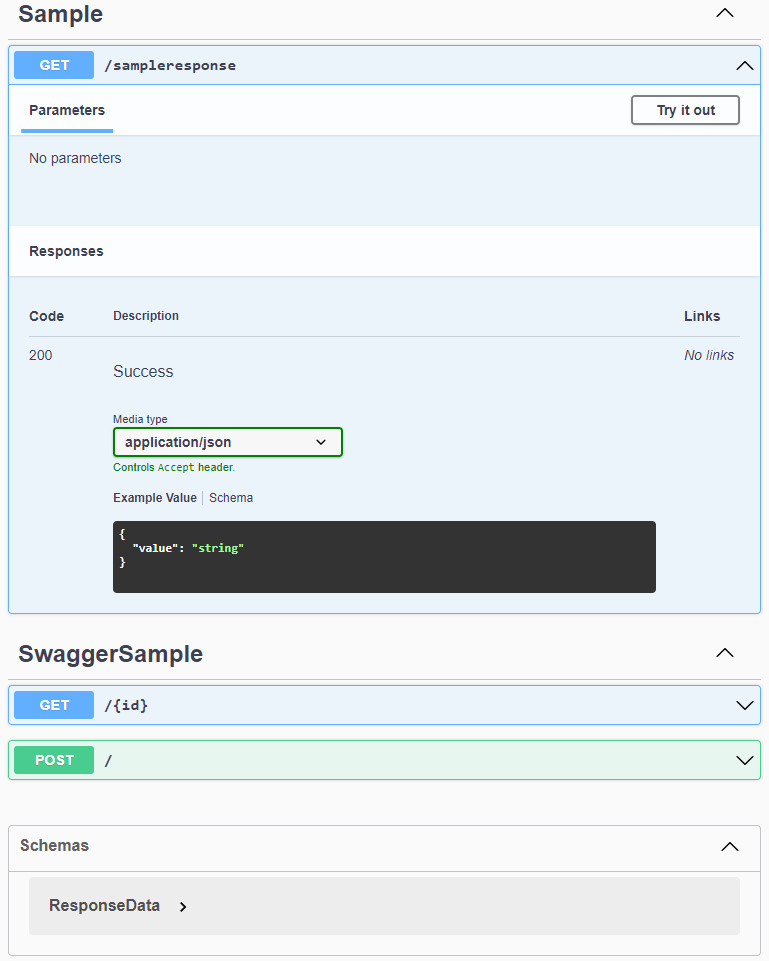
Figure 3.3 – Swagger UI methods
图 3.3 – Swagger UI 方法
The endpoint description, on the other hand, is very useful to include. It’s very easy to implement: just insert C# comments in the method (just insert three slashes, ///, in the method). Minimal APIs don’t have methods like we are used to in web-based controllers, so they are not natively supported.
另一方面,终端节点描述非常有用。这很容易实现:只需在方法中插入 C# 注释(只需在方法中插入三个斜杠 , 即可)。Minimal API 没有我们在基于 Web 的控制器中习惯的方法,因此它们本身不受支持。
Swagger isn’t just the GUI we’re used to seeing. Above all, Swagger is the JSON file that supports the OpenAPI specification, of which the latest version is 3.1.0.
Swagger 不仅仅是我们习惯看到的 GUI。首先,Swagger 是支持 OpenAPI 规范的 JSON 文件,最新版本为 3.1.0。
In the following snippet, we show the section containing the description of the first endpoint that we inserted in the API. We can infer both the tag and the operation ID; this information will be used by those who will interface with the API:
在以下代码段中,我们显示了包含我们在 API 中插入的第一个终端节点的描述的部分。我们可以推断 tag 和作 ID;此信息将由将与 API 交互的人员使用:
"paths": {
"/sampleresponse": {
"get": {
"tags": [
"Sample"
],
"operationId": "SampleResponseOperation",
"responses": {
"200": {
"description": "Success",
"content": {
"application/json": {
"schema": {
"$ref": "#/components/schemas/ResponseData"
}
}
}
}
}
}
},
In this section, we have seen how to configure Swagger and what is currently not yet supported.
在本节中,我们了解了如何配置 Swagger 以及当前尚不支持的内容。
In the following chapters, we will also see how to configure OpenAPI, both for the OpenID Connect standard and authentication via the API key.
在接下来的章节中,我们还将了解如何配置 OpenAPI,包括 OpenID Connect 标准和通过 API 密钥进行身份验证。
In the preceding code snippet of the Swagger UI, Swagger makes the schematics of the objects involved available, both inbound to the various endpoints and outbound from them.
在 Swagger UI 的前面的代码片段中,Swagger 使所涉及对象的示意图可用,包括入站到各个端点和从它们出站的示意图。
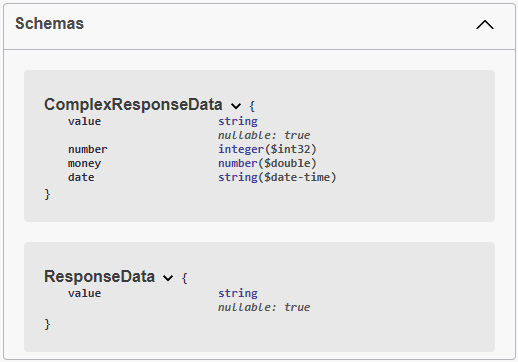
Figure 3.4 – Input and output data schema
图 3.4 – 输入和输出数据架构
We will learn how to deal with these objects and how to validate and define them in Chapter 6, Exploring Validation and Mapping.
我们将在第 6 章 探索验证和映射 中学习如何处理这些对象以及如何验证和定义它们。
Swagger OperationFilter
Swagger OperationFilter
The operation filter allows you to add behavior to all operations shown by Swagger. In the following example, we’ll show you how to add an HTTP header to a particular call, filtering it by OperationId.
作筛选器允许您向 Swagger 显示的所有作添加行为。在以下示例中,我们将向您展示如何向特定调用添加 HTTP 标头,并按 OperationId 对其进行筛选。
When you go to define an operation filter, you can also set filters based on routes, tags, and operation IDs:
在定义作筛选条件时,您还可以根据路由、标签和作 ID 设置筛选条件:
public class CorrelationIdOperationFilter : IOperationFilter
{
private readonly IWebHostEnvironment environment;
public CorrelationIdOperationFilter(IWebHostEnvironment
environment)
{
this.environment = environment;
}
/// <summary>
/// Apply header in parameter Swagger.
/// We add default value in parameter for developer
environment
/// </summary>
/// <param name="operation"></param>
/// <param name="context"></param>
public void Apply(OpenApiOperation operation,
OperationFilterContext context)
{
if (operation.Parameters == null)
{
operation.Parameters = new
List<OpenApiParameter>();
}
if (operation.OperationId ==
"SampleResponseOperation")
{
operation.Parameters.Add(new OpenApiParameter
{
Name = "x-correlation-id",
In = ParameterLocation.Header,
Required = false,
Schema = new OpenApiSchema { Type =
"String", Default = new OpenApiString("42") }
});
}
}
}
To define an operation filter, the IOperationFilter interface must be implemented.
要定义作过滤器,必须实现 IOperationFilter 接口。
In the constructor, you can define all interfaces or objects that have been previously registered in the dependency inject engine.
在构造函数中,您可以定义之前在 dependency inject 引擎中注册的所有接口或对象。
The filter then consists of a single method, called Apply, which provides two objects:
然后,筛选器由一个名为 Apply 的方法组成,该方法提供两个对象:
• OpenApiOperation: An operation where we can add parameters or check the operation ID of the current call
• OperationFilterContext: The filter context that allows you to read ApiDescription, where you can find the URL of the current endpoint
Finally, to enable the operation filter in Swagger, we will need to register it inside the SwaggerGen method.
最后,要在 Swagger 中启用作筛选器,我们需要在 SwaggerGen 方法中注册它。
In this method, we should then add the filter, as follows:
在此方法中,我们应该添加过滤器,如下所示:
builder.Services.AddSwaggerGen(c =>
{
… removed for brevity
c.OperationFilter<CorrelationIdOperationFilter>();
});
Here is the result at the UI level; in the endpoint and only for a particular operation ID, we would have a new mandatory header with a default parameter that, in development, will not have to be inserted:
下面是 UI 级别的结果;在终端节点中,并且仅针对特定的作 ID,我们将有一个带有 default 参数的新 mandatory 标头,在开发中,不必插入该参数:
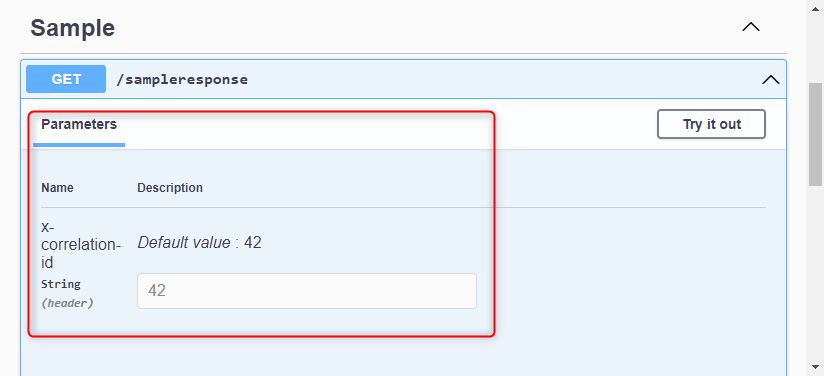
Figure 3.5 – API key section
图 3.5 – API 密钥部分
This case study helps us a lot when we have an API key that we need to set up and we don’t want to insert it on every single call.
当我们有一个需要设置的 API 密钥并且我们不想在每次调用时都插入它时,这个案例研究对我们有很大帮助。
Operation filter in production
生产中的作过滤器
Since Swagger should not be enabled in the production environment, the filter and its default value will not create application security problems.
由于不应在生产环境中启用 Swagger,因此过滤器及其默认值不会造成应用程序安全问题。
We recommend that you disable Swagger in the production environment.
建议您在生产环境中关闭 Swagger。
In this section, we figured out how to enable a UI tool that describes the API and allows us to test it. In the next section, we will see how to enable the call between single-page applications (SPAs) and the backend via CORS.
在本节中,我们弄清楚了如何启用描述 API 并允许我们测试它的 UI 工具。在下一节中,我们将了解如何通过 CORS 启用单页应用程序 (SPA) 与后端之间的调用。
Enabling CORS
启用 CORS
CORS is a security mechanism whereby an HTTP/S request is blocked if it arrives from a different domain than the one where the application is hosted. More information can be found in the Microsoft documentation or on the Mozilla site for developers.
CORS 是一种安全机制,如果 HTTP/S 请求来自与托管应用程序的域不同的域,则 HTTP/S 请求将被阻止。有关详细信息,请参阅 Microsoft 文档或 Mozilla 开发人员网站。
A browser prevents a web page from making requests to a domain other than the domain that serves that web page. A web page, SPA, or server-side web page can make HTTP requests to several backend APIs that are hosted in different origins.
浏览器会阻止网页向提供该网页的域以外的域发出请求。网页、SPA 或服务器端网页可以向托管在不同源中的多个后端 API 发出 HTTP 请求。
This restriction is called the same-origin policy. The same-origin policy prevents a malicious site from reading data from another site. Browsers don’t block HTTP requests but do block response data.
此限制称为同源策略。同源策略可防止恶意站点从其他站点读取数据。浏览器不会阻止 HTTP 请求,但会阻止响应数据。
We, therefore, understand that the CORS qualification, as it relates to safety, must be evaluated with caution.
因此,我们理解必须谨慎评估与安全相关的 CORS 资格。
The most common scenario is that of SPAs that are released on web servers with different web addresses than the web server hosting the minimal API:
最常见的情况是在 Web 服务器上发布的 SPA,这些 SPA 的 Web 地址与托管最小 API 的 Web 服务器不同:
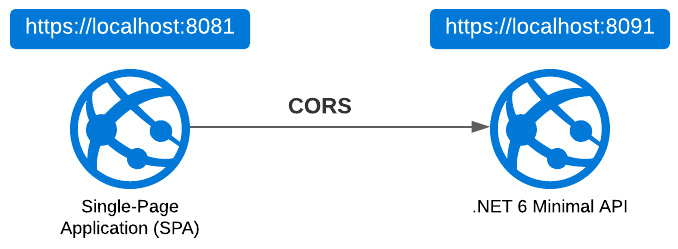
Figure 3.6 – SPA and minimal API
图 3.6 – SPA 和最小 API
A similar scenario is that of microservices, which need to talk to each other. Each microservice will reside at a particular web address that will be different from the others.
类似的场景是微服务,它们需要相互通信。每个微服务将驻留在一个与其他微服务不同的特定 Web 地址上。
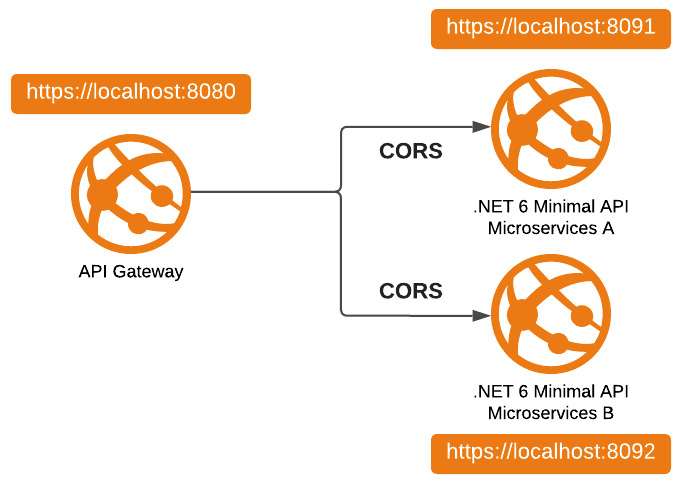
Figure 3.7 – Microservices and minimal APIs
图 3.7 – 微服务和最少的 API
In all these cases, therefore, a CORS problem is encountered.
因此,在所有这些情况下,都会遇到 CORS 问题。
We now understand the cases in which a CORS request can occur. Now let’s see what the correct HTTP request flow is and how the browser handles the request.
现在,我们了解了可能发生 CORS 请求的情况。现在让我们看看正确的 HTTP 请求流是什么,以及浏览器如何处理请求。
CORS flow from an HTTP request
来自 HTTP 请求的 CORS 流
What happens when a call leaves the browser for a different address other than the one where the frontend is hosted?
当调用离开浏览器前往托管前端的地址以外的其他地址时,会发生什么情况?
The HTTP call is executed and it goes all the way to the backend code, which executes correctly.
HTTP 调用被执行,并一直进入后端代码,后端代码正确执行。
The response, with the correct data inside, is blocked by the browser. That’s why when we execute a call with Postman, Fiddler, or any HTTP client, the response reaches us correctly.
包含正确数据的响应被浏览器阻止。这就是为什么当我们使用 Postman、Fiddler 或任何 HTTP 客户端执行调用时,响应会正确到达我们。
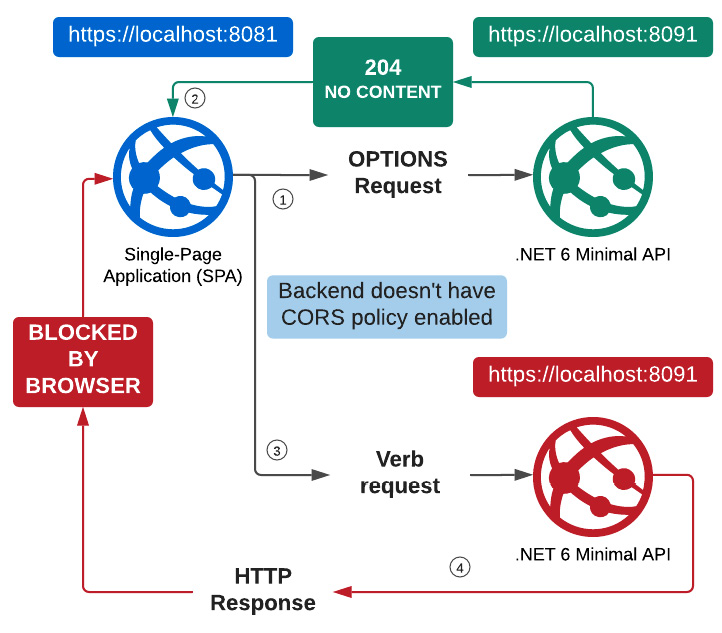
Figure 3.8 – CORS flow
图 3.8 – CORS 流程
In the following figure, we can see that the browser makes the first call with the OPTIONS method, to which the backend responds correctly with a 204 status code:
在下图中,我们可以看到浏览器使用 OPTIONS 方法进行了第一次调用,后端以 204 状态码正确响应:
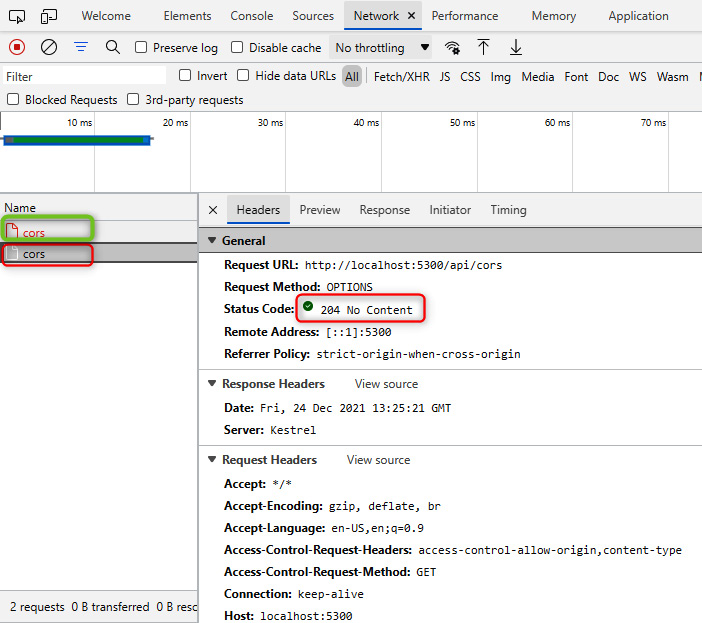
Figure 3.9 – First request for the CORS call (204 No Content result)
图 3.9 – CORS 调用的第一个请求(204 No Content 结果)
In the second call that the browser makes, an error occurs; the strict-origin-when-cross-origin value is shown in Referrer Policy, which indicates the refusal by the browser to accept data from the backend:
在浏览器进行的第二次调用中,会发生错误;strict-origin-when-cross-origin 值显示在 Referrer Policy 中,该值表示浏览器拒绝接受来自后端的数据:
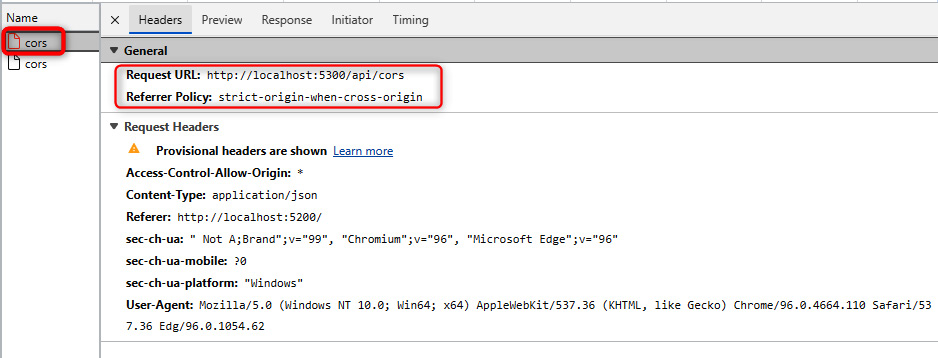
Figure 3.10 – Second request for the CORS call (blocked by the browser)
图 3.10 – CORS 调用的第二个请求(被浏览器阻止)
When CORS is enabled, in the response to the OPTIONS method call, three headers are inserted with the characteristics that the backend is willing to respect:
启用 CORS 后,在对 OPTIONS 方法调用的响应中,将插入三个标头,这些标头具有后端愿意遵循的特征:
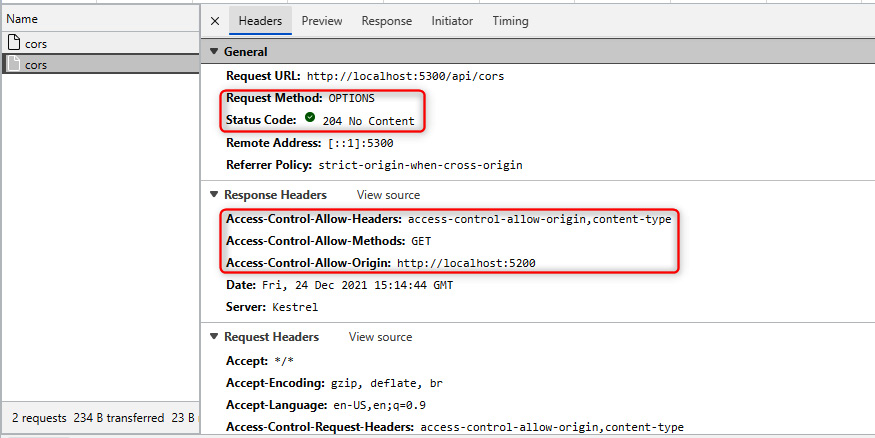
Figure 3.11 – Request for CORS call (with CORS enabled)
图 3.11 – 请求 CORS 调用(启用 CORS)
In this case, we can see that three headers are added that define Access-Control-Allow-Headers, Access-Control-Allow-Methods, and Access-Control-Allow-Origin.
在本例中,我们可以看到添加了三个标头,分别定义 Access-Control-Allow-Headers、Access-Control-Allow-Methods 和 Access-Control-Allow-Origin。
The browser with this information can accept or block the response to this API.
具有此信息的浏览器可以接受或阻止对此 API 的响应。
Setting CORS with a policy
使用策略设置 CORS
Many configurations are possible within a .NET 6 application for activating CORS. We can define authorization policies in which the four available settings can be configured. CORS can also be activated by adding extension methods or annotations.
在 .NET 6 应用程序中可以使用许多配置来激活 CORS。我们可以定义授权策略,在其中可以配置四个可用设置。还可以通过添加扩展方法或注释来激活 CORS。
But let us proceed in order.
但是,让我们按顺序进行吧。
The CorsPolicyBuilder class allows us to define what is allowed or not allowed within the CORS acceptance policy.
orsPolicyBuilder 类允许我们定义 CORS 接受策略中允许或不允许的内容。
We have, therefore, the possibility to set different methods, for example:
因此,我们可以设置不同的方法,例如:
• AllowAnyHeader
• AllowAnyMethod
• AllowAnyOrigin
• AllowCredentials
While the first three methods are descriptive and allow us to enable any settings relating to the header, method, and origin of the HTTP call, respectively, AllowCredentials allows us to include the cookie with the authentication credentials.
虽然前三种方法是描述性的,并允许我们分别启用与 HTTP 调用的标头、方法和来源相关的任何设置,但 AllowCredentials 允许我们将 Cookie 与身份验证凭据一起包含。
CORS policy recommendations
CORS 策略建议
We recommend that you don’t use the AllowAny methods but instead filter out the necessary information to allow for greater security. As a best practice, when enabling CORS, we recommend the use of these methods:
我们建议您不要使用 AllowAny 方法,而是筛选掉必要的信息以提高安全性。作为最佳实践,在启用 CORS 时,我们建议使用以下方法:
• WithExposedHeaders
• WithHeaders
• WithOrigins
To simulate a scenario for CORS, we created a simple frontend application with three different buttons. Each button allows you to test one of the possible configurations of CORS within the minimal API. We will explain these configurations in a few lines.
为了模拟 CORS 的场景,我们创建了一个具有三个不同按钮的简单前端应用程序。每个按钮都允许您在最小 API 中测试 CORS 的一种可能配置。我们将用几行来解释这些配置。
To enable the CORS scenario, we have created a single-page application that can be launched on a web server in memory. We have used LiveReloadServer, a tool that can be installed with the .NET CLI. We talked about it at the start of the chapter and now it’s time to use it.
为了启用 CORS 方案,我们创建了一个单页应用程序,该应用程序可以在内存中的 Web 服务器上启动。我们使用了 LiveReloadServer,这是一个可以使用 .NET CLI 安装的工具。我们在本章的开头讨论过它,现在是时候使用它了。
After installing it, you need to launch the SPA with the following command:
安装后,您需要使用以下命令启动 SPA:
livereloadserver "{BasePath}\Chapter03\2-CorsSample\Frontend"
Here, BasePath is the folder where you are going to download the examples available on GitHub.
此处,BasePath 是您要下载 GitHub 上可用示例的文件夹。
Then you must start the application backend, either through Visual Studio or Visual Studio Code or through the .NET CLI with the following command:
然后,您必须使用以下命令通过 Visual Studio 或 Visual Studio Code 或通过 .NET CLI 启动应用程序后端:
dotnet run .\Backend\CorsSample.csproj
We’ve figured out how to start an example that highlights the CORS problem; now we need to configure the server to accept the request and inform the browser that it is aware that the request is coming from a different source.
我们已经想出了如何开始一个突出 CORS 问题的示例;现在我们需要配置服务器以接受请求并通知浏览器它知道请求来自不同的来源。
Next, we will talk about policy configuration. We will understand the characteristics of the default policy as well as how to create a custom one.
接下来,我们将讨论策略配置。我们将了解默认策略的特征以及如何创建自定义策略。
Configuring a default policy
配置默认策略
To configure a single CORS enabling policy, you need to define the behavior in the Program.cs file and add the desired configurations. Let’s implement a policy and define it as Default.
要配置单个 CORS 启用策略,您需要在 Program.cs 文件中定义行为并添加所需的配置。让我们实现一个策略并将其定义为 Default。
Then, to enable the policy for the whole application, simply add app.UseCors(); before defining the handlers:
然后,要为整个应用程序启用策略,只需添加 app.UseCors();在定义处理程序之前:
var builder = WebApplication.CreateBuilder(args);
var corsPolicy = new CorsPolicyBuilder("http://localhost:5200")
.AllowAnyHeader()
.AllowAnyMethod()
.Build();
builder.Services.AddCors(c => c.AddDefaultPolicy(corsPolicy));
var app = builder.Build();
app.UseCors();
app.MapGet("/api/cors", () =>
{
return Results.Ok(new { CorsResultJson = true });
});
app.Run();
Configuring custom policies
配置自定义策略
We can create several policies within an application; each policy may have its own configuration and each policy may be associated with one or more endpoints.
我们可以在一个应用程序中创建多个策略;每个策略可能有自己的配置,并且每个策略可能与一个或多个终端节点关联。
In the case of microservices, having several policies helps to precisely segment access from a different source.
对于微服务,拥有多个策略有助于精确分段来自不同来源的访问。
In order to configure a new policy, it is necessary to add it and give it a name; this name will give access to the policy and allow it to be associated with the endpoint.
要配置新策略,必须添加该策略并为其命名;此名称将授予对策略的访问权限,并允许它与终端节点关联。
The customized policy, as in the previous example, is assigned to the entire application:
如前面的示例所示,自定义策略被分配给整个应用程序:
var builder = WebApplication.CreateBuilder(args);
var corsPolicy = new CorsPolicyBuilder("http://localhost:5200")
.AllowAnyHeader()
.AllowAnyMethod()
.Build();
builder.Services.AddCors(options => options.AddPolicy("MyCustomPolicy", corsPolicy));
var app = builder.Build();
app.UseCors("MyCustomPolicy");
app.MapGet("/api/cors", () =>
{
return Results.Ok(new { CorsResultJson = true });
});
app.Run();
We next look at how to apply a single policy to a specific endpoint; to this end, two methods are available. The first is via an extension method to the IEndpointConventionBuilder interface. The second method is to add the EnableCors annotation followed by the name of the policy to be enabled for that method.
接下来,我们将了解如何将单个策略应用于特定终端节点;为此,有两种方法可供选择。第一种是通过 IEndpointConventionBuilder 接口的扩展方法。第二种方法是添加 EnableCors 注释,后跟要为该方法启用的策略的名称。
Setting CORS with extensions
使用扩展设置 CORS
It is necessary to use the RequireCors method followed by the name of the policy.
必须使用 RequireCors 方法,后跟策略的名称。
With this method, it is then possible to enable one or more policies for an endpoint:
使用此方法,可以为终端节点启用一个或多个策略:
app.MapGet("/api/cors/extension", () =>
{
return Results.Ok(new { CorsResultJson = true });
})
.RequireCors("MyCustomPolicy");
Setting CORS with an annotation
使用注释设置 CORS
The second method is to add the EnableCors annotation followed by the name of the policy to be enabled for that method:
第二种方法是添加 EnableCors 注释,后跟要为该方法启用的策略的名称:
app.MapGet("/api/cors/annotation", [EnableCors("MyCustomPolicy")] () =>
{
return Results.Ok(new { CorsResultJson = true });
});
Regarding controller programming, it soon becomes apparent that it is not possible to apply a policy to all methods of a particular controller. It is also not possible to group controllers and enable the policy. It is therefore necessary to apply the individual policy to the method or the entire application.
关于控制器编程,很快就会发现不可能将策略应用于特定控制器的所有方法。也无法对控制器进行分组并启用策略。因此,有必要将单个策略应用于方法或整个应用程序。
In this section, we found out how to configure browser protection for applications hosted on different domains.
在本节中,我们了解了如何为托管在不同域上的应用程序配置浏览器保护。
In the next section, we will start configuring our applications.
在下一节中,我们将开始配置我们的应用程序。
Working with global API settings
使用全局 API 设置
We have just defined how you can load data with the options pattern within an ASP.NET application. In this section, we want to describe how you can configure an application and take advantage of everything we saw in the previous section.
我们刚刚定义了如何在 ASP.NET 应用程序中使用 options 模式加载数据。在本节中,我们想描述如何配置应用程序并利用我们在上一节中看到的所有内容。
With the birth of .NET Core, the standard has moved from the Web.config file to the appsettings.json file. The configurations can also be read from other sources, such as other file formats like the old .ini file or a positional file.
随着 .NET Core 的诞生,该标准已从 Web.config 文件移至 appsettings.json 文件。还可以从其他来源读取配置,例如其他文件格式,如旧.ini文件或位置文件。
In minimal APIs, the options pattern feature remains unchanged, but in the next few paragraphs, we will see how to reuse the interfaces or the appsettings.json file structure.
在最小 API 中,选项模式功能保持不变,但在接下来的几段中,我们将看到如何重用接口或 appsettings.json 文件结构。
Configuration in .NET 6
.NET 6 中的配置
The object provided from .NET is IConfiguration, which allows us to read some specific configurations inside the appsettings file.
从 .NET 提供的对象是 IConfiguration,它允许我们读取 appsettings 文件中的一些特定配置。
But, as described earlier, this interface does much more than just access a file for reading.
但是,如前所述,此接口的作用不仅仅是访问文件进行读取。
The following extract from the official documentation helps us understand how the interface is the generic access point that allows us to access the data inserted in various services:
以下摘录自官方文档有助于我们了解接口如何成为允许我们访问插入各种服务中的数据的通用接入点:
Configuration in ASP.NET Core is performed using one or more configuration providers. Configuration providers read configuration data from key-value pairs using a variety of configuration sources.
ASP.NET Core 中的配置是使用一个或多个配置提供程序执行的。配置提供程序使用各种配置源从键值对中读取配置数据。
The following is a list of configuration sources:
以下是配置源的列表:
• Settings files, such as appsettings.json
• Environment variables
• Azure Key Vault
• Azure App Configuration
• Command-line arguments
• Custom providers, installed or created
• Directory files
• In-memory .NET objects
(https://docs.microsoft.com/aspnet/core/fundamentals/configuration/)
The IConfiguration and IOptions interfaces, which we will see in the next chapter, are designed to read data from the various providers. These interfaces are not suitable for reading and editing the configuration file while the program is running.
我们将在下一章中看到的 IConfiguration 和 IOptions 接口旨在从各种提供程序读取数据。这些接口不适合在程序运行时读取和编辑配置文件。
The IConfiguration interface is available through the builder object, builder.Configuration, which provides all the methods needed to read a value, an object, or a connection string.
IConfiguration 接口可通过 builder 对象 builder 获得。Configuration,它提供读取值、对象或连接字符串所需的所有方法。
After looking at one of the most important interfaces that we will use to configure the application, we want to define good development practices and use a fundamental building block for any developer: namely, classes. Copying the configuration into a class will allow us to better enjoy the content anywhere in the code.
在查看了我们将用于配置应用程序的最重要的接口之一之后,我们想要定义良好的开发实践并为任何开发人员使用一个基本构建块:即类。将配置复制到类中将使我们能够更好地享受代码中任何位置的内容。
We define classes containing a property and classes corresponding appsettings file:
我们定义包含属性的类和对应的 appsettings 文件的类:
Configuration classes
public class MyCustomObject
{
public string? CustomProperty { get; init; }
}
public class MyCustomStartupObject
{
public string? CustomProperty { get; init; }
}
And here, we bring back the corresponding JSON of the C# class that we just saw:
在这里,我们返回我们刚刚看到的 C# 类的相应 JSON:
appsettings.json definition
appsettings.json定义
{
"MyCustomObject": {
"CustomProperty": "PropertyValue"
},
"MyCustomStartupObject": {
"CustomProperty": "PropertyValue"
},
"ConnectionStrings": {
"Default": "MyConnectionstringValueInAppsettings"
}
}
Next, we will be performing several operations.
接下来,我们将执行几项作。
The first operation we perform creates an instance of the startupConfig object that will be of the MyCustomStartupObject type. To populate the instance of this object, through IConfiguration, we are going to read the data from the section called MyCustomStartupObject:
我们执行的第一个作将创建一个 startupConfig 对象的实例,该实例将为 MyCustomStartupObject 类型。为了填充此对象的实例,通过 IConfiguration,我们将从名为 MyCustomStartupObject 的部分读取数据:
var startupConfig = builder.Configuration.GetSection(nameof(MyCustomStartupObject)).Get<MyCustomStartupObject>();
The newly created object can then be used in the various handlers of the minimal APIs.
然后,新创建的对象可以在最小 API 的各种处理程序中使用。
Instead, in this second operation, we use the dependency injection engine to request the instance of the IConfiguration object:
相反,在第二个作中,我们使用依赖项注入引擎来请求 IConfiguration 对象的实例:
app.MapGet("/read/configurations", (IConfiguration configuration) =>
{
var customObject = configuration.
GetSection(nameof(MyCustomObject)).Get<MyCustomObject>();
With the IConfiguration object, we will retrieve the data similarly to the operation just described. We select the GetSection(nameof(MyCustomObject)) section and type the object with the Get<T>() method.
使用 IConfiguration 对象,我们将检索数据,类似于刚才描述的作。我们选择 GetSection(nameof(MyCustomObject)) 部分,并使用Get<T>()方法键入对象。
Finally, in these last two examples, we read a single key, present at the root level of the appsettings file:
最后,在最后两个示例中,我们读取了一个键,该键位于 appsettings 文件的根级别:
MyCustomValue = configuration.GetValue<string>("MyCustomValue"),
ConnectionString = configuration.GetConnectionString("Default"),
The configuration.GetValue<T>(“JsonRootKey”) method extracts the value of a key and converts it into an object; this method is used to read strings or numbers from a root-level property.
configuration.GetValue<T>(“JsonRootKey”) 方法提取键的值并将其转换为对象;此方法用于从根级别属性中读取字符串或数字。
In the next line, we can see how you can leverage an IConfiguration method to read ConnectionString.
在下一行中,我们可以看到如何利用 IConfiguration 方法来读取 ConnectionString。
In the appsettings file, connection strings are placed in a specific section, ConnectionStrings, that allows you to name the string and read it. Multiple connection strings can be placed in this section to exploit it in different objects.
在 appsettings 文件中,连接字符串放置在特定部分 ConnectionStrings 中,该部分允许你命名和读取字符串。可以在此部分中放置多个连接字符串,以便在不同的对象中利用它。
In the configuration provider for Azure App Service, connection strings should be entered with a prefix that also indicates the SQL provider you are trying to use, as described in the following link: https://docs.microsoft.com/azure/app-service/configure-common#configure-connection-strings.
在 Azure 应用服务的配置提供程序中,应输入连接字符串,并带有一个前缀,该前缀也指示你尝试使用的 SQL 提供程序,如以下链接所述:https://docs.microsoft.com/azure/app-service/configure-common#configure-connection-strings。
At runtime, connection strings are available as environment variables, prefixed with the following connection types:
在运行时,连接字符串可用作环境变量,前缀为以下连接类型:
• SQLServer: SQLCONNSTR
• MySQL: MYSQLCONNSTR
• SQLAzure: SQLAZURECONNSTR
• Custom: CUSTOMCONNSTR
• PostgreSQL: POSTGRESQLCONNSTR_
For completeness, we will bring back the entire code just described in order to have a better general picture of how to exploit the IConfiguration object inside the code:
为了完整起见,我们将返回刚才描述的整个代码,以便更好地了解如何在代码中利用 IConfiguration 对象:
var builder = WebApplication.CreateBuilder(args);
var startupConfig = builder.Configuration.GetSection(nameof(MyCustomStartupObject)).Get<MyCustomStartupObject>();
app.MapGet("/read/configurations", (IConfiguration configuration) =>
{
var customObject = configuration.GetSection
(nameof(MyCustomObject)).Get<MyCustomObject>();
return Results.Ok(new
{
MyCustomValue = configuration.GetValue
<string>("MyCustomValue"),
ConnectionString = configuration.
GetConnectionString("Default"),
CustomObject = customObject,
StartupObject = startupConfig
});
})
.WithName("ReadConfigurations");
We’ve seen how to take advantage of the appsettings file with connection strings, but very often, we have many different files for each environment. Let’s see how to take advantage of one file for each environment.
我们已经了解了如何利用带有连接字符串的 appsettings 文件,但通常,每个环境都有许多不同的文件。让我们看看如何为每个环境利用一个文件。
Priority in appsettings files
appsettings 文件中的优先级
The appsettings file can be managed according to the environments in which the application is located. In this case, the practice is to place key information for that environment in the appsettings.{ENVIRONMENT}.json file.
可以根据应用程序所在的环境来管理 appsettings 文件。在这种情况下,做法是将该环境的关键信息放在 appsettings.{ENVIRONMENT}.json文件。
The root file (that is, appsettings.json) should be used for the production environment only.
根文件(即 appsettings.json)应仅用于生产环境。
For example, if we created these examples in the two files for the “Priority” key, what would we get?
例如,如果我们在两个文件中为 “Priority” 键创建这些示例,我们会得到什么?
appsettings.json
"Priority": "Root"
appsettings.Development.json
"Priority": "Dev"
If it is a Development environment, the value of the key would result in Dev, while in a Production environment, the value would result in Root.
如果是 Development 环境,则 key 的值将导致 Dev,而在 Production 环境中,该值将导致 Root。
What would happen if the environment was anything other than Production or Development? For example, if it were called Stage? In this case, having not specified any appsettings.Stage.json file, the read value would be that of one of the appsettings.json files and therefore, Root.
如果环境不是生产或开发,会发生什么情况?例如,如果它被称为 Stage?在本例中,未指定任何 appsettings.Stage.json文件中,读取值将是其中一个appsettings.json文件的值,因此是 Root。
However, if we specified the appsettings.Stage.json file, the value would be read from the that file.
但是,如果我们指定 appsettings.Stage.json文件中,将从该文件中读取该值。
Next, let’s visit the Options pattern. There are objects that the framework provides to load configuration information upon startup or when changes are made by the systems department. Let’s go over how.
接下来,让我们访问 Options 模式。框架提供了一些对象,用于在启动时或系统部门进行更改时加载配置信息。让我们来看看如何作。
Options pattern
选项模式
The options pattern uses classes to provide strongly typed access to groups of related settings, that is, when configuration settings are isolated by scenario into separate classes.
选项模式使用类提供对相关设置组的强类型访问,即,当配置设置按方案隔离到单独的类中时。
The options pattern will be implemented with different interfaces and different functionalities. Each interface (see the following subsection) has its own features that help us achieve certain goals.
选项模式将使用不同的接口和不同的功能实现。每个界面(请参阅以下小节)都有自己的功能,可以帮助我们实现某些目标。
But let’s start in order. We define an object for each type of interface (we will do it to better represent the examples), but the same class can be used to register more options inside the configuration file. It is important to keep the structure of the file identical:
但让我们按顺序开始。我们为每种类型的接口定义一个对象(我们将这样做以更好地表示示例),但同一个类可用于在配置文件中注册更多选项。保持文件的结构相同非常重要:
public class OptionBasic
{
public string? Value { get; init; }
}
public class OptionSnapshot
{
public string? Value { get; init; }
}
public class OptionMonitor
{
public string? Value { get; init; }
}
public class OptionCustomName
{
public string? Value { get; init; }
}
Each option is registered in the dependency injection engine via the Configure method, which also requires the registration of the T type present in the method signature. As you can see, in the registration phase, we declared the types and the section of the file where to retrieve the information, and nothing more:
每个选项都通过 Configure 方法在依赖项注入引擎中注册,该方法还需要注册方法签名中存在的 T 类型。如你所见,在注册阶段,我们声明了类型和文件部分,用于检索信息,仅此而已:
builder.Services.Configure<OptionBasic>(builder.Configuration.GetSection("OptionBasic"));
builder.Services.Configure<OptionMonitor>(builder.Configuration.GetSection("OptionMonitor"));
builder.Services.Configure<OptionSnapshot>(builder.Configuration.GetSection("OptionSnapshot"));
builder.Services.Configure<OptionCustomName>("CustomName1", builder.Configuration.GetSection("CustomName1"));
builder.Services.Configure<OptionCustomName>("CustomName2", builder.Configuration.GetSection("CustomName2"));
We have not yet defined how the object should be read, how often, and with what type of interface.
我们尚未定义应该如何读取对象、读取频率以及使用什么类型的接口。
The only thing that changes is the parameter, as seen in the last two examples of the preceding code snippet. This parameter allows you to add a name to the option type. The name is required to match the type used in the method signature. This feature is called named options.
唯一更改的是参数,如前面代码段的最后两个示例所示。此参数允许您向选项类型添加名称。该名称必须与方法签名中使用的类型匹配。此功能称为 named options。
Different option interfaces
不同的选项接口
Different interfaces can take advantage of the recordings you just defined. Some support named options and some do not:
不同的界面可以利用您刚刚定义的记录。有些支持命名选项,有些则不支持:
• IOptions<TOptions>:
Is registered as a singleton and can be injected into any service lifetime
注册为单一实例,可以注入到任何服务生命周期中
Does not support the following:
不支持以下内容:
Reading of configuration data after the app has started
在应用程序启动后读取配置数据
Named options
命名选项
• IOptionsSnapshot<TOptions>:
Is useful in scenarios where options should be recomputed on every request
在应在每个请求上重新计算选项的情况下非常有用
Is registered as scoped and therefore cannot be injected into a singleton service
注册为 scoped,因此不能注入到单一实例服务
Supports named options
支持命名选项
IOptionsMonitor<TOptions>:
Is used to retrieve options and manage options notifications for TOptions instances
用于检索选项和管理 TOptions 实例的选项通知
Is registered as a singleton and can be injected into any service lifetime
注册为单一实例,可以注入到任何服务生命周期中
Supports the following:
支持以下功能:
Change notifications
更改通知
Named options
命名选项
Reloadable configuration
可重新加载配置
Selective options invalidation (IOptionsMonitorCache<TOptions>)
选择性选项失效 (IOptionsMonitorCache<TOptions>)
We want to point you to the use of IOptionsFactory<TOptions>, which is responsible for creating new instances of options. It has a single Create method. The default implementation takes all registered IConfigureOptions<TOptions> and IPostConfigureOptions and performs all configurations first, followed by post-configuration (https://docs.microsoft.com/aspnet/core/fundamentals/configuration/options#options-interfaces).
我们想向您介绍一下 IOptionsFactory<TOptions> 的使用,它负责创建新的选项实例。它只有一个 Create 方法。默认实现采用所有已注册的 IConfigureOptions<TOptions> 和 IPostConfigureOptions<TOptions>并首先执行所有配置,然后执行后配置 (https://docs.microsoft.com/aspnet/core/fundamentals/configuration/options#options-interfaces)。
The Configure method can also be followed by another method in the configuration pipeline. This method is called PostConfigure and is intended to modify the configuration each time it is configured or reread. Here is an example of how to record this behavior:
Configure 方法也可以后跟配置管道中的另一个方法。此方法称为 PostConfigure,旨在在每次配置或重新读取配置时修改配置。以下是如何记录此行为的示例:
builder.Services.PostConfigure<MyConfigOptions>(myOptions =>
{
myOptions.Key1 = "my_new_value_post_configuration";
});
Putting it all together
把它们放在一起
Having defined the theory of these numerous interfaces, it remains for us to see IOptions at work with a concrete example.
在定义了这些众多接口的理论之后,我们仍然需要通过一个具体的例子来了解 IOptions 的工作原理。
Let’s see the use of the three interfaces just described and the use of IOptionsFactory, which, along with the Create method and with the named options function, retrieves the correct instance of the object:
让我们看看刚才描述的三个接口的用法以及 IOptionsFactory 的用法,它与 Create 方法和命名选项函数一起检索对象的正确实例:
app.MapGet("/read/options", (IOptions<OptionBasic> optionsBasic,
IOptionsMonitor<OptionMonitor> optionsMonitor,
IOptionsSnapshot<OptionSnapshot> optionsSnapshot,
IOptionsFactory<OptionCustomName> optionsFactory) =>
{
return Results.Ok(new
{
Basic = optionsBasic.Value,
Monitor = optionsMonitor.CurrentValue,
Snapshot = optionsSnapshot.Value,
Custom1 = optionsFactory.Create("CustomName1"),
Custom2 = optionsFactory.Create("CustomName2")
});
})
.WithName("ReadOptions");
In the previous code snippet, we want to bring attention to the use of the different interfaces available.
在前面的代码片段中,我们希望提请注意可用不同接口的使用。
Each individual interface used in the previous snippet has a particular life cycle that characterizes its behavior. Finally, each interface has slight differences in the methods, as we have already described in the previous paragraphs.
上一个代码段中使用的每个接口都有一个特定的生命周期,用于描述其行为。最后,正如我们在前面的段落中已经描述的那样,每个接口在方法上略有不同。
IOptions and validation
操作和验证
Last but not least is the validation functionality of the data present in the configuration. This is very useful when the team that has to release the application still performs manual or delicate operations that need to be at least verified by the code.
最后但并非最不重要的一点是配置中存在的数据的验证功能。当必须发布应用程序的团队仍然执行至少需要由代码验证的手动或精细作时,这非常有用。
Before the advent of .NET Core, very often, the application would not start because of an incorrect configuration. Now, with this feature, we can validate the data in the configuration and throw errors.
在 .NET Core 出现之前,应用程序经常由于配置不正确而无法启动。现在,借助此功能,我们可以验证配置中的数据并引发错误。
Here is an example:
下面是一个示例:
Register option with validation
带验证的 Register 选项
builder.Services.AddOptions<ConfigWithValidation>().Bind(builder.Configuration.GetSection(nameof(ConfigWithValidation)))
.ValidateDataAnnotations();
app.MapGet("/read/options", (IOptions<ConfigWithValidation> optionsValidation) =>
{
return Results.Ok(new
{
Validation = optionsValidation.Value
});
})
.WithName("ReadOptions");
This is the configuration file where an error is explicitly reported:
这是明确报告错误的配置文件:
Appsettings section for configuration validation
用于配置验证的 Appsettings 部分
"ConfigWithValidation": {
"Email": "[email protected]",
"NumericRange": 1001
}
And here is the class containing the validation logic:
下面是包含验证逻辑的类:
public class ConfigWithValidation
{
[RegularExpression(@"^([\w\.\-]+)@([\w\-]+)((\.(\w)
{2,})+)$")]
public string? Email { get; set; }
[Range(0, 1000, ErrorMessage = "Value for {0} must be
between {1} and {2}.")]
public int NumericRange { get; set; }
}
The application then encounters errors while using the particular configuration and not at startup. This is also because, as we have seen before, IOptions could reload information following a change in appsettings:
然后,应用程序在使用特定配置时遇到错误,而不是在启动时遇到错误。这也是因为,正如我们之前看到的,IOptions 可以在 appsettings 更改后重新加载信息:
Error validate option
错误验证选项
Microsoft.Extensions.Options.OptionsValidationException: DataAnnotation validation failed for 'ConfigWithValidation' members: 'NumericRange' with the error: 'Value for NumericRange must be between 0 and 1000.'.
Best practice for using validation in IOptions
在 IOptions 中使用验证的最佳实践
This setting is not suitable for all application scenarios. Only some options can have formal validations; if we think of a connection string, it is not necessarily formally incorrect, but the connection may not be working.
此设置并不适合所有应用程序方案。只有某些选项可以进行正式验证;如果我们考虑一个连接字符串,它不一定在形式上是错误的,但连接可能无法正常工作。
Be cautious about applying this feature, especially since it reports errors at runtime and not during startup and gives an Internal Server Error, which is not a best practice in scenarios that should be handled.
在应用此功能时请谨慎,尤其是因为它在运行时而不是在启动期间报告错误,并给出内部服务器错误,这在应该处理的场景中不是最佳实践。
Everything we’ve seen up to this point is about configuring the appsettings.json file, but what if we wanted to use other sources for configuration management? We’ll look at that in the next section.
到目前为止,我们所看到的所有内容都是关于配置 appsettings.json 文件的,但是如果我们想使用其他源进行配置管理呢?我们将在下一节中介绍这一点。
Configuration sources
配置源
As we mentioned at the beginning of the section, the IConfiguration interface and all variants of IOptions work not only with the appsettings file but also on different sources.
正如我们在本节开头提到的,IConfiguration 接口和 IOptions 的所有变体不仅适用于 appsettings 文件,也适用于不同的源。
Each source has its own characteristics, and the syntax for accessing objects is very similar between providers. The main problem is when we must define a complex object or an array of objects; in this case, we will see how to behave and be able to replicate the dynamic structure of a JSON file.
每个源都有其自己的特征,并且访问对象的语法在提供程序之间非常相似。主要问题是当我们必须定义一个复杂对象或一个对象数组时;在这种情况下,我们将了解如何作并能够复制 JSON 文件的动态结构。
Let’s look at two very common use cases.
让我们看两个非常常见的用例。
Configuring an application in Azure App Service
在 Azure 应用服务中配置应用程序
Let’s start with Azure, and in particular, the Azure Web Apps service.
让我们从 Azure 开始,特别是 Azure Web 应用服务。
On the Configuration page, there are two sections: Application settings and Connection strings.
在 Configuration (配置) 页面上,有两个部分: Application settings (应用程序设置) 和 Connection strings (连接字符串)。
In the first section, we need to insert the keys and values or JSON objects that we saw in the previous examples.
在第一部分中,我们需要插入我们在前面的示例中看到的键和值或 JSON 对象。
In the Connection strings section, you can insert the connection strings that are usually inserted in the appsettings.json file. In this section, in addition to the textual string, it is necessary to set the connection type, as we saw in the Configuration in .NET 6 section.
在 Connection strings (连接字符串) 部分中,您可以插入通常插入 appsettings.json 文件中的连接字符串。在本节中,除了文本字符串之外,还需要设置连接类型,正如我们在 .NET 6 中的配置部分中看到的那样。
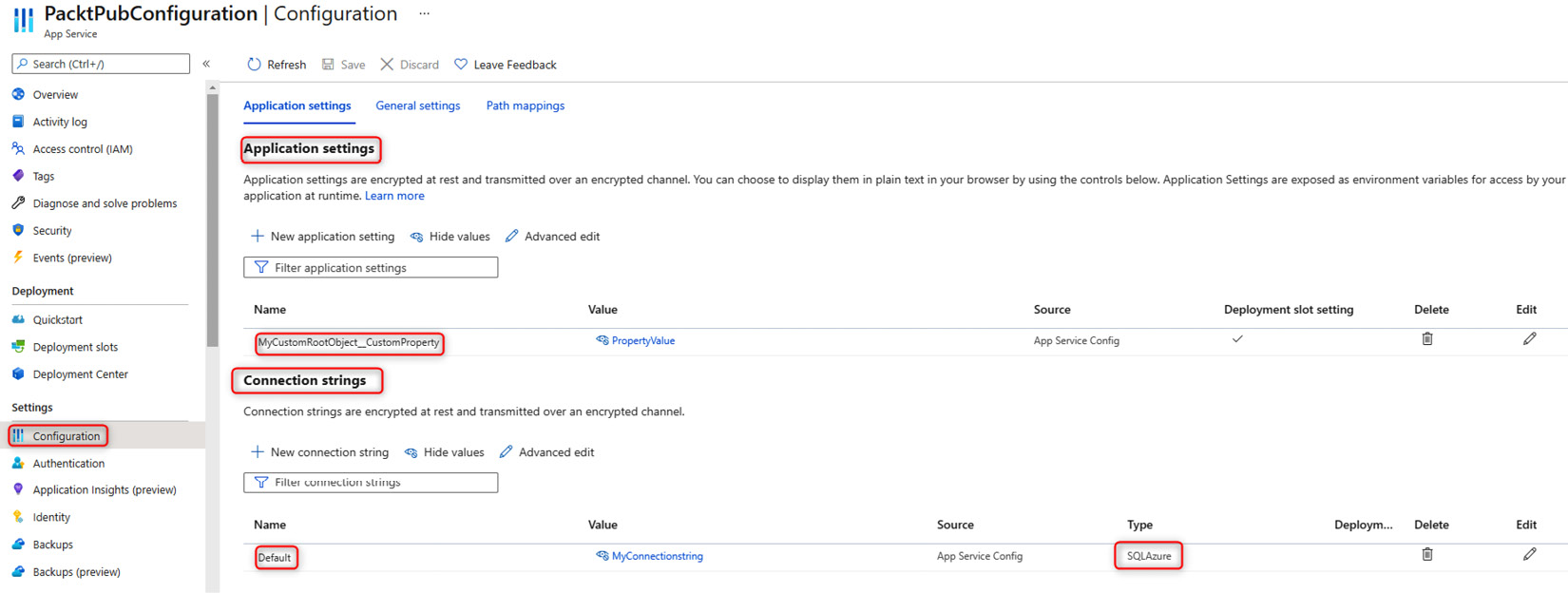
Figure 3.12 – Azure App Service Application settings
图 3.12 – Azure 应用服务应用程序设置
Inserting an object
插入对象
To insert an object, we must specify the parent for each key.
要插入对象,我们必须为每个键指定 parent。
The format is as follows:
格式如下:
parent__key
Note that there are two underscores.
请注意,有两个下划线。
The object in the JSON file would be defined as follows:
JSON 文件中的对象将定义如下:
"MyCustomObject": {
"CustomProperty": "PropertyValue"
}
So, we should write MyCustomObjectCustomProperty.
所以,我们应该写MyCustomObjectCustomProperty。
Inserting an array
插入数组
Inserting an array is much more verbose.
插入数组要详细得多。
The format is as follows:
格式如下:
parent__child__ArrayIndexNumber_key
The array in the JSON file would be defined as follows:
JSON 文件中的数组定义如下:
{
"MyCustomArray": {
"CustomPropertyArray": [
{ "CustomKey": "ValueOne" },
{ "CustomKey ": "ValueTwo" }
]
}
}
So, to access the ValueOne value, we should write the following: MyCustomArrayCustomPropertyArray0CustomKey.
因此,要访问 ValueOne 值,我们应该编写以下内容:MyCustomArrayCustomPropertyArray0CustomKey。
Configuring an application in Docker
在 Docker 中配置应用程序
If we are developing for containers and therefore for Docker, appsettings files are usually replaced in the docker-compose file, and very often in the override file, because it behaves analogously to the settings files divided by the environment.
如果我们针对容器和 Docker 进行开发,则 appsettings 文件通常会在 docker-compose 文件中被替换,并且经常在 override 文件中被替换,因为它的行为类似于按环境划分的设置文件。
We want to provide a brief overview of the features that are usually leveraged to configure an application hosted in Docker. Let’s see in detail how to define root keys and objects, and how to set the connection string. Here is an example:
我们想简要概述通常用于配置 Docker 中托管的应用程序的功能。让我们详细看看如何定义根键和对象,以及如何设置连接字符串。下面是一个示例:
app.MapGet("/env-test", (IConfiguration configuration) =>
{
var rootProperty = configuration.
GetValue<string>("RootProperty");
var sampleVariable = configuration.
GetValue<string>("RootSettings:SampleVariable");
var connectionString = configuration.
GetConnectionString("SqlConnection");
return Results.Ok(new
{
RootProperty = rootProperty,
SampleVariable = sampleVariable,
Connection String = connectionString
});
})
.WithName("EnvironmentTest");
Minimal APIs that use configuration
使用配置的最小 API
The docker-compose.override.yaml file is as follows:
docker-compose.override.yaml 文件如下:
services:
dockerenvironment:
environment:
- ASPNETCORE_ENVIRONMENT=Development
- ASPNETCORE_URLS=https://+:443;http://+:80
- RootProperty=minimalapi-root-value
- RootSettings__SampleVariable=minimalapi-variable-value
- ConnectionStrings__SqlConnection=Server=minimal.db;Database=minimal_db;User Id=sa;Password=Taggia42!
There is only one application container for this example, and the service that instantiates it is called dockerenvironment.
此示例只有一个应用程序容器,实例化它的服务称为 dockerenvironment。
In the configuration section, we can see three particularities that we are going to analyze line by line.
在配置部分,我们可以看到我们将逐行分析的三个特性。
The snippet we want to show you has several very interesting components: a property in the configuration root, an object composed of a single property, and a connection string to a database.
我们要向您展示的代码段有几个非常有趣的组件:配置根中的属性、由单个属性组成的对象以及数据库的连接字符串。
In this first configuration, you are going to set a property that is the root of the configurations. In this case, it is a simple string:
在第一个配置中,您将设置一个属性,该属性是配置的根。在本例中,它是一个简单的字符串:
# First configuration
- RootProperty=minimalapi-root-value
In this second configuration, we are going to set up an object:
在第二个配置中,我们将设置一个对象:
# Second configuration
- RootSettings__SampleVariable=minimalapi-variable-value
The object is called RootSettings, while the only property it contains is called SampleVariable. This object can be read in different ways. We recommend using the Ioptions object that we have seen extensively before. In the preceding example, we show how to access a single property present in an object via code.
该对象称为 RootSettings,而它包含的唯一属性称为 SampleVariable。可以通过不同的方式读取此对象。我们建议使用我们之前广泛看到的 Ioptions 对象。在前面的示例中,我们展示了如何通过代码访问对象中存在的单个属性。
In this case, via code, you need to use the following notation to access the value: RootSettings:SampleVariable. This approach is useful if you need to read a single property, but we recommend using the Ioptions interfaces to access the object.
在这种情况下,您需要通过代码使用以下表示法来访问该值:RootSettings:SampleVariable。如果需要读取单个属性,此方法非常有用,但我们建议使用 Ioptions 接口来访问对象。
In this last example, we show you how to set the connection string called SqlConnection. This way, it will be easy to retrieve the information from the base methods available on Iconfiguration:
在最后一个示例中,我们将向您展示如何设置名为 SqlConnection 的连接字符串。这样,就很容易从 Iconfiguration 上可用的 base 方法中检索信息:
# Third configuration
- ConnectionStrings__SqlConnection=Server=minimal.db;Database=minimal_db;User Id=sa;Password=Taggia42!
To read the information, it is necessary to exploit this method: GetConnectionString(“SqlConnection”).
要读取信息,必须利用此方法: GetConnectionString(“SqlConnection”)。
There are a lot of scenarios for configuring our applications; in the next section, we will also see how to handle errors.
配置我们的应用程序有很多场景;在下一节中,我们还将了解如何处理错误。
Error handling
错误处理
Error handling is one of the features that every application must provide. The representation of an error allows the client to understand the error and possibly handle the request accordingly. Very often, we have our own customized methods of handling errors.
错误处理是每个应用程序都必须提供的功能之一。错误的表示允许客户端理解错误并可能相应地处理请求。很多时候,我们有自己的自定义错误处理方法。
Since what we’re describing is a key functionality of the application, we think it’s fair to see what the framework provides and what is more correct to use.
由于我们所描述的是应用程序的关键功能,因此我们认为查看框架提供的内容以及使用起来更正确的内容是公平的。
Traditional approach
传统方法
.NET provides the same tool for minimal APIs that we can implement in traditional development: a Developer Exception Page. This is nothing but middleware that reports the error in plain text format. This middleware can’t be removed from the ASP.NET pipeline and works exclusively in the development environment (https://docs.microsoft.com/aspnet/core/fundamentals/error-handling).
.NET 为最小 API 提供了我们可以在传统开发中实现的相同工具:开发人员异常页。这只不过是以纯文本格式报告错误的中间件。此中间件无法从 ASP.NET 管道中删除,并且只能在开发环境 (https://docs.microsoft.com/aspnet/core/fundamentals/error-handling) 中运行。
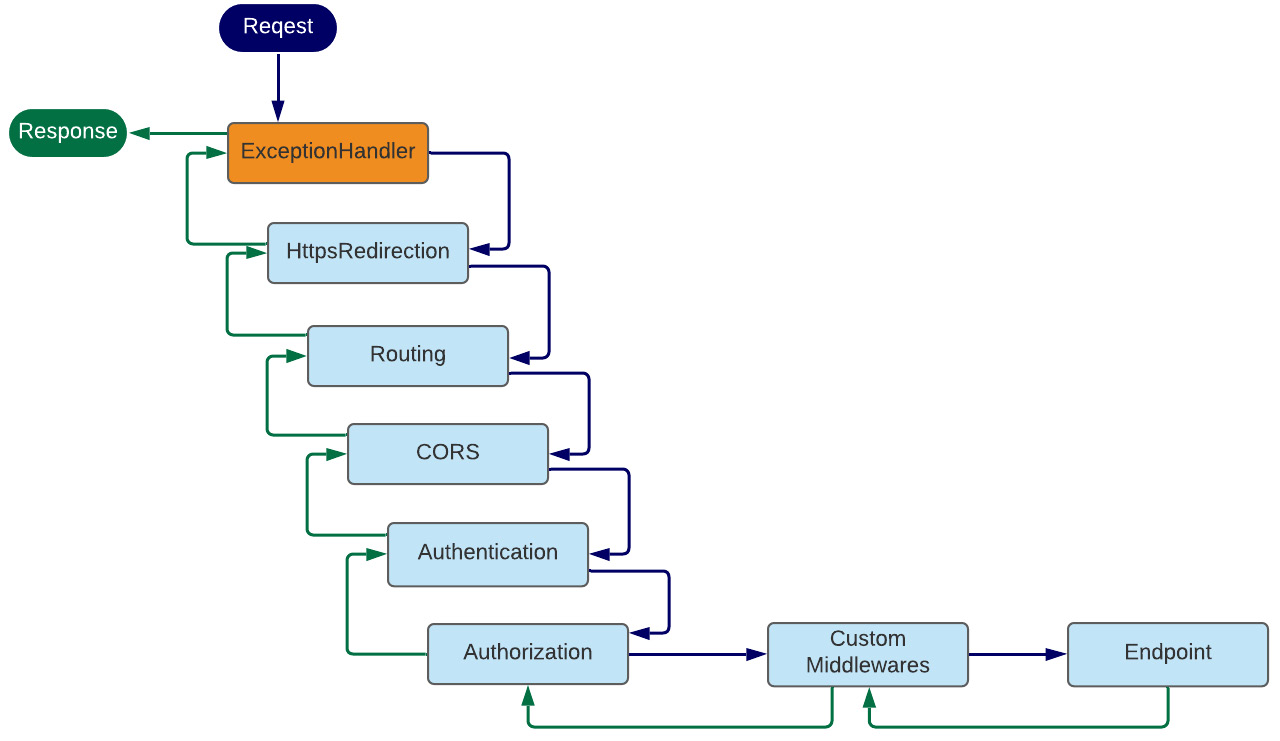
Figure 3.13 – Minimal APIs pipeline, ExceptionHandler
图 3.13 – 最小 API 管道 ExceptionHandler
If exceptions are raised within our code, the only way to catch them in the application layer is through middleware that is activated before sending the response to the client.
如果在我们的代码中引发了异常,那么在应用程序层捕获它们的唯一方法是通过在将响应发送到客户端之前激活的中间件。
Error handling middleware is standard and can be implemented as follows:
错误处理中间件是标准的,可以按如下方式实现:
app.UseExceptionHandler(exceptionHandlerApp =>
{
exceptionHandlerApp.Run(async context =>
{
context.Response.StatusCode = StatusCodes.
Status500InternalServerError;
context.Response.ContentType = Application.Json;
var exceptionHandlerPathFeature = context.Features.
Get<IExceptionHandlerPathFeature>()!;
var errorMessage = new
{
Message = exceptionHandlerPathFeature.Error.Message
};
await context.Response.WriteAsync
(JsonSerializer.Serialize(errorMessage));
if (exceptionHandlerPathFeature?.
Error is FileNotFoundException)
{
await context.Response.
WriteAsync(" The file was not found.");
}
if (exceptionHandlerPathFeature?.Path == "/")
{
await context.Response.WriteAsync("Page: Home.");
}
});
});
We have shown here a possible implementation of the middleware. In order to be implemented, the UseExceptionHandler method must be exploited, allowing the writing of management code for the whole application.
我们在这里展示了中间件的可能实现。为了实现,必须利用 UseExceptionHandler 方法,允许为整个应用程序编写管理代码。
Through the var functionality called exceptionHandlerPathFeature = context.Features.Get<IExceptionHandlerPathFeature>()!;, we can access the error stack and return the information of interest for the caller in the output:
通过名为 exceptionHandlerPathFeature = context.Features.Get<IExceptionHandlerPathFeature>()!;,我们可以访问错误堆栈并在输出中返回调用方感兴趣的信息:
app.MapGet("/ok-result", () =>
{
throw new ArgumentNullException("taggia-parameter",
"Taggia has an error");
})
.WithName("OkResult");
When an exception occurs in the code, as in the preceding example, the middleware steps in and handles the return message to the client.
当代码中发生异常时,如前面的示例所示,中间件会介入并处理发送给客户端的返回消息。
If the exception were to occur in internal application stacks, the middleware would still intervene to provide the client with the correct error and appropriate indication.
如果内部应用程序堆栈中发生异常,中间件仍会进行干预,为客户端提供正确的错误和适当的指示。
Problem Details and the IETF standard
问题详细信息和 IETF 标准
Problem Details for HTTP APIs is an IETF standard that was approved in 2016. This standard allows a set of information to be returned to the caller with standard fields and JSON notations that help identify the error.
HTTP API 的问题详细信息是 2016 年批准的 IETF 标准。此标准允许使用标准字段和 JSON 表示法将一组信息返回给调用方,以帮助识别错误。
HTTP status codes are sometimes not enough to convey enough information about an error to be useful. While the humans behind web browsers can be informed about the nature of the problem with an HTML response body, non-human consumers, such as machine, PC, and server, of so-called HTTP APIs usually cannot.
HTTP 状态代码有时不足以传达有关错误的足够信息,因此没有用。虽然 Web 浏览器背后的人类可以通过 HTML 响应正文了解问题的性质,但所谓的 HTTP API 的非人类使用者(如机器、PC 和服务器)通常不能。
This specification defines simple JSON and XML document formats to suit this purpose. They are designed to be reused by HTTP APIs, which can identify distinct problem types specific to their needs.
此规范定义了简单的 JSON 和 XML 文档格式以适应此目的。它们旨在供 HTTP API 重用,HTTP API 可以识别特定于其需求的不同问题类型。
Thus, API clients can be informed of both the high-level error class and the finer-grained details of the problem (https://datatracker.ietf.org/doc/html/rfc7807).
因此,API 客户端可以了解高级错误类和问题的更细粒度的详细信息 (https://datatracker.ietf.org/doc/html/rfc7807)。
In .NET, there is a package with all the functionality that meets the IETF standard.
在 .NET 中,有一个包,其中包含满足 IETF 标准的所有功能。
The package is called Hellang.Middleware.ProblemDetails, and you can download it at the following address: https://www.nuget.org/packages/Hellang.Middleware.ProblemDetails/.
该包名为 Hellang.Middleware.ProblemDetails,您可以在以下地址下载:https://www.nuget.org/packages/Hellang.Middleware.ProblemDetails/。
Let’s see now how to insert the package into the project and configure it:
现在让我们看看如何将包插入到项目中并对其进行配置:
var builder = WebApplication.CreateBuilder(args);
builder.Services.TryAddSingleton<IActionResultExecutor<ObjectResult>, ProblemDetailsResultExecutor>();
builder.Services.AddProblemDetails(options =>
{ options.MapToStatusCode<NotImplementedException>
(StatusCodes.Status501NotImplemented);
});
var app = builder.Build();
app.UseProblemDetails();
As you can see, there are only two instructions to make this package work:
如您所见,只有两条说明可以使此软件包正常工作:
builder.Services.AddProblemDetails
app.UseProblemDetails();
Since, in the minimal APIs, the IActionResultExecutor interface is not present in the ASP.NET pipeline, it is necessary to add a custom class to handle the response in case of an error.
由于在最小 API 中,ASP.NET 管道中不存在 IActionResultExecutor 接口,因此有必要添加自定义类以在出现错误时处理响应。
To do this, you need to add a class (the following) and register it in the dependency injection engine: builder.Services.TryAddSingleton<IActionResultExecutor<ObjectResult>, ProblemDetailsResultExecutor>(); .
为此,您需要添加一个类(如下)并在依赖项注入引擎 builder 中注册它。 builder.Services.TryAddSingleton<IActionResultExecutor<ObjectResult>, ProblemDetailsResultExecutor>();。
Here is the class to support the package, also under minimal APIs:
以下是支持该包的类,也在最小 API 下:
public class ProblemDetailsResultExecutor : IActionResultExecutor<ObjectResult>
{
public virtual Task ExecuteAsync(ActionContext context,
ObjectResult result)
{
ArgumentNullException.ThrowIfNull(context);
ArgumentNullException.ThrowIfNull(result);
var executor = Results.Json(result.Value, null,
"application/problem+json", result.StatusCode);
return executor.ExecuteAsync(context.HttpContext);
}
}
As mentioned earlier, the standard for handling error messages has been present in the IETF standard for several years, but for the C# language, it is necessary to add the package just mentioned.
如前所述,处理错误消息的标准在 IETF 标准中已经存在了几年,但对于 C# 语言,有必要添加刚才提到的包。
Now, let’s see how this package goes about handling errors on some endpoints that we report here:
现在,让我们看看这个软件包如何处理我们在此处报告的某些端点上的错误:
app.MapGet("/internal-server-error", () =>
{
throw new ArgumentNullException("taggia-parameter",
"Taggia has an error");
})
.Produces<ProblemDetails>(StatusCodes.
Status500InternalServerError)
.WithName("internal-server-error");
We throw an application-level exception with this endpoint. In this case, the ProblemDetails middleware goes and returns a JSON error consistent with the error. We then have the handling of an unhandled exception for free:
我们使用此终端节点引发应用程序级异常。在这种情况下,ProblemDetails 中间件会返回与错误一致的 JSON 错误。然后,我们可以免费处理未处理的异常:
{
"type": "https://httpstatuses.com/500",
"title": "Internal Server Error",
"status": 500,
"detail": "Taggia has an error (Parameter 'taggia-
parameter')",
"exceptionDetails": [
{
------- for brevity
}
],
"traceId": "00-f6ff69d6f7ba6d2692d87687d5be75c5-
e734f5f081d7a02a-00"
}
By inserting additional configurations in the Program file, you can map some specific exceptions to HTTP errors. Here is an example:
通过在 Program 文件中插入其他配置,您可以将某些特定异常映射到 HTTP 错误。下面是一个示例:
builder.Services.AddProblemDetails(options =>
{
options.MapToStatusCode<NotImplementedException>
(StatusCodes.Status501NotImplemented);
});
The code with the NotImplementedException exception is mapped to HTTP error code 501:
具有 NotImplementedException 异常的代码映射到 HTTP 错误代码 501:
app.MapGet("/not-implemented-exception", () =>
{
throw new NotImplementedException
("This is an exception thrown from a Minimal API.");
})
.Produces<ProblemDetails>(StatusCodes.
Status501NotImplemented)
.WithName("NotImplementedExceptions");
Finally, it is possible to create extensions to the ProblemDetails class of the framework with additional fields or to call the base method by adding custom text.
最后,可以使用其他字段创建框架的 ProblemDetails 类的扩展,或者通过添加自定义文本来调用基方法。
Here are the last two examples of MapGet endpoint handlers:
以下是 MapGet 端点处理程序的最后两个示例:
app.MapGet("/problems", () =>
{
return Results.Problem(detail: "This will end up in
the 'detail' field.");
})
.Produces<ProblemDetails>(StatusCodes.Status400BadRequest)
.WithName("Problems");
app.MapGet("/custom-error", () =>
{
var problem = new OutOfCreditProblemDetails
{
Type = "https://example.com/probs/out-of-credit",
Title = "You do not have enough credit.",
Detail = "Your current balance is 30,
but that costs 50.",
Instance = "/account/12345/msgs/abc",
Balance = 30.0m, Accounts =
{ "/account/12345", "/account/67890" }
};
return Results.Problem(problem);
})
.Produces<OutOfCreditProblemDetails>(StatusCodes.
Status400BadRequest)
.WithName("CreditProblems");
app.Run();
public class OutOfCreditProblemDetails : ProblemDetails
{
public OutOfCreditProblemDetails()
{
Accounts = new List<string>();
}
public decimal Balance { get; set; }
public ICollection<string> Accounts { get; }
}
Summary
总结
In this chapter, we have seen several advanced aspects regarding the implementation of minimal APIs. We explored Swagger, which is used to document APIs and provide the developer with a convenient, working debugging environment. We saw how CORS handles the issue of applications hosted on different addresses other than the current API. Finally, we saw how to load configuration information and handle unexpected errors in the application.
在本章中,我们了解了有关实现最小 API 的几个高级方面。我们探索了 Swagger,它用于记录 API,并为开发人员提供方便、有效的调试环境。我们了解了 CORS 如何处理托管在当前 API 以外的不同地址上的应用程序问题。最后,我们了解了如何加载配置信息和处理应用程序中的意外错误。
We explored the nuts and bolts that will allow us to be productive in a short amount of time.
我们探索了使我们能够在短时间内提高工作效率的具体细节。
In the next chapter, we will add a fundamental building block for SOLID pattern-oriented programming, namely the dependency injection engine, which will help us to better manage the application code scattered in the various layers.
在下一章中,我们将为 SOLID 面向模式的编程添加一个基本构建块,即依赖注入引擎,这将帮助我们更好地管理分散在各个层中的应用程序代码。
Part 2: What’s New in .NET 6?
第 2 部分:.NET 6 中的新增功能
In the second part of the book, we want to show you the features of the .NET 6 framework and how they can also be used in minimal APIs.
在本书的第二部分,我们想向你展示 .NET 6 框架的功能,以及如何在最小的 API 中使用它们。
We will cover the following chapters in this section:
在本节中,我们将介绍以下章节:
Chapter 4, Dependency Injection in a Minimal API Project
第 4 章 最小 API 项目中的依赖关系注入
Chapter 5, Using Logging to Identify Errors
第 5 章 使用日志记录识别错误
Chapter 6, Exploring Validation and Mapping
第 6 章 探索验证和映射
Chapter 7, Integration with the Data Access Layer
第 7 章 与数据访问层集成
4 Dependency Injection in a Minimal API Project
最小 API 项目中的依赖关系注入
In this chapter of the book, we will discuss some basic topics of minimal APIs in .NET 6.0. We will learn how they differ from the controller-based Web APIs that we were used to using in the previous version of .NET. We will also try to underline the pros and the cons of this new approach of writing APIs.
在本书的这一章中,我们将讨论 .NET 6.0 中最小 API 的一些基本主题。我们将了解它们与我们以前在 .NET 版本中习惯使用的基于控制器的 Web API 有何不同。我们还将尝试强调这种编写 API 的新方法的优缺点。
In this chapter, we will be covering the following topics:
在本章中,我们将介绍以下主题:
• What is dependency injection?
什么是依赖项注入?
• Implementing dependency injection in a minimal API project
在最小 API 项目中实现依赖关系注入
Technical requirements
技术要求
To follow the explanations in this chapter, you will need to create an ASP.NET Core 6.0 Web API application. You can refer the Technical requirements section of Chapter 2, Exploring Minimal APIs and Their Advantages to know how to do it.
要按照本章中的说明进行作,您需要创建一个 ASP.NET Core 6.0 Web API 应用程序。您可以参考 第 2 章 探索最小 API 及其优势 的技术要求 部分来了解如何作。
All the code samples in this chapter can be found in the GitHub repository for this book at https://github.com/PacktPublishing/Minimal-APIs-in-ASP.NET-Core-6/tree/main/Chapter04.
本章中的所有代码示例都可以在本书的 GitHub 存储库中找到,网址为 https://github.com/PacktPublishing/Minimal-APIs-in-ASP.NET-Core-6/tree/main/Chapter04。
What is dependency injection?
什么是依赖项注入?
For a while, .NET has natively supported the dependency injection (often referred to as DI) software design pattern.
一段时间以来,.NET 本身就支持依赖关系注入(通常称为 DI)软件设计模式。
Dependency injection is a way to implement in .NET the Inversion of Control (IoC) pattern between service classes and their dependencies. By the way, in .NET, many fundamental services are built with dependency injection, such as logging, configuration, and other services.
依赖项注入是在 .NET 中实现服务类及其依赖项之间的控制反转 (IoC) 模式的一种方式。顺便说一句,在 .NET 中,许多基本服务都是通过依赖项注入构建的,例如日志记录、配置和其他服务。
Let’s look at a practical example to get a good understanding of how it works.
让我们看一个实际示例,以更好地理解它是如何工作的。
Generally speaking, a dependency is an object that depends on another object. In the following example, we have a LogWriter class with only one method inside, called Log:
一般来说,依赖项是依赖于另一个对象的对象。在下面的示例中,我们有一个 LogWriter 类,其中只有一个方法,称为 Log:
public class LogWriter
{
public void Log(string message)
{
Console.WriteLine($"LogWriter.Write
(message: \"{message}\")");
}
}
Other classes in the project, or in another project, can create an instance of the LogWriter class and use the Log method.
项目或其他项目中的其他类可以创建 LogWriter 类的实例并使用 Log 方法。
Take a look at the following example:
请看以下示例:
public class Worker
{
private readonly LogWriter _logWriter = new LogWriter();
protected async Task ExecuteAsync(CancellationToken
stoppingToken)
{
while (!stoppingToken.IsCancellationRequested)
{
_logWriter.Log($"Worker running at:
{DateTimeOffset.Now}");
await Task.Delay(1000, stoppingToken);
}
}
}
This class depends directly on the LogWriter class, and it’s hardcoded in each class of your projects.
此类直接依赖于 LogWriter 类,并且在项目的每个类中都是硬编码的。
This means that you will have some issues if you want to change the Log method; for instance, you will have to replace the implementation in each class of your solution.
这意味着,如果要更改 Log 方法,您将遇到一些问题;例如,您必须替换解决方案的每个类中的 implementation。
The preceding implementation has some issues if you want to implement unit tests in your solution. It’s not easy to create a mock of the LogWriter class.
如果要在解决方案中实现单元测试,前面的实现存在一些问题。创建 LogWriter 类的 mock 并不容易。
Dependency injection can solve these problems with some changes in our code:
依赖项注入可以通过对代码进行一些更改来解决这些问题:
-
Use an interface to abstract the dependency.
使用接口抽象依赖项。
-
Register the dependency injection in the built-in service connecte to .NET.
在内置服务 connecte to .NET 中注册依赖项注入。
-
Inject the service into the constructor of the class.
将服务注入到类的构造函数中。
The preceding things might seem like they require big change in your code, but they are very easy to implement.
上述内容似乎需要对代码进行大量更改,但它们很容易实现。
Let’s see how we can achieve this goal with our previous example:
让我们看看如何通过前面的示例来实现这个目标:
- First, we will create an ILogWriter interface with the abstraction of our logger:
public interface ILogWriter
首先,我们将使用记录器的抽象创建一个 ILogWriter 接口:
{
void Log(string message);
}
-
Next, implement this ILogWriter interface in a real class called ConsoleLogWriter:
public class ConsoleLogWriter : ILogWriter
接下来,在名为 ConsoleLogWriter 的实际类中实现此 ILogWriter 接口:
{
public void Log(string message)
{
Console.WriteLine($"ConsoleLogWriter.
Write(message: \"{message}\")");
}
}
-
Now, change the Worker class and replace the explicit LogWriter class with the new ILogWriter interface:
现在,更改 Worker 类,并将显式 LogWriter 类替换为新的 ILogWriter 接口:
public class Worker
{
private readonly ILogWriter _logWriter;
public Worker(ILogWriter logWriter)
{
_logWriter = logWriter;
}
protected async Task ExecuteAsync
(CancellationToken stoppingToken)
{
while (!stoppingToken.IsCancellationRequested)
{
_logWriter.Log($"Worker running at:
{DateTimeOffset.Now}");
await Task.Delay(1000, stoppingToken);
}
}
}
As you can see, it’s very easy to work in this new way, and the advantages are substantial. Here are a few advantages of dependency injection:
如您所见,以这种新方式工作非常容易,而且优势非常大。以下是依赖项注入的一些优点:
• Maintainability 可维护性
• Testability 测试
• Reusability 可重用
Now we need to perform the last step, that is, register the dependency when the application starts up.
现在我们需要执行最后一步,即在应用程序启动时注册依赖项。
4.At the top of the Program.cs file, add this line of code:
在 Program.cs 文件的顶部,添加以下代码行:
builder.Services.AddScoped<ILogWriter, ConsoleLogWriter>();
In the next section, we will discuss the difference between dependency injection lifetimes, another concept that you need to understand before using dependency injection in your minimal API project.
在下一节中,我们将讨论依赖注入生命周期之间的区别,这是在最小 API 项目中使用依赖注入之前需要了解的另一个概念。
Understanding dependency injection lifetimes
了解依赖关系注入生命周期
In the previous section, we learned the benefits of using dependency injection in our project and how to transform our code to use it.
在上一节中,我们了解了在项目中使用依赖项注入的好处,以及如何转换代码以使用它。
In one of the last paragraphs, we added our class as a service to ServiceCollection of .NET.
在最后一段中,我们将类作为服务添加到 .NET 的 ServiceCollection 中。
In this section, we will try to understand the difference between each dependency injection’s lifetime.
在本节中,我们将尝试了解每个依赖注入的生命周期之间的差异。
The service lifetime defines how long an object will be alive after it has been created by the container.
服务生存期定义对象在容器创建后将处于活动状态的时间。
When they are registered, dependencies require a lifetime definition. This defines the conditions when a new service instance is created.
注册依赖项时,它们需要生命周期定义。这定义了创建新服务实例时的条件。
In the following list, you can find the lifetimes defined in .NET:
在以下列表中,您可以找到 .NET 中定义的生存期:
• Transient: A new instance of the class is created every time it is requested.
Transient:每次请求时都会创建类的新实例。
• Scoped: A new instance of the class is created once per scope, for instance, for the same HTTP request.
范围:每个范围创建一次类的新实例,例如,针对同一 HTTP 请求。
• Singleton: A new instance of the class is created only on the first request. The next request will use the same instance of the same class.
Singleton:仅在第一个请求时创建类的新实例。下一个请求将使用同一类的相同实例。
Very often, in web applications, you only find the first two lifetimes, that is, transient and scoped.
很多时候,在 Web 应用程序中,你只能找到前两个生命周期,即 transient 和 scoped。
If you have a particular use case that requires a singleton, it’s not prohibited, but for best practice, it is recommended to avoid them in web applications.
如果您有需要单例的特定用例,则不禁止这样做,但为了最佳实践,建议在 Web 应用程序中避免使用它们。
In the first two cases, transient and scoped, the services are disposed of at the end of the request.
在前两种情况中,transient 和 scoped,服务将在请求结束时被释放。
In the next section, we will see how to implement all the concepts that we have mentioned in the last two sections (the definition of dependency injection and its lifetime) in a short demo that you can use as a starting point for your next project.
在下一节中,我们将通过一个简短的演示来了解如何实现我们在最后两节中提到的所有概念(依赖注入的定义及其生命周期),您可以将其用作下一个项目的起点。
Implementing dependency injection in a minimal API project
在最小 API 项目中实现依赖关系注入
After understanding how to use dependency injection in an ASP.NET Core project, let’s try to understand how to use dependency injection in our minimal API project, starting with the default project using the WeatherForecast endpoint.
在了解了如何在 ASP.NET Core 项目中使用依赖项注入之后,让我们尝试了解如何在最小 API 项目中使用依赖项注入,从使用 WeatherForecast 端点的默认项目开始。
This is the actual code of the WeatherForecast GET endpoint:
这是 WeatherForecast GET 端点的实际代码:
app.MapGet("/weatherforecast", () =>
{
var forecast = Enumerable.Range(1, 5).Select(index =>
new WeatherForecast
(
DateTime.Now.AddDays(index),
Random.Shared.Next(-20, 55),
summaries[Random.Shared.
Next(summaries.Length)]
))
.ToArray();
return forecast;
});
As we mentioned before, this code works but it’s not easy to test it, especially the creation of the new values of the weather.
正如我们之前提到的,这段代码可以工作,但并不容易测试它,尤其是创建 weather 的新值。
The best choice is to use a service to create fake values and use it with dependency injection.
最好的选择是使用服务创建假值并将其与依赖项注入一起使用。
Let’s see how we can better implement our code:
让我们看看如何更好地实现我们的代码:
- First of all, in the Program.cs file, add a new interface called IWeatherForecastService and define a method that returns an array of the WeatherForecast entity:
首先,在 Program.cs 文件中,添加一个名为 IWeatherForecastService 的新接口,并定义一个返回 WeatherForecast 实体数组的方法:
public interface IWeatherForecastService
{
WeatherForecast[] GetForecast();
}
- The next step is to create the real implementation of the class inherited from the interface.
下一步是创建从接口继承的类的真正实现。
The code should look like this:
代码应如下所示:
public class WeatherForecastService : IWeatherForecastService
{
}
-
Now cut and paste the code from the project template inside our new implementation of the service. The final code looks like this:
现在,将项目模板中的代码剪切并粘贴到我们新的服务实现中。最终代码如下所示:
public class WeatherForecastService : IWeatherForecastService
{
public WeatherForecast[] GetForecast()
{
var summaries = new[]
{
"Freezing", "Bracing", "Chilly", "Cool",
"Mild", "Warm", "Balmy", "Hot", "Sweltering",
"Scorching"
};
var forecast = Enumerable.Range(1, 5).
Select(index =>
new WeatherForecast
(
DateTime.Now.AddDays(index),
Random.Shared.Next(-20, 55),
summaries[Random.Shared.Next
(summaries.Length)]
))
.ToArray();
return forecast;
}
}
-
We are now ready to add our implementation of WeatherForecastService as a dependency injection in our project. To do that, insert the following line below the first line of code in the Program.cs file:
现在,我们已准备好将 WeatherForecastService 的实现作为依赖项注入添加到我们的项目中。为此,请在 Program.cs 文件中的第一行代码下方插入以下行:
builder.Services.AddScoped<IWeatherForecastService, WeatherForecastService>();
When the application starts, insert our service into the services collection. Our work is not finished yet.
当应用程序启动时,将我们的服务插入到服务集合中。我们的工作还没有完成。
We need to use our service in the default MapGet implementation of the WeatherForecast endpoint.
我们需要在 WeatherForecast 端点的默认 MapGet 实现中使用我们的服务。
The minimal API has his own parameter binding implementation and it’s very easy to use.
最小的 API 有自己的参数绑定实现,非常易于使用。
First of all, to implement our service with dependency injection, we need to remove all the old code from the endpoint.
首先,要使用依赖项注入实现我们的服务,我们需要从端点中删除所有旧代码。
The code of the endpoint, after removing the code, looks like this:
删除代码后,端点的代码如下所示:
app.MapGet("/weatherforecast", () =>
{
});
We can improve our code and use the dependency injection very easily by simply replacing the old code with the new code:
我们可以通过简单地将旧代码替换为新代码来非常轻松地改进我们的代码并使用依赖注入:
app.MapGet("/weatherforecast", (IWeatherForecastService weatherForecastService) =>
{
return weatherForecastService.GetForecast();
});
In the minimal API project, the real implementations of the services in the service collection are passed as parameters to the functions and you can use them directly.
在最小 API 项目中,服务集合中服务的真实实现作为参数传递给函数,您可以直接使用它们。
From time to time, you may have to use a service from the dependency injection directly in the main function during the startup phase. In this case, you must retrieve the instance of the implementation directly from the services collection, as shown in the following code snippet:
有时,您可能必须在启动阶段直接在 main 函数中使用依赖项注入中的服务。在这种情况下,您必须直接从 services 集合中检索实现的实例,如以下代码片段所示:
using (var scope = app.Services.CreateScope())
{
var service = scope.ServiceProvider.GetRequiredService
<IWeatherForecastService>();
service.GetForecast();
}
In this section, we have implemented dependency injection in a minimal API project, starting from the default template.
在本节中,我们从默认模板开始,在最小 API 项目中实现了依赖注入。
We reused the existing code but implemented it with logic that’s more geared toward an architecture that’s better suited to being maintained and tested in the future.
我们重用了现有代码,但使用更适合将来维护和测试的架构的逻辑来实现它。
Summary
总结
Dependency injection is a very important approach to implement in modern applications. In this chapter, we learned what dependency injection is and discussed its fundamentals. Then, we saw how to use dependency injection in a minimal API project.
依赖项注入是在现代应用程序中实现的一种非常重要的方法。在本章中,我们了解了什么是依赖注入并讨论了它的基础知识。然后,我们了解了如何在最小 API 项目中使用依赖注入。
In the next chapter, we will focus on another important layer of modern applications and discuss how to implement a logging strategy in a minimal API project.
在下一章中,我们将重点介绍现代应用程序的另一个重要层,并讨论如何在最小的 API 项目中实现日志记录策略。
5 Using Logging to Identify Errors
5 使用日志记录识别错误
In this chapter, we will begin to learn about the logging tools that .NET provides us with. A logger is one of the tools that developers must use to debug an application or understand its failure in production. The log library has been built into ASP.NET with several features enabled by design. The purpose of this chapter is to delve into the things we take for granted and add more information as we go.
在本章中,我们将开始了解 .NET 为我们提供的日志记录工具。记录器是开发人员用来调试应用程序或了解其在生产中的故障时必须使用的工具之一。日志库已内置于 ASP.NET 中,通过设计启用了多项功能。本章的目的是深入研究我们认为理所当然的事情,并在此过程中添加更多信息。
The themes we will touch on in this chapter are as follows:
我们将在本章中讨论的主题如下:
• Exploring logging in .NET
探索 .NET 中的日志记录
• Leveraging the logging framework
利用日志记录框架
• Storing a structured log with Serilog
使用 Serilog 存储结构化日志
Technical requirements
技术要求
As reported in the previous chapters, it will be necessary to have the .NET 6 development framework.
如前几章所述,有必要具有 .NET 6 开发框架。
There are no special requirements in this chapter for beginning to test the examples described.
本章中没有对开始测试所描述的示例的特殊要求。
All the code samples in this chapter can be found in the GitHub repository for this book at https://github.com/PacktPublishing/Minimal-APIs-in-ASP.NET-Core-6/tree/main/Chapter05.
本章中的所有代码示例都可以在本书的 GitHub 存储库中找到,网址为 https://github.com/PacktPublishing/Minimal-APIs-in-ASP.NET-Core-6/tree/main/Chapter05。
Exploring logging in .NET
探索 .NET 中的日志记录
ASP.NET Core templates create a WebApplicationBuilder and a WebApplication, which provide a simplified way to configure and run web applications without a startup class.
ASP.NET Core 模板创建 WebApplicationBuilder 和 WebApplication,它们提供了一种无需启动类即可配置和运行 Web 应用程序的简化方法。
As mentioned previously, with .NET 6, the Startup.cs file is eliminated in favor of the existing Program.cs file. All startup configurations are placed in this file, and in the case of minimal APIs, endpoint implementations are also placed.
如前所述,在 .NET 6 中,Startup.cs 文件被消除,取而代之的是现有的 Program.cs 文件。所有启动配置都放置在此文件中,对于最小的 API,还会放置端点实现。
What we have just described is the starting point of every .NET application and its various configurations.
我们刚才描述的是每个 .NET 应用程序及其各种配置的起点。
Logging into an application means tracking the evidence in different points of the code to check whether it is running as expected. The purpose of logging is to track over time all the conditions that led to an unexpected result or event in the application. Logging in an application can be useful both during development and while the application is in production.
登录到应用程序意味着跟踪代码不同点的证据,以检查它是否按预期运行。日志记录的目的是随着时间的推移跟踪导致应用程序中出现意外结果或事件的所有条件。在开发期间和应用程序处于生产状态时,登录应用程序都非常有用。
However, for logging, as many as four providers are added for tracking application information:
但是,对于日志记录,将添加多达四个提供程序来跟踪应用程序信息:
• Console: The Console provider logs output to the console. This log is unusable in production because the console of a web application is usually not visible. This kind of log is useful during development to make logging fast when you are running your app under Kestrel on your desktop machine in the app console window.
控制台:控制台提供程序将输出记录到控制台。此日志在生产中不可用,因为 Web 应用程序的控制台通常不可见。在开发过程中,这种日志非常有用,当您在应用程序控制台窗口中的桌面计算机上的 Kestrel 下运行应用程序时,可以快速进行日志记录。
• Debug: The Debug provider writes log output by using the System.Diagnostics.Debug class. When we develop, we are used to seeing this section in the Visual Studio output window.
调试:调试提供程序使用 System.Diagnostics.Debug 类写入日志输出。在开发时,我们习惯于 Visual Studio 输出窗口中看到此部分。
Under the Linux operating system, information is tracked depending on the distribution in the following locations: /var/log/message and /var/log/syslog.
在 Linux作系统下,根据以下位置的分发情况跟踪信息:/var/log/message 和 /var/log/syslog。
• EventSource: On Windows, this information can be viewed in the EventTracing window.
EventSource:在 Windows 上,可以在 EventTracing 窗口中查看此信息。
• EventLog (only when running on Windows): This information is displayed in the native Windows window, so you can only see it if you run the application on the Windows operating system.
EventLog (仅在 Windows 上运行时):此信息显示在本机 Windows 窗口中,因此只有在 Windows作系统上运行应用程序时才能看到它。
A new feature in the latest .NET release
最新 .NET 版本中的新功能
New logging providers have been added in the latest versions of .NET. However, these providers are not enabled within the framework.
最新版本的 .NET 中添加了新的日志记录提供程序。但是,这些提供程序未在框架内启用。
Use these extensions to enable new logging scenarios: AddSystemdConsole, AddJsonConsole, and AddSimpleConsole.
使用以下扩展启用新的日志记录方案:AddSystemdConsole、AddJsonConsole 和 AddSimpleConsole。
You can find more details on how to configure the log and what the basic ASP.NET settings are at this link: https://docs.microsoft.com/aspnet/core/fundamentals/host/generic-host.
您可以在以下链接中找到有关如何配置日志以及基本 ASP.NET 设置的更多详细信息:https://docs.microsoft.com/aspnet/core/fundamentals/host/generic-host。
We’ve started to see what the framework gives us; now we need to understand how to leverage it within our applications. Before proceeding, we need to understand what a logging layer is. It is a fundamental concept that will help us break down information into different layers and enable them as needed:
我们已经开始看到框架给我们带来了什么;现在我们需要了解如何在我们的应用程序中利用它。在继续之前,我们需要了解什么是日志层。这是一个基本概念,可帮助我们将信息分解为不同的层并根据需要启用它们:
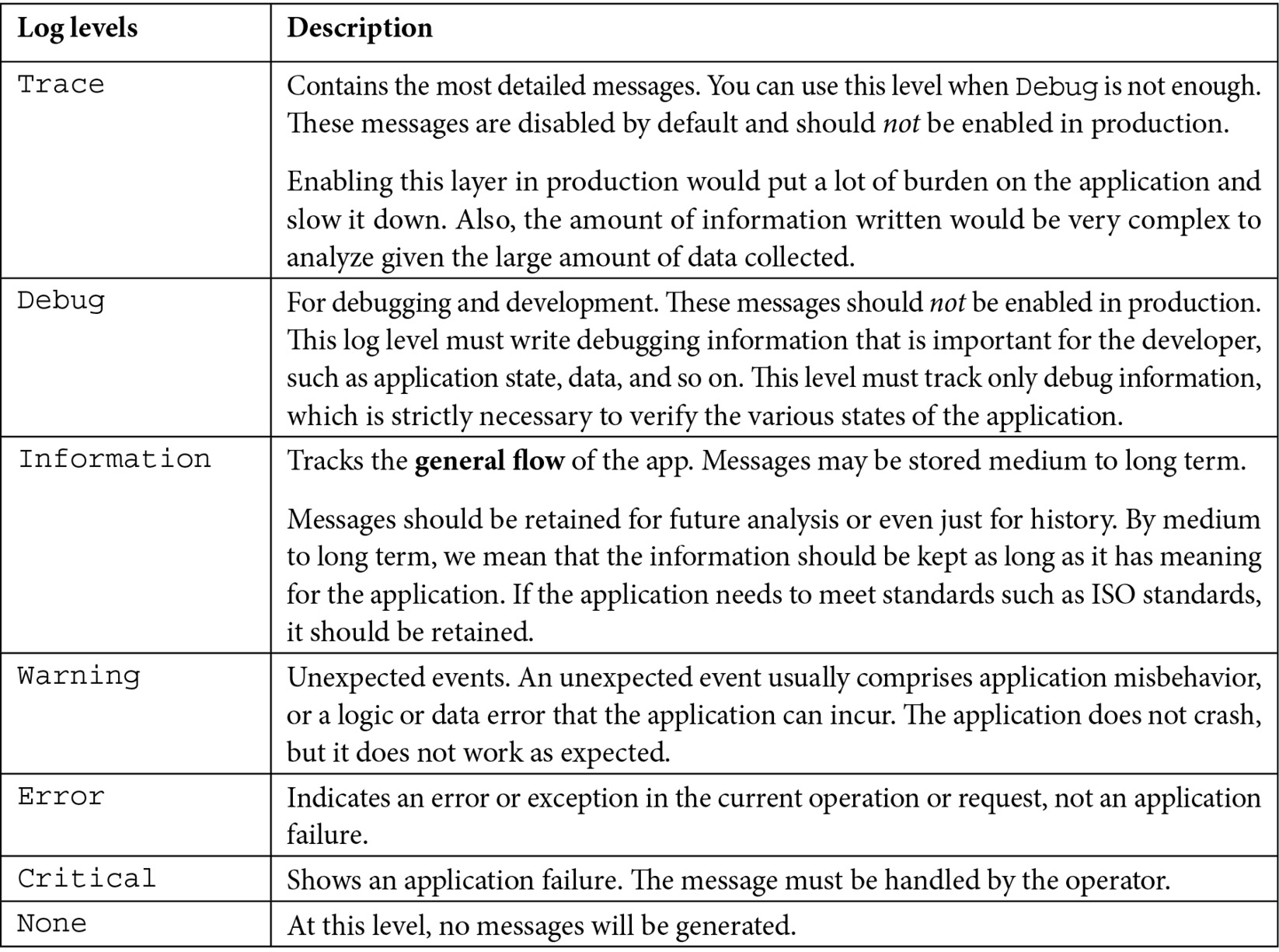
Table 5.1 – Log levels
表 5.1 – 日志级别
Table 5.1 shows the most verbose levels down to the least verbose level.
表 5.1 显示了最详细的级别到最不详细的级别。
To learn more, you can read the article titled Logging in .NET Core and ASP.NET Core, which explains the logging process in detail here: https://docs.microsoft.com/aspnet/core/fundamentals/logging/.
若要了解详细信息,可以阅读标题为“在 .NET Core 和 ASP.NET Core 中登录”的文章,其中详细介绍了日志记录过程:https://docs.microsoft.com/aspnet/core/fundamentals/logging/。
If we select our log level as Information, everything at this level will be tracked down to the Critical level, skipping Debug and Trace.
如果我们将日志级别选为 Information,则此级别的所有内容都将被跟踪到 Critical 级别,跳过 Debug 和 Trace。
We’ve seen how to take advantage of the log layers; now, let’s move on to writing a single statement that will log information and can allow us to insert valuable content into the tracking system.
我们已经看到了如何利用日志层;现在,让我们继续编写一个语句,该语句将记录信息,并允许我们将有价值的内容插入到跟踪系统中。
Configuring logging
配置日志记录
To start using the logging component, you need to know a couple of pieces of information to start tracking data. Each logger object (ILogger<T>) must have an associated category. The log category allows you to segment the tracking layer with a high definition. For example, if we want to track everything that happens in a certain class or in an ASP.NET controller, without having to rewrite all our code, we need to enable the category or categories of our interest.
要开始使用 logging 组件,您需要了解一些信息才能开始跟踪数据。每个记录器对象 (ILogger<T>) 必须具有关联的类别。日志类别允许您对高清晰度的跟踪层进行分段。例如,如果我们想跟踪某个类或 ASP.NET 控制器中发生的所有事情,而不必重写所有代码,我们需要启用我们感兴趣的一个或多个类别。
A category is a T class. Nothing could be simpler. You can reuse typed objects of the class where the log method is injected. For example, if we’re implementing MyService, and we want to track everything that happens in the service with the same category, we just need to request an ILogger<MyService> object instance from the dependency injection engine.
类别是 T 类。没有比这更简单的了。您可以重用注入 log 方法的类的类型化对象。例如,如果我们正在实现 MyService,并且想要跟踪具有相同类别的服务中发生的所有事情,则只需从依赖项注入引擎请求 ILogger<MyService> 对象实例。
Once the log categories are defined, we need to call the ILogger<T> object and take advantage of the object’s public methods. In the previous section, we looked at the log layers. Each log layer has its own method for tracking information. For example, LogDebug is the method specified to track information with a Debug layer.
定义日志类别后,我们需要调用 ILogger<T> 对象并利用该对象的公共方法。在上一节中,我们了解了日志层。每个日志层都有自己的跟踪信息方法。例如,LogDebug 是指定用于使用 Debug 层跟踪信息的方法。
Let’s now look at an example. I created a record in the Program.cs file:
现在让我们看一个示例。我在 Program.cs 文件中创建了一条记录:
internal record CategoryFiltered();
This record is used to define a particular category of logs that I want to track only when necessary. To do this, it is advisable to define a class or a record as an end in itself and enable the necessary trace level.
此记录用于定义我只想在必要时跟踪的特定日志类别。为此,建议将类或记录定义为其本身的 end,并启用必要的跟踪级别。
A record that is defined in the Program.cs file has no namespace; we must remember this when we define the appsettings file with all the necessary information.
在 Program.cs 文件中定义的记录没有命名空间;当我们使用所有必要的信息定义 AppSettings 文件时,我们必须记住这一点。
If the log category is within a namespace, we must consider the full name of the class. In this case, it is LoggingSamples.Categories.MyCategoryAlert:
如果日志类别位于命名空间内,则必须考虑类的全名。在本例中,它是 LoggingSamples.Categories.MyCategoryAlert:
namespace LoggingSamples.Categories
{
public class MyCategoryAlert
{
}
}
If we do not specify the category, as in the following example, the selected log level is the default:
如果我们不指定类别,如以下示例所示,则所选日志级别为默认日志级别:
"Logging": {
"LogLevel": {
"Default": "Information",
"Microsoft.AspNetCore": "Warning",
"CategoryFiltered": "Information",
"LoggingSamples.Categories.MyCategoryAlert": "Debug"
}
}
Anything that comprises infrastructure logs, such as Microsoft logs, stays in special categories such as Microsoft.AspNetCore or Microsoft.EntityFrameworkCore.
构成基础结构日志的任何内容(如 Microsoft 日志)都属于特殊类别,如 Microsoft.AspNetCore 或 Microsoft.EntityFrameworkCore。
The full list of Microsoft log categories can be found at the following link:
Microsoft 日志类别的完整列表可在以下链接中找到:
https://docs.microsoft.com/aspnet/core/fundamentals/logging/#aspnet-core-and-ef-core-categories
Sometimes, we need to define certain log levels depending on the tracking provider. For example, during development, we want to see all the information in the log console, but we only want to see errors in the log file.
有时,我们需要根据跟踪提供商定义某些日志级别。例如,在开发过程中,我们希望在日志控制台中看到所有信息,但我们只想在日志文件中看到错误。
To do this, we don’t need to change the configuration code but just define its level for each provider. The following is an example that shows how everything that is tracked in the Microsoft categories is shown from the Information layer to the ones below it:
为此,我们不需要更改配置代码,只需为每个提供程序定义其级别。以下示例显示了如何从信息层向其下方的 Microsoft 类别中跟踪的所有内容显示:
{
"Logging": { // Default, all providers.
"LogLevel": {
"Microsoft": "Warning"
},
"Console": { // Console provider.
"LogLevel": {
"Microsoft": "Information"
}
}
}
}
Now that we’ve figured out how to enable logging and how to filter the various categories, all that’s left is to apply this information to a minimal API.
现在我们已经弄清楚了如何启用日志记录以及如何筛选各种类别,剩下的工作就是将此信息应用于最小的 API。
In the following code, we inject two ILogger instances with different categories. This is not a common practice, but we did it to make the example more concrete and show how the logger works:
在下面的代码中,我们注入了两个不同类别的 ILogger 实例。这不是一种常见的做法,但我们这样做是为了使示例更加具体并展示 Logger 的工作原理:
app.MapGet("/first-log", (ILogger<CategoryFiltered> loggerCategory, ILogger<MyCategoryAlert> loggerAlertCategory) =>
{
loggerCategory.LogInformation("I'm information
{MyName}", "My Name Information");
loggerAlertCategory.LogInformation("I'm information
{MyName}", "Alert Information");
return Results.Ok();
})
.WithName("GetFirstLog");
In the preceding snippet, we inject two instances of the logger with different categories; each category tracks a single piece of information. The information is written according to a template that we will describe shortly. The effect of this example is that based on the level, we can show or disable the information displayed for a single category, without changing the code.
在前面的代码段中,我们注入了两个不同类别的 Logger 实例;每个类别跟踪一条信息。该信息是根据我们稍后将介绍的模板编写的。此示例的效果是,根据级别,我们可以显示或禁用为单个类别显示的信息,而无需更改代码。
We started filtering the logo by levels and categories. Now, we want to show you how to define a template that will allow us to define a message and make it dynamic in some of its parts.
我们开始按级别和类别过滤徽标。现在,我们想向您展示如何定义一个模板,该模板将允许我们定义消息并使其在某些部分中是动态的。
Customizing log message
自定义日志消息
The message field that is asked by the log methods is a simple string object that we can enrich and serialize through the logging frameworks in proper structures. The message is therefore essential to identify malfunctions and errors, and inserting objects in it can significantly help us to identify the problem:
log 方法询问的 message 字段是一个简单的字符串对象,我们可以通过日志记录框架以适当的结构对其进行扩充和序列化。因此,该消息对于识别故障和错误至关重要,在其中插入对象可以显着帮助我们识别问题:
string apples = "apples";
string pears = "pears";
string bananas = "bananas";
logger.LogInformation("My fruit box has: {pears}, {bananas}, {apples}", apples, pears, bananas);
The message template contains placeholders that interpolate content into the textual message.
消息模板包含将内容插入到文本消息中的占位符。
In addition to the text, it is necessary to pass the arguments to replace the placeholders. Therefore, the order of the parameters is valid but not the name of the placeholders for the substitution.
除了文本之外,还需要传递参数来替换占位符。因此,参数的顺序有效,但替换的占位符名称无效。
The result then considers the positional parameters and not the placeholder names:
然后,结果会考虑位置参数,而不是占位符名称:
My fruit box has: apples, pears, bananas
Now you know how to customize log messages. Next, let us learn about infrastructure logging, which is essential while working in more complex scenarios.
现在您知道如何自定义日志消息了。接下来,让我们了解一下基础设施日志记录,这在更复杂的场景中工作时是必不可少的。
Infrastructure logging
基础设施日志记录
In this section, we want to tell you about a little-known and little-used theme within ASP.NET applications: the W3C log.
在本节中,我们想向您介绍 ASP.NET 应用程序中一个鲜为人知且很少使用的主题:W3C 日志。
This log is a standard that is used by all web servers, not only Internet Information Services (IIS). It also works on NGINX and many other web servers and can be used on Linux, too. It is also used to trace various requests. However, the log cannot understand what happened inside the call.
此日志是所有 Web 服务器都使用的标准,而不仅仅是 Internet Information Services (IIS)。它也适用于 NGINX 和许多其他 Web 服务器,也可以在 Linux 上使用。它还用于跟踪各种请求。但是,日志无法理解调用中发生的情况。
Thus, this feature focuses on the infrastructure, that is, how many calls are made and to which endpoint.
因此,此功能侧重于基础设施,即进行多少次调用以及调用到哪个终端节点。
In this section, we will see how to enable tracking, which, by default, is stored on a file. The functionality takes a little time to find but enables more complex scenarios that must be managed with appropriate practices and tools, such as OpenTelemetry.
在本节中,我们将了解如何启用跟踪,默认情况下,跟踪存储在文件中。该功能需要一点时间才能找到,但支持更复杂的场景,这些场景必须使用适当的实践和工具(如 OpenTelemetry)进行管理。
OpenTelemetry
开放遥测
OpenTelemetry is a collection of tools, APIs, and SDKs. We use it to instrument, generate, collect, and export telemetry data (metrics, logs, and traces) to help analyze software performance and behavior. You can learn more at the OpenTelemetry official website: https://opentelemetry.io/.
OpenTelemetry 是工具、API 和 SDK 的集合。我们使用它来检测、生成、收集和导出遥测数据(指标、日志和跟踪),以帮助分析软件性能和行为。您可以在 OpenTelemetry 官方网站上了解更多信息: https://opentelemetry.io/.
To configure W3C logging, you need to register the AddW3CLogging method and configure all available options.
要配置 W3C 日志记录,您需要注册 AddW3CLogging 方法并配置所有可用选项。
To enable logging, you only need to add UseW3CLogging.
要启用日志记录,您只需添加 UseW3CLogging。
The writing of the log does not change; the two methods enable the scenario just described and start writing data to the W3C log standard:
日志的写入不会改变;这两种方法启用刚才描述的方案并开始将数据写入 W3C 日志标准:
var builder = WebApplication.CreateBuilder(args);
builder.Services.AddW3CLogging(logging =>
{
logging.LoggingFields = W3CLoggingFields.All;
});
var app = builder.Build();
app.UseW3CLogging();
app.MapGet("/first-w3c-log", (IWebHostEnvironment webHostEnvironment) =>
{
return Results.Ok(new { PathToWrite =
webHostEnvironment.ContentRootPath });
})
.WithName("GetW3CLog");
We report the header of the file that is created (the headers of the information will be tracked later):
我们报告所创建文件的标题(稍后将跟踪信息的标题):
#Version: 1.0
#Start-Date: 2022-01-03 10:34:15
#Fields: date time c-ip cs-username s-computername s-ip s-port cs-method cs-uri-stem cs-uri-query sc-status time-taken cs-version cs-host cs(User-Agent) cs(Cookie) cs(Referer)
We’ve seen how to track information about the infrastructure hosting our application; now, we want to increase log performance with new features in .NET 6 that help us set up standard log messages and avoid errors.
我们已经了解了如何跟踪有关托管应用程序的基础设施的信息;现在,我们希望通过 .NET 6 中的新功能来提高日志性能,这些功能可以帮助我们设置标准日志消息并避免错误。
Source generators
源生成器
One of the novelties of .NET 6 is the source generators; they are performance optimization tools that generate executable code at compile time. The creation of executable code at compile time, therefore, generates an increase in performance. During the execution phase of the program, all structures are comparable to code written by the programmer before compilation.
.NET 6 的新颖之处之一是源生成器;它们是在编译时生成可执行代码的性能优化工具。因此,在编译时创建可执行代码会提高性能。在程序的执行阶段,所有结构都与程序员在编译前编写的代码相当。
String interpolation using $”” is generally great, and it makes for much more readable code than string.Format(), but you should almost never use it when writing log messages:
使用 $“” 的字符串插值通常很棒,并且它使代码比 string 更具可读性。Format(),但在编写日志消息时几乎不应该使用它:
logger.LogInformation($"I'm {person.Name}-{person.Surname}")
The output of this method to the Console will be the same when using string interpolation or structural logging, but there are several problems:
使用字符串插值或结构日志记录时,此方法对 Console 的输出将相同,但存在几个问题:
• You lose the structured logs and you won’t be able to filter by the format values or archive the log message in the custom field of NoSQL products.
您将丢失结构化日志,并且无法按格式值进行筛选,也无法在 NoSQL 产品的自定义字段中存档日志消息。
• Similarly, you no longer have a constant message template to find all identical logs.
同样,您不再有固定的消息模板来查找所有相同的日志。
• The serialization of the person is done ahead of time before the string is passed into LogInformation.
将字符串传递到 LogInformation 之前,会提前完成人员的序列化。
• The serialization is done even though the log filter is not enabled. To avoid processing the log, it is necessary to check whether the layer is active, which would make the code much less readable.
即使未启用日志过滤器,也会完成序列化。为避免处理日志,有必要检查该层是否处于活动状态,这将使代码的可读性大大降低。
Let us say you decide to update the log message to include Age to clarify why the log is being written:
假设您决定更新日志消息以包含 Age 以阐明写入日志的原因:
logger.LogInformation("I'm {Name}-{Surname} with {Age}", person.Name, person.Surname);
In the previous code snippet, I added Age in the message template but not in the method signature. At compile time, there is no compile-time error, but when this line is executed, an exception is thrown due to the lack of a third parameter.
在前面的代码段中,我在消息模板中添加了 Age,但没有在方法签名中添加。在编译时,没有编译时错误,但是当执行此行时,由于缺少第三个参数,会引发异常。
LoggerMessage in .NET 6 comes to our rescue, automatically generating the code to log the necessary data. The methods will require the correct number of parameters and the text will be formatted in a standard way.
.NET 6 中的 LoggerMessage 可以帮我们忙,自动生成代码来记录必要的数据。这些方法将需要正确数量的参数,并且文本将以标准方式格式化。
To use the LoggerMessage syntax, you can take advantage of a partial class or a static class. Inside the class, it will be possible to define the method or methods with all the various log cases:
要使用 LoggerMessage 语法,您可以利用分部类或静态类。在类中,可以使用所有不同的日志情况定义一个或多个方法:
public partial class LogGenerator
{
private readonly ILogger<LogGeneratorCategory>
_logger;
public LogGenerator(ILogger<LogGeneratorCategory>
logger)
{
_logger = logger;
}
[LoggerMessage(
EventId = 100,
EventName = "Start",
Level = LogLevel.Debug,
Message = "Start Endpoint: {endpointName} with
data {dataIn}")]
public partial void StartEndpointSignal(string
endpointName, object dataIn);
[LoggerMessage(
EventId = 101,
EventName = "StartFiltered",
Message = "Log level filtered: {endpointName}
with data {dataIn}")]
public partial void LogLevelFilteredAtRuntime(
LogLevel, string endpointName, object dataIn);
}
public class LogGeneratorCategory { }
In the previous example, we created a partial class, injected the logger and its category, and implemented two methods. The methods are used in the following code:
在前面的示例中,我们创建了一个分部类,注入了 Logger 及其类别,并实现了两个方法。这些方法在以下代码中使用:
app.MapPost("/start-log", (PostData data, LogGenerator logGenerator) =>
{
logGenerator.StartEndpointSignal("start-log", data);
logGenerator.LogLevelFilteredAtRuntime(LogLevel.Trace,
"start-log", data);
})
.WithName("StartLog");
internal record PostData(DateTime Date, string Name);
Notice how in the second method, we also have the possibility to define the log level at runtime.
请注意,在第二种方法中,我们还可以在运行时定义日志级别。
Behind the scenes, the [LoggerMessage] source generator generates the LoggerMessage.Define() code to optimize your method call. The following output shows the generated code:
在后台,[LoggerMessage] 源生成器会生成 LoggerMessage.Define() 代码来优化方法调用。以下输出显示了生成的代码:
[global::System.CodeDom.Compiler.GeneratedCodeAttribute("Microsoft.Extensions.Logging.Generators", "6.0.5.2210")]
public partial void LogLevelFilteredAtRuntime(
global::Microsoft.Extensions.Logging.LogLevel
logLevel, global::System.String endpointName,
global::System.Object dataIn)
{
if (_logger.IsEnabled(logLevel))
{
_logger.Log(
logLevel,
new global::Microsoft.Extensions.
Logging.EventId(101, "StartFiltered"),
new __LogLevelFilteredAtRuntimeStruct(
endpointName, dataIn),
null,
__LogLevelFilteredAtRuntimeStruct.
Format);
}
}
In this section, you have learned about some logging providers, different log levels, how to configure them, what parts of the message template to modify, enabling logging, and the benefits of source generators. In the next section, we will focus more on logging providers.
在本节中,您了解了一些日志记录提供程序、不同的日志级别、如何配置它们、要修改消息模板的哪些部分、启用日志记录以及源生成器的好处。在下一节中,我们将更多地关注日志提供程序。
Leveraging the logging framework
利用日志记录框架
The logging framework, as mentioned at the beginning of the chapter, already has by design a series of providers that do not require adding any additional packages. Now, let us explore how to work with these providers and how to build custom ones. We will analyze only the Console log provider because it has all the sufficient elements to replicate the same reasoning on other log providers.
如本章开头所述,日志框架在设计上已经有一系列不需要添加任何其他包的提供程序。现在,让我们探索如何与这些提供商合作以及如何构建自定义提供商。我们将仅分析 Console 日志提供程序,因为它具有在其他日志提供程序上复制相同推理的所有足够元素。
Console log
控制台日志
The Console log provider is the most used one because, during the development, it gives us a lot of information and collects all the application errors.
Console 日志提供程序是最常用的一种,因为在开发过程中,它为我们提供了大量信息并收集了所有应用程序错误。
Since .NET 6, this provider has been joined by the AddJsonConsole provider, which, besides tracing the errors like the console, serializes them in a JSON object readable by the human eye.
从 .NET 6 开始,此提供程序已由 AddJsonConsole 提供程序加入,该提供程序除了像控制台一样跟踪错误外,还会将它们序列化为人眼可读的 JSON 对象。
In the following example, we show how to configure the JsonConsole provider and also add indentation when writing the JSON payload:
在以下示例中,我们将展示如何配置 JsonConsole 提供程序,并在写入 JSON 有效负载时添加缩进:
builder.Logging.AddJsonConsole(options =>
options.JsonWriterOptions = new JsonWriterOptions()
{
Indented = true
});
As we’ve seen in the previous examples, we’re going to track the information with the message template:
正如我们在前面的示例中所看到的,我们将使用 message 模板跟踪信息:
app.MapGet("/first-log", (ILogger<CategoryFiltered> loggerCategory, ILogger<MyCategoryAlert> loggerAlertCategory) =>
{
loggerCategory.LogInformation("I'm information
{MyName}", "My Name Information");
loggerCategory.LogDebug("I'm debug {MyName}",
"My Name Debug");
loggerCategory.LogInformation("I'm debug {Data}",
new PayloadData("CategoryRoot", "Debug"));
loggerAlertCategory.LogInformation("I'm information
{MyName}", "Alert Information");
loggerAlertCategory.LogDebug("I'm debug {MyName}",
"Alert Debug");
var p = new PayloadData("AlertCategory", "Debug");
loggerAlertCategory.LogDebug("I'm debug {Data}", p);
return Results.Ok();
})
.WithName("GetFirstLog");
Finally, an important note: the Console and JsonConsole providers do not serialize objects passed via the message template but only write the class name.
最后,需要注意的是:Console 和 JsonConsole 提供程序不会序列化通过消息模板传递的对象,而只写入类名。
var p = new PayloadData("AlertCategory", "Debug");
loggerAlertCategory.LogDebug("I'm debug {Data}", p);
This is definitely a limitation of providers. Thus, we suggest using structured logging tools such as NLog, log4net, and Serilog, which we will talk about shortly.
这绝对是提供商的限制。因此,我们建议使用结构化日志记录工具,例如 NLog、log4net 和 Serilog,我们稍后会讨论这些工具。
We present the outputs of the previous lines with the two providers just described:
我们将前面几行的输出与刚才描述的两个提供商一起呈现:
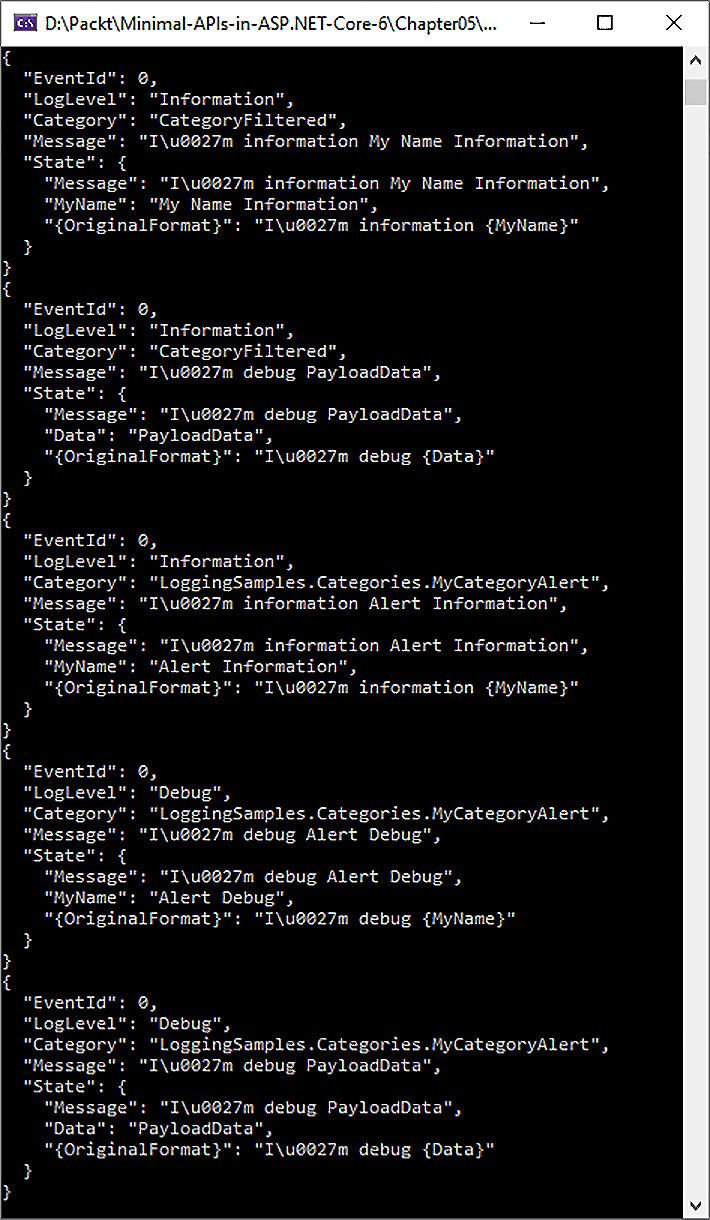
Figure 5.1 – AddJsonConsole output
图 5.1 – AddJsonConsole 输出
Figure 5.1 shows the log formatted as JSON, with several additional details compared to the traditional console log.
图 5.1 显示了格式为 JSON 的日志,与传统控制台日志相比,还有一些额外的细节。
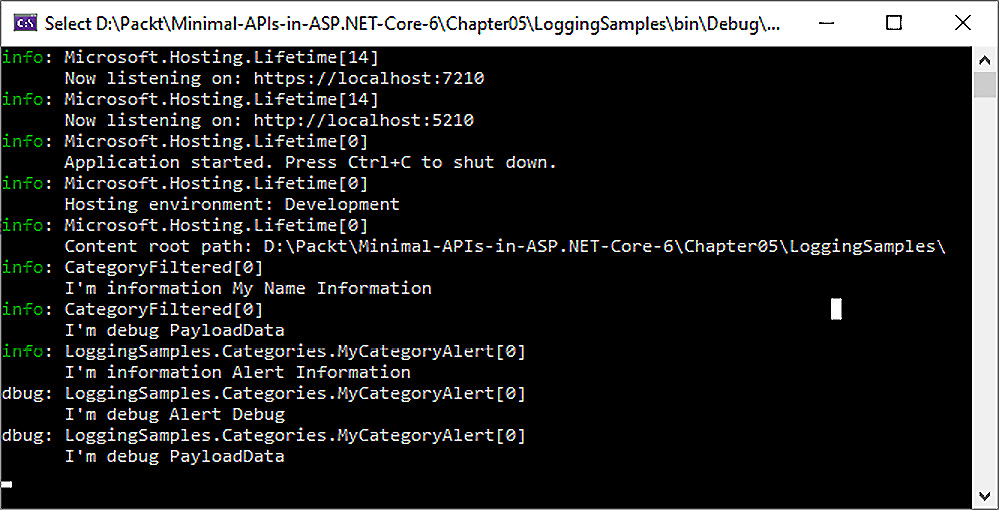
Figure 5.2 – Default logging provider Console output
图 5.2 – 默认日志记录提供程序控制台输出
Figure 5.2 shows the default logging provider Console output.
图 5.2 显示了默认的日志记录提供程序 Console 输出。
Given the default providers, we want to show you how you can create a custom one that fits the needs of your application.
给定默认提供程序,我们想向您展示如何创建适合您应用程序需求的自定义提供程序。
Creating a custom provider
创建自定义提供程序
The logging framework designed by Microsoft can be customized with little effort. Thus, let us learn how to create a custom provider.
Microsoft 设计的日志记录框架可以毫不费力地进行自定义。因此,让我们学习如何创建自定义提供商(provider)。
Why create a custom provider? Well, put simply, to not have dependencies with logging libraries and to better manage the performance of the application. Finally, it also encapsulates some custom logic of your specific scenario and makes your code more manageable and readable.
为什么要创建自定义提供商?嗯,简单地说,不要依赖日志库,并更好地管理应用程序的性能。最后,它还封装了特定方案的一些自定义逻辑,并使代码更易于管理和可读。
In the following example, we have simplified the usage scenario to show you the minimum components needed to create a working logging provider for profit.
在以下示例中,我们简化了使用场景,向您展示了创建有效的日志记录提供商以获取利润所需的最少组件。
One of the fundamental parts of a provider is the ability to configure its behavior. Let us create a class that can be customized at application startup or retrieve information from appsettings.
提供程序的基本部分之一是配置其行为的能力。让我们创建一个类,该类可以在应用程序启动时自定义或从 appsettings 中检索信息。
In our example, we define a fixed EventId to verify a daily rolling file logic and a path of where to write the file:
在我们的示例中,我们定义了一个固定的 EventId 来验证每日滚动文件逻辑和写入文件的路径:
public class FileLoggerConfiguration
{
public int EventId { get; set; }
public string PathFolderName { get; set; } =
"logs";
public bool IsRollingFile { get; set; }
}
The custom provider we are writing will be responsible for writing the log information to a text file. We achieve this by implementing the log class, which we call FileLogger, which implements the ILogger interface.
我们正在编写的自定义提供程序将负责将日志信息写入文本文件。我们通过实现 log 类来实现这一点,我们称之为 FileLogger,它实现 ILogger 接口。
In the class logic, all we do is implement the log method and check which file to put the information in.
在 class logic中,我们所做的只是实现 log 方法并检查将信息放入哪个文件。
We put the directory verification in the next file, but it’s more correct to put all the control logic in this method. We also need to make sure that the log method does not throw exceptions at the application level. The logger should never affect the stability of the application:
我们将目录验证放在下一个文件中,但将所有 control logic 都放在此方法中更为正确。我们还需要确保 log 方法不会在应用程序级别引发异常。记录器不应影响应用程序的稳定性:
public class FileLogger : ILogger
{
private readonly string name;
private readonly Func<FileLoggerConfiguration>
getCurrentConfig;
public FileLogger(string name,
Func<FileLoggerConfiguration> getCurrentConfig)
{
this.name = name;
this.getCurrentConfig = getCurrentConfig;
}
public IDisposable BeginScope<TState>(TState state)
=> default!;
public bool IsEnabled(LogLevel logLevel) => true;
public void Log<TState>(LogLevel logLevel, EventId
, TState state, Exception? exception,
Func<TState, Exception?, string> formatter)
{
if (!IsEnabled(logLevel))
{
return;
}
var config = getCurrentConfig();
if (config.EventId == 0 || config.EventId ==
eventId.Id)
{
string line = $"{name} - {formatter(state,
exception)}";
string fileName = config.IsRollingFile ?
RollingFileName : FullFileName;
string fullPath = Path.Combine(
config.PathFolderName, fileName);
File.AppendAllLines(fullPath, new[] { line });
}
}
private static string RollingFileName =>
$"log-{DateTime.UtcNow:yyyy-MM-dd}.txt";
private const string FullFileName = "logs.txt";
}
Now, we need to implement the ILoggerProvider interface, which is intended to create one or more instances of the logger class just discussed.
现在,我们需要实现 ILoggerProvider 接口,该接口旨在创建刚才讨论的 Logger 类的一个或多个实例。
In this class, we check the directory we mentioned in the previous paragraph, but we also check whether the settings in the appsettings file change, via IOptionsMonitor<T>:
在这个类中,我们检查了我们在上一段中提到的目录,但我们也会通过 IOptionsMonitor<T>检查 appsettings 文件中的设置是否发生了变化:
public class FileLoggerProvider : ILoggerProvider
{
private readonly IDisposable onChangeToken;
private FileLoggerConfiguration currentConfig;
private readonly ConcurrentDictionary<string,
FileLogger> _loggers = new();
public FileLoggerProvider(
IOptionsMonitor<FileLoggerConfiguration> config)
{
currentConfig = config.CurrentValue;
CheckDirectory();
onChangeToken = config.OnChange(updateConfig =>
{
currentConfig = updateConfig;
CheckDirectory();
});
}
public ILogger CreateLogger(string categoryName)
{
return _loggers.GetOrAdd(categoryName, name => new
FileLogger(name, () => currentConfig));
}
public void Dispose()
{
_loggers.Clear();
onChangeToken.Dispose();
}
private void CheckDirectory()
{
if (!Directory.Exists(currentConfig.PathFolderName))
Directory.CreateDirectory(currentConfig.
PathFolderName);
}
}
Finally, to simplify its use and configuration during the application startup phase, we also define an extension method for registering the various classes just mentioned.
最后,为了简化它在应用程序启动阶段的使用和配置,我们还定义了一个扩展方法,用于注册刚才提到的各种类。
The AddFile method will register ILoggerProvider and couple it to its configuration (very simple as an example, but it encapsulates several aspects of configuring and using a custom provider):
AddFile 方法将注册 ILoggerProvider 并将其耦合到其配置(示例非常简单,但它封装了配置和使用自定义提供程序的几个方面):
public static class FileLoggerExtensions
{
public static ILoggingBuilder AddFile(
this ILoggingBuilder builder)
{
builder.AddConfiguration();
builder.Services.TryAddEnumerable(
ServiceDescriptor.Singleton<ILoggerProvider,
FileLoggerProvider>());
LoggerProviderOptions.RegisterProviderOptions<
FileLoggerConfiguration, FileLoggerProvider>
(builder.Services);
return builder;
}
public static ILoggingBuilder AddFile(
this ILoggingBuilder builder,
Action<FileLoggerConfiguration> configure)
{
builder.AddFile();
builder.Services.Configure(configure);
return builder;
}
}
We record everything seen in the Program.cs file with the AddFile extension as shown:
我们使用 AddFile 扩展名记录 Program.cs 文件中看到的所有内容,如下所示:
builder.Logging.AddFile(configuration =>
{
configuration.PathFolderName = Path.Combine(
builder.Environment.ContentRootPath, "logs");
configuration.IsRollingFile = true;
});
The output is shown in Figure 5.3, where we can see both Microsoft log categories in the first five lines (this is the classic application startup information):
输出如图 5.3 所示,我们可以在前五行中看到两个 Microsoft 日志类别(这是经典应用程序启动信息):
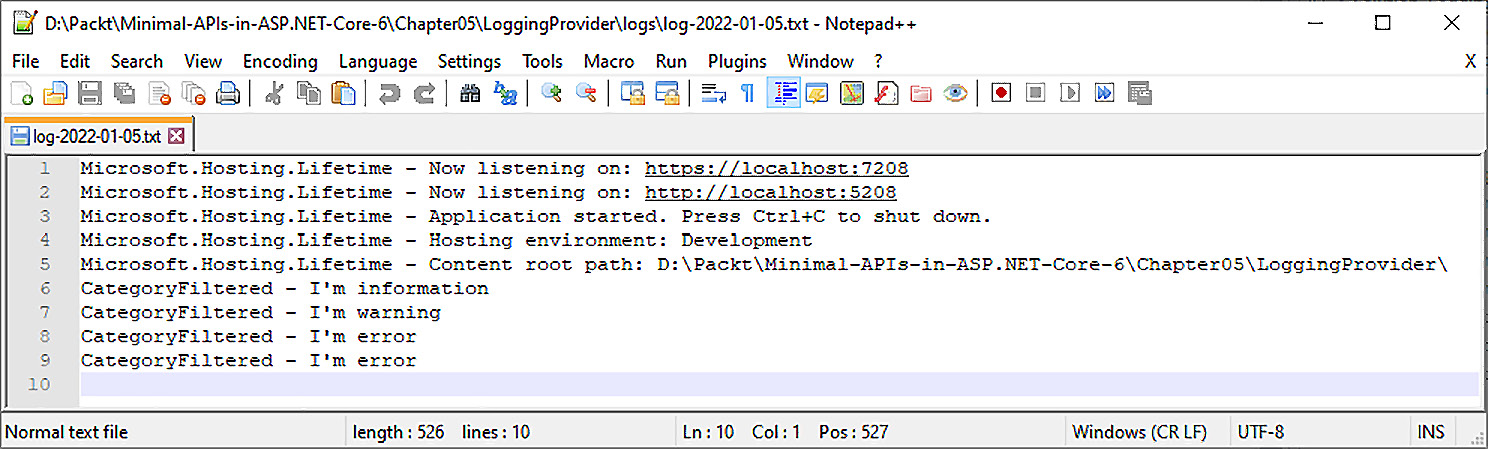
Figure 5.3 – File log provider output
图 5.3 – 文件日志提供程序输出
Then, the handler of the minimal APIs that we reported in the previous sections is called. As you can see, no exception data or data passed to the logger is serialized.
然后,调用我们在前面几节中报告的最小 API 的处理程序。如您所见,不会序列化任何异常数据或传递给 logger 的数据。
To add this functionality as well, it is necessary to rewrite ILogger formatter and support serialization of the object. This will give you everything you need to have in a useful logging framework for production scenarios.
若要同时添加此功能,必须重写 ILogger 格式化程序并支持对象的序列化。这将为您提供用于生产场景的有用日志记录框架所需的一切。
We’ve seen how to configure the log and how to customize the provider object to create a structured log to send to a service or storage.
我们已经了解了如何配置日志以及如何自定义 provider 对象以创建要发送到服务或存储的结构化日志。
In the next section, we want to describe the Azure Application Insights service, which is very useful for both logging and application monitoring.
在下一部分中,我们将介绍 Azure Application Insights 服务,该服务对于日志记录和应用程序监视都非常有用。
Application Insights
应用程序洞察
In addition to the already seen providers, one of the most used ones is Azure Application Insights. This provider allows you to send every single log event in the Azure service. In order to insert the provider into our project, all we would have to do is install the following NuGet package:
除了已经看到的提供程序之外,最常用的提供程序之一是 Azure Application Insights。此提供程序允许您发送 Azure 服务中的每个日志事件。为了将提供程序插入到我们的项目中,我们只需安装以下 NuGet 包:
<PackageReference Include="Microsoft.ApplicationInsights.AspNetCore" Version="2.20.0" />
Registering the provider is very easy.
注册提供商非常简单。
We first register the Application Insights framework, AddApplicationInsightsTelemetry, and then register its extension on the AddApplicationInsights logging framework.
我们首先注册 Application Insights 框架 AddApplicationInsightsTelemetry,然后在 AddApplicationInsights 日志记录框架上注册其扩展。
In the NuGet package previously described, the one for logging the component to the logging framework is also present as a reference:
在前面描述的 NuGet 包中,用于将组件记录到日志记录框架的包也作为参考存在:
var builder = WebApplication.CreateBuilder(args);
builder.Services.AddApplicationInsightsTelemetry();
builder.Logging.AddApplicationInsights();
To register the instrumentation key, which is the key that is issued after registering the service on Azure, you will need to pass this information to the registration method. We can avoid hardcoding this information by placing it in the appsettings.json file using the following format:
若要注册检测密钥(在 Azure 上注册服务后颁发的密钥),您需要将此信息传递给注册方法。我们可以使用以下格式将此信息放在 appsettings.json 文件中,从而避免对此信息进行硬编码:
"ApplicationInsights": {
"InstrumentationKey": "your-key"
},
This process is also described in the documentation (https://docs.microsoft.com/it-it/azure/azure-monitor/app/asp-net-core#enable-application-insights-server-side-telemetry-no-visual-studio).
文档 (https://docs.microsoft.com/it-it/azure/azure-monitor/app/asp-net-core#enable-application-insights-server-side-telemetry-no-visual-studio) 中也介绍了此过程。
By launching the method already discussed in the previous sections, we have all the information hooked into Application Insights.
通过启动前面部分中已讨论的方法,我们将所有信息挂接到 Application Insights 中。
Application Insights groups the logs under a particular trace. A trace is a call to an API, so everything that happens in that call is logically grouped together. This feature takes advantage of the WebServer information and, in particular, TraceParentId issued by the W3C standard for each call.
Application Insights 将日志分组到特定跟踪下。跟踪是对 API 的调用,因此该调用中发生的所有事情都在逻辑上分组在一起。此功能利用 WebServer 信息,特别是 W3C 标准为每个调用颁发的 TraceParentId。
In this way, Application Insights can bind calls between various minimal APIs, should we be in a microservice application or with multiple services collaborating with each other.
通过这种方式,Application Insights 可以在各种最小 API 之间绑定调用,前提是我们位于微服务应用程序中或多个服务相互协作。
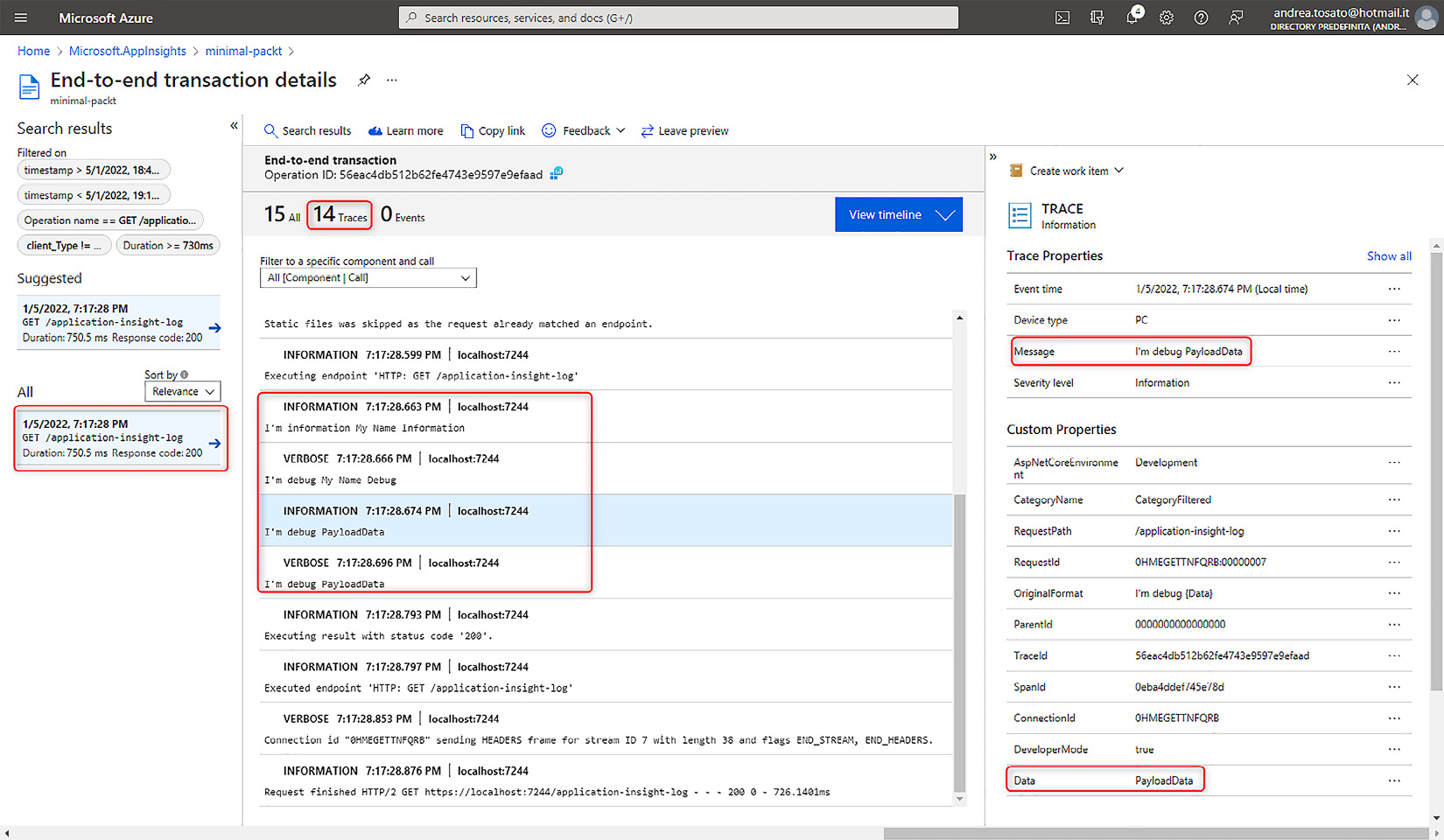
Figure 5.4 – Application Insights with a standard log provider
图 5.4 – 具有标准日志提供程序的 Application Insights
We notice how the default formatter of the logging framework does not serialize the PayloadData object but only writes the text of the object.
我们注意到日志记录框架的默认格式化程序不会序列化 PayloadData 对象,而只写入对象的文本。
In the applications that we will bring into production, it will be necessary to also trace the serialization of the objects. Understanding the state of the object on time is fundamental to analyzing the errors that occurred during a particular call while running queries in the database or reading the data read from the same.
在我们即将投入生产的应用程序中,还需要跟踪对象的序列化。了解对象的按时状态对于在数据库中运行查询或读取从数据库中读取的数据时分析特定调用期间发生的错误至关重要。
Storing a structured log with Serilog
使用 Serilog 存储结构化日志
As we just discussed, tracking structured objects in the log helps us tremendously in understanding errors.
正如我们刚才讨论的,跟踪日志中的结构化对象对我们理解错误有很大帮助。
We, therefore, suggest one of the many logging frameworks: Serilog.
因此,我们建议使用众多日志框架之一:Serilog。
Serilog is a comprehensive library that has many sinks already written that allow you to store log data and search it later.
Serilog 是一个综合库,它已经编写了许多接收器,允许您存储日志数据并在以后进行搜索。
Serilog is a logging library that allows you to track information on multiple data sources. In Serilog, these sources are called sinks, and they allow you to write structured data inside the log applying a serialization of the data passed to the logging system.
Serilog 是一个日志记录库,允许您跟踪有关多个数据源的信息。在 Serilog 中,这些源称为 sink,它们允许您在日志中写入结构化数据,应用传递给日志记录系统的数据的序列化。
Let’s see how to get started using Serilog for a minimal API application. Let’s install these NuGet packages. Our goal will be to track the same information we’ve been using so far, specifically Console and ApplicationInsights:
让我们看看如何开始将 Serilog 用于最小的 API 应用程序。让我们安装这些 NuGet 包。我们的目标是跟踪我们目前一直在使用的相同信息,特别是控制台和 ApplicationInsights:
<PackageReference Include="Microsoft.ApplicationInsights.AspNetCore" Version="2.20.0" />
<PackageReference Include="Serilog.AspNetCore" Version="4.1.0" />
<PackageReference Include="Serilog.Settings.Configuration" Version="3.3.0" />
<PackageReference Include="Serilog.Sinks.ApplicationInsights" Version="3.1.0" />
The first package is the one needed for the ApplicationInsights SDK in the application. The second package allows us to register Serilog in the ASP.NET pipeline and to be able to exploit Serilog. The third package allows us to configure the framework in the appsettings file and not have to rewrite the application to change a parameter or code. Finally, we have the package to add the ApplicationInsights sink.
第一个包是应用程序中 ApplicationInsights SDK 所需的包。第二个包允许我们在 ASP.NET 管道中注册 Serilog,并能够利用 Serilog。第三个包允许我们在 appsettings 文件中配置框架,而不必重写应用程序来更改参数或代码。最后,我们有了用于添加 ApplicationInsights 接收器的包。
In the appsettings file, we create a new Serilog section, in which we should register the various sinks in the Using section. We register the log level, the sinks, the enrichers that enrich the information for each event, and the properties, such as the application name:
在 appsettings 文件中,我们创建一个新的 Serilog 部分,我们应该在其中注册 Using 部分的各种接收器。我们注册日志级别、接收器、扩充每个事件信息的 enricher 以及属性,例如应用程序名称:
"Serilog": {
"Using": [ "Serilog.Sinks.Console",
"Serilog.Sinks.ApplicationInsights" ],
"MinimumLevel": "Verbose",
"WriteTo": [
{ "Name": "Console" },
{
"Name": "ApplicationInsights",
"Args": {
"restrictedToMinimumLevel": "Information",
"telemetryConverter": "Serilog.Sinks.
ApplicationInsights.Sinks.ApplicationInsights.
TelemetryConverters.TraceTelemetryConverter,
Serilog.Sinks.ApplicationInsights"
}
}
],
"Enrich": [ "FromLogContext"],
"Properties": {
"Application": "MinimalApi.Packt"
}
}
Now, we just have to register Serilog in the ASP.NET pipeline:
现在,我们只需要在 ASP.NET 管道中注册 Serilog:
using Microsoft.ApplicationInsights.Extensibility;
using Serilog;
var builder = WebApplication.CreateBuilder(args);
builder.Logging.AddSerilog();
builder.Services.AddApplicationInsightsTelemetry();
var app = builder.Build();
Log.Logger = new LoggerConfiguration()
.WriteTo.ApplicationInsights(app.Services.GetRequiredService<TelemetryConfiguration>(), TelemetryConverter.Traces)
.CreateLogger();
With the builder.Logging.AddSerilog() statement, we register Serilog with the logging framework to which all logged events will be passed with the usual ILogger interface. Since the framework needs to register the TelemetryConfiguration class to register ApplicationInsights, we are forced to hook the configuration to the static Logger object of Serilog. This is all because Serilog will turn the information from the Microsoft logging framework over to the Serilog framework and add all the necessary information.
builder.Logging.AddSerilog()语句中,我们将 Serilog 注册到日志记录框架,所有记录的事件都将使用通常的 ILogger 接口传递到该框架。由于框架需要注册 TelemetryConfiguration 类来注册 ApplicationInsights,因此我们被迫将配置挂接到 Serilog 的静态 Logger 对象。这都是因为 Serilog 会将信息从 Microsoft 日志记录框架转移到 Serilog 框架并添加所有必要的信息。
The usage is very similar to the previous one, but this time, we add an @ (at) to the message template that will tell Serilog to serialize the sent object.
用法与前一个非常相似,但这次,我们在消息模板中添加一个 @ (at),它将告诉 Serilog 序列化发送的对象。
With this very simple {@Person} wording, we will be able to achieve the goal of serializing the object and sending it to the ApplicationInsights service:
使用这个非常简单的 {@Person} 措辞,我们将能够实现序列化对象并将其发送到 ApplicationInsights 服务的目标:
app.MapGet("/serilog", (ILogger<CategoryFiltered> loggerCategory) =>
{
loggerCategory.LogInformation("I'm {@Person}", new
Person("Andrea", "Tosato", new DateTime(1986, 11,
9)));
return Results.Ok();
})
.WithName("GetFirstLog");
internal record Person(string Name, string Surname, DateTime Birthdate);
Finally, we have to find the complete data, serialized with the JSON format, in the Application Insights service.
最后,我们必须在 Application Insights 服务中找到使用 JSON 格式序列化的完整数据。
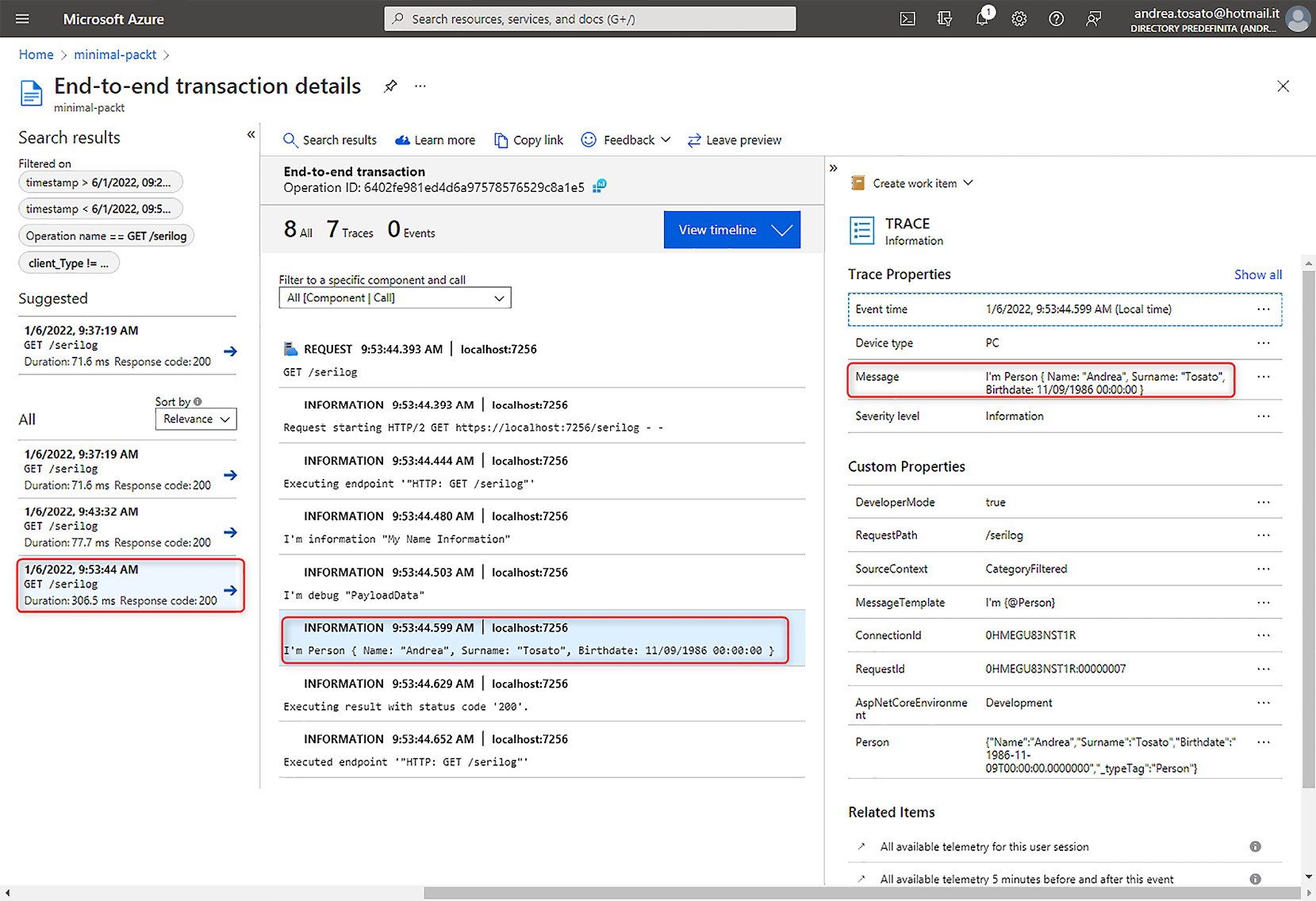
Figure 5.5 – Application Insights with structured data
图 5.5 – 包含结构化数据的 Application Insights
Summary
总结
In this chapter, we have seen several logging aspects of the implementation of minimal APIs.
在本章中,我们了解了最小 API 实现的几个日志记录方面。
We started to appreciate the ASP.NET churned logging framework, and we understood how to configure and customize it. We focused on how to define a message template and how to avoid errors with the source generator.
我们开始欣赏 ASP.NET 的 churned 日志记录框架,并且我们了解如何配置和自定义它。我们重点介绍了如何定义消息模板以及如何避免源生成器出错。
We saw how to use the new provider to serialize logs with the JSON format and create a custom provider. These elements turned out to be very important for mastering the logging tool and customizing it to your liking.
我们了解了如何使用新的提供程序以 JSON 格式序列化日志并创建自定义提供程序。事实证明,这些元素对于掌握日志记录工具并根据您的喜好对其进行自定义非常重要。
Not only was the application log mentioned but also the infrastructure log, which together with Application Insights becomes a key element to monitoring your application. Finally, we understood that there are ready-made tools, such as Serilog, that help us to have ready-to-use functionalities with a few steps thanks to some packages installed by NuGet.
不仅提到了应用程序日志,还提到了基础结构日志,它与 Application Insights 一起成为监视应用程序的关键元素。最后,我们了解到有一些现成的工具,例如 Serilog,由于 NuGet 安装的一些软件包,它们可以帮助我们通过几个步骤获得即用型功能。
In the next chapter, we will present the mechanisms for validating an input object to the API. This is a fundamental feature to return a correct error to the calls and discard inaccurate requests or those promoted by illicit activities such as spam and attacks, aimed at generating load on our servers.
在下一章中,我们将介绍验证 API 的输入对象的机制。这是一项基本功能,可向调用返回正确的错误并丢弃不准确的请求或由非法活动(如垃圾邮件和攻击)推动的请求,旨在在我们的服务器上产生负载。
6 Exploring Validation and Mapping
6 探索验证和映射
In this chapter of the book, we will discuss how to perform data validation and mapping with minimal APIs, showing what features we currently have, what is missing, and what the most interesting alternatives are. Learning about these concepts will help us to develop more robust and maintainable applications.
在本书的这一章中,我们将讨论如何使用最少的 API 执行数据验证和映射,展示我们目前拥有的功能、缺少的功能以及最有趣的替代方案。了解这些概念将有助于我们开发更健壮且可维护的应用程序。
In this chapter, we will be covering the following topics:
在本章中,我们将介绍以下主题:
• Handling validation
处理验证
• Mapping data to and from APIs
将数据映射到 API 或从 API 映射数据
Technical requirements
技术要求
To follow the descriptions in this chapter, you will need to create an ASP.NET Core 6.0 Web API application. Refer to the Technical requirements section in Chapter 2, Exploring Minimal APIs and Their Advantages, for instructions on how to do so.
要按照本章中的描述进行作,您需要创建一个 ASP.NET Core 6.0 Web API 应用程序。有关如何执行此作的说明,请参阅第 2 章 “探索最小 API 及其优势”中的“技术要求”部分。
If you’re using your console, shell, or bash terminal to create the API, remember to change your working directory to the current chapter number (Chapter06).
如果您使用控制台、shell 或 bash 终端创建 API,请记住将工作目录更改为当前章节编号 (Chapter06)。
All the code samples in this chapter can be found in the GitHub repository for this book at https://github.com/PacktPublishing/Minimal-APIs-in-ASP.NET-Core-6/tree/main/Chapter06.
本章中的所有代码示例都可以在本书的 GitHub 存储库中找到,网址为 https://github.com/PacktPublishing/Minimal-APIs-in-ASP.NET-Core-6/tree/main/Chapter06。
Handling validation
处理验证
Data validation is one of the most important processes in any working software. In the context of a Web API, we perform the validation process to ensure that the information passed to our endpoints respects certain rules – for example, that a Person object has both the FirstName and LastName properties defined, an email address is valid, or an appointment date isn’t in the past.
数据验证是任何工作软件中最重要的过程之一。在 Web API 的上下文中,我们执行验证过程以确保传递给终端节点的信息符合某些规则,例如,Person 对象同时定义了 FirstName 和 LastName 属性、电子邮件地址有效或约会日期不是过去的日期。
In controller-based projects, we can perform these checks, also termed model validation, directly on the model, using data annotations. In fact, the ApiController attribute that is placed on a controller makes model validation errors automatically trigger a 400 Bad Request response if one or more validation rules fail. Therefore, in controller-based projects, we typically don’t need to perform explicit model validation at all: if the validation fails, our endpoint will never be invoked.
在基于控制器的项目中,我们可以使用数据注释直接在模型上执行这些检查,也称为模型验证。事实上,放置在控制器上的 ApiController 属性会使模型验证错误在一个或多个验证规则失败时自动触发 400 Bad Request 响应。因此,在基于控制器的项目中,我们通常根本不需要执行显式模型验证:如果验证失败,我们的端点将永远不会被调用。
Note : The ApiController attribute enables the automatic model validation behavior using the ModelStateInvalidFilter action filter.
注意 : ApiController 属性使用 ModelStateInvalidFilter作筛选器启用自动模型验证行为。
Unfortunately, minimal APIs do not provide built-in support for validation. The IModelValidator interface and all related objects cannot be used. Thus, we don’t have a ModelState; we can’t prevent the execution of our endpoint if there is a validation error and must explicitly return a 400 Bad Request response.
遗憾的是,最小 API 不提供对验证的内置支持。不能使用 IModelValidator 接口和所有相关对象。因此,我们没有 ModelState;如果存在验证错误,我们无法阻止终端节点的执行,并且必须显式返回 400 Bad Request 响应。
So, for example, let’s see the following code:
因此,例如,让我们看看以下代码:
app.MapPost("/people", (Person person) =>
{
return Results.NoContent();
});
public class Person
{
[Required]
[MaxLength(30)]
public string FirstName { get; set; }
[Required]
[MaxLength(30)]
public string LastName { get; set; }
[EmailAddress]
[StringLength(100, MinimumLength = 6)]
public string Email { get; set; }
}
As we can see, the endpoint will be invoked even if the Person argument does not respect the validation rules. There is only one exception: if we use nullable reference types and we don’t pass a body in the request, we effectively get a 400 Bad Request response. As mentioned in Chapter 2, Exploring Minimal APIs and Their Advantages, nullable reference types are enabled by default in .NET 6.0 projects.
正如我们所看到的,即使 Person 参数不遵守验证规则,也会调用端点。只有一个例外:如果我们使用可为 null 的引用类型,并且我们没有在请求中传递正文,我们实际上会得到 400 Bad Request 响应。如第 2 章 探索最小 API 及其优点中所述,在 .NET 6.0 项目中默认启用可为 null 的引用类型。
If we want to accept a null body (if ever there was a need), we need to declare the parameter as Person?. But, as long as there is a body, the endpoint will always be invoked.
如果我们想接受一个 null body(如果有需要),我们需要将参数声明为 Person?。但是,只要有 body,端点就会始终被调用。
So, with minimal APIs, it is necessary to perform validation inside each route handler and return the appropriate response if some rules fail. We can either implement a validation library compatible with the existing attributes so that we can perform validation using the classic data annotations approach, as described in the next section, or use a third-party solution such as FluentValidation, as we will see in the Integrating FluentValidation section.
因此,使用最少的 API,有必要在每个路由处理程序中执行验证,并在某些规则失败时返回相应的响应。我们可以实现与现有属性兼容的验证库,以便我们可以使用经典数据注释方法执行验证,如下一节所述,也可以使用第三方解决方案,例如 FluentValidation,正如我们将在集成 FluentValidation 部分中看到的那样。
Performing validation with data annotations
使用数据注释执行验证
If we want to use the common validation pattern based on data annotations, we need to rely on reflection to retrieve all the validation attributes in a model and invoke their IsValid methods, which are provided by the ValidationAttribute base class.
如果我们想使用基于数据注释的通用验证模式,则需要依靠反射来检索模型中的所有验证属性,并调用它们的 IsValid 方法,这些方法由 ValidationAttribute 基类提供。
This behavior is a simplification of what ASP.NET Core actually does to handle validations. However, this is the way validation in controller-based projects works.
此行为简化了 ASP.NET Core 实际处理验证的作。但是,这就是基于 controller 的 projects 中 validation 的工作方式。
While we can also manually implement a solution of this kind with minimal APIs, if we decide to use data annotations for validation, we can leverage a small but interesting library, MiniValidation, which is available on GitHub (https://github.com/DamianEdwards/MiniValidation) and NuGet (https://www.nuget.org/packages/MiniValidation).
虽然我们也可以使用最少的 API 手动实现此类解决方案,但如果我们决定使用数据注释进行验证,我们可以利用一个小而有趣的库 MiniValidation,该库可在 GitHub (https://github.com/DamianEdwards/MiniValidation) 和 NuGet (https://www.nuget.org/packages/MiniValidation) 上使用。
Important note : At the time of writing, MiniValidation is available on NuGet as a prerelease.
重要提示 : 在撰写本文时,MiniValidation 在 NuGet 上作为预发行版提供。
We can add this library to our project in one of the following ways:
我们可以通过以下方式之一将此库添加到我们的项目中:
• Option 1: If you’re using Visual Studio 2022, right-click on the project and choose the Manage NuGet Packages command to open the Package Manager GUI; then, search for MiniValidation. Be sure to check the Include prerelease option and click Install.
选项 1:如果您使用的是 Visual Studio 2022,请右键单击项目并选择“管理 NuGet 包”命令以打开包管理器 GUI;然后,搜索 MiniValidation。请务必选中 Include prerelease 选项,然后单击 Install。
• Option 2: Open the Package Manager Console if you’re inside Visual Studio 2022, or open your console, shell, or bash terminal, go to your project directory, and execute the following command: dotnet add package MiniValidation --prerelease
选项 2:如果您在 Visual Studio 2022 中,请打开包管理器控制台,或者打开控制台、shell 或 bash 终端,转到您的项目目录,然后执行以下命令:dotnet add package MiniValidation --prerelease
Now, we can validate a Person object using the following code:
现在,我们可以使用以下代码验证 Person 对象:
app.MapPost("/people", (Person person) =>
{
var isValid = MiniValidator.TryValidate(person,
out var errors);
if (!isValid)
{
return Results.ValidationProblem(errors);
}
return Results.NoContent();
});
As we can see, the MiniValidator.TryValidate static method provided by MiniValidation takes an object as input and automatically verifies all the validation rules that are defined on its properties. If the validation fails, it returns false and populates the out parameter with all the validation errors that have occurred. In this case, because it is our responsibility to return the appropriate response code, we use Results.ValidationProblem, which produces a 400 Bad Request response with a ProblemDetails object (as described in Chapter 3, Working with Minimal APIs) and also contains the validation issues.
正如我们所看到的,MiniValidation 提供的 MiniValidator.TryValidate 静态方法将对象作为输入,并自动验证在其属性上定义的所有验证规则。如果验证失败,它将返回 false 并使用已发生的所有验证错误填充 out 参数。在这种情况下,由于我们有责任返回适当的响应代码,因此我们使用 Results.ValidationProblem,它生成带有 ProblemDetails 对象的 400 Bad Request 响应(如第 3 章 使用最小 API 中所述),并且还包含验证问题。
Now, as an example, we can invoke the endpoint using the following invalid input:
现在,例如,我们可以使用以下无效输入调用终端节点:
{
"lastName": "MyLastName",
"email": "email"
}
This is the response we will obtain:
这是我们将获得的响应:
{
"type":
"https://tools.ietf.org/html/rfc7231#section-6.5.1",
"title": "One or more validation errors occurred.",
"status": 400,
"errors": {
"FirstName": [
"The FirstName field is required."
],
"Email": [
"The Email field is not a valid e-mail address.",
"The field Email must be a string with a minimum
length of 6 and a maximum length of 100."
]
}
}
In this way, besides the fact that we need to execute validation manually, we can implement the approach of using data annotations on our models in the same way we were accustomed to in previous versions of ASP.NET Core. We can also customize error messages and define custom rules by creating classes that inherit from ValidationAttribute.
这样,除了需要手动执行验证之外,我们还可以像以前版本的 ASP.NET Core 一样,在模型上实现使用数据注释的方法。我们还可以通过创建继承自 ValidationAttribute 的类来自定义错误消息和定义自定义规则。
Note : The full list of validation attributes available in ASP.NET Core 6.0 is published at https://docs.microsoft.com/dotnet/api/system.componentmodel.dataannotations. If you’re interested in creating custom attributes, you can refer to https://docs.microsoft.com/aspnet/core/mvc/models/validation#custom-attributes.
注意 : ASP.NET Core 6.0 中可用的验证属性的完整列表发布在 https://docs.microsoft.com/dotnet/api/system.componentmodel.dataannotations。如果你对创建自定义属性感兴趣,可以参考 https://docs.microsoft.com/aspnet/core/mvc/models/validation#custom-attributes。
Although data annotations are the most used solution, we can also handle validations using a so-called fluent approach, which has the benefit of completely decoupling validation rules from the model, as we’ll see in the next section.
尽管数据注释是最常用的解决方案,但我们也可以使用所谓的 Fluent 方法处理验证,其优点是将验证规则与模型完全解耦,我们将在下一节中看到。
Integrating FluentValidation
集成 FluentValidation
In every application, it is important to correctly organize our code. This is also true for validation. While data annotations are a working solution, we should think about alternatives that can help us write more maintainable projects. This is the purpose of FluentValidation – a library, part of the .NET Foundation, that allows us to build validation rules using a fluent interface with lambda expressions. The library is available on GitHub (https://github.com/FluentValidation/FluentValidation) and NuGet (https://www.nuget.org/packages/FluentValidation). This library can be used in any kind of project, but when working with ASP.NET Core, there is an ad-hoc NuGet package (https://www.nuget.org/packages/FluentValidation.AspNetCore) that contains useful methods that help to integrate it.
在每个应用程序中,正确组织我们的代码都很重要。验证也是如此。虽然数据注释是一种有效的解决方案,但我们应该考虑可以帮助我们编写更可维护项目的替代方案。这就是 FluentValidation 的用途 – 一个库,是 .NET Foundation 的一部分,它允许我们使用带有 lambda 表达式的 Fluent 接口构建验证规则。该库在 GitHub (https://github.com/FluentValidation/FluentValidation) 和 NuGet (https://www.nuget.org/packages/FluentValidation) 上提供。此库可用于任何类型的项目,但在使用 ASP.NET Core 时,有一个临时 NuGet 包 (https://www.nuget.org/packages/FluentValidation.AspNetCore) 包含有助于集成它的有用方法。
Note : .NET Foundation is an independent organization that aims to support open source software development and collaboration around the .NET platform. You can learn more at https://dotnetfoundation.org.
注意 : .NET Foundation 是一个独立的组织,旨在支持围绕 .NET 平台的开源软件开发和协作。您可以在 https://dotnetfoundation.org 中了解更多信息。
As stated before, with this library, we can decouple validation rules from the model to create a more structured application. Moreover, FluentValidation allows us to define even more complex rules with a fluent syntax without the need to create custom classes based on ValidationAttribute. The library also natively supports the localization of standard error messages.
如前所述,借助此库,我们可以将验证规则与模型解耦,以创建更加结构化的应用程序。此外,FluentValidation 允许我们使用 Fluent 语法定义更复杂的规则,而无需基于 ValidationAttribute 创建自定义类。该库还原生支持标准错误消息的本地化。
So, let’s see how we can integrate FluentValidation into a minimal API project. First, we need to add this library to our project in one of the following ways:
那么,让我们看看如何将 FluentValidation 集成到一个最小的 API 项目中。首先,我们需要通过以下方式之一将此库添加到我们的项目中:
• Option 1: If you’re using Visual Studio 2022, right-click on the project and choose the Manage NuGet Packages command to open Package Manager GUI. Then, search for FluentValidation.DependencyInjectionExtensions and click Install.
选项 1:如果您使用的是 Visual Studio 2022,请右键单击项目并选择“管理 NuGet 包”命令以打开包管理器 GUI。然后,搜索 FluentValidation.DependencyInjectionExtensions 并单击 Install。
• Option 2: Open Package Manager Console if you’re inside Visual Studio 2022, or open your console, shell, or bash terminal, go to your project directory, and execute the following command: dotnet add package FluentValidation.DependencyInjectionExtensions
选项 2:如果您在 Visual Studio 2022 中,请打开包管理器控制台,或者打开控制台、shell 或 bash 终端,转到您的项目目录,然后执行以下命令:
dotnet add 包 FluentValidation.DependencyInjectionExtensions
Now, we can rewrite the validation rules for the Person object and put them in a PersonValidator class:
现在,我们可以重写 Person 对象的验证规则,并将它们放入 PersonValidator 类中:
public class PersonValidator : AbstractValidator<Person>
{
public PersonValidator()
{
RuleFor(p =>
p.FirstName).NotEmpty().MaximumLength(30);
RuleFor(p =>
p.LastName).NotEmpty().MaximumLength(30);
RuleFor(p => p.Email).EmailAddress().Length(6,
100);
}
}
PersonValidator inherits from AbstractValidator<T>, a base class provided by FluentValidation that contains all the methods we need to define the validation rules. For example, we fluently say that we have a rule for the FirstName property, which is that it must not be empty and it can have a maximum length of 30 characters.
PersonValidator 继承自 AbstractValidator<T>,后者是 FluentValidation 提供的基类,包含定义验证规则所需的所有方法。例如,我们流畅地说我们有一条 FirstName 属性的规则,即它不能为空,并且最大长度为 30 个字符。
The next step is to register the validator in the service provider so that we can use it in our route handlers. We can perform this task with a simple instruction:
下一步是在 service provider 中注册 validator,以便我们可以在 route handlers 中使用它。我们可以通过一个简单的指令来执行这项任务:
var builder = WebApplication.CreateBuilder(args);
//...
builder.Services.AddValidatorsFromAssemblyContaining<Program>();
The AddValidatorsFromAssemblyContaining method automatically registers all the validators derived from AbstractValidator within the assembly containing the specified type. In particular, this method registers the validators and makes them accessible through dependency injection via the IValidator<T> interface, which in turn, is implemented by the AbstractValidator<T> class. If we have multiple validators, we can register them all with this single instruction. We can also easily put our validators in external assemblies.
AddValidatorsFromAssemblyContaining 方法会自动在包含指定类型的程序集中注册从 AbstractValidator 派生的所有验证程序。特别是,此方法注册验证器,并通过 IValidator<T> 接口通过依赖项注入使它们可访问,而 IValidator<T> 接口又由 AbstractValidatorT 类实现。如果我们有多个验证者,我们可以使用这个指令将它们全部注册。我们还可以轻松地将验证器放在外部程序集中。
Now that everything is in place, remembering that with minimal APIs we don’t have automatic model validation, we must update our route handler in this way:
现在一切都已准备就绪,请记住,使用最少的 API 时,我们没有自动模型验证,我们必须以这种方式更新我们的路由处理程序:
app.MapPost("/people", async (Person person, IValidator<Person> validator) =>
{
var validationResult =
await validator.ValidateAsync(person);
if (!validationResult.IsValid)
{
var errors = validationResult.ToDictionary();
return Results.ValidationProblem(errors);
}
return Results.NoContent();
});
We have added an IValidator argument in the route handler parameter list, so now we can invoke its ValidateAsync method to apply the validation rules against the input Person object. If the validation fails, we extract all the error messages and return them to the client with the usual Results.ValidationProblem method, as described in the previous section.
我们在路由处理程序参数列表中添加了 IValidator 参数,因此现在我们可以调用其 ValidateAsync 方法,以对输入 Person 对象应用验证规则。如果验证失败,我们将提取所有错误消息,并使用通常的 Results.ValidationProblem 方法将它们返回给客户端,如上一节所述。
In conclusion, let’s see what happens if we try to invoke the endpoint using the following input as before:
总之,让我们看看如果我们像以前一样尝试使用以下输入调用终端节点会发生什么情况:
{
"lastName": "MyLastName",
"email": "email"
}
We’ll get the following response:
我们将收到以下响应:
{
"type":
"https://tools.ietf.org/html/rfc7231#section-6.5.1",
"title": "One or more validation errors occurred.",
"status": 400,
"errors": {
"FirstName": [
"'First Name' non può essere vuoto."
],
"Email": [
"'Email' non è un indirizzo email valido.",
"'Email' deve essere lungo tra i 6 e 100 caratteri.
Hai inserito 5 caratteri."
]
}
}
As mentioned earlier, FluentValidation provides translations for standard error messages, so this is the response you get when running on an Italian system. Of course, we can completely customize the messages with the typical fluent approach, using the WithMessage method chained to the validation methods defined in the validator. For example, see the following:
如前所述,FluentValidation 为标准错误消息提供翻译,因此这是您在意大利语系统上运行时得到的响应。当然,我们可以使用典型的 Fluent 方法完全自定义消息,使用链接到验证器中定义的验证方法的 WithMessage 方法。例如,请参阅以下内容:
RuleFor(p => p.FirstName).NotEmpty().WithMessage("You must provide the first name");
We’ll talk about localization in further detail in Chapter 9, Leveraging Globalization and Localization.
我们将在第 9 章 利用全球化和本地化 中更详细地讨论本地化。
This is just a quick example of how to define validation rules with FluentValidation and use them with minimal APIs. This library allows many more complex scenarios that are comprehensively described in the official documentation available at https://fluentvalidation.net.
这只是一个快速示例,说明如何使用 FluentValidation 定义验证规则并将其与最少的 API 一起使用。此库允许许多更复杂的场景,这些场景在 https://fluentvalidation.net 上提供的官方文档中进行了全面描述。
Now that we have seen how to add validation to our route handlers, it is important to understand how we can update the documentation created by Swagger with this information.
现在我们已经了解了如何将验证添加到路由处理程序中,了解如何使用此信息更新 Swagger 创建的文档非常重要。
Adding validation information to Swagger
向 Swagger 添加验证信息
Regardless of the solution that has been chosen to handle validation, it is important to update the OpenAPI definition with the indication that a handler can produce a validation problem response, calling the ProducesValidationProblem method after the endpoint declaration:
无论选择哪种解决方案来处理验证,都必须更新 OpenAPI 定义,并指示处理程序可以生成验证问题响应,并在端点声明后调用 ProducesValidationProblem 方法:
app.MapPost("/people", (Person person) =>
{
//...
})
.Produces(StatusCodes.Status204NoContent)
.ProducesValidationProblem();
In this way, a new response type for the 400 Bad Request status code will be added to Swagger, as we can see in Figure 6.1:
这样,400 Bad Request 状态码的新响应类型就会被添加到 Swagger 中,如图 6.1 所示:
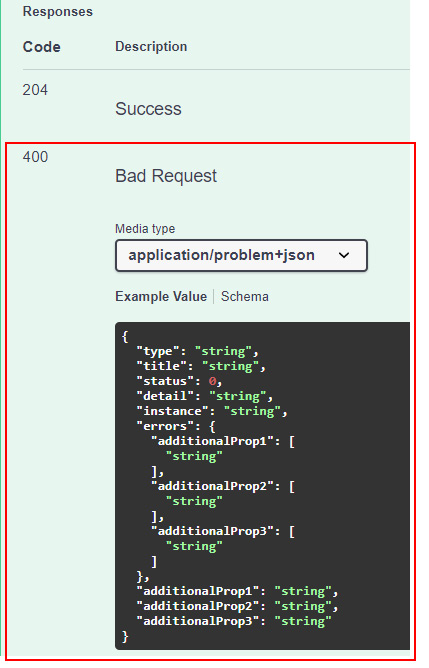
Figure 6.1 – The validation problem response added to Swagger
图 6.1 – 添加到 Swagger 的验证问题响应
Moreover, the JSON schemas that are shown at the bottom of the Swagger UI can show the rules of the corresponding models. One of the benefits of defining validation rules using data annotations is that they are automatically reflected in these schemas:
此外,Swagger UI 底部显示的 JSON 架构可以显示相应模型的规则。使用数据注释定义验证规则的好处之一是,它们会自动反映在这些架构中:
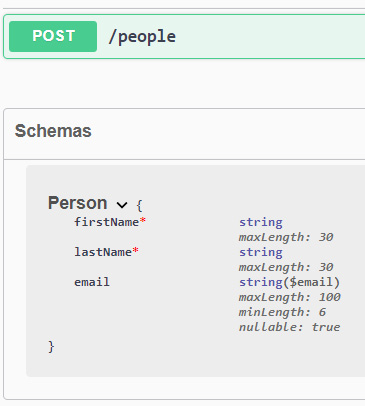
Figure 6.2 – The validation rules for the Person object in Swagger
图 6.2 – Swagger 中 Person 对象的验证规则
Unfortunately, validation rules defined with FluentValidation aren’t automatically shown in the JSON schema of Swagger. We can overcome this limitation by using MicroElements.Swashbuckle.FluentValidation, a small library that, as usual, is available on GitHub (https://github.com/micro-elements/MicroElements.Swashbuckle.FluentValidation) and NuGet (https://www.nuget.org/packages/MicroElements.Swashbuckle.FluentValidation). After adding it to our project, following the same steps described before for the other NuGet packages we have introduced, we just need to call the AddFluentValidationRulesToSwagger extension method:
遗憾的是,使用 FluentValidation 定义的验证规则不会自动显示在 Swagger 的 JSON 架构中。我们可以通过使用 MicroElements.Swashbuckle.FluentValidation 来克服这一限制,这是一个小型库,通常可在 GitHub (https://github.com/micro-elements/MicroElements.Swashbuckle.FluentValidation) 和 NuGet (https://www.nuget.org/packages/MicroElements.Swashbuckle.FluentValidation) 上使用。将其添加到我们的项目后,按照之前针对我们介绍的其他 NuGet 包的相同步骤,我们只需调用 AddFluentValidationRulesToSwagger 扩展方法:
var builder = WebApplication.CreateBuilder(args);
//...
builder.Services.AddFluentValidationRulesToSwagger();
In this way, the JSON schema shown in Swagger will reflect the validation rules, as with the data annotations. However, it’s worth remembering that, at the time of writing, this library does not support all the validators available in FluentValidation. For more information, we can refer to the GitHub page of the library.
这样,Swagger 中显示的 JSON 架构将反映验证规则,就像数据注释一样。但是,值得记住的是,在撰写本文时,此库并不支持 FluentValidation 中可用的所有验证器。有关更多信息,我们可以参考该库的 GitHub 页面。
This ends our overview of validation in minimal APIs. In the next section, we’ll analyze another important theme of every API: how to correctly handle the mapping of data to and from our services.
我们对最小 API 中的验证的概述到此结束。在下一节中,我们将分析每个 API 的另一个重要主题:如何正确处理进出我们服务的数据。
Mapping data to and from APIs
将数据映射到 API 或从 API 映射数据
When dealing with APIs that can be called by any system, there is one golden rule: we should never expose our internal objects to the callers. If we don’t follow this decoupling idea and, for some reason, need to change our internal data structures, we could end up breaking all the clients that interact with us. Both the internal data structures and the objects that are used to dialog with the clients must be able to evolve independently from one another.
在处理任何系统都可以调用的 API 时,有一条黄金法则:我们永远不应该将我们的内部对象暴露给调用者。如果我们不遵循这种解耦的想法,并且出于某种原因需要改变我们的内部数据结构,我们最终可能会破坏所有与我们交互的客户端。内部数据结构和用于与 Client 端对话的对象都必须能够彼此独立地发展。
This requirement for dialog is the reason why mapping is so important. We need to transform input objects of one type into output objects of a different type and vice versa. In this way, we can achieve two objectives:
这种对对话的要求是映射如此重要的原因。我们需要将一种类型的输入对象转换为不同类型的输出对象,反之亦然。通过这种方式,我们可以实现两个目标:
• Evolve our internal data structures without introducing breaking changes with the contracts that are exposed to the callers
改进我们的内部数据结构,而不会对暴露给调用方的合约引入中断性变更
• Modify the format of the objects used to communicate with the clients without the need to change the way these objects are handled internally
修改用于与 Client 端通信的对象的格式,而无需更改内部处理这些对象的方式
In other words, mapping means transforming one object into another, literally, by copying and converting an object’s properties from a source to a destination. However, mapping code is boring, and testing mapping code is even more boring. Nevertheless, we need to fully understand that the process is crucial and strive to adopt it in all scenarios.
换句话说,映射意味着通过将对象的属性从源复制并转换为目标,将一个对象转换为另一个对象。但是,映射代码很无聊,测试映射代码更无聊。尽管如此,我们需要充分理解这个过程是至关重要的,并努力在所有情况下采用它。
So, let’s consider the following object, which could represent a person saved in a database using Entity Framework Core:
因此,让我们考虑以下对象,它可以表示使用 Entity Framework Core 保存在数据库中的人员:
public class PersonEntity
{
public int Id { get; set; }
public string FirstName { get; set; }
public string LastName { get; set; }
public DateTime BirthDate { get; set; }
public string City { get; set; }
}
We have set endpoints for getting a list of people or retrieving a specific person.
我们设置了用于获取人员列表或检索特定人员的端点。
The first thought could be to directly return PersonEntity to the caller. The following code is highly simplified, enough for us to understand the scenario:
第一个想法可能是直接将 PersonEntity 返回给调用方。以下代码经过高度简化,足以让我们理解该场景:
app.MapGet("/people/{id:int}", (int id) =>
{
// In a real application, this entity could be
// retrieved from a database, checking if the person
// with the given ID exists.
var person = new PersonEntity();
return Results.Ok(person);
})
.Produces(StatusCodes.Status200OK, typeof(PersonEntity));
What happens if we need to modify the schema of the database, adding, for example, the creation date of the entity? In this case, we need to change PersonEntity with a new property that maps the relevant date. However, the callers also get this information now, which we probably don’t want to be exposed. Instead, if we use a so-called data transformation object (DTO) to expose the person, this problem will be redundant:
如果我们需要修改数据库的架构,例如添加实体的创建日期,会发生什么情况?在这种情况下,我们需要使用映射相关日期的新属性更改 PersonEntity。但是,调用方现在也会获得此信息,我们可能不希望这些信息被公开。相反,如果我们使用所谓的数据转换对象 (DTO) 来公开人员,则此问题将是多余的:
public class PersonDto
{
public int Id { get; set; }
public string FirstName { get; set; }
public string LastName { get; set; }
public DateTime BirthDate { get; set; }
public string City { get; set; }
}
This means that our API should return an object of the PersonDto type instead of PersonEntity, performing a conversion between the two objects. At first sight, the exercise appears to be a useless duplication of code, as the two classes contain the same properties. However, if we consider the fact that PersonEntity could evolve with new properties that are necessary for the database, or change structure with a new semantic that the caller shouldn’t know, the importance of mapping becomes clear. An example is storing the city in a separate table and exposing it through an Address property. Or suppose that, for security reasons, we don’t want to expose the exact birth date anymore, only the age of the person. Using an ad-hoc DTO, we can easily change the schema and update the mapping without touching our entity, having a better separation of concerns.
这意味着我们的 API 应返回 PersonDto 类型的对象,而不是 PersonEntity,从而在两个对象之间执行转换。乍一看,该练习似乎是无用的代码重复,因为这两个类包含相同的属性。但是,如果我们考虑到 PersonEntity 可能会使用数据库所需的新属性进行演变,或者使用调用方不应知道的新语义更改结构,则映射的重要性就会变得显而易见。例如,将城市存储在单独的表中,并通过 Address 属性公开它。或者假设,出于安全原因,我们不想再公开确切的出生日期,而只想公开人的年龄。使用临时 DTO,我们可以轻松更改架构并更新映射,而无需接触我们的实体,从而更好地分离关注点。
Of course, mapping can be bidirectional. In our example, we need to convert PersonEntity to PersonDto before returning it to the client. However, we could also do the opposite – that is, convert the PersonDto type that comes from a client into PersonEntity to save it to a database. All the solutions we’re talking about are valid for both scenarios.
当然,映射可以是双向的。在我们的示例中,我们需要先将 PersonEntity 转换为 PersonDto,然后再将其返回给客户端。但是,我们也可以执行相反的作,即,将来自客户端的 PersonDto 类型转换为 PersonEntity 以将其保存到数据库。我们讨论的所有解决方案都适用于这两种情况。
We can either perform mapping manually or adopt a third-party library that provides us with this feature. In the following sections, we’ll analyze both approaches, understanding the pros and cons of the available solutions.
我们可以手动执行映射,也可以采用为我们提供此功能的第三方库。在以下部分中,我们将分析这两种方法,了解可用解决方案的优缺点。
Performing manual mapping
执行手动映射
In the previous section, we said that mapping essentially means copying the properties of a source object into the properties of a destination and applying some sort of conversion. The easiest and most effective way to perform this task is to do it manually.
在上一节中,我们说过映射实质上意味着将源对象的属性复制到目标的属性中,并应用某种转换。执行此任务的最简单、最有效的方法是手动执行。
With this approach, we need to take care of all the mapping code by ourselves. From this point of view, there is nothing much more to say; we need a method that takes an object as input and transforms it into another as output, remembering to apply mapping recursively if a class contains a complex property that must be mapped in turn. The only suggestion is to use an extension method so that we can easily call it everywhere we need.
使用这种方法,我们需要自己处理所有的 map 代码。从这个角度来看,没有什么可说的了;我们需要一个方法,将一个对象作为输入并将其转换为另一个作为输出,如果一个类包含必须依次映射的复杂属性,请记住递归地应用映射。唯一的建议是使用扩展方法,这样我们就可以轻松地在需要的任何地方调用它。
A full example of this mapping process is available in the GitHub repository: https://github.com/PacktPublishing/Minimal-APIs-in-ASP.NET-Core-6/tree/main/Chapter06.
GitHub 存储库中提供了此映射过程的完整示例:https://github.com/PacktPublishing/Minimal-APIs-in-ASP.NET-Core-6/tree/main/Chapter06。
This solution guarantees the best performance because we explicitly write all mapping instructions without relying on an automatic system (such as reflection). However, the manual method has a drawback: every time we add a property in the entity that must be mapped to a DTO, we need to change the mapping code. On the other hand, some approaches can simplify mapping, but at the cost of performance overhead. In the next section, we look at one such approach using AutoMapper.
此解决方案保证了最佳性能,因为我们显式编写了所有映射指令,而无需依赖自动系统(例如反射)。但是,手动方法有一个缺点:每次我们在实体中添加必须映射到 DTO 的属性时,都需要更改映射代码。另一方面,某些方法可以简化映射,但会以性能开销为代价。在下一节中,我们将介绍一种使用 AutoMapper 的此类方法。
Mapping with AutoMapper
使用 AutoMapper 进行映射
AutoMapper is probably one the most famous mapping framework for .NET. It uses a fluent configuration API that works with a convention-based matching algorithm to match source values to destination values. As with FluentValidation, the framework is part of the .NET Foundation and is available either on GitHub (https://github.com/AutoMapper/AutoMapper) or NuGet (https://www.nuget.org/packages/AutoMapper). Again, in this case, we have a specific NuGet package, https://www.nuget.org/packages/AutoMapper.Extensions.Microsoft.DependencyInjection, that simplifies its integration into ASP.NET Core projects.
AutoMapper 可能是最著名的 .NET 映射框架之一。它使用 Fluent 配置 API,该 API 与基于约定的匹配算法配合使用,以将源值与目标值匹配。与 FluentValidation 一样,该框架是 .NET Foundation 的一部分,可在 GitHub (https://github.com/AutoMapper/AutoMapper) 或 NuGet (https://www.nuget.org/packages/AutoMapper) 上使用。同样,在本例中,我们有一个特定的 NuGet 包 https://www.nuget.org/packages/AutoMapper.Extensions.Microsoft.DependencyInjection,它简化了它与 ASP.NET Core 项目的集成。
Let’s take a quick look at how to integrate AutoMapper in a minimal API project, showing its main features. The full documentation of the library is available at https://docs.automapper.org.
让我们快速看一下如何将 AutoMapper 集成到一个最小的 API 项目中,展示它的主要功能。该库的完整文档可在 https://docs.automapper.org 上获得。
As usual, the first thing to do is to add the library to our project, following the same instructions we used in the previous sections. Then, we need to configure AutoMapper, telling it how to perform mapping. There are several ways to perform this task, but the recommended approach is to create classes that are inherited from the Profile base class provided by the library and put the configuration into the constructor:
像往常一样,首先要做的是按照我们在前面部分中使用的相同说明将库添加到我们的项目中。然后,我们需要配置 AutoMapper,告诉它如何执行映射。有多种方法可以执行此任务,但推荐的方法是创建从库提供的 Profile 基类继承的类,并将配置放入构造函数中:
public class PersonProfile : Profile
{
public PersonProfile()
{
CreateMap<PersonEntity, PersonDto>();
}
}
That’s all we need to start: a single instruction to indicate that we want to map PersonEntity to PersonDto, without any other details. We have said that AutoMapper is convention-based. This means that, by default, it maps properties with the same name from the source to the destination, while also performing automatic conversions into compatible types, if necessary. For example, an int property on the source can be automatically mapped to a double property with the same name on the destination. In other words, if source and destination objects have the same property, there is no need for any explicit mapping instruction. However, in our case, we need to perform some transformations, so we can add them fluently after CreateMap:
这就是我们需要开始的全部内容:一条指令,指示我们想要将 PersonEntity 映射到 PersonDto,没有任何其他细节。我们已经说过 AutoMapper 是基于约定的。这意味着,默认情况下,它将具有相同名称的属性从源映射到目标,同时还会根据需要执行自动转换为兼容类型。例如,源上的 int 属性可以自动映射到目标上具有相同名称的 double 属性。换句话说,如果源对象和目标对象具有相同的属性,则不需要任何显式映射指令。但是,在我们的示例中,我们需要执行一些转换,以便我们可以在 CreateMap 之后流畅地添加它们:
public class PersonProfile : Profile
{
public PersonProfile()
{
CreateMap<PersonEntity, PersonDto>()
.ForMember(dst => dst.Age, opt =>
opt.MapFrom(src => CalculateAge(src.BirthDate)))
.ForMember(dst => dst.City, opt =>
opt.MapFrom(src => src.Address.City));
}
private static int CalculateAge(DateTime dateOfBirth)
{
var today = DateTime.Today;
var age = today.Year - dateOfBirth.Year;
if (today.DayOfYear < dateOfBirth.DayOfYear)
{
age--;
}
return age;
}
}
With the ForMember method, we can specify how to map destination properties, dst.Age and dst.City, using conversion expressions. We still don’t need to explicitly map the Id, FirstName, or LastName properties because they exist with these names at both the source and destination.
使用 ForMember 方法,我们可以指定如何映射目标属性 dst。年龄和 dst。City,使用转换表达式。我们仍然不需要显式映射 Id、FirstName 或 LastName 属性,因为它们与这些名称一起存在于源和目标中。
Now that we have defined the mapping profile, we need to register it at startup so that ASP.NET Core can use it. As with FluentValidation, we can invoke an extension method on IServiceCollection:
现在我们已经定义了映射配置文件,我们需要在启动时注册它,以便 ASP.NET Core 可以使用它。与 FluentValidation 一样,我们可以在 IServiceCollection 上调用扩展方法:
builder.Services.AddAutoMapper(typeof(Program).Assembly);
With this line of code, we automatically register all the profiles that are contained in the specified assembly. If we add more profiles to our project, such as a separate Profile class for every entity to map, we don’t need to change the registration instructions.
使用这行代码,我们会自动注册指定程序集中包含的所有配置文件。如果我们向项目添加更多配置文件,例如要映射的每个实体的单独 Profile 类,则无需更改注册说明。
In this way, we can now use the IMapper interface through dependency injection:
这样,我们现在可以通过依赖注入来使用 IMapper 接口:
app.MapGet("/people/{id:int}", (int id, IMapper mapper) =>
{
var personEntity = new PersonEntity();
//...
var personDto = mapper.Map<PersonDto>(personEntity);
return Results.Ok(personDto);
})
.Produces(StatusCodes.Status200OK, typeof(PersonDto));
After retrieving PersonEntity, for example, from a database using Entity Framework Core, we call the Map method on the IMapper interface, specifying the type of the resulting object and the input class. With this line of code, AutoMapper will use the corresponding profile to convert PersonEntity into a PersonDto instance.
例如,在使用 Entity Framework Core 从数据库中检索 PersonEntity 后,我们在 IMapper 接口上调用 Map 方法,并指定结果对象的类型和输入类。通过这行代码,AutoMapper 将使用相应的配置文件将 PersonEntity 转换为 PersonDto 实例。
With this solution in place, mapping is now much easier to maintain because, as long as we add properties with the same name on the source and destination, we don’t need to change the profile at all. Moreover, AutoMapper supports list mapping and recursive mapping too. So, if we have an entity that must be mapped, such as a property of the AddressEntity type on the PersonEntity class, and the corresponding profile is available, the conversion is again performed automatically.
有了这个解决方案,映射现在更容易维护,因为只要我们在源和目标上添加具有相同名称的属性,我们就根本不需要更改配置文件。此外,AutoMapper 还支持列表映射和递归映射。因此,如果我们有一个必须映射的实体,例如 PersonEntity 类上 AddressEntity 类型的属性,并且相应的配置文件可用,则转换将再次自动执行。
The drawback of this approach is a performance overhead. AutoMapper works by dynamically executing mapping code at runtime, so it uses reflection under the hood. Profiles are created the first time they are used and then they are cached to speed up subsequent mappings. However, profiles are always applied dynamically, so there is a cost for the operation that is dependent on the complexity of the mapping code itself. We have only seen a basic example of AutoMapper. The library is very powerful and can manage quite complex mappings. However, we need to be careful not to abuse it – otherwise, we can negatively impact the performance of our application.
这种方法的缺点是性能开销。AutoMapper 的工作原理是在运行时动态执行映射代码,因此它在后台使用反射。配置文件在首次使用时创建,然后缓存以加快后续映射的速度。但是,配置文件始终是动态应用的,因此作的成本取决于映射代码本身的复杂性。我们只看到了 AutoMapper 的一个基本示例。该库非常强大,可以管理相当复杂的映射。但是,我们需要小心不要滥用它 - 否则,我们可能会对应用程序的性能产生负面影响。
Summary
总结
Validation and mapping are two important features that we need to take into account when developing APIs to build more robust and maintainable applications. Minimal APIs do not provide any built-in way to perform these tasks, so it is important to know how we can add support for this kind of feature. We have seen that we can perform validations with data annotations or using FluentValidation and how to add validation information to Swagger. We have also talked about the significance of data mapping and shown how to either leverage manual mapping or the AutoMapper library, describing the pros and cons of each approach.
验证和映射是我们在开发 API 以构建更健壮且可维护的应用程序时需要考虑的两个重要功能。Minimal API 不提供任何内置方法来执行这些任务,因此了解如何添加对此类功能的支持非常重要。我们已经看到,我们可以使用数据注释或使用 FluentValidation 执行验证,以及如何向 Swagger 添加验证信息。我们还讨论了数据映射的重要性,并展示了如何利用手动映射或 AutoMapper 库,描述了每种方法的优缺点。
In the next chapter, we will talk about how to integrate minimal APIs with a data access layer, showing, for example, how to access a database using Entity Framework Core.
在下一章中,我们将讨论如何将最小 API 与数据访问层集成,例如,展示如何使用 Entity Framework Core 访问数据库。
7 Integration with the Data Access Layer
与 Data Access Layer 集成
In this chapter, we will learn about some basic ways to add a data access layer to the minimal APIs in .NET 6.0. We will see how we can use some topics covered previously in the book to access data with Entity Framework (EF) and then with Dapper. These are two ways to access a database.
在本章中,我们将了解向 .NET 6.0 中的最小 API 添加数据访问层的一些基本方法。我们将了解如何使用本书前面介绍的一些主题,通过 Entity Framework (EF) 和 Dapper 访问数据。这是访问数据库的两种方法。
In this chapter, we will be covering the following topics:
在本章中,我们将介绍以下主题:
• Using Entity Framework
• Using Dapper
By the end of this chapter, you will be able to use EF from scratch in a minimal API project, and use Dapper for the same goal. You will also be able to tell when one approach is better than the other in a project.
在本章结束时,您将能够在最小的 API 项目中从头开始使用 EF,并将 Dapper 用于相同的目标。您还可以判断在项目中何时一种方法优于另一种方法。
Technical requirements
技术要求
To follow along with this chapter, you will need to create an ASP.NET Core 6.0 Web API application. You can use either of the following options:
要按照本章的学习,您需要创建一个 ASP.NET Core 6.0 Web API 应用程序。您可以使用以下任一选项:
• Click on the New Project option in the File menu of Visual Studio 2022, then choose the ASP.NET Core Web API template, select a name and the working directory in the wizard, and be sure to uncheck the Use controllers option in the next step.
单击 Visual Studio 2022 的“文件”菜单中的“新建项目”选项,然后选择 ASP.NET Core Web API 模板,在向导中选择名称和工作目录,并确保在下一步中取消选中“使用控制器”选项。
• Open your console, shell, or Bash terminal, and change to your working directory. Use the following command to create a new Web API application: dotnet new webapi -minimal -o Chapter07
打开您的控制台、shell 或 Bash 终端,然后切换到您的工作目录。使用以下命令创建新的 Web API 应用程序:dotnet new webapi -minimal -o Chapter07
Now, open the project in Visual Studio by double-clicking on the project file or, in Visual Studio Code, type the following command in the already open console:
现在,通过双击项目文件在 Visual Studio 中打开项目,或者在 Visual Studio Code 中,在已打开的控制台中键入以下命令:
cd Chapter07
code.
Finally, you can safely remove all the code related to the WeatherForecast sample, as we don’t need it for this chapter.
最后,您可以安全地删除与 WeatherForecast 示例相关的所有代码,因为本章不需要它。
All the code samples in this chapter can be found in the GitHub repository for this book at https://github.com/PacktPublishing/Minimal-APIs-in-ASP.NET-Core-6/tree/main/Chapter07.
本章中的所有代码示例都可以在本书的 GitHub 存储库中找到,网址为 https://github.com/PacktPublishing/Minimal-APIs-in-ASP.NET-Core-6/tree/main/Chapter07。
Using Entity Framework
使用Entity Framework
We can absolutely say that if we are building an API, it is very likely that we will interact with data.
我们可以肯定地说,如果我们正在构建一个 API,我们很可能会与数据交互。
In addition, this data most probably needs to be persisted after the application restarts or after other events, such as a new deployment of the application. There are many options for persisting data in .NET applications, but EF is the most user-friendly and common solution for a lot of scenarios.
此外,这些数据很可能需要在应用程序重启后或其他事件(例如应用程序的新部署)之后保留。在 .NET 应用程序中保存数据的选项有很多,但 EF 是适用于许多方案的最用户友好和最常见的解决方案。
Entity Framework Core (EF Core) is an extensible, open source, and cross-platform data access library for .NET applications. It enables developers to work with the database by using .NET objects directly and removes, in most cases, the need to know how to write the data access code directly in the database.
Entity Framework Core (EF Core) 是一个适用于 .NET 应用程序的可扩展、开源和跨平台数据访问库。它使开发人员能够直接使用 .NET 对象来处理数据库,并且在大多数情况下,无需知道如何直接在数据库中编写数据访问代码。
On top of this, EF Core supports a lot of databases, including SQLite, MySQL, Oracle, Microsoft SQL Server, and PostgreSQL.
最重要的是,EF Core 支持许多数据库,包括 SQLite、MySQL、Oracle、Microsoft SQL Server 和 PostgreSQL。
In addition, it supports an in-memory database that helps to write tests for our applications or to make the development cycle easier because you don’t need a real database up and running.
此外,它还支持内存数据库,有助于为我们的应用程序编写测试或简化开发周期,因为您不需要启动和运行真正的数据库。
In the next section, we will see how to set up a project for using EF and its main features.
在下一节中,我们将了解如何设置使用 EF 的项目及其主要功能。
Setting up the project
设置项目
From the project root, create an Icecream.cs class and give it the following content:
从项目根目录中,创建一个 Icecream.cs 类并为其提供以下内容:
namespace Chapter07.Models;
public class Icecream
{
public int Id { get; set; }
public string? Name { get; set; }
public string? Description { get; set; }
}
The Icecream class is an object that represents an ice cream in our project. This class should be called a data model, and we will use this object in the next sections of this chapter to map it to a database table.
Icecream 类是表示我们项目中的Icecream的对象。这个类应该被称为 data model,我们将在本章的后面部分使用这个对象来 Map 它到一个数据库表。
Now it’s time to add the EF Core NuGet reference to the project.
现在,可以将 EF Core NuGet 引用添加到项目。
In order to do that, you can use one of the following methods:
为此,您可以使用以下方法之一:
• In a new terminal window, enter the following code to add the EF Core InMemory package:
在新的终端窗口中,输入以下代码以添加 EF Core InMemory 包:
dotnet add package Microsoft.EntityFrameworkCore.InMemory
• If you would like to use Visual Studio 2022 to add the reference, right-click on Dependencies and then select Manage NuGet Packages. Search for Microsoft.EntityFrameworkCore.InMemory and install the package.
如果要使用 Visual Studio 2022 添加引用,请右键单击 “依赖项”,然后选择 “管理 NuGet 包”。搜索 Microsoft.EntityFrameworkCore.InMemory 并安装该包。
In the next section, we will be adding EF Core to our project.
在下一部分中,我们将 EF Core 添加到我们的项目中。
Adding EF Core to the project
将 EF Core 添加到项目
In order to store the ice cream objects in the database, we need to set up EF Core in our project.
为了将冰淇淋对象存储在数据库中,我们需要在项目中设置 EF Core。
To set up an in-memory database, add the following code to the bottom of the Program.cs file:
要设置内存中数据库,请将以下代码添加到 Program.cs 文件的底部:
class IcecreamDb : DbContext
{
public IcecreamDb(DbContextOptions options) :
base(options) { }
public DbSet<Icecream> Icecreams { get; set; } = null!;
}
DbContext object represents a connection to the database, and it’s used to save and query instances of entities in the database.
DbContext 对象表示与数据库的连接,用于保存和查询数据库中的实体实例。
The DbSet represents the instances of the entities, and they will be converted into a real table in the database.
DbSet 表示实体的实例,它们将转换为数据库中的实际表。
In this case, we will have just one table in the database, called Icecreams.
在本例中,数据库中只有一个名为 Icecreams 的表。
In Program.cs, after the builder initialization, add the following code:
在 Program.cs 中,在生成器初始化后,添加以下代码:
builder.Services.AddDbContext<IcecreamDb>(options => options.UseInMemoryDatabase("icecreams"));
Now we are ready to add some API endpoints to start interacting with the database.
现在我们准备添加一些 API 端点以开始与数据库交互。
Adding endpoints to the project
向项目添加端点
Let’s add the code to create a new item in the icecreams list. In Program.cs, add the following code before the app.Run() line of code:
让我们添加代码以在 icecreams 列表中创建一个新项目。在 Program.cs 中,在app.Run() 之前添加以下代码:
app.MapPost("/icecreams", async (IcecreamDb db, Icecream icecream) =>
{
await db.Icecreams.AddAsync(icecream);
await db.SaveChangesAsync();
return Results.Created($"/icecreams/{icecream.Id}",
icecream);
});
The first parameter of the MapPost function is the DbContext. By default, the minimal API architecture uses dependency injection to share the instances of the DbContext.
MapPost 函数的第一个参数是 DbContext。默认情况下,最小 API 体系结构使用依赖项注入来共享 DbContext 的实例。
Dependency injection
依赖关系注入
If you want to know more about dependency injection, go to Chapter 4, Dependency Injection in a Minimal API Project.
如果您想了解有关依赖注入的更多信息,请转到第 4 章 最小 API 项目中的依赖注入。
In order to save an item into the database, we use the AddSync method directly from the entity that represents the object.
为了将项保存到数据库中,我们直接从表示对象的实体中使用 AddSync 方法。
To persist the new item in the database, we need to call the SaveChangesAsync() method, which is responsible for saving all the changes that happen to the database before the last call to SaveChangesAsync().
要在数据库中保留新项,我们需要调用 SaveChangesAsync() 方法,该方法负责保存上次调用 SaveChangesAsync() 之前对数据库发生的所有更改。
In a very similar way, we can add the endpoint to retrieve all the items in the icecreams database.
以非常相似的方式,我们可以添加终端节点来检索 icecreams 数据库中的所有项目。
After the code to add an ice cream, we can add the following code:
在添加冰淇淋的代码之后,我们可以添加以下代码:
app.MapGet("/icecreams", async (IcecreamDb db) => await db.Icecreams.ToListAsync());
Also, in this case, the DbContext is available as a parameter and we can retrieve all the items in the database directly from the entities in the DbContext.
此外,在这种情况下,DbContext 可用作参数,我们可以直接从 DbContext 中的实体检索数据库中的所有项。
With the ToListAsync() method, the application loads all the entities in the database and sends them back as the endpoint result.
使用 ToListAsync() 方法,应用程序加载数据库中的所有实体,并将它们作为终端节点结果发送回去。
Make sure you have saved all your changes in the project and run the app.
确保您已保存项目中的所有更改并运行应用程序。
A new browser window will open, and you can navigate to the /swagger URL:
将打开一个新的浏览器窗口,您可以导航到 /swagger URL:
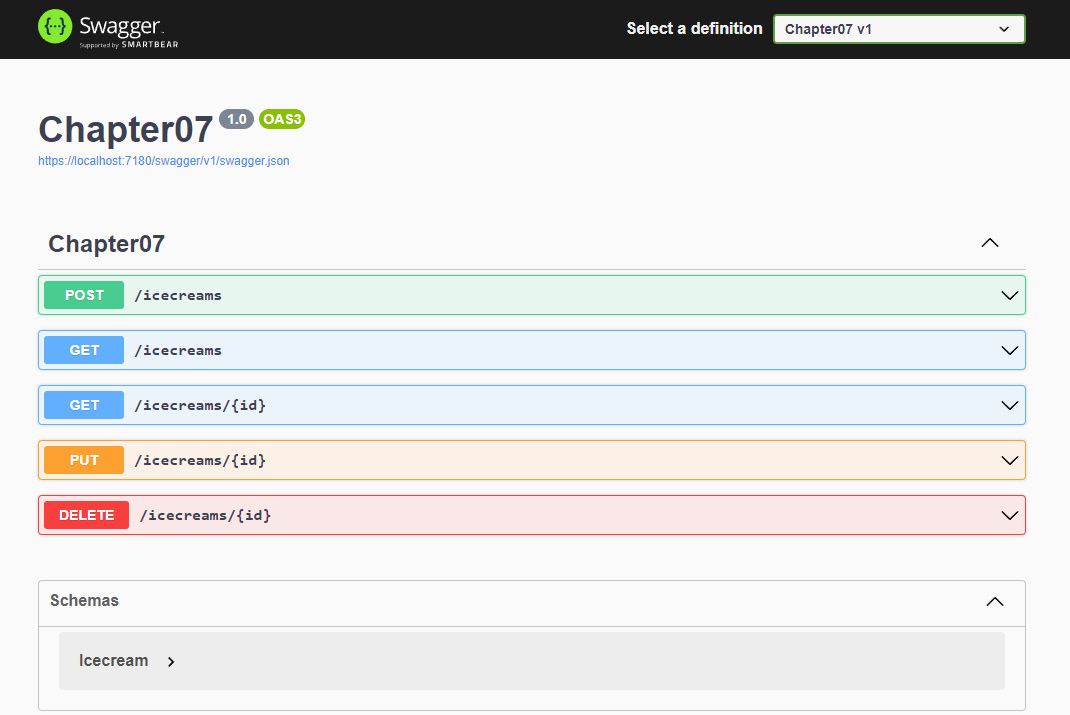
Figure 7.1 – Swagger browser window
图 7.1 – Swagger 浏览器窗口
Select the POST/icecreams button, followed by Try it out.
选择 POST/icecreams 按钮,然后选择 Try it out。
Replace the request body content with the following JSON:
将请求正文内容替换为以下 JSON:
{
"id": 0,
"name": "icecream 1",
"description": "description 1"
}
Click on Execute:
单击 Execute:
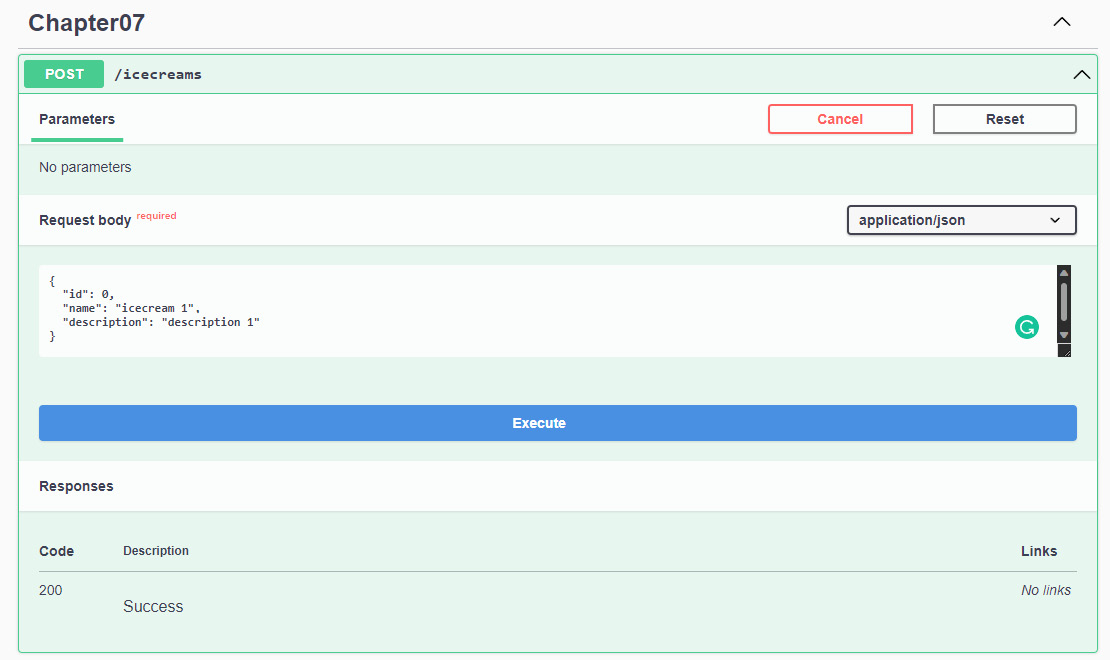
Figure 7.2 – Swagger response
图 7.2 – Swagger 响应
Now we have at least one item in the database, and we can try the other endpoint to retrieve all the items in the database.
现在,数据库中至少有一个项目,我们可以尝试使用另一个端点来检索数据库中的所有项目。
Scroll down the page a little bit and select GET/icecreams, followed by Try it out and then Execute.
向下滚动页面并选择 GET/icecreams,然后选择 Try it out,然后选择 Execute。
You will see the list with one item under Response Body.
您将在 Response Body (响应正文) 下看到带有一个项目的列表。
Let’s see how to finalize this first demo by adding the other CRUD operations to our endpoints:
让我们看看如何通过将其他 CRUD作添加到我们的端点来完成第一个演示:
- To get an item by ID, add the following code under the app.MapGet route you created earlier:
要按 ID 获取项目,请在应用程序下添加app.MapGet路由代码:
app.MapGet("/icecreams/{id}", async (IcecreamDb db, int id) => await db.Icecreams.FindAsync(id));
To check this out, you can launch the application again and use the Swagger UI as before.
要检查这一点,您可以再次启动应用程序并像以前一样使用 Swagger UI。
-
Next, add an item in the database by performing a post call (as in the previous section).
接下来,通过执行 post 调用在数据库中添加一个项目(如上一节所示)。
-
Click GET/icecreams/{id) followed by Try it out.
单击 GET/icecreams/{id) 后跟 Try it out。
-
Insert the value 1 in the id parameter field and then click on Execute.
在 id 参数字段中插入值 1,然后单击 Execute。
-
You will see the item in the Response Body section.
您将在 Response Body (响应正文) 部分看到该项目。
-
The following is an example of a response from the API:
以下是来自 API 的响应示例:
{
"id": 1,
"name": "icecream 1",
"description": "description 1"
}
This is what the response looks like:
响应如下所示:
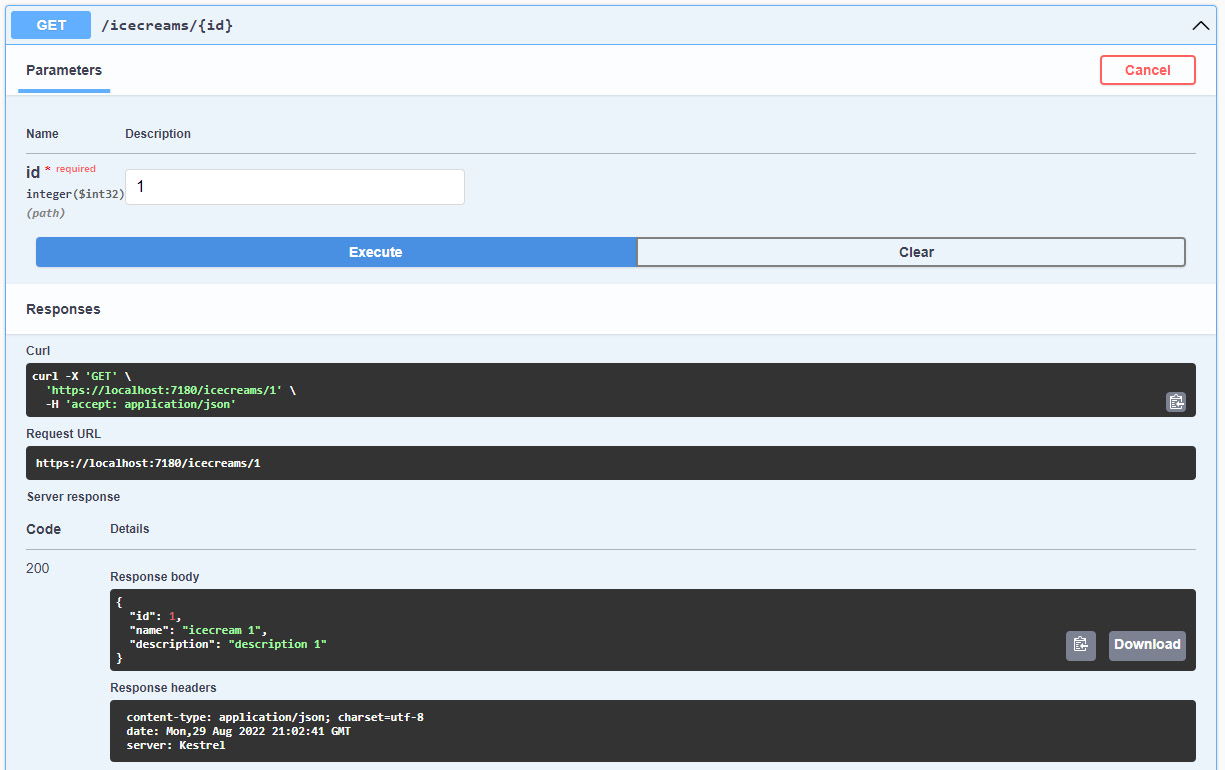
Figure 7.3 – Response result
图 7.3 – 响应结果
To update an item by ID, we can create a new MapPut endpoint with two parameters: the item with the entity values and the ID of the old entity in the database that we want to update.
要按 ID 更新项目,我们可以创建一个具有两个参数的新 MapPut 终端节点:具有实体值的项目和数据库中要更新的旧实体的 ID。
The code should be like the following snippet:
代码应类似于以下代码段:
app.MapPut("/icecreams/{id}", async (IcecreamDb db, Icecream updateicecream, int id) =>
{
var icecream = await db.Icecreams.FindAsync(id);
if (icecream is null) return Results.NotFound();
icecream.Name = updateicecream.Name;
icecream.Description = updateicecream.Description;
await db.SaveChangesAsync();
return Results.NoContent();
});
Just to be clear, first of all, we need to find the item in the database with the ID from the parameters. If we don’t find an item in the database, it’s a good practice to return a Not Found HTTP status to the caller.
需要明确的是,首先,我们需要在数据库中找到具有参数中 ID 的项目。如果我们在数据库中找不到项目,最好将 Not Found HTTP 状态返回给调用者。
If we find the entity in the database, we update the entity with the new values and we save all the changes in the database before sending back the HTTP status No Content.
如果我们在数据库中找到实体,我们将使用新值更新实体,并在发回 HTTP 状态 No Content 之前保存数据库中的所有更改。
The last CRUD operation we need to perform is to delete an item from the database.
我们需要执行的最后一个 CRUD作是从数据库中删除一个项目。
This operation is very similar to the update operation because, first of all, we need to find the item in the database and then we can try to perform the delete operation.
此操作与更新作非常相似,因为首先,我们需要在数据库中找到该项目,然后我们可以尝试执行删除作。
The following code snippet shows how to implement a delete operation with the right HTTP verb of the minimal API:
以下代码片段显示了如何使用最小 API 的正确 HTTP 动词实施删除作:
app.MapDelete("/icecreams/{id}", async (IcecreamDb db, int id) =>
{
var icecream = await db.Icecreams.FindAsync(id);
if (icecream is null)
{
return Results.NotFound();
}
db.Icecreams.Remove(icecream);
await db.SaveChangesAsync();
return Results.Ok();
});
In this section, we have learned how to use EF in a minimal API project.
在本节中,我们学习了如何在最小 API 项目中使用 EF。
We saw how to add the NuGet packages to start working with EF, and how to implement the entire set of CRUD operations in a minimal API .NET 6 project.
我们了解了如何添加 NuGet 包以开始使用 EF,以及如何在最小的 API .NET 6 项目中实现整套 CRUD作。
In the next section, we will see how to implement the same project with the same logic but using Dapper as the primary library to access data.
在下一节中,我们将了解如何使用相同的逻辑实现相同的项目,但使用 Dapper 作为主库来访问数据。
Using Dapper
使用 Dapper
Dapper is an Object-Relational Mapper (ORM) or, to be more precise, a micro ORM. With Dapper, we can write SQL statements directly in .NET projects like we can do in SQL Server (or another database). One of the best advantages of using Dapper in a project is the performance, because it doesn’t translate queries from .NET objects and doesn’t add any layers between the application and the library to access the database. It extends the IDbConnection object and provides a lot of methods to query the database. This means we have to write queries that are compatible with the database provider.
Dapper 是一个对象关系映射器 (ORM),或者更准确地说,是一个微型 ORM。使用 Dapper,我们可以直接在 .NET 项目中编写 SQL 语句,就像在 SQL Server(或其他数据库)中一样。在项目中使用 Dapper 的最大优势之一是性能,因为它不会转换来自 .NET 对象的查询,也不会在应用程序和库之间添加任何层来访问数据库。它扩展了 IDbConnection 对象,并提供了许多查询数据库的方法。这意味着我们必须编写与数据库提供程序兼容的查询。
It supports synchronous and asynchronous method executions. This is a list of the methods that Dapper adds to the IDbConnection interface:
它支持同步和异步方法执行。以下是 Dapper 添加到 IDbConnection 接口的方法列表:
• Execute
• Query
• QueryFirst
• QueryFirstOrDefault
• QuerySingle
• QuerySingleOrDefault
• QueryMultiple
As we mentioned, it provides an async version for all these methods. You can find the right methods by adding the Async keyword at the end of the method name.
正如我们所提到的,它为所有这些方法提供了一个异步版本。您可以通过在方法名称的末尾添加 Async 关键字来查找正确的方法。
In the next section, we will see how to set up a project for using Dapper with a SQL Server LocalDB.
在下一节中,我们将了解如何设置一个项目,以便将 Dapper 与 SQL Server LocalDB 结合使用。
Setting up the project
设置项目
The first thing we are going to do is to create a new database. You can use your SQL Server LocalDB instance installed with Visual Studio by default or another SQL Server instance in your environment.
我们要做的第一件事是创建一个新数据库。您可以使用默认随 Visual Studio 一起安装的 SQL Server LocalDB 实例,也可以使用环境中的其他 SQL Server 实例。
You can execute the following script in your database to create one table and populate it with data:
您可以在数据库中执行以下脚本来创建一个表并使用数据填充它:
CREATE TABLE [dbo].[Icecreams](
[Id] [int] IDENTITY(1,1) NOT NULL,
[Name] [nvarchar](50) NOT NULL,
[Description] [nvarchar](255) NOT NULL)
GO
INSERT [dbo].[Icecreams] ([Name], [Description]) VALUES ('Icecream 1','Description 1')
INSERT [dbo].[Icecreams] ([Name], [Description]) VALUES ('Icecream 2','Description 2')
INSERT [dbo].[Icecreams] ([Name], [Description]) VALUES ('Icecream 3','Description 3')
Once we have the database, we can install these NuGet packages with the following command in the Visual Studio terminal:
拥有数据库后,我们可以在 Visual Studio 终端中使用以下命令安装这些 NuGet 包:
Install-Package Dapper
Install-Package Microsoft.Data.SqlClient
Now we can continue to add the code to interact with the database. In this example, we are going to use a repository pattern.
现在我们可以继续添加代码以与数据库交互。在此示例中,我们将使用存储库模式。
Creating a repository pattern
创建存储库模式
In this section, we are going to create a simple repository pattern, but we will try to make it as simple as possible so we can understand the main features of Dapper:
在本节中,我们将创建一个简单的存储库模式,但我们将尝试使其尽可能简单,以便我们了解 Dapper 的主要功能:
-
In the Program.cs file, add a simple class that represents our entity in the database:
public class Icecream
在 Program.cs 文件中,添加一个表示数据库中实体的简单类:
{
public int Id { get; set; }
public string? Name { get; set; }
public string? Description { get; set; }
}
-
After this, modify the appsettings.json file by adding the connection string at the end of the file:
在此之后,通过在文件末尾添加连接字符串来修改 appsettings.json 文件:
"ConnectionStrings": {
"SqlConnection":
"Data Source=(localdb)\\MSSQLLocalDB;
Initial Catalog=Chapter07;
Integrated Security=True;
Connect Timeout=30;
Encrypt=False;
TrustServerCertificate=False;"
}
If you are using LocalDB, the connection string should be the right one for your environment as well.
如果您使用的是 LocalDB,则连接字符串也应适合您的环境。
-
Create a new class in the root of the project called DapperContext and give it the following code:
在项目的根目录中创建一个名为 DapperContext 的新类,并为其提供以下代码:
public class DapperContext
{
private readonly IConfiguration _configuration;
private readonly string _connectionString;
public DapperContext(IConfiguration configuration)
{
_configuration = configuration;
_connectionString = _configuration
.GetConnectionString("SqlConnection");
}
public IDbConnection CreateConnection()
=> new SqlConnection(_connectionString);
}
We injected with dependency injection the IConfiguration interface to retrieve the connection string from the settings file.
我们通过依赖项注入注入 IConfiguration 接口从设置文件中检索连接字符串。
- Now we are going to create the interface and the implementation of our repository. In order to do that, add the following code to the Program.cs file.
现在,我们将创建接口和存储库的实现。为此,请将以下代码添加到 Program.cs 文件中。
public interface IIcecreamsRepository
{
}
public class IcecreamsRepository : IIcecreamsRepository
{
private readonly DapperContext _context;
public IcecreamsRepository(DapperContext context)
{
_context = context;
}
}
In the next sections, we will be adding some code to the interface and to the implementation of the repository.
在接下来的部分中,我们将向接口和存储库的实现添加一些代码。
Finally, we can register the context, the interface, and its implementation as a service.
在接下来的部分中,我们将向接口和存储库的实现添加一些代码。
- Let’s put the following code after the builder initialization in the Program.cs file:
让我们在 builder 初始化后将以下代码放入 Program.cs 文件中:
builder.Services.AddSingleton<DapperContext>();
builder.Services.AddScoped<IIcecreamsRepository, IcecreamsRepository>();
Now we are ready to implement the first query.
现在我们已准备好实现第一个查询。
Using Dapper to query the database
使用 Dapper 查询数据库
First of all, let’s modify the IIcecreamsRepository interface by adding a new method:
首先,我们通过添加新方法来修改 IIcecreamsRepository 接口:
public Task<IEnumerable<Icecream>> GetIcecreams();
Then, let’s implement this method in the IcecreamsRepository class:
然后,让我们在 IcecreamsRepository 类中实现此方法:
public async Task<IEnumerable<Icecream>> GetIcecreams()
{
var query = "SELECT * FROM Icecreams";
using (var connection = _context.CreateConnection())
{
var result =
await connection.QueryAsync<Icecream>(query);
return result.ToList();
}
}
Let’s try to understand all the steps in this method. We created a string called query, where we store the SQL query to fetch all the entities from the database.
让我们尝试了解此方法中的所有步骤。我们创建了一个名为 query 的字符串,我们在其中存储 SQL 查询以从数据库中获取所有实体。
Then, inside the using statement, we used DapperContext to create the connection.
然后,在 using 语句中,我们使用 DapperContext 创建连接。
Once the connection was created, we used it to call the QueryAsync method and passed the query as an argument.
创建连接后,我们使用它来调用 QueryAsync 方法并将查询作为参数传递。
Dapper, when the results return from the database, converted them into IEnumerable<T> automatically.
当结果从数据库返回时,Dapper 会自动将它们转换为 IEnumerable<T>。
The following is the final code of the interface and our first implementation:
以下是接口的最终代码和我们的第一个实现:
public interface IIcecreamsRepository
{
public Task<IEnumerable<Icecream>> GetIcecreams();
}
public class IcecreamsRepository : IIcecreamsRepository
{
private readonly DapperContext _context;
public IcecreamsRepository(DapperContext context)
{
_context = context;
}
public async Task<IEnumerable<Icecream>> GetIcecreams()
{
var query = "SELECT * FROM Icecreams";
using (var connection =
_context.CreateConnection())
{
var result =
await connection.QueryAsync<Icecream>(query);
return result.ToList();
}
}
}
In the next section, we will see how to add a new entity to the database and how to use the ExecuteAsync method to run a query.
在下一节中,我们将了解如何向数据库添加新实体,以及如何使用 ExecuteAsync 方法运行查询。
Adding a new entity in the database with Dapper
使用 Dapper 在数据库中添加新实体
Now we are going to manage adding a new entity to the database for future implementations of the API post request.
现在,我们将管理向数据库添加新实体,以便将来实现 API post 请求。
Let’s modify the interface by adding a new method called CreateIcecream with an input parameter of the Icecream type:
让我们通过添加一个名为 CreateIcecream 的新方法来修改接口,该方法的输入参数为 Icecream 类型:
public Task CreateIcecream(Icecream icecream);
Now we must implement this method in the repository class:
现在我们必须在 repository 类中实现此方法:
public async Task CreateIcecream(Icecream icecream)
{
var query = "INSERT INTO Icecreams (Name, Description)
VALUES (@Name, @Description)";
var parameters = new DynamicParameters();
parameters.Add("Name", icecream.Name, DbType.String);
parameters.Add("Description", icecream.Description,
DbType.String);
using (var connection = _context.CreateConnection())
{
await connection.ExecuteAsync(query, parameters);
}
}
Here, we create the query and a dynamic parameters object to pass all the values to the database.
在这里,我们创建查询和动态参数对象,以将所有值传递给数据库。
We populate the parameters with the values from the Icecream object in the method parameter.
我们在 method 参数中使用 Icecream 对象的值填充参数。
We create the connection with the Dapper context and then we use the ExecuteAsync method to execute the INSERT statement.
我们使用 Dapper 上下文创建连接,然后使用 ExecuteAsync 方法执行 INSERT 语句。
This method returns an integer value as a result, representing the number of affected rows in the database. In this case, we don’t use this information, but you can return this value as the result of the method if you need it.
此方法返回一个整数值作为结果,该值表示数据库中受影响的行数。在这种情况下,我们不会使用此信息,但如果需要,可以将此值作为方法的结果返回。
Implementing the repository in the endpoints
在端点中实施存储库
To add the final touch to our minimal API, we need to implement the two endpoints to manage all the methods in our repository pattern:
为了对我们的最小 API 进行最后的润色,我们需要实现两个端点来管理存储库模式中的所有方法:
app.MapPost("/icecreams", async (IIcecreamsRepository repository, Icecream icecream) =>
{
await repository.CreateIcecream(icecream);
return Results.Ok();
});
app.MapGet("/icecreams", async (IIcecreamsRepository repository) => await repository.GetIcecreams());
In both map methods, we pass the repository as a parameter because, as usual in the minimal API, the services are passed as parameters in the map methods.
在这两种 map 方法中,我们都将存储库作为参数传递,因为与最小 API 一样,服务在 map 方法中作为参数传递。
This means that the repository is always available in all parts of the code.
这意味着存储库在代码的所有部分中始终可用。
In the MapGet endpoint, we use the repository to load all the entities from the implementation of the repository and we use the result as the result of the endpoint.
在 MapGet 端点中,我们使用存储库加载存储库实现中的所有实体,并将结果用作端点的结果。
In the MapPost endpoint, in addition to the repository parameter, we accept also the Icecream entity from the body of the request and we use the same entity as a parameter to the CreateIcecream method of the repository.
在 MapPost 终端节点中,除了存储库参数之外,我们还接受请求正文中的 Icecream 实体,并将同一实体用作存储库的 CreateIcecream 方法的参数。
Summary
总结
In this chapter, we learned how to interact with a data access layer in a minimal API project with the two most common tools in a real-world scenario: EF and Dapper.
在本章中,我们学习了如何使用实际场景中最常用的两种工具(EF 和 Dapper)与最小 API 项目中的数据访问层进行交互。
For EF, we covered some basic features, such as setting up a project to use this ORM and how to perform some basic operations to implement a full CRUD API endpoint.
对于 EF,我们介绍了一些基本功能,例如设置项目以使用此 ORM,以及如何执行一些基本作来实现完整的 CRUD API 终端节点。
We did basically the same thing with Dapper as well, starting from an empty project, adding Dapper, setting up the project for working with a SQL Server LocalDB, and implementing some basic interactions with the entities of the database.
我们对 Dapper 也做了基本相同的作,从一个空项目开始,添加 Dapper,设置项目以使用 SQL Server LocalDB,并实现与数据库实体的一些基本交互。
In the next chapter, we’ll focus on authentication and authorization in a minimal API project. It’s important, first of all, to protect your data in the database.
在下一章中,我们将重点介绍最小 API 项目中的身份验证和授权。首先,保护数据库中的数据很重要。
Part 3: Advanced Development and Microservices Concepts
第 3 部分:高级开发和微服务概念
In this advanced section of the book, we want to show more scenarios that are typical in backend development. We will also go over the performance of this new framework and understand the scenarios in which it is really useful.
在本书的这个高级部分,我们想展示更多后端开发中的典型场景。我们还将介绍这个新框架的性能,并了解它真正有用的场景。
We will cover the following chapters in this section:
在本节中,我们将介绍以下章节:
Chapter 8, Adding Authentication and Authorization
第 8 章 添加验证和授权
Chapter 9, Leveraging Globalization and Localization
第 9 章 利用全球化和本地化
Chapter 10, Evaluating and Benchmarking the Performance of Minimal APIs
第 10 章 评估最小 API 的性能并对其进行基准测试
8 Adding Authentication and Authorization
8 添加身份验证和授权
Any kind of application must deal with authentication and authorization. Often, these terms are used interchangeably, but they actually refer to different scenarios. In this chapter of the book, we will explain the difference between authentication and authorization and show how to add these features to a minimal API project.
任何类型的应用程序都必须处理身份验证和授权。通常,这些术语可以互换使用,但它们实际上指的是不同的场景。在本书的这一章中,我们将解释身份验证和授权之间的区别,并展示如何将这些功能添加到最小的 API 项目中。
Authentication can be performed in many different ways: using local accounts with external login providers, such as Microsoft, Google, Facebook, and Twitter; using Azure Active Directory and Azure B2C; and using authentication servers such as Identity Server and Okta. Moreover, we may have to deal with requirements such as two-factor authentication and refresh tokens. In this chapter, however, we will focus on the general aspects of authentication and authorization and see how to implement them in a minimal API project, in order to provide a general understanding of the topic. The information and samples that will be provided will show how to effectively work with authentication and authorization and how to customize their behaviors according to our requirements.
可以通过多种不同的方式执行身份验证:使用外部登录提供程序(如 Microsoft、Google、Facebook 和 Twitter)的本地帐户;使用 Azure Active Directory 和 Azure B2C;以及使用 Identity Server 和 Okta 等身份验证服务器。此外,我们可能必须处理双重身份验证和刷新令牌等要求。但是,在本章中,我们将重点介绍身份验证和授权的一般方面,并了解如何在最小的 API 项目中实现它们,以便对该主题有一个大致的理解。将提供的信息和示例将展示如何有效地使用身份验证和授权,以及如何根据我们的要求自定义它们的行为。
In this chapter, we will be covering the following topics:
在本章中,我们将介绍以下主题:
• Introducing authentication and authorization
身份验证和授权简介
• Protecting a minimal API
保护最小 API
• Handling authorization – roles and policies
处理授权 – 角色和策略
Technical requirements
技术要求
To follow the examples in this chapter, you will need to create an ASP.NET Core 6.0 Web API application. Refer to the Technical requirements section in Chapter 2, Exploring Minimal APIs and Their Advantages, for instructions on how to do so.
要遵循本章中的示例,您需要创建一个 ASP.NET Core 6.0 Web API 应用程序。有关如何执行此作的说明,请参阅第 2 章 “探索最小 API 及其优势”中的“技术要求”部分。
If you’re using your console, shell, or Bash terminal to create the API, remember to change your working directory to the current chapter number: Chapter08.
如果您使用控制台、shell 或 Bash 终端创建 API,请记住将工作目录更改为当前章节编号:Chapter08。
All the code samples in this chapter can be found in the GitHub repository for this book at https://github.com/PacktPublishing/Minimal-APIs-in-ASP.NET-Core-6/tree/main/Chapter08.
本章中的所有代码示例都可以在本书的 GitHub 存储库中找到,网址为 https://github.com/PacktPublishing/Minimal-APIs-in-ASP.NET-Core-6/tree/main/Chapter08。
Introducing authentication and authorization
身份验证和授权简介
As said at the beginning, the terms authentication and authorization are often used interchangeably, but they represent different security functions. Authentication is the process of verifying that users are who they say they are, while authorization is the task of granting an authenticated user permission to do something. So, authorization must always follow authentication.
如开头所述,术语 authentication 和 authorization 经常互换使用,但它们代表不同的安全功能。身份验证是验证用户是否是他们所声称的身份的过程,而授权是授予经过身份验证的用户执行某项作的权限的任务。因此,授权必须始终遵循身份验证。
Let’s think about the security in an airport: first, you show your ID to authenticate your identity; then, at the gate, you present the boarding pass to be authorized to board the flight and get access to the plane.
让我们考虑一下机场的安检:首先,您出示您的身份证以验证您的身份;然后,在登机口,您出示登机牌以获得登机和登机权。
Authentication and authorization in ASP.NET Core are handled by corresponding middleware and work in the same way in minimal APIs and controller-based projects. They allow the restriction of access to endpoints depending on user identity, roles, policies, and so on, as we’ll see in detail in the following sections.
ASP.NET Core 中的身份验证和授权由相应的中间件处理,并且在最小 API 和基于控制器的项目中以相同的方式工作。它们允许根据用户身份、角色、策略等限制对终端节点的访问,我们将在以下部分中详细介绍。
You can find a great overview of ASP.NET Core authentication and authorization in the official documentation available at https://docs.microsoft.com/aspnet/core/security/authentication and https://docs.microsoft.com/aspnet/core/security/authorization.
您可以在 https://docs.microsoft.com/aspnet/core/security/authentication 和 https://docs.microsoft.com/aspnet/core/security/authorization 上提供的官方文档中找到 ASP.NET Core 身份验证和授权的精彩概述。
Protecting a minimal API
保护最小 API
Protecting a minimal API means correctly setting up authentication and authorization. There are many types of authentication solutions that are adopted in modern applications. In web applications, we typically use cookies, while when dealing with web APIs, we use methods such as an API key, basic authentication, and JSON Web Token (JWT). JWTs are the most commonly used, and in the rest of the chapter, we’ll focus on this solution.
保护最小 API 意味着正确设置身份验证和授权。现代应用程序中采用的身份验证解决方案有多种类型。在 Web 应用程序中,我们通常使用 cookie,而在处理 Web API 时,我们使用 API 密钥、基本身份验证和 JSON Web 令牌 (JWT) 等方法。JWT 是最常用的,在本章的其余部分,我们将重点介绍此解决方案。
Note : A good starting point to understand what JWTs are and how they are used is available at https://jwt.io/introduction.
注意 : 了解 JWT 是什么以及如何使用 JWT 的良好起点位于 https://jwt.io/introduction。
To enable authentication and authorization based on JWT, the first thing to do is to add the Microsoft.AspNetCore.Authentication.JwtBearer NuGet package to our project, using one of the following ways:
要启用基于 JWT 的身份验证和授权,首先要做的是使用以下方法之一将 Microsoft.AspNetCore.Authentication.JwtBearer NuGet 包添加到我们的项目中:
• Option 1: If you’re using Visual Studio 2022, right-click on the project and choose the Manage NuGet Packages command to open Package Manager GUI, then search for Microsoft.AspNetCore.Authentication.JwtBearer and click on Install.
选项 1:如果您使用的是 Visual Studio 2022,请右键单击项目并选择“管理 NuGet 包”命令以打开包管理器 GUI,然后搜索 Microsoft.AspNetCore.Authentication.JwtBearer 并单击“安装”。
• Option 2: Open Package Manager Console if you’re inside Visual Studio 2022, or open your console, shell, or Bash terminal, go to your project directory, and execute the following command:
选项 2:如果您在 Visual Studio 2022 中,请打开包管理器控制台,或者打开控制台、shell 或 Bash 终端,转到您的项目目录,然后执行以下命令:
dotnet add package Microsoft.AspNetCore.Authentication.JwtBearer
Now, we need to add authentication and authorization services to the service provider, so that they are available through dependency injection:
现在,我们需要向服务提供商添加身份验证和授权服务,以便它们可以通过依赖项注入使用:
var builder = WebApplication.CreateBuilder(args);
//...
builder.Services.AddAuthentication(JwtBearerDefaults.AuthenticationScheme).AddJwtBearer();
builder.Services.AddAuthorization();
This is the minimum code that is necessary to add JWT authentication and authorization support to an ASP.NET Core project. It isn’t a real working solution yet, because it is missing the actual configuration, but it is enough to verify how endpoint protection works.
这是向 ASP.NET Core 项目添加 JWT 身份验证和授权支持所需的最少代码。它还不是一个真正的有效解决方案,因为它缺少实际配置,但足以验证 Endpoint Protection 的工作原理。
In the AddAuthentication() method, we specify that we want to use the bearer authentication scheme. This is an HTTP authentication scheme that involves security tokens that are in fact called bearer tokens. These tokens must be sent in the Authorization HTTP header with the format Authorization: Bearer <token>. Then, we call AddJwtBearer() to tell ASP.NET Core that it must expect a bearer token in the JWT format. As we’ll see later, the bearer token is an encoded string generated by the server in response to a login request. After that, we use AddAuthorization() to also add authorization services.
在 AddAuthentication() 方法中,我们指定要使用不记名身份验证方案。这是一种 HTTP 身份验证方案,它涉及实际上称为持有者令牌的安全令牌。这些令牌必须在 Authorization HTTP 标头中以 Authorization: Bearer <token>格式发送。然后,我们调用 AddJwtBearer() 来告诉 ASP.NET Core 它必须需要 JWT 格式的不记名令牌。正如我们稍后将看到的,持有者令牌是服务器为响应登录请求而生成的编码字符串。之后,我们使用 AddAuthorization() 也添加授权服务。
Now, we need to insert authentication and authorization middleware in the pipeline so that ASP.NET Core will be instructed to check the token and apply all the authorization rules:
现在,我们需要在管道中插入身份验证和授权中间件,以便指示 ASP.NET Core 检查令牌并应用所有授权规则:
var app = builder.Build();
//..
app.UseAuthentication();
app.UseAuthorization();
//...
app.Run();
Important Note : We have said that authorization must follow authentication. This means that the authentication middleware must come first; otherwise, the security will not work as expected.
重要提示 : 我们已经说过,授权必须在身份验证之后进行。这意味着身份验证中间件必须放在第一位;否则,安全性将无法按预期工作。
Finally, we can protect our endpoints using the Authorize attribute or the RequireAuthorization() method:
最后,我们可以使用 Authorize 属性或 RequireAuthorization() 方法保护我们的端点:
app.MapGet("/api/attribute-protected", [Authorize] () => "This endpoint is protected using the Authorize attribute");
app.MapGet("/api/method-protected", () => "This endpoint is protected using the RequireAuthorization method")
.RequireAuthorization();
Note : The ability to specify an attribute directly on a lambda expression (as in the first endpoint of the previous example) is a new feature of C# 10.
注意 : 直接在 lambda 表达式上指定属性的功能(如上一个示例的第一个终结点所示)是 C# 10 的一项新功能。
If we now try to call each of these methods using Swagger, we’ll get a 401 unauthorized response, which should look as follows:
如果我们现在尝试使用 Swagger 调用这些方法中的每一个,我们将得到一个 401 未授权的响应,它应该如下所示:
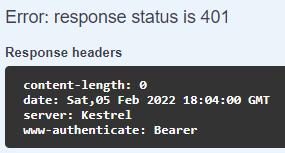
Figure 8.1 – Unauthorized response in Swagger
图 8.1 – Swagger 中未经授权的响应
Note that the message contains a header indicating that the expected authentication scheme is Bearer, as we have declared in the code.
请注意,该消息包含一个标头,指示预期的身份验证方案是 Bearer,正如我们在代码中声明的那样。
So, now we know how to restrict access to our endpoints to authenticated users. But our work isn’t finished: we need to generate a JWT bearer, validate it, and find a way to pass such a token to Swagger so that we can test our protected endpoints.
因此,现在我们知道如何将对终端节点的访问限制为经过身份验证的用户。但我们的工作还没有完成:我们需要生成一个 JWT bearer,验证它,并找到一种方法将这样的令牌传递给 Swagger,以便我们可以测试受保护的端点。
Generating a JWT bearer
生成 JWT 持有者
We have said that a JWT bearer is generated by the server as a response to a login request. ASP.NET Core provides all the APIs we need to create it, so let’s see how to perform this task.
我们已经说过,JWT bearer 是由服务器生成的,作为对登录请求的响应。ASP.NET Core 提供了创建它所需的所有 API,让我们看看如何执行此任务。
The first thing to do is to define the login request endpoint to authenticate the user with their username and password:
首先要做的是定义登录请求端点,以使用用户的用户名和密码对用户进行身份验证:
app.MapPost("/api/auth/login", (LoginRequest request) =>
{
if (request.Username == "marco" && request.Password ==
"P@$$w0rd")
{
// Generate the JWT bearer...
}
return Results.BadRequest();
});
For the sake of simplicity, in the preceding example, we have used hardcoded values, but in a real application, we’d use, for example, ASP.NET Core Identity, the part of ASP.NET Core that is responsible for user management. More information on this topic is available in the official documentation at https://docs.microsoft.com/aspnet/core/security/authentication/identity.
为简单起见,在前面的示例中,我们使用了硬编码值,但在实际应用程序中,我们将使用 ASP.NET Core Identity,这是 Core 中负责用户管理 ASP.NET 部分。有关此主题的更多信息,请参阅 https://docs.microsoft.com/aspnet/core/security/authentication/identity 的官方文档。
In a typical login workflow, if the credentials are invalid, we return a 400 Bad Request response to the client. If, instead, the username and password are correct, we can effectively generate a JWT bearer, using the classes available in ASP.NET Core:
在典型的登录工作流程中,如果凭证无效,我们会向客户端返回 400 Bad Request 响应。相反,如果用户名和密码正确,我们可以使用 ASP.NET Core 中可用的类有效地生成 JWT bearer:
var claims = new List<Claim>()
{
new(ClaimTypes.Name, request.Username)
};
var securityKey = new SymmetricSecurityKey(Encoding.UTF8.GetBytes("mysecuritystring"));
var credentials = new SigningCredentials(securityKey, SecurityAlgorithms.HmacSha256);
var jwtSecurityToken = new JwtSecurityToken(
issuer: "https://www.packtpub.com",
audience: "Minimal APIs Client",
claims: claims, expires: DateTime.UtcNow.AddHours(1),
signingCredentials: credentials);
var accessToken = new JwtSecurityTokenHandler()
.WriteToken(jwtSecurityToken);
return Results.Ok(new { AccessToken = accessToken });
JWT bearer creation involves many different concepts, but through the preceding code example, we’ll focus on the basic ones. This kind of bearer contains information that allows verifying the user identity, along with other declarations that describe the properties of the user. These properties are called claims and are expressed as string key-value pairs. In the preceding code, we created a list with a single claim that contains the username. We can add as many claims as we need, and we can also have claims with the same name. In the next sections, we’ll see how to use claims, for example, to enforce authorization.
JWT bearer 创建涉及许多不同的概念,但通过前面的代码示例,我们将重点介绍基本概念。这种类型的 bearer 包含允许验证用户身份的信息,以及描述用户属性的其他声明。这些属性称为声明,表示为字符串键值对。在前面的代码中,我们创建了一个列表,其中包含一个包含用户名的声明。我们可以根据需要添加任意数量的声明,也可以拥有具有相同名称的声明。在接下来的部分中,我们将了解如何使用声明,例如,强制实施授权。
Next in the preceding code, we defined the credentials (SigningCredentials) to sign the JWT bearer. The signature depends on the actual token content and is used to check that the token hasn’t been tampered with. In fact, if we change anything in the token, such as a claim value, the signature will consequentially change. As the key to sign the bearer is known only by the server, it is impossible for a third party to modify the token and sustain its validity. In the preceding code, we used SymmetricSecurityKey, which is never shared with clients.
接下来,在前面的代码中,我们定义了凭证 (SigningCredentials) 来对 JWT 持有者进行签名。签名取决于实际的 Token 内容,用于检查 Token 是否未被篡改。事实上,如果我们更改 Token 中的任何内容,例如声明值,签名也会随之更改。由于对 bearer 进行签名的密钥只有服务器知道,因此第三方无法修改 Token 并维持其有效性。在上面的代码中,我们使用了 SymmetricSecurityKey,它永远不会与客户端共享。
We used a short string to create the credentials, but the only requirement is that the key should be at least 32 bytes or 16 characters long. In .NET, strings are Unicode and therefore, each character takes 2 bytes. We also needed to set the algorithm that the credentials will use to sign the token. To this end, we have specified the Hash-Based Message Authentication Code (HMAC) and the hash function, SHA256, specifying the SecurityAlgorithms.HmacSha256 value. This algorithm is quite a common choice in these kinds of scenarios.
我们使用了一个短字符串来创建凭证,但唯一的要求是密钥应至少为 32 字节或 16 个字符长。在 .NET 中,字符串是 Unicode,因此每个字符占用 2 个字节。我们还需要设置凭证将用于对令牌进行签名的算法。为此,我们指定了基于哈希的消息身份验证代码 (HMAC) 和哈希函数 SHA256,并指定了 SecurityAlgorithms.HmacSha256 值。在这类场景中,这种算法是一个非常常见的选择。
Note : You can find more information about the HMAC and the SHA256 hash function at https://docs.microsoft.com/dotnet/api/system.security.cryptography.hmacsha256#remarks.
注意 : 您可以在 https://docs.microsoft.com/dotnet/api/system.security.cryptography.hmacsha256#remarks 中找到有关 HMAC 和 SHA256 哈希函数的更多信息。
By this point in the preceding code, we finally have all the information to create the token, so we can instantiate a JwtSecurityToken object. This class can use many parameters to build the token, but for the sake of simplicity, we have specified only the minimum set for a working example:
在前面的代码中,到这一点时,我们终于拥有了创建令牌的所有信息,因此我们可以实例化 JwtSecurityToken 对象。这个类可以使用许多参数来构建令牌,但为了简单起见,我们只为工作示例指定了最小集:
Issuer: A string (typically a URI) that identifies the name of the entity that is creating the token
颁发者:一个字符串(通常是 URI),用于标识创建令牌的实体的名称
Audience: The recipient that the JWT is intended for, that is, who can consume the token
受众:JWT 的目标接收者,即可以使用令牌的用户
The list of claims
索赔列表
The expiration time of the token (in UTC)
Token 的过期时间(UTC 单位)
The signing credentials
签名凭证
Tip In the preceding code example, values used to build the token are hardcoded, but in a real-life application, we should place them in an external source, for example, in the appsettings.json configuration file.
提示 : 在前面的代码示例中,用于构建令牌的值是硬编码的,但在实际应用程序中,我们应该将它们放在外部源中,例如,在 appsettings.json 配置文件中。
You can find further information on creating a token at https://docs.microsoft.com/dotnet/api/system.identitymodel.tokens.jwt.jwtsecuritytoken.
您可以在 https://docs.microsoft.com/dotnet/api/system.identitymodel.tokens.jwt.jwtsecuritytoken 中找到有关创建令牌的更多信息。
After all the preceding steps, we could create JwtSecurityTokenHandler, which is responsible for actually generating the bearer token and returning it to the caller with a 200 OK response.
完成上述所有步骤后,我们可以创建 JwtSecurityTokenHandler,它负责实际生成不记名令牌并将其返回给调用方,并给出 200 OK 响应。
So, now we can try the login endpoint in Swagger. After inserting the correct username and password and clicking the Execute button, we will get the following response:
所以,现在我们可以尝试 Swagger 中的登录端点。在插入正确的用户名和密码并单击 Execute 按钮后,我们将得到以下响应:
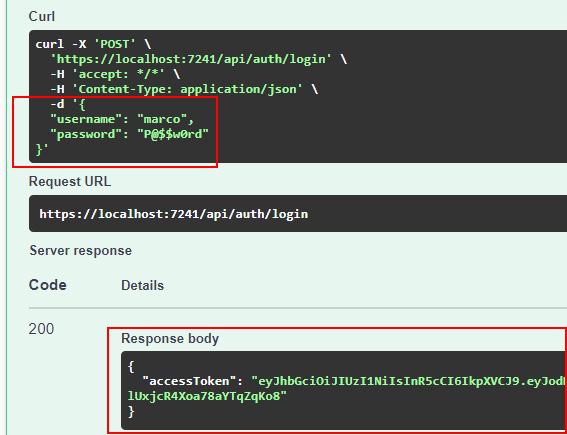
Figure 8.2 – The JWT bearer as a result of the login request in Swagger
图 8.2 – Swagger 中登录请求的结果 JWT 持有者
We can copy the token value and insert it in the URL of the site https://jwt.ms to see what it contains. We’ll get something like this:
我们可以复制 token 值并将其插入到站点的 URL 中 https://jwt.ms 以查看它包含的内容。我们将得到如下结果:
{
"alg": "HS256",
"typ": "JWT"
}.{
"http://schemas.xmlsoap.org/ws/2005/05/identity/claims/name": "marco",
"exp": 1644431527,
"iss": "https://www.packtpub.com",
"aud": "Minimal APIs Client"
}.[Signature]
In particular, we see the claims that have been configured:
具体而言,我们会看到已配置的声明:
• name: The name of the logged user
name:已登录用户的名称
• exp: The token expiration time, expressed in Unix epoch
exp:Token 过期时间,以 Unix 纪元表示
• iss: The issuer of the token
iss:令牌的发行者
• aud: The audience (receiver) of the token
aud:令牌的受众(接收者)
This is the raw view, but we can switch to the Claims tab to see the decoded list of all the claims, with a description of their meaning, where available.
这是原始视图,但我们可以切换到 Claims 选项卡,查看所有声明的解码列表,以及其含义的描述(如果可用)。
There is one important point that requires attention: by default, the JWT bearer isn’t encrypted (it’s just a Base64-encoded string), so everyone can read its content. Token security does not depend on the inability to be decoded, but on the fact that it is signed. Even if the token’s content is clear, it is impossible to modify it because in this case, the signature (which uses a key that is known only by the server) will become invalid.
有一点需要注意:默认情况下,JWT bearer 未加密(它只是一个 Base64 编码的字符串),因此每个人都可以读取其内容。令牌安全性不取决于无法解码,而是取决于它是否已签名。即使 Token 的内容很清楚,也无法修改它,因为在这种情况下,签名(使用只有服务器知道的密钥)将失效。
So, it’s important not to insert sensitive data in the token; claims such as usernames, user IDs, and roles are usually fine, but, for example, we should not insert information related to privacy. To give a deliberately exaggerated example, we mustn’t insert a credit card number in the token! In any case, keep in mind that even Microsoft for Azure Active Directory uses JWT, with no encryption, so we can trust this security system.
因此,不要在令牌中插入敏感数据非常重要;用户名、用户 ID 和角色等声明通常没问题,但例如,我们不应插入与隐私相关的信息。举一个故意夸大的例子,我们不能在令牌中插入信用卡号!无论如何,请记住,即使是 Microsoft for Azure Active Directory 也使用 JWT,没有加密,因此我们可以信任这个安全系统。
In conclusion, we have described how to obtain a valid JWT. The next steps are to pass the token to our protected endpoints and instruct our minimal API on how to validate it.
总之,我们已经描述了如何获取有效的 JWT。接下来的步骤是将令牌传递给我们受保护的终端节点,并指示我们的最小 API 如何验证它。
Validating a JWT bearer
验证 JWT 持有者
After creating the JWT bearer, we need to pass it in every HTTP request, inside the Authorization HTTP header, so that ASP.NET Core can verify its validity and allow us to invoke the protected endpoints. So, we have to complete the AddJwtBearer() method invocation that we showed earlier with the description of the rules to validate the bearer:
创建 JWT 不记名后,我们需要在 Authorization HTTP 标头内的每个 HTTP 请求中传递它,以便 ASP.NET Core 可以验证其有效性并允许我们调用受保护的端点。因此,我们必须完成之前展示的 AddJwtBearer() 方法调用,其中包含验证 bearer 的规则说明:
builder.Services.AddAuthentication(JwtBearerDefaults.AuthenticationScheme)
.AddJwtBearer(options =>
{
options.TokenValidationParameters = new TokenValidationParameters
{
ValidateIssuerSigningKey = true,
IssuerSigningKey = new SymmetricSecurityKey(
Encoding.UTF8.GetBytes("mysecuritystring")),
ValidIssuer = "https://www.packtpub.com",
ValidAudience = "Minimal APIs Client"
};
});
In the preceding code, we added a lambda expression with which we defined the TokenValidationParameter object that contains the token validation rules. First of all, we checked the issuer signing key, that is, the signature of the token, as shown in the Generating a JWT bearer section, to verify that the JWT has not been tampered with. The security string that has been used to sign the token is required to perform this check, so we specify the same value (mysecuritystring) that we inserted during the login request.
在前面的代码中,我们添加了一个 lambda 表达式,我们用该表达式定义了包含令牌验证规则的 TokenValidationParameter 对象。首先,我们检查了颁发者的签名密钥,即 Token 的签名,如 生成 JWT bearer 部分所示,以验证 JWT 是否未被篡改。执行此检查需要用于对令牌进行签名的安全字符串,因此我们指定了在登录请求期间插入的相同值 (mysecuritystring)。
Then, we specify what valid values for the issuer and the audience of the token are. If the token has been emitted from a different issuer, or was intended for another audience, the validation fails. This is an important security check; we should be sure that the bearer has been issued by someone we expected to issue it and for the audience we want.
然后,我们指定令牌的颁发者和受众的有效值。如果令牌是从其他颁发者发出的,或者是针对其他受众的,则验证将失败。这是一项重要的安全检查;我们应该确保 Bearer 是由我们预期会颁发它的人签发的,并且是针对我们想要的受众。
Tip : As already pointed out, we should place the information used to work with the token in an external source, so that we can reference the correct values during token generation and validation, avoiding hardcoding them or writing their values twice.
提示 : 如前所述,我们应该将用于处理令牌的信息放在外部源中,以便我们可以在令牌生成和验证期间引用正确的值,避免对它们进行硬编码或重复写入它们的值。
We don’t need to specify that we also want to validate the token expiration because this check is automatically enabled. A clock skew is applied when validating the time to compensate for slight differences in clock time or to handle delays between the client request and the instant at which it is processed by the server. The default value is 5 minutes, which means that an expired token is considered valid for a 5-minute timeframe after its actual expiration. We can reduce the clock skew, or disable it, using the ClockSkew property of the TokenValidationParameter class.
我们不需要指定我们还要验证令牌过期,因为此检查是自动启用的。在验证时间时应用 clock skew 以补偿 clock time 的微小差异或处理 Client 端请求与服务器处理请求的时刻之间的延迟。默认值为 5 分钟,这意味着过期的令牌在实际过期后的 5 分钟内被视为有效。我们可以使用 TokenValidationParameter 类的 ClockSkew 属性来减少或禁用时钟偏差。
Now, the minimal API has all the information to check the bearer token validity. In order to test whether everything works as expected, we need a way to tell Swagger how to send the token within a request, as we’ll see in the next section.
现在,最小 API 拥有检查持有者令牌有效性的所有信息。为了测试一切是否按预期工作,我们需要一种方法来告诉 Swagger 如何在请求中发送令牌,我们将在下一节中看到。
Adding JWT support to Swagger
向 Swagger 添加 JWT 支持
We have said that the bearer token is sent in the Authorization HTTP header of a request. If we want to use Swagger to verify the authentication system and test our protected endpoints, we need to update the configuration so that it will be able to include this header in the requests.
我们已经说过,持有者令牌是在请求的 Authorization HTTP 标头中发送的。如果我们想使用 Swagger 来验证身份验证系统并测试受保护的端点,我们需要更新配置,以便它能够在请求中包含此标头。
To perform this task, it is necessary to add a bit of code to the AddSwaggerGen() method:
要执行此任务,必须向 AddSwaggerGen() 方法添加一些代码:
var builder = WebApplication.CreateBuilder(args);
//...
builder.Services.AddSwaggerGen(options =>
{
options.AddSecurityDefinition(JwtBearerDefaults.AuthenticationScheme, new OpenApiSecurityScheme
{
Type = SecuritySchemeType.ApiKey,
In = ParameterLocation.Header,
Name = HeaderNames.Authorization,
Description = "Insert the token with the 'Bearer '
prefix"
});
options.AddSecurityRequirement(new
OpenApiSecurityRequirement
{
{
new OpenApiSecurityScheme
{
Reference = new OpenApiReference
{
Type = ReferenceType.SecurityScheme,
Id =
JwtBearerDefaults.AuthenticationScheme
}
},
Array.Empty<string>()
}
});
});
In the preceding code, we defined how Swagger handles authentication. Using the AddSecurityDefinition() method, we described how our API is protected; we used an API key, which is the bearer token, in the header with the name Authorization. Then, with AddSecurityRequirement(), we specified that we have a security requirement for our endpoints, which means that the security information must be sent for every request.
在上面的代码中,我们定义了 Swagger 如何处理身份验证。使用 AddSecurityDefinition() 方法,我们描述了如何保护我们的 API;我们在标头中使用了名为 Authorization 的 API 密钥,即不记名令牌。然后,使用 AddSecurityRequirement(),我们指定了端点的安全要求,这意味着必须为每个请求发送安全信息。
After adding the preceding code, if we now run our application, the Swagger UI will contain something new.
添加上述代码后,如果我们现在运行应用程序,Swagger UI 将包含一些新内容。
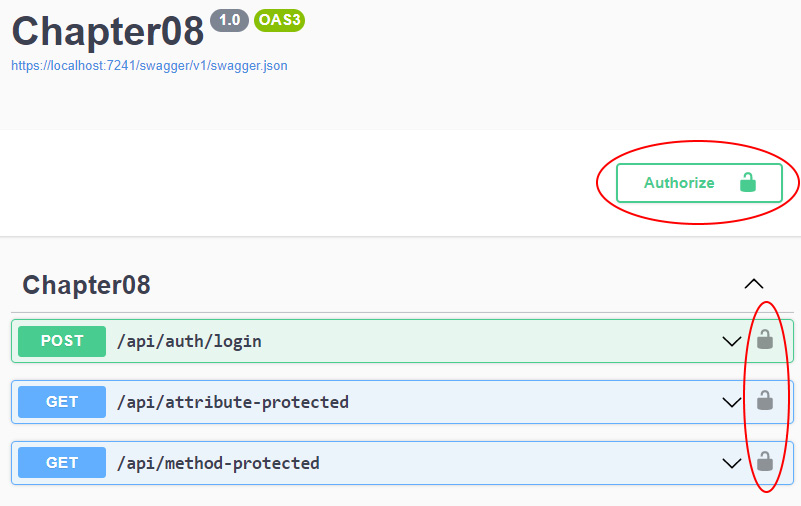
Figure 8.3 – Swagger showing the authentication features
图 8.3 – Swagger 显示身份验证功能
Upon clicking the Authorize button or any of the padlock icons at the right of the endpoints, the following window will show up, allowing us to insert the bearer token:
单击 Authorize 按钮或端点右侧的任何挂锁图标后,将显示以下窗口,允许我们插入不记名令牌:
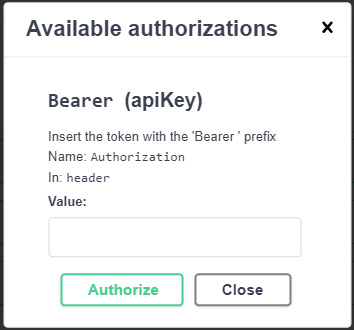
Figure 8.4 – The window that allows setting the bearer token
图 8.4 – 允许设置 bearer token 的窗口
The last thing to do is to insert the token in the Value textbox and confirm by clicking on Authorize. From now on, the specified bearer will be sent along with every request made with Swagger.
最后要做的是将令牌插入 Value 文本框中,然后单击 Authorize 进行确认。从现在开始,指定的 bearer 将与使用 Swagger 发出的每个请求一起发送。
We have finally completed all the required steps to add authentication support to minimal APIs. Now, it’s time to verify that everything works as expected. In the next section, we’ll perform some tests.
我们终于完成了向最小 API 添加身份验证支持所需的所有步骤。现在,是时候验证一切是否按预期工作了。在下一节中,我们将执行一些测试。
Testing authentication
测试身份验证
As described in the previous sections, if we call one of the protected endpoints, we get a 401 Unauthorized response. To verify that token authentication works, let’s call the login endpoint to get a token. After that, click on the Authorize button in Swagger and insert the obtained token, remembering the Bearer prefix. Now, we’ll get a 200 OK response, meaning that we are able to correctly invoke the endpoints that require authentication. We can also try changing a single character in the token to again get the 401 Unauthorized response, because in this case, the signature will not be the expected one, as described before. In the same way, if the token is formally valid but has expired, we will obtain a 401 response.
如前面部分所述,如果我们调用其中一个受保护的终端节点,则会收到 401 Unauthorized 响应。要验证令牌身份验证是否有效,让我们调用登录终端节点以获取令牌。之后,点击 Swagger 中的 Authorize 按钮并插入获取的令牌,记住 Bearer 前缀。现在,我们将收到 200 OK 响应,这意味着我们能够正确调用需要身份验证的终端节点。我们还可以尝试更改令牌中的单个字符以再次获得 401 Unauthorized 响应,因为在这种情况下,签名将不是预期的签名,如前所述。同理,如果 Token 正式有效但已过期,我们将获得 401 响应。
As we have defined endpoints that can be reached only by authenticated users, a common requirement is to access user information within the corresponding route handlers. In Chapter 2, Exploring Minimal APIs and Their Advantages, we showed that minimal APIs provide a special binding that directly provides a ClaimsPrincipal object representing the logged user:
由于我们已经定义了只有经过身份验证的用户才能访问的端点,因此一个常见的要求是访问相应路由处理程序中的用户信息。在第 2 章 探索最小 API 及其优势中,我们展示了最小 API 提供了一个特殊的绑定,该绑定直接提供表示已记录用户的 ClaimsPrincipal 对象:
app.MapGet("/api/me", [Authorize] (ClaimsPrincipal user) => $"Logged username: {user.Identity.Name}");
The user parameter of the route handler is automatically filled with user information. In this example, we just get the name, which in turn is read from the token claims, but the object exposes many properties that allow us to work with authentication data. We can refer to the official documentation at https://docs.microsoft.com/dotnet/api/system.security.claims.claimsprincipal.identity for further details.
路由处理程序的 user 参数会自动填充用户信息。在此示例中,我们只获取 name,而 name 又是从 token 声明中读取的,但该对象公开了许多允许我们处理身份验证数据的属性。有关详细信息,请参阅 https://docs.microsoft.com/dotnet/api/system.security.claims.claimsprincipal.identity 上的官方文档。
This ends our overview of authentication. In the next section, we’ll see how to handle authorization.
我们对身份验证的概述到此结束。在下一节中,我们将了解如何处理授权。
Handling authorization – roles and policies
处理授权 – 角色和策略
Right after the authentication, there is the authorization step, which grants an authenticated user permission to do something. Minimal APIs provide the same authorization features as controller-based projects, based on the concepts of roles and policies.
在身份验证之后,立即执行授权步骤,该步骤授予经过身份验证的用户执行某些作的权限。Minimal API 基于角色和策略的概念,提供与基于控制器的项目相同的授权功能。
When an identity is created, it may belong to one or more roles. For example, a user can belong to the Administrator role, while another can be part of two roles: User and Stakeholder. Typically, each user can perform only the operations that are allowed by their roles. Roles are just claims that are inserted in the JWT bearer upon authentication. As we’ll see in a moment, ASP.NET Core provides built-in support to verify whether a user belongs to a role.
创建身份时,它可能属于一个或多个角色。例如,一个用户可以属于 Administrator 角色,而另一个用户可以属于两个角色:User 和 Slikeholder。通常,每个用户只能执行其角色允许的作。角色只是在身份验证时插入到 JWT 持有者中的声明。正如我们稍后将看到的,ASP.NET Core 提供了内置支持来验证用户是否属于某个角色。
While role-based authorization covers many scenarios, there are cases in which this kind of security isn’t enough because we need to apply more specific rules to check whether the user has the right to perform some activities. In such a situation, we can create custom policies that allow us to specify more detailed authorization requirements and even completely define the authorization logic based on our algorithms.
虽然基于角色的授权涵盖了许多场景,但在某些情况下,这种安全性是不够的,因为我们需要应用更具体的规则来检查用户是否有权执行某些活动。在这种情况下,我们可以创建自定义策略,允许我们指定更详细的授权要求,甚至根据我们的算法完全定义授权逻辑。
In the next sections, we’ll see how to manage both role-based and policy-based authorization in our APIs, so that we can cover all our requirements, that is, allowing access to certain endpoints only to users with specific roles or claims, or based on our custom logic.
在接下来的部分中,我们将了解如何在 API 中管理基于角色和基于策略的授权,以便我们可以满足所有要求,即仅允许具有特定角色或声明的用户访问某些终端节点,或者允许基于我们的自定义逻辑访问某些终端节点。
Handling role-based authorization
处理基于角色的授权
As already introduced, roles are claims. This means that they must be inserted in the JWT bearer token upon authentication, just like any other claims:
如前所述,角色是声明。这意味着,在身份验证时,必须将它们插入到 JWT 不记名令牌中,就像任何其他声明一样:
app.MapPost("/api/auth/login", (LoginRequest request) =>
{
if (request.Username == "marco" && request.Password ==
"P@$$w0rd")
{
var claims = new List<Claim>()
{
new(ClaimTypes.Name, request.Username),
new(ClaimTypes.Role, "Administrator"),
new(ClaimTypes.Role, "User")
};
//...
}
In this example, we statically add two claims with name ClaimTypes.Role: Administrator and User. As said in the previous sections, in a real-world application, these values typically come from a complete user management system built, for example, with ASP.NET Core Identity.
在此示例中,我们静态添加两个名称为 ClaimTypes.Role 的声明:Administrator 和 User。如前几节所述,在实际应用程序中,这些值通常来自一个完整的用户管理系统,例如,使用 ASP.NET Core Identity 构建。
As in all the other claims, roles are inserted in the JWT bearer. If now we try to invoke the login endpoint, we’ll notice that the token is longer because it contains a lot of information, which we can verify using the https://jwt.ms site again, as follows:
与所有其他声明一样,角色也插入到 JWT 持有者中。如果现在我们尝试调用登录端点,我们会注意到令牌更长,因为它包含大量信息,我们可以再次使用 https://jwt.ms 站点验证这些信息,如下所示:
{
"alg": "HS256",
"typ": "JWT"
}.{
"http://schemas.xmlsoap.org/ws/2005/05/identity/claims/name": "marco",
"http://schemas.microsoft.com/ws/2008/06/identity/claims/role": [
"Administrator",
"User"
],
"exp": 1644755166,
"iss": "https://www.packtpub.com",
"aud": "Minimal APIs Client"
}.[Signature]
In order to restrict access to a particular endpoint only for users that belong to a given role, we need to specify this role as an argument in the Authorize attribute or the RequireAuthorization() method:
为了限制仅属于给定角色的用户访问特定端点,我们需要将此角色指定为 Authorize 属性或 RequireAuthorization() 方法中的参数:
app.MapGet("/api/admin-attribute-protected", [Authorize(Roles = "Administrator")] () => { });
app.MapGet("/api/admin-method-protected", () => { })
.RequireAuthorization(new AuthorizeAttribute { Roles = "Administrator" });
In this way, only users who are assigned the Administrator role can access the endpoints. We can also specify more roles, separating them with a comma: the user will be authorized if they have at least one of the specified roles.
这样,只有分配了 Administrator 角色的用户才能访问终端节点。我们还可以指定更多角色,用逗号分隔:如果用户至少拥有一个指定的角色,则用户将被授权。
Important Note : Role names are case sensitive.
重要提示 : 角色名称区分大小写。
Now suppose we have the following endpoint:
现在假设我们有以下端点:
app.MapGet("/api/stackeholder-protected", [Authorize(Roles = "Stakeholder")] () => { });
This method can only be consumed by a user who is assigned the Stakeholder role. However, in our example, this role isn’t assigned. So, if we use the previous bearer token and try to invoke this endpoint, of course, we’ll get an error. But in this case, it won’t be 401 Unauthorized, but rather 403 Forbidden. We see this behavior because the user is actually authenticated (meaning the token is valid, so no 401 error), but they don’t have the authorization to execute the method, so access is forbidden. In other words, authentication errors and authorization errors lead to different HTTP status codes.
此方法只能由分配了 Stakeholder 角色的用户使用。但是,在我们的示例中,未分配此角色。因此,如果我们使用以前的 bearer token 并尝试调用此 endpoint,我们当然会收到错误。但在这种情况下,它不会是 401 Unauthorized,而是 403 Forbidden。我们看到这种行为是因为用户实际上已经过身份验证(意味着令牌有效,因此没有 401 错误),但他们没有执行该方法的授权,因此禁止访问。换句话说,身份验证错误和授权错误会导致不同的 HTTP 状态代码。
There is another important scenario that involves roles. Sometimes, we don’t need to restrict endpoint access at all but need to adapt the behavior of the handler according to the specific user role, such as when retrieving only a certain type of information. In this case, we can use the IsInRole() method, which is available on the ClaimsPrincipal object:
还有另一个涉及角色的重要方案。有时,我们根本不需要限制端点访问,但需要根据特定的用户角色来调整处理程序的行为,例如当只检索某种类型的信息时。在这种情况下,我们可以使用 IsInRole() 方法,该方法在 ClaimsPrincipal 对象上可用:
app.MapGet("/api/role-check", [Authorize] (ClaimsPrincipal user) =>
{
if (user.IsInRole("Administrator"))
{
return "User is an Administrator";
}
return "This is a normal user";
});
In this endpoint, we only use the Authorize attribute to check whether the user is authenticated or not. Then, in the route handler, we check whether the user has the Administrator role. If yes, we just return a message, but we can imagine that administrators can retrieve all the available information, while normal users get only a subset, based on the values of the information itself.
在此终端节点中,我们只使用 Authorize 属性来检查用户是否经过身份验证。然后,在路由处理程序中,我们检查用户是否具有 Administrator 角色。如果是,我们只返回一条消息,但我们可以想象管理员可以检索所有可用信息,而普通用户只能根据信息本身的值获得一个子集。
As we have seen, with role-based authorization, we can perform different types of authorization checks in our endpoints, to cover many scenarios. However, this approach cannot handle all situations. If roles aren’t enough, we need to use authorization based on policies, which we will discuss in the next section.
正如我们所看到的,通过基于角色的授权,我们可以在端点中执行不同类型的授权检查,以涵盖许多场景。但是,此方法无法处理所有情况。如果角色还不够,我们需要使用基于策略的授权,我们将在下一节中讨论。
Applying policy-based authorization
应用基于策略的授权
Policies are a more general way to define authorization rules. Role-based authorization can be considered a specific policy authorization that involves a roles check. We typically use policies when we need to handle more complex scenarios.
策略是定义授权规则的更通用方法。基于角色的授权可被视为涉及角色检查的特定策略授权。当我们需要处理更复杂的场景时,我们通常会使用策略。
This kind of authorization requires two steps:
这种授权需要两个步骤:
- Defining a policy with a rule set
使用规则集定义策略
- Applying a certain policy on the endpoints
在端点上应用特定策略
Policies are added in the context of the AddAuthorization() method, which we saw in the previous section, Protecting a minimal API. Each policy has a unique name, which is used to later reference it, and a set of rules, which are typically described in a fluent manner.
策略是在 AddAuthorization() 方法的上下文中添加的,我们在上一节 保护最小 API 中看到了。每个策略都有一个唯一的名称(用于以后引用它)和一组规则,这些规则通常以流畅的方式进行描述。
We can use policies when role authorization is not enough. Suppose that the bearer token also contains the ID of the tenant to which the user belongs:
当角色授权不足时,我们可以使用策略。假设 bearer token 还包含用户所属租户的 ID:
var claims = new List<Claim>()
{
// ...
new("tenant-id", "42")
};
Again, in a real-world scenario, this value could come from a database that stores the properties of the user. Suppose that we want to only allow users who belong to a particular tenant to reach an endpoint. As tenant-id is a custom claim, ASP.NET Core doesn’t know how to use it to enforce authorization. So, we can’t use the solutions shown earlier. We need to define a custom policy with the corresponding rule:
同样,在实际方案中,此值可能来自存储用户属性的数据库。假设我们只想允许属于特定租户的用户访问终端节点。由于 tenant-id 是一个自定义声明,因此 ASP.NET Core 不知道如何使用它来强制实施授权。因此,我们不能使用前面显示的解决方案。我们需要定义一个带有相应规则的自定义策略:
builder.Services.AddAuthorization(options =>
{
options.AddPolicy("Tenant42", policy =>
{
policy.RequireClaim("tenant-id", "42");
});
});
In the preceding code, we created a policy named Tenant42, which requires that the token contains the tenant-id claim with the value 42. The policy variable is an instance of AuthorizationPolicyBuilder and exposes methods that allow us to fluently specify the authorization rules; we can specify that a policy requires certain users, roles, and claims to be satisfied. We can also chain multiple requirements in the same policy, writing, for example, something such as policy.RequireRole(“Administrator”).RequireClaim(“tenant-id”). The full list of methods is available on the documentation page at https://docs.microsoft.com/dotnet/api/microsoft.aspnetcore.authorization.authorizationpolicybuilder.
在上面的代码中,我们创建了一个名为 Tenant42 的策略,该策略要求令牌包含值为 42 的 tenant-id 声明。policy 变量是 AuthorizationPolicyBuilder 的一个实例,它公开了允许我们流畅地指定授权规则的方法;我们可以指定策略要求满足某些用户、角色和声明。我们还可以将多个需求链接在同一个策略中,例如,编写诸如 policy 之类的内容。RequireRole(“管理员”)。RequireClaim(“tenant-id”)的完整的方法列表可在 https://docs.microsoft.com/dotnet/api/microsoft.aspnetcore.authorization.authorizationpolicybuilder 的文档页面上找到。
Then, in the method we want to protect, we have to specify the policy name, as usual with the Authorize attribute or the RequireAuthorization() method:
然后,在我们想要保护的方法中,我们必须指定策略名称,就像通常使用 Authorize 属性或 RequireAuthorization() 方法一样:
app.MapGet("/api/policy-attribute-protected", [Authorize(Policy = "Tenant42")] () => { });
app.MapGet("/api/policy-method-protected", () => { })
.RequireAuthorization("Tenant42");
If we try to execute these preceding endpoints with a token that doesn’t have the tenant-id claim, or its value isn’t 42, we get a 403 Forbidden result, as happened with the role check.
如果我们尝试使用没有 tenant-id 声明或其值不是 42 的令牌执行这些前面的终结点,则会收到 403 Forbidden 结果,就像角色检查一样。
There are scenarios in which declaring a list of allowed roles and claims isn’t enough: for example, we would need to perform more complex checks or verify authorization based on dynamic parameters. In these cases, we can use the so-called policy requirements, which comprise a collection of authorization rules for which we can provide custom verification logic.
在某些情况下,声明允许的角色和声明列表是不够的:例如,我们需要执行更复杂的检查或根据动态参数验证授权。在这些情况下,我们可以使用所谓的策略要求,它包含一组授权规则,我们可以为其提供自定义验证逻辑。
To adopt this solution, we need two objects:
要采用此解决方案,我们需要两个对象:
• A requirement class that implements the IAuthorizationRequirement interface and defines the requirement we want to manage
实现 IAuthorizationRequirement 接口并定义我们要管理的要求的要求类
• A handler class that inherits from AuthorizationHandler and contains the logic to verify the requirement
一个从 AuthorizationHandler 继承并包含验证要求的逻辑的处理程序类
Let’s suppose we don’t want users who don’t belong to the Administrator role to access certain endpoints during a maintenance time window. This is a perfectly valid authorization rule, but we cannot afford it using the solutions we have seen up to now. The rule involves a condition that considers the current time, so the policy cannot be statically defined.
假设我们不希望不属于 Administrator 角色的用户在维护时段内访问某些终端节点。这是一个完全有效的授权规则,但使用我们目前看到的解决方案,我们无法承受它。该规则涉及考虑当前时间的条件,因此不能静态定义策略。
So, we start by creating a custom requirement:
因此,我们首先创建自定义需求:
public class MaintenanceTimeRequirement : IAuthorizationRequirement
{
public TimeOnly StartTime { get; init; }
public TimeOnly EndTime { get; init; }
}
The requirement contains the start and end times of the maintenance window. During this interval, we only want administrators to be able to operate.
该要求包含维护时段的开始和结束时间。在此间隔期间,我们只希望管理员能够进行作。
Note : TimeOnly is a new data type that has been introduced with C# 10 and allows us to store only only the time of the day (and not the date). More information is available at https://docs.microsoft.com/dotnet/api/system.timeonly.
注意 : TimeOnly 是 C# 10 中引入的一种新数据类型,它允许我们只存储一天中的时间(而不是日期)。有关更多信息,请访问 https://docs.microsoft.com/dotnet/api/system.timeonly。
Note that the IAuthorizationRequirement interface is just a placeholder. It doesn’t contain any method or property to be implemented; it serves only to identify that the class is a requirement. In other words, if we don’t need any additional information for the requirement, we can create a class that implements IAuthorizationRequirement but actually has no content at all.
请注意,IAuthorizationRequirement 接口只是一个占位符。它不包含任何要实现的方法或属性;它仅用于标识该类是必需的。换句话说,如果我们不需要要求的任何其他信息,我们可以创建一个实现 IAuthorizationRequirement 但实际上根本没有内容的类。
This requirement must be enforced, so it is necessary to create the corresponding handler:
必须强制执行此要求,因此必须创建相应的处理程序:
public class MaintenanceTimeAuthorizationHandler
: AuthorizationHandler<MaintenanceTimeRequirement>
{
protected override Task HandleRequirementAsync(
AuthorizationHandlerContext context,
MaintenanceTimeRequirement requirement)
{
var isAuthorized = true;
if (!context.User.IsInRole("Administrator"))
{
var time = TimeOnly.FromDateTime(DateTime.Now);
if (time >= requirement.StartTime && time <
requirement.EndTime)
{
isAuthorized = false;
}
}
if (isAuthorized)
{
context.Succeed(requirement);
}
return Task.CompletedTask;
}
}
Our handler inherits from AuthorizationHandler<MaintenanceTimeRequirement>, so we need to override the HandleRequirementAsync() method to verify the requirement, using the AuthorizationHandlerContext parameter, which contains a reference to the current user. As said at the beginning, if the user is not assigned the Administrator role, we check whether the current time falls in the maintenance window. If so, the user doesn’t have the right to access.
我们的处理程序继承自 AuthorizationHandler<MaintenanceTimeRequirement>,因此我们需要使用 AuthorizationHandlerContext 参数(包含对当前用户的引用)重写 HandleRequirementAsync() 方法来验证需求。如开头所述,如果未为用户分配 Administrator 角色,我们将检查当前时间是否在维护时段内。如果是这样,则用户无权访问。
At the end, if the isAuthorized variable is true, it means that the authorization can be granted, so we call the Succeed() method on the context object, passing the requirement that we want to validate. Otherwise, we don’t invoke any method on the context, meaning that the requirement hasn’t been verified.
最后,如果 isAuthorized 变量为 true,则表示可以授予授权,因此我们在上下文对象上调用 Succeed() 方法,传递我们要验证的要求。否则,我们不会在上下文中调用任何方法,这意味着需求尚未经过验证。
We haven’t yet finished implementing the custom policy. We still have to define the policy and register the handler in the service provider:
我们尚未完成自定义策略的实施。我们仍然需要定义策略并在服务提供者中注册处理程序:
builder.Services.AddAuthorization(options =>
{
options.AddPolicy("TimedAccessPolicy", policy =>
{
policy.Requirements.Add(new
MaintenanceTimeRequirement
{
StartTime = new TimeOnly(0, 0, 0),
EndTime = new TimeOnly(4, 0, 0)
});
});
});
builder.Services.AddScoped<IAuthorizationHandler, MaintenanceTimeAuthorizationHandler>();
In the preceding code, we defined a maintenance time window from midnight till 4:00 in the morning. Then, we registered the handler as an implementation of the IAuthorizationHandler interface, which in turn is implemented by the AuthorizationHandler class.
在上面的代码中,我们定义了从午夜到凌晨 4:00 的维护时间窗口。然后,我们将处理程序注册为 IAuthorizationHandler 接口的实现,而该接口又由 AuthorizationHandler 类实现。
Now that we have everything in place, we can apply the policy to our endpoints:
现在我们已经准备好了一切,我们可以将策略应用于我们的端点:
app.MapGet("/api/custom-policy-protected", [Authorize(Policy = "TimedAccessPolicy")] () => { });
When we try to reach this endpoint, ASP.NET Core will check the corresponding policy, find that it contains a requirement, and scan all the registrations of the IAuhorizationHandler interface to see whether there is one that is able to handle the requirement. Then, the handler will be invoked, and the result will be used to determine whether the user has the right to access the route. If the policy isn’t verified, we’ll get a 403 Forbidden response.
当我们尝试访问此终端节点时,ASP.NET Core 将检查相应的策略,发现它包含需求,并扫描 IAuhorizationHandler 接口的所有注册,以查看是否有能够处理该要求的接口。然后,将调用处理程序,结果将用于确定用户是否有权访问路由。如果策略未经过验证,我们将收到 403 Forbidden 响应。
We have shown how powerful policies are, but there is more. We can also use them to define global rules that are automatically applied to all endpoints, using the concepts of default and fallback policies, as we’ll see in the next section.
我们已经展示了政策的强大之处,但还有更多。我们还可以使用 default 和 fallback 策略的概念,使用它们来定义自动应用于所有端点的全局规则,我们将在下一节中看到。
Using default and fallback policies
使用 default 和 fallback 策略
Default and fallback policies are useful when we want to define global rules that must be automatically applied. In fact, when we use the Authorize attribute or the RequireAuthorization() method, without any other parameter, we implicitly refer to the default policy defined by ASP.NET Core, which is set to require an authenticated user.
当我们想要定义必须自动应用的全局规则时,Default 和 fallback 策略非常有用。事实上,当我们使用 Authorize 属性或 RequireAuthorization() 方法时,如果没有任何其他参数,我们隐式引用了 ASP.NET Core 定义的默认策略,该策略设置为需要经过身份验证的用户。
If we want to use different conditions by default, we just need to redefine the DefaultPolicy property, which is available in the context of the AddAuthorization() method:
如果我们想默认使用不同的条件,我们只需要重新定义 DefaultPolicy 属性,该属性在 AddAuthorization() 方法的上下文中可用:
builder.Services.AddAuthorization(options =>
{
var policy = new AuthorizationPolicyBuilder()
.RequireAuthenticatedUser()
.RequireClaim("tenant-id").Build();
options.DefaultPolicy = policy;
});
We use AuthorizationPolicyBuilder to define all the security requirements, then we set it as a default policy. In this way, even if we don’t specify a custom policy in the Authorize attribute or the RequireAuthorization() method, the system will always verify whether the user is authenticated, and the bearer contains the tenant-id claim. Of course, we can override this default behavior by just specifying roles or policy names in the authorization attribute or method.
我们使用 AuthorizationPolicyBuilder 定义所有安全要求,然后将其设置为默认策略。这样,即使我们没有在 Authorize 属性或 RequireAuthorization() 方法中指定自定义策略,系统也将始终验证用户是否经过身份验证,并且持有者包含 tenant-id 声明。当然,我们可以通过在 authorization 属性或方法中指定角色或策略名称来覆盖此默认行为。
A fallback policy, on the other hand, is the policy that is applied when there is no authorization information on the endpoints. It is useful, for example, when we want all our endpoints to be automatically protected, even if we forget to specify the Authorize attribute or just don’t want to repeat the attribute for each handler. Let us try and understand this using the following code:
另一方面,回退策略是在终端节点上没有授权信息时应用的策略。例如,当我们希望自动保护所有端点时,即使我们忘记指定 Authorize 属性或只是不想为每个处理程序重复该属性,它也很有用。让我们尝试使用以下代码来理解这一点:
builder.Services.AddAuthorization(options =>
{
options.FallbackPolicy = options.DefaultPolicy;
});
In the preceding code, FallbackPolicy becomes equal to DefaultPolicy. We have said that the default policy requires that the user be authenticated, so the result of this code is that now, all the endpoints automatically need authentication, even if we don’t explicitly protect them.
在上面的代码中,FallbackPolicy 等于 DefaultPolicy。我们已经说过,默认策略要求对用户进行身份验证,因此此代码的结果是,现在,所有端点都自动需要身份验证,即使我们没有明确保护它们。
This is a typical solution to adopt when most of our endpoints have restricted access. We don’t need to specify the Authorize attribute or use the RequireAuthorization() method anymore. In other words, now all our endpoints are protected by default.
当我们的大多数端点都限制访问时,这是一种典型的解决方案。我们不再需要指定 Authorize 属性或使用 RequireAuthorization() 方法。换句话说,现在我们所有的端点都默认受到保护。
If we decide to use this approach, but a bunch of endpoints need public access, such as the login endpoint, which everyone should be able to invoke, we can use the AllowAnonymous attribute or the AllowAnonymous() method:
如果我们决定使用这种方法,但有大量端点需要公共访问,例如每个人都应该能够调用的登录端点,我们可以使用 AllowAnonymous 属性或 AllowAnonymous() 方法:
app.MapPost("/api/auth/login", [AllowAnonymous] (LoginRequest request) => { });
// OR
app.MapPost("/api/auth/login", (LoginRequest request) => { })
.AllowAnonymous();
As the name implies, the preceding code will bypass all authorization checks for the endpoint, including the default and fallback authorization policies.
顾名思义,前面的代码将绕过终端节点的所有授权检查,包括默认和回退授权策略。
To deepen our knowledge of policy-based authentication, we can refer to the official documentation at https://docs.microsoft.com/aspnet/core/security/authorization/policies.
为了加深我们对基于策略的身份验证的了解,我们可以参考 https://docs.microsoft.com/aspnet/core/security/authorization/policies 的官方文档。
Summary
总结
Knowing how authentication and authorization work in minimal APIs is fundamental to developing secure applications. Using JWT bearer authentication roles and policies, we can even define complex authorization scenarios, with the ability to use both standard and custom rules.
了解身份验证和授权在最小 API 中的工作原理是开发安全应用程序的基础。使用 JWT 不记名身份验证角色和策略,我们甚至可以定义复杂的授权场景,并能够使用标准和自定义规则。
In this chapter, we have introduced basic concepts to make a service secure, but there is much more to talk about, especially regarding ASP.NET Core Identity: an API that supports login functionality and allows managing users, passwords, profile data, roles, claims, and more. We can look further into this topic by checking out the official documentation, which is available at https://docs.microsoft.com/aspnet/core/security/authentication/identity.
在本章中,我们介绍了确保服务安全的基本概念,但还有更多内容要讨论,尤其是关于 ASP.NET 核心身份:一个支持登录功能并允许管理用户、密码、配置文件数据、角色、声明等的 API。我们可以通过查看官方文档来进一步了解这个主题,该文档可在 https://docs.microsoft.com/aspnet/core/security/authentication/identity 上获得。
In the next chapter, we will see how to add multilanguage support to our minimal APIs and how to correctly handle applications that work with different date formats, time zones, and so on.
在下一章中,我们将了解如何为我们的最小 API 添加多语言支持,以及如何正确处理使用不同日期格式、时区等的应用程序。
9 Leveraging Globalization and Localization
9 利用全球化和本地化
When developing an application, it is important to think about multi-language support; a multilingual application allows for a wider audience reach. This is also true for web APIs: messages returned by endpoints (for example, validation errors) should be localized, and the service should be able to handle different cultures and deal with time zones. In this chapter of the book, we will talk about globalization and localization, and we will explain what features are available in minimal APIs to work with these concepts. The information and samples that will be provided will guide us when adding multi-language support to our services and correctly handling all the related behaviors so that we will be able to develop global applications.
在开发应用程序时,考虑多语言支持非常重要;多语言应用程序允许更广泛的受众范围。Web API 也是如此:端点返回的消息(例如,验证错误)应该本地化,并且服务应该能够处理不同的区域性并处理时区。在本书的这一章中,我们将讨论全球化和本地化,并将解释最小 API 中有哪些功能可用于处理这些概念。将提供的信息和示例将指导我们向我们的服务添加多语言支持并正确处理所有相关行为,以便我们能够开发全球应用程序。
In this chapter, we will be covering the following topics:
在本章中,我们将介绍以下主题:
• Introducing globalization and localization
全球化和本地化简介
• Localizing a minimal API application
本地化最小 API 应用程序
• Using resource files
使用资源文件
• Integrating localization in validation frameworks
将本地化集成到验证框架中
• Adding UTC support to a globalized minimal API
向全球化的最小 API 添加 UTC 支持
Technical requirements
技术要求
To follow the descriptions in this chapter, you will need to create an ASP.NET Core 6.0 Web API application. Refer to the Technical requirements section in Chapter 1, Introduction to Minimal APIs, for instructions on how to do so.
要按照本章中的描述进行作,您需要创建一个 ASP.NET Core 6.0 Web API 应用程序。有关如何执行此作的说明,请参阅第 1 章 最小 API 简介中的技术要求部分。
If you’re using your console, shell, or Bash terminal to create the API, remember to change your working directory to the current chapter number (Chapter09).
如果您使用控制台、shell 或 Bash 终端创建 API,请记住将工作目录更改为当前章节编号 (Chapter09)。
All the code samples in this chapter can be found in the GitHub repository for this book at https://github.com/PacktPublishing/Minimal-APIs-in-ASP.NET-Core-6/tree/main/Chapter09.
本章中的所有代码示例都可以在本书的 GitHub 存储库中找到,网址为 https://github.com/PacktPublishing/Minimal-APIs-in-ASP.NET-Core-6/tree/main/Chapter09。
Introducing globalization and localization
全球化和本地化简介
When thinking about internationalization, we must deal with globalization and localization, two terms that seem to refer to the same concepts but actually involve different areas. Globalization is the task of designing applications that can manage and support different cultures. Localization is the process of adapting an application to a particular culture, for example, by providing translated resources for each culture that will be supported.
在考虑国际化时,我们必须处理全球化和本地化,这两个术语似乎指的是相同的概念,但实际上涉及不同的领域。全球化的任务是设计能够管理和支持不同区域性的应用程序。本地化是使应用程序适应特定区域性的过程,例如,为将要支持的每种区域性提供翻译资源。
Note : The terms internationalization, globalization, and localization are often abbreviated to I18N, G11N, and L10N, respectively.
注意 : 术语国际化、全球化和本地化通常分别缩写为 I18N、G11N 和 L10N。
As with all the other features that we have already introduced in the previous chapters, globalization and localization can be handled by the corresponding middleware and services that ASP.NET Core provides and work in the same way in minimal APIs and controller-based projects.
与我们在前几章中介绍的所有其他功能一样,全球化和本地化可以由 ASP.NET Core 提供的相应中间件和服务处理,并且在最小的 API 和基于控制器的项目中以相同的方式工作。
You can find a great introduction to globalization and localization in the official documentation available at https://docs.microsoft.com/dotnet/core/extensions/globalization and https://docs.microsoft.com/dotnet/core/extensions/localization, respectively. In the rest of the chapter, we will focus on how to add support for these features in a minimal API project; in this way, we’ll introduce some important concepts and explain how to leverage globalization and localization in ASP.NET Core.
您可以分别在 https://docs.microsoft.com/dotnet/core/extensions/globalization 和 https://docs.microsoft.com/dotnet/core/extensions/localization 上提供的官方文档中找到有关全球化和本地化的精彩介绍。在本章的其余部分,我们将重点介绍如何在最小 API 项目中添加对这些功能的支持;通过这种方式,我们将介绍一些重要的概念,并解释如何在 ASP.NET Core 中利用全球化和本地化。
Localizing a minimal API application
本地化最小 API 应用程序
To enable localization within a minimal API application, let us go through the following steps:
要在最小 API 应用程序中启用本地化,让我们执行以下步骤:
- The first step to making an application localizable is to specify the supported cultures by setting the corresponding options, as follows:
使应用程序可本地化的第一步是通过设置相应的选项来指定受支持的区域性,如下所示:
var builder = WebApplication.CreateBuilder(args);
//...
var supportedCultures = new CultureInfo[] { new("en"), new("it"), new("fr") };
builder.Services.Configure<RequestLocalizationOptions>(options =>
{
options.SupportedCultures = supportedCultures;
options.SupportedUICultures = supportedCultures;
options.DefaultRequestCulture = new
RequestCulture(supportedCultures.First());
});
In our example, we want to support three cultures – English, Italian, and French – so, we create an array of CultureInfo objects.
在我们的示例中,我们希望支持三种区域性 – 英语、意大利语和法语 – 因此,我们创建了一个 CultureInfo 对象数组。
We’re defining neutral cultures, that is, cultures that have a language but are not associated with a country or region. We could also use specific cultures, such as en-US or en-GB, to represent the cultures of a particular region: for example, en-US would refer to the English culture prevalent in the United States, while en-GB would refer to the English culture prevalent in the United Kingdom. This difference is important because, depending on the scenario, we may need to use country-specific information to correctly implement localization. For example, if we want to show a date, we have to know that the date format in the United States is M/d/yyyy, while in the United Kingdom, it is dd/MM/yyyy. So, in this case, it becomes fundamental to work with specific cultures. We also use specific cultures if we need to support language differences across cultures. For example, a particular word may have different spellings depending on the country (e.g., color in the US versus colour in the UK). That said, for our scenario of minimal APIs, working with neutral cultures is just fine.
我们定义的非特定区域性,即具有某种语言但与国家或地区无关的区域性。我们还可以使用特定区域性(如 en-US 或 en-GB)来表示特定区域的区域性:例如,en-US 表示美国流行的英语区域性,而 en-GB 表示英国流行的英语区域性。这种差异很重要,因为根据具体情况,我们可能需要使用特定于国家/地区的信息来正确实施本地化。例如,如果我们想显示一个日期,我们必须知道美国的日期格式是 M/d/yyyy,而在英国是 dd/MM/yyyy。因此,在这种情况下,与特定文化合作变得至关重要。如果我们需要支持跨文化的语言差异,我们也会使用特定区域性。例如,根据国家/地区,特定单词可能具有不同的拼写(例如,美国的 color 与英国的 colour)。也就是说,对于我们的最小 API 方案,使用非特定区域性就很好了。
- Next, we configure RequestLocalizationOptions, setting the cultures and specifying the default one to use if no information about the culture is provided. We specify both the supported cultures and the supported UI cultures:
接下来,我们配置 RequestLocalizationOptions,设置区域性并指定在未提供有关区域性的信息时要使用的默认区域性。我们指定了受支持的区域性和受支持的 UI 区域性:
• The supported cultures control the output of culture-dependent functions, such as date, time, and number format.
支持的区域性控制依赖于区域性的函数(如日期、时间和数字格式)的输出。
• The supported UI cultures are used to choose which translated strings (from .resx files) are searched for. We will talk about .resx files later in this chapter.
支持的 UI 区域性用于选择要搜索的已翻译字符串(从 .resx 文件)。我们将在本章后面讨论 .resx 文件。
In a typical application, cultures and UI cultures are set to the same values, but of course, we can use different options if needed.
在典型的应用程序中,区域性和 UI 区域性设置为相同的值,但当然,如果需要,我们可以使用不同的选项。
- Now that we have configured our service to support globalization, we need to add the localization middleware to the ASP.NET Core pipeline so it will be able to automatically set the culture of the request. Let us do so using the following code:
现在我们已经将服务配置为支持全球化,我们需要将本地化中间件添加到 ASP.NET Core 管道中,以便它能够自动设置请求的区域性。让我们使用以下代码来做到这一点:
var app = builder.Build();
//...
app.UseRequestLocalization();
//...
app.Run();
In the preceding code, with UseRequestLocalization(), we’re adding RequestLocalizationMiddleware to the ASP.NET Core pipeline to set the current culture of each request. This task is performed using a list of RequestCultureProvider that can read information about the culture from various sources. Default providers comprise the following:
在前面的代码中,我们使用 UseRequestLocalization() 将 RequestLocalizationMiddleware 添加到 ASP.NET Core 管道,以设置每个请求的当前区域性。此任务是使用 RequestCultureProvider 列表执行的,该列表可以从各种源读取有关区域性的信息。默认提供程序包括以下内容:
• QueryStringRequestCultureProvider: Searches for the culture and ui-culture query string parameters
• QueryStringRequestCultureProvider:搜索 culture 和 ui-culture 查询字符串参数
• CookieRequestCultureProvider: Uses the ASP.NET Core cookie
CookieRequestCultureProvider:使用 ASP.NET Core Cookie
AcceptLanguageHeaderRequestProvider: Reads the requested culture from the Accept-Language HTTP header
AcceptLanguageHeaderRequestProvider:从 Accept-Language HTTP 标头中读取请求的区域性
For each request, the system will try to use these providers in this exact order, until it finds the first one that can determine the culture. If the culture cannot be set, the one specified in the DefaultRequestCulture property of RequestLocalizationOptions will be used.
对于每个请求,系统将尝试按此确切顺序使用这些提供程序,直到找到可以确定区域性的第一个提供程序。如果无法设置区域性,则将使用 RequestLocalizationOptions 的 DefaultRequestCulture 属性中指定的区域性。
If necessary, it is also possible to change the order of the request culture providers or even define a custom provider to implement our own logic to determine the culture. More information on this topic is available at :
如有必要,还可以更改请求文化提供者的顺序,甚至定义自定义提供者来实现我们自己的逻辑来确定文化。有关此主题的更多信息,请访问:
https://docs.microsoft.com/aspnet/core/fundamentals/localization#use-a-custom-provider.
Important note : The localization middleware must be inserted before any other middleware that might use the request culture.
重要提示 : 本地化中间件必须插入到可能使用请求区域性的任何其他中间件之前。
In the case of web APIs, whether using controller-based or minimal APIs, we usually set the request culture through the Accept-Language HTTP header. In the following section, we will see how to extend Swagger with the ability to add this header when trying to invoke methods.
对于 Web API,无论是使用基于控制器的 API 还是最小的 API,我们通常通过 Accept-Language HTTP 标头来设置请求文化。在下一节中,我们将看到如何扩展 Swagger,使其能够在尝试调用方法时添加此标头。
Adding globalization support to Swagger
向 Swagger 添加全球化支持
We want Swagger to provide us with a way to specify the Accept-Language HTTP header for each request so that we can test our globalized endpoints. Technically speaking, this means adding an operation filter to Swagger that will be able to automatically insert the language header, using the following code:
我们希望 Swagger 为我们提供一种方法来为每个请求指定 Accept-Language HTTP 标头,以便我们可以测试我们的全球化端点。从技术上讲,这意味着向 Swagger 添加一个作过滤器,该过滤器将能够使用以下代码自动插入语言标头:
public class AcceptLanguageHeaderOperationFilter : IOperationFilter
{
private readonly List<IOpenApiAny>?
supportedLanguages;
public AcceptLanguageHeaderOperationFilter
(IOptions<RequestLocalizationOptions>
requestLocalizationOptions)
{
supportedLanguages =
requestLocalizationOptions.Value.
SupportedCultures?.Select(c =>
newOpenApiString(c.TwoLetterISOLanguageName)).
Cast<IOpenApiAny>(). ToList();
}
public void Apply(OpenApiOperation operation,
OperationFilterContext context)
{
if (supportedLanguages?.Any() ?? false)
{
operation.Parameters ??= new
List<OpenApiParameter>();
operation.Parameters.Add(new
OpenApiParameter
{
Name = HeaderNames.AcceptLanguage,
In = ParameterLocation.Header,
Required = false,
Schema = new OpenApiSchema
{
Type = "string",
Enum = supportedLanguages,
Default = supportedLanguages.
First()
}
});
}
}
}
In the preceding code, AcceptLanguageHeaderOperationFilter takes the RequestLocalizationOptions object via dependency injection that we have defined at startup and extracts the supported languages in the format that Swagger expects from it. Then, in the Apply() method, we add a new OpenApiParameter that corresponds to the Accept-Language header. In particular, with the Schema.Enum property, we provide the list of supported languages using the values we have extracted in the constructor. This method is invoked for every operation (that is, every endpoint), meaning that the parameter will be automatically added to each of them.
在前面的代码中,AcceptLanguageHeaderOperationFilter 通过我们在启动时定义的依赖项注入获取 RequestLocalizationOptions 对象,并以 Swagger 期望的格式提取支持的语言。然后,在 Apply() 方法中,我们添加一个对应于 Accept-Language 标头的新 OpenApiParameter。具体而言,对于 Schema.Enum 属性,我们使用在构造函数中提取的值提供支持的语言列表。每个作(即每个端点)都会调用此方法,这意味着参数将自动添加到每个作中。
Now, we need to add the new filter to Swagger:
现在,我们需要将新过滤器添加到 Swagger:
var builder = WebApplication.CreateBuilder(args);
//...
builder.Services.AddSwaggerGen(options =>
{
options.OperationFilter<AcceptLanguageHeaderOperation
Filter>();
});
As we did with the preceding code, for every operation, Swagger will execute the filter, which in turn will add a parameter to specify the language of the request.
正如我们对前面的代码所做的那样,对于每个作,Swagger 将执行过滤器,而过滤器又会添加一个参数来指定请求的语言。
So, let’s suppose we have the following endpoint:
因此,假设我们有以下端点:
app.MapGet("/culture", () => Thread.CurrentThread.CurrentCulture.DisplayName);
In the preceding handler, we just return the culture of the thread. This method takes no parameter; however, after adding the preceding filter, the Swagger UI will show the following:
在前面的处理程序中,我们只返回线程的区域性。此方法不带参数;但是,在添加上述筛选器后,Swagger UI 将显示以下内容:
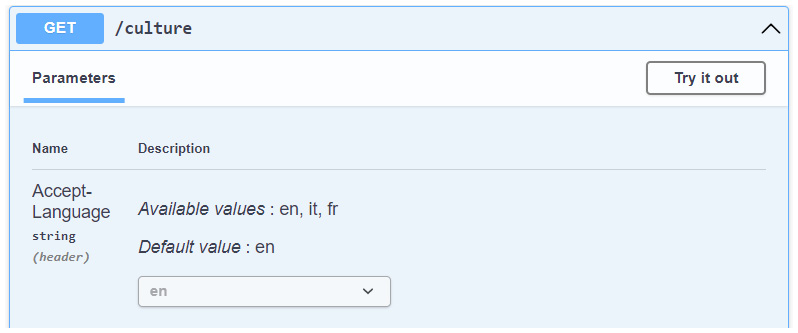
Figure 9.1 – The Accept-Language header added to Swagger
图 9.1 – 添加到 Swagger 的 Accept-Language 标头
The operation filter has added a new parameter to the endpoint, allowing us to select the language from a dropdown. We can click the Try it out button to choose a value from the list and then click Execute to invoke the endpoint:
作筛选器已向终端节点添加了一个新参数,允许我们从下拉列表中选择语言。我们可以单击 Try it out 按钮从列表中选择一个值,然后单击 Execute 以调用终端节点:
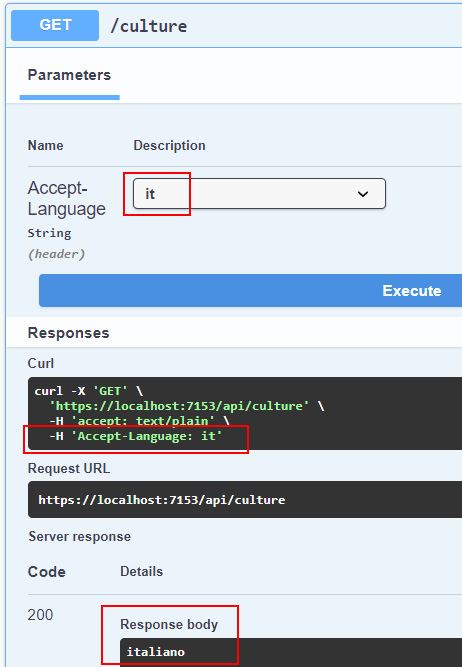
Figure 9.2 – The result of the execution with the Accept-Language HTTP header
图 9.2 – 使用 Accept-Language HTTP 标头执行的结果
This is the result of selecting it as a language request: Swagger has added the Accept-Language HTTP header, which, in turn, has been used by ASP.NET Core to set the current culture. Then, in the end, we get and return the culture display name in the route handler.
这是选择它作为语言请求的结果:Swagger 添加了 Accept-Language HTTP 标头,而 ASP.NET Core 又使用该标头来设置当前区域性。然后,最后,我们在路由处理程序中获取并返回区域性显示名称。
This example shows us that we have correctly added globalization support to our minimal API. In the next section, we’ll go further and work with localization, starting by providing translated resources to callers based on the corresponding languages.
此示例向我们展示了我们已正确地将全球化支持添加到我们的最小 API 中。在下一节中,我们将进一步讨论本地化,首先根据相应的语言向调用者提供翻译后的资源。
Using resource files
使用资源文件
Our minimal API now supports globalization, so it can switch cultures based on the request. This means that we can provide localized messages to callers, for example, when communicating validation errors. This feature is based on the so-called resource files (.resx), a particular kind of XML file that contains key-value string pairs representing messages that must be localized.
我们的最小 API 现在支持全球化,因此它可以根据请求切换区域性。这意味着我们可以向调用者提供本地化消息,例如,在传达验证错误时。此功能基于所谓的资源文件 (.resx),这是一种特殊类型的 XML 文件,其中包含表示必须本地化的消息的键值字符串对。
Note : These resource files are exactly the same as they have been since the early versions of .NET.
注意 : 这些资源文件与自 .NET 早期版本以来完全相同。
Creating and working with resource files
创建和使用资源文件
With resource files, we can easily separate strings from code and group them by culture. Typically, resource files are put in a folder called Resources. To create a file of this kind using Visual Studio, let us go through the following steps:
使用资源文件,我们可以轻松地将字符串与代码分离,并按区域性对它们进行分组。通常,资源文件放在名为 Resources 的文件夹中。要使用 Visual Studio 创建此类文件,让我们执行以下步骤:
Important note : Unfortunately, Visual Studio Code does not provide support for handling .resx files. More information about this topic is available at https://github.com/dotnet/AspNetCore.Docs/issues/2501.
重要提示 : 遗憾的是,Visual Studio Code 不支持处理 .resx 文件。有关此主题的更多信息,请访问 https://github.com/dotnet/AspNetCore.Docs/issues/2501。
-
Right-click on the folder in Solution Explorer and then choose Add | New Item.
右键单击“解决方案资源管理器”中的文件夹,然后选择“添加”|”新建项目。
-
In the Add New Item dialog window, search for Resources, select the corresponding template, and name the file, for example, Messages.resx:
在 Add New Item 对话框窗口中,搜索 Resources,选择相应的模板,然后将文件命名为 Messages.resx:
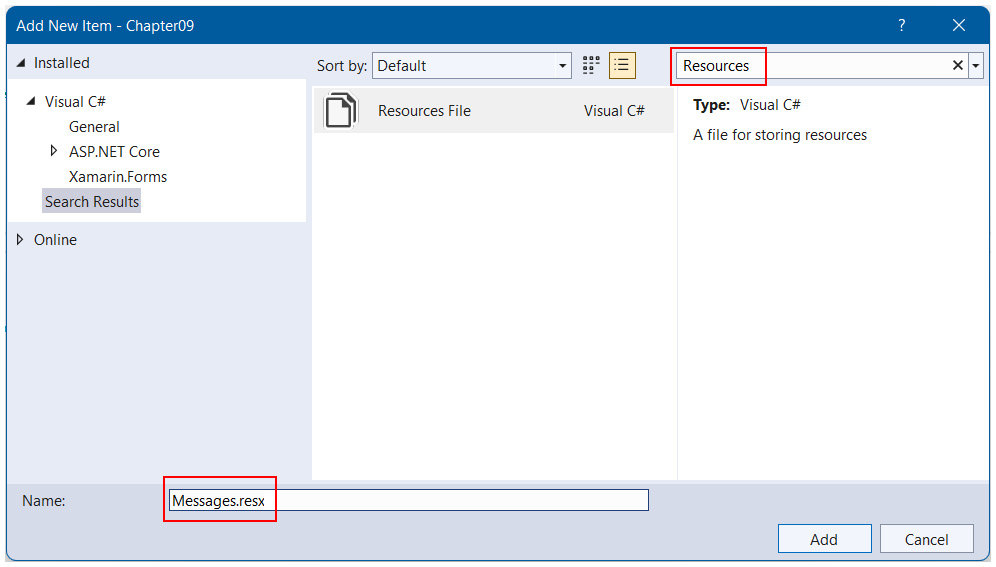
Figure 9.3 – Adding a resource file to the project
图 9.3 – 将资源文件添加到项目中
The new file will immediately open in the Visual Studio editor.
新文件将立即在 Visual Studio 编辑器中打开。
- The first thing to do in the new file is to select Internal or Public (based on the code visibility we want to achieve) from the Access Modifier option so that Visual Studio will create a C# file that exposes the properties to access the resources:
在新文件中要做的第一件事是从 Access Modifier 选项中选择 Internal 或 Public (基于我们想要实现的代码可见性),以便 Visual Studio 创建一个 C# 文件,该文件公开属性以访问资源:
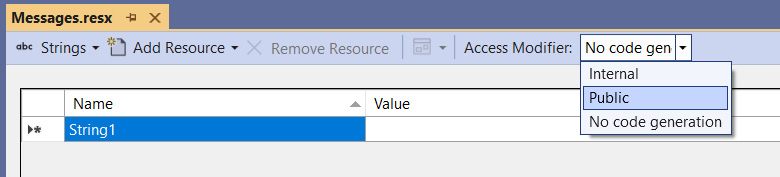
Figure 9.4 – Changing the Access Modifier of the resource file
图 9.4 – 更改资源文件的访问修饰符
As soon as we change this value, Visual Studio will add a Messages.Designer.cs file to the project and automatically create properties that correspond to the strings we insert in the resource file.
一旦我们更改了此值,Visual Studio 就会将 Messages.Designer.cs 文件添加到项目中,并自动创建与我们插入到资源文件中的字符串相对应的属性。
Resource files must follow a precise naming convention. The file that contains default culture messages can have any name (such as Messages.resx, as in our example), but the other .resx files that provide the corresponding translations must have the same name, with the specification of the culture (neutral or specific) to which they refer. So, we have Messages.resx, which will store default (English) messages.
资源文件必须遵循精确的命名约定。包含默认区域性消息的文件可以具有任何名称(如 Messages.resx,如本例中所示),但提供相应翻译的其他 .resx 文件必须具有相同的名称,并具有它们所引用的区域性(非特定或特定)的规范。因此,我们有 Messages.resx,它将存储默认(英文)消息。
- Since we also want to localize our messages in Italian, we need to create another file with the name Messages.it.resx.
由于我们还希望将消息本地化为 Italian,因此需要创建另一个名为 Messages.it.resx 的文件。
Note : We don’t create a resource file for French culture on purpose because this way, we’ll see how APS.NET Core looks up the localized messages in practice.
注意 : 我们不会故意为法国文化创建资源文件,因为这样,我们将看到 APS.NET Core 在实践中如何查找本地化的消息。
- Now, we can start experimenting with resource files. Let’s open the Messages.resx file and set Name to HelloWorld and Value to Hello World!.
现在,我们可以开始试验资源文件。让我们打开 Messages.resx 文件,并将 Name 设置为 HelloWorld,将 Value 设置为 Hello World!。
In this way, Visual Studio will add a static HelloWorld property in the Messages autogenerated class that allows us to access values based on the current culture.
通过这种方式,Visual Studio 将在 Messages 自动生成的类中添加一个静态 HelloWorld 属性,该属性允许我们访问基于当前区域性的值。
-
To demonstrate this behavior, also open the Messages.it.resx file and add an item with the same Name, HelloWorld, but now set Value to the translation Ciao mondo!.
为了演示此行为,还请打开 Messages.it.resx 文件并添加具有相同名称的项 HelloWorld,但现在将 Value 设置为翻译 Ciao mondo!。
-
Finally, we can add a new endpoint to showcase the usage of the resource files:
最后,我们可以添加新的端点来展示资源文件的使用情况:
// using Chapter09.Resources;
app.MapGet("/helloworld", () => Messages.HelloWorld);
In the preceding route handler, we simply access the static Mesasges.HelloWorld property that, as discussed before, has been automatically created while editing the Messages.resx file.
在前面的路由处理程序中,我们只需访问静态 Mesasges.HelloWorld 属性,如前所述,该属性是在编辑 Messages.resx 文件时自动创建的。
If we now run the minimal API and try to execute this endpoint, we’ll get the following responses based on the request language that we select in Swagger:
如果我们现在运行最小 API 并尝试执行此终端节点,我们将根据我们在 Swagger 中选择的请求语言获得以下响应:

Table 9.1 – Responses based on the request language
表 9.1 – 基于请求语言的响应
When accessing a property such as HelloWorld, the autogenerated Messages class internally uses ResourceManager to look up the corresponding localized string. First of all, it looks for a resource file whose name contains the requested culture. If it is not found, it reverts to the parent culture of that culture. This means that, if the requested culture is specific, ResourceManager searches for the neutral culture. If no resource file is still found, then the default one is used.
当访问诸如 HelloWorld 之类的属性时,自动生成的 Messages 类在内部使用 ResourceManager 来查找相应的本地化字符串。首先,它查找其名称包含所请求区域性的资源文件。如果未找到,它将还原为该区域性的父区域性。这意味着,如果请求的区域性是特定的,则 ResourceManager 会搜索非特定区域性。如果仍未找到资源文件,则使用默认资源文件。
In our case, using Swagger, we can select only English, Italian, or French as a neutral culture. But what happens if a client sends other values? We can have situations such as the following:
在我们的示例中,使用 Swagger,我们只能选择英语、意大利语或法语作为非特定区域性。但是,如果客户端发送其他值,会发生什么情况呢?我们可能会遇到以下情况:
• The request culture is it-IT: the system searches for Messages.it-IT.resx and then finds and uses Messages.it.resx.
请求区域性是 it-IT:系统搜索 Messages.it-IT.resx,然后查找并使用 Messages.it.resx。
• The request culture is fr-FR: the system searches for Messages.fr-FR.resx, then Messages.fr.resx, and (because neither are available) finally uses the default, Messages.resx.
请求区域性是 fr-FR:系统搜索 Messages.fr-FR.resx,然后搜索 Messages.fr.resx,最后(因为两者都不可用)使用默认的 Messages.resx。
• The request culture is de (German): because this isn’t a supported culture at all, the default request culture will be automatically selected, so strings will be searched for in the Messages.resx file.
请求区域性为 de (德语) :由于这根本不是受支持的区域性,因此将自动选择默认请求区域性,因此将在 Messages.resx 文件中搜索字符串。
Note : If a localized resource file exists, but it doesn’t contain the specified key, then the value of the default file will be used.
注意 : 如果本地化资源文件存在,但不包含指定的键,则将使用默认文件的值。
Formatting localized messages using resource files
使用资源文件设置本地化消息的格式
We can also use resource files to format localized messages. For example, we can add the following strings to the resource files of the project:
我们还可以使用 resource 文件来格式化本地化的消息。例如,我们可以将以下字符串添加到项目的资源文件中:

Table 9.2 – A custom localized message
表 9.2 – 自定义本地化消息
Now, let’s define this endpoint:
现在,让我们定义这个端点:
// using Chapter09.Resources;
app.MapGet("/hello", (string name) =>
{
var message = string.Format(Messages.GreetingMessage,
name);
return message;
});
As in the preceding code example, we get a string from a resource file according to the culture of the request. But, in this case, the message contains a placeholder, so we can use it to create a custom localized message using the name that is passed to the route handler. If we try to execute the endpoint, we will get results such as these:
与前面的代码示例一样,我们根据请求的区域性从资源文件中获取字符串。但是,在这种情况下,消息包含一个占位符,因此我们可以使用它来使用传递给路由处理程序的名称创建自定义本地化消息。如果我们尝试执行端点,我们将得到如下结果:

Table 9.3 – Responses with custom localized messages based on the request language
表 9.3 – 使用基于请求语言的自定义本地化消息的响应
The possibility to create localized messages with placeholders that are replaced at runtime using different values is a key point for creating truly localizable services.
创建带有占位符的本地化消息的可能性,这些占位符在运行时使用不同的值替换,这是创建真正可本地化服务的关键点。
In the beginning, we said that a typical use case of localization in web APIs is when we need to provide localized error messages upon validation. In the next section, we’ll see how to add this feature to our minimal API.
一开始,我们说过 Web API 中本地化的一个典型用例是我们需要在验证时提供本地化的错误消息。在下一节中,我们将了解如何将此功能添加到我们的最小 API 中。
Integrating localization in validation frameworks
将本地化集成到验证框架中
In Chapter 6, Exploring Validation and Mapping, we talked about how to integrate validation into a minimal API project. We learned how to use the MiniValidation library, rather than FluentValidation, to validate our models and provide validation messages to the callers. We also said that FluentValidation already provides translations for standard error messages.
在 第 6 章 探索验证和映射 中,我们讨论了如何将验证集成到一个最小的 API 项目中。我们学习了如何使用 MiniValidation 库(而不是 FluentValidation)来验证我们的模型并向调用者提供验证消息。我们还说过,FluentValidation 已经为标准错误消息提供了翻译。
However, with both libraries, we can leverage the localization support we have just added to our project to support localized and custom validation messages.
但是,对于这两个库,我们可以利用刚刚添加到项目中的本地化支持来支持本地化和自定义验证消息。
Localizing validation messages with MiniValidation
使用 MiniValidation 本地化验证消息
Using the MiniValidation library, we can use validation based on Data Annotations with minimal APIs. Refer to Chapter 6, Exploring Validation and Mapping, for instructions on how to add this library to the project.
使用 MiniValidation 库,我们可以使用基于数据注释的验证和最少的 API。有关如何将此库添加到项目中的说明,请参阅第 6 章 探索验证和映射。
Then, recreate the same Person class:
然后,重新创建相同的 Person 类:
public class Person
{
[Required]
[MaxLength(30)]
public string FirstName { get; set; }
[Required]
[MaxLength(30)]
public string LastName { get; set; }
[EmailAddress]
[StringLength(100, MinimumLength = 6)]
public string Email { get; set; }
}
Every validation attribute allows us to specify an error message, which can be a static string or a reference to a resource file. Let’s see how to correctly handle the localization for the Required attribute. Add the following values in resource files:
每个 validation 属性都允许我们指定一条错误消息,它可以是静态字符串或对资源文件的引用。让我们看看如何正确处理 Required 属性的本地化。在资源文件中添加以下值:
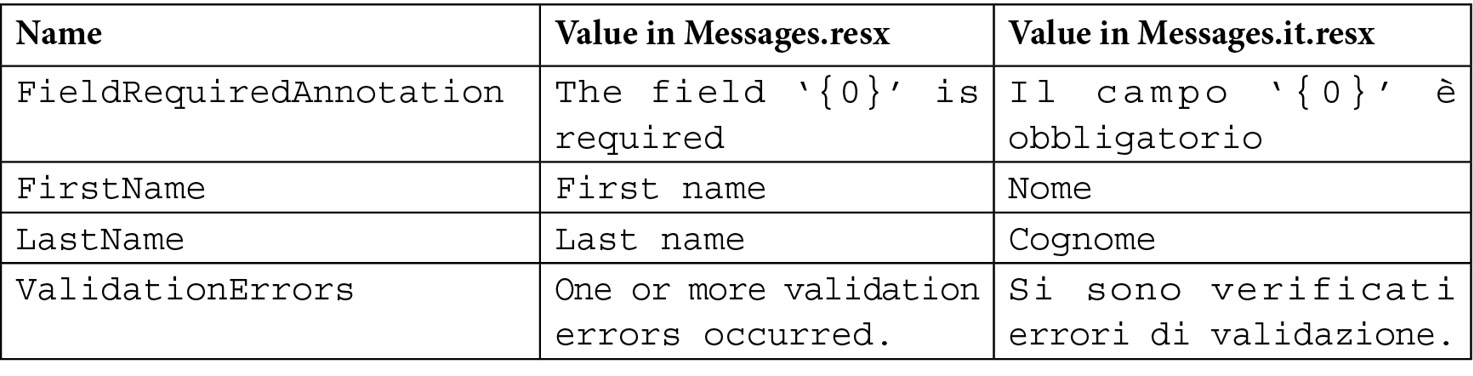
Table 9.4 – Localized validation error messages used by Data Annotations
表 9.4 – 数据注释使用的本地化验证错误消息
We want it so that when a required validation rule fails, the localized message that corresponds to FieldRequiredAnnotation is returned. Moreover, this message contains a placeholder, because we want to use it for every required field, so we also need the translation of property names.
我们希望,当必需的验证规则失败时,将返回与 FieldRequiredAnnotation 对应的本地化消息。此外,此消息包含一个占位符,因为我们希望将其用于每个必填字段,因此我们还需要属性名称的翻译。
With these resources, we can update the Person class with the following declarations:
有了这些资源,我们可以使用以下声明更新 Person 类:
public class Person
{
[Display(Name = "FirstName", ResourceType =
typeof(Messages))]
[Required(ErrorMessageResourceName =
"FieldRequiredAnnotation",
ErrorMessageResourceType = typeof(Messages))]
public string FirstName { get; set; }
//...
}
Each validation attribute, such as Required (as used in this example), exposes properties that allow us to specify the name of the resource to use and the type of class that contains the corresponding definition. Keep in mind that the name is a simple string, with no check at compile time, so if we write an incorrect value, we’ll only get an error at runtime.
每个验证属性(如 Required(如本例中所示))都公开了允许我们指定要使用的资源的名称以及包含相应定义的类类型的属性。请记住,名称是一个简单的字符串,在编译时没有检查,因此如果我们写入了不正确的值,我们只会在运行时收到错误。
Next, we can use the Display attribute to also specify the name of the field that must be inserted in the validation message.
接下来,我们还可以使用 Display 属性来指定必须插入到验证消息中的字段的名称。
Note : You can find the complete declaration of the Person class with localized data annotations on the GitHub repository at https://github.com/PacktPublishing/Minimal-APIs-in-ASP.NET-Core-6/blob/main/Chapter09/Program.cs#L97.
注意 : 您可以在 GitHub 存储库的 https://github.com/PacktPublishing/Minimal-APIs-in-ASP.NET-Core-6/blob/main/Chapter09/Program.cs#L97 上找到带有本地化数据注释的 Person 类的完整声明。
Now we can re-add the validation code shown in Chapter 6, Exploring Validation and Mapping. The difference is that now the validation messages will be localized:
现在我们可以重新添加第 6 章 探索验证和映射 中所示的验证代码。不同之处在于,现在验证消息将被本地化:
app.MapPost("/people", (Person person) =>
{
var isValid = MiniValidator.TryValidate(person, out
var errors);
if (!isValid)
{
return Results.ValidationProblem(errors, title:
Messages.ValidationErrors);
}
return Results.NoContent();
});
In the preceding code, the messages contained in the errors dictionary that is returned by the MiniValidator.TryValidate() method will be localized according to the request culture, as described in the previous sections. We also specify the title parameter in the Results.ValidationProblem() invocation because we want to localize this value too (otherwise, it will always be the default One or more validation errors occurred).
在上面的代码中,MiniValidator.TryValidate() 方法返回的 errors 字典中包含的消息将根据请求区域性进行本地化,如前面的部分所述。我们还在 Results.ValidationProblem() 调用中指定了 title 参数,因为我们也希望本地化此值(否则,它将始终为默认的 One or more validation errors occurred)。
If instead of data annotations, we prefer using FluentValidation, we know that it supports localization of standard error messages by default from Chapter 6, Exploring Validation and Mapping. However, with this library, we can also provide our translations. In the next section, we’ll talk about implementing this solution.
如果我们更喜欢使用 FluentValidation 而不是数据注释,那么我们知道它默认支持第 6 章 探索验证和映射 中的标准错误消息的本地化。但是,有了这个库,我们也可以提供我们的翻译。在下一节中,我们将讨论如何实现此解决方案。
Localizing validation messages with FluentValidation
使用 FluentValidation 本地化验证消息
With FluentValidation, we can totally decouple the validation rules from our models. As said before, refer to Chapter 6, Exploring Validation and Mapping, for instructions on how to add this library to the project and how to configure it.
使用 FluentValidation,我们可以将验证规则与我们的模型完全解耦。如前所述,请参阅 第 6 章 探索验证和映射 ,以获取有关如何将此库添加到项目以及如何配置它的说明。
Next, let us recreate the PersonValidator class:
接下来,让我们重新创建 PersonValidator 类:
public class PersonValidator : AbstractValidator<Person>
{
public PersonValidator()
{
RuleFor(p => p.FirstName).NotEmpty().
MaximumLength(30);
RuleFor(p => p.LastName).NotEmpty().
MaximumLength(30);
RuleFor(p => p.Email).EmailAddress().Length(6,
100);
}
}
In the case that we haven’t specified any messages, the default ones will be used. Let’s add the following resource to customize the NotEmpty validation rule:
如果我们没有指定任何消息,则将使用默认消息。让我们添加以下资源来自定义 NotEmpty 验证规则:

Table 9.5 – The localized validation error messages used by FluentValidation
表 9.5 – FluentValidation 使用的本地化验证错误消息
Note that, in this case, we also have a placeholder that will be replaced by the property name. However, different from data annotations, FluentValidation uses a placeholder with a name to better identify its meaning.
请注意,在本例中,我们还有一个占位符,该占位符将替换为属性名称。但是,与数据注释不同,FluentValidation 使用带有名称的占位符来更好地识别其含义。
Now, we can add this message in the validator, for example, for the FirstName property:
现在,我们可以在验证器中添加以下消息,例如,对于 FirstName 属性:
RuleFor(p => p.FirstName).NotEmpty().
WithMessage(Messages.NotEmptyMessage).
WithName(Messages.FirstName);
We use WithMessage() to specify the message that must be used when the preceding rule fails, following which we add the WithName() invocation to overwrite the default property name used for the {PropertyName} placeholder of the message.
我们使用 WithMessage() 指定在前面的规则失败时必须使用的消息,然后我们添加 WithName() 调用以覆盖用于消息的 {PropertyName} 占位符的默认属性名称。
Note : You can find the complete implementation of the PersonValidator class with localized messages in the GitHub repository at https://github.com/PacktPublishing/Minimal-APIs-in-ASP.NET-Core-6/blob/main/Chapter09/Program.cs#L129.
注意 : 您可以在 GitHub 存储库中找到 PersonValidator 类的完整实现以及本地化消息,网址为 https://github.com/PacktPublishing/Minimal-APIs-in-ASP.NET-Core-6/blob/main/Chapter09/Program.cs#L129。
Finally, we can leverage the localized validator in our endpoint, as we did in Chapter 6, Exploring Validation and Mapping:
最后,我们可以在端点中利用本地化的验证器,就像我们在第 6 章 探索验证和映射中所做的那样:
app.MapPost("/people", async (Person person, IValidator<Person> validator) =>
{
var validationResult = await validator.
ValidateAsync(person);
if (!validationResult.IsValid)
{
var errors = validationResult.ToDictionary();
return Results.ValidationProblem(errors, title:
Messages.ValidationErrors);
}
return Results.NoContent();
});
As in the case of data annotations, the validationResult variable will contain localized error messages that we return to the caller using the Results.ValidationProblem() method (again, with the definition of the title property).
与数据注释一样,validationResult 变量将包含本地化的错误消息,我们使用 Results.ValidationProblem() 方法(同样,使用 title 属性的定义)将这些错误消息返回给调用者。
Tip : In our example, we have seen how to explicitly assign translations for each property using the WithMessage() method. FluentValidation also provides a way to replace all (or some) of its default messages. You can find more information in the official documentation at https://docs.fluentvalidation.net/en/latest/localization.xhtml#default-messages.
提示 : 在我们的示例中,我们已经看到了如何使用 WithMessage() 方法为每个属性显式分配翻译。FluentValidation 还提供了一种替换其所有(或部分)默认消息的方法。您可以在 https://docs.fluentvalidation.net/en/latest/localization.xhtml#default-messages 的官方文档中找到更多信息。
This ends our overview of localization using resource files. Next, we’ll talk about an important topic when dealing with services that are meant to be used worldwide: the correct handling of different time zones.
我们对使用资源文件的本地化的概述到此结束。接下来,我们将讨论在处理旨在在全球范围内使用的服务时的一个重要话题:正确处理不同的时区。
Adding UTC support to a globalized minimal API
向全球化的最小 API 添加 UTC 支持
So far, we have added globalization and localization support to our minimal API because we want it to be used by the widest audience possible, irrespective of culture. But, if we think about being accessible to a worldwide audience, we should consider several aspects related to globalization. Globalization does not only pertain to language support; there are important factors we need to consider, for example, geographic locations, as well as time zones.
到目前为止,我们已经在我们的最小 API 中添加了全球化和本地化支持,因为我们希望它被尽可能广泛的受众使用,而不受文化影响。但是,如果我们考虑让全世界的受众都能接触到,我们应该考虑与全球化相关的几个方面。全球化不仅与语言支持有关;我们需要考虑一些重要因素,例如地理位置和时区。
So, for example, we can have our minimal API running in Italy, which follows Central European Time (CET) (GMT+1), while our clients can use browsers that execute a single-page application, rather than mobile apps, all over the world. We could also have a database server that contains our data, and this could be in another time zone. Moreover, at a certain point, it may be necessary to provide better support for worldwide users, so we’ll have to move our service to another location, which could have a new time zone. In conclusion, our system could deal with data in different time zones, and, potentially, the same services could switch time zones during their lives.
因此,例如,我们可以在意大利运行我们的最小 API,它遵循中欧时间 (CET) (GMT+1),而我们的客户可以使用执行单页应用程序的浏览器,而不是世界各地的移动应用程序。我们还可以有一个包含我们数据的数据库服务器,它可以在另一个时区。此外,在某个时候,可能需要为全球用户提供更好的支持,因此我们将不得不将我们的服务转移到另一个位置,该位置可能具有新的时区。总之,我们的系统可以处理不同时区的数据,并且相同的服务在其生命周期中可能会切换时区。
In these situations, the ideal solution is working with DateTimeOffset, a data type that includes time zones and that JsonSerializer fully supports, preserving time zone information during serialization and deserialization. If we could always use it, we’d automatically solve any problem related to globalization, because converting a DateTimeOffset value to a different time zone is straightforward. However, there are cases in which we can’t handle the DateTimeOffset type, for example:
在这些情况下,理想的解决方案是使用 DateTimeOffset,这是一种包含时区的数据类型,并且 JsonSerializer 完全支持,在序列化和反序列化期间保留时区信息。如果我们始终可以使用它,我们就会自动解决与全球化相关的任何问题,因为将 DateTimeOffset 值转换为不同的时区非常简单。但是,在某些情况下,我们无法处理 DateTimeOffset 类型,例如:
• When we’re working on a legacy system that relies on DateTime everywhere, updating the code to use DateTimeOffset isn’t an option because it requires too many changes and breaks the compatibility with the old data.
当我们在无处不在都依赖 DateTime 的旧系统上工作时,更新代码以使用 DateTimeOffset 不是一个选项,因为它需要太多更改并破坏与旧数据的兼容性。
• We have a database server such as MySQL that doesn’t have a column type for storing DateTimeOffset directly, so handling it requires extra effort, for example, using two separate columns, increasing the complexity of the domain.
我们有一个数据库服务器,例如 MySQL,它没有用于直接存储 DateTimeOffset 的列类型,因此处理它需要额外的工作,例如,使用两个单独的列,这增加了域的复杂性。
• In some cases, we simply aren’t interested in sending, receiving, and saving time zones – we just want to handle time in a “universal” way.
在某些情况下,我们只是对发送、接收和保存时区不感兴趣——我们只想以 “通用” 的方式处理时间。
So, in all the scenarios where we can’t or don’t want to use the DateTimeOffset data type, one of the best and simplest ways to deal with different time zones is to handle all dates using Coordinated Universal Time (UTC): the service must assume that the dates it receives are in the UTC format and, on the other hand, all the dates returned by the API must be in UTC.
因此,在我们不能或不想使用 DateTimeOffset 数据类型的所有情况下,处理不同时区的最佳和最简单的方法之一是使用协调世界时 (UTC) 处理所有日期:服务必须假定它收到的日期是 UTC 格式,另一方面, API 返回的所有日期都必须采用 UTC 格式。
Of course, we must handle this behavior in a centralized way; we don’t want to have to remember to apply the conversion to and from the UTC format every time we receive or send a date. The well-known JSON.NET library provides an option to specify how to treat the time value when working with a DateTime property, allowing it to automatically handle all dates as UTC and convert them to that format if they represent a local time. However, the current version of Microsoft JsonSerializer used in minimal APIs doesn’t include such a feature. From Chapter 2, Exploring Minimal APIs and Their Advantages, we know that we cannot change the default JSON serializer in minimal APIs, but we can overcome this lack of UTC support by creating a simple JsonConverter:
当然,我们必须以集中的方式处理这种行为;我们不想记住在每次接收或发送日期时都要应用与 UTC 格式之间的转换。众所周知的 JSON.NET 库提供了一个选项,用于指定在使用 DateTime 属性时如何处理时间值,从而允许它自动将所有日期作为 UTC 处理,并在它们表示本地时间时将其转换为该格式。但是,最小 API 中使用的 Microsoft JsonSerializer 的当前版本不包含此类功能。从第 2 章 探索最小 API 及其优势中,我们知道我们无法在最小 API 中更改默认的 JSON 序列化器,但是我们可以通过创建一个简单的 JsonConverter 来克服缺乏 UTC 支持的问题:
public class UtcDateTimeConverter : JsonConverter<DateTime>
{
public override DateTime Read(ref Utf8JsonReader
reader, Type typeToConvert, JsonSerializerOptions
options)
=> reader.GetDateTime().ToUniversalTime();
public override void Write(Utf8JsonWriter writer,
DateTime value, JsonSerializerOptions options)
=> writer.WriteStringValue((value.Kind ==
DateTimeKind.Local ? value.ToUniversalTime() : value)
.ToString("yyyy'-'MM'-'dd'T'HH':'mm':'ss'.'
fffffff'Z'"));
}
With this converter, we tell JsonSerializer how to treat DateTime properties:
通过这个转换器,我们告诉 JsonSerializer 如何处理 DateTime 属性:
• When DateTime is read from JSON, the value is converted to UTC using the ToUniversalTime() method.
从 JSON 中读取 DateTime 时,将使用 ToUniversalTime() 方法将该值转换为 UTC。
• When DateTime must be written to JSON, if it represents a local time (DateTimeKind.Local), it is converted to UTC before serialization – then, it is serialized using the Z suffix, which indicates that the time is UTC.
当必须将 DateTime 写入 JSON 时,如果它表示本地时间 (DateTimeKind.Local),则会在序列化之前将其转换为 UTC – 然后,它将使用 Z 后缀进行序列化,这表示时间为 UTC。
Now, before using this converter, let’s add the following endpoint definition:
现在,在使用此转换器之前,让我们添加以下端点定义:
app.MapPost("/date", (DateInput date) =>
{
return Results.Ok(new
{
Input = date.Value,
DateKind = date.Value.Kind.ToString(),
ServerDate = DateTime.Now
});
});
public record DateInput(DateTime Value);
Let’s try to call it, for example, with a date formatted as 2022-03-06T16:42:37-05:00. We’ll obtain something similar to the following:
例如,让我们尝试使用格式为 2022-03-06T16:42:37-05:00 的日期来调用它。我们将获得类似于以下内容的内容:
{
"input": "2022-03-06T22:42:37+01:00",
"dateKind": "Local",
"serverDate": "2022-03-07T18:33:17.0288535+01:00"
}
The input date, containing a time zone, has automatically been converted to the local time of the server (in this case, the server is running in Italy, as stated at the beginning), as also demonstrated by the dateKind field. Moreover, serverDate contains a date that is relative to the server time zone.
包含时区的输入日期已自动转换为服务器的本地时间(在本例中,服务器在意大利运行,如开头所述),dateKind 字段也演示了该日期。此外, serverDate 包含相对于服务器时区的日期。
Now, let’s add UtcDateTimeConverter to JsonSerializer:
现在,让我们将 UtcDateTimeConverter 添加到 JsonSerializer 中:
var builder = WebApplication.CreateBuilder(args);
//...
builder.Services.Configure<Microsoft.AspNetCore.Http.Json.
JsonOptions>(options =>
{
options.SerializerOptions.Converters.Add(new
UtcDateTimeConverter());
});
With this configuration, every DateTime property will be processed using our custom converters. Now, execute the endpoint again, using the same input as before. This time, the result will be as follows:
使用此配置,每个 DateTime 属性都将使用我们的自定义转换器进行处理。现在,使用与之前相同的输入再次执行终端节点。这一次,结果将如下所示:
{
"input": "2022-03-06T21:42:37.0000000Z",
"dateKind": "Utc",
"serverDate": "2022-03-06T17:40:08.1472051Z"
}
The input is the same, but our UtcDateTimeConverter has now converted the date to UTC and, on the other hand, has serialized the server date as UTC; now, our API, in a centralized way, can automatically handle all dates as UTC, no matter its time zone or the time zones of the callers.
输入是相同的,但是我们的 UtcDateTimeConverter 现在已经将日期转换为 UTC,另一方面,已将服务器日期序列化为 UTC;现在,我们的 API 以集中的方式自动将所有日期处理为 UTC,无论其时区或调用者的时区如何。
Finally, there are two other points to make all the systems correctly work with UTC:
最后,还有另外两点可以使所有系统正确地使用 UTC:
• When we need to retrieve the current date in the code, we always have to use DateTime.UtcNow instead of DateTime.Now
当我们需要在代码中检索当前日期时,我们始终必须使用 DateTime.UtcNow 而不是 DateTime.Now
• Client applications must know that they will receive the date in UTC format and act accordingly, for example, invoking the ToLocalTime() method
客户端应用程序必须知道它们将收到 UTC 格式的日期并采取相应的措施,例如,调用 ToLocalTime() 方法
In this way, the minimal API is truly globalized and can work with any time zone; without having to worry about explicit conversion, all times input or output will be always in UTC, so it will be much easier to handle them.
通过这种方式,最小的 API 是真正全球化的,并且可以在任何时区工作;无需担心显式转换,所有时间 input 或 output 都将始终为 UTC,因此处理它们会容易得多。
Summary
总结
Developing minimal APIs with globalization and localization support in mind is fundamental in an interconnected world. ASP.NET Core includes all the features needed to create services that can react to the culture of the user and provide translations based on the request language: the usage of localization middleware, resource files, and custom validation messages allows the creation of services that can support virtually every culture. We have also talked about the globalization-related problems that could arise when working with different time zones and shown how to solve it using the centralized UTC date time format so that our APIs can seamlessly work irrespective of the geographic location and time zone of clients.
在考虑全球化和本地化支持的情况下开发最少的 API 是互联世界的基础。ASP.NET Core 包括创建服务所需的所有功能,这些服务可以响应用户文化并根据请求语言提供翻译:使用本地化中间件、资源文件和自定义验证消息,可以创建几乎可以支持所有文化的服务。我们还讨论了使用不同时区时可能出现的全球化相关问题,并展示了如何使用集中式 UTC 日期时间格式来解决这个问题,以便我们的 API 可以无缝工作,而不受客户的地理位置和时区的影响。
In Chapter 10, Evaluating and Benchmarking the Performance of Minimal APIs, we will talk about why minimal APIs were created and analyze the performance benefits of using minimal APIs over the classic controller-based approach.
在第 10 章 评估最小 API 的性能并对其进行基准测试中,我们将讨论创建最小 API 的原因,并分析使用最小 API 相对于基于控制器的经典方法的性能优势。
10 Evaluating and Benchmarking the Performance of Minimal APIs
评估最小 API 的性能并对其进行基准测试
The purpose of this chapter is to understand one of the motivations for which the minimal APIs framework was created.
本章的目的是了解创建最小 API 框架的动机之一。
This chapter will provide some obvious data and examples of how you can measure the performance of an ASP.NET 6 application using the traditional approach as well as how you can measure the performance of an ASP.NET application using the minimal API approach.
本章将提供一些明显的数据和示例,说明如何使用传统方法测量 ASP.NET 6 应用程序的性能,以及如何使用最小 API 方法测量 ASP.NET 应用程序的性能。
Performance is key to any functioning application; however, very often it takes a back seat.
性能是任何正常运行的应用程序的关键;然而,它经常退居二线。
A performant and scalable application depends not only on our code but also on the development stack. Today, we have moved on from the .NET full framework and .NET Core to .NET and can start to appreciate the performance that the new .NET has achieved, version after version – not only with the introduction of new features and the clarity of the framework but also primarily because the framework has been completely rewritten and improved with many features that have made it fast and very competitive compared to other languages.
高性能和可扩展的应用程序不仅取决于我们的代码,还取决于开发堆栈。今天,我们已经从 .NET 完整框架和 .NET Core 转向 .NET,并且可以开始欣赏新 .NET 所实现的性能,一个版本又一个版本 - 不仅引入了新功能和框架的清晰度,而且主要是因为该框架已被完全重写和改进,具有许多功能,与其他语言相比,这些功能使其速度更快且非常有竞争力。
In this chapter, we will evaluate the performance of the minimal API by comparing its code with identical code that has been developed traditionally. We’ll understand how to evaluate the performance of a web application, taking advantage of the BenchmarkDotNet framework, which can be useful in other application scenarios.
在本章中,我们将通过将最小 API 的代码与传统开发的相同代码进行比较来评估最小 API 的性能。我们将了解如何利用 BenchmarkDotNet 框架评估 Web 应用程序的性能,该框架在其他应用程序场景中可能很有用。
With minimal APIs, we have a new simplified framework that helps improve performance by leaving out some components that we take for granted with ASP.NET.
通过最少的 API,我们有一个新的简化框架,它通过省略一些我们认为理所当然的组件来帮助提高性能 ASP.NET。
The themes we will touch on in this chapter are as follows:
我们将在本章中讨论的主题如下:
• Improvements with minimal APIs
使用最少的 API 进行改进
• Exploring performance with load tests
通过负载测试探索性能
• Benchmarking minimal APIs with BenchmarkDotNet
使用 BenchmarkDotNet 对最小 API 进行基准测试
Technical requirements
技术要求
Many systems can help us test the performance of a framework.
许多系统可以帮助我们测试框架的性能。
We can measure how many requests per second one application can handle compared to another, assuming equal application load. In this case, we are talking about load testing.
我们可以测量一个应用程序每秒可以处理多少个请求,假设应用程序负载相同。在本例中,我们谈论的是负载测试。
To put the minimal APIs on the test bench, we need to install k6, the framework we will use for conducting our tests.
要将最小的 API 放在测试台上,我们需要安装 k6,我们将用于执行测试的框架。
We will launch load testing on a Windows machine with only .NET applications running.
我们将在仅运行 .NET 应用程序的 Windows 计算机上启动负载测试。
To install k6, you can do either one of the following:
要安装 k6,您可以执行以下任一操作:
• If you’re using the Chocolatey package manager (https://chocolatey.org/), you can install the unofficial k6 package with the following command:
如果您使用的是 Chocolatey 包管理器 (https://chocolatey.org/),您可以使用以下命令安装非官方的 k6 包:
choco install k6
• If you’re using Windows Package Manager (https://github.com/microsoft/winget-cli), you can install the official package from the k6 manifests with this command:
如果您使用的是 Windows Package Manager (https://github.com/microsoft/winget-cli),则可以使用以下命令从 k6 清单安装官方软件包:
winget install k6
• You can also test your application published on the internet with Docker:
您还可以使用 Docker 测试在 Internet 上发布的应用程序:
docker pull loadimpact/k6
• Or as we did, we installed k6 on the Windows machine and launched everything from the command line. You can download k6 from this link: https://dl.k6.io/msi/k6-latest-amd64.msi.
或者,我们在 Windows 计算机上安装了 k6 并从命令行启动所有内容。您可以从以下链接下载 k6:https://dl.k6.io/msi/k6-latest-amd64.msi。
In the final part of the chapter, we’ll measure the duration of the HTTP method for making calls to the API.
在本章的最后一部分,我们将测量 HTTP 方法调用 API 的持续时间。
We’ll stand at the end of the system as if the API were a black box and measure the reaction time. BenchmarkDotNet is the tool we’ll be using – to include it in our project, we need to reference its NuGet package:
我们将站在系统的末端,就好像 API 是一个黑匣子一样,并测量反应时间。BenchmarkDotNet 是我们将要使用的工具 - 要将其包含在我们的项目中,我们需要引用其 NuGet 包:
dotnet add package BenchmarkDotNet
All the code samples in this chapter can be found in the GitHub repository for this book at the following link:
本章中的所有代码示例都可以在本书的 GitHub 存储库中找到,链接如下:
https://github.com/PacktPublishing/Minimal-APIs-in-ASP.NET-Core-6/tree/main/Chapter10
Improvements with minimal APIs
使用最少的 API 进行改进
Minimal APIs were designed not only to improve the performance of APIs but also for better code convenience and similarity to other languages to bring developers from other platforms closer. Performance has increased both from the point of view of the .NET framework, as each version has incredible improvements, as well as from the point of view of the simplification of the application pipeline. Let’s see in detail what has not been ported and what improves the performance of this framework.
Minimal API 的设计不仅是为了提高 API 的性能,也是为了更好的代码便利性和与其他语言的相似性,从而拉近来自其他平台的开发人员的距离。从 .NET Framework 的角度来看,性能都有所提高,因为每个版本都有令人难以置信的改进,而且从应用程序管道的简化的角度来看也是如此。让我们详细看看哪些内容尚未移植,哪些内容提高了此框架的性能。
The minimal APIs execution pipeline omits the following features, which makes the framework lighter:
最小 API 执行管道省略了以下功能,这使得框架更轻量级:
• Filters, such as IAsyncAuthorizationFilter, IAsyncActionFilter, IAsyncExceptionFilter, IAsyncResultFilter, and IasyncResourceFilter
• Model binding
• Binding for forms, such as IFormFile
• Built-in validation
• Formatters
• Content negotiations
• Some middleware
• View rendering
• JsonPatch
• OData
• API versioning
Performance Improvements in .NET 6
.NET 6 中的性能改进
Version after version, .NET improves its performance. In the latest version of the framework, improvements made over previous versions have been reported. Here’s where you can find a complete summary of what’s new in .NET 6:
一个又一个版本,.NET 提高了其性能。在最新版本的框架中,报告了对以前版本所做的改进。您可以在此处找到 .NET 6 中新增功能的完整摘要:
https://devblogs.microsoft.com/dotnet/performance-improvements-in-net-6/
Exploring performance with load tests
通过负载测试探索性能
How to estimate the performance of minimal APIs? There are many points of view to consider and in this chapter, we will try to address them from the point of view of the load they can support. We decided to adopt a tool – k6 – that performs load tests on a web application and tells us how many requests per second can a minimal API handle.
如何估算最小 API 的性能?有许多观点需要考虑,在本章中,我们将尝试从它们可以支持的负载的角度来解决这些问题。我们决定采用一种工具 k6,它在 Web 应用程序上执行负载测试,并告诉我们最小 API 每秒可以处理多少个请求。
As described by its creators, k6 is an open source load testing tool that makes performance testing easy and productive for engineering teams. The tool is free, developer-centric, and extensible. Using k6, you can test the reliability and performance of your systems and catch performance regressions and problems earlier. This tool will help you to build resilient and performant applications that scale.
正如其创建者所描述的那样,k6 是一种开源负载测试工具,它使工程团队的性能测试变得简单而高效。该工具是免费的、以开发人员为中心且可扩展的。使用 k6,您可以测试系统的可靠性和性能,并更早地捕获性能回归和问题。此工具将帮助您构建可扩展的弹性和高性能应用程序。
In our case, we would like to use the tool for performance evaluation and not for load testing. Many parameters should be considered during load testing, but we will only focus on the http_reqs index, which indicates how many requests have been handled correctly by the system.
在我们的例子中,我们希望使用该工具进行性能评估,而不是进行负载测试。在负载测试期间应考虑许多参数,但我们只关注 http_reqs 指数,它表示系统正确处理了多少个请求。
We agree with the creators of k6 about the purpose of our test, namely performance and synthetic monitoring.
我们同意 k6 的创建者关于我们测试的目的,即性能和综合监控。
Use cases
使用案例
k6 users are typically developers, QA engineers, SDETs, and SREs. They use k6 for testing the performance and reliability of APIs, microservices, and websites. Common k6 use cases include the following:
k6 用户通常是开发人员、QA 工程师、SDET 和 SRE。他们使用 k6 来测试 API、微服务和网站的性能和可靠性。常见的 k6 使用案例包括:
• Load testing: k6 is optimized for minimal resource consumption and designed for running high load tests (spike, stress, and soak tests).
负载测试:k6 针对最小资源消耗进行了优化,专为运行高负载测试(峰值、压力和浸泡测试)而设计。
• Performance and synthetic monitoring: With k6, you can run tests with a small load to continuously validate the performance and availability of your production environment.
性能和综合监控:使用 k6,您可以运行小负载测试,以持续验证生产环境的性能和可用性。
• Chaos and reliability testing: k6 provides an extensible architecture. You can use k6 to simulate traffic as part of your chaos experiments or trigger them from your k6 tests.
混沌和可靠性测试:k6 提供可扩展的架构。您可以使用 k6 在混沌实验中模拟流量,也可以从 k6 测试中触发流量。
However, we have to make several assumptions if we want to evaluate the application from the point of view just described. When a load test is performed, it is usually much more complex than the ones we will perform in this section. When an application is bombarded with requests, not all of them will be successful. We can say that the test passed successfully if a very small percentage of the responses failed. In particular, we usually consider 95 or 98 percentiles of outcomes as the statistic on which to derive the test numbers.
但是,如果我们想从刚才描述的角度评估应用程序,我们必须做出几个假设。执行负载测试时,它通常比我们将在本节中执行的要复杂得多。当应用程序被请求轰炸时,并非所有请求都会成功。如果极小比例的响应失败,我们可以说测试成功通过。特别是,我们通常将 95 或 98 个百分位数的结果视为得出测试数字的统计数据。
With this background, we can perform stepwise load testing as follows: in ramp up, the system will be concerned with running the virtual user (VU) load from 0 to 50 for about 15 seconds. Then, we will keep the number of users stable for 60 seconds, and finally, ramp down the load to zero virtual users for another 15 seconds.
在此背景下,我们可以按如下方式执行逐步负载测试:在加速过程中,系统将关注从 0 到 50 的虚拟用户 (VU) 负载运行约 15 秒。然后,我们将保持用户数量稳定 60 秒,最后,将负载降低到零虚拟用户,再持续 15 秒。
Each newly written stage of the test is expressed in the JavaScript file in the stages section. Testing is therefore conducted under a simple empirical evaluation.
测试的每个新编写阶段都表示在 JavaScript 文件的 stages 部分中。因此,测试是在简单的实证评估下进行的。
First, we create three types of responses, both for the ASP.NET Web API and minimal API:
首先,我们为 ASP.NET Web API 和最小 API 创建三种类型的响应:
• Plain-text.
• Very small JSON data against a call – the data is static and always the same.
针对调用的非常小的 JSON 数据 – 数据是静态的,并且始终相同。
• In the third response, we send JSON data with an HTTP POST method to the API. For the Web API, we check the validation of the object, and for the minimal API, since there is no validation, we return the object as received.
在第三个响应中,我们使用 HTTP POST 方法将 JSON 数据发送到 API。对于 Web API,我们检查对象的验证,对于最小的 API,由于没有验证,我们返回接收的对象。
The following code will be used to compare the performance between the minimal API and the traditional approach:
以下代码将用于比较最小 API 和传统方法之间的性能:
Minimal API
最小 API
app.MapGet("text-plain",() => Results.Content("response"))
.WithName("GetTextPlain");
app.MapPost("validations",(ValidationData validation) => Results.Ok(validation)).WithName("PostValidationData");
app.MapGet("jsons", () =>
{
var response = new[]
{
new PersonData { Name = "Andrea", Surname =
"Tosato", BirthDate = new DateTime
(2022, 01, 01) },
new PersonData { Name = "Emanuele",
Surname = "Bartolesi", BirthDate = new
DateTime(2022, 01, 01) },
new PersonData { Name = "Marco", Surname =
"Minerva", BirthDate = new DateTime
(2022, 01, 01) }
};
return Results.Ok(response);
})
.WithName("GetJsonData");
Traditional Approach
传统方法
For the traditional approach, three distinct controllers have been designed as shown here:
对于传统方法,设计了三个不同的控制器,如下所示:
[Route("text-plain")]
[ApiController]
public class TextPlainController : ControllerBase
{
[HttpGet]
public IActionResult Get()
{
return Content("response");
}
}
[Route("validations")]
[ApiController]
public class ValidationsController : ControllerBase
{
[HttpPost]
public IActionResult Post(ValidationData data)
{
return Ok(data);
}
}
public class ValidationData
{
[Required]
public int Id { get; set; }
[Required]
[StringLength(100)]
public string Description { get; set; }
}
[Route("jsons")]
[ApiController]
public class JsonsController : ControllerBase
{
[HttpGet]
public IActionResult Get()
{
var response = new[]
{
new PersonData { Name = "Andrea", Surname =
"Tosato", BirthDate = new
DateTime(2022, 01, 01) },
new PersonData { Name = "Emanuele", Surname =
"Bartolesi", BirthDate = new
DateTime(2022, 01, 01) },
new PersonData { Name = "Marco", Surname =
"Minerva", BirthDate = new
DateTime(2022, 01, 01) }
};
return Ok(response);
}
}
public class PersonData
{
public string Name { get; set; }
public string Surname { get; set; }
public DateTime BirthDate { get; set; }
}
In the next section, we will define an options object, where we are going to define the execution ramp described here. We define all clauses to consider the test satisfied. As the last step, we write the real test, which does nothing but call the HTTP endpoint using GET or POST, depending on the test.
在下一节中,我们将定义一个 options 对象,我们将在其中定义此处描述的执行斜坡。我们定义所有子句以认为满足测试。作为最后一步,我们编写真正的测试,它只使用 GET 或 POST 调用 HTTP 终端节点,具体取决于测试。
Writing k6 tests
编写 k6 测试
Let’s create a test for each case scenario that we described in the previous section:
让我们为上一节中描述的每个 case 场景创建一个测试:
import http from "k6/http";
import { check } from "k6";
export let options = {
summaryTrendStats: ["avg", "p(95)"],
stages: [
// Linearly ramp up from 1 to 50 VUs during 10
seconds
{ target: 50, duration: "10s" },
// Hold at 50 VUs for the next 1 minute
{ target: 50, duration: "1m" },
// Linearly ramp down from 50 to 0 VUs over the
last 15 seconds
{ target: 0, duration: "15s" }
],
thresholds: {
// We want the 95th percentile of all HTTP
request durations to be less than 500ms
"http_req_duration": ["p(95)<500"],
// Thresholds based on the custom metric we
defined and use to track application failures
"check_failure_rate": [
// Global failure rate should be less than 1%
"rate<0.01",
// Abort the test early if it climbs over 5%
{ threshold: "rate<=0.05", abortOnFail: true },
],
},
};
export default function () {
// execute http get call
let response = http.get("http://localhost:7060/jsons");
// check() returns false if any of the specified
conditions fail
check(response, {
"status is 200": (r) => r.status === 200,
});
}
In the preceding JavaScript file, we wrote the test using k6 syntax. We have defined the options, such as the evaluation threshold of the test, the parameters to be measured, and the stages that the test should simulate. Once we have defined the options of the test, we just have to write the code to call the APIs that interest us – in our case, we have defined three tests to call the three endpoints that we want to evaluate.
在上面的 JavaScript 文件中,我们使用 k6 语法编写了测试。我们已经定义了选项,例如测试的评估阈值、要测量的参数以及测试应模拟的阶段。定义测试选项后,我们只需编写代码来调用我们感兴趣的 API – 在我们的例子中,我们已经定义了三个测试来调用我们想要评估的三个端点。
Running a k6 performance test
运行 k6 性能测试
Now that we have written the code to test the performance, let’s run the test and generate the statistics of the tests.
现在我们已经编写了代码来测试性能,让我们运行测试并生成测试的统计信息。
We will report all the general statistics of the collected tests:
我们将报告所收集测试的所有一般统计数据:
-
First, we need to start the web applications to run the load test. Let’s start with both the ASP.NET Web API application and the minimal API application. We expose the URLs, both the HTTPS and HTTP protocols.
首先,我们需要启动 Web 应用程序以运行负载测试。让我们从 ASP.NET Web API 应用程序和最小 API 应用程序开始。我们公开 URL,包括 HTTPS 和 HTTP 协议。
-
Move the shell to the root folder and run the following two commands in two different shells:
将 shell 移动到根文件夹,并在两个不同的 shell 中运行以下两个命令:
dotnet .\MinimalAPI.Sample\bin\Release\net6.0\MinimalAPI.Sample.dll --urls=https://localhost:7059/;http://localhost:7060/
dotnet .\ControllerAPI.Sample\bin\Release\net6.0\ControllerAPI.Sample.dll --urls="https://localhost:7149/;http://localhost:7150/"
-
Now, we just have to run the three test files for each project.
现在,我们只需要为每个项目运行三个测试文件。
• This one is for the controller-based Web API:
此 API 适用于基于控制器的 Web API:
k6 run .\K6\Controllers\json.js --summary-export=.\K6\results\controller-json.json
• This one is for the minimal API:
此 API 适用于最小 API:
k6 run .\K6\Minimal\json.js --summary-export=.\K6\results\minimal-json.json
Here are the results.
以下是结果。
For the test in traditional development mode with a plain-text content type, the number of requests served per second is 1,547:
对于纯文本内容类型的传统开发模式下的测试,每秒提供的请求数为 1547:
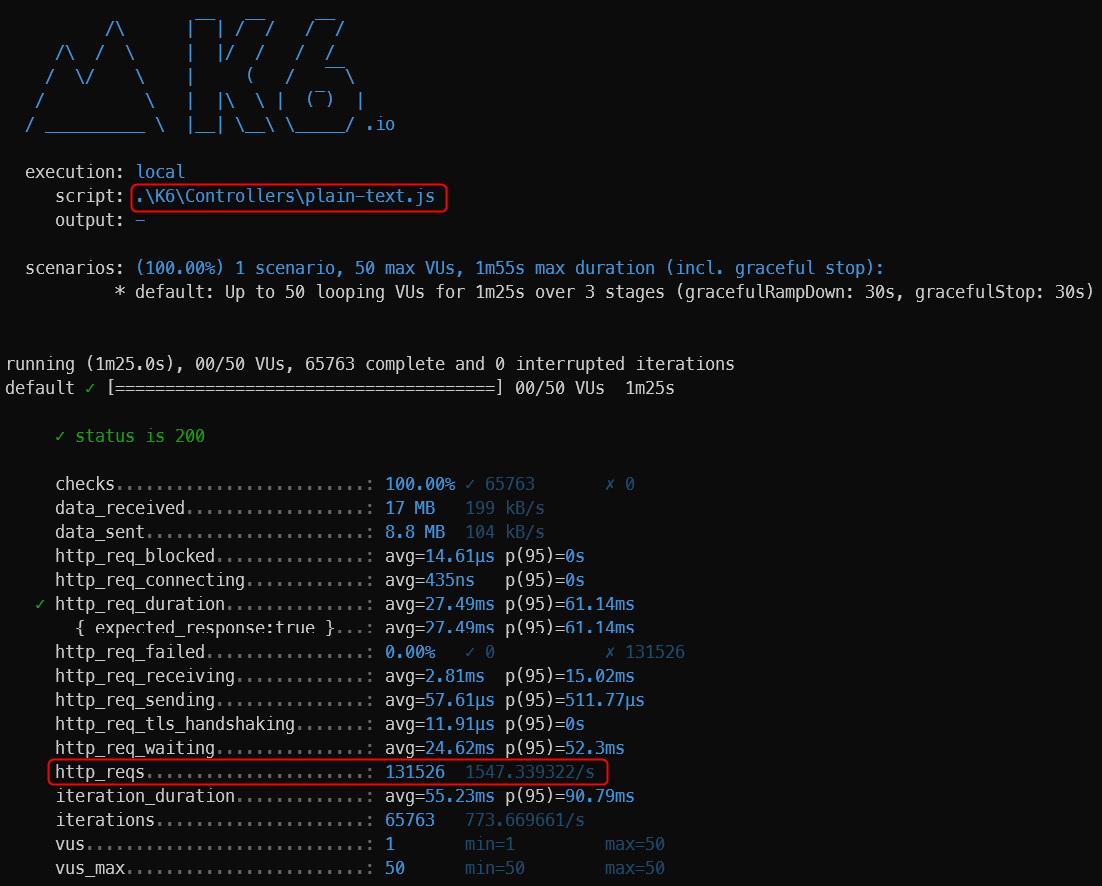
Figure 10.1 – The load test for a controller-based API and plain text
图 10.1 – 基于控制器的 API 和纯文本的负载测试
For the test in traditional development mode with a json content type, the number of requests served per second is 1,614:
对于传统开发模式下的 json 内容类型的测试,每秒提供的请求数为 1614:
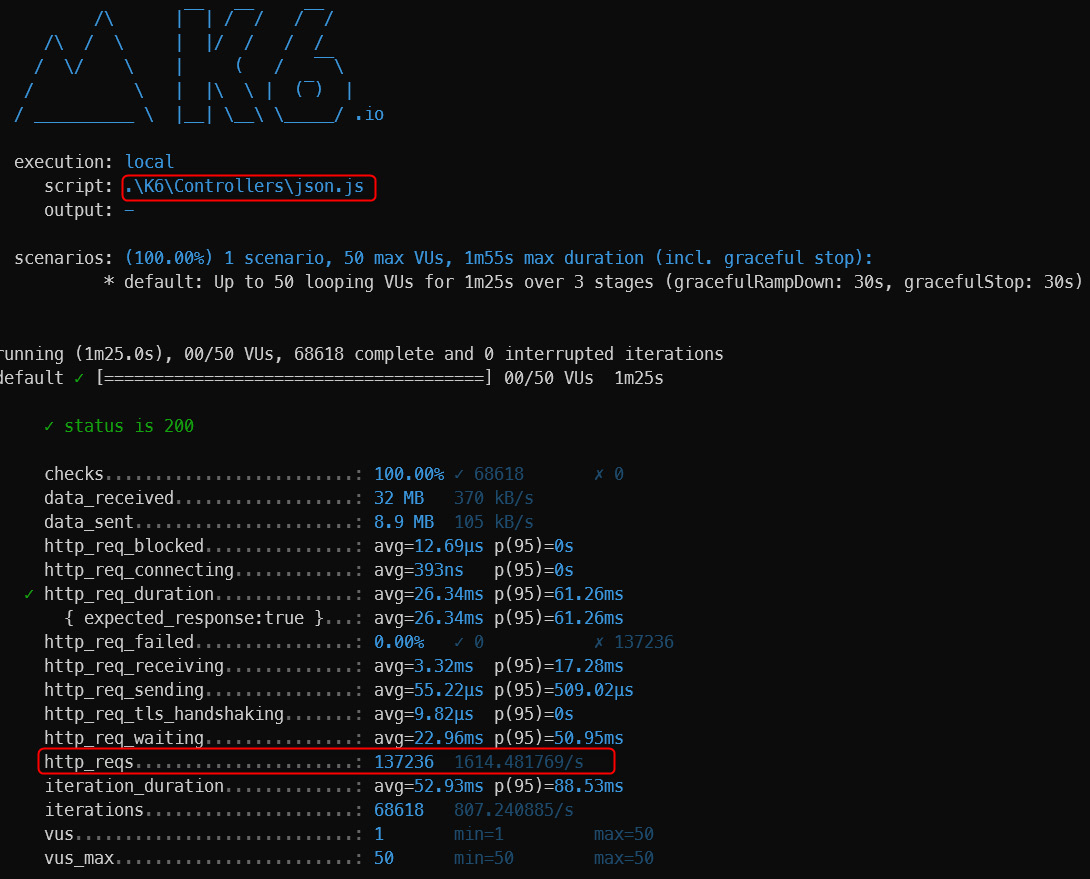
Figure 10.2 – The load test for a controller-based API and JSON result
图 10.2 – 基于控制器的 API 和 JSON 结果的负载测试
For the test in traditional development mode with a json content type and model validation, the number of requests served per second is 1,602:
对于传统开发模式下的 json 内容类型和模型验证的测试,每秒提供的请求数为 1602:
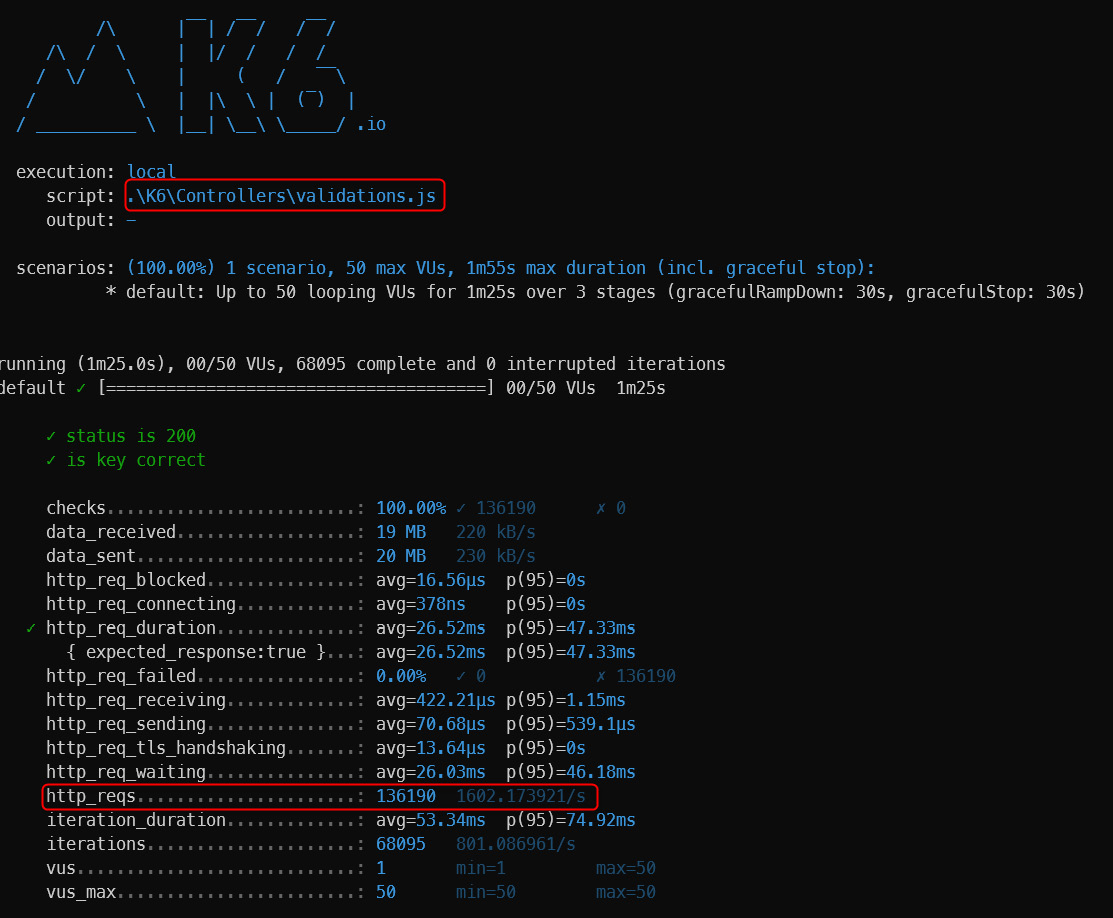
Figure 10.3 – The load test for a controller-based API and validation payload
图 10.3 – 基于控制器的 API 和验证有效负载的负载测试
For the test in minimal API development mode with a plain-text content type, the number of requests served per second is 2,285:
对于在纯文本内容类型的最小 API 开发模式下的测试,每秒提供的请求数为 2285:
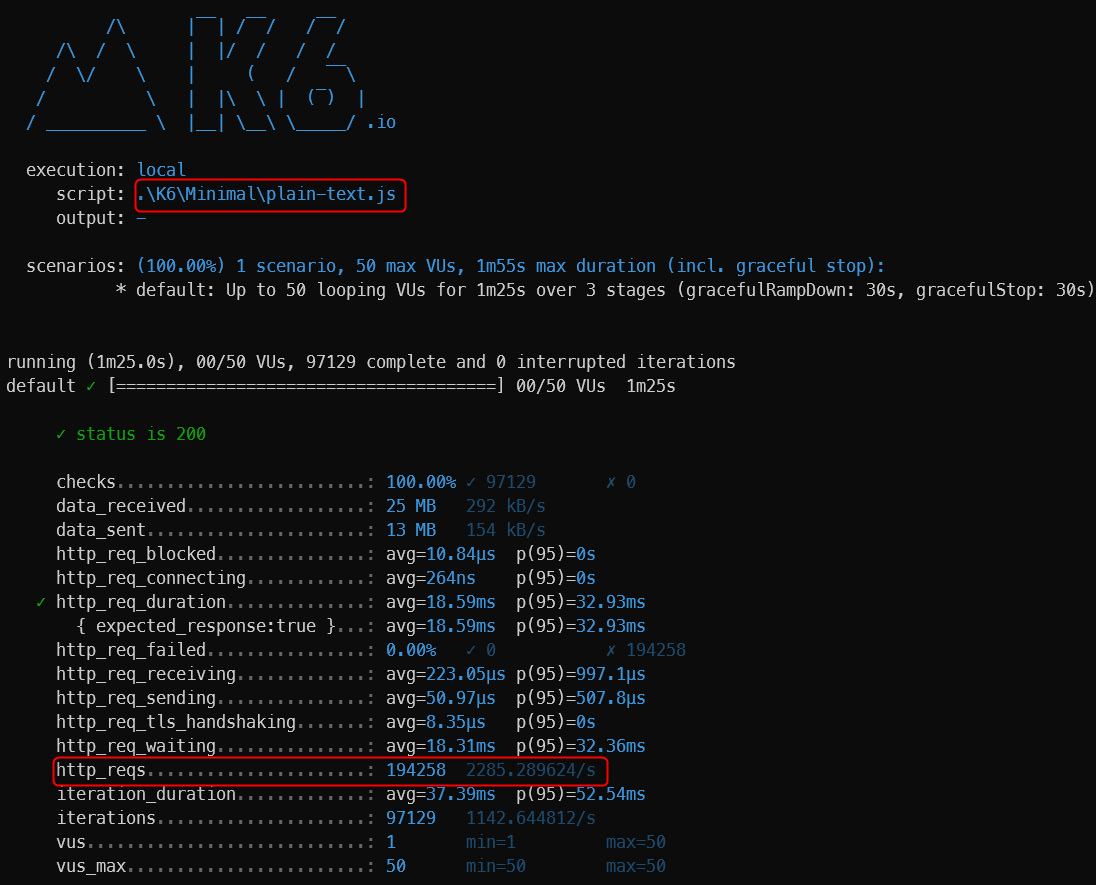
Figure 10.4 – The load test for a minimal API and plain text
图 10.4 – 最小 API 和纯文本的负载测试
For the test in minimal API development mode with a json content type, the number of requests served per second is 2,030:
对于在 json 内容类型的最小 API 开发模式下的测试,每秒提供的请求数为 2030:
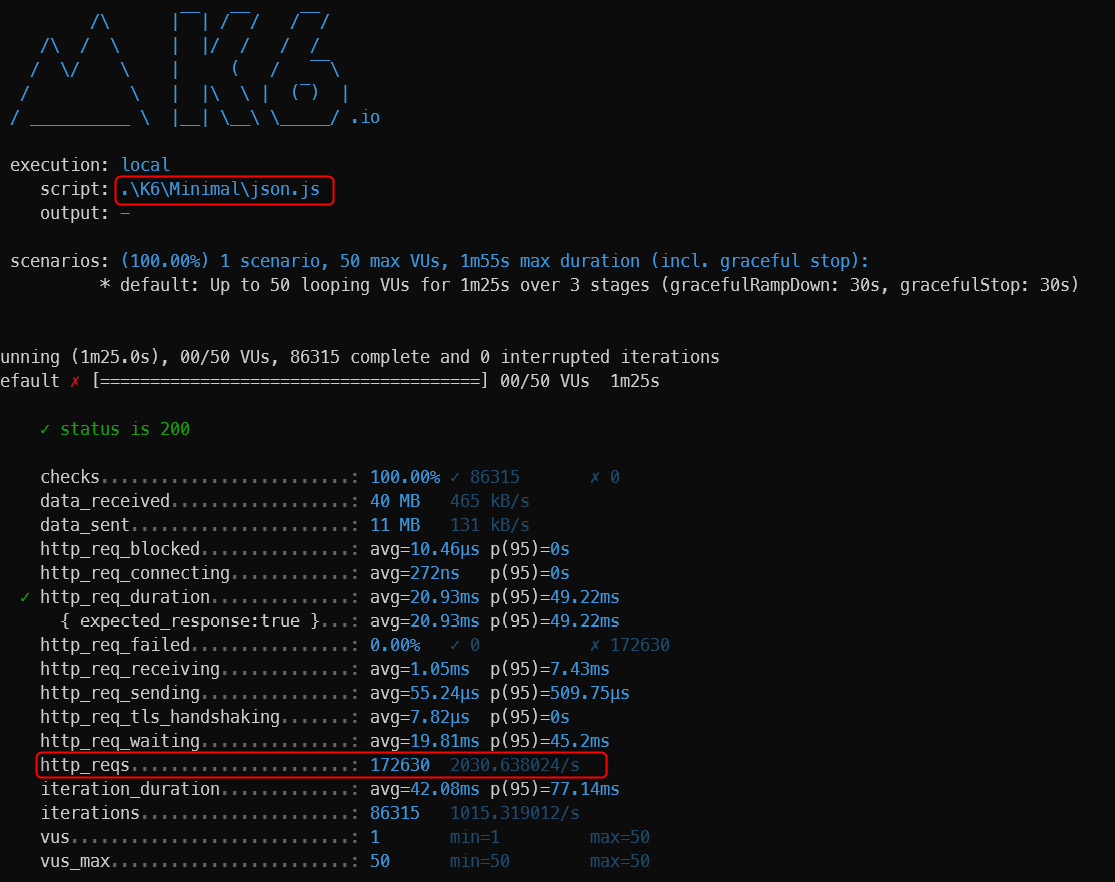
Figure 10.5 – The load test for a minimal API and JSON result
图 10.5 – 最小 API 和 JSON 结果的负载测试
For the test in minimal API development mode with a json content type with model validation, the number of requests served per second is 2,070:
对于在最小 API 开发模式下使用具有模型验证的 json 内容类型的测试,每秒提供的请求数为 2070:
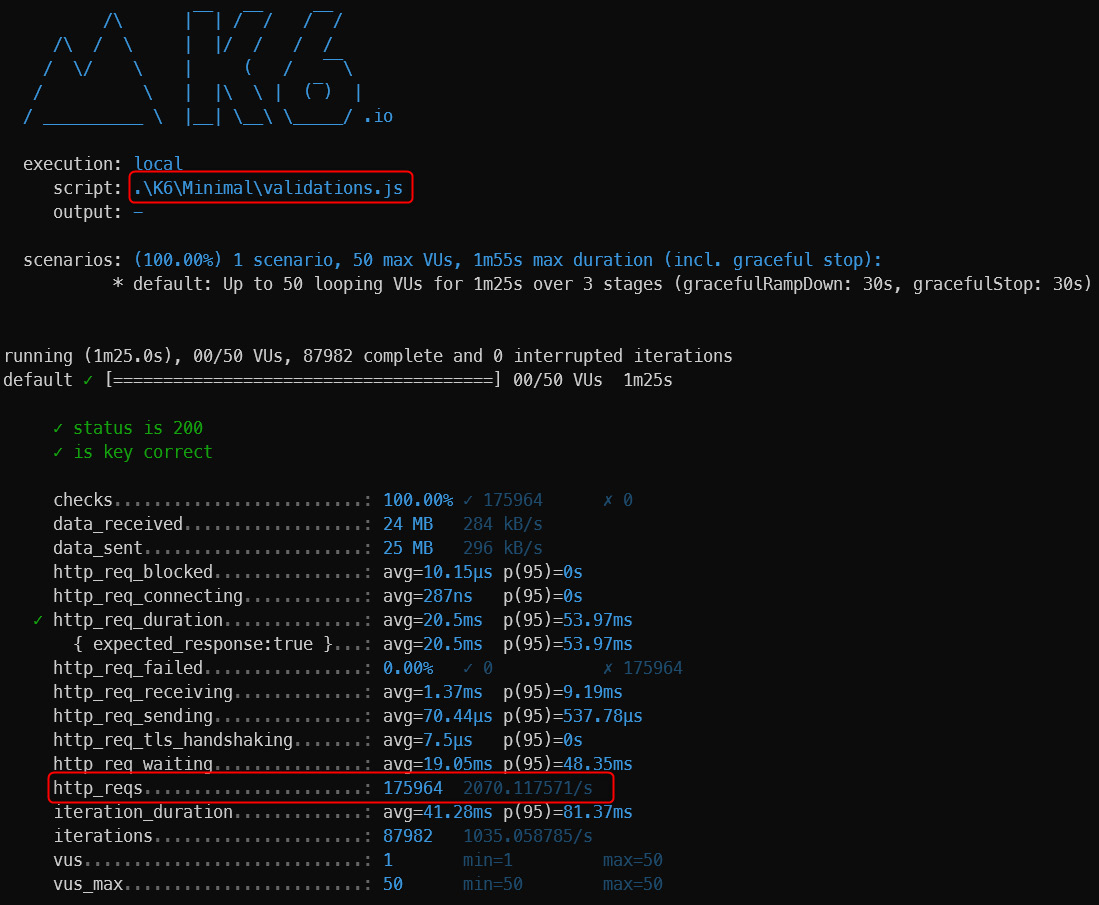
Figure 10.6 – The load test for a minimal API and no validation payload
图 10.6 – 最小 API 且无验证有效负载的负载测试
In the following image, we show a comparison of the three tested functionalities, reporting the number of requests served with the same functionality:
在下图中,我们显示了三个测试功能的比较,报告了使用相同功能提供的请求数:
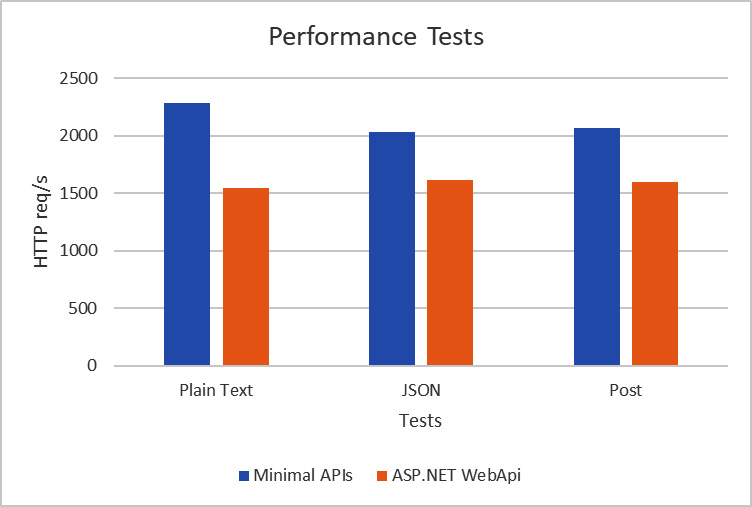
Figure 10.7 – The performance results
As we might have expected, minimal APIs are much faster than controller-based web APIs.
正如我们所料,最小的 API 比基于控制器的 Web API 快得多。
The difference is approximately 30%, and that’s no small feat.
差异约为 30%,这可不是一件小事。
Obviously, as previously mentioned, minimal APIs have features missing in order to optimize performance, the most striking being data validation.
显然,如前所述,为了优化性能,最小的 API 缺少一些功能,最引人注目的是数据验证。
In the example, the payload is very small, and the differences are not very noticeable.
在此示例中,有效负载非常小,差异不是很明显。
As the payload and validation rules grow, the difference in speed between the two frameworks will only increase.
随着有效负载和验证规则的增长,两个框架之间的速度差异只会增加。
We have seen how to measure performance with a load testing tool and then evaluate how many requests it can serve per second with the same number of machines and users connected.
我们已经了解了如何使用负载测试工具测量性能,然后评估在连接相同数量的机器和用户的情况下,它每秒可以处理多少个请求。
We can also use other tools to understand how minimal APIs have had a strong positive impact on performance.
我们还可以使用其他工具来了解最少的 API 如何对性能产生强大的积极影响。
Benchmarking minimal APIs with BenchmarkDotNet
使用 BenchmarkDotNet 对最小 API 进行基准测试
BenchmarkDotNet is a framework that allows you to measure written code and compare performance between libraries written in different versions or compiled with different .NET frameworks.
BenchmarkDotNet 是一个框架,可用于测量编写的代码,并比较以不同版本编写或使用不同 .NET 框架编译的库之间的性能。
This tool is used for calculating the time taken for the execution of a task, the memory used, and many other parameters.
此工具用于计算执行任务所花费的时间、使用的内存和许多其他参数。
Our case is a very simple scenario. We want to compare the response times of two applications written to the same version of the .NET Framework.
我们的情况非常简单。我们想要比较写入同一版本的 .NET Framework 的两个应用程序的响应时间。
How do we perform this comparison? We take an HttpClient object and start calling the methods that we have also defined for the load testing case.
我们如何进行这种比较?我们获取一个 HttpClient 对象,并开始调用我们也为负载测试案例定义的方法。
We will therefore obtain a comparison between two methods that exploit the same HttpClient object and recall methods with the same functionality, but one is written with the ASP.NET Web API and the traditional controllers, while the other is written using minimal APIs.
因此,我们将比较两种利用相同 HttpClient 对象和调用具有相同功能的方法,但一种是使用 ASP.NET Web API 和传统控制器编写的,而另一种是使用最少的 API 编写的。
BenchmarkDotNet helps you to transform methods into benchmarks, track their performance, and share reproducible measurement experiments.
BenchmarkDotNet 可帮助您将方法转换为基准测试,跟踪其性能,并共享可重现的测量实验。
Under the hood, it performs a lot of magic that guarantees reliable and precise results thanks to the perfolizer statistical engine. BenchmarkDotNet protects you from popular benchmarking mistakes and warns you if something is wrong with your benchmark design or obtained measurements. The library has been adopted by over 6,800 projects, including .NET Runtime, and is supported by the .NET Foundation (https://benchmarkdotnet.org/).
在引擎盖下,它执行了很多魔力,由于 perfolizer 统计引擎,保证了可靠和精确的结果。BenchmarkDotNet 可保护您免受常见的基准测试错误的影响,并在基准测试设计或获得的测量值出现问题时向您发出警告。该库已被 6,800 多个项目采用,包括 .NET Runtime,并得到 .NET Foundation (https://benchmarkdotnet.org/) 的支持。
Running BenchmarkDotNet
运行 BenchmarkDotNet
We will write a class that represents all the methods for calling the APIs of the two web applications. Let’s make the most of the startup feature and prepare the objects we will send via POST. The function marked as [GlobalSetup] is not computed during runtime, and this helps us calculate exactly how long it takes between the call and the response from the web application:
我们将编写一个类,该类表示用于调用两个 Web 应用程序的 API 的所有方法。让我们充分利用启动功能并准备将通过 POST 发送的对象。标记为 [GlobalSetup] 的函数在运行时不会计算,这有助于我们准确计算调用和 Web 应用程序的响应之间需要多长时间:
- Register all the classes in Program.cs that implement BenchmarkDotNet:
在 Program.cs 中注册所有实现 BenchmarkDotNet 的类:
BenchmarkSwitcher.FromAssembly(typeof(Program).Assembly).Run(args);
In the preceding snippet, we have registered the current assembly that implements all the functions that will be needed to be evaluated in the performance calculation. The methods marked with [Benchmark] will be executed over and over again to establish the average execution time.
在前面的代码段中,我们注册了当前程序集,该程序集实现了在性能计算中需要评估的所有函数。标有 [Benchmark] 的方法将一遍又一遍地执行,以确定平均执行时间。
-
The application must be compiled on release and possibly within the production environment:
应用程序必须在发布时编译,并且可能在生产环境中编译:
namespace DotNetBenchmarkRunners
{
[SimpleJob(RuntimeMoniker.Net60, baseline: true)]
[JsonExporter]
public class Performances
{
private readonly HttpClient clientMinimal =
new HttpClient();
private readonly HttpClient
clientControllers = new HttpClient();
private readonly ValidationData data = new
ValidationData()
{
Id = 1,
Description = "Performance"
};
[GlobalSetup]
public void Setup()
{
clientMinimal.BaseAddress = new
Uri("https://localhost:7059");
clientControllers.BaseAddress = new
Uri("https://localhost:7149");
}
[Benchmark]
public async Task Minimal_Json_Get() =>
await clientMinimal.GetAsync("/jsons");
[Benchmark]
public async Task Controller_Json_Get() =>
await clientControllers.GetAsync("/jsons");
[Benchmark]
public async Task Minimal_TextPlain_Get()
=> await clientMinimal.
GetAsync("/text-plain");
[Benchmark]
public async Task
Controller_TextPlain_Get() => await
clientControllers.GetAsync("/text-plain");
[Benchmark]
public async Task Minimal_Validation_Post()
=> await clientMinimal.
PostAsJsonAsync("/validations", data);
[Benchmark]
public async Task
Controller_Validation_Post() => await
clientControllers.
PostAsJsonAsync("/validations", data);
}
public class ValidationData
{
public int Id { get; set; }
public string Description { get; set; }
}
}
-
Before launching the benchmark application, launch the web applications:
在启动基准测试应用程序之前,请启动 Web 应用程序:
Minimal API application
最小 API 应用程序
dotnet .\MinimalAPI.Sample\bin\Release\net6.0\MinimalAPI.Sample.dll --urls="https://localhost:7059/;http://localhost:7060/"
Controller-based application
基于控制器的应用程序
dotnet .\ControllerAPI.Sample\bin\Release\net6.0\ControllerAPI.Sample.dll --urls=https://localhost:7149/;http://localhost:7150/
By launching these applications, various steps will be performed and a summary report will be extracted with the timelines that we report here:
通过启动这些应用程序,将执行各种步骤,并提取一份摘要报告,其中包含我们在此处报告的时间表:
dotnet .\DotNetBenchmarkRunners\bin\Release\net6.0\DotNetBenchmarkRunners.dll --filter *
For each method performed, the average value or the average execution time is reported.
对于执行的每种方法,都会报告平均值或平均执行时间。
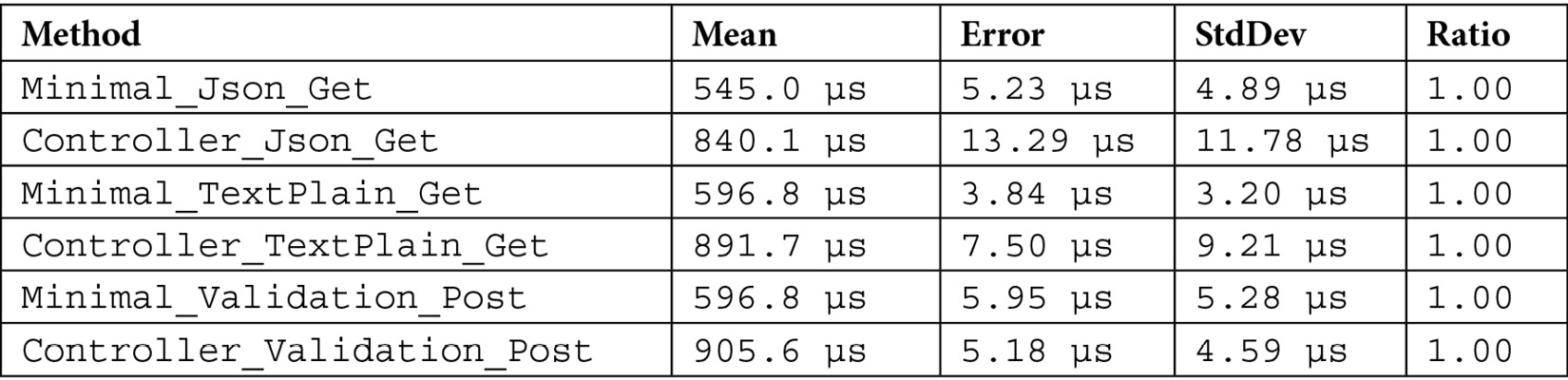
Table 10.1 – Benchmark HTTP requests for minimal APIs and controllers
表 10.1 – 针对最小 API 和控制器的 HTTP 请求进行基准测试
In the following table, Error denotes how much the average value may vary due to a measurement error. Finally, the standard deviation (StdDev) indicates the deviation from the mean value. The times are given in μs and are therefore very small to measure empirically if not with instruments with that just exposed.
在下表中,Error 表示平均值可能因测量误差而变化的程度。最后,标准差 (StdDev) 表示与平均值的偏差。时间以 μs 为单位,因此如果不是用刚刚曝光的仪器,实证测量的时间非常小。
Summary
总结
In the chapter, we compared the performance of minimal APIs with that of the traditional approach by using two very different methods.
在本章中,我们使用两种截然不同的方法比较了最小 API 的性能与传统方法的性能。
Minimal APIs were not designed for performance alone and evaluating them solely on that basis is a poor starting point.
最小的 API 不仅仅是为了性能而设计的,仅根据该基础评估它们是一个糟糕的起点。
Table 10.1 indicates that there are a lot of differences between the responses of minimal APIs and that of traditional ASP.NET Web API applications.
表 10.1 表明,最小 API 的响应与传统的 ASP.NET Web API 应用程序的响应之间存在很多差异。
The tests were conducted on the same machine with the same resources. We found that minimal APIs performed about 30% better than the traditional framework.
测试是在同一台机器上以相同的资源进行的。我们发现,minimal API 的性能比传统框架高出约 30%。
We have learned about how to measure the speed of our applications – this can be useful for understanding whether the application will hold the load and what response time it can offer. We can also leverage this on small portions of critical code.
我们已经了解了如何测量应用程序的速度 – 这对于了解应用程序是否能够承受负载以及它可以提供多少响应时间非常有用。我们还可以将它用于关键代码的一小部分。
As a final note, the applications tested were practically bare bones. The validation part that should be evaluated in the ASP.NET Web API application is almost irrelevant since there are only two fields to consider. The gap between the two frameworks increases as the number of components that have been eliminated in the minimal APIs that we have already described increases.
最后要注意的是,测试的应用程序几乎是裸露的。应在 ASP.NET Web API 应用程序中评估的验证部分几乎无关紧要,因为只有两个字段需要考虑。随着我们已经描述的最小 API 中已删除的组件数量的增加,这两个框架之间的差距也会增加。
Other Books You May Enjoy
您可能喜欢的其他书籍
If you enjoyed this book, you may be interested in these other books by Packt:
如果您喜欢这本书,您可能会对 Packt 的这些其他书籍感兴趣:
Customizing ASP.NET Core 6.0 - Second Edition
定制 ASP.NET Core 6.0 - 第二版
Jürgen Gutsch
ISBN: 978-1-80323-360-4
Explore various application configurations and providers in ASP.NET Core 6
Enable and work with caches to improve the performance of your application
Understand dependency injection in .NET and learn how to add third-party DI containers
Discover the concept of middleware and write your middleware for ASP.NET Core apps
Create various API output formats in your API-driven projects
Get familiar with different hosting models for your ASP.NET Core app
ASP.NET Core 6 and Angular - Fifth Edition
ASP.NET Core 6 和 Angular - 第五版
Valerio De Sanctis
ISBN: 978-1-80323-970-5
Use the new Visual Studio Standalone TypeScript Angular template
Implement and consume a Web API interface with ASP.NET Core
Set up an SQL database server using a local instance or a cloud datastore
Perform C# and TypeScript debugging using Visual Studio 2022
Create TDD and BDD unit tests using xUnit, Jasmine, and Karma
Perform DBMS structured logging using providers such as SeriLog
Deploy web apps to Azure App Service using IIS, Kestrel, and NGINX
Learn to develop fast and flexible Web APIs using GraphQL
Add real-time capabilities to Angular apps with ASP.NET Core SignalR
Packt is searching for authors like you
If you’re interested in becoming an author for Packt, please visit authors.packtpub.com and apply today. We have worked with thousands of developers and tech professionals, just like you, to help them share their insight with the global tech community. You can make a general application, apply for a specific hot topic that we are recruiting an author for, or submit your own idea.