18 SEARCHING
18 搜索
In this chapter, we’re going to tackle the topic of searching in ASP.NET Core Web API. Searching is one of those functionalities that can make or break your API, and the level of difficulty when implementing it can vary greatly depending on your specifications.
在本章中,我们将讨论 ASP.NET Core Web API 中的搜索主题。搜索是可以成就或破坏 API 的功能之一,实现它的难度可能会因您的规范而有很大差异。
If you need to implement a basic searching feature where you are just trying to search one field in the database, you can easily implement it. On the other hand, if it’s a multi-column, multi-term search, you would probably be better off with some of the great search libraries out there like Lucene.NET which are already optimized and proven.
如果您需要实现一个基本的搜索功能,即您只是尝试搜索数据库中的一个字段,则可以轻松实现它。另一方面,如果它是一个多列、多词的搜索,你可能会最好使用一些很棒的搜索库,比如 Lucene.NET 已经经过优化和验证的搜索库。
18.1 What is Searching?
18.1 什么是搜索?
There is no doubt in our minds that you’ve seen a search field on almost every website on the internet. It’s easy to find something when we are familiar with the website structure or when a website is not that large.
毫无疑问,在我们看来,您几乎在互联网上的每个网站上都看到了搜索字段。当我们熟悉网站结构或网站不是那么大时,很容易找到一些东西。
But if we want to find the most relevant topic for us, we don’t know what we’re going to find, or maybe we’re first-time visitors to a large website, we’re probably going to use a search field.
但是,如果我们想找到与我们最相关的主题,我们不知道会找到什么,或者也许我们是第一次访问大型网站,我们可能会使用搜索字段。
In our simple project, one use case of a search would be to find an employee by name.
在我们的简单项目中,搜索的一个用例是按姓名查找员工。
Let’s see how we can achieve that.
让我们看看如何实现这一目标。
18.2 Implementing Searching in Our Application
18.2 在我们的应用程序中实现搜索
Since we’re going to implement the most basic search in our project, the implementation won’t be complex at all. We have all we need infrastructure-wise since we already covered paging and filtering. We’ll just extend our implementation a bit.
由于我们将在项目中实现最基本的搜索,因此实现起来一点也不复杂。我们已经在基础设施方面拥有了所需的一切,因为我们已经介绍了分页和过滤。我们只是稍微扩展一下我们的实现。
What we want to achieve is something like this:
我们想要实现的是这样的:
https://localhost:5001/api/companies/companyId/employees?searchTerm=MihaelFins
This should return just one result: Mihael Fins. Of course, the search needs to work together with filtering and paging, so that’s one of the things we’ll need to keep in mind too.
这应该只返回一个结果:Mihael Fins。当然,搜索需要与过滤和分页一起工作,所以这也是我们需要记住的事情之一。
Like we did with filtering, we’re going to extend our EmployeeParameters class first since we’re going to send our search query as a query parameter:
就像我们对筛选所做的那样,我们将首先扩展我们的 EmployeeParameters 类,因为我们要将搜索查询作为查询参数发送:
namespace Shared.RequestFeatures;

public class EmployeeParameters : RequestParameters
{
    public uint MinAge { get; set; }
    public uint MaxAge { get; set; } = int.MaxValue;
    public bool ValidAgeRange => MaxAge > MinAge;
    public string? SearchTerm { get; set; }
}
Simple as that.
就这么简单。
Now we can write queries with searchTerm=”name” in them.
现在我们可以编写包含 searchTerm=“name” 的查询。
The next thing we need to do is actually implement the search functionality in our EmployeeRepository class:
接下来我们需要做的是在我们的 EmployeeRepository 类中实际实现搜索功能:
public async Task<PagedList<Employee>> GetEmployeesAsync(Guid companyId,
    EmployeeParameters employeeParameters, bool trackChanges)
{
    var employees = await FindByCondition(e => e.CompanyId.Equals(companyId), trackChanges)
        .FilterEmployees(employeeParameters.MinAge, employeeParameters.MaxAge)
        .Search(employeeParameters.SearchTerm)
        .OrderBy(e => e.Name)
        .ToListAsync();

    return PagedList<Employee>
        .ToPagedList(employees, employeeParameters.PageNumber, employeeParameters.PageSize);
}
We have made two changes here. The first is modifying the filter logic and the second is adding the Search method for the searching functionality.
我们在此处进行了两项更改。第一个是修改筛选逻辑,第二个是添加 Search 搜索功能的方法。
But these methods (FilterEmployees and Search) are not created yet, so let’s create them.
但是这些方法(FilterEmployees 和 Search)尚未创建,因此让我们创建它们。
In the Repository project, we are going to create the new folder Extensions and inside of that folder the new class RepositoryEmployeeExtensions:
在 Repository 项目中,我们将创建新文件夹 Extensions,并在该文件夹内创建新类 RepositoryEmployeeExtensions:
using Entities.Models;

namespace Repository.Extensions;

public static class RepositoryEmployeeExtensions
{
    public static IQueryable<Employee> FilterEmployees(this IQueryable<Employee> employees, uint minAge, uint maxAge) =>
        employees.Where(e => (e.Age >= minAge && e.Age <= maxAge));

    public static IQueryable<Employee> Search(this IQueryable<Employee> employees, string searchTerm)
    {
        if (string.IsNullOrWhiteSpace(searchTerm))
            return employees;

        var lowerCaseTerm = searchTerm.Trim().ToLower();

        return employees.Where(e => e.Name.ToLower().Contains(lowerCaseTerm));
    }
}
So, we are just creating our extension methods to update our query until it is executed in the repository. Now, all we have to do is add a using directive to the EmployeeRepository class:
因此,我们只是在创建扩展方法来更新我们的查询,直到它在存储库中执行。现在,我们所要做的就是向 EmployeeRepository 类添加一个 using 指令:
using Repository.Extensions;That’s it for our implementation. As you can see, it isn’t that hard since it is the most basic search and we already had an infrastructure set.
这就是我们的实施。如您所见,这并不难,因为它是最基本的搜索,而且我们已经设置了基础设施。
18.3 Testing Our Implementation
18.3 测试我们的实现
Let’s send a first request with the value Mihael Fins for the search term:
让我们发送第一个请求,搜索词的值为 Mihael Fins:
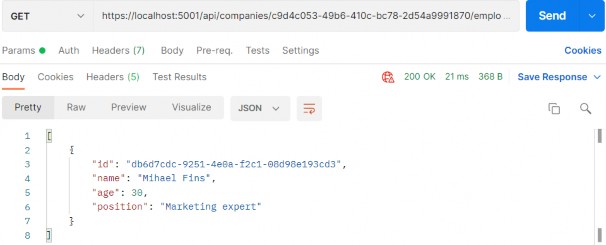
This is working great.
这效果很好。
Now, let’s find all employees that contain the letters “ae”:
现在,让我们查找包含字母 “ae” 的所有员工:
https://localhost:5001/api/companies/c9d4c053-49b6-410c-bc78-2d54a9991870/employees?searchTerm=ae
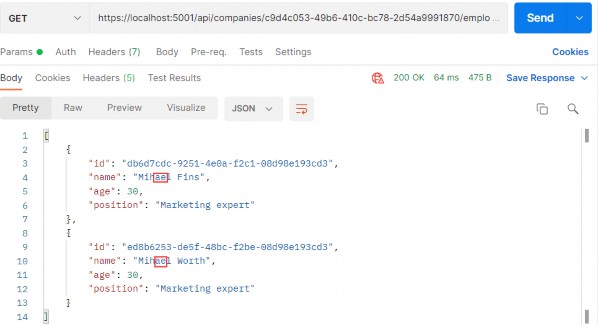
Great. One more request with the paging and filtering:
伟大。另一个带有分页和过滤的请求:
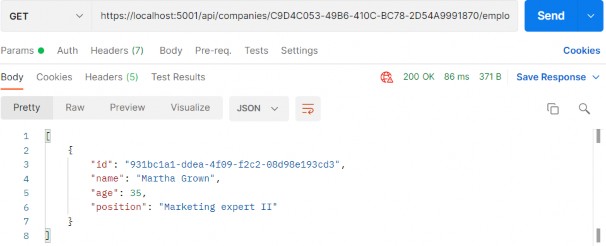
And this works as well.
这也有效。
That’s it! We’ve successfully implemented and tested our search functionality.
就是这样!我们已经成功实施并测试了我们的搜索功能。
If we check the Headers tab for each request, we will find valid x- pagination as well.
如果我们检查每个请求的 Headers 选项卡,我们也会发现有效的 x 分页。